
How to run a program as administrator or in compatibility mode
Two settings help older programs that do not start or do not work right: administrator rights and compatibility mode. Both are set per program and are easy to undo.
- Time
- 2 to 5 minutes
- Level
- Easy
- You need
- An administrator account, or the password of one.
Before you start
- Check the publisher's website for a newer version of the program first. Microsoft lists an update as the first thing to try.
- Run a program as administrator only if you trust where it came from: it gets full access to Windows.
Windows 11
Steps written for Windows 11 25H2 and 26H2.
Run the program as administrator once
Right-click the program in the Start search results, or right-click its shortcut, and select Run as administrator. Select Yes when Windows asks for permission. If the program now works, it only needed administrator rights.
Open the program's properties
If the program still fails, right-click its shortcut or its .exe file and select Properties.
Open the Compatibility tab
Select the Compatibility tab. Every setting on this tab applies to this one program only.
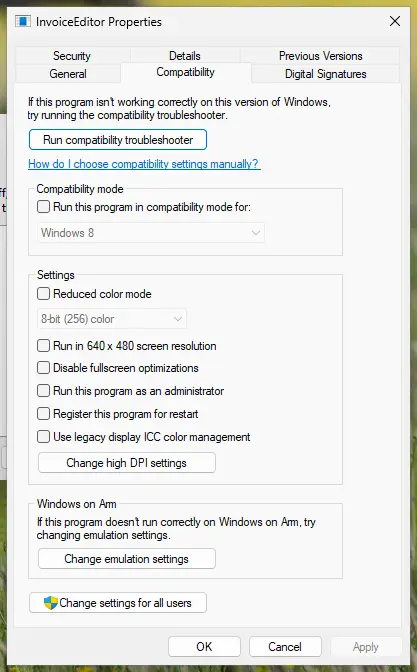
The Compatibility tab. Our test PC runs Windows on Arm, so it has one extra section at the bottom. Screenshot: Windows 11 26H2 Turn on compatibility mode
Select the Run this program in compatibility mode for check box. In the list below it, select the version of Windows the program was made for.
Make it always run as administrator
Only if step 1 helped: select the Run this program as an administrator check box. Windows will then ask for permission every time the program starts.
Save and test
Select OK and start the program again. If it does not help, come back to this tab and try another version of Windows in the list.
Run the compatibility troubleshooter
If no setting helps, open Start > Settings > System > Troubleshoot > Other troubleshooters. Find Program Compatibility Troubleshooter, select Run and follow the instructions on the screen.
Windows 10
Steps written for Windows 10 22H2.
Microsoft ended support for Windows 10 on October 14, 2025.
Run the program as administrator once
Right-click the program in the Start search results, or right-click its shortcut, and select Run as administrator. Select Yes when Windows asks for permission. If the program now works, it only needed administrator rights.
Open the program's properties
If the program still fails, right-click its shortcut or its .exe file and select Properties.
Open the Compatibility tab
Select the Compatibility tab. Every setting on this tab applies to this one program only.
Turn on compatibility mode
Select the Run this program in compatibility mode for check box. In the list below it, select the version of Windows the program was made for.
Make it always run as administrator
Only if step 1 helped: select the Run this program as an administrator check box. Windows will then ask for permission every time the program starts.
Save and test
Select OK and start the program again. If it does not help, come back to this tab and try another version of Windows in the list.
Run the compatibility troubleshooter
If no setting helps, open Start > Settings > Update & Security > Troubleshoot and select Additional troubleshooters. Under Find and fix other problems, select Program Compatibility Troubleshooter, then Run the troubleshooter.
What the two settings do
Run as administrator starts the program with full rights. Windows shows a User Account Control prompt first: an administrator selects Yes, a standard user has to enter an administrator's name and password. Compatibility mode makes Windows behave like an older version for that one program. Other programs are not affected.
The Compatibility tab also has a Run compatibility troubleshooter button. On current Windows 11 the troubleshooter opens in the Get Help app.
Another way to always run as administrator
- Right-click the program's shortcut and select Properties.
- Select the Advanced button.
- Select the Run as administrator check box.
- Select OK, then OK again.
This changes only that shortcut. The setting on the Compatibility tab applies however the program is started.
How to undo it
- Right-click the program's shortcut or .exe file and select Properties.
- On the Compatibility tab, clear the Run this program in compatibility mode for box.
- Clear the Run this program as an administrator box.
- Select OK.
Remove compatibility mode from programs that are made for your version of Windows. The Microsoft 365 installer, for example, stops with an error when its Setup file runs in compatibility mode.
If the program still does not work
Update your device drivers through Windows Update: see Update, roll back or reinstall a driver. If the program worked before and stopped after a change, remove and install it again (Uninstall a program or app in Windows) or go back with Undo recent changes with System Restore. If many programs fail at once, repair Windows system files with Run DISM and SFC to repair Windows system files.
Used in 88 guides
How to fix Steam library folder not writable error in Windows?
How to fix BlueStacks not installing in Windows?
How to fix Valheim crashes and errors?
How to fix DDraw.dll missing or not found error in Windows?
How to fix Discord stuck at gray screen on Windows?
How to fix Discord stream stuck on loading in Windows?
How to fix "The system cannot find the path specified" in uTorrent?
How to fix Chrome.exe application error in Windows?
How to fix Discord green screen and camera not working in Windows?
How to find Wifi password on Windows 10 and 11, even for saved networks
How to fix Steam fatal error "Failed to load Steamui.dll"?
How to fix "Failed to find Steam" error in Windows?
How to fix Resident Evil Village black screen crash on Steam?
How to fix Wo Long: Fallen Dynasty crashes on Windows?
How to fix app is opening as background processes in Windows?
How to fix "Can't delete Microsoft Defender Protection history" in Windows?
How to fix mso.dll missing or not found error in Windows?
How to fix ".exe has stopped working" error on Windows 10 and Windows 11?
How to fix Media Creation Tool error 0x8007043C - 0x90018 in Windows?
How to fix "DllRegisterServer failed with error code 0x80070715" error in Windows?
How to fix "JavaScript error occurred in the main process" error?
How to fix "Insufficient Memory" error while using a Canon printer?
How to fix KernelBase.dll causes application crashes in Windows?
0x80070299: The requested operation could not be completed due to a file system limitation
How to fix Riot Client not launching in Windows?
How to fix Media Creation Tool error 0x80070005 - 0xA001B in Windows?
How to fix Windows activation error 0x803FABB8?
How to fix Windows 10 activation error code 0xC004F034?
How to fix "The Steam Client Service service failed to start" error in Windows?
How to fix MSI Afterburner "Failed to start scanning" error in Windows?
How to disable sleep mode in Windows 11 and 10 (and when you should not)
How to fix "D3D11-compatible GPU is required" error in Windows when launching games?
How to fix Windows activation error code 0xC004F025?
How to fix "Unable to find the Ubisoft Game Launcher" error in Windows?
How to fix blurry or pixelated text in Chrome?
How to fix Epic Games error code LS-0013 in Windows?
How to fix Windows upgrade error 0x8007007f?
How to fix error 0x80070659 in Windows?
How to take high resolution screenshots in Windows 10/11?
How to fix "No supported DirectX version found" in Avatar: Frontiers of Pandora?
How to fix "Minimum requirements not met" error on Steam?
How to fix CLR20r3 error in Windows?
How to fix DirectX error "Setup could not download the file" in Windows?
How to fix "Your graphics card does not support DirectX 11 features" error?
How to Fix Error 0x80070522: A required privilege is not held by the client?
How to fix Runtime error 216 on Windows?
How to fix Media Creation Tool error 0x80070006 - 0x90018 in Windows?
How to fix FIFA 23 Error: Unable to Save Personal Settings 1?
How to fix Bootstrapper.exe error in Windows?
How to fix GeForce NOW 0x0000012E error in Windows?
How to fix .NET Framework installation error 0x800c0006 in Windows?
How to fix Microsoft Office activation error 0x4004F00C in Windows?
How to fix Victoria 3 crashing or not responding on Windows 11 and 10
How to fix Windows activation error 0x803FABC3?
How to fix "Extracting files to the temporary location" error 1152 in Windows?
How to fix 0x0000000d error in Windows?
How to fix GeForce Now error 0xC192000C in Windows?
How to fix VMware "Failed to start the virtual machine" error in Windows?
How to fix "Unsupported 16-bit application" error in Windows?
How to fix "You do not have sufficient rights to perform this operation" error in Windows?
How to fix "Unable to install printer" error code 0x00000c1 on Windows 10?
How to fix error 0x800710FE "This file is currently not available for use on this computer"?
How to fix "Microsoft Office encountered an error during setup" in Windows?
How to fix error 0xc0000141 "The application was unable to start correctly" in Windows?
How to fix "Internal error: CallSpawnServer: Unexpected response: $0" in Windows?
How to fix installation error 0x80040c01 in Windows?
How to fix Prototype 2 crashing on startup in Windows 11 and 10
How to fix "Incorrect function" error in Windows?
How to fix printer error 0x00000002 "Operation failed" in Windows?
How to fix printer error 0x00000003 in Windows?
How to fix "UE4 Game has crashed and will close" error in Windows?
How to fix .NET Runtime error 1026 (Event ID 1026) in Windows?
How to fix "The operation was canceled by the user (0x4C7)" error on Steam?
How to fix Final Fantasy 16 low FPS, stuttering or crashing on PC?
How to fix error 740 "Elevated permissions are required to run DISM" in Windows?
How to fix "Bootstrapper has stopped working" error in Windows?
How to fix "Can't create files" error in Windows Installation Assistant?
How to fix "Could not call proc" error in Windows?
How to fix FIFA 22 not launching in Windows?
How to fix "Steam must be running to play this game" error in Windows?
How to fix xlive.dll missing or not found error in Windows?
How to fix "Another instance of application is already running" error in Windows?
How to fix Red Dead Redemption 2 "Unknown error FFFFFFFF" in Windows?
How to fix SKYUI error code 1 in Skyrim?
How to fix Discord error "A fatal Javascript error occurred" in Windows?
How to fix Google Chrome error ERR_ADDRESS_INVALID in Windows?
How to fix "Unable to install printer" 0x000003eb error in Windows?
How to fix VCRUNTIME140_1.dll missing or not found error in Windows?
Sources
- Microsoft Support: Make older apps or programs compatible with the latest version of Windows (Program Compatibility Troubleshooter, Windows 11 and 10) (read Oct 11, 2026)
- Microsoft Learn: Run Visual Studio as an administrator (right-click, Run as administrator; shortcut Properties, Advanced) (read Oct 11, 2026)
- Microsoft Support: "We can't install Office without modern Windows" error (Compatibility tab, Run this program in compatibility mode for) (read Oct 11, 2026)
- Microsoft Support: The Windows Vista Application Compatibility Update (select an operating system in the list) (read Oct 11, 2026)
- Microsoft Learn: UIPI issues with UI and browser automation actions (Compatibility tab, Run this program as an administrator) (read Oct 11, 2026)
- Microsoft Learn: How User Account Control works (consent and credential prompts) (read Oct 11, 2026)
- Microsoft Q&A: Run compatibility troubleshooter button on the Compatibility tab (read Oct 11, 2026)
- Microsoft Q&A: the compatibility troubleshooter in Get Help on Windows 11 25H2 (read Oct 11, 2026)