
How to fix Resident Evil Village black screen crash on Steam?

Prefer to fix it yourself? The manual steps follow.
- 9methods
- 5 to 30 minutes
- Easy
Applies to Resident Evil Village (Resident Evil 8, BIOHAZARD VILLAGE) on Steam for Windows 11 and Windows 10, including the Gold Edition
9 methods in this guide
I have recently purchased Resident Evil Village on Steam, and every single time I try to launch the game, it shows a black screen (it looks like it is about to launch) and then simply terminates. It prevents me from even accessing the game, and I am really disappointed. Any advice on this?
When Resident Evil Village on Steam opens a black window and then closes, the game failed while it set up the screen or loaded, and Windows shows no error. Most often the display settings, HDR, a mod or an overlay is in the way. Turn off HDR and reset the game's display settings first.
A black screen that closes on its own means re8.exe stopped while it set up the display or loaded its files. Turn off HDR in Windows and keep one monitor connected (Fix 1). If it still closes, rename config.ini in the game folder so the game starts with default display settings (Fix 2), then remove mods and turn off overlays (Fixes 3 and 4).
| Error | No error text. The game opens a black window, sometimes in full screen, and closes after a few seconds back to the desktop or to Steam. |
|---|---|
| Where it appears | At launch, before the Capcom logo or the main menu. Steam shows the game as running for a moment, then as stopped. |
| Main cause | The display setup the game tries to start with: HDR, a resolution or refresh rate the screen refuses, a TV or a second monitor. Mods and overlays come next. |
| Fastest fix | Turn off HDR in Windows and disconnect extra screens (Fix 1). It takes two minutes and changes nothing in the game. |
| Also written as | resident evil village black screen on startup, RE8 black screen, re8.exe crash on launch, Resident Evil Village not launching, resident evil village startup crash. |
| Affects | The Steam version for Windows. The PlayStation and Xbox versions are different software and are not covered by these steps. |
| Vendor status | Capcom keeps a Steam troubleshooting page for the game, last updated 2026/07/17. Its dev team also confirmed one launch failure caused by the patch of 14 October 2022 and gave a workaround. |
| Game folder | C:\Program Files (x86)\Steam\steamapps\common\Resident Evil Village BIOHAZARD VILLAGE, with re8.exe and the graphics settings file config.ini. |
| Time to fix | 2 to 5 minutes for the display and settings fixes, 20 to 30 minutes for a clean driver reinstall or a file check. |
Facts checked on 16 October 2026. Steps written for Windows 11 (25H2 and 26H2) and Windows 10 22H2, Steam version of Resident Evil Village (re8.exe).
What the Resident Evil Village black screen on startup means
Resident Evil Village runs from one program, re8.exe, in its Steam folder. When you select Play, it first creates its window, sets the screen to the resolution, refresh rate and HDR mode saved in config.ini, and only then shows the Capcom logo. The black window is that first stage.
If the game closes during that stage, it never reaches the point where it could show a message. So there is no error code to search for. The reason is the setup the game tried to use or a program that stopped it, and the fixes below test those one at a time.
| What you see | What it most likely points to |
|---|---|
| Black window for a few seconds, then the desktop | The display setup or a program that hooks into the game. Start with Fix 1. |
| Black screen, the monitor says "no signal" or flickers | The screen refuses the mode the game asks for: HDR, a refresh rate or a resolution. Fixes 1 and 2. |
| Nothing appears at all, Steam shows Running and then Play again | A program blocks re8.exe before it opens a window: antivirus, a mod or missing rights. Fixes 3, 5 and 6. |
| The game starts on the black screen with sound, then closes | The window opened but the graphics device failed. Fixes 4, 7 and 8. |
| Black only during cutscenes, with the game running | A video codec problem, not a startup crash. See the FAQ on cutscenes. |
The old version of this page also mentioned PlayStation and Xbox. Every step here is for Windows and Steam. A console that shows a black screen needs the console maker's own steps.
Why Resident Evil Village crashes to a black screen, most common cause first
The order below follows what Capcom asks for when you report the problem and what its own troubleshooting page lists. Capcom support asks for your monitor or TV model and whether your HDMI cable is certified for 4K and HDR, which tells you how often the display chain is the cause.
| How often | Cause | How to spot it | Fix |
|---|---|---|---|
| Most often | HDR, a TV, a 4K or high refresh screen, or a second monitor | HDR is on in Windows, or the PC is connected to a TV or two screens | Fix 1 |
| Often | A display mode in config.ini the screen cannot show | It began after you changed the resolution, refresh rate, display mode or monitor | Fix 2 |
| Often | Mods, trainers or other third-party software in the game folder | It began after a mod or a game patch | Fix 3 |
| Often | An overlay or recorder that hooks into the game at start | Discord, a recorder, Steam or the NVIDIA overlay runs | Fix 4 |
| Sometimes | The antivirus blocks re8.exe as a false positive | A warning about the game, or nothing at all appears | Fix 5 |
| Sometimes | Steam or the game lacks the rights it needs | Steam was installed in a protected folder or by another user | Fix 6 |
| Sometimes | An old or damaged graphics driver | Other games crash too, or it began after a driver update | Fix 7 |
| Sometimes | A laptop starts the game on its built-in graphics | A laptop with Intel or AMD graphics plus an NVIDIA or AMD card | Fix 8 |
| Rarely | Damaged or missing game files | A stopped download, a full disk, or only this game fails | Fix 9 |
The old page told NVIDIA users to install driver 368.81. That driver came out years before the game was released in May 2021, so it does not know the graphics cards sold since then, and we found no source that ties it to this crash. Fix 7 rolls back to the driver you had before instead.
How to fix the Resident Evil Village black screen crash on Steam
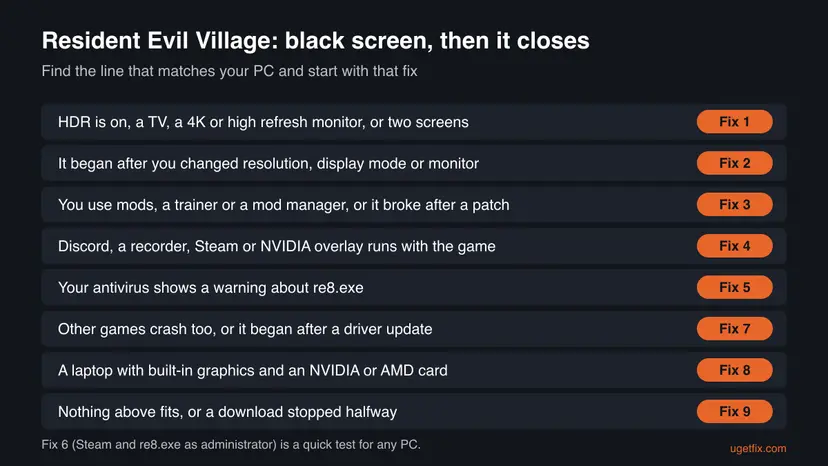
Fixes 1 and 2 change only the display setup and fix the black screen on many PCs in minutes. Fixes 3 to 6 remove what stops re8.exe before it can draw. Fixes 7 to 9 follow Capcom's own page: the driver, laptops with two graphics chips and the game files.
| What you see or what your PC has | Start with |
|---|---|
| HDR is on, or the PC uses a TV, a 4K or high refresh monitor, or two screens | Fix 1 |
| It began after you changed the resolution, the display mode or the monitor | Fix 2 |
| You installed mods, a trainer or a mod manager, or it began after a patch | Fix 3 |
| Discord, a recorder, the Steam overlay or the NVIDIA overlay runs | Fix 4 |
| Your antivirus showed a warning, or nothing appears at all | Fix 5 |
| Other games crash too, or it began after a driver update | Fix 7 |
| A laptop with built-in graphics and a separate NVIDIA or AMD card | Fix 8 |
| A download stopped halfway, or nothing above fits | Fix 9 |
Fix 1. Turn off HDR and start the game with one screen connected
5 minutesNo riskEveryone, and first of all players with HDR on, a TV, a 4K or high refresh monitor, or more than one screen.
The black window is the moment the game switches the screen to its own mode. If the monitor, the TV or the cable cannot take that mode, the picture stays black and the game closes. Capcom asks for the screen model and whether the cable is certified for 4K and HDR for this reason.
- Close the game and Steam.
- Right-click Start and select Settings, then open System > Display.
- If you have several screens, select the one you play on at the top of the page.
- On Windows 11, turn off Use HDR. On Windows 10 22H2, open Windows HD Color settings and turn off Use HDR; older builds name the switch Play HDR games and apps.
- Unplug or switch off every screen but one, or set Show only on 1 under Multiple displays.
- Start Steam again and select Play.
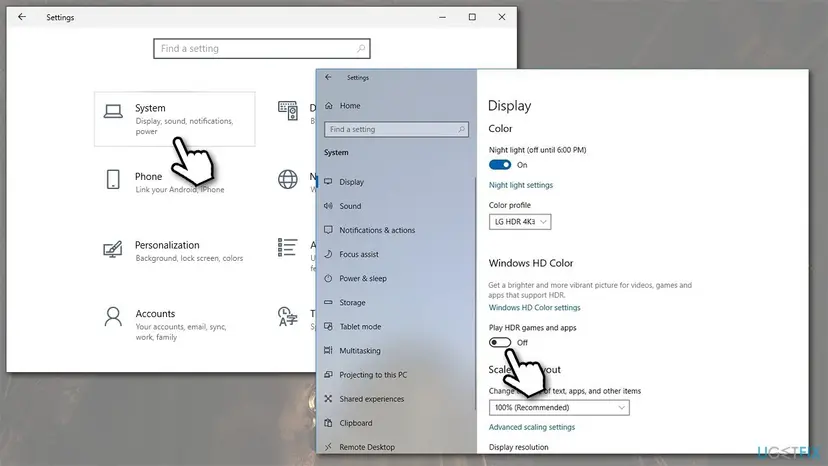
On Windows 11 the shortcut Win + Alt + B also turns HDR on and off. If the game starts now, you can turn HDR on again from the game's own display options after the main menu loads, where the game can test the mode first.
Try a direct cable from the graphics card to the TV, or a cable sold as certified for 4K and HDR. Capcom support asks for the HDMI cable brand and model when you report this problem, which shows the cable can be the cause.
It worked if: The Capcom logo appears after the black window, and the game reaches the main menu.
If not: If the screen stays black with HDR off and one screen, reset the game's display settings in Fix 2.
Fix 2. Reset the display settings in config.ini, or start the game in a window
5 minutesLow riskThe black screen began after you changed the resolution, refresh rate, display mode or monitor, or Fix 1 did not help.
Capcom names config.ini in the game folder as the game's graphics settings file. The game reads it before the first picture, so a mode your screen cannot show makes it fail at every start. Without the file, the game cannot use those saved settings.
- Close the game fully.
- In Steam, right-click Resident Evil Village in the Library and select Manage > Browse local files.
- Find
config.iniin the folder that opens. - Rename it to
config_backup.ini. - Start the game from Steam and set the display options again, with HDR off at first.
Your saves are not in this file, so nothing is lost. Capcom does not describe this reset for Village. If the game does not start or does not create a new config.ini, rename config_backup.ini back so the old settings return.
To start in a window instead, right-click the game in Steam, select Properties, and type -window in Launch Options on the General page. The old page advised -window or -windowed. No Capcom source we read lists either option for this game, so if nothing changes, delete the text again.
It worked if: The game starts with default display settings and opens the main menu.
If not: If you use mods or the black screen began after a patch, go to Fix 3. Otherwise turn off overlays in Fix 4.
Fix 3. Remove mods and third-party tools, and test without DLC after a patch
10 minutesLow riskYou installed mods, a trainer, a mod manager or a cheat table, or the game stopped starting right after a Steam update.
Capcom's dev team wrote that the patch of 14 October 2022 updated the game's security features, which may conflict with third-party software. Capcom asks players to remove all related files and then run the game. Mod files load before the first picture, so a broken one leaves only the black window.
- If you used a mod manager, use its own option to remove every mod from the game.
- In Steam, select Manage > Browse local files for the game and remove the files the mod's instructions told you to copy there. Move them to another folder rather than deleting them.
- Close trainers, cheat tools and frame rate tools before you start the game.
- Verify the game files in Steam, as Fix 9 shows, so Steam puts back any original file a mod replaced.
- Start the game without mods.
Capcom warns that save data created while using third-party software may not work properly even after the software and its files are removed. Copy your save folder or keep Steam Cloud on before you test, so you can go back.
In 2022 the same patch also stopped the game from starting for players who owned DLC. Capcom's workaround was to untick Winters' Expansion and Street Wolf Outfit in the game's Properties, on the page then named Additional Content (DLC), until the expansion came out on 28 October 2022. That bug is fixed, but unticking DLC for one start is still a quick test after a new patch.
It worked if: The game starts without mods. Adding mods back one at a time shows which one causes the black screen.
If not: If the game fails with no mods at all, turn off overlays and recorders in Fix 4.
Fix 4. Turn off the Steam overlay and other overlays and recorders
5 minutesNo riskDiscord, a screen recorder, the Steam overlay, the NVIDIA overlay, AMD Software or Xbox Game Bar runs when you start the game.
An overlay draws its own layer on top of the game, so it hooks into the game's graphics as the window opens. If that hook fails, the game can close on the black screen before it shows anything.
- In Steam, open Steam > Settings and select In Game.
- Turn off Enable the Steam Overlay while in-game.
- To turn it off for this game only, right-click the game, select Properties, and on the General page turn off the same option.
- Quit Discord, recording and streaming apps, and GPU monitoring tools, or turn off their in-game overlay in their own settings.
- Start the game again.
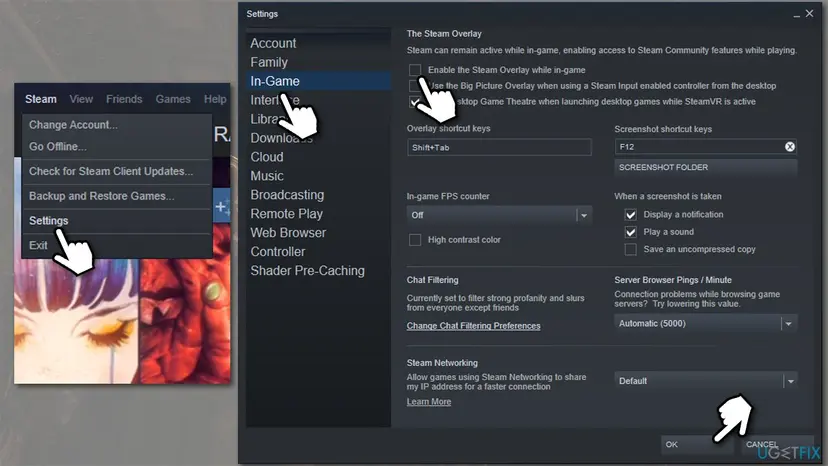
Capcom also notes that recording software can hurt the game's stability. If the game starts with everything closed, turn the programs back on one at a time to find the one that breaks the start.
It worked if: The game passes the black window and opens the main menu with the overlays off.
If not: If nothing changes, check whether your antivirus blocks the game in Fix 5.
Fix 5. Check whether your antivirus blocked re8.exe
5 minutesLow riskYour antivirus showed a warning when you started the game, or nothing appears at all after you select Play.
Capcom writes that some launch problems come from antivirus software that blocks the game program as a false positive. A blocked re8.exe opens no window or closes at once, which looks the same as a crash.
- Open Start, search for Windows Security and open it.
- Select Virus & threat protection > Protection history.
- Look for a blocked or quarantined item that names
re8.exeor the game folder. - If you find one, select it and choose Allow on device or Restore.
- Start the game again.
Capcom also advises adding the game folder, C:\Program Files (x86)\Steam, and C:\Users\%USERNAME%\AppData\Local\Steam to the antivirus exclusion list. Add an exclusion only when the history shows the game was blocked, and only for these folders. If the game still fails, remove the exclusions again.
With another antivirus, look in its own quarantine or history list. Capcom notes that Bitdefender also needs re8.exe on its application whitelist under Advanced Threat Defense.
It worked if: The blocked file is back, re8.exe starts, and the antivirus no longer reports it.
If not: If nothing was blocked, start Steam and the game with administrator rights in Fix 6.
Fix 6. Start Steam and re8.exe as administrator
2 minutesLow riskA quick test for any PC, and first of all when Steam was installed by another user or outside the default folder.
Capcom writes that some players get the game running only when Steam runs in administrator mode. The game then has the rights to write its settings and files on the first start.
- Quit Steam fully from the icon next to the clock.
- Right-click the Steam shortcut and select Run as administrator.
- Start the game from the Library.
- If it still closes, select Manage > Browse local files, right-click
re8.exeand select Run as administrator.
If this helps and you want it every time, the full steps, including the setting that makes a program always start as administrator: How to run a program as administrator or in compatibility mode.
It worked if: The game starts when Steam runs as administrator.
If not: If administrator rights change nothing, go back to normal Steam and reinstall the graphics driver in Fix 7.
Fix 7. Do a clean reinstall of the graphics driver, or roll it back
20 minutesLow riskOther games crash too, the black screen began right after a driver update, or Fixes 1 to 6 did not help.
Capcom says outdated drivers cause problems up to the game not starting, and advises a clean install that removes old driver files and game profiles. A new driver can also bring the problem, which is why rolling back is the other half of this fix.
Download the current driver from NVIDIA, AMD or Intel first, so it is ready. If the black screen began after a driver update, use Roll Back Driver instead. Step by step, with Windows 11 screens: Update, roll back or reinstall a driver.
- Or roll back the driver. If the problem started after a driver update, select Roll Back Driver, choose a reason and select Yes. The button is greyed out when Windows has no earlier driver to return to.
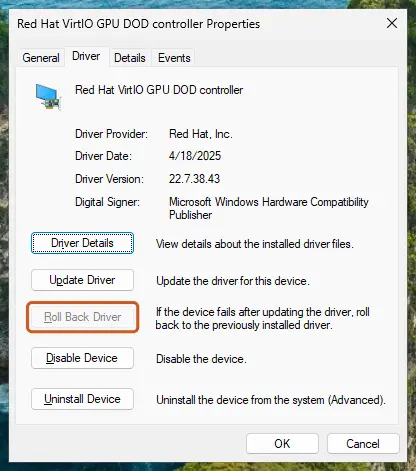
Roll Back Driver is greyed out here because there is no earlier driver. Screenshot: Windows 11 26H2. - Or reinstall the driver. Select Uninstall Device. Tick Attempt to remove the driver for this device only if you want Windows to delete the driver package too, then select Uninstall.
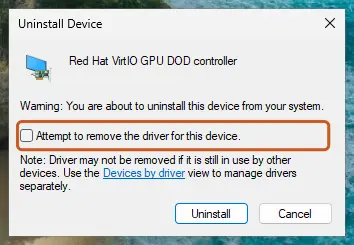
Tick the checkbox only to delete the driver package as well. Screenshot: Windows 11 26H2. - Restart. Restart the PC. Windows detects the device again and installs a driver for it.
These steps were written for Windows 11 24H2 and later. The full page with the other versions and what each result means: Update, roll back or reinstall a driver
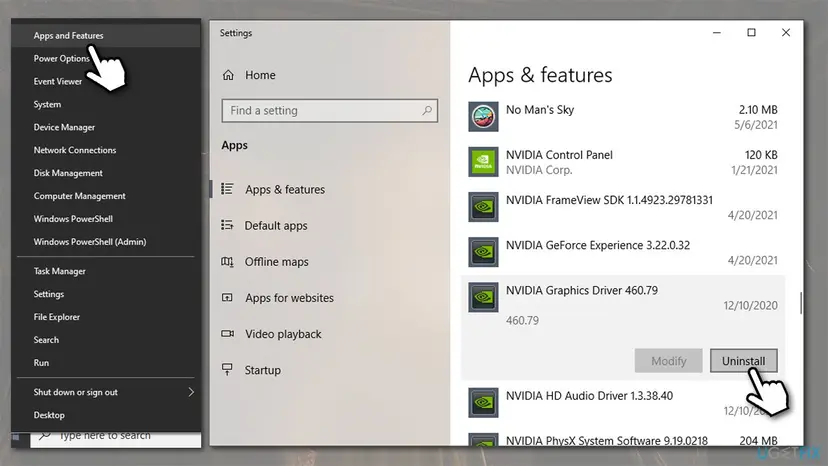
- Restart Windows after the install, so the card starts with the new driver.
- Capcom names Display Driver Uninstaller (DDU), a free third-party tool many players use for a fuller clean. Device Manager is enough for most PCs.
- Capcom also asks you to run Windows Update and Microsoft's DirectX End-User Runtime installer, which adds older DirectX files some games use.
It worked if: Device Manager shows your card with the new or the earlier driver version, and the game passes the black screen.
If not: On a laptop, check which graphics chip runs the game in Fix 8. On a desktop, verify the game files in Fix 9.
Fix 8. Make a laptop run the game on its dedicated graphics card
10 minutesNo riskA laptop with built-in Intel or AMD graphics and a separate NVIDIA or AMD card. Desktops can skip this fix.
Capcom writes that on laptops with two graphics chips the built-in one can override the dedicated card. Capcom also says it has not tested built-in graphics with the game and does not support them, so the start can fail on the black screen.
- Plug the laptop into its charger.
- Open Settings > System > Display > Graphics.
- Find Resident Evil Village in the list, or add
re8.exefrom the game folder. - Select it, open its options and choose High performance, which names your NVIDIA or AMD card.
- In the NVIDIA Control Panel, open Manage 3D settings > Program Settings, select the game and set Power management mode to Prefer maximum performance.
- Start the game.
On AMD laptops, set the game to high performance in AMD Software, under its switchable graphics settings. Capcom also asks you to set the Windows power plan to high performance; the steps for Windows 11 and Windows 10 are here: Change the power mode.
Capcom's last suggestion is to turn off the built-in graphics in the BIOS. On many laptops the screen is wired through the built-in chip, so check the laptop maker's manual before you change that setting.
It worked if: The game uses the NVIDIA or AMD card and passes the black screen.
If not: If the right card runs the game and it still closes, verify the game files in Fix 9.
Fix 9. Verify the game files in Steam, then reinstall the game if that fails
10 to 30 minutesNo riskOnly this game fails, a download or patch stopped halfway, the disk was full, or nothing above helped.
A damaged or missing file stops the game while it loads, before the first picture. Steam compares each file with its own copy and downloads only what does not match. Capcom says this can find damaged files even on a fresh install.
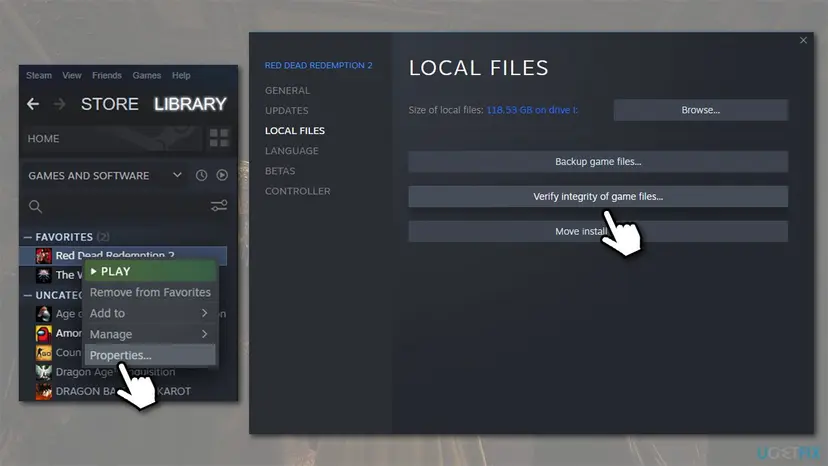
In Steam, right-click the game, select Properties > Installed Files and Verify integrity of game files. Step by step: How to verify game files in Steam, Epic Games, Xbox app, EA app, Battle.net and GOG Galaxy.
- Restart and open Steam. Restart your computer and launch Steam.
- Open the game's menu. Right-click the game in your Library, or open the game's Library page and select the gear icon on the far right.
- Open Properties. Select Properties in the menu.
- Verify the files. Select the Installed Files tab and select Verify integrity of game files.
- Wait for the result. Steam checks the game's files. This can take several minutes.
These steps were written for Steam on Windows. The full page with the other versions and what each result means: How to verify game files in Steam, Epic Games, Xbox app, EA app, Battle.net and GOG Galaxy
Capcom notes that one or more files may fail to verify. Those are local configuration files that Steam does not replace, and you can ignore the message.
If the check finds nothing and the game still closes, reinstall it. In Steam, right-click the game and select Manage > Uninstall, then install it again from the Library. Steam downloads the whole game again, so this takes a while on a slow connection.
It worked if: Steam reports that all files were checked, or downloads the files that failed, and the game starts.
If not: If a fresh install shows the same black screen, collect the files Capcom asks for, as the next section explains.
Still a black screen: what to collect and send to Capcom
Windows writes a short record each time re8.exe crashes. Press Win + R, type eventvwr.msc and open Windows Logs > Application. Look for an Application Error entry at the time of the crash with re8.exe as the application; the faulting module it names, such as a driver or an overlay file, points to the cause.
- Press Win + R, type
dxdiagand press Enter. - Wait until the tool has read your system, then select Save All Information and save
DxDiag.txt. - Copy
config.inifrom the game folder; Capcom names it as the graphics settings file it needs. - Note the model of every monitor or TV, and the brand and model of the HDMI cable, with whether it is certified for 4K and HDR.
- Send these files and notes to Capcom support, with when the black screen appears.
- The PC is below the minimum on the Steam page: Capcom says it does not support PCs that do not meet the minimum requirements, and that such PCs may not run the game.
- SLI or Crossfire with two cards: Capcom suggests turning these off, as they may cause compatibility problems with the game.
- Other demanding games crash too, or the PC restarts: that points to hardware, not to this game. Test the memory with How to test your RAM with Windows Memory Diagnostic and watch the card's temperature.
How to keep Resident Evil Village from crashing on startup again
- Turn HDR on from the game's own options after the main menu loads, not only in Windows, so the game can test the mode.
- Change one display setting at a time and keep a copy of
config.inithat works. - Remove mods before a big game patch and add them back only when their makers have updated them.
- Install graphics drivers from the card maker and restart after each install.
- Let Steam finish updates before you play, and keep free space on the game drive.
- Keep Windows updated. Windows 10 left support on 14 October 2025, so move to Windows 11 if the PC allows it.
Frequently asked questions
Why does Resident Evil Village show a black screen and then close on startup?
Because re8.exe stopped during its first stage, while it set the screen to the saved display mode and loaded its files. At that point it cannot show a message yet, so you see only the black window. The usual reasons are HDR or a display mode the screen refuses, a mod, an overlay, the antivirus or the graphics driver. Turn off HDR first, then reset config.ini, as Fixes 1 and 2 explain.
Where is the Resident Evil Village crash report?
Capcom's Steam page for Village does not describe a crash report file. It asks for DxDiag.txt, the config.ini file from the game folder and your monitor and cable models instead. Windows keeps its own record: in Event Viewer, under Windows Logs > Application, an Application Error entry names re8.exe and the module that failed. That name helps you choose the fix, for example a driver file points to Fix 7. The section above lists what to send.
The screen turns black only during cutscenes. Is that the same problem?
No. Capcom writes that some cutscenes use video playback that relies on the Windows Media Player codec. Windows N editions, sold mainly in Europe and Korea, may not have it. Install Microsoft's Media Feature Pack for your Windows version and try again. Capcom also warns that a separately installed video codec can break cutscene video; set it so it does not run under Media Foundation, or remove it.
Does the -window launch option work in Resident Evil Village?
We could not confirm it. The old page advised -window or -windowed in Steam's Launch Options, and no Capcom source we read lists either one for this game. Trying it costs nothing: type it under Properties > General > Launch Options and start the game. If nothing changes, delete the text. Renaming config.ini as Fix 2 shows is the surer way to remove a full screen mode the screen cannot show.
Can I run Resident Evil Village without Steam, or fix a pirated copy?
This page covers the Steam version only. The Steam version starts through Steam, so Steam has to run and be signed in. Pirated copies change the game's files, and Capcom's dev team wrote that the game's security features may conflict with third-party software. We do not give steps for such copies. If you own the game on Steam, the fixes above apply.
Will I lose my saves if I reinstall Resident Evil Village?
Not when Steam Cloud is on for the game, because Steam keeps the saves online and puts them back after the install. Check it in the game's Properties > General in Steam before you uninstall. None of the other fixes touch saves: config.ini holds settings only, and verifying the files does not replace them. Saves made with mods are the exception Capcom warns about, so copy those first.
Can Resident Evil Village run on integrated graphics?
Capcom writes that some high-end integrated chips and modern laptop integrated graphics may work, but they are not tested and not officially supported. On a laptop with a dedicated card, make sure the game runs on that card, as Fix 8 shows. If the PC has only integrated graphics or is below the minimum on the Steam page, Capcom says the game may not run and it gives no technical support for it.
Did Capcom fix the black screen in a patch?
Capcom has not named a black screen at startup as a known issue on its troubleshooting page, which was last updated on 2026/07/17. The only launch failure Capcom confirmed came with the patch of 14 October 2022, and its workaround was to untick two DLC items until 28 October 2022. If the game stopped starting after a new patch, remove mods and test without DLC as Fix 3 explains, then send the files above.
I searched for this in Arabic, Russian, Portuguese or Chinese. Does this page apply?
Yes, if the game is the Steam version on Windows. The searches "شاشه سوداء" (black screen) and "لم تفتح" (it did not open) describe this exact problem. If you searched "нет не помогло" (no, it did not help), "тоже самое ошибка" (the same error) or "برضو" (still), go to the section on what to collect and send to Capcom. For "como resolver" (how to solve it) or "是這個嗎?" (is this it?), start with Fix 1. The steps work on any language version of Windows.
Sources
Did this fix work?
One click, no account. It tells the next reader which guides are worth their time.
Questions and experiences: fix Resident Evil Village black screen crash on Steam
Still broken, or found a fix we did not cover? Ask here: members and our editors answer. Reading is open; writing needs a free account.
…