
How to fix SKYUI error code 1 in Skyrim?

Prefer to fix it yourself? The manual steps follow.
- 8methods
- 2 to 20 minutes
- Easy
Applies to Skyrim Special Edition and Anniversary Edition (Steam and GOG) with SkyUI 5.2 SE or SkyUI 6; also Skyrim Legendary Edition with SKSE 1.7.3 and Skyrim VR with SKSE VR
8 methods in this guide
- What the error means
- Causes, most common first
- Which SKSE build you need
- The fixes
- 1. Start with the SKSE loader
- 2. Use the mod manager's SKSE entry
- 3. Match SKSE64 to the game
- 4. Reinstall SKSE64 manually
- 5. Run the loader as admin
- 6. Allow the loader in antivirus
- 7. Move the game folder
- 8. Verify game files
- Still there: read the logs
- Other SkyUI error codes
- Prevent it
- FAQ
Hello. I am trying to get my game to work. However, when I load into the game, I receive SKYUI error code 1, which says "The Skyrim Script Extender (SKSE64) is not running." I cannot seem to find what could be causing this, so I am looking for help. Thanks in advance.
SkyUI error code 1 means SkyUI asked the Skyrim Script Extender (SKSE64) for its version and got no answer, so SKSE64 is not running in this game session. Most often the game was started the normal way instead of through skse64_loader.exe, or Skyrim updated and the installed SKSE64 no longer matches it. Start the game through the loader first.
Close Skyrim and start it with skse64_loader.exe from the game folder, or with the SKSE entry in Vortex or Mod Organizer 2, while Steam is open (Fix 1 and Fix 2). If the error stays, Skyrim probably updated: compare the game version with the SKSE64 build and install the matching one (Fix 3). The Epic Games Store and Xbox Game Pass copies cannot run SKSE64 at all.
| Error | SKYUI ERROR CODE 1: "The Skyrim Script Extender (SKSE64) is not running. SkyUI will not work correctly!" SkyUI's source names it ERR_SKSE_MISSING. |
|---|---|
| Where it appears | A message box in the game right after a save loads or a new game starts, before you can play. It comes back on every load until SKSE64 runs. |
| Main cause | The game was started without the SKSE64 loader: from Steam's Play button, a desktop shortcut to SkyrimSE.exe, or the plain Skyrim entry of a mod manager. |
| Fastest fix | Start Skyrim with skse64_loader.exe, or with the SKSE tool in Vortex or the SKSE executable in Mod Organizer 2. Takes one minute. |
| Second cause | SKSE64 does not match the game: Skyrim updated to 1.7.99 and 1.7.104 in 2026, and older SKSE64 builds stop loading. |
| Also written as | SkyUI error 1, SKSE error code 1, "skse64 is not running skyui", "Skyrim Script Extender is not running SkyUI will not work correctly". |
| Current builds | Steam: SKSE64 2.3.1 for game 1.7.104. GOG: SKSE64 2.2.6 for game 1.6.1179. SkyUI 6 for all Steam and GOG versions. |
| Not supported | Epic Games Store and Microsoft Store or Xbox Game Pass copies of Skyrim, and consoles. No fix exists for these. |
| Time to fix | 1 minute for the launcher, 10 to 20 minutes for a manual reinstall of SKSE64. |
Facts checked on 14 October 2026. Steps written for Skyrim Special Edition and Anniversary Edition on Steam (game 1.7.104 with SKSE64 2.3.1) and GOG (game 1.6.1179 with SKSE64 2.2.6), SkyUI 6, on Windows 11 (25H2 and 26H2) and Windows 10 22H2.
What SkyUI error code 1 means
SkyUI needs SKSE64 for almost everything it does: the Mod Configuration Menu, the new inventory, the favorites groups and the active effects icons. So every time you load a save, SkyUI's main script asks SKSE64 for its release number. In SkyUI's source code this check is one line: if SKSE.GetVersionRelease() returns 0, SkyUI shows error code 1 and stops its other checks.
A release number of 0 means SKSE64's code is not inside the running game. SKSE64 is not a normal mod in the Data folder. A small program, skse64_loader.exe, starts the game and loads SKSE64's DLL into it as it starts. If the loader did not start the game, or it could not load the DLL, the game runs without SKSE64 and SkyUI notices.
- Full text (SkyUI 6, Special Edition)
- SKYUI ERROR CODE 1. The Skyrim Script Extender (SKSE64) is not running. SkyUI will not work correctly! This message may also appear if a new Skyrim Patch has been released. In this case, wait until SKSE64 has been updated, then install the new version.
- Last line
- For more help, visit the SkyUI SE Nexus or Workshop pages.
- Legendary Edition text
- The same message with "(SKSE)" instead of "(SKSE64)" and "visit the SkyUI download site" at the end.
- Name in the source
ERR_SKSE_MISSING = 1inSKI_Main.psc
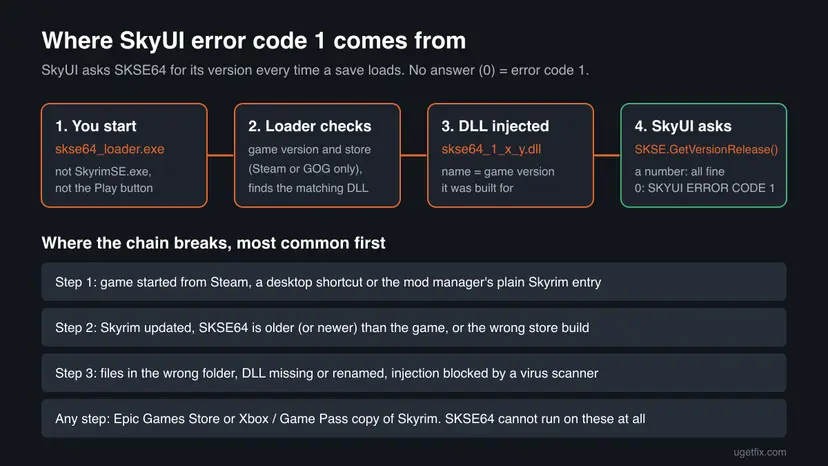
Error code 1 does not mean SkyUI is broken or badly installed. SkyUI is running fine, because it is SkyUI that shows the box. The problem is always one step earlier, in how SKSE64 was installed or how the game was started.
Why SKSE64 is not running: the causes, most common first
The SkyUI team gives two causes on its Nexus page: SKSE64 was not installed correctly, or the game was not started with skse64_loader.exe with Steam open in the background. The SKSE64 loader's own error messages add the rest: wrong version, wrong store, wrong folder, missing DLL and blocked start.
| Cause | How often | How you recognise it | Fix |
|---|---|---|---|
| The game was started without the loader | Most often | You pressed Play in Steam or used a shortcut to SkyrimSE.exe. No SKSE window or error appeared. | Fix 1, Fix 2 |
| The mod manager starts plain Skyrim | Often | Vortex or Mod Organizer 2 has a Skyrim entry and an SKSE entry, and the plain one is selected. | Fix 2 |
| Skyrim updated, SKSE64 is older | Often after a game update | The loader says "You are using a newer version of Skyrim than this version of SKSE64 supports", or flashes and closes. | Fix 3 |
| The SKSE64 build is for another store or version | Sometimes | The loader says the build "is compatible with the Steam version" while you have GOG, or the other way round. | Fix 3 |
| Files in the wrong folder or missing | Sometimes | "Couldn't find SkyrimSE.exe. You have installed the loader to the wrong folder" or "Couldn't find SKSE64 DLL". | Fix 4 |
| Windows or a virus scanner blocks the loader | Less often | "Launching failed. Please try running skse64_loader as an administrator" or the loader file disappears. | Fix 5, Fix 6 |
| Game folder under Program Files | Rarely the only cause | The loader works only as administrator. | Fix 7 |
| Game files changed by a failed downgrade | Rarely | SkyrimSE.exe has a version no SKSE64 build supports. | Fix 8 |
| Epic Games Store or Game Pass copy | No fix | The loader says "The Epic Store version of Skyrim is not supported" or names the Windows Store or Game Pass version. | None: SKSE64 cannot run |
The SkyUI page asks for Steam to be running. The loader's source shows why: for the Steam version it sets Steam's game ID and only starts Steam by itself when you add the -launchsteam option. Open Steam first and you avoid the question.
Which SKSE build matches your copy of Skyrim
SKSE64 is built for one exact game version. A build for 1.6.1170 does not load into 1.7.104, and the Steam build does not load into the GOG game. This table is read from the SKSE team's website, the SKSE64 Nexus page and the archives themselves on 14 October 2026.
| Your game | Game version | SKSE build | Loader to start |
|---|---|---|---|
| Skyrim Special Edition or Anniversary Edition, Steam | 1.7.104 | SKSE64 2.3.1 (Nexus) | skse64_loader.exe |
| Skyrim Special Edition or Anniversary Edition, GOG | 1.6.1179 | SKSE64 2.2.6 GOG build | skse64_loader.exe |
| Special Edition kept at the old version | 1.5.97 | SKSE64 2.0.20 | skse64_loader.exe |
| Skyrim (Legendary Edition, 2011) | 1.9.32 | SKSE 1.7.3 (installer, 7z or Steam) | skse_loader.exe |
| Skyrim VR | 1.4.15 | SKSE VR 2.0.12 | sksevr_loader.exe |
| Epic Games Store, Microsoft Store or Xbox Game Pass, consoles | Any | None | SKSE cannot run |
On 14 August 2026 the SKSE site warned that Bethesda had announced an incoming update. Versions 1.7.99 and 1.7.104 followed, with SKSE64 2.3.0 and 2.3.1. Every new game patch stops the old SKSE64 build until a new one is released, and SkyUI's message says to wait for it.
How to fix SkyUI error code 1
Fixes 1 and 2 are about how you start the game and solve most cases in a minute. Fix 3 and Fix 4 are for an update or a broken install. Fixes 5 to 8 are for a loader that Windows, a virus scanner or changed game files stop.
| What you see or have | Start with |
|---|---|
| You start Skyrim from Steam, a desktop icon or the Skyrim launcher. | Fix 1 |
| You use Vortex or Mod Organizer 2. | Fix 2 |
| The error started right after Skyrim updated, or the loader shows a version message. | Fix 3 |
The loader says it cannot find SkyrimSE.exe or the SKSE64 DLL. | Fix 4 |
| The loader says "Launching failed" or asks you to run it as administrator. | Fix 5 |
The loader opens nothing, or skse64_loader.exe vanished from the folder. | Fix 6 |
| Skyrim bought on the Epic Games Store or played through Game Pass. | No fix: SKSE64 does not support these copies |
Fix 1. Start Skyrim with skse64_loader.exe, with Steam open
1 minuteNo riskYou installed SKSE64 by hand and start the game from Steam or a shortcut.
SKSE64 only works when its loader starts the game, so every other way of starting Skyrim runs it without SKSE64. The SKSE64 readme says it plainly: you or your mod manager must continue to use the loader.
- Quit Skyrim completely. Make sure Steam is running and signed in.
- In Steam, right-click The Elder Scrolls V: Skyrim Special Edition in your Library and select Manage > Browse local files. The game folder opens.
- Check that you see
SkyrimSE.exeandskse64_loader.exeside by side. If the loader is missing, go to Fix 4. - Double-click
skse64_loader.exe. The game starts after a moment, usually without the Skyrim launcher window. - Load your save. If no SkyUI message appears, open the console with the tilde key (~) and type
getskseversion, then press Enter. A version number such as 2.3.1 means SKSE64 runs. - For daily use, right-click
skse64_loader.exe, select Show more options > Send to > Desktop (create shortcut) on Windows 11, or Send to > Desktop (create shortcut) on Windows 10, and start the game only from that shortcut.
On the GOG version, open the game folder from GOG Galaxy or File Explorer and start the same skse64_loader.exe. The GOG build of SKSE64 2.2.6 has the same file name for the loader.
It worked if: The save loads with no SkyUI message, the inventory shows SkyUI's single list with icons, and getskseversion prints a version number.
If not: If the loader shows its own error, read it: a version message points to Fix 3, a missing file to Fix 4, "Launching failed" to Fix 5.
Fix 2. Start the game through the SKSE entry in Vortex or Mod Organizer 2
2 minutesNo riskYou install mods with Vortex or Mod Organizer 2 and start Skyrim from it.
A mod manager has two ways to start Skyrim: the plain game and the SKSE loader. If the plain entry is selected, or the SKSE entry points to a file that is gone, SkyUI loads without SKSE64 and shows code 1.
Vortex. The SKSE64 Nexus page tells Vortex users to deploy SKSE64 and then start the game with the shortcut on the Vortex dashboard.
- Open Vortex with Skyrim Special Edition as the managed game and select Mods.
- Make sure Skyrim Script Extender (SKSE64) is in the list and enabled, then select Deploy Mods in the toolbar.
- Open the Dashboard. Among the tools, find the shortcut for the Skyrim Script Extender. Vortex adds it once SKSE64 is in the game folder.
- Start the game with that shortcut, as the SKSE64 Nexus page tells Vortex users. Users report that the tool's menu can make it the primary start button.
- Do not start Skyrim from Steam or a desktop icon while you use Vortex.
Mod Organizer 2. The Step guide for Skyrim Special Edition, which uses MO2, starts the game by selecting the SKSE executable from the drop-down list and selecting Run.
- Open Mod Organizer 2. In the drop-down list at the top right, next to Run, select the SKSE entry (named SKSE or similar). MO2 usually adds it by itself once
skse64_loader.exeis in the game folder. - If there is no SKSE entry, open the executables window with the gears icon in the toolbar, select + and then Add from file.
- Browse to the game folder, select
skse64_loader.exe, give it a title such as SKSE and select Apply, then OK. - Select the SKSE entry and select Run. Always start the game from MO2 this way, never from Steam.
The loader and its DLL must sit next to SkyrimSE.exe, not inside a mod in MO2's mods folder. Only SKSE64's script files can live inside an MO2 mod, which is how the Step guide sets it up.
It worked if: The game starts from the SKSE entry and the save loads with no SkyUI message. In MO2, the SKSE entry stays selected next to Run.
If not: If the SKSE entry starts nothing or shows an SKSE error, the loader or DLL is missing or does not match the game: go to Fix 3.
Fix 3. Install the SKSE64 build that matches your game version and store
5 minutesLow riskThe error started after a Skyrim update, or the loader shows a version or store message.
The loader compares the version of SkyrimSE.exe with the version it was built for and refuses any other one. SkyUI's own message warns that a new Skyrim patch causes code 1 until SKSE64 is updated.
- Open the game folder, right-click
SkyrimSE.exeand select Properties. - Select the Details tab and read Product version, for example 1.7.104.0 on Steam today.
- Compare it with the table in "Which SKSE build matches your copy of Skyrim" above, or with the list on the SKSE team's website,
skse.silverlock.org. - Download the matching build: the Steam build from the SKSE64 page on Nexus Mods, the GOG build or the 1.5.97 build from the SKSE website.
- Install it with Fix 4 (manual) or as a new SKSE64 file in Vortex, replacing every old file. Then start the game with Fix 1 or Fix 2.
If your game version is newer than the newest SKSE64 build, no fix exists yet. The loader says so itself: "If this version just came out, please be patient while we update our code." Play without SKSE mods, or wait. Many SKSE plugins also need new versions after a game update.
It worked if: The loader starts the game without a version message, and getskseversion in the console prints the build you installed.
If not: If the versions match and the loader still fails, the files are probably in the wrong place or mixed with an older build: reinstall them with Fix 4.
Fix 4. Reinstall SKSE64 by hand in the right folders
10 minutesLow riskThe loader cannot find the game or its DLL, or files of several SKSE64 builds are mixed.
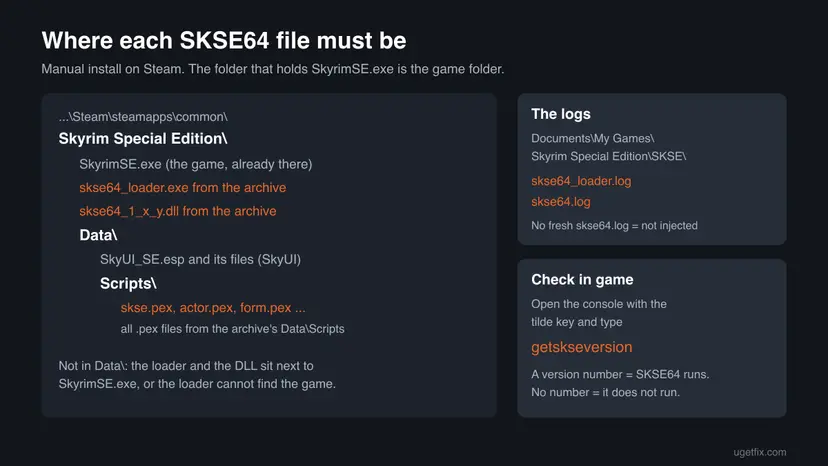
The loader looks for SkyrimSE.exe in its own folder and for a DLL named after the game version next to it. Files copied into Data, or a DLL from another build, stop it before the game starts.
- Quit the game. In the game folder, delete the old
skse64_loader.exeand everyskse64_*.dllfile. The SKSE64 readme says these are the files to remove when you uninstall it. - Open the SKSE64 archive (a .7z file) with 7-Zip. The SKSE website warns against archive tools from the Microsoft Store.
- Open the top folder of the archive, for example
skse64_2_02_06_gog, and copy the.exeand.dllfiles into the game folder, next toSkyrimSE.exe. Do not put them in Data. - Copy the
.pexfiles from the archive'sData\Scriptsfolder into the game'sData\Scriptsfolder. Replace the existing files when Windows asks. - Ignore the
srcfolder andData\Scripts\Sourceunless you write mods. They are for programmers only. - Start the game with
skse64_loader.exe(Fix 1).
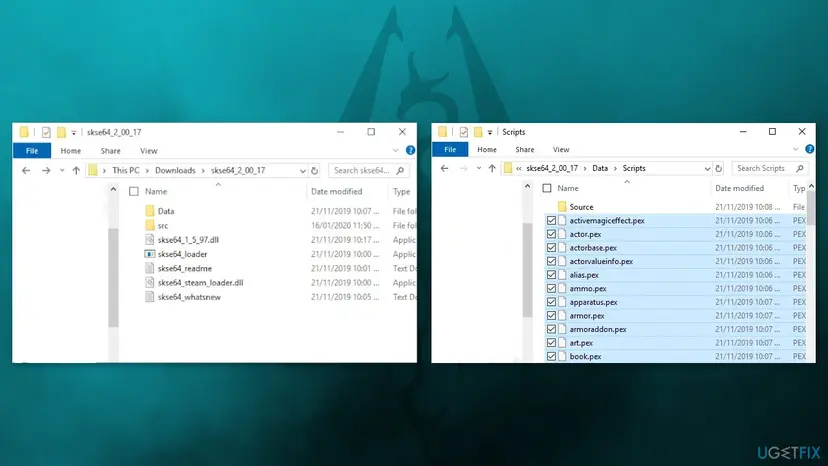
If a mod replaces one of SKSE64's script files with an older copy, SkyUI usually shows code 3 or code 7 instead of code 1. In Vortex or MO2, let SKSE64's scripts win the file conflict.
It worked if: The loader starts the game, a new skse64.log appears in the SKSE log folder with the current time, and SkyUI shows no message.
If not: If the loader reports that launching failed, go to Fix 5. If it shows no window at all and the file disappears, go to Fix 6.
Fix 5. Run skse64_loader.exe as administrator
3 minutesLow riskThe loader says launching failed, or SkyUI still reports code 1 although you used the loader.
The loader must start the game and write SKSE64 into it before it runs. When Windows refuses that, the loader asks for administrator rights itself. The SKSE64 readme gives this as the answer when Skyrim still launches without SKSE64.
- Right-click
skse64_loader.exein the game folder and select Run as administrator. Select Yes in the User Account Control window. - If SkyUI no longer shows code 1, make it permanent: right-click the loader, select Properties and open the Compatibility tab.
- Select Run this program as an administrator and then OK.
- If you start the game from a mod manager, set the same option on the mod manager's own
.exefile, because it starts the loader.
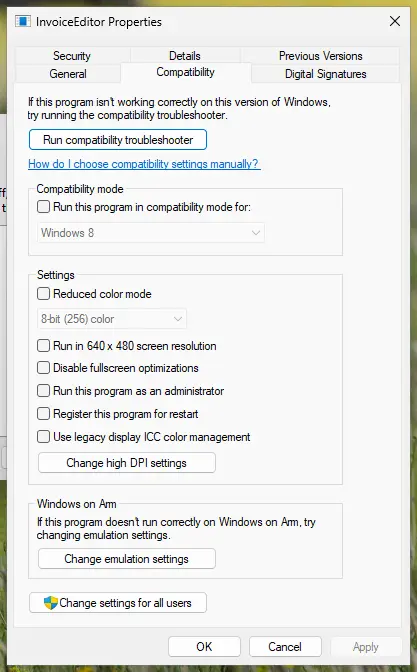
Step by step with both Windows versions: How to run a program as administrator or in compatibility mode.
The SKSE64 readme warns that running as administrator may run the game as a separate user. In that case your load order must be copied to that user's profile. If your mods seem missing, this is the reason.
It worked if: The game starts through the loader without "Launching failed", and the save loads with no SkyUI message.
If not: If you prefer not to run the game as administrator for good, move it out of Program Files (Fix 7). If the loader is blocked or deleted, see Fix 6.
Fix 6. Let your virus scanner allow the SKSE64 loader
5 minutesLow riskThe loader opens nothing, flashes and closes, or skse64_loader.exe disappears from the folder.
SKSE64 loads its code into the game with DLL injection, a technique malware also uses, so some scanners block or delete the loader. The loader's source even warns to check for conflicts with a virus scanner when something else starts the game.
- Open Windows Security > Virus & threat protection > Protection history and look for an entry that names
skse64_loader.exeor askse64_*.dllfile. - If you find one, make sure your SKSE64 file came from
skse.silverlock.org, the SKSE64 GitHub page or the Nexus page of the user ianpatt. The readme names these as the only legitimate places. - Restore the file from the entry with Actions > Restore or Allow on device, or reinstall SKSE64 (Fix 4).
- For one test, pause real-time protection, start the game with the loader and turn protection back on right after: Turn off Microsoft Defender protection for a moment.
- If the test works, add the game folder as an exclusion in your scanner instead of leaving protection off.
Turn real-time protection back on as soon as the test is done. Since SKSE64 2.2.7 the DLLs are signed to reduce false alarms, so a current build from the official pages is rarely flagged. A file from anywhere else is a real risk.
It worked if: The loader file stays in the folder, the game starts through it and SkyUI shows no message, with protection turned back on.
If not: If nothing was blocked and the loader still fails, move the game out of Program Files (Fix 7) or restore the game files (Fix 8).
Fix 7. Move Skyrim out of the Program Files folder
15 minutesLow riskThe loader only works as administrator and you would rather not run Skyrim that way.
Steam installs games under C:\Program Files (x86)\Steam\steamapps\common by default, a folder Windows protects. The Step guide recommends installing modding tools outside such protected folders, so the loader and mod managers work without administrator rights.
- In Steam, open Settings > Storage and select + to create a new library on another drive or in a folder such as
D:\Games\SteamLibrary. - Still under Storage, select the drive where Skyrim is installed now.
- Select The Elder Scrolls V: Skyrim Special Edition and select Move, then choose the new library.
- Point Vortex or Mod Organizer 2 to the new game folder if it does not find it by itself.
- Start the game with
skse64_loader.exefrom the new folder, without administrator rights.
Steam's Move feature moves the game folder only. Skyrim saves and the SKSE logs live in Documents\My Games, which does not move with it.
It worked if: The game starts from the new folder through the loader without an administrator prompt and loads with no SkyUI message.
If not: If the loader still fails after the move, the game files themselves may be changed: go to Fix 8.
Fix 8. Verify Skyrim's game files, then install SKSE64 again
15 minutesLow riskA downgrade tool, a replaced SkyrimSE.exe or a broken update left a game version no SKSE64 build supports.
The loader only accepts the exact game versions SKSE64 knows. Steam's file check puts back the current, unchanged SkyrimSE.exe, and then the current SKSE64 build fits again.
Steam checks every game file and downloads the changed or missing ones. Step by step for Steam and GOG Galaxy: How to verify game files in Steam, Epic Games, Xbox app, EA app, Battle.net and GOG Galaxy.
- In Steam, right-click the game, select Properties, open Installed Files and select Verify integrity of game files.
- When it finishes, read the Product version of
SkyrimSE.exeagain (Fix 3, steps 1 and 2). - Install the SKSE64 build for that version with Fix 4, then start the game with Fix 1 or Fix 2.
If you downgraded Skyrim on purpose to keep older SKSE plugins, the check brings back the newest version and those plugins may stop working. Back up the game folder first if you want to keep the old version.
It worked if: Steam reports that files were checked, SkyrimSE.exe shows the current version, and the matching SKSE64 build loads.
If not: Read the SKSE logs as described below, and include them if you ask for help.
Still SkyUI error code 1? Read the SKSE logs
The SKSE team asks for its log files with every support request. They show whether the loader ran, which game version it found and whether the DLL loaded. The SKSE64 readme puts them in Documents\My Games\Skyrim Special Edition\SKSE.
| What you find | What it means | Next step |
|---|---|---|
No skse64_loader.log from today | The loader did not run: the game was started some other way | Fix 1 or Fix 2 |
skse64_loader.log from today, but no new skse64.log | The loader ran, but SKSE64 did not load into the game | Read the last lines of the loader log, then Fix 3 to Fix 6 |
| Both logs from today | SKSE64 loaded in that session | Make sure you load the save in that same session |
| A line about the Epic Store or the Windows Store | Unsupported copy of the game | No fix: SKSE64 cannot run on it |
The SKSE team says to make sure the game starts properly without SKSE64 first. Then attach skse64.log and skse64_loader.log as files, not pasted text. Turn on file name extensions in File Explorer so you pick the right files. The team cannot help with load order problems.
Other SkyUI error codes and how they differ from code 1
SkyUI shows a different code for each check that fails, and it stops at the first one. Once code 1 is gone, a second message can appear for the next problem. Codes 5 and 6 checked SkyUI's menu files in older versions; SkyUI 6 has retired them.
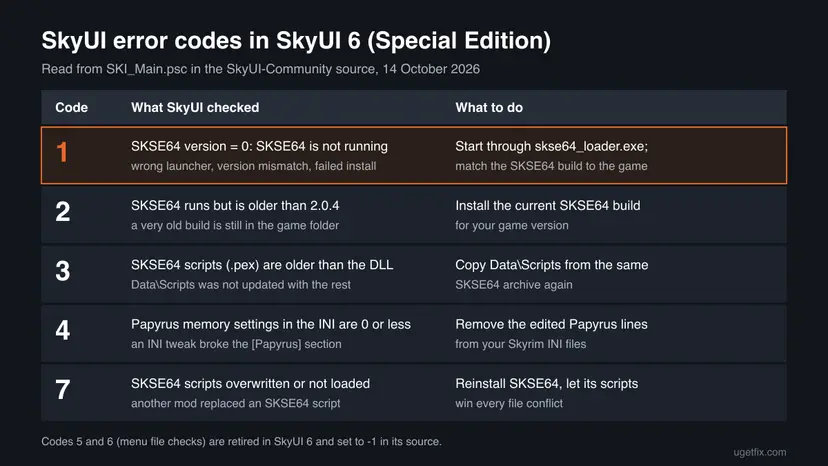
- Code 2: SKSE64 runs but is older than the minimum SkyUI asks for (2.0.4 in SkyUI 6). Install the current build.
- Code 3: SKSE64's script files are older than its DLL. Copy
Data\Scriptsfrom the same archive again. - Code 4: the Papyrus memory settings in your Skyrim INI files are 0 or less. Remove the Papyrus lines a tweak guide added.
- Code 7: SKSE64's scripts were overwritten by another mod or not loaded. Reinstall SKSE64 and let its scripts win.
How to keep SkyUI error code 1 from coming back
Code 1 comes back for the same two reasons: a different way of starting the game, or a Skyrim update. Both are easy to avoid once you know them.
- Start Skyrim only from the SKSE shortcut or the SKSE entry in your mod manager.
- After every Skyrim update, check the SKSE website before you play a modded save.
- Keep the SKSE64 archive you installed, so you can copy its scripts again.
- Download SKSE64 only from
skse.silverlock.org, its GitHub page or its Nexus page.
- Press Play in Steam or use a desktop icon for
SkyrimSE.exewith a modded game. - Copy the SKSE64 loader and DLL into the Data folder.
- Rename an old SKSE64 DLL to match a new game version. The loader rejects it.
- Save a game during a session that showed code 1, if you can avoid it.
In a session without SKSE64, SkyUI's menus and every mod that needs SKSE64 do not work as intended. We could not confirm from an official source that saving then harms the save. Loading an older save after the fix is the safe choice.
Frequently asked questions
What does SkyUI error code 1 mean?
It means the Skyrim Script Extender (SKSE64) is not running in your game session. SkyUI asks SKSE64 for its version every time a save loads. When the answer is 0, SkyUI shows SKYUI ERROR CODE 1 with the text "The Skyrim Script Extender (SKSE64) is not running. SkyUI will not work correctly!" SkyUI itself works; it is warning you that most of its features need SKSE64. The usual reason is that the game was started without skse64_loader.exe, or that SKSE64 does not match the game version after an update.
How do I fix SkyUI error code 1 quickly?
Quit the game, make sure Steam is open, and start Skyrim with skse64_loader.exe from the game folder, or with the SKSE tile in Vortex or the SKSE entry in Mod Organizer 2. That alone fixes most cases. If the loader shows a message about the game version, download the SKSE64 build for your exact game version: 2.3.1 for Steam 1.7.104 and 2.2.6 for GOG 1.6.1179 on 14 October 2026. Then open the console and type getskseversion to confirm it runs.
Why does SkyUI say SKSE64 is not running when I installed it?
Installing SKSE64 is not enough: the game must be started through its loader every single time. The SkyUI team names two causes: SKSE64 was not installed correctly, or the game was not started with skse64_loader.exe and Steam open. A third common reason is a Skyrim update, after which the old SKSE64 build no longer loads. Check the game version of SkyrimSE.exe in its Properties under Details and compare it with the SKSE64 build you have.
Is SKSE error code 1 the same as SkyUI error code 1?
Yes, people search for both, but the message comes from SkyUI, not from SKSE. SKSE64's own loader does not use numbered codes; it shows plain sentences such as "Couldn't find SKSE64 DLL" or "You are using a newer version of Skyrim than this version of SKSE64 supports". If you see one of those, the loader tells you the cause directly. If you only see the SkyUI box in the game, the loader most likely never ran.
Do I need SKSE for SkyUI?
Yes. SkyUI's Nexus page lists SKSE64 as its only requirement and explains that UI modding without SKSE is very limited: no text input, no Mod Configuration Menu, no extended item data, no active effects icons and no new favorites menu. Without SKSE64 there would be almost no features left. Install SKSE64 before SkyUI, as SkyUI's own install steps say, and enable SkyUI_SE.esp in the game's Creations menu or your mod manager.
Can I use SkyUI and SKSE with the Epic Games or Game Pass version of Skyrim?
No. The SKSE64 readme and Nexus page say that the Epic Games Store, Windows Store or Xbox Game Pass and console versions are not supported. The loader even detects these copies and says so. Game Pass and Microsoft Store games are locked down in a way similar to consoles, according to the SKSE website. You need the Steam or GOG version of Skyrim Special Edition or Anniversary Edition to use SKSE64 and SkyUI.
Why did SkyUI error code 1 appear after a Skyrim update?
Each SKSE64 build works with one exact game version. When Steam updates Skyrim, the old build stops loading and SkyUI shows code 1. SkyUI's message says this itself: wait until SKSE64 has been updated, then install the new version. In 2026, Skyrim moved to 1.7.99 and 1.7.104, and SKSE64 2.3.0 and 2.3.1 followed. Many SKSE plugins also need updates after such a change, so check their pages too.
Does SkyUI error code 1 happen on Skyrim VR or Steam Deck?
Skyrim VR uses its own script extender, SKSE VR (build 2.0.12 for game 1.4.15), started with sksevr_loader.exe, and the same rule applies: start through the loader. On Steam Deck, the Windows game runs through Proton, and code 1 again means the loader did not start it. Users report replacing the Skyrim launcher with the loader as a workaround. We could not confirm a method documented by the SKSE team, so we do not give steps for it.
How to fix SkyUI error code 1 (как исправить)?
This page answers the Russian query as well: the fix is the same in every language. Close the game and start it with skse64_loader.exe from the game folder, or with the SKSE entry in Vortex or Mod Organizer 2, while Steam is open. If that does not help, install the SKSE64 build for your game version from the SKSE website or its Nexus page. If the loader shows a message, it is in English and names the cause directly.
What is SkyUI error code 5 and is it related to code 1?
Code 5 meant an incompatible SkyUI menu file, usually because another mod had overwritten one of SkyUI's interface files. It is a different problem from code 1. In SkyUI 6 for Special Edition, the source code sets codes 5 and 6 to -1, so those menu checks are retired. If you still see code 5, you probably run an older SkyUI version: install the current SkyUI and let its files win over other interface mods.
Sources
Did this fix work?
One click, no account. It tells the next reader which guides are worth their time.
Questions and experiences: fix SKYUI error code 1 in Skyrim
Still broken, or found a fix we did not cover? Ask here: members and our editors answer. Reading is open; writing needs a free account.
…