
How to fix "Internal error: CallSpawnServer: Unexpected response: $0" in Windows?

Prefer to fix it yourself? The manual steps follow.
- 7methods
- 2 to 20 minutes
- Easy
Applies to Windows 11, Windows 10; any program whose installer is built with Inno Setup (users report it with GOG games, MediaMonkey and Cakewalk)
7 methods in this guide
Hello. I tried to install a program on my Windows PC but I received the "Internal error: CallSpawnServer: Unexpected response: $0" message. What could this be and how do I fix it?
"Internal error: CallSpawnServer: Unexpected response: $0" is not a Windows error. It comes from installers built with Inno Setup, when the setup tries to start a program for you and its own background helper no longer answers. Run the setup file as administrator first; it then needs no helper at all.
The message comes from an Inno Setup installer, not from Windows. Its background copy, which starts programs for you without admin rights, has closed or stopped answering. Right-click the setup file and select Run as administrator (Fix 1): the installer then starts programs itself and skips the step that fails. If the error shows on the last page, untick Launch and start the program from Start (Fix 2).
| Error | Internal error: CallSpawnServer: Unexpected response: $0, in a small error window of the installer. |
|---|---|
| Where it appears | While a program installs, most often on the last page after you select Finish with a Launch or View README box ticked, or at a step where the setup runs another program. |
| Main cause | The first, non-elevated copy of the setup (Inno Setup calls it the spawn server) has closed or does not answer when the elevated copy asks it to start a program. |
| Fastest fix | Start the setup file with Run as administrator (Fix 1). |
| Also written as | CallSpawnServer unexpected response $0, internal error call spawn server unexpected response $0, Interal error: CallSpawnServer. A related line is "CallSpawnServer: Unexpected status". |
| Comes from | Inno Setup, a free installer builder used by many software makers. The message is written in its source code as CallSpawnServer: Unexpected response: $%x; $0 is the reply value 0 in hexadecimal. |
| Affects | Windows 11 and Windows 10, any program with an Inno Setup installer. It is a fault of that one installer, not of Windows. |
| Maker's status | Inno Setup documents the helper behaviour, but no help page names this error. A developer note ties one case to a setup file that has the same name as the program. |
| Time to fix | About 2 minutes with Fix 1 or Fix 2. Up to 20 minutes if you need a clean boot. |
Facts checked on 15 October 2026. Steps written for Windows 11 (25H2 and 26H2) and Windows 10 22H2.
What "CallSpawnServer: Unexpected response: $0" means
Many programs, from games sold on GOG to music players and audio tools, use Inno Setup to build their installer. When you start such a setup, Windows shows the UAC prompt and the setup starts a second copy of itself with administrator rights. The first copy, with your normal rights, stays quietly in the background. Inno Setup calls it the spawn server.
The spawn server has one job: when the installer must start a program as you, not as administrator, the elevated copy sends it a message and the spawn server starts that program. In Inno Setup's source code, the function that sends this message is CallSpawnServer. If the reply is not the one it expects, the setup stops with "Internal error: CallSpawnServer: Unexpected response: $0". A reply of 0 means the message was not handled at all, most often because the first copy is gone.
The text is written inside the installer of the program you are setting up. Windows only shows it. That is why system repairs such as SFC rarely change anything, and why the fixes below work on the installer instead.
- Spellings people search: callspawnserver unexpected response $0, internal error call spawn server unexpected response $0, and the misprint "Interal error" seen in a developer note.
- In Vietnamese, Indonesian, Turkish and other searches ("đây là lỗi gì", "lỗi gì", "maksudnya"): the answer is the same. The installer's background helper did not answer, and the program may already be installed.
- Close relative: "CallSpawnServer: Unexpected status" comes from the same hand-over and has the same fixes.
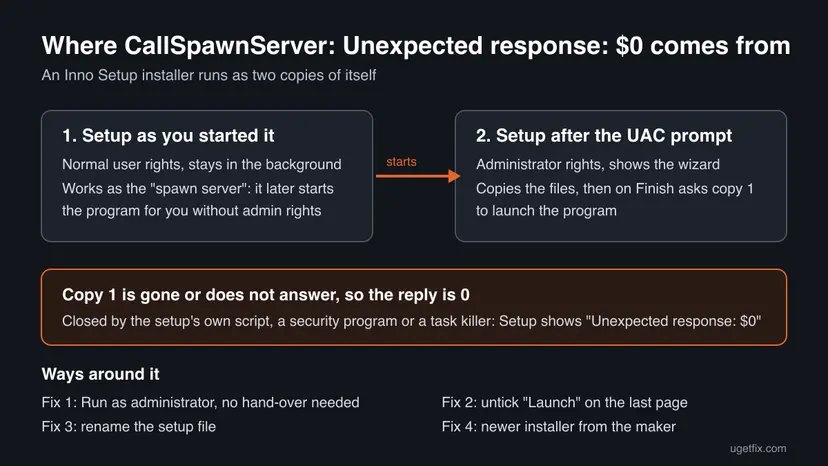
Why the installer gets the $0 reply
Most often the first copy of the setup was closed before the end. A developer note shows one way this happens: the installer's own script closes the program by its file name, the setup file has the same name, and the script ends the setup's own helper too. Less often a security program or a task cleaning tool ends the background copy. Rarely the setup runs from a place where Windows cannot keep the two copies talking, for example from inside another app's download window.
| Cause | How often | How to tell | Fix |
|---|---|---|---|
| The installer starts a program as you on the last page and the helper is gone. | Most often | The error appears right after Finish with a Launch box ticked. | Fix 1, Fix 2 |
| The setup file has the same name as the program, and its script closes that name. | Often with some installers | The setup is called like Program.exe, not Program-setup.exe. | Fix 3 |
| A bug in an older version of this one installer. | Sometimes | The same error on two PCs with the same setup file. | Fix 4 |
| Security software or a task tool ends the background copy. | Less often | A third-party antivirus, a game booster or a process killer runs. | Fix 5, Fix 6 |
| Damaged Windows files. | Rarely | Other installers and programs also fail. | Fix 7 |
The order above follows how Inno Setup's code reaches this message and what users report. It is not a measured share of cases. Inno Setup's makers do not publish a list of causes for it.
How to fix "CallSpawnServer: Unexpected response: $0"
Fixes 1 and 2 avoid the hand-over that fails and help most readers in two minutes. Fixes 3 and 4 deal with the installer itself. Fixes 5 to 7 are for the few cases where something else on the PC ends the setup.
| What you see or have | Start with |
|---|---|
| The error appears as soon as you select Finish on the last page. | Fix 2, then Fix 1 |
| The error appears in the middle of the install, or you do not know when. | Fix 1 |
| The setup file has exactly the same name as the program. | Fix 3 |
| The same setup fails on another PC too. | Fix 4 |
| A third-party antivirus, game booster or task tool runs in the background. | Fix 5, then Fix 6 |
| Many different installers fail, not only this one. | Fix 7 |
Fix 1. Start the setup file with Run as administrator
2 minutesLow riskEveryone who sees the error, wherever in the install it appears.
Inno Setup's help says that when you start a setup with Run as administrator, it has no chance to run anything with your original rights. Its code then starts programs directly and never calls the spawn server, so the step that returns $0 is skipped.
- Close the error window and any setup window that is still open.
- Open the folder where you saved the setup file, usually Downloads.
- Right-click the setup file and select Run as administrator.
- Select Yes in the User Account Control window.
- Go through the setup as before and select Finish.
- If the program opens at the end, close it once and start it again from Start, so it runs with your normal rights.
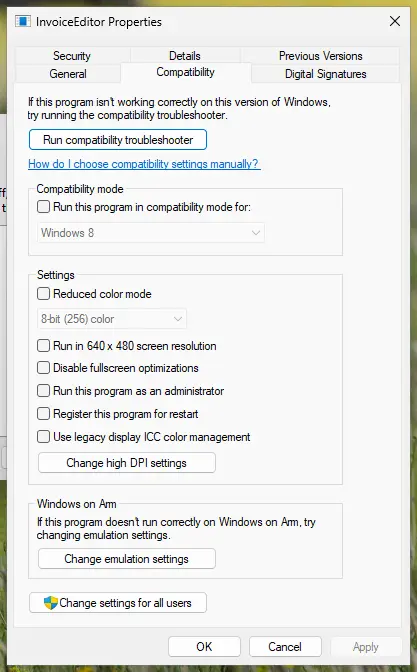
Run a setup as administrator only when it comes from the program's maker or a store you trust: it gets full access to Windows. More about this setting: How to run a program as administrator or in compatibility mode
It worked if: The setup ends with no error window, and the program is in the Start menu.
If not: If the error appears again on the last page, go to Fix 2. If it appears earlier, go to Fix 3.
Fix 2. Untick Launch on the last page and start the program yourself
2 minutesNo riskThe error appears after you select Finish on the last page of the setup.
Inno Setup's help says that the check boxes on the last page (the postinstall entries, such as Launch the program or View the README) run with your original rights by default. Those are exactly the entries that go through the spawn server. With the boxes clear, the setup has nothing to hand over.
- Select OK in the error window. The files are usually already copied at this point.
- Open Start and look for the program. If it is there, start it: you are done.
- If it is not there, run the setup again.
- On the last page, Completing the Setup Wizard, clear every check box, such as Launch or View the README file.
- Select Finish, then start the program from Start or its desktop shortcut.
If one of the boxes was a README or release notes file, open it from the program's folder, usually under C:\Program Files or C:\Program Files (x86), or from its Start menu folder.
It worked if: The setup closes without a message and the program starts from Start.
If not: If the program does not start, or there were no boxes to clear, use Fix 1, then Fix 3.
Fix 3. Rename the setup file so it differs from the program's name
2 minutesNo riskThe setup file has exactly the program's name, for example Program.exe instead of Program-setup.exe, and Fix 1 did not help.
A developer note describes this error when an installer's script closes the program by its file name and the setup output file was given the same name. The script then ends the setup's own helper. A different file name keeps the helper out of reach. We could not confirm that every installer with this error works this way, but renaming is harmless.
- Close the error window and every setup window.
- Open Downloads in File Explorer and select the setup file.
- Press F2 and add
-setupbefore.exe, for exampleProgram-setup.exe. Press Enter. - Right-click the renamed file and select Run as administrator, then Yes.
- Install as usual.
If File Explorer does not show .exe at the end of file names, select View > Show > File name extensions on Windows 11, or the View tab and File name extensions on Windows 10.
It worked if: The install runs through and no CallSpawnServer window appears.
If not: If the error is the same, the fault sits in the installer itself. Go to Fix 4.
Fix 4. Get a fresh installer from the program's maker
10 minutesNo riskThe error stays after Fixes 1 to 3, or the same setup fails on another PC.
The message is part of the installer that the maker built, so only the maker can change it. A newer installer may be built with a newer Inno Setup or a corrected script. Makers learn about such faults from user reports.
- Delete the setup file you have.
- Download the newest installer from the maker's own website or the store you bought the program in, for example the GOG Galaxy library for a GOG game.
- Run it as administrator, as in Fix 1.
- If the error stays, write to the maker's support or forum. Give the full error text, the setup file name and version, and the step where it appears.
A repacked or cracked installer from a download site can be built with any script, including harmful ones. Take setups only from the maker or a store you trust. This page does not help with pirated software.
It worked if: The new installer finishes without the error.
If not: If even the newest installer fails, something on your PC may end it. Go to Fix 5.
Fix 5. Close task tools and pause third-party security software for one install
5 minutesLow riskYou use a third-party antivirus, a game booster, a RAM cleaner or a tool that ends background processes, and Fixes 1 to 4 failed.
The spawn server sits in the background with no window of its own, which makes it look like a stray process to tools that end such processes. If something ends it during the install, the next hand-over returns $0.
- Close game boosters, memory cleaners and task killer tools from the notification area.
- Open your antivirus and pause its real-time protection for the shortest time it offers.
- Run the setup as administrator straight away.
- Turn the protection back on as soon as the setup ends, whether it worked or not.
Do this only with a setup from the maker, for one install, and stay off other websites while protection is paused. If the install works only while protection is paused, ask the antivirus maker how to allow this setup. Microsoft Defender steps: Turn off Microsoft Defender protection for a moment
It worked if: The install finishes while protection is paused, which shows the security program ended the helper.
If not: Turn protection back on and try a clean boot in Fix 6.
Fix 6. Install from a clean boot
15 minutesLow riskYou cannot tell which background program ends the setup, or you have no third-party antivirus.
A clean boot starts Windows with only Microsoft services. If the setup works then, a startup program or service was ending the spawn server, and you can switch the others back on one by one to find it.
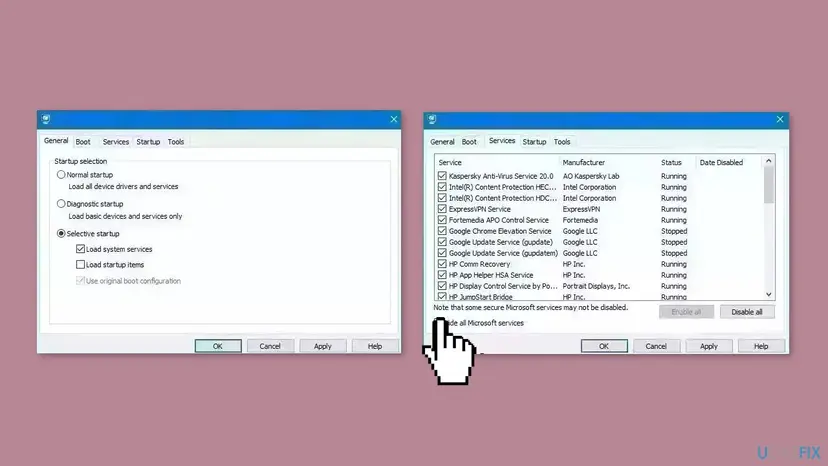
- Open System Configuration. Select Search on the taskbar, type msconfig and select System Configuration from the results.
- Hide Microsoft services. On the Services tab, select the Hide all Microsoft services check box. Only services from other companies stay in the list.
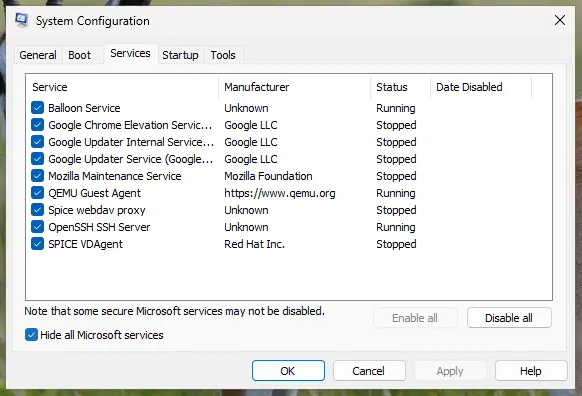
With Hide all Microsoft services ticked, only third-party services stay in the list. Screenshot: Windows 11 26H2. - Disable the remaining services. Select Disable all, then select Apply.
- Open Task Manager. On the Startup tab of System Configuration, select Open Task Manager.
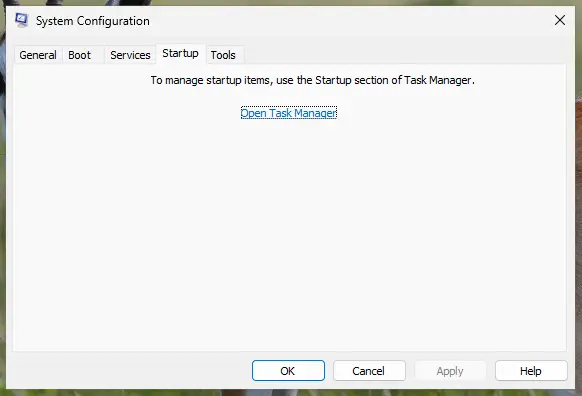
The Startup tab only links to Task Manager. Screenshot: Windows 11 26H2. - Disable the startup apps. On the Startup apps tab in Task Manager, select each item whose status is Enabled and select Disable. Write down or take a screenshot of the items you disable: you need the list to turn them back on.
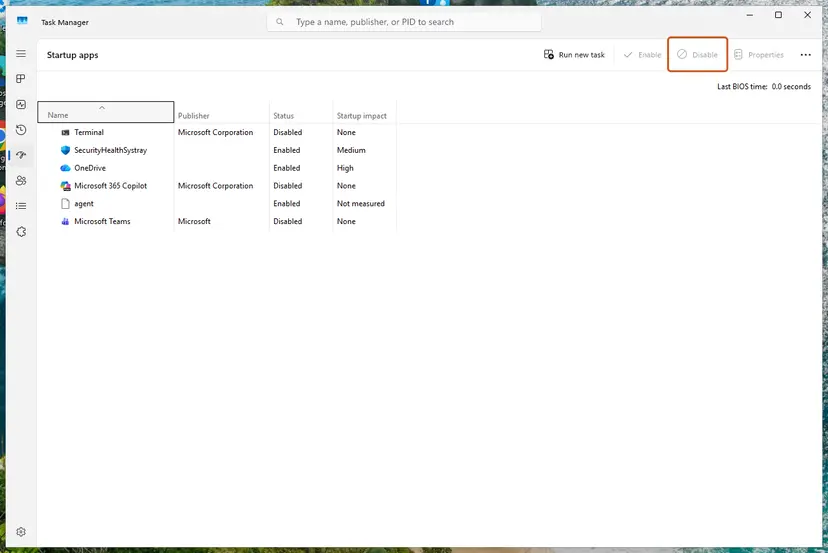
Select an app, then Disable. Screenshot: Windows 11 26H2. - Confirm the changes. Close Task Manager. On the Startup tab of System Configuration, select OK.
- Restart and test. Restart the PC. Windows now starts in a clean boot environment: try again the thing that failed (run the app, install the update, uninstall the program).
These steps were written for Windows 11 25H2 and 26H2. The full page with the other versions and what each result means: How to perform a clean boot in Windows
It worked if: The setup ends without the error in the clean boot state. Then return to a normal start as the procedure shows.
If not: If it fails in a clean boot too, run the system file check in Fix 7.
Fix 7. Repair Windows system files with SFC and DISM
20 minutesLow riskMany different installers fail on this PC, not only this one.
The two setup copies talk through standard Windows window messages. That part of Windows rarely breaks, so this is the last step, not the first. It is worth running only when other installers also fail.
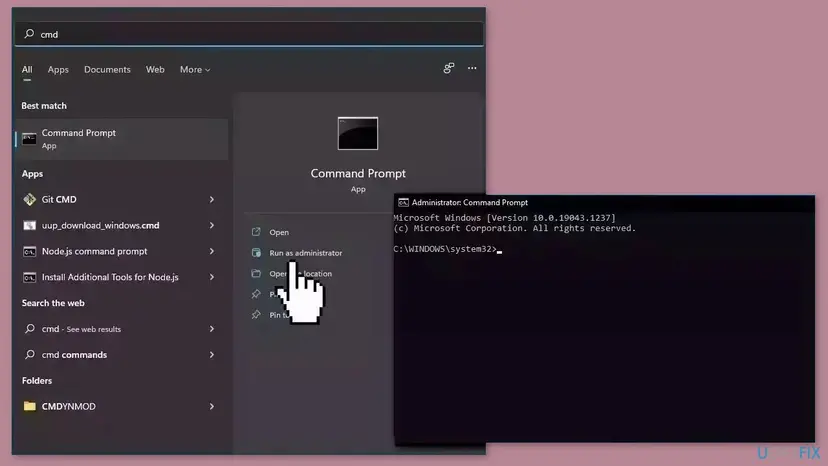
- Open an elevated command window. Right-click Start and select Terminal (Admin), or type cmd in the search box, right-click Command Prompt and select Run as administrator. Select Yes when Windows asks for permission.
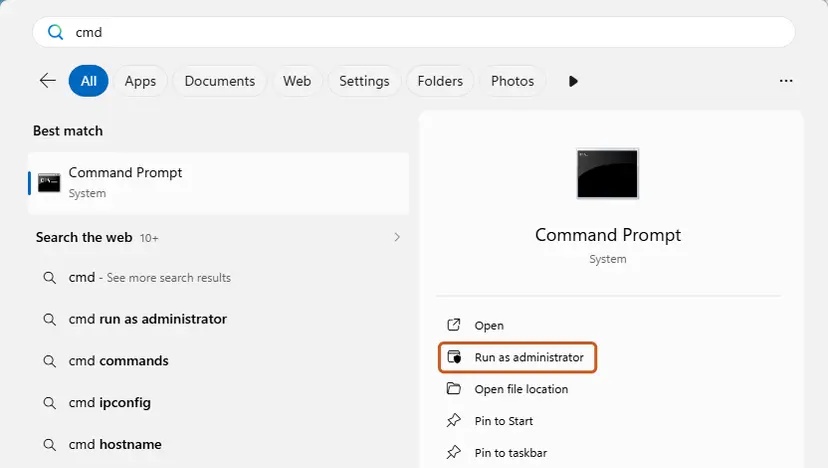
Search for cmd and choose Run as administrator. Screenshot: Windows 11 26H2. - Run DISM first. Type the command below and press Enter. DISM downloads clean copies of damaged components from Windows Update, so it can take several minutes. Wait until it says The operation completed successfully.
DISM.exe /Online /Cleanup-Image /RestoreHealth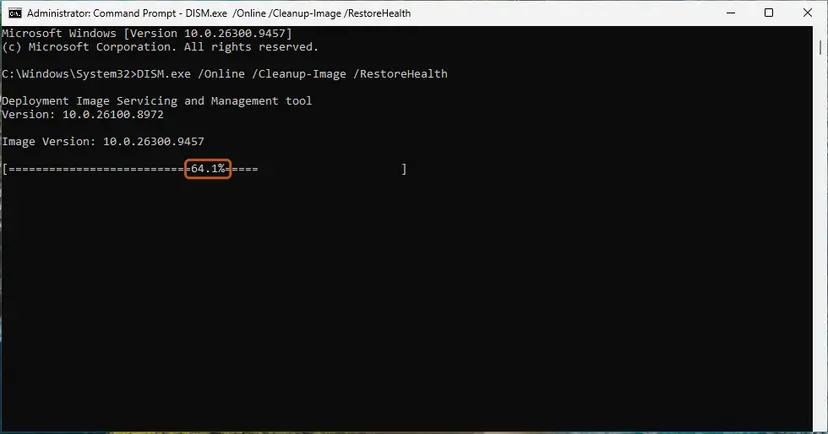
DISM /RestoreHealth running. Screenshot: Windows 11 26H2. - Run System File Checker. In the same window, type the command below and press Enter. Do not close the window until the verification reaches 100%.
sfc /scannow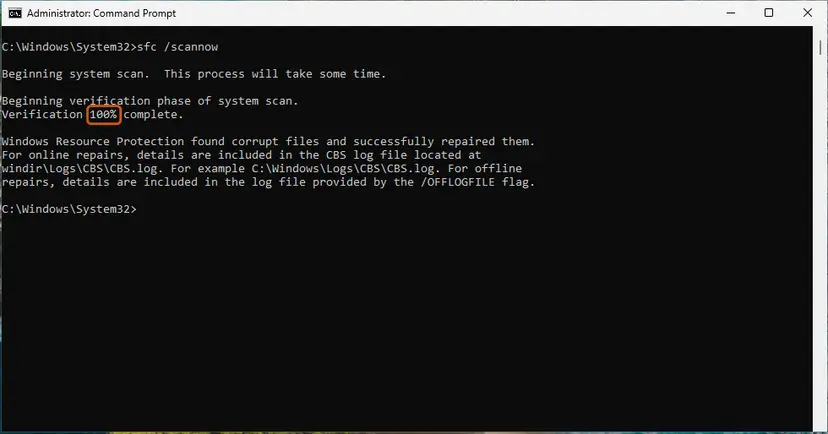
sfc /scannow at 100%. Screenshot: Windows 11 26H2. - Read the result and restart. Compare the last message with the table below this guide, then restart the PC so that repaired files are loaded.
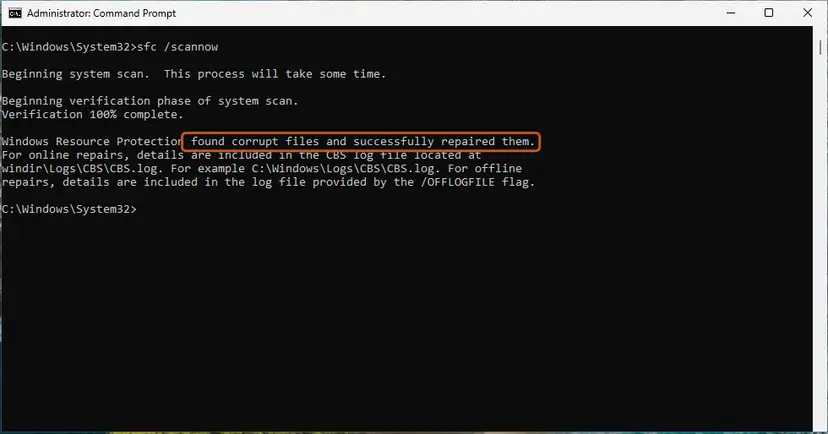
The result line tells you what SFC did. Screenshot: Windows 11 26H2.
These steps were written for Windows 11 24H2 and 25H2. The full page with the other versions and what each result means: Run DISM and SFC to repair Windows system files
It worked if: SFC reports that it found no problems or repaired them, and the setup now finishes.
If not: Follow the steps under "If the error is still there" below.
If "CallSpawnServer: Unexpected response: $0" is still there
Check first whether the program is already installed: open Start or Settings > Apps > Installed apps and look for it. In many cases the error comes only at the very end, so the program works and only the launch failed.
- Write a setup log. Inno Setup installers accept the
/LOGswitch. Press Win + R, drag the setup file into the box, add/LOG="%USERPROFILE%\Desktop\setup-log.txt"and press Enter. The log on the desktop shows the last step before the error. - Send the maker: the full error text, the setup file name and version, your Windows version from Settings > System > About, the log, and which fixes you tried by number.
- Check the file: if the setup did not come from the maker or a known store, scan it with Microsoft Defender before you try again: How to scan for malware with Microsoft Defender
We could not confirm that every installer passes the /LOG switch to Inno Setup. Some makers wrap the setup in their own launcher. If no log file appears, the maker's support is the next step.
How to keep the CallSpawnServer error from coming back
- Start setups that failed once with Run as administrator.
- Keep setup files with a name that is not the same as the program, such as
Program-setup.exe. - Download installers from the maker or a store you trust.
- Let the setup finish before you close any window or start other programs.
- Do not end unknown background tasks in Task Manager while a setup runs.
- Do not run memory cleaners or game boosters during an install.
- Do not turn security software off for good to make a setup work.
- Do not use repacked installers from download sites.
If you build installers yourself with Inno Setup, give the output setup file a name that is not the same as the program's file name, and do not end processes by that name in the script while the setup is running.
Frequently asked questions
What does "Internal error: CallSpawnServer: Unexpected response: $0" mean?
It means an installer built with Inno Setup asked its own background copy to start a program and got no valid answer. The first copy of the setup runs with your normal rights and starts programs for you; the second copy has administrator rights and does the install. When the first copy is gone, the reply is 0, shown as $0. The program itself is often already installed. Running the setup as administrator, Fix 1 on this page, avoids the hand-over.
Is the CallSpawnServer error a virus?
No. The message is a normal part of the Inno Setup installer engine, which many honest programs use. It tells you that the two copies of the setup lost contact, nothing more. A virus is a separate question that depends on where the setup file came from. If you took it from the maker's site or a known store, there is no reason to worry. If it came from an unknown download site, scan it with Microsoft Defender before you try again.
Where do I click to fix it?
Close the error window first. Then find the setup file in your Downloads folder, right-click it and select Run as administrator, and select Yes in the window that Windows shows. Go through the install again. If the error appeared right after you selected Finish, also clear the Launch check box on the last page before you select Finish. Then start the program from the Start menu. These two clicks are Fix 1 and Fix 2.
Is the program installed after the error?
Often it is. When the error appears after you select Finish, the files were copied before the setup tried to launch the program or open a README file. Open Start or Settings, then Apps and Installed apps, and look for the program. If it is listed and starts, you can ignore the error. If it appears in the middle of the install, the setup may have stopped early; run it again as administrator.
Why does Run as administrator help?
Inno Setup's help explains that a setup started with Run as administrator has no way back to your normal rights. In that case it does not use the background helper at all and starts programs directly. The step that fails with $0 never happens. The only side effect is that a program launched at the end also runs as administrator, so close it once and start it again from Start.
I see this error with a GOG game, MediaMonkey or Cakewalk. Is it the same?
Yes. Users report the same message with GOG game installers, MediaMonkey and Cakewalk, because all of them use Inno Setup. The fixes on this page work on the installer, not on the program, so they are the same. If the newest installer from the maker still fails after Fixes 1 to 3, report it on the maker's forum or support page with the full error text and the setup file name, as Fix 4 says.
What is CallSpawnServer?
It is the name of a function inside Inno Setup, the free installer builder. The function sends a request from the elevated copy of the setup to the first copy, which Inno Setup calls the spawn server, to start a program with the user's original rights. It then waits for that program and asks for its result. Two messages come from it: "Unexpected response" when the first request fails and "Unexpected status" when a later check fails.
Will SFC, driver updates or a new .NET Framework fix it?
Rarely. The earlier version of this page listed them, but the error comes from the installer, not from Windows files, drivers or .NET. The setup engine is a self-contained program that does not use .NET. SFC and DISM are worth a run only when many different installers fail on the same PC, which is Fix 7. Driver and .NET updates were dropped from this page because they do not touch the part that fails.
I searched in another language. Is there a guide in Spanish, Italian or Chinese?
This page is in English only. The error text is the same in every language, because it is an internal message of Inno Setup and is not translated. People search "como resolver", "come risolvere", "böyle hata veriyor" or "これはなんで" and get the same answer: run the setup as administrator and untick Launch on the last page. If a translator tool helps you follow the steps, the buttons sit in the same places. A search for a school e-book installer such as 康軒電子書 leads here when its setup shows this error; the same fixes apply.
Sources
- Inno Setup Help: [Run] and [UninstallRun] sections (runasoriginaluser and postinstall flags) (jrsoftware.org)
- Inno Setup source code: Setup.SpawnClient.pas (CallSpawnServer) (github.com)
- cnblogs developer note: Interal error: CallSpawnServer: Unexpected response: $0 when packaging with Inno Setup (cnblogs.com)
Did this fix work?
One click, no account. It tells the next reader which guides are worth their time.
Questions and experiences: fix "Internal error: CallSpawnServer: Unexpected response: $0" in Windows
Still broken, or found a fix we did not cover? Ask here: members and our editors answer. Reading is open; writing needs a free account.
…