
How to fix Red Dead Redemption 2 "Unknown error FFFFFFFF" in Windows?

Prefer to fix it yourself? The manual steps follow.
- 8methods
- 2 minutes for the audio test, 5 minutes for the API switch, 15 to 60 minutes for the driver and file checks
- Easy
Applies to Red Dead Redemption 2 Story Mode and Red Dead Online on Windows PC (Rockstar Games Launcher, Steam and Epic Games Store)
8 methods in this guide
Hello. Red Dead Redemption 2 keeps crashing on my Windows PC with "Unknown error FFFFFFFF". What is this message? Is there any way to fix this?
Unknown error FFFFFFFF, often searched as FFFF, is the message Red Dead Redemption 2 shows on PC when the game closes without a named cause. Rockstar ties it to three things: an audio device, an old graphics driver and a broken graphics API setting. On a modded game, take the mods out first.
Start the game first and only then plug in your headset or speakers (Fix 1), as Rockstar advises. If it still closes, switch the graphics API in system.xml from Vulkan to DX12 (or back) and delete every sga_ file in the Settings folder (Fix 2). If you use mods, move them out of the game folder before anything else (Fix 3). Then update the NVIDIA or AMD driver (Fix 4).
| Error | Unknown error FFFFFFFF in Red Dead Redemption 2 on PC. Rockstar's support article calls it Error Code FFFFFFFF. |
|---|---|
| Where it appears | In a message after the game closes: at launch, during a loading screen or in the middle of play. Story Mode and Red Dead Online both show it. |
| Main cause | Rockstar names three: some external audio devices, out of date graphics drivers, and a misconfigured graphics API in the advanced graphics settings. On modded copies, overloaded memory pools. |
| Fastest fix | Plug the headset or speakers in after the game has started (Fix 1), then switch Vulkan and DX12 and delete the sga_ files (Fix 2). |
| Also written as | FFFF, FFFFFF, FFFFFFF, "Unknown error: FFFFFFFF", "Error FFFF". The full code has eight F characters; shorter spellings are the same error. |
| Affects | The PC version only, bought on the Rockstar Games Launcher, Steam or the Epic Games Store. Not the PS4 or Xbox One versions. |
| Rockstar's status | A known PC error with its own support article, last updated 26 July 2024. No title update names FFFFFFFF as fixed. The last PC title update is 1.32. |
| Saves | Not touched by any fix here. Saves live in Documents\Rockstar Games\Red Dead Redemption 2\Profiles, the files you edit are in the Settings folder next to it. |
| Time to fix | 2 to 5 minutes for Fix 1 and Fix 2. Up to an hour when you need a clean driver install or a full check of the game files. |
Facts checked on 14 October 2026. Steps written for Windows 11 (25H2 and 26H2) and Windows 10 22H2, with the game steps read from Rockstar Support for the Rockstar Games Launcher, Steam and Epic Games copies.
What "Unknown error FFFFFFFF" means in Red Dead Redemption 2, and its other spellings
FFFFFFFF is not a code with a meaning of its own. It is the highest value a 32 bit number can hold, and programs often return it when something failed without a more precise error. That is why the game itself writes Unknown error in front of it: the engine knows it has to stop, but it has no specific message for the reason.
Rockstar has one support article for it, Red Dead Redemption 2 Error Code FFFFFFFF, written for PC. It names three causes: some external audio devices, out of date graphics drivers, and a misconfigured setting in the advanced graphics section of system.xml. Rockstar gives no fourth cause and no log file to read.
| What you see or type | What it is |
|---|---|
| Unknown error FFFFFFFF, Unknown error: FFFFFFFF | The full message. Eight F characters. |
| Unknown error FFFF, error FFFF, FFFFFF, FFFFFFF, fffff | Short forms used in searches and forums. The game does not print a shorter code: it is the same error. |
| RDR2 error FFFFFFFF, rdo unknown error FFFF | The same error in Story Mode (RDR2) or in Red Dead Online (RDO). The fixes are the same. |
| ERR_GFX_STATE, ERR_GFX_D3D_DEFERRED_MEM | Different crashes with their own Rockstar articles. They name the graphics part that failed, FFFFFFFF does not. |
Rockstar's article is for the PC version. On a console the game cannot be modded and has no system.xml, and Rockstar has no FFFFFFFF article for PS4 or Xbox One.
What causes Unknown error FFFFFFFF, from the most common to the rarest
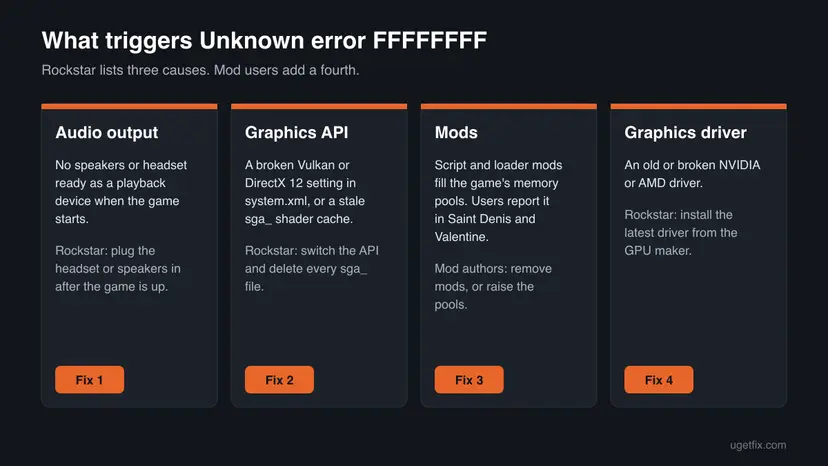
On an unmodded copy, follow Rockstar's order: the audio device first, because it costs nothing to test, then the graphics API, then the driver. On a modded copy, the mods come first. The authors of a well known FFFFFFFF fix for modders say the error appears when the game's memory pools overflow, which script mods and add-on models push past the default limits.
| Cause | How common | Sign | Fix |
|---|---|---|---|
| No audio output ready when the game starts, or a USB or Bluetooth headset | Common, named first by Rockstar | Crash at launch, often on a PC with only a headset | Fix 1 |
Broken graphics API setting or a stale sga_ shader cache | Common, named by Rockstar | Crash at launch or in the first loading screen after a driver or GPU change | Fix 2 |
| Mods: Lenny's Mod Loader, Script Hook RDR2, ASI scripts, trainers | The most common cause on modded copies | Crash in big towns or after instant travel, gone without mods | Fix 3 |
| Old or damaged NVIDIA or AMD driver | Common, named by Rockstar | Crashes after a Windows reinstall or with a driver from Windows Update | Fix 4 |
| Damaged or incomplete game files | Less common | Crash after an update, a moved install or a full disk | Fix 5 |
| Page file set by hand | Rare | You or a tuning tool changed virtual memory | Fix 6 |
| Permissions, fullscreen optimizations or background overlays | Rare | Nothing above helped | Fix 7 and Fix 8 |
None of these causes is a hardware fault in itself. If the game also fails with other errors, such as ERR_GFX_D3D_DEFERRED_MEM, read the section If FFFFFFFF does not go away after the fixes.
How to fix Unknown error FFFFFFFF in Red Dead Redemption 2
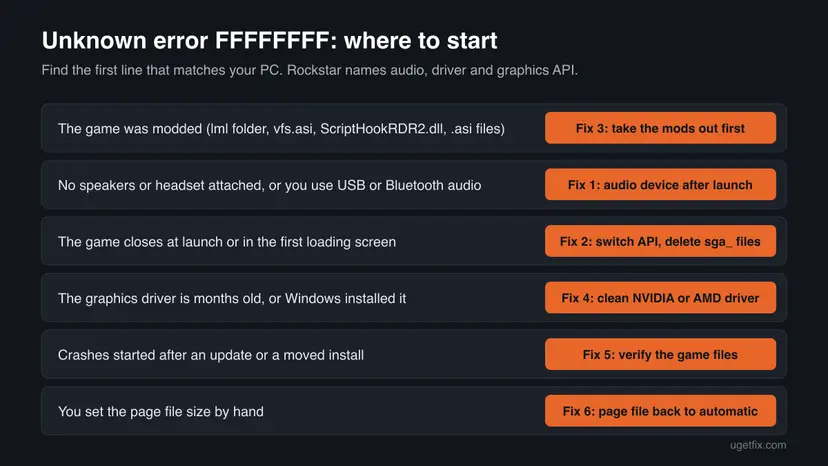
Fix 1 and Fix 2 are the two steps from Rockstar's own FFFFFFFF article and take five minutes together. A modded game goes straight to Fix 3. Test the game after each fix and stop when it runs.
| What you see or what your PC has | Start with |
|---|---|
The game folder has an lml folder, vfs.asi, ScriptHookRDR2.dll or other .asi files | Fix 3 |
| A USB or Bluetooth headset, or no speakers at all | Fix 1 |
| The crash comes at launch or in the first loading screen | Fix 2 |
| The graphics driver is old, or Windows installed it | Fix 4 |
| The crash started after a game update or after you moved the install | Fix 5 |
| You changed the page file size by hand | Fix 6 |
Fix 1. Connect the headset or speakers after the game has started
2 minutesNo riskEvery reader first, above all if you use a USB or Bluetooth headset or have no speakers attached.
Rockstar lists some external audio devices as a cause of FFFFFFFF and its advice is to plug the headphones or speakers in after you have booted the game. The game then starts with a working default output instead of a device that is still connecting.
- Close Red Dead Redemption 2 and the launcher it runs from.
- Unplug the USB headset, or turn off the Bluetooth headset, so it is not connected.
- Make sure Windows still has a playback device: Windows 11, Settings > System > Sound, section Output. Windows 10, Settings > System > Sound, Choose your output device. Your monitor speakers or the motherboard audio are enough.
- Start the game and wait until the main menu or the Story Mode load has finished.
- Now plug the headset in or connect it over Bluetooth, and pick it as the output in Windows if the sound does not switch on its own.
- Play for at least as long as it took the error to appear before.
If Windows shows No output devices found, the game has nothing to send sound to. Connect any speaker or headset before you start the game, or fix the audio driver first with Update, roll back or reinstall a driver.
Rockstar's PC title update 1.14.1 of 25 November 2019 also fixed a crash when Windows audio devices or settings were changed while the game was running. If you are on a current version, that crash is gone, but switching devices in the middle of play is still the first thing to avoid while you test.
It worked if: The game reaches the menu and keeps running with the headset connected after launch.
If not: Leave the headset plugged in the way that worked best and go to Fix 2 to reset the graphics API.
Fix 2. Switch the graphics API between Vulkan and DirectX 12 and delete the sga_ files
5 minutesLow riskAnyone whose game closes at launch or in the first loading screen, or after a driver or graphics card change.
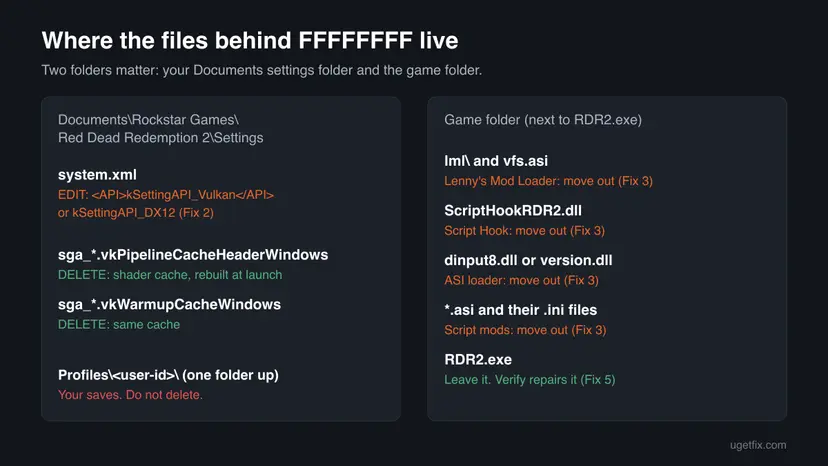
Rockstar's second fix for FFFFFFFF is to change the graphics API in system.xml and delete the sga_ files, the cached shader data the game built for the old setting. A broken API value or a stale cache stops the renderer before the game can name an error.
- Close the game and the launcher.
- Open File Explorer and go to the Settings folder. You can paste this path in the address bar:
%USERPROFILE%\Documents\Rockstar Games\Red Dead Redemption 2\Settings - Copy
system.xmlto your desktop as a backup. - Right-click
system.xml, select Open with > Notepad, and press Ctrl + F to findkSettingAPI. The line sits in the<advancedGraphics>section. - If the line says Vulkan, change it to DX12. If it already says DX12, change it to Vulkan:
<API>kSettingAPI_Vulkan</API> becomes <API>kSettingAPI_DX12</API> - Select File > Save and close Notepad.
- In the same Settings folder, delete every file whose name starts with
sga_, for examplesga_vulkan_final_init.vkPipelineCacheHeaderWindowsandsga_vulkan_final_init.vkWarmupCacheWindows. - Start the game. The first start may take longer than usual.
If the game reaches the menu, you can switch the API there too. Rockstar's steps: Settings > Graphics, set Advanced Settings to Unlocked, then change Graphics API. Save, but do not restart when the game asks: return to the main menu, exit and start the game again. If DirectX 12 itself is refused on your PC, see DirectX 12 is not supported on your system.
PCGamingWiki lists the launch argument -ignorepipelinecache, which makes the game skip the sga_ cache files. In the Rockstar Games Launcher it goes in Settings, your game under My installed games, field Launch arguments. On Steam, right-click the game, select Properties and type it under Launch Options. PCGamingWiki lists it for the ERR_GFX_STATE crash. Keep it only while you test and remove it once the game is stable.
It worked if: The game passes the loading screen with the other API and the error box no longer appears.
If not: Put your backup system.xml back if the other API runs worse, then go to Fix 3 if you use mods or Fix 4 if you do not.
Fix 3. Move the mods out of the game folder, then add them back one by one
10 minutesLow riskAnyone who installed Lenny's Mod Loader, Script Hook RDR2, an ASI loader, a trainer or any .asi script.
On modded copies FFFFFFFF usually means the game ran out of room in one of its fixed memory pools. The author of a widely used FFFFFFFF fix built it by watching which pools overflowed with popular mods installed. Without mods the pools are never pushed past their limits.
- Open the game folder: in the Rockstar Games Launcher select Settings, your game under My installed games, then Open next to View installation folder. On Steam, right-click the game and select Manage > Browse local files.
- Create a folder on your desktop called
rdr2-mods-off. - Move these items from the game folder into it if they exist: the
lmlfolder,vfs.asi,lml.ini,ScriptHookRDR2.dll,dinput8.dll,version.dll, and every.asifile with its.inifile. - Leave
RDR2.exeand the game's own folders in place. Do not move anything you are unsure about: Fix 5 restores the original files anyway. - Start the game and play in the place where the error came before, for example the same town.
- If the error is gone, put the loader back first, then one mod at a time, and play the same spot after each one.
- Instant travel and teleport mods. The author of the FFFFFFFF pool fix warns against teleporting and instant fast travel mods because the game was not designed to load that way. Use trains and camp fast travel instead.
- Pickup and world persistence mods. Users on the RDR2Mods forum report the error near Saint Denis and Valentine with a no glowing pickups mod and an entity persistence mod installed.
- Pool limit files. Some modders raise the pools with an edited
gameconfig.xmlloaded through Lenny's Mod Loader. It is a third-party file, not a Rockstar fix, and its author says it cannot cover every mod list.
Rockstar's mod guidelines and terms apply to single-player mods only. Never start Red Dead Online with script mods or loaders in the game folder. Move them out before you go online.
It worked if: The game runs through the spot where it crashed before, and the error comes back only when one specific mod is added.
If not: If the error stays with every mod removed, run Fix 5 to restore the original game files, then try Fix 4.
Fix 4. Install the latest NVIDIA or AMD graphics driver
15 minutesLow riskAnyone whose driver is older than a few months or came from Windows Update instead of NVIDIA or AMD.
Rockstar names out of date graphics drivers as one of the three causes of FFFFFFFF and points to the NVIDIA and AMD download pages for the latest version. The game draws every frame through this driver, so a driver fault stops it before it can name an error.
- Find your graphics card: right-click Start, open Device Manager and expand Display adapters.
- Download the current driver for that card from the maker:
https://www.nvidia.com/Download/index.aspxfor NVIDIA orhttps://www.amd.com/en/supportfor AMD, the two pages Rockstar links. - Run the installer. If it offers a clean installation, choose it, so old profiles are reset too.
- Restart Windows, then start the game. Expect a longer first load while shaders are built for the new driver.
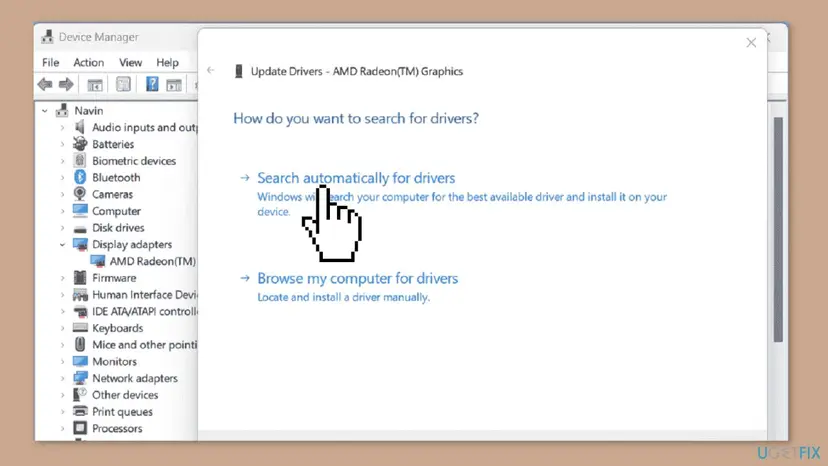
If the crashes began right after a driver update, go the other way and roll the driver back. Both directions, and a full reinstall, are covered step by step: Update, roll back or reinstall a driver.
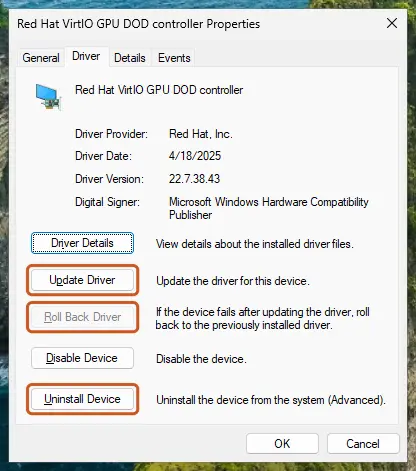
It worked if: The driver version in Device Manager has changed and the game no longer stops with FFFFFFFF.
If not: Run Fix 2 again after the driver change, because a new driver makes the old sga_ cache stale. Then go to Fix 5.
Fix 5. Verify the game files in the launcher you bought the game from
20 to 60 minutesNo riskAnyone whose crashes began after an update, a moved install, a full disk or removed mods.
Rockstar says verifying game files can resolve crashing and freezing and also makes sure the game is up to date. It replaces any game file that differs from Rockstar's copy, including files changed by mods you forgot.
- Close the game.
- Rockstar Games Launcher: sign in and select Settings.
- Select Red Dead Redemption 2 under My installed games on the left.
- Select Verify Integrity under Verify game file integrity.
- Wait for the pop-up above the system tray that says the game is verified and ready to play.
For a Steam or Epic Games copy, verify in that launcher instead. The steps for each store are in one place: How to verify game files in Steam, Epic Games, Xbox app, EA app, Battle.net and GOG Galaxy.
It worked if: The launcher reports the game as verified, downloads any damaged files, and the game starts without FFFFFFFF.
If not: If files were replaced and the error stays, the files were not the cause. Go to Fix 6 if you ever changed the page file, otherwise Fix 7.
Fix 6. Let Windows manage the page file again
5 minutes and a restartLow riskOnly if you, a tuning guide or a tool once set the page file size by hand.
Rockstar has an article that says adjusting the page file or virtual memory by hand can make Red Dead Redemption 2 crash, and that letting Windows manage it may resolve those crashes. A page file that is too small leaves the game without memory to fall back on.
- Press Win + R, type
sysdm.cpland press Enter to open System Properties. - On the Advanced tab, under Performance, select Settings.
- In Performance Options, open the Advanced tab and select Change under Virtual memory.
- Tick Automatically manage paging file size for all drives.
- Select OK, close the windows and select Restart Now when Windows asks.
Rockstar says plainly that you do not need these steps if you never changed virtual memory. Skip this fix in that case.
It worked if: After the restart the tick box stays on, and the game runs for longer than before without the error.
If not: Leave the setting on automatic and go to Fix 7.
Fix 7. Run RDR2.exe as administrator and turn off fullscreen optimizations
3 minutesLow riskAnyone for whom Fix 1 to Fix 6 did not help, on any store version.
Rockstar's articles for the related ERR_GFX_STATE crash and for "exited unexpectedly" both tell PC players to tick Run this program as an administrator and disable fullscreen optimization on RDR2.exe. It removes two Windows layers between the game and the screen.
- Open the game folder as in Fix 3. On the Epic Games Store, select the three dots on the game tile, then Manage and the folder icon on the Installation tab.
- Right-click
RDR2.exeand select Properties. - Open the Compatibility tab.
- Tick Run this program as an administrator and Disable fullscreen optimizations.
- Select OK and start the game from the launcher as usual.
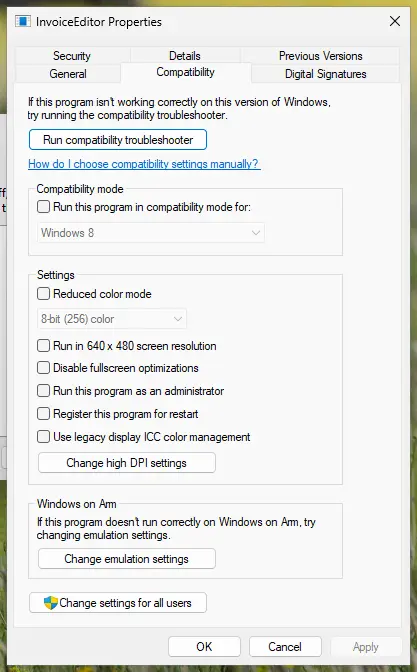
Do not turn on compatibility mode for an older Windows version: Rockstar does not ask for it. More on what each setting does: How to run a program as administrator or in compatibility mode.
It worked if: Windows asks for permission when the game starts, and the game runs without the FFFFFFFF box.
If not: Untick both boxes again if nothing changed, and go to Fix 8.
Fix 8. Start Windows without background apps and overlays
15 minutesLow riskAnyone who runs overlays, monitoring or RGB tools and still sees the error after Fix 1 to Fix 7.
Overlay and monitoring tools inject code into the game. For the PC port of the first Red Dead Redemption, Rockstar ties crashes to RivaTuner and MSI Afterburner. Its FFFFFFFF article does not mention overlays, so for RDR2 treat this as a test, not a known cause.
- Close RivaTuner, MSI Afterburner, Discord overlay, recording tools and RGB software from the system tray.
- Start the game and test. If it now runs, start the tools again one at a time to find the one that clashes.
- If you cannot tell which program interferes, do a clean boot so Windows starts only Microsoft services, then test again.
The clean boot steps, and how to undo them, are here: How to perform a clean boot in Windows. Your security software stays on: if you suspect it, pause it for one test only with Turn off Microsoft Defender protection for a moment and turn it back on right after.
It worked if: The game runs in a clean boot, and you find the one tool that brings the error back.
If not: Undo the clean boot, then read the next section for what to collect and send to Rockstar Support.
If FFFFFFFF does not go away: what to check and what to send to Rockstar
Red Dead Redemption 2 does not write a crash log that Rockstar documents for players. Windows does record the crash. Open Event Viewer (right-click Start), go to Windows Logs > Application and look for an Application Error entry for RDR2.exe at the time of the crash. The Faulting module name line tells you which file was running when the game stopped.
| Faulting module | What it suggests | Go to |
|---|---|---|
RDR2.exe | The game itself: settings, cache, files or mods | Fix 2, Fix 3, Fix 5 |
| A file of the graphics driver (its Properties > Details name NVIDIA or AMD) | The graphics driver | Fix 4, then Fix 2 |
vfs.asi, ScriptHookRDR2.dll, dinput8.dll or another .asi | A mod or loader | Fix 3 |
| A Windows audio file, or a file of your headset's software | The audio device or its driver | Fix 1 |
- Send to Rockstar Support (
support.rockstargames.com, Submit a Request): the store you bought from, your Windows version, your graphics card and driver version, the API you use (Vulkan or DX12), and what Fix 1 to Fix 8 changed. - Signs of hardware: other games also crash, the PC restarts on its own, or Windows shows blue screens. Then test the memory with How to test your RAM with Windows Memory Diagnostic and check temperatures before you blame the game.
- Signs of a system below spec: the game also stops with ERR_GFX_D3D_DEFERRED_MEM. Rockstar says to lower settings and keep the video memory meter at about two thirds.
How to keep Unknown error FFFFFFFF from coming back
- Start the game first and connect a USB or Bluetooth headset after it, as Rockstar advises.
- Delete the
sga_files in the Settings folder after every driver update or graphics card change. - Keep a copy of a working
system.xmlnext to the original. - Add mods one at a time and play a big town after each one.
- Verify the game files after you remove mods or after a game update.
- Do not switch audio devices while the game is running.
- Do not use instant travel or teleport mods with a heavy mod list.
- Do not set the page file size by hand for this game.
- Do not start Red Dead Online with script mods or loaders in the game folder.
- Do not edit
system.xmlwhile the game is running: close it first, as in Fix 2.
Red Dead Redemption 2 is still on Windows 10 in Rockstar's minimum requirements. Windows 10 left support on 14 October 2025, so new graphics drivers and game fixes are tested on Windows 11 first.
Frequently asked questions
How do I fix unknown error FFFF in a FitGirl repack or a cracked copy of RDR2?
This page cannot help with that, and the fixes here may not work on it. A repack or crack replaces the game's own files and launcher check, so Fix 5 cannot restore them and Rockstar Support will not look at the crash. Comments under Lenny's Mod Loader show users of old cracked builds who could not start the game with it. Installers from unofficial sources can also carry malware. The only copy that can be repaired the documented way is one bought on the Rockstar Games Launcher, Steam or the Epic Games Store.
Is unknown error FFFF the same as FFFFFFFF?
Yes. The game shows the full code with eight F characters, Unknown error FFFFFFFF. FFFF, FFFFFF and FFFFFFF are shortened versions people type into search or forums. Rockstar's support article uses only the full form, Error Code FFFFFFFF, and gives one set of fixes for it. If your screen shows a different code, such as ERR_GFX_STATE or ERR_GFX_D3D_DEFERRED_MEM, that is a separate crash with its own Rockstar article, although Fix 2 and Fix 4 help with those too.
Does unknown error FFFF also happen in Red Dead Online?
Yes. Players report the same message in Red Dead Online, and the causes Rockstar names, audio devices, drivers and the graphics API, do not depend on the game mode. Use Fix 1, Fix 2 and Fix 4 the same way. One difference matters: Red Dead Online must never run with script mods or loaders in the game folder, so if you play both modes with mods installed, move them out first as in Fix 3. If many players see errors at the same moment, check Rockstar's service status page before you change anything.
Will deleting the sga_ files or switching the API delete my saves?
No. Your saves live in Documents\Rockstar Games\Red Dead Redemption 2\Profiles, in a folder named after your user ID. Fix 2 works only in the Settings folder next to it: system.xml holds the graphics settings and the sga_ files hold shader cache data the game builds again. Rockstar also syncs saves to its cloud. To be safe, copy the Profiles folder to another drive before you reinstall the game or try anything beyond Fix 2.
Should I use Vulkan or DirectX 12 for Red Dead Redemption 2?
Use the one that runs without crashing on your PC. Rockstar offers both and its FFFFFFFF fix says switch to DX12 or the other way round. PCGamingWiki notes that DirectX 12 can be slower than Vulkan on some graphics cards, depending on the GPU. If you get FFFFFFFF on one API, the other is the first thing to try. If both crash, the cause is more likely the driver or mods.
Why does RDR2 crash with FFFFFFFF in Saint Denis or after some time of play?
A crash in a big town or after a while of play points to memory limits, not a broken install. On modded games the town loads more people, horses and objects than the game's pools are sized for, which is what the modders' FFFFFFFF fix raises. Users report the error near Saint Denis and Valentine with certain pickup and persistence mods. On an unmodded game, check that you did not set the page file by hand (Fix 6) and that the video memory meter in the graphics settings is not near its limit.
How do I clear the RDR2 cache on PC?
Close the game, open %USERPROFILE%\Documents\Rockstar Games\Red Dead Redemption 2\Settings and delete every file whose name starts with sga_. These files hold the shader pipeline cache Rockstar asks you to remove in its FFFFFFFF fix. The game builds them again the next time it starts, so the first load is slower. Do not delete system.xml unless you want all graphics settings reset, and do not touch the Profiles folder, which holds your saves.
Can I keep my mods and still get rid of FFFFFFFF?
Often, yes, but not every mod list fits. First find the mod that triggers the error by adding them back one at a time after Fix 3. Then drop that mod, look for an updated version, or reduce how many heavy script mods you run together. Some players load a third-party gameconfig.xml with larger memory pools through Lenny's Mod Loader. Its author says it cannot cover every combination and that you may need to adjust the pools yourself, so keep a backup.
Has Rockstar fixed Unknown error FFFFFFFF in an update?
No title update names FFFFFFFF as fixed. Rockstar's PC update 1.14.1 in November 2019 fixed crashes when audio devices changed during play and after switching between Vulkan and DirectX 12, two of the triggers behind this error. The last title update, 1.32, fixed more PC crashes and Offline Mode problems with Windows 11. Rockstar's FFFFFFFF support article was last updated on 26 July 2024 and still lists the three causes in this guide.
Sources
- Rockstar Games Support: Red Dead Redemption 2 Error Code FFFFFFFF (support.rockstargames.com)
- Rockstar Games Support: Red Dead Redemption 2 on PC crashing with ERR_GFX_STATE error (support.rockstargames.com)
- Rockstar Games Support: Red Dead Redemption 2 on PC crashing under custom virtual memory settings (support.rockstargames.com)
Did this fix work?
One click, no account. It tells the next reader which guides are worth their time.
Questions and experiences: fix Red Dead Redemption 2 "Unknown error FFFFFFFF" in Windows
Still broken, or found a fix we did not cover? Ask here: members and our editors answer. Reading is open; writing needs a free account.
…