
How to fix .NET Runtime error 1026 (Event ID 1026) in Windows?

Prefer to fix it yourself? The manual steps follow.
- 7methods
- 5 minutes to read the event, 10 to 30 minutes to fix
- Intermediate
Applies to Windows 11, Windows 10, Windows Server
7 methods in this guide
Hello. I wanted to open an application on my Windows PC, but it does not open or crashes shortly after launching. I also receive a .NET runtime error 1026. I have no idea what could be causing the issue. Does anyone have any ideas?
Event ID 1026 from the source .NET Runtime means one program built on .NET crashed because of an error it did not handle. The event names the program and the error type in its Exception Info line. Read that line first, because it decides the fix: most often an update or reinstall of the program named in the event.
Event 1026 is not a Windows fault but a crash report of one program. Open Event Viewer, go to Windows Logs > Application, open the .NET Runtime event 1026 and read the Application line and the first Exception Info line (Fix 1). A missing file or a bug points to updating or reinstalling that program (Fix 2). A configuration error points to its settings file (Fix 3).
| Error | Event ID 1026, source .NET Runtime, level Error: "The process was terminated due to an unhandled exception." |
|---|---|
| Where it appears | In Event Viewer under Windows Logs > Application, at the moment a .NET program closes or fails to start. The program itself often shows no message at all. |
| Main cause | An error inside the program named on the Application line that its code did not catch: a missing or wrong file, damaged settings, missing access rights or a plain bug. |
| Fastest fix | Read the first Exception Info line of the event (Fix 1), then update or reinstall the program it names (Fix 2). |
| Also written as | .NET Runtime 1026, .NET Runtime error 1026, event 1026 .NET Runtime, EventID 1026, net runtime error 1026, error 1026, イベントID 1026 on Japanese Windows. |
| Logged together with | Event 1000 from Application Error in the same second, with faulting module KERNELBASE.dll and exception code 0xe0434352. |
| Affects | Any program built on .NET Framework or newer .NET, on Windows 11, Windows 10 and Windows Server. The event looks the same on all of them. |
| Vendor status | Not a Windows bug. Microsoft's own support articles show event 1026 as the record of a crash in one program, with the fix belonging to that program. |
| Time to fix | About 5 minutes to read the event. The repair takes from a few minutes (renaming a settings folder) to half an hour (a reinstall). |
Facts checked on 15 October 2026. Steps written for Windows 11 (25H2 and 26H2) and Windows 10 22H2.
What .NET Runtime Event ID 1026 means and how to read it
Event ID 1026 is an entry in the Application log from the source .NET Runtime, level Error, keywords Classic. Windows writes it when a program that runs on .NET hits an error, called an exception, that the program's own code does not handle. The .NET runtime then ends the process and logs what happened.
Event ID 1026 as Microsoft shows it in a SharePoint support article (shortened)
Log Name: Application
Source: .NET Runtime
Event ID: 1026
Level: Error
Application: stsadm.exe
Framework Version: v4.0.30319
Description: The process was terminated due to an unhandled exception.
Exception Info: System.IO.FileNotFoundException
at Microsoft.SharePoint.StsAdmin.SPStsAdmin..cctor()
Exception Info: System.TypeInitializationException
at Microsoft.SharePoint.StsAdmin.SPStsAdmin.Main(System.String[])- Application is the program file that crashed. On your PC it reads Application: [program].exe with the real name. This is the program to fix, not Windows.
- Framework Version: v4.0.30319 means the program runs on .NET Framework 4.x. Every 4.x version, up to 4.8.1 on Windows 11, reports this same number.
- Description is always the same sentence. It says the crash happened, not why.
- Exception Info names the error type. When there are several, the first one is the root error and the later ones only wrap it. In Microsoft's example the root error is a missing file (
FileNotFoundException). - The "at" lines show where in the program's code the error happened. You do not need to understand them, but the program's support team does.
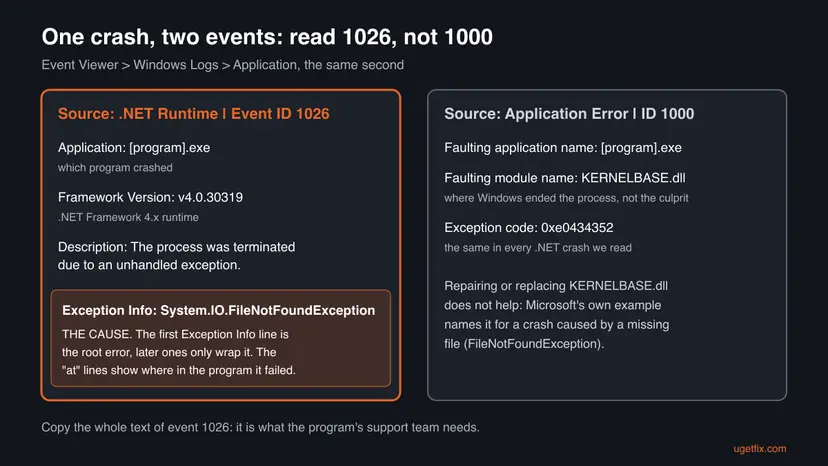
Right after 1026, Windows logs event 1000 from Application Error with the faulting module KERNELBASE.dll and the exception code 0xe0434352. Microsoft's own example shows exactly this pair for a crash caused by a missing file. Do not try to repair or download KERNELBASE.dll: it is a Windows file that only reports the crash.
Why .NET Runtime error 1026 happens: causes ranked
The Exception Info line separates the causes. We have no counts of how often each one occurs, so the order below follows the examples in Microsoft's support articles and the reports we read: problems inside the program first, damaged .NET Framework files rarely.
| Cause | First Exception Info line | Other signs | Fix |
|---|---|---|---|
| A file of the program is missing, damaged or from another version. | FileNotFoundException, FileLoadException, MissingMethodException, TypeLoadException | Started after an update or a failed install of that program. | Fix 2 |
| A bug in the program. | NullReferenceException, InvalidOperationException, ArgumentException, OverflowException | Same crash at the same moment every time, on other PCs too. | Fix 2 |
| The program's settings file is damaged. | ConfigurationErrorsException, often wrapped in TypeInitializationException | Started after a power cut, a crash or a full disk. | Fix 3 |
| A native part the program needs is missing, or .NET Framework itself is damaged. | DllNotFoundException, BadImageFormatException, or errors inside System. code in several programs | Several .NET programs crash, not just one. | Fix 4 |
| The program may not write where it wants to. | UnauthorizedAccessException, IOException | Works when started as administrator, or after Controlled folder access was turned on. | Fix 5 |
| Another program interferes. | Changes from crash to crash, or .NET Runtime events 1022 or 1023 nearby. | Crash stops in a clean boot. | Fix 6 |
| Damaged Windows system files. | Errors in many programs, not only .NET ones. | Windows tools crash or fail too. | Fix 7 |
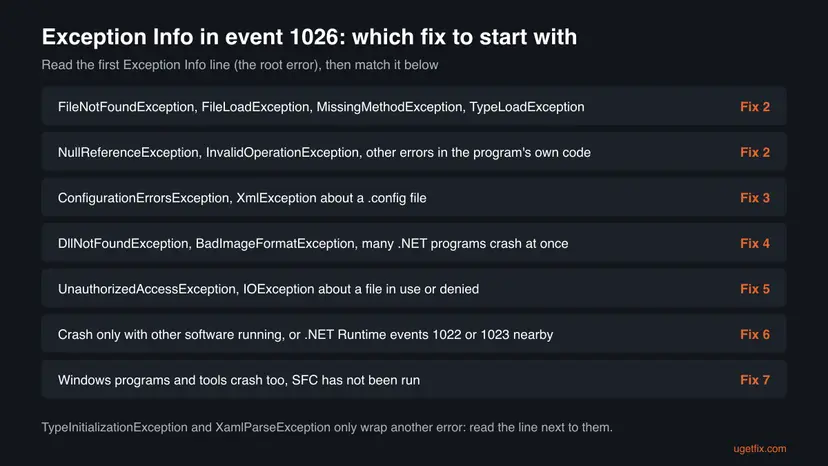
TypeInitializationException and XamlParseException only say that something failed while a part of the program or its window was being built. In Microsoft's example, the TypeInitializationException wraps the missing file. In a report on Microsoft Q&A, a XamlParseException wrapped an OverflowException in the code that loads pictures. Always go by the error under the wrapper.
How to fix .NET Runtime error 1026
Fix 1 takes five minutes and tells you which of the others is yours. Fixes 2 and 3 cover most single program crashes. Fixes 4 to 7 are for crashes that affect several programs or keep coming back. You do not need to work through all of them.
| What you see or have | Start with |
|---|---|
| You found event 1026 and do not know which program or error it is. | Fix 1 |
| One program crashes at start, and the event names a missing file or an error in its code. | Fix 2 |
The event names ConfigurationErrorsException, or the program crashed after a power cut. | Fix 3 |
Several .NET programs crash, or the event names DllNotFoundException. | Fix 4 |
The event names UnauthorizedAccessException, or the program works as administrator. | Fix 5 |
| The error type changes from crash to crash. | Fix 6 |
| Windows' own programs crash as well. | Fix 7 |
Fix 1. Open event 1026 and read the Application and Exception Info lines
5 minutesNo riskEveryone who saw .NET Runtime error 1026 and does not yet know which program and error it is.
Event 1026 is a crash report, and its two key lines tell you which program failed and why. Without them, every fix below is a guess.
- Press Win + R, type
eventvwrand select OK. - Expand Windows Logs and select Application.
- Select Filter Current Log in the right pane.
- Open the Event sources list, tick .NET Runtime, type
1026in the event ID box and select OK. - Double-click the newest event and read the General tab.
- Note the name after Application: and the first line that starts with Exception Info:.
- Select Copy at the bottom of the window and paste the text into Notepad. You will need it if the fixes below do not help.
Prefer one command? This lists the last five 1026 events with their full text. Run it in Terminal or Windows PowerShell; it does not need administrator rights for the Application log.
PowerShell: the last five .NET Runtime 1026 events
Get-WinEvent -FilterHashtable @{ LogName='Application'; ProviderName='.NET Runtime'; Id=1026 } -MaxEvents 5 |
Format-List TimeCreated, Message- Same program every time? The problem belongs to that program. Go by the chooser table above.
- A program you never start? Updaters, tray tools and background services also run on .NET. The name tells you which one, and Fix 2 still applies.
- A different program each time? Go to Fix 4 and then Fix 6.
It worked if: You know the program file named on the Application line and the error type on the first Exception Info line.
If not: If no 1026 event exists, the crash was not a .NET one. Look for event 1000 from Application Error at the same time and follow the module it names.
Fix 2. Update, repair or reinstall the program named in the event
15 to 30 minutesLow riskThe first Exception Info line names a missing file, a wrong version or an error in the program's own code.
Microsoft's example of event 1026 is a program that could not find one of its own files. A missing, damaged or mismatched program file is fixed only by putting the program's files back, and a code bug only by a newer version.
- Look up the program file from the Application line. If you do not recognise it, right-click the program in Task Manager > Details next time it runs, or search the file name in File Explorer.
- Check the program for an update: in its Help or About menu, or on the maker's website.
- If no update exists, press Win + I and open Apps > Installed apps (Windows 10: Apps > Apps & features).
- Select the three dots next to the program. If Modify or Repair is offered, run it first.
- If that does not help, select Uninstall, restart the PC and install the newest version from the maker's own website.
- Start the program and check Event Viewer for a new 1026 event.
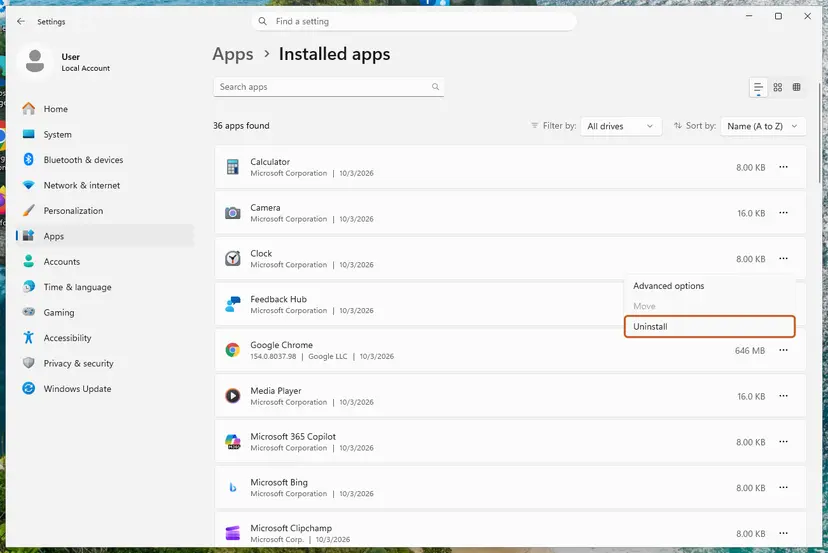
Every way to remove a program, also from Control Panel: Uninstall a program or app in Windows A Store app has Repair and Reset buttons instead: How to repair or reset an app in Windows
Accounting, design and game tools keep data in their own folders. Use the program's own backup or export function before you uninstall it, especially for company files of programs such as Sage 50 or QuickBooks.
It worked if: The program starts and stays open, and no new 1026 event appears for it in the Application log.
If not: If the same Exception Info line comes back after a clean install, send the copied event text to the program's support (see below). If the line names a configuration error, go to Fix 3.
Fix 3. Reset the program's damaged settings file
10 minutesLow riskThe event names ConfigurationErrorsException, or the program crashed for the first time after a power cut or a full disk.
A .NET Framework program reads its settings file the moment it starts. If that file is cut off or full of garbage, the program crashes before showing any window, and a reinstall often leaves the file in place.
Microsoft documents a ConfigurationErrorsException in event 1026 for one of its own services, wrapped in a TypeInitializationException. Most .NET Framework desktop programs keep per-user settings in a file named user.config under a folder named after the program's maker.
- Close the program. In Task Manager, check that it no longer runs.
- Press Win + R, type
%LocalAppData%and press Enter. - Open the folder named after the program's maker. Inside, look for a folder that starts with the program file name, such as
Program.exe_Url_followed by random letters. - Rename that folder by adding
.oldat the end. Do not delete it. - Repeat steps 2 to 4 with
%AppData%, because some programs keep the file there. - Start the program. It creates new settings with default values.
Renaming resets the program's preferences, such as window sizes, recent files or a saved server address. Your documents are not in this folder. To undo, delete the new folder and remove .old from the old one.
The older version of this guide renamed a file in %LocalAppData%\Microsoft_Corporation. That folder is the same kind of settings store for Microsoft programs, and renaming it works the same way. Changing the permissions of C:\Users, as that guide also said, is not needed and we removed it.
It worked if: The program opens with default settings, and Event Viewer shows no new 1026 event for it.
If not: If the program still crashes, put the old folder back and reinstall the program (Fix 2). A config file in the program's install folder, named like Program.exe.config, is only restored by a reinstall.
Fix 4. Repair .NET Framework and the Visual C++ runtimes
20 minutesLow riskSeveral .NET programs crash, or the event names DllNotFoundException or BadImageFormatException.
When many programs fail at once, the shared part they all use is the likely common factor. Many .NET programs also call native parts that need the Visual C++ runtimes, and a missing one shows up as DllNotFoundException.
- Repair each Visual C++ entry. Right-click an entry and select Change, then select Repair in the window that opens. Do the same for every Microsoft Visual C++ entry.
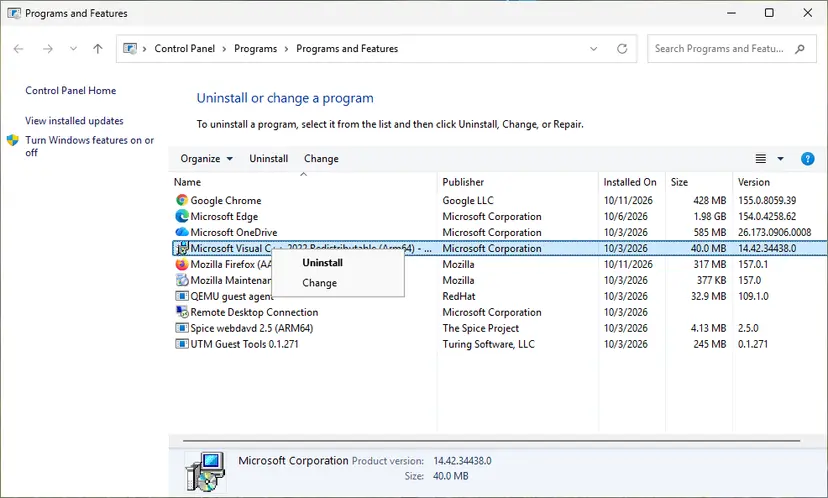
Right-click the entry and select Change to reach the repair option. Screenshot: Windows 11 26H2. - Install the latest supported version. Download the latest Visual C++ v14 Redistributable from Microsoft: Visual C++ Redistributable latest supported downloads and run it. On a 64-bit PC install both X64 and X86, because 32-bit programs need the x86 package. On an ARM64 PC install ARM64. This one version serves programs built with Visual Studio 2017 to 2026.
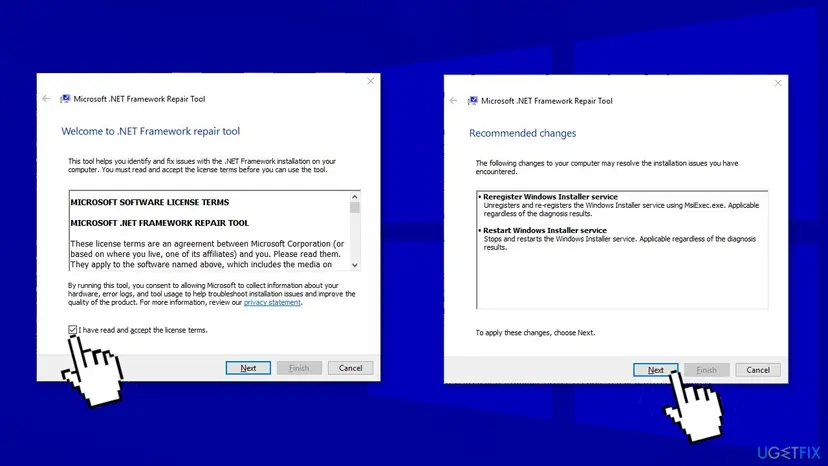
- Run the .NET Framework Repair Tool. Download the Microsoft .NET Framework Repair Tool and run NetFxRepairTool.exe. The wizard looks for setup problems, asks for your consent before it applies fixes, then repairs the installed .NET Framework versions. The tool is in English only.
- Turn on .NET Framework 3.5 if a program asks for it. Select Start, search for Windows Features and open it. In Turn Windows features on or off, select the .NET Framework 3.5 (includes .NET 2.0 and 3.0) check box and select OK. Windows downloads the files, so stay online.
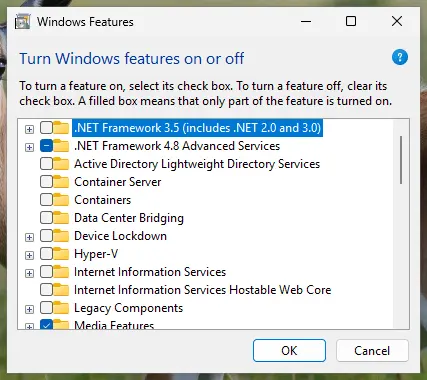
.NET Framework 3.5 is turned on in Windows Features. Screenshot: Windows 11 26H2.
These steps were written for Windows 11 25H2 and 26H2, Windows 10 22H2. The full page with the other versions and what each result means: How to repair Microsoft Visual C++ Redistributable and .NET Framework
- Do not uninstall .NET Framework 4.8 or 4.8.1. It is part of Windows 10 and Windows 11. Unticking .NET Framework 4.8 Advanced Services in Windows Features, as older guides say, removes only ASP.NET and WCF parts and does not reinstall anything.
- Newer .NET programs (.NET 6, 8 and later) do not use .NET Framework. If the maker says the program needs such a version, install the matching .NET Desktop Runtime from dotnet.microsoft.com.
- Do not uninstall Visual C++ packages as the old guide said. Repair them, then add the latest supported version.
All steps, including Programs and Features and .NET Framework 3.5: How to repair Microsoft Visual C++ Redistributable and .NET Framework Missing Visual C++ files have their own guide: VCRUNTIME140_1.dll missing.
It worked if: The Repair Tool finishes without reporting new problems, and the programs that crashed start again after a restart.
If not: If only one program still crashes, go back to Fix 2 for it. If many still crash, try Fix 6 and then Fix 7.
Fix 5. Give the program the access it needs
10 minutesLow riskThe event names UnauthorizedAccessException or IOException, or the program works when started as administrator.
UnauthorizedAccessException means Windows refused the program a file or folder. Common reasons are an old program that writes into its own install folder, and Controlled folder access in Windows Security blocking it.
- Right-click the program's shortcut and select Run as administrator once, as a test.
- If it now starts, check the maker's site for a newer version that does not need this.
- Open Windows Security > Virus & threat protection and select Manage ransomware protection.
- If Controlled folder access is on, open Block history and look for the program.
- If it is listed, select Allow an app through Controlled folder access and add the program's .exe file. Protection stays on for every other app.
- Start the program normally and check Event Viewer again.
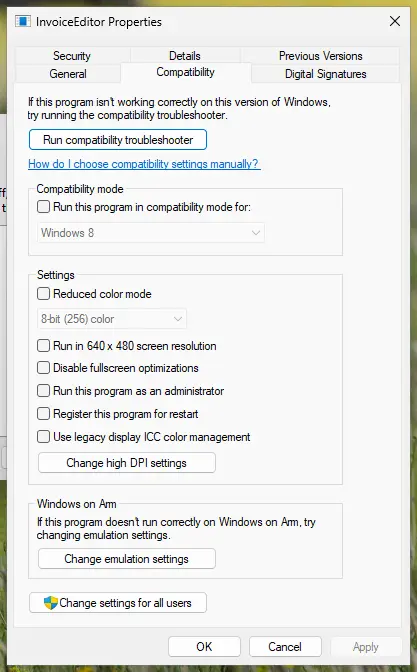
If the maker says the program must run as administrator, make it permanent on the Compatibility tab: How to run a program as administrator or in compatibility mode
It worked if: The program opens without administrator rights, and no new UnauthorizedAccessException appears in event 1026.
If not: If it works only as administrator and no update exists, keep the Compatibility tab setting and tell the maker. If it fails even as administrator, go to Fix 6.
Fix 6. Find a program that interferes with a clean boot
20 minutesLow riskThe error type changes from crash to crash, or .NET Runtime events 1022 or 1023 appear near 1026.
Monitoring tools, overlays and some security programs load themselves into other processes. A clean boot starts Windows without them, so if the crash stops, one of them is the cause.
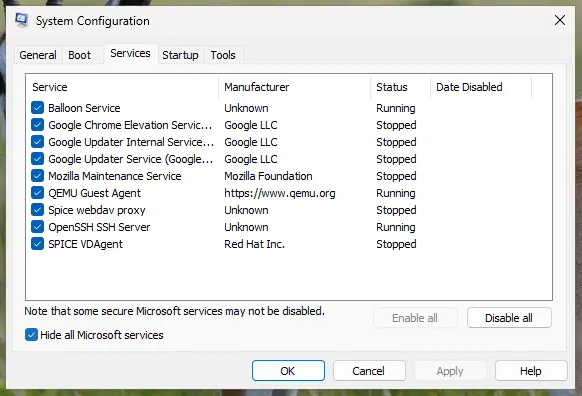
- Do a clean boot with the steps in How to perform a clean boot in Windows: third-party services and startup apps off.
- Start the program that crashed. If it works, turn half of the services back on and restart.
- Repeat with smaller halves until the crash returns. The last group you turned on holds the culprit.
- Update or remove that program, then return to a normal start.
The old version of this guide told you to tick Safe boot on the Boot tab of msconfig. That is Safe Mode, not a clean boot, and many programs do not run there at all. Leave the Boot tab alone.
It worked if: The program runs in a clean boot, and you find the service or startup app that makes it crash.
If not: If the program crashes in a clean boot too, nothing else interferes. Go to Fix 7, then send the event text to the maker.
Fix 7. Repair Windows system files with DISM and SFC
20 to 40 minutesNo riskWindows' own tools crash too, or Fixes 2 to 6 did not help and several programs are affected.
.NET Framework 4.8 is part of Windows 10 and 11, so damaged Windows files can damage it too. DISM restores the Windows image and SFC then replaces bad system files from it.
- Open an elevated command window. Right-click Start and select Terminal (Admin), or type cmd in the search box, right-click Command Prompt and select Run as administrator. Select Yes when Windows asks for permission.
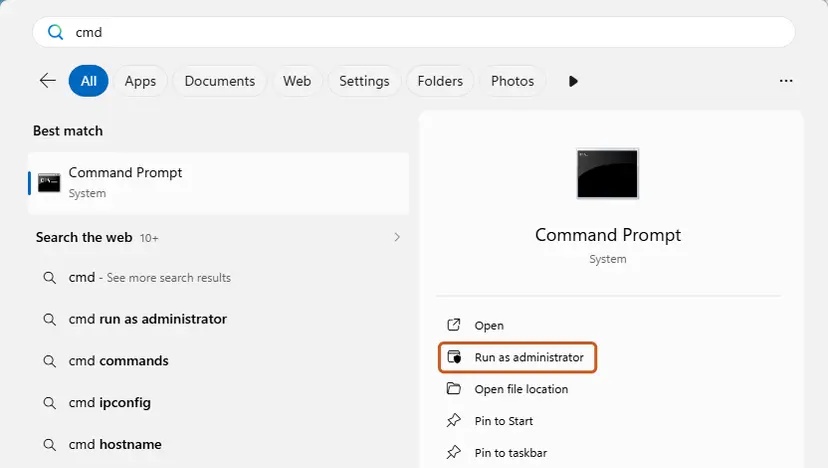
Search for cmd and choose Run as administrator. Screenshot: Windows 11 26H2. - Run DISM first. Type the command below and press Enter. DISM downloads clean copies of damaged components from Windows Update, so it can take several minutes. Wait until it says The operation completed successfully.
DISM.exe /Online /Cleanup-Image /RestoreHealth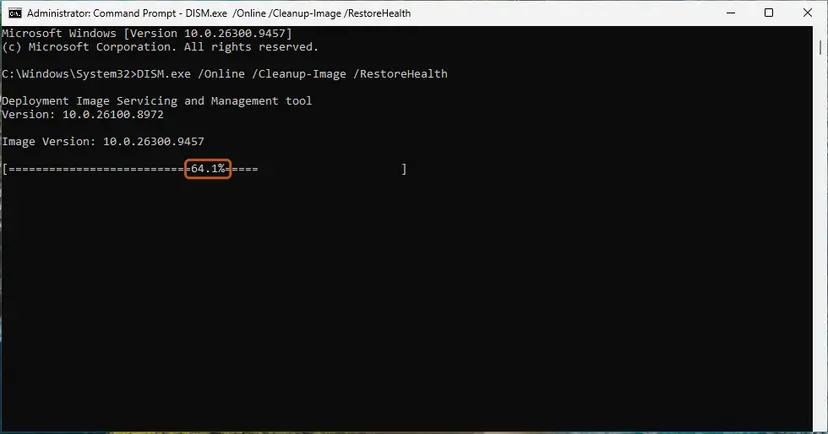
DISM /RestoreHealth running. Screenshot: Windows 11 26H2. - Run System File Checker. In the same window, type the command below and press Enter. Do not close the window until the verification reaches 100%.
sfc /scannow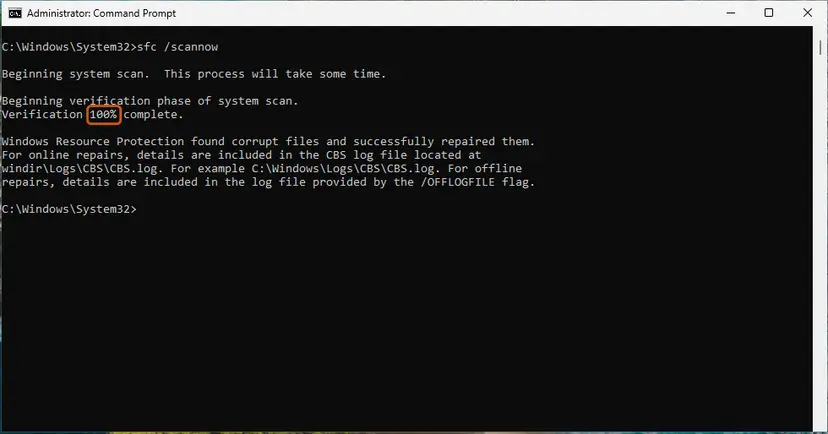
sfc /scannow at 100%. Screenshot: Windows 11 26H2. - Read the result and restart. Compare the last message with the table below this guide, then restart the PC so that repaired files are loaded.
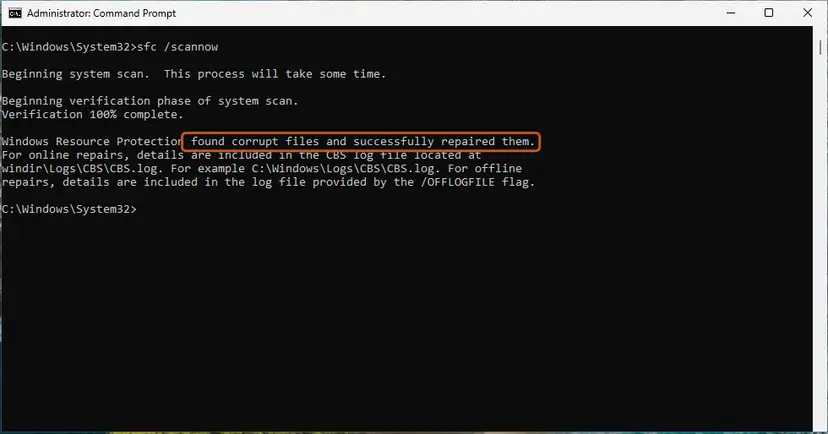
The result line tells you what SFC did. Screenshot: Windows 11 26H2.
These steps were written for Windows 11 24H2 and 25H2. The full page with the other versions and what each result means: Run DISM and SFC to repair Windows system files
It worked if: SFC reports that it found no integrity violations or that it repaired them, and the crashes stop after a restart.
If not: If SFC cannot repair some files, run DISM again and restart. If the crashes continue, see the next section.
If event 1026 keeps coming back: what to send and to whom
When the same Exception Info line comes back after a clean install, the bug is most likely inside the program. Only its maker can fix that, and they need the event text, not a description of the crash.
- The full text of event 1026. Copied with the Copy button in Fix 1, including all the "at" lines.
- The matching event 1000. Program version, fault offset and report ID help the maker match crashes.
- What you did. Starting the program, opening a certain file, printing, syncing.
- Your Windows version. Press Win + R and type
winver. - What you already tried. Reinstall, settings reset, clean boot.
| What the event shows | Who to ask |
|---|---|
| The program's own names in the "at" lines and the same error every time. | The program's maker. |
Only System. names, in many programs. | Microsoft Support, after Fix 4 and Fix 7. |
| A Microsoft program, such as SharePoint or a Windows Server tool. | Microsoft Support or the product's documentation. |
Event 1026 is almost never a sign of failing hardware. A rare exception: a .NET program that crashes at random places together with blue screens can point to faulty memory. Test it with Windows Memory Diagnostic before you replace anything.
How to keep .NET Runtime error 1026 from coming back
- Keep Windows updated. .NET Framework fixes arrive through Windows Update. Windows 10 left support on 14 October 2025, so a Windows 10 PC without extended updates no longer gets them.
- Update the program itself. Most 1026 crashes are fixed by the program's maker, not by Microsoft.
- Install from the maker only. Copied program folders and portable versions often miss files, which leads to FileNotFoundException.
- Keep free space on the system drive. A full disk can leave a settings file cut off, which leads to the crash in Fix 3.
- Shut down properly. A power cut while a program saves its settings is the most common way the settings file gets damaged.
One 1026 event for a tool you never use, logged once months ago, needs no action. Start looking when the same program logs it again and again, or when a program you need will not start.
Frequently asked questions
What is Event ID 1026 .NET Runtime error?
It is a crash report. When a program built on .NET hits an error its code does not handle, the .NET runtime ends the program and writes event 1026 from the source .NET Runtime into the Application log. The text always says "The process was terminated due to an unhandled exception." The useful parts are the Application line, which names the program, and the Exception Info line, which names the error type. The event itself is not something to repair: the cause is in the program it names.
Is .NET Runtime error 1026 a Windows bug or a virus?
Neither, in most cases. Microsoft's support articles show event 1026 as the record of a crash in one program, with the fix belonging to that program. It is not a sign of malware. If the Application line names a program you do not know and cannot find in Installed apps, check where the file lives and run a scan with Microsoft Defender, but treat that as a separate check. The error type in Exception Info, not the event number, decides what to do.
Why does .NET Runtime error 1026 come with KERNELBASE.dll and event 1000?
Because one crash writes two events. Event 1026 from .NET Runtime explains the .NET error. Event 1000 from Application Error records the same crash from Windows' side and names KERNELBASE.dll as the faulting module with the exception code 0xe0434352. Microsoft's own example shows this pair for a crash caused by a missing program file. KERNELBASE.dll is not damaged, so do not download or replace it. Read the Exception Info line of event 1026 instead.
What do .NET Runtime events 1022 and 1023 mean on Windows 11?
They are other events from the same source. We did not find a Microsoft page that documents them. In reports we read, event 1022 says a profiler failed to load, which points to a monitoring or diagnostic tool that hooks into .NET programs. Event 1023 says the process was terminated due to an internal error in the .NET Runtime. Both are a reason to try the clean boot in Fix 6, and for 1023 also the repairs in Fix 4 and Fix 7.
Is イベントID 1026 on Japanese Windows the same error?
Yes. On Japanese Windows, Event Viewer shows the same .NET Runtime event with ID 1026, only with translated labels. The event number, the source and the Exception Info lines with names such as System.IO.FileNotFoundException stay the same, because they come from .NET, not from the Windows language. The steps on this page apply. The program file name on the Application line tells you which program to fix.
How do I fix .NET Framework error 1026 in Sage 50 or QuickBooks?
Treat it like any other program: open event 1026 and read the Application and Exception Info lines (Fix 1). If the line names a missing file, use the program's own repair or reinstall it (Fix 2) after a backup of your company file. If it names a configuration error, reset its settings (Fix 3). We could not confirm a cause specific to Sage 50 or QuickBooks, so send the copied event text to the maker's support if the crash returns.
Can I ignore event 1026 if nothing seems to crash?
Often yes. Updaters, tray tools and background services also run on .NET, and when one of them crashes you see nothing but the event. Check the Application line. If it names a tool you do not use, remove that tool or leave it. If it names something you need, such as a backup or sync service, follow Fix 2, because that service has stopped working. A single old event needs no action.
Should I uninstall or turn off .NET Framework in Windows Features?
No. .NET Framework 4.8 and 4.8.1 are part of Windows 10 and Windows 11 and cannot be removed like a normal program. Unticking .NET Framework 4.8 Advanced Services only removes ASP.NET and WCF parts that most desktop programs do not use, so it does not reinstall anything. If you suspect damaged .NET files, run the .NET Framework Repair Tool and SFC instead (Fix 4 and Fix 7). Only .NET Framework 3.5 is turned on there when a program asks for it.
Is "error 1026" in other apps the same as event 1026?
Not always. This page is about event ID 1026 from the source .NET Runtime in Event Viewer. Other programs and streaming services use their own error 1026 with a different meaning, for example the Disney+ app. If you see error 1026 inside an app window and no .NET Runtime event at that time in the Application log, the steps here do not apply. Look up that app's own help page for its code.
Does .NET Runtime error 1026 look different on Windows 10 and Windows 11?
No. The event, its source, its level and its text are the same on Windows 10, Windows 11 and Windows Server, and so are the steps on this page. The menu paths differ only slightly: Installed apps on Windows 11 is Apps & features on Windows 10. Windows 10 left support on 14 October 2025, so .NET Framework fixes no longer reach a Windows 10 PC without extended updates.
Sources
- Microsoft Learn: "SharePoint Foundation administration tool has stopped working" error during a slipstream installation (events 1026 and 1000) (learn.microsoft.com)
- Microsoft Learn: Troubleshoot Azure Windows VM Agent issues (event 1026 with ConfigurationErrorsException) (learn.microsoft.com)
- Microsoft Q&A: .NET Runtime 1026, Application Error 1000, Application crashes (user report) (learn.microsoft.com)
Did this fix work?
One click, no account. It tells the next reader which guides are worth their time.
Questions and experiences: fix .NET Runtime error 1026 (Event ID 1026) in Windows
Still broken, or found a fix we did not cover? Ask here: members and our editors answer. Reading is open; writing needs a free account.
…