
How to repair Microsoft Visual C++ Redistributable and .NET Framework
Many programs and games need the Microsoft Visual C++ runtime libraries and .NET Framework. When these are damaged or missing, programs fail to start with errors about missing DLL files such as MSVCP140.dll, or with a .NET Framework error. Repair what is installed, then add what is missing.
- Time
- 15 to 30 minutes
- Level
- Medium
- You need
- An administrator account and an internet connection.
Before you start
- Install pending updates in Settings > Windows Update and restart the PC.
- Close the program that shows the error.
- Download the installers only from Microsoft's own pages linked in the steps.
Windows 11 and 10
Steps written for Windows 11 25H2 and 26H2, Windows 10 22H2.
Open Programs and Features
Type control panel in the search box on the taskbar and select Control Panel. Select Programs > Programs and Features.
Find the installed versions
Look for the entries that start with Microsoft Visual C++. Each one shows a year and an architecture, x64 or x86. Several entries side by side are normal: older versions stay installed next to newer ones.
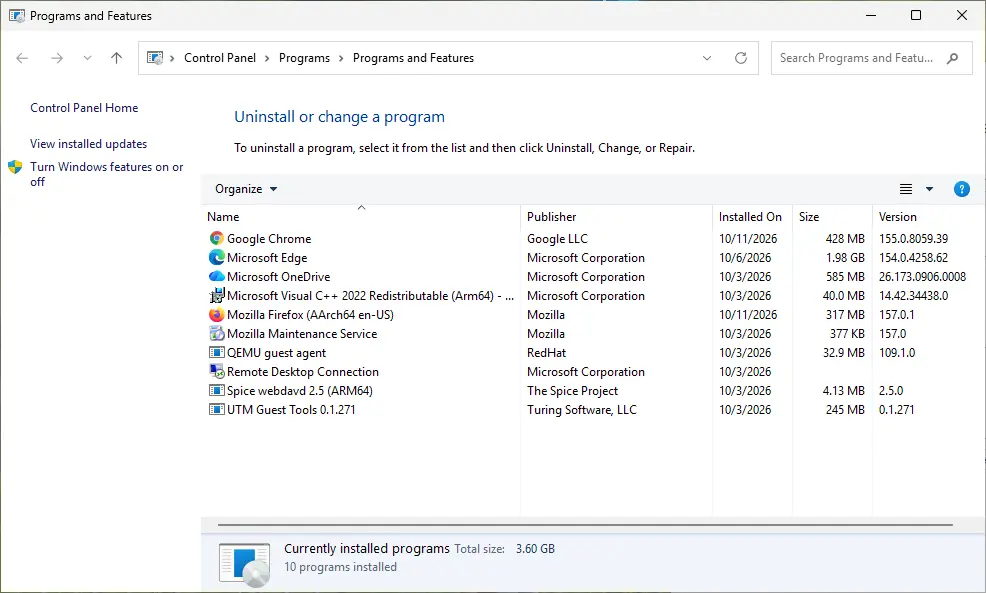
Each Visual C++ version is its own entry in Programs and Features. Screenshot: Windows 11 26H2 Repair each Visual C++ entry
Right-click an entry and select Change, then select Repair in the window that opens. Do the same for every Microsoft Visual C++ entry.
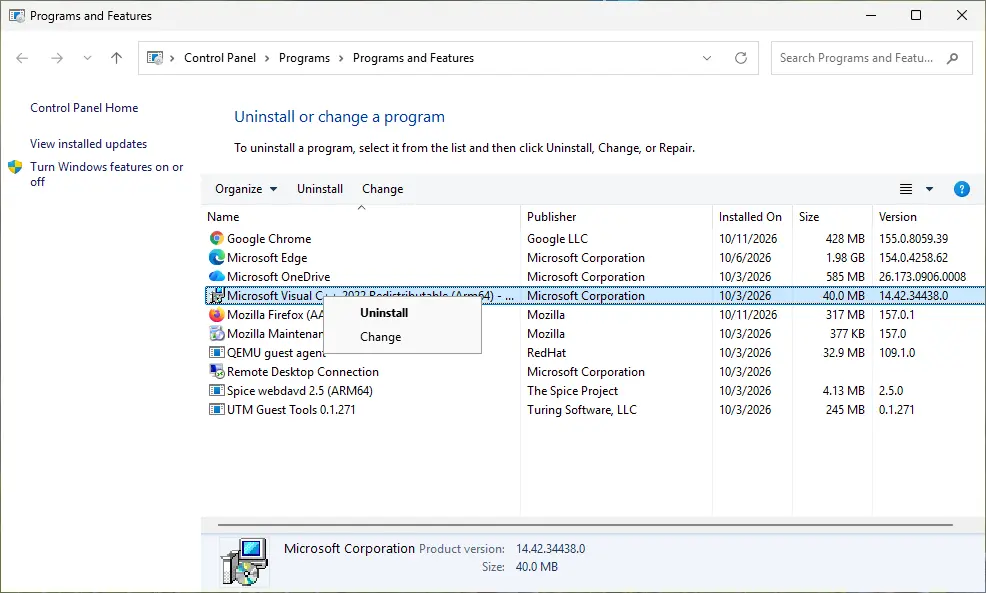
Right-click the entry and select Change to reach the repair option. Screenshot: Windows 11 26H2 Install the latest supported version
Download the latest Visual C++ v14 Redistributable from Microsoft: Visual C++ Redistributable latest supported downloads and run it. On a 64-bit PC install both X64 and X86, because 32-bit programs need the x86 package. On an ARM64 PC install ARM64. This one version serves programs built with Visual Studio 2017 to 2026.
Run the .NET Framework Repair Tool
Download the Microsoft .NET Framework Repair Tool and run NetFxRepairTool.exe. The wizard looks for setup problems, asks for your consent before it applies fixes, then repairs the installed .NET Framework versions. The tool is in English only.
Turn on .NET Framework 3.5 if a program asks for it
Select Start, search for Windows Features and open it. In Turn Windows features on or off, select the .NET Framework 3.5 (includes .NET 2.0 and 3.0) check box and select OK. Windows downloads the files, so stay online.
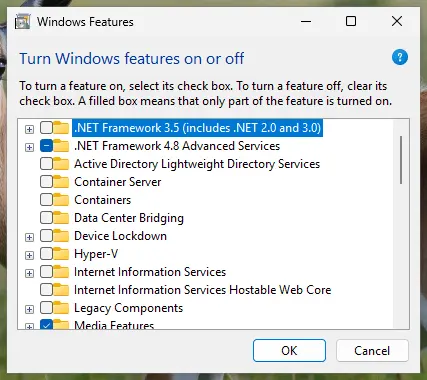
.NET Framework 3.5 is turned on in Windows Features. Screenshot: Windows 11 26H2 Restart and test
Restart the PC and start the program that showed the error.
Which .NET Framework version is installed
Windows 11 and 10 come with .NET Framework 4, which does not run programs built for versions 1.1 to 3.5. That is why old programs ask for 3.5 separately.
To check for version 4.8 or later, open PowerShell and run the command below. True means it is installed.
(Get-ItemPropertyValue -LiteralPath 'HKLM:SOFTWARE\Microsoft\NET Framework Setup\NDP\v4\Full' -Name Release) -ge 528040
.NET Framework 3.5 is installed when the value Install equals 1 in the registry key HKEY_LOCAL_MACHINE\SOFTWARE\Microsoft\NET Framework Setup\NDP\v3.5.
If the repair or the installation fails
- The Visual C++ installer stops with an error. Right-click the installer and select Run as administrator. Close all running programs, or restart the PC to release locked files, and try again.
- It says an older version cannot be removed (error 1714). Uninstall that older Microsoft Visual C++ entry in Programs and Features, then run the latest installer again. See Uninstall a program or app in Windows.
- .NET Framework 3.5 fails with 0x800f0906, 0x800f0907, 0x800f081f or 0x800F0922. Check the internet connection and Windows Update, then repair system files with Run DISM and SFC to repair Windows system files and try again.
- Windows 11 version 26H1 (build 28000) or later. .NET Framework 3.5 is not in the Windows Features list there. Microsoft offers it as a separate installer: Microsoft: Install .NET Framework 3.5 on Windows 11.
- The program still does not start. The fault is then in the program itself. Repair or reinstall it: How to repair or reset an app in Windows.
How to undo it
A repair changes nothing you need to undo. To remove .NET Framework 3.5 again, open Turn Windows features on or off and clear its check box. Do not uninstall Visual C++ entries to tidy up the list: programs that need them stop working.
The .NET Framework Repair Tool saves a log file named FixDotNet*.cab to your desktop. You can delete it when everything works.
Used in 54 guides
How to fix Application error 0xc0150004 in Windows?
Fix: this application failed to start because no Qt platform plugin could be initialized
How to fix error code 0xe06d7363 on Windows?
How to fix Entry Point Not Found error in Windows?
How to fix "The timestamp signature and/or certificate could not be verified or is malformed"
How to fix Windows application error 0xe0434352?
How to fix amd_ags_x64.dll missing or not found error in Windows?
Fix: the application has failed to start because its side-by-side configuration is incorrect
How to fix ".exe has stopped working" error on Windows 10 and Windows 11?
Error 1053: The service did not respond to the start or control request in a timely fashion
How to fix KernelBase.dll causes application crashes in Windows?
How to fix ucrtbase.dll application error on Windows?
How to fix Task Scheduler error 0xE0434F4D in Windows?
How to fix "DLL is either not designed to run on Windows or it contains an error"?
How to fix "Upgrade to iCloud for Windows failed" error in Windows?
How to fix Forza Horizon 5 error 0xc0000005 in Windows?
How to fix Event ID 1026 error in Windows?
How to fix Riot Client not launching in Windows?
How to fix File System Error (-1073741515) in Windows 10?
How to fix Windows Update error 0x800B010A?
How to fix Windows Error Reporting Event ID 1001?
How to fix Microsoft Visual C++ Redistributable error 0x80070641?
How to fix Epic Games error code LS-0013 in Windows?
How to fix KB5057056 fails to install in Windows 10?
How to fix 0xc0000139 BSOD error in Windows?
How to fix EXCEPTION_ACCESS_VIOLATION error on Windows 10?
How to fix CLR20r3 error in Windows?
How to fix Xbox app error 0x80131522 in Windows?
How to fix "Error 1067: The process terminated unexpectedly" in Windows?
How to fix Bootstrapper.exe error in Windows?
How to fix .NET Framework installation error 0x800c0006 in Windows?
How to fix api-ms-win-core-windowserrorreporting-l1-1-1.dll is missing on Windows?
How to fix "MMC could not create the snap-in" error in Windows?
How to fix File System error (-1073740791) in Windows?
How to fix "The application was unable to start correctly (0xc0150002)" error in Windows?
How to fix .NET Framework error 0x800713ec in Windows?
How to fix Windows update error 0x80070661?
How to fix "can't find the printer" error 1801 in Windows?
How to fix Assertion failed: C++ Runtime Library Expression vulcan_ error?
How to fix BEX64 error in Windows?
How to fix .NET Framework error code 0x80072EE6 in Windows?
How to fix 0x89240101 error in Age of Empires IV?
How to fix AacAmbientLighting.exe - Application error in Windows?
How to fix error 0xc0000141 "The application was unable to start correctly" in Windows?
How to fix Prototype 2 crashing on startup in Windows 11 and 10
How to fix "The following components are required to run this program" error in Windows?
How to fix .NET Runtime error 1026 (Event ID 1026) in Windows?
How to fix "UE4 Game has crashed and will close" error in Windows?
How to fix OneDrive.exe - Bad Image error in Windows?
How to fix "Could not call proc" error in Windows?
How to fix FIFA 22 not launching in Windows?
How to fix Corel VideoStudio not opening in Windows?
How to fix VAN 0 Error Code in Valorant?
How to fix VCRUNTIME140_1.dll missing or not found error in Windows?
Sources
- Microsoft Learn: Microsoft Visual C++ Redistributable latest supported downloads (read Oct 11, 2026)
- Microsoft Learn: Troubleshoot Visual C++ Redistributable installation problems (read Oct 11, 2026)
- Microsoft Support: Repair apps and programs in Windows (read Oct 11, 2026)
- Microsoft Q&A: Microsoft Visual C++ 2022 x86 minimum runtime (Change, then Repair) (read Oct 11, 2026)
- Microsoft Support: Microsoft .NET Framework Repair Tool is available (read Oct 11, 2026)
- Microsoft Learn: Repair .NET Framework (read Oct 11, 2026)
- Microsoft Learn: Install .NET Framework 3.5 on Windows 10 and Windows Server (read Oct 11, 2026)
- Microsoft Learn: Install .NET Framework 3.5 on Windows 11 (read Oct 11, 2026)
- Microsoft Learn: How to determine which .NET Framework versions are installed (read Oct 11, 2026)