
Fix: this application failed to start because no Qt platform plugin could be initialized

Prefer to fix it yourself? The manual steps follow.
- 8methods
- 5 minutes to find the program, 10 to 20 minutes for the fix
- Intermediate
Applies to Windows 11, Windows 10, any desktop program built with Qt 5 or Qt 6, Python apps that use PyQt5
8 methods in this guide
- What the error means
- Causes, most common first
- Why version matters
- The fixes
- 1. Reinstall the program
- 2. Check the platforms folder
- 3. Remove QT_PLUGIN_PATH
- 4. Stop the startup entry
- 5. Reset or reinstall OneDrive
- 6. Repair the VC++ runtime
- 7. Fix PyQt5 tools in Python
- 8. Deploy your build
- If it still appears
- Keep it from returning
- FAQ
Hello. Recently, after a Windows update, I was unable to get OneDrive to work. Whenever my PC boots, I receive an error "Application failed to start because no Qt platform plugin could be initialized." Any advice on how to deal with this issue? Thanks in advance.
"This application failed to start because no Qt platform plugin could be initialized" means a program built with Qt could not load its Windows platform plugin, qwindows.dll, so it closed before its window opened. Most often the program's own install is incomplete. Note which program the window belongs to and reinstall it from its maker first.
The Qt platform plugin error means one program cannot load platforms\qwindows.dll, the file that lets a Qt program draw its window on Windows. Find which program shows it, then repair or reinstall that program from its maker (Fix 1). If the program folder has no platforms folder, the install is broken (Fix 2). If several Qt programs fail at once, remove a system-wide QT_PLUGIN_PATH variable (Fix 3).
| Error | This application failed to start because no Qt platform plugin could be initialized. Reinstalling the application may fix this problem. |
|---|---|
| Where it appears | A small window right after you start a program, or at sign-in when a startup entry launches one. The title bar usually shows the program's name. |
| Main cause | The program's platforms\qwindows.dll is missing, damaged, or from another Qt version, so Qt cannot open the program's window. |
| Fastest fix | Repair or reinstall the program that shows the window (Fix 1). |
| Also written as | No Qt platform plugin could be initialized, Qt platform plugin could not be initialized, this application failed to start because no Qt, Qt platform plugin windows error. |
| Extra line | Available platform plugins are: minimal, offscreen, windows. The list changes with what the program ships, and it may be empty. |
| Affects | Programs built with the Qt framework on Windows 11 and Windows 10. Windows 10 left support on 14 October 2025; the fixes are the same. |
| Vendor status | Not a Windows bug. The Qt Company documents that every Qt program must ship qwindows.dll in a platforms subfolder, so the program's maker owns the fix. |
| Time to fix | 5 minutes to find the program, 10 to 20 minutes to reinstall it or clean an environment variable. |
Facts checked on 16 October 2026. Steps written for Windows 11 (25H2 and 26H2) and Windows 10 22H2.
What "no Qt platform plugin could be initialized" means
Qt is a C++ framework that companies use to build programs for Windows, macOS, Linux and phones. The full message on Windows usually reads: This application failed to start because no Qt platform plugin could be initialized. Reinstalling the application may fix this problem. A second line often follows: Available platform plugins are: minimal, offscreen, windows.
The Qt Company's deployment guide says every Qt program with a window needs a platform plugin, and on Windows that plugin is qwindows.dll. It must sit in a folder named platforms under the program's folder. When Qt cannot find a copy it can load, it shows this message and the program closes. Selecting OK does not start it.
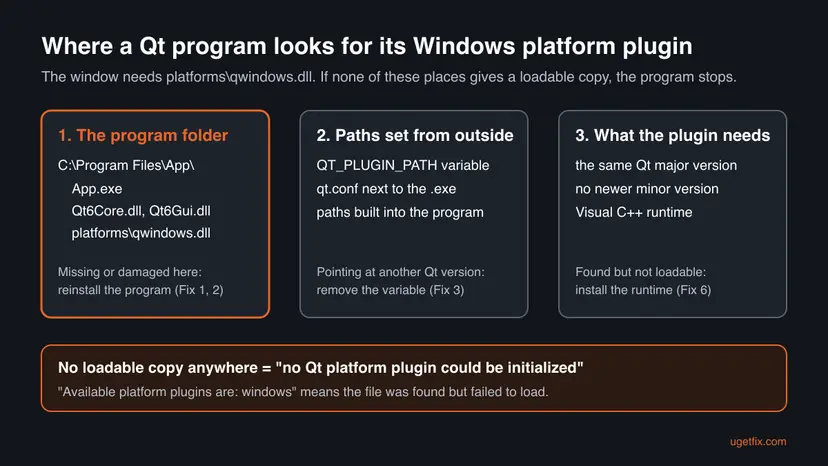
- The second line is a clue. If it lists
windows, the program foundqwindows.dllbut could not load it: a version clash or a missing runtime. If the list is empty or lackswindows, the file is missing. - It is one program's problem. Qt is not a part of Windows, and there is no Qt package to install or switch on for the whole PC. Each program carries its own copy.
- It is not a virus warning and not a hardware fault. It is a loading failure of one program.
Write down the name in the error window's title bar before you close it. If the window appears at sign-in with no title you know, open Task Manager > Startup apps and look for a program you recently installed or updated. The fixes below all start from that name.
Why a program says no Qt platform plugin could be initialized
The Qt documentation names three places a program depends on: its own folder, the paths it is told to search, and the Qt version of the plugin it finds. Each cause below breaks one of them.
| How often | Cause | Signs | Fix |
|---|---|---|---|
| Most often | The program's install is incomplete or was damaged by a failed update, so platforms\qwindows.dll is gone or broken. | One program fails, often right after an update. Other Qt programs still open. | Fix 1, Fix 2 |
| Often | Another program set a system-wide QT_PLUGIN_PATH variable that points at its own Qt version. | Several Qt programs fail at once, often after you installed Python tools, a scientific suite or a developer kit. | Fix 3 |
| Often | A startup entry launches a program that was partly removed or broken. | The window appears at sign-in, without you opening anything. | Fix 4, Fix 5 |
| Less often | The Visual C++ runtime the Qt files need is missing or damaged. | The second line lists windows, and reinstalling did not help. | Fix 6 |
| Python users | PyQt5 tools such as Qt Designer cannot find the plugin folder inside the Python package. | The error appears when you start designer.exe or a script from site-packages. | Fix 7 |
| Developers | Your own build was copied without its platforms folder. | The program runs on your PC but not on another one. | Fix 8 |
Installing the full Qt framework on your PC does not fix someone else's program, because Qt loads the plugin from the program's own paths. System file checks and driver updates do not restore a file that belongs to the program either.
Why a copied qwindows.dll often fails to load
Qt checks every plugin before it loads it, so that several Qt versions can live side by side on one PC. The Qt Company's plugin page sets the rules, and they explain why a file from another program or a download site does not fix the error.
| Program built with | Plugin built with | Loads? |
|---|---|---|
| Qt 6.2 | Qt 6.1 or Qt 6.2.1 | Yes |
| Qt 6.2 | Qt 6.3 (a newer minor version) | No |
| Qt 6 | Qt 5 (an older major version) | No |
| Release build | Debug build | Not reliably: plugins must be built in the same mode as the program |
So the right qwindows.dll is the one that came with the same program. That is why reinstalling works and copying a DLL from a website usually does not.
How to fix "no Qt platform plugin could be initialized"
Fix 1 works for most readers. Fix 2 confirms whether the install is broken, Fix 3 is for several Qt programs failing at once, and Fixes 4 and 5 are for a window at sign-in and for OneDrive. Fixes 6 to 8 cover the runtime, Python tools and your own builds. Test the program after each fix.
| What you see or have | Start with |
|---|---|
| One program fails after an install or update | Fix 1 |
| You want to check the program folder first | Fix 2 |
| Several Qt programs fail at the same time | Fix 3 |
| The window appears when Windows starts or you sign in | Fix 4 |
| The window names OneDrive | Fix 5 |
| The second line lists windows and a reinstall did not help | Fix 6 |
| You start Qt Designer or a script from Python's site-packages | Fix 7 |
| You built the program yourself | Fix 8 |
Fix 1. Repair or reinstall the program that shows the Qt error
10 to 20 minutesRead the warningOne program fails with the message, as the message itself suggests.
The Qt Company's deployment guide says the program's installer must put qwindows.dll in a platforms folder next to the program's Qt files. A clean install from the maker puts back the exact plugin built for that program's Qt version.
Some programs keep projects, settings or save files in their own folder, and an uninstall can remove them. Copy that folder to another drive first, or use the program's own export or sync.
- Press Win + I and open Apps > Installed apps. Type the program's name in the search box.
- Select the three dots next to it. If Modify or Repair is offered, run it and test the program.
- If not, or it did not help, select Uninstall and follow the uninstaller.
- Restart the PC.
- Download the newest version from the maker's website or the store you got it from, and install it.
- Start the program before you change anything else.
With pictures for every step: Uninstall a program or app in Windows.
Users report a "can't be found" message when a newer version is already on the PC under another entry. Install the newest version over it instead of removing the old one first, then test.
It worked if: The program opens its window without the Qt message.
If not: If the newest version fails the same way, check its folder with Fix 2. If other Qt programs fail too, go to Fix 3.
Fix 2. Check that the program folder has platforms\qwindows.dll
5 minutesNo riskYou want to know whether the install is broken before you reinstall, or a reinstall did not help.
Qt looks for plugins in the program's own folder first, in a subfolder named after the plugin type. If platforms\qwindows.dll is not there, nothing but a correct install brings it back, and you know the maker's installer is at fault.
- Right-click the program's shortcut or its entry in the Start menu and select Open file location. If you land on a shortcut, right-click it again and select Open file location.
- In File Explorer, select View > Show > File name extensions so you see
.dlland.confendings. - Look for the program's
.exeand Qt files such asQt5Core.dllorQt6Core.dll. - Open the
platformsfolder in the same place. Some programs keep it inside apluginsfolder instead. - Check that
qwindows.dllis there and its size is not 0 KB. - Look for a
qt.conffile next to the.exe. Do not edit it; note whether it exists for the maker's support.
| What you find | What it means | Next |
|---|---|---|
No platforms folder, or no qwindows.dll | The install is incomplete | Fix 1 with the newest installer, then report it to the maker |
qwindows.dll is there | The file is found but cannot load | Fix 3, then Fix 6 |
| Qt files of two versions, such as Qt5 and Qt6 DLLs mixed | Files from another program were copied in | Fix 1, after removing the program folder |
It worked if: You know whether the plugin file is missing or present, and which fix comes next.
If not: If you cannot find the program folder at all, use the path from Task Manager in Fix 4.
Fix 3. Remove a system-wide QT_PLUGIN_PATH environment variable
10 minutesLow riskSeveral Qt programs fail at once, often after you installed Python tools, a scientific suite or a developer kit.
When QT_PLUGIN_PATH is set, Qt also looks for plugins in the folders it names. The Qt Company warns not to set it system-wide because it interferes with other Qt installations: programs then pick up plugins from another Qt version and fail.
- Press Win + R, type
sysdm.cpland select OK. - Open the Advanced tab and select Environment Variables.
- In both lists, User variables and System variables, look for names that start with
QT_, such asQT_PLUGIN_PATH. - Select the variable, then Edit, and copy its value into Notepad so you can put it back.
- Select Delete, then OK in every window. System variables need an administrator account.
- Sign out and back in, or restart, so programs see the change. Start the failing program.
The value is a folder path, and the folder tells you which program added the variable. If that program stops working afterwards, reinstall it: its own installer or launcher should set the path only for itself.
It worked if: The Qt programs that failed together open again.
If not: If there was no QT_ variable, or removing it changed nothing, put it back from Notepad and go to Fix 6.
Fix 4. Stop the startup entry that shows the Qt error at sign-in
10 minutesLow riskThe window appears when Windows starts or you sign in, and you did not open anything.
A window at boot means something in your startup list launches a Qt program whose plugin is missing, often the remains of a partly removed program. Finding the entry gives you the program's name, and disabling it stops the window without touching anything else.
- Right-click Start, select Task Manager and open Startup apps.
- Look for a program you recently installed, updated or removed. Right-click it and select Open file location.
- If that folder has Qt files such as
Qt5Core.dllorQt6Core.dll, you have found the program. - If you still use it, run Fix 1 for it. If you do not, right-click the entry and select Disable.
- Restart the PC and check whether the window returns.
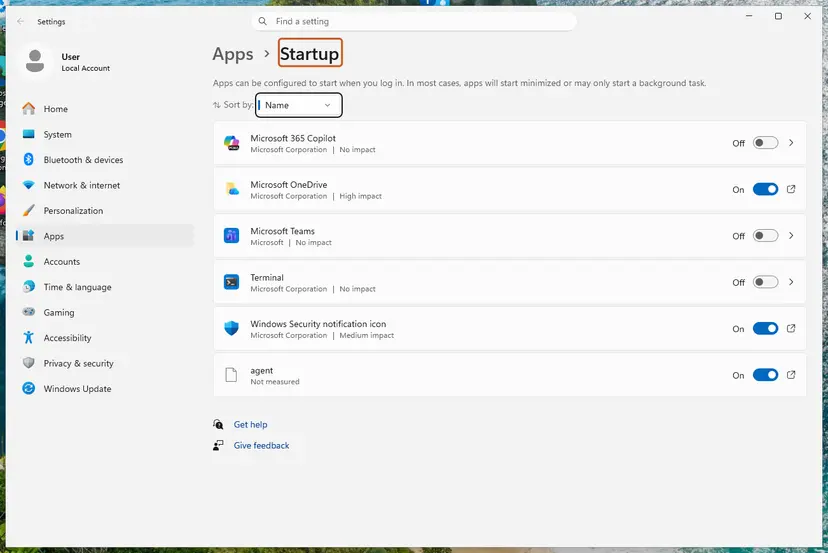
More ways to control what starts with Windows: Stop apps from opening at startup.
It worked if: Windows starts without the Qt window, and the programs you use still open.
If not: If no entry has Qt files, a program you open by hand is the cause: go back to Fix 1 with its name.
Fix 5. Reset or reinstall OneDrive when the window names OneDrive
10 minutesLow riskThe error window or the startup entry points to OneDrive, as in the reader's question.
OneDrive starts at every sign-in, so a broken OneDrive install shows its error at each boot. Reinstalling it from its own setup file replaces its program files without touching the files you keep in OneDrive. We could not confirm from Microsoft that OneDrive uses Qt, so check the title bar first: another startup program may be the real cause (Fix 4).
First try a reset, which keeps the install and rebuilds its settings: How to reset OneDrive in Windows. If OneDrive still shows the error, reinstall it.
- Press Win + R on your keyboard.
- In the Run dialog, paste the path below and select OK.
- Go through the installation steps and restart your PC.
- If Windows says it cannot find the file, download the OneDrive installer from Microsoft's OneDrive website and run it.
%userprofile%\AppData\Local\Microsoft\OneDrive\Update\OneDriveSetup.exe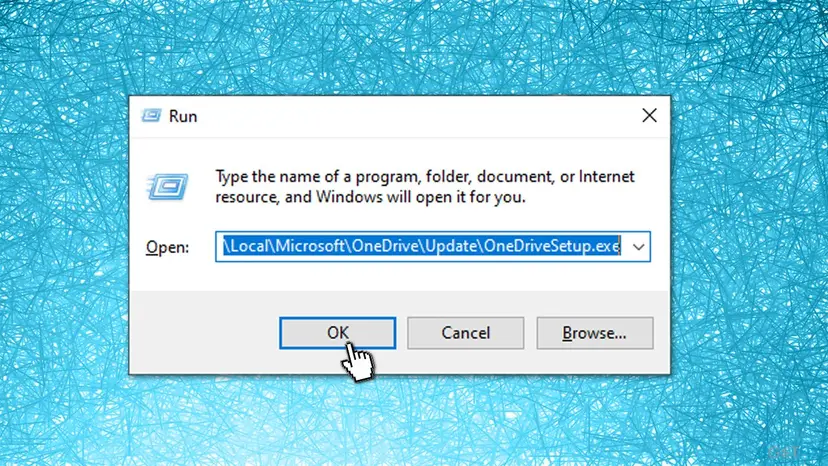
If setup says a newer OneDrive is already installed, see our guide to the newer version of OneDrive is installed error.
It worked if: OneDrive signs in and syncs, and no Qt window appears at the next boot.
If not: If the window still appears with OneDrive reinstalled, the cause is another startup program: go to Fix 4.
Fix 6. Install or repair the Microsoft Visual C++ Redistributable
10 minutesLow riskThe second line lists windows, qwindows.dll is in place, and a reinstall did not help.
Qt programs built with Microsoft Visual C++ need its runtime, such as vcruntime140.dll. The Qt Company tells makers to install the official Visual C++ Redistributable with their program. If it is missing or damaged, the plugin file is found but cannot load.
- Open Settings > Apps > Installed apps and type
Visual C++in the search box. - Find the Microsoft Visual C++ Redistributable entries for 2015-2022 or later, in both x64 and x86.
- Select the three dots, then Modify and Repair. Do this for each one.
- If none is listed, download the latest supported package from Microsoft and install x64, then x86.
- Restart the PC and start the program.
Step by step, including .NET: How to repair Microsoft Visual C++ Redistributable and .NET Framework.
Get the runtime only from Microsoft and never single DLL files from a download site. Do not uninstall other Visual C++ years: other programs need them.
It worked if: The repair ends with a success message, and the program opens after the restart.
If not: If it still fails, send the maker the details listed in "If the Qt error still appears".
Fix 7. Copy the platforms folder for PyQt5 tools in Python
10 minutesLow riskYou start Qt Designer or another tool from the pyqt5_tools package, or a Python script, and get the message.
The pyqt5_tools package keeps its Qt programs in pyqt5_tools\Qt\bin, while the platform plugin sits in the PyQt5 package's PyQt5\Qt\plugins\platforms. Qt looks next to the program, so a copy of platforms there lets the tool find it.
- Press Win + E to open File Explorer and select This PC on the left.
- Type
pyqt5_toolsin the search box and press Enter. - Right-click the pyqt5_tools folder in the results and select Open folder location. This opens Python's site-packages folder.
- Open PyQt5 > Qt > plugins. Some PyQt5 versions name the folder
Qt5instead ofQt. - Right-click platforms and select Copy, or press Ctrl + C.
- Go back to site-packages and open pyqt5_tools > Qt > bin.
- Right-click an empty space and select Paste, or press Ctrl + V. If asked, select Replace the files in the destination.
- Start the tool again.
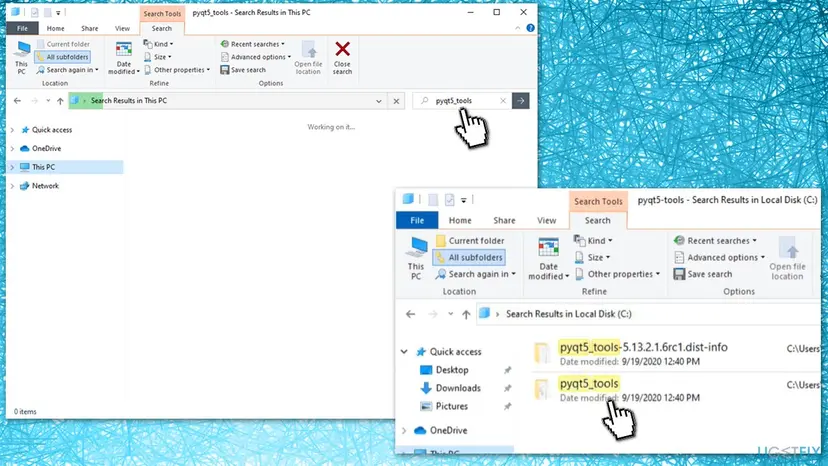
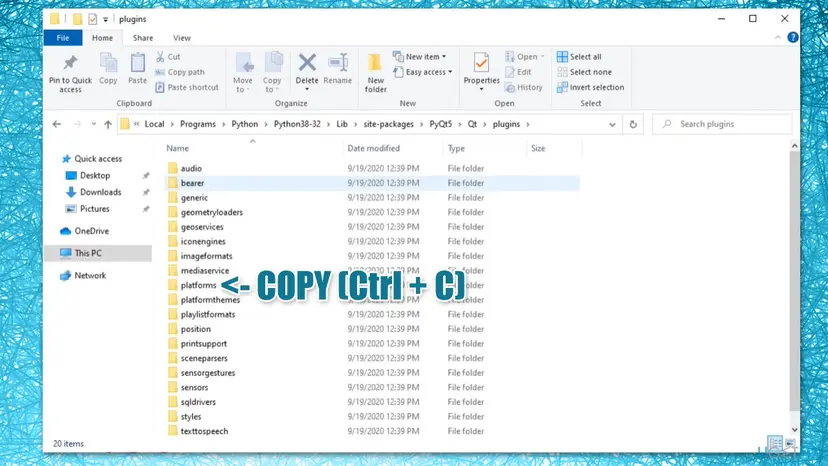
Copy the folder only inside the same Python install, so the plugin and the tool share one PyQt5 version. A platforms folder from another Python or another program breaks the version rules above.
It worked if: Qt Designer or the script opens its window.
If not: If it still fails, look for a QT_PLUGIN_PATH variable that points to another Python with Fix 3.
Fix 8. Deploy your own Qt build with windeployqt
5 minutesNo riskYou built the program yourself, and it runs on your PC but shows the message on another one.
The Qt Company calls windeployqt the recommended way to deploy a Qt program on Windows. It reads the .exe and copies the Qt libraries, the platforms plugin and the runtime files it needs into the program folder, which is exactly what a copied build lacks.
- If you installed Qt with the Qt Online Installer, run
qtenv2.batfrom<qt-installation-folder>\binfirst to set up the build environment. - Run
windeployqt.exewith the path to your built.exe, as below. Add--qmldirwith your QML folder for a Qt Quick program. - Check that the output folder now has
platforms\qwindows.dll. - Copy the whole folder to the other PC, or package it, and include the official Visual C++ Redistributable installer.
windeployqt.exe --dry-run .\build\MyApp.exe
windeployqt.exe .\build\MyApp.exe
windeployqt.exe --qmldir .\qml .\build\MyApp.exe
The --dry-run line only shows what would be copied. The Qt Company notes that windeployqt does not add third-party libraries such as database drivers, so ship those yourself.
It worked if: The program starts on a PC that has no Qt installed.
If not: If it still fails there, start it with QT_DEBUG_PLUGINS set, as described below, and read which plugin is rejected.
If the Qt error still appears
When the newest version of one program still fails on a PC with a clean environment, its installer does not deliver a plugin your PC can load. Only its maker can fix that, and Qt can tell you why the plugin was rejected.
- Open Command Prompt, type
set QT_DEBUG_PLUGINS=1and press Enter. This turns on Qt's plugin report for this window only. - In the same window, start the program by its full path in quotes, such as
"C:\Program Files\App\App.exe". - Programs that print to the console then list each plugin Qt tries and why it fails. Many window programs print nothing; that is normal.
- Run
winverand note the Windows version and OS build. - Send the maker's support the full error text, the program version, the plugin report if you got one and the Windows build.
- On a work or school PC, policies may block installs and environment changes. Ask your IT department before you change anything.
- A game or launcher usually has a Repair or Verify option in its launcher, which restores missing plugin files like a reinstall.
- A different start error without the word Qt, such as a side-by-side message, has another cause: see the side-by-side configuration guide.
How to keep the Qt platform plugin error from coming back
The error returns when a program's own Qt files are changed or another tool sends Qt programs to the wrong folder. A few habits prevent most cases.
- Update programs with their own updater or a full installer from the maker.
- Remove programs through Installed apps, so their startup entries go too.
- Let Python tools and developer kits set Qt paths only inside their own environment.
- Keep the Visual C++ Redistributable packages that are installed.
- Set
QT_PLUGIN_PATHas a system-wide variable. - Copy
qwindows.dllor Qt DLLs from one program into another. - Download Qt DLLs from DLL collection sites.
- Delete files from a program folder to save space.
Frequently asked questions
What does "this application failed to start because no Qt platform plugin could be initialized" mean?
It means a program built with the Qt framework could not load the plugin that draws its window on Windows. That plugin is the file qwindows.dll, kept in a platforms folder under the program's folder. When Qt finds no copy it can load, it shows this message and closes the program. The problem belongs to that one program, not to Windows, and reinstalling the program from its maker fixes most cases.
How do I fix "no Qt platform plugin could be initialized" on Windows 11 or 10?
Find the program named in the error window's title bar and repair or reinstall it from its maker. If several Qt programs fail at once, open Environment Variables with sysdm.cpl and remove a QT_PLUGIN_PATH variable set for the whole PC. If the window appears at sign-in, find the program in Task Manager's Startup apps. The steps are the same on Windows 11 and Windows 10 22H2.
Why does OneDrive say "this application failed to start because no Qt platform plugin could be initialized"?
The window appears at sign-in, when OneDrive and other startup programs start together, so it is easy to blame OneDrive. We could not confirm from Microsoft that OneDrive is built with Qt. Check the title bar of the window and the folders of your startup apps for Qt5Core.dll or Qt6Core.dll. If OneDrive is really the program, reset it, then reinstall it with OneDriveSetup.exe. Your files in OneDrive stay in the cloud.
What do "Available platform plugins are: minimal, offscreen, windows" mean?
They are the platform plugins Qt found in the program's platforms folder. Windows is the one a normal program needs; minimal and offscreen do not open a normal desktop window. If windows is in the list, Qt found qwindows.dll but could not load it, usually because of another Qt version or a missing Visual C++ runtime. If the list is empty, the file is missing.
Will installing Qt fix the error?
No. Installing the Qt framework or its developer tools does not fix a program made by someone else, because Qt loads plugins from the program's own folder and paths. A second Qt on the PC can even make things worse if its installer sets a system-wide QT_PLUGIN_PATH. Reinstall the program that fails instead; its installer carries the plugin built for its Qt version.
Can I download qwindows.dll and copy it into the program folder?
It rarely works and is not safe. Qt refuses a plugin built with a newer minor version or another major version than the program's own Qt, so a random qwindows.dll is usually rejected. DLL download sites also offer files of unknown origin. The right copy is the one from the same program, which a repair or reinstall puts back.
Why did the Qt error start after a Windows update?
A Windows update does not remove a program's Qt files, but it restarts the PC, so every startup program loads again. An update that ran at the same time for the program itself, or a program installed shortly before, is the more likely cause. Check Task Manager's Startup apps and the program's own update history before you blame Windows.
Is "Qt platform plugin could not be initialized" a different error?
No. "Could not be initialized" is a common way of writing the same message, which reads no Qt platform plugin could be initialized. Searches such as this application failed to start qt, this application failed to start because no qt and qt platform plugin windows all mean the same failure, and the fixes on this page apply to all of them.
Is the Qt platform plugin error a virus?
No, the message is a loading failure of a Qt program, not a security warning. It is worth a malware scan only when the startup entry or the program folder is one you never installed, especially in a Temp or AppData folder. In that case scan with Microsoft Defender before you delete anything: How to scan for malware with Microsoft Defender.
Sources
Did this fix work?
One click, no account. It tells the next reader which guides are worth their time.
Questions and experiences: Fix: this application failed to start because no Qt platform plugin could be initialized
Still broken, or found a fix we did not cover? Ask here: members and our editors answer. Reading is open; writing needs a free account.
…