
How to stop apps from opening on startup
Apps that start when you sign in slow down startup and use memory in the background. Turning them off does not uninstall anything: you can still open them yourself, and turn them back on at any time.
- Time
- A few minutes
- Level
- Easy
- You need
- Nothing. Some entries can be changed only from an administrator account.
Before you start
- Keep your antivirus and anything you use every day (cloud sync, password manager) turned on.
- If you do not know what an entry is, leave it on and look up the name first.
Windows 11
Steps written for Windows 11 24H2, 25H2 and 26H2.
Open the Startup settings
Select Start > Settings > Apps > Startup.
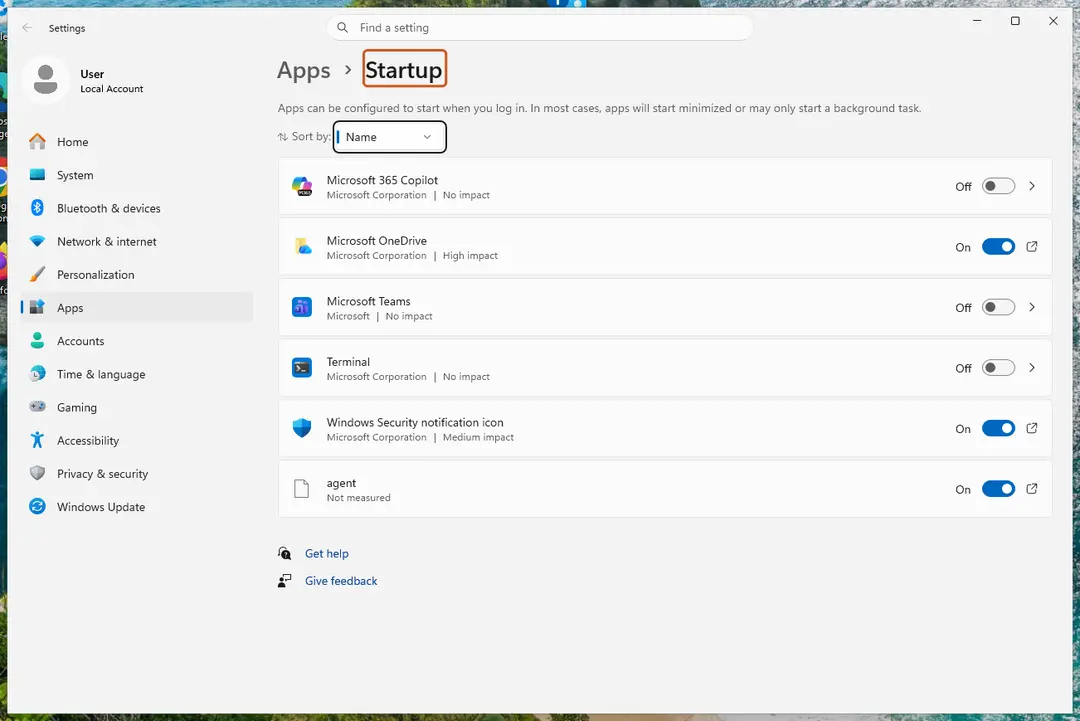
Each app has its own switch and its startup impact. Screenshot: Windows 11 26H2 Turn apps off
Set the switch of each app you do not need at sign-in to Off. Use Sort by to put the apps with the highest impact first.
Or use Task Manager
Right-click Start, select Task Manager, then Startup apps. Select an app and select Disable. Task Manager shows the same list with more detail, such as the publisher.
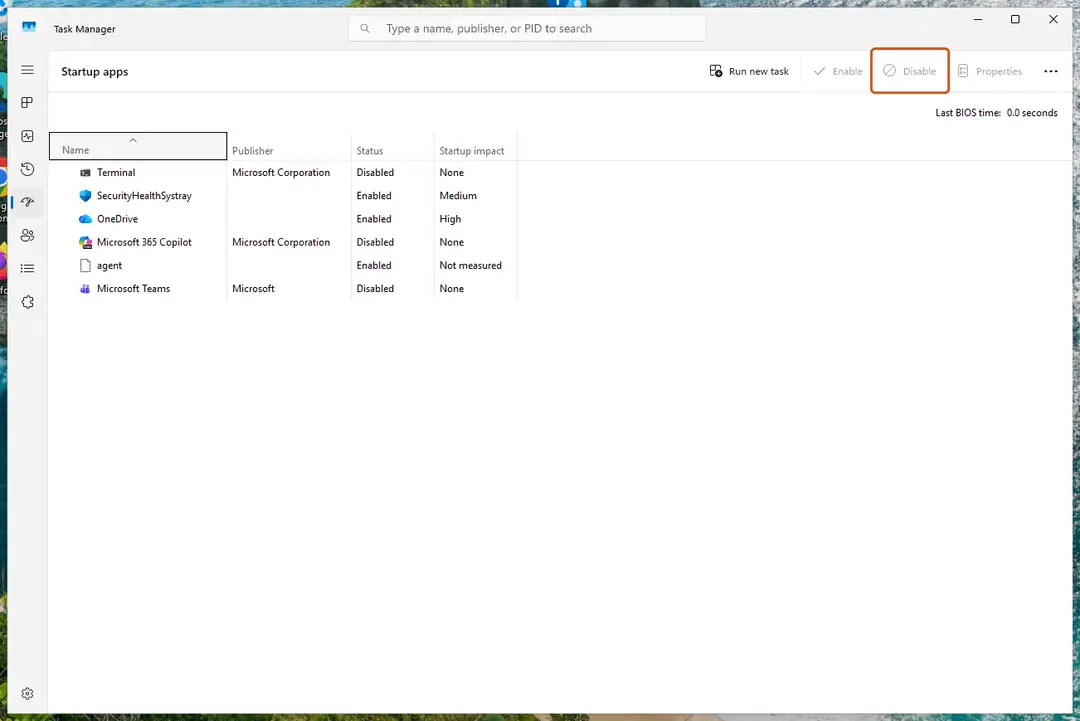
Select an app, then Disable. Screenshot: Windows 11 26H2 Restart to check
Restart the PC. The apps you turned off no longer open by themselves.
Windows 10
Steps written for Windows 10 22H2.
Microsoft ended support for Windows 10 on October 14, 2025. Startup apps are managed the same way as before.
Open the Startup settings
Select Start > Settings > Apps > Startup.
Turn apps off
Set the switch of each app you do not need at sign-in to Off.
Or use Task Manager
Press Ctrl + Shift + Esc. If Task Manager opens small, select More details. Open the Startup tab, select an app and select Disable.
Restart to check
Restart the PC. The apps you turned off no longer open by themselves.
What the startup impact means
| Impact | Meaning (Microsoft) |
|---|---|
| High | More than 1 second of CPU time or more than 3 MB of disk reads at startup. |
| Medium | Between 300 milliseconds and 1 second of CPU time, or between 292 KB and 3 MB of disk reads. |
| Low | Less than 300 milliseconds of CPU time and less than 292 KB of disk reads. |
| Not measured | No data yet; the app is turned on. |
| None | The app is turned off. |
If an app is not in the list
Apps that are not registered with Windows can start from the Startup folder. Right-click Start, select Run, type shell:startup (your account) or shell:common startup (all accounts) and press Enter. Delete the app's shortcut from that folder; the app itself stays installed.
If an entry reads We couldn't find this app, the program was removed or sits on a drive that is not connected. Reinstall it, or remove the leftover entry.
If an app keeps coming back
Some apps turn their own startup back on. Look for an option such as start with Windows or open at login in the app's own settings and turn it off there. If you do not need the app at all, uninstall it: Uninstall a program or app in Windows. If you never installed it, check it for unwanted software: Remove a browser extension On 2-Spyware.
Used in 57 guides
How to use the Steam Notes feature: open, pin and manage notes
How to fix Roblox high CPU usage in Windows?
How to fix the winscomrssrv.dll error in Windows 10 and Windows 11
Fix: this application failed to start because no Qt platform plugin could be initialized
How to fix Windows application error 0xe0434352?
How to fix Waves MaxxAudio Service Application high CPU in Windows?
How to fix missing Windows Security icon in taskbar?
How to fix cdp.dll error in Windows?
"A driver can't load on this device": how to fix it in Windows 11 and 10
How to fix Kingdom Come Deliverance 2 crashing on Windows?
How to uninstall Opera Stable, and should you remove it?
Iqvw64e.sys "A driver cannot load on this device": how to fix it in Windows 11 and 10
How to fix Snipping Tool opening automatically in Windows?
How to fix msteams_autostarter.exe error in Windows?
How to fix nvspcap64.dll error in Windows?
Laptop lagging when charging in Windows 11 and 10: how to fix it
How to fix MSI Afterburner "Failed to start scanning" error in Windows?
LogMeIn keeps popping up: stop LogMeIn Rescue or Hamachi opening automatically in Windows
How to fix "Search for app in the Store?" error on Windows?
How to fix "ExplorerFrame.dll was loaded but the entry-point DllRegisterServer was not found"?
How to fix The Last of Us Part I crashes and freezes on Windows?
How to fix Steam Client WebHelper high CPU usage?
How to fix the amdkmdag.sys error (blue screen) in Windows 10 and 11
How to fix tasklist.exe Application Error in Windows?
Gdrv2.sys "A driver cannot load on this device": how to fix it in Windows 11 and 10
How to fix Runtime error 7: Out of memory in Windows?
How to fix high CPU usage by Conhost.exe (Console Window Host)?
How to fix Windows Update error 0x8007041D?
How to fix Windows update error 0x80073D02?
How to fix RAVCpl64.exe System Error in Windows?
How to fix "The application was unable to start correctly" error 0xc000012d in Windows?
How to fix the intelppm.sys blue screen (BSOD) in Windows
Adobe GC Invoker Utility (AdobeGCClient.exe): what it is and can you stop it
How to fix Windows activation error 0xC004D302?
How to fix SynTPEnh.exe application error in Windows?
How to fix Cryptographic Services high CPU or disk usage in Windows?
How to fix Assertion failed: C++ Runtime Library Expression vulcan_ error?
How to fix Xbox app is stuck at "Launching Xbox App" in Windows?
How to fix "The description for Event ID 153 from source nvlddmkm cannot be found" in Windows?
How to fix Event ID 10010 DistributedCOM error in Windows?
How to fix AacAmbientLighting.exe - Application error in Windows?
How to fix "Incorrect function" error in Windows?
What is Web Indexing Service (Bright Data) and how to uninstall it in Windows
How to fix C:\Windows\System32\cmd.exe window popping up in Windows?
How to fix OneDrive.exe - Bad Image error in Windows?
How to fix "You need a new app to open this me.blueone.win link" error in Windows?
How to fix PhoneExperienceHost.exe error in Windows?
How to fix "Another instance of application is already running" error in Windows?
How to fix ERR_PROXY_CONNECTION_FAILED error?
How to disable a virtual camera in Windows 11: Lenovo, Windows Virtual Camera, OBS and more
How to fix SecurityHealthSystray.exe Bad Image error in Windows?
How to remove red crosshair in the middle of the screen in Windows?
How to fix "The description for Event ID 0 from source nvlddmkm cannot be found"?
How to fix WhatsApp error "Your microphone is unavailable or in-use on another app" in Windows?
How to fix "Get an app to open this ms-cortana2 link" message when copying files in Windows?
How to uninstall BlueStacks completely from Windows 11 and 10
How to uninstall OneDrive from Windows 10?
Sources
- Microsoft Support: Configure startup applications in Windows (read Oct 3, 2026)