
How to fix Windows activation error 0xC004D302?

Prefer to fix it yourself? The manual steps follow.
- 7methods
- 5 to 30 minutes
- Easy
Applies to Windows 11, Windows 10 and Windows Server (2016 to 2025), all editions with the desktop, after a rearm, a licence repair or a Sysprep image
7 methods in this guide
Hello. Today I received an activation error 0xC004D302 on my Windows computer. Some functions stopped working. What should I do?
Error 0xC004D302 means the Windows licence store was just rearmed, usually by slmgr /rearm, slmgr /rilc or Sysprep, and Windows refuses further licence commands until it restarts. In most cases a full restart followed by slmgr /ato clears it. If it comes back after a restart, something keeps rearming or the licence files are damaged.
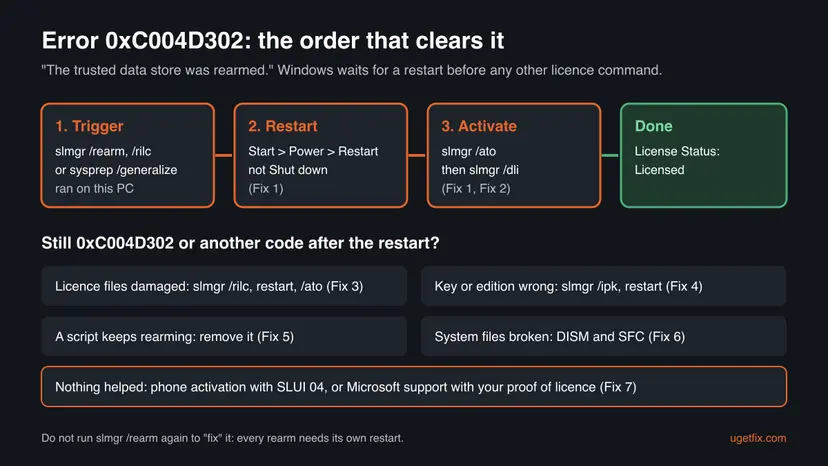
Restart the PC with Start > Power > Restart (not Shut down), then open Command Prompt as administrator and run slmgr /ato (Fix 1). The code says the trusted data store was rearmed and a restart is required. If the error returns after the restart, reinstall the licence files with slmgr /rilc (Fix 3) and check that nothing runs slmgr /rearm again (Fix 5).
| Error | 0xC004D302: "The security processor reported that the trusted data store was rearmed." |
|---|---|
| Where it appears | In a Windows Script Host box after an slmgr command, or on the Activation page, right after slmgr /rearm, slmgr /rilc or sysprep /generalize and before a restart. |
| Main cause | The licence timers were reset (rearmed) and Windows has not restarted since, so the next licence command is refused. |
| Fastest fix | A full restart, then slmgr /ato in an administrator Command Prompt (Fix 1). |
| Also written as | 0xc004d302, C004D302, "Error: 0xC004D302 On a computer running Microsoft Windows non-core edition, run 'slui.exe 0x2a 0xC004D302' to display the error text." |
| Affects | Windows 11, Windows 10 (also searched as the 0xC004D302 Windows 10 activation error), Windows Server 2016 to 2025, and older versions back to Vista. Windows 10 left support on 14 October 2025; activation works the same way. |
| Microsoft's status | Not a bug. Microsoft's slmgr reference describes /rearm as resetting the activation timers and says a restart is needed after licence changes to keep the licence service stable. |
| When it is not fixable at home | The key does not match the edition, the PC never had a valid licence, or the rearm limit is used up. Then you need the right key, phone activation or Microsoft support. |
| Time to fix | About 5 minutes for a restart and slmgr /ato. About 30 minutes if the licence files or system files need repair. |
Facts checked on 15 October 2026. Steps written for Windows 11 (25H2 and 26H2) and Windows 10 22H2.
What error 0xC004D302 means and why it says "non-core edition"
Most people first see the code in a small Windows Script Host box after running an slmgr command. The box reads: "Error: 0xC004D302 On a computer running Microsoft Windows non-core edition, run 'slui.exe 0x2a 0xC004D302' to display the error text." The box does not explain the code. It tells you how to ask Windows for the explanation.
When you run slui.exe 0x2a 0xC004D302, Windows shows the real text: "The security processor reported that the trusted data store was rearmed." The trusted data store is where Windows keeps its licence state. Rearming resets the activation timers, and Microsoft's slmgr reference says /rearm does exactly that. Until Windows restarts, the licence service treats the store as in the middle of a change and refuses further commands.
| What you see | Where | What it tells you |
|---|---|---|
| Error: 0xC004D302 On a computer running Microsoft Windows non-core edition, run 'slui.exe 0x2a 0xC004D302' to display the error text. | Windows Script Host box after slmgr | slmgr only prints the code. Run the slui command to read its text. |
| The security processor reported that the trusted data store was rearmed. | The window that slui.exe 0x2a 0xC004D302 opens | The licence timers were reset. A restart is required before the next licence command. |
| 0xC004D302 on the Activation page | Settings > System > Activation | Same cause: a rearm or licence repair ran and Windows has not restarted yet. |
| 0x80041014 next to 0xC004D302 | slmgr on Windows Server after a migration | Reported together on Microsoft Q&A when a new key did not match the installed edition. |
The words do not mean your Windows is fake or cut down. The same sentence appears for many codes. A non-core edition is a Windows with the normal desktop, where slui can open a window. Windows Server Core has no such desktop. Microsoft does not document the sentence itself, so this is our reading of it.
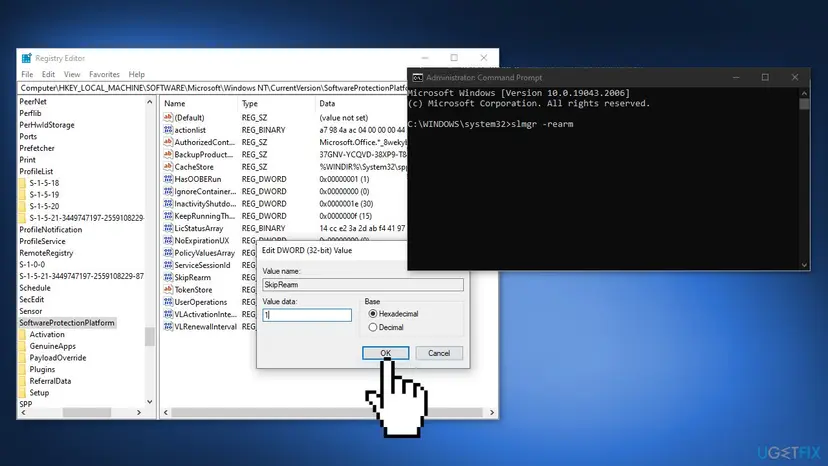
Why error 0xC004D302 appears, from most to least common
Every case starts with something that reset the licence store. The question is whether a restart is all that is missing, or whether something else is wrong as well. Find your row, then go to its fix.
| Cause | How often | How to tell | Fix |
|---|---|---|---|
slmgr /rearm or slmgr /rilc was run, and the next slmgr command came before a restart. | Most often | You or a script ran slmgr minutes ago. The error appears on the second command. | Fix 1 |
| Activation is still pending after the restart. | Often | No error now, but the Activation page says Not active. | Fix 2 |
| The licence files in the trusted store are damaged, for example after malware, a disk error or a migration. | Sometimes | The error or another licence code returns even after a restart. | Fix 3, Fix 6 |
| The product key does not match the installed edition, for example Standard and Datacenter on Windows Server. | Sometimes | slmgr /dli shows another edition or channel than the key you bought. | Fix 4 |
A script, scheduled task or activator tool runs slmgr /rearm at every start. | Less often | The error is back after every restart, and you did not run slmgr yourself. | Fix 5 |
A Windows image was prepared with sysprep /generalize, which calls the rearm, and licence commands ran before its first restart. | Rarely, mostly IT | The PC came from a company image or a deployment script. | Fix 1 |
Some older pages blame the MachineKeys folder or broken crypto permissions. One answer on Microsoft Q&A repeats that idea, but we could not confirm it from a Microsoft page, so this guide does not ask you to change folder permissions.
Run slui.exe 0x2a 0xC004D302 and check the licence state (2 minutes)
These checks read the licence state and change nothing. Microsoft notes that slmgr /dli and slmgr /dlv do not need administrator rights. Do them once before the fixes, and again after each fix.
- Press Win + R, type the command below and press Enter. A window shows the full error text.
slui.exe 0x2a 0xC004D302 - If the window says the trusted data store was rearmed, the cause is a rearm. Go to Fix 1.
- Open Command Prompt and run the command below. Note the Description line (OEM, RETAIL or VOLUME), the Partial Product Key and the License Status.
slmgr /dli - For more detail, such as the edition name and the activation ID, run:
slmgr /dlv - If slmgr shows another code instead, run
slui.exe 0x2afollowed by that code to read its text.
0xC004D302 does not delete anything and Windows keeps starting. It only blocks licence changes until the next restart. An unactivated Windows still runs, but some personalisation settings are locked until it is activated.
How to fix Windows activation error 0xC004D302
Fix 1 solves most cases in five minutes. Fixes 2 to 4 are for a Windows that still does not activate after the restart. Fix 5 stops a rearm that keeps coming back, Fix 6 repairs system files, and Fix 7 is for the cases only Microsoft can solve. Do not run slmgr /rearm again to clear this error.
| What you see or have | Start with |
|---|---|
You or a script ran slmgr /rearm, /rilc or Sysprep, and you have not restarted since. | Fix 1 |
| The error is gone after the restart, but Windows is still not activated. | Fix 2 |
| The error or another licence code returns after a restart, with no script running. | Fix 3 |
| You installed a new key, or the server was migrated, and the edition may not match. | Fix 4 |
| The error is back after every restart and you never ran slmgr yourself. | Fix 5 |
slmgr itself fails or SFC found damaged files. | Fix 6 |
| Nothing above worked and you have proof of a valid licence. | Fix 7 |
Fix 1. Restart Windows fully, then activate with slmgr /ato
5 minutesNo riskEveryone who sees 0xC004D302 right after an slmgr command, a licence repair or a Sysprep run.
The error text itself says the store was rearmed. Microsoft's slmgr reference says licence changes need a restart, or a restart of the Software Protection service, to keep the licence service stable. After the restart the store accepts commands again.
- Save your work and close open apps.
- Select Start > Power > Restart. Do not use Shut down: with Fast Startup on, a shutdown does not start Windows fresh.
- After Windows starts, type cmd in the search box on the taskbar and select Run as administrator next to Command Prompt, then Yes.
- Start online activation:
slmgr /ato - Check the result:
slmgr /dli
If you use slmgr in a script, put a restart between /rearm or /rilc and any other licence command. Running /ipk or /ato in the same session is what produces 0xC004D302.
It worked if: slmgr /ato reports that the product was activated, and slmgr /dli shows License Status: Licensed.
If not: If no error appears but Windows is still not active, go to Fix 2. If 0xC004D302 appears again after a real restart, go to Fix 3 or Fix 5.
Fix 2. Run the Activation troubleshooter after the restart
5 minutesNo riskThe rearm error is gone after the restart, but the Activation page still says Windows is not activated.
A rearm only resets timers. It does not activate anything. If the PC has a digital licence linked to its hardware or your Microsoft account, the troubleshooter can apply it once the store accepts commands again.
Activation needs a working connection. If the PC is offline, fix that first: How to check your internet connection in Windows
- Sign in with an administrator account.
- Open Settings > System > Activation. On Windows 10 it is Settings > Update & Security > Activation.
- Select Troubleshoot. The option is shown only while Windows is not activated.
- If it offers Activate Windows, select it and then Activate.
- Read any new code it shows and run
slui.exe 0x2awith that code to see its text.
It worked if: The Activation page says Windows is activated, and the watermark is gone after the next restart.
If not: If it says no licence was found, check the key and edition in Fix 4. If it shows 0xC004D302 again, go to Fix 3.
Fix 3. Reinstall the licence files with slmgr /rilc
10 minutesLow riskThe error or another licence code comes back after a real restart, and no script is running slmgr.
Microsoft's slmgr reference says /rilc reinstalls the known-good licence copies stored in %SystemRoot%\system32\oem and %SystemRoot%\System32\spp\tokens, replacing the matching licences in the trusted store. That repairs a store damaged by malware, a disk error or a migration.
- Open Command Prompt as administrator, as in Fix 1.
- Reinstall the licence files:
slmgr /rilc - Wait for the Windows Script Host box to confirm, then select OK.
- Restart with Start > Power > Restart before any other licence command. Skipping this restart brings 0xC004D302 back.
- Open Command Prompt as administrator again and activate:
slmgr /ato
A user on Microsoft's forum ran slmgr -rilc and slmgr -rearm one after the other and got exactly this error. The restart between the commands, and after them, is the part that matters.
It worked if: After the restart, slmgr /ato succeeds and slmgr /dli shows Licensed.
If not: If /ato now says the key is invalid or for another edition, go to Fix 4. If /rilc itself fails, repair system files with Fix 6.
Fix 4. Install the product key that matches your edition
10 minutesLow riskYou typed a new key, the server was migrated to new hardware or a new hypervisor, or slmgr /dli shows another edition than you bought.
On Microsoft Q&A, 0xC004D302 was reported together with 0x80041014 on a Windows Server 2016 virtual machine after a move from Xen to Hyper-V. The advisor's first check was whether the key matched the edition, Standard or Datacenter, and the channel.
- Run
slmgr /dlvand note the edition name and the channel (OEM, RETAIL or VOLUME). - Compare them with the key you own: the box, the email from the shop, or your volume licence portal.
- Open Command Prompt as administrator and install the matching key, replacing the X characters:
slmgr /ipk XXXXX-XXXXX-XXXXX-XXXXX-XXXXX - Restart the PC. Microsoft says to restart after installing a key so the licence service stays stable.
- Activate:
slmgr /ato
Microsoft's reference says slmgr /ipk silently replaces the installed key. Write down the key you are replacing and where it came from, so you can go back to it if the new one is refused.
On a home PC with the key in the firmware, the edition must match the one the PC was sold with. Our guide to error 0xC004F215 shows how to read that key and compare editions.
It worked if: slmgr /ato reports success, and slmgr /dli shows the new partial key and Licensed.
If not: If the key is refused as invalid for this edition, you need a key for the installed edition or a reinstall of the right one. If online activation fails with a valid key, use Fix 7.
Fix 5. Stop the script or tool that keeps rearming Windows
15 minutesLow risk0xC004D302 is back after every restart and you did not run slmgr yourself.
One rearm and one restart clear the error. If it returns at every start, something runs slmgr /rearm again. Microsoft's reference says Sysprep calls the rearm too, so deployment scripts and activator tools both fit this pattern.
- Press Win + R, type taskschd.msc and press Enter to open Task Scheduler.
- Select Task Scheduler Library and look for tasks you do not know whose Actions tab runs
slmgr,cscriptor a.cmdfile. - Right-click such a task and select Disable. Do not delete Microsoft's own tasks under Microsoft > Windows.
- Check the apps that start with Windows and turn off unknown ones: Stop apps from opening at startup
- If you ran an activator tool or a script from a forum, remove it and scan the PC: How to scan for malware with Microsoft Defender
- Restart, then run
slmgr /atoas in Fix 1.
Tools that promise free activation change licence files and run with full rights. Microsoft's licence terms do not allow working around activation. This page links to none of them. If one caused the error, a genuine key and Fix 3 are the way back.
It worked if: After two restarts in a row, slmgr /dli runs without 0xC004D302 and the Activation page shows a stable status.
If not: If you find nothing and the error still returns, the PC may come from a company image: ask its IT department. At home, go to Fix 6.
Fix 6. Repair Windows system files with DISM and SFC
20 to 30 minutesNo riskslmgr or /rilc fails with errors, or the licence problem started after malware, a crash or a disk error.
The licence service and the known-good licence copies are system files. If they are damaged, /rilc has nothing good to copy from. The advisor on Microsoft Q&A suggested the same repair before rebuilding the licence store.
DISM repairs the Windows component store, then SFC replaces damaged system files from it. Step by step: Run DISM and SFC to repair Windows system files
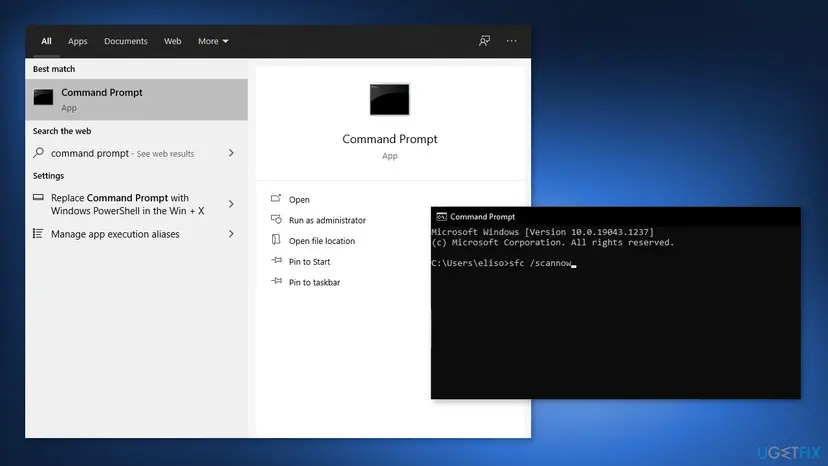
- Open an elevated command window. Right-click Start and select Terminal (Admin), or type cmd in the search box, right-click Command Prompt and select Run as administrator. Select Yes when Windows asks for permission.
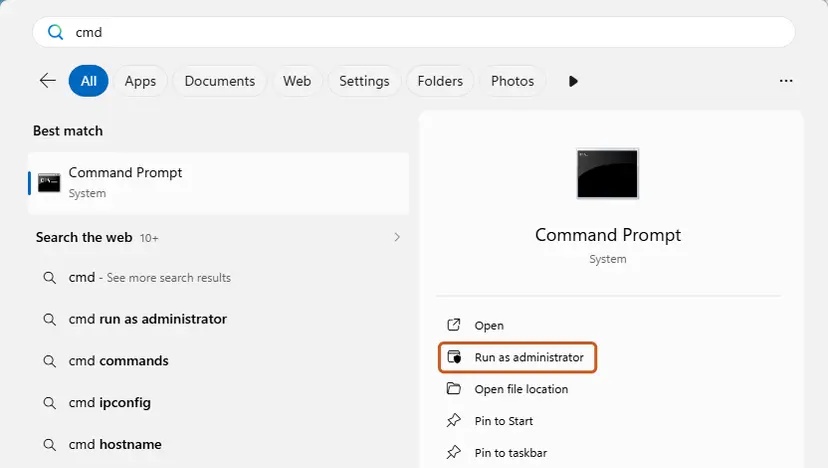
Search for cmd and choose Run as administrator. Screenshot: Windows 11 26H2. - Run DISM first. Type the command below and press Enter. DISM downloads clean copies of damaged components from Windows Update, so it can take several minutes. Wait until it says The operation completed successfully.
DISM.exe /Online /Cleanup-Image /RestoreHealth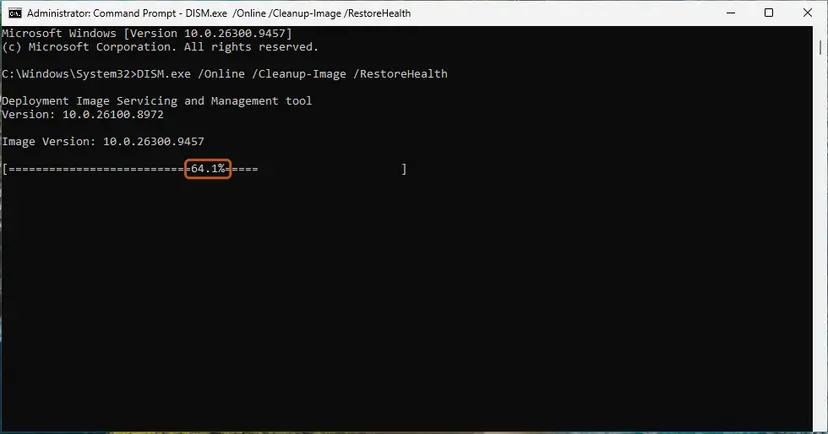
DISM /RestoreHealth running. Screenshot: Windows 11 26H2. - Run System File Checker. In the same window, type the command below and press Enter. Do not close the window until the verification reaches 100%.
sfc /scannow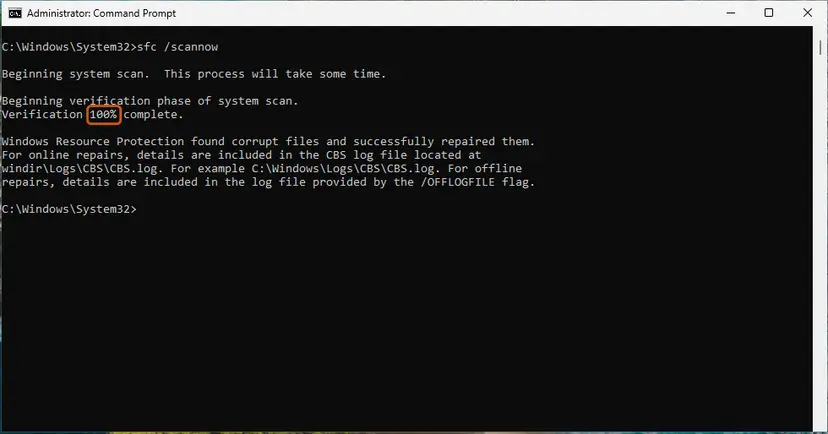
sfc /scannow at 100%. Screenshot: Windows 11 26H2. - Read the result and restart. Compare the last message with the table below this guide, then restart the PC so that repaired files are loaded.
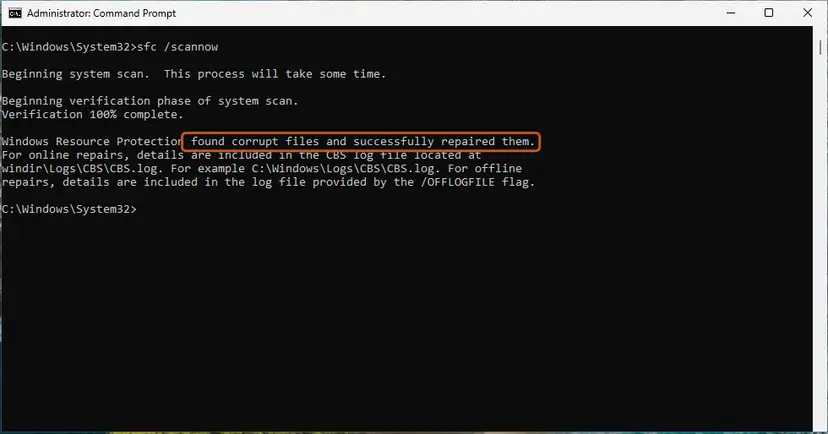
The result line tells you what SFC did. Screenshot: Windows 11 26H2.
These steps were written for Windows 11 24H2 and 25H2. The full page with the other versions and what each result means: Run DISM and SFC to repair Windows system files
It worked if: SFC reports that it found no integrity violations or that it repaired them. After a restart, Fix 3 and Fix 1 complete without errors.
If not: If SFC cannot repair files, run Fix 3 once more after a restart. If activation still fails, go to Fix 7.
Fix 7. Activate by phone or contact Microsoft support
15 to 30 minutesNo riskYou have a valid key or proof of purchase and Fixes 1 to 6 did not help.
Phone activation and support work outside the local licence commands that keep failing. The advisor on Microsoft Q&A named slui 4 and an escalation to Microsoft as the last step for this code.
- Restart the PC first, so no rearm is pending.
- Type SLUI 04 in the search box on the taskbar and press Enter.
- Choose your country and follow the steps: call the number, read out the installation ID and type the confirmation ID you are given.
- If phone activation is not offered, save screenshots of
slmgr /dlvand of the error. - Contact Microsoft support from support.microsoft.com/contactus with the code 0xC004D302, the edition, the channel and what ran before the error.
For volume licences on Windows Server, the volume licence portal and your Microsoft partner are the contacts. Have the product key, the edition and the date of the migration or change ready.
It worked if: Phone activation ends with a confirmation, or support activates Windows or tells you clearly what licence the PC needs.
If not: If support says the key does not belong to this edition or PC, a new licence for the installed edition is the remaining legal way.
If error 0xC004D302 is still there
When none of the fixes worked, collect the facts below before you contact anyone. They show whether the store keeps being rearmed, or whether the licence itself is the problem.
| What to check | Where | What it tells you |
|---|---|---|
| Full error text | slui.exe 0x2a 0xC004D302 or with any new code | Whether you still have a rearm, or a key or edition problem now. |
| Edition, channel, status | slmgr /dlv | Which licence Windows uses and whether it is Licensed or in a grace or notification state. |
| Licence events | Event Viewer, Windows Logs > Application, source Security-SPP | The time of each licence attempt and rearm. We could not confirm a specific event ID for 0xC004D302. |
| Scheduled tasks | Task Scheduler Library | A task that runs slmgr at start, which brings the error back. |
- A home PC that came with Windows: the PC maker can restore a missing or wrong OEM key.
- A PC or server from work: the IT department, which owns the image and the volume licence.
- Windows bought from Microsoft: Microsoft support with your order (Fix 7).
The old version of this page suggested a disk check and System Restore. No source ties either one to a rearmed licence store, so we left them out. Chkdsk is still right if the PC shows other signs of a failing disk.
How to avoid error 0xC004D302 next time
Nearly every case starts with a licence command that was not followed by a restart. A short rule for scripts and manual work prevents it.
- Restart after every
slmgr /rearm,/rilcor/ipk, before the next licence command. - In deployment scripts, put a reboot between Sysprep or a rearm and the activation step.
- Check the edition and channel with
slmgr /dlvbefore you buy or install a key. - Link your Microsoft account so a digital licence follows the PC.
- Do not run
slmgr /rearmto clear 0xC004D302: it starts the same cycle again. - Do not change the SkipRearm value or other keys under SoftwareProtectionPlatform.
- Do not run activator tools or registry tricks from forums or videos.
- Do not chain several licence commands in one script without a restart.
Frequently asked questions
What does error 0xC004D302 mean?
It means the security processor of the Windows licence service reports that the trusted data store was rearmed. In plain words, the activation timers were reset, usually by slmgr /rearm, slmgr /rilc or Sysprep, and Windows has not restarted since. Until the restart, the licence service refuses new commands. A full restart followed by slmgr /ato clears it in most cases. Your files are not affected.
How do I read the error text with slui.exe 0x2a 0xC004D302?
Press Win + R, type slui.exe 0x2a 0xC004D302 and press Enter. Windows opens a window with the full text of the code. The same trick works for any licence code that slmgr prints without an explanation: replace the last part with that code. This is the step the Windows Script Host box asks for when it says to run slui to display the error text.
What is a "Windows non-core edition" activation error?
It is not a separate error. The sentence "On a computer running Microsoft Windows non-core edition, run slui.exe" is what slmgr prints for many codes when it does not show their text itself. A non-core edition is a normal Windows with a desktop, where the slui window can open, unlike Windows Server Core. The code at the end of the sentence is the one that matters, here 0xC004D302.
Why do I get a slui.exe error when I try to activate?
slui.exe is the Windows activation window. When it or slmgr shows an error, the hex code tells you the reason. With 0xC004D302 the reason is a rearm that still needs a restart. Restart with Start > Power > Restart, then try again. If slui itself does not open, repair system files with DISM and SFC (Fix 6) and try again after a restart.
Do I get 0xC004D302 on Windows 11 and Windows 10 in the same way?
Yes. The licence service, slmgr and slui work the same on Windows 11 and Windows 10, so the fixes are the same. Only the path to the Activation page differs: Settings > System > Activation on Windows 11, Settings > Update & Security > Activation on Windows 10. Windows 10 left support on 14 October 2025, but activation still works. Windows Server shows the same code after a rearm or a migration.
Will running slmgr /rearm again fix 0xC004D302?
No. A rearm is what causes the code. Running it again resets the timers once more and needs another restart, and the number of rearms is limited. Restart instead, then run slmgr /ato. If you need to extend a grace period on a test machine, run one rearm, restart at once, and only then run other licence commands. Never use a rearm as a replacement for a valid licence.
What does slui.exe 0x2a 0xC004D307 mean?
It is a different code from the same family. Run slui.exe 0x2a 0xC004D307 to read its text on your PC. In user reports it appears when the allowed number of rearms is used up, after repeated slmgr /rearm runs. We could not confirm that from a Microsoft page. In either case another rearm will not help: activate with a valid key (Fix 4) or by phone (Fix 7).
Did an activator tool cause my 0xC004D302 error?
It can. Free activation scripts often call slmgr /rearm or reinstall licence files, and some run at every start. If the error came right after such a tool, remove it, scan the PC with Microsoft Defender and check Task Scheduler (Fix 5). Then reinstall the licence files (Fix 3) and activate with a genuine key. This page does not help with activators, which work around Microsoft's licence terms.
I ran the fixes and still get the same error. What now?
Check that you really restarted between commands, with Restart and not Shut down. Then look for a script or task that runs slmgr (Fix 5). If none exists, the licence files or the key are the problem: run Fix 6, then Fix 3, then Fix 4. Collect slmgr /dlv and the Security-SPP events and contact the PC maker, your IT team or Microsoft. This page is in English; the steps are the same in every language.
Sources
- Microsoft Learn: Slmgr.vbs options for obtaining volume activation information (learn.microsoft.com)
- Microsoft Q&A: Error 0xC004D302 after virus attack (user report with the error text) (learn.microsoft.com)
- Microsoft Q&A: Windows 2016 R2 license activation error after a migration to Hyper-V 2025 (0x80041014 and 0xC004D302) (learn.microsoft.com)
Did this fix work?
One click, no account. It tells the next reader which guides are worth their time.
Questions and experiences: fix Windows activation error 0xC004D302
Still broken, or found a fix we did not cover? Ask here: members and our editors answer. Reading is open; writing needs a free account.
…