
How to check your internet connection in Windows
A few quick checks show where the connection breaks: in Windows, in the router, or at your internet provider. Nothing here changes your settings.
- Time
- 5 to 10 minutes
- Level
- Easy
- You need
- Access to your modem and router. An administrator account for the commands.
Before you start
- Try another device on the same network. If it has no internet either, the cause is the router, the modem or the provider, not this PC.
- Restarting the router disconnects everyone on your network for a few minutes.
Windows 11
Steps written for Windows 11 25H2 and 26H2.
Check the connection status
Select Start > Settings > Network & internet. The status of your connection is at the top of the page. Select Properties next to the network name to see its details.
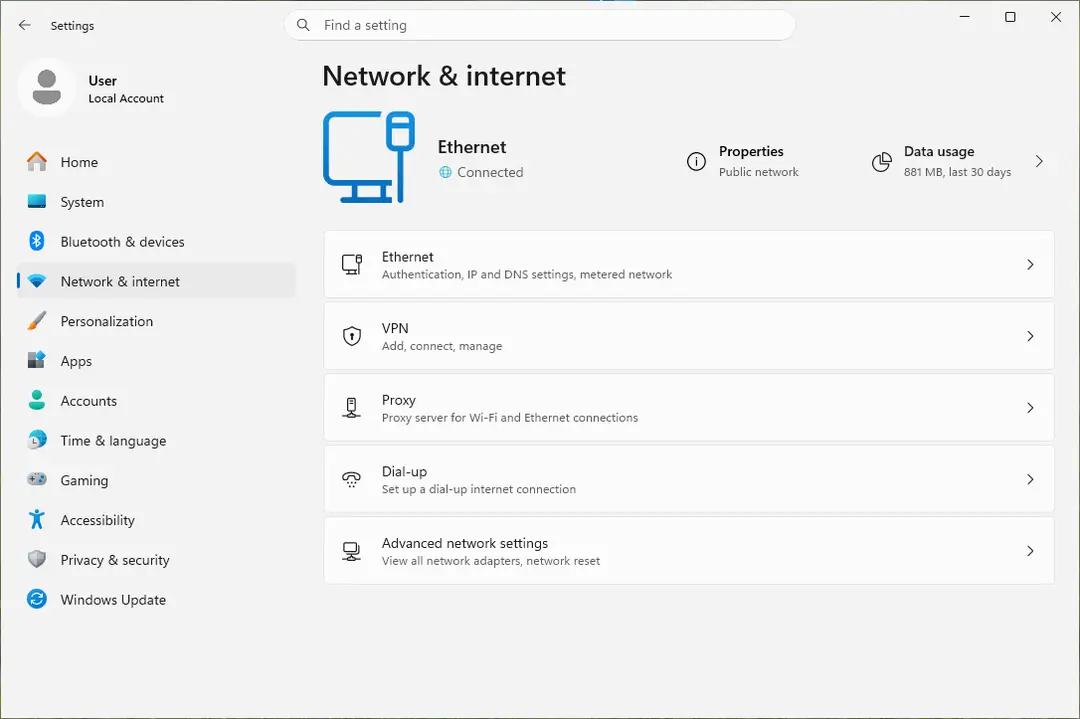
The top of Network & internet shows whether you are connected. Screenshot: Windows 11 26H2 Check that Wi-Fi is on and connected
Select the Network, Sound or Battery icon on the right side of the taskbar. Make sure Wi-Fi is turned on and that your network shows Connected below its name.
Run the Network troubleshooter
Open the Get Help app and type connect to network and internet in the search bar. Select Run network diagnostics and complete the steps it offers.
Restart the modem and the router
Unplug the power cable of the router, then of the modem, and wait at least 30 seconds. Plug the modem back in and wait until its lights stop blinking, then plug in the router. Wait a few minutes and try to connect again.
Open Command Prompt as administrator
Type command prompt in the search box on the taskbar. Next to Command Prompt, select Run as administrator, then Yes.
Find the address of your router
Type the command below and press Enter. Under the name of your network connection, note the address next to Default gateway, for example 192.168.1.1.
ipconfigPing the router
Type ping followed by that address and press Enter. Four lines that start with Reply from mean the PC reaches the router.
ping 192.168.1.1Find and ping the DNS server
Run the first command and note the address it shows. Then type ping followed by that address. The DNS server is the service that turns website names into addresses.
ipconfig /all | findstr /c:"DNS Servers"
Windows 10
Steps written for Windows 10 22H2.
Microsoft ended support for Windows 10 on October 14, 2025.
Open the network status page
Select Start > Settings > Network & Internet, then select Status in the menu on the left.
Check that Wi-Fi is on and connected
Select the Network, Sound or Battery icon on the right side of the taskbar. Make sure Wi-Fi is turned on and that your network shows Connected below its name.
Run the Network troubleshooter
On the Status page, scroll down and select Network troubleshooter. Follow the instructions in the window that opens.
Restart the modem and the router
Unplug the power cable of the router, then of the modem, and wait at least 30 seconds. Plug the modem back in and wait until its lights stop blinking, then plug in the router. Wait a few minutes and try to connect again.
Open Command Prompt as administrator
Type command prompt in the search box on the taskbar. Next to Command Prompt, select Run as administrator, then Yes.
Find the address of your router
Type the command below and press Enter. Under the name of your network connection, note the address next to Default gateway, for example 192.168.1.1.
ipconfigPing the router
Type ping followed by that address and press Enter. Four lines that start with Reply from mean the PC reaches the router.
ping 192.168.1.1Find and ping the DNS server
Run the first command and note the address it shows. Then type ping followed by that address. The DNS server is the service that turns website names into addresses.
ipconfig /all | findstr /c:"DNS Servers"
How to read the results
| What you see | What it means | Next |
|---|---|---|
| The router replies to ping, but websites do not open | The PC reaches the router. Microsoft points to the modem or the internet provider in this case. | Check on another device for an outage or contact the provider. |
| No reply from the router | The link between the PC and the router is broken. | Connect the PC to the router or modem with an Ethernet cable if you can. If that works, the Wi-Fi part of the router is the problem. |
| The router replies, the DNS server does not | Addresses work, website names do not. | Flush the DNS cache (Reset the network and flush DNS) or change the DNS server in the network's TCP/IP settings. |
| Your IP address starts with 169.254 | Windows could not get an address from the router. | Restart the router. Check in its settings that DHCP is turned on. |
What ipconfig /all shows
ipconfig shows the IP address, subnet mask and default gateway of every network adapter. ipconfig /all shows the full configuration. The lines that matter here:
- IPv4 Address: the address of this PC on your network.
- Default Gateway: the address of your router.
- DNS Servers: the servers that look up website names.
If the connection still does not work
Open Settings > Network & internet > Proxy and turn off any manual proxy settings you did not set up yourself. Then reset the network stack: Reset the network and flush DNS covers the DNS flush, the Winsock and TCP/IP resets and the full network reset, in that order. If only this PC fails on a network that works for other devices, reinstall the network adapter driver: see Update, roll back or reinstall a driver.
Used in 123 guides
How to fix "An error occurred, please try again later" on YouTube?
How to fix "This site can't be reached" in Chrome on Windows?
How to fix "We can't get to this file right now because computer syncing is paused"?
Bluebook not opening on Windows: fix "An unexpected error has occurred"
How to fix GeForce Now error 0x800b1004 in Windows?
How to fix BlueStacks not installing in Windows?
How to fix "Oops! Something went wrong" error on YouTube?
How to fix "You're offline. Check your connection" on YouTube?
How to fix Discord stream stuck on loading in Windows?
How to fix Netflix proxy error (netflix.com/proxy)?
How to fix "We weren't able to activate Windows on this device" error?
How to fix Windows 10 activation error code 0xC004F074?
How to fix Steam error code 118?
How to fix Steam integration on GOG Galaxy not working?
How to fix Steam Login Error Code E87 in Windows?
How to find Wifi password on Windows 10 and 11, even for saved networks
How to fix "Friend request failed" error in Discord?
How to fix 0x80070102 error when playing games on Windows?
How to fix "Download failed" error on Brave browser?
How to fix Windows activation error 0x803fa068?
How to fix Phone Link clipboard not working?
How to fix "You were disconnected from Blizzard services" error in Windows?
How to fix 0x800f0821 error when installing optional features in Windows?
How to fix Windows update error 0x800706ba?
How to fix "Source file could not be read" error on Firefox?
How to fix Valorant error code 38?
How to fix Windows Update error 0x800704C6
How to fix Steam “Failed loading profile data” error in Windows?
How to fix Phone Link not generating a QR code or PIN in Windows?
How to fix Xbox app error code 0x87e00004 in Windows?
How to fix "Sorry, we couldn't connect you" error in Microsoft Teams?
How to fix Phone Link app error 37 in Windows?
How to fix "Error 0x800701AA: The cloud operation was not completed" in Windows?
How to fix Windows activation error 0x8007251D?
How to fix Windows upgrade error 0xc004f075?
How to fix Microsoft Store error 0x80048839?
How to fix missing currency in Calculator app on Windows?
How to fix PuTTy Fatal Error: Network Connection timed out?
How to fix Windows activation error 0x803FABB8?
How to fix Microsoft Office error 0-2031 in Windows?
How to fix Steam error "Unable to verify email address" in Windows?
How to fix 0x80180018 error when adding a second account in Windows?
How to fix Monster Hunter World error code 50382-MW1 in Windows?
How to fix "We can't start this add-in because it isn't set up properly" in Office?
How to fix PIN error 0x801c044f in Windows?
How to fix "You can't sign in with this account" error in Windows?
How to fix OneDrive error 0x8004da9a in Windows?
How to fix Microsoft Office error 30033-44 in Windows?
How to fix Microsoft Store error 0x800704C6
How to fix Windows activation error 0x80041023?
How to fix Steam error code 106 in Windows?
How to fix log in error "Too many requests" in Windows?
How to fix Microsoft Office error 30088-4 in Windows?
How to Fix Windows Update Error 0x8024001f?
How to fix Microsoft Store error 0x800713AB?
How to fix ArmouryCrate.UserSessionHelper.exe - Application Error in Windows?
How to fix Windows activation error 0xC004F009?
How to fix Microsoft Store error 0x8D050003 in Windows
How to fix Windows activation error 0x8007232B?
How to fix error AADSTS90100: Login parameter is empty or not valid error in Windows?
How to fix SSL_ERROR_HANDSHAKE_FAILURE_ALERT error in Windows?
How to fix "Product Activation Failed" error in Epic Store?
How to fix "BITS service failed to start. Error 0x80004015" in Windows?
How to fix "RPC executor service threw an error!" when signing in to Google
How to fix activation error 0x803F7001 on Windows 10?
TAP-Windows Adapter V9: what it is and how to fix or remove it on Windows 11 and 10
How to fix Microsoft Office error code 30174-8 (1392)?
How to fix Microsoft Office error 30180-4 in Windows?
How to fix Windows activation error 0xC004C020?
How to fix Microsoft Edge translator not working?
How to fix "A connection to the Steam VAC servers could not be made" error in Windows?
How to fix GeForce NOW 0x0000012E error in Windows?
How to fix Microsoft Store error 0x80D03805 on Windows
How to fix Network List Service (netprofm.dll) high CPU in Windows?
How to fix .NET Framework installation error 0x800c0006 in Windows?
How to fix Azure AD 801c03ed error in Windows?
How to fix Windows activation error 0x803FABC3?
How to fix GeForce Now error 0xC192000C in Windows?
How to fix Windows activation error 0xC004D302?
How to fix troubleshooter error "I'm sorry. I was unable to run the Windows Update diagnostic"?
How to fix Steam error "No download source" in Windows?
How to fix "Windows reported that no product key was found on your device" error?
How to fix .NET Framework error code 0x80072EE6 in Windows?
How to fix Microsoft Office error 30045-29 in Windows?
[Fix] Windows or Microsoft Office activation error 0xc004c060
How to fix Office error 30045-44 in Windows?
Your device is offline. Try a different sign-in method: how to fix it in Windows?
How to fix installation error 0x80040c01 in Windows?
How to fix Windows activation error 0x80010105?
How to fix Microsoft Office error 30088-45 in Windows?
That verification method isn't working right now: how to fix it on a Microsoft account?
How to fix "The network you are using may require you to visit its login page" error in Windows
How to fix File System error (-2015294522) in Windows?
How to fix WiFi icon is not showing on taskbar in Windows?
How to fix Windows activation error 0x803fa067?
How to fix Windows activation error 0xC004F215?
How to fix “There was a problem loading this web content” error on Steam?
How to fix Microsoft Office installation error 30182-1011 in Windows?
How to fix Microsoft Store error 0x80073CF8 on Windows
QTS1081B driver: how to install it on Windows 11 and Windows 10 when it fails
How to fix "We can't set up mobile hotspot" error in Windows?
How to fix Google Classroom stuck at loading screen?
How to fix VAN 0 Error Code in Valorant?
How to fix Windows Activation error 0xC004F211?
How to fix Steam error code: 105 (Unable to connect to Server)?
How to fix streaming error code 232001 in Windows?
How to fix error code 109 "Unable to connect to server" on Steam?
How to fix ERR_SOCKET_NOT_CONNECTED error in Google Chrome?
How to fix error code VAL 51 in Valorant?
Retrieving data. Wait a few seconds and try to cut or copy again. How to fix it in Excel
How to fix printer error code 0x00000040 in Windows?
How to fix WhatsApp white screen error?
How to fix Diablo 4 Error 300008 "Your request has timed out"?
How to fix file:///tmp/error.html error in Google Chrome?
How to fix "Something went wrong while attempting to sign you in" Steam error in Windows?
How to fix Steam error code 2 in Windows?
How to fix Microsoft Office error code 30015-25 (1006) in Windows?
How to fix Microsoft Office error code 0-2048 in Windows?
How to fix "sent an invalid response" ERR_SSL_PROTOCOL_ERROR on Google Chrome?
How to fix ERR_CACHE_MISS error?
How to fix ERR_QUIC_PROTOCOL_ERROR on Google Chrome?
How to fix "Application error: a client-side exception has occurred" on Chrome?
How to fix DNS_PROBE_POSSIBLE error in Chrome or other browsers?
Sources
- Microsoft Support: Fix Wi-Fi connection issues in Windows (troubleshooter, modem and router restart, ping test, DNS check; Windows 11 and 10) (read Oct 11, 2026)
- Microsoft Support: Essential Network Settings and Tasks in Windows (connection status, Properties) (read Oct 11, 2026)
- Microsoft Support: Windows troubleshooters in Get Help (Network and internet troubleshooter) (read Oct 11, 2026)
- Microsoft Learn: ipconfig command reference (read Oct 11, 2026)
- Microsoft Learn: ping command reference (read Oct 11, 2026)