
How to fix file:///tmp/error.html error in Google Chrome?

Prefer to fix it yourself? The manual steps follow.
- 7methods
- 2 to 20 minutes
- Intermediate
Applies to Google Chrome and Chromium-based browsers on Linux, ChromeOS, macOS, Windows and Android; kiosks and embedded browsers
7 methods in this guide
Hello. Google Chrome does not load websites and I get the File://tmp/error.html error. Is there a way to fix this?
file:///tmp/error.html is not a Chrome error code. It is the address of a page stored in the temporary folder of the machine that runs the browser, and some program other than Chrome put it there or tried to open it. Read the message Chrome really shows on that tab first: it tells you which of the fixes below is yours.
Chrome did not produce this address. A program on the device opened a page from the temporary folder /tmp, or a setting points there. Look at the tab: Your file couldn't be accessed means the file is gone or out of the browser's reach, This page is blocked means a policy. Start with Fix 1 to read the message, then Fix 2 to find what opens the address. Clearing the cache or reinstalling Chrome does not help.
| Error | file:///tmp/error.html in the address bar. It is a local file address, not an error code. Chrome's own code on that tab is usually ERR_FILE_NOT_FOUND, sometimes ERR_ACCESS_DENIED or ERR_BLOCKED_BY_ADMINISTRATOR. |
|---|---|
| Where it appears | In the address bar of a tab that you did not open yourself: at browser start, after a program launches the browser, or on a kiosk or embedded screen whose own software shows a local page. |
| Main cause | Software outside Chrome wrote, or expected, an error page in the temporary folder /tmp and opened it in the browser. The file is missing, already cleaned up, or outside the browser's reach. |
| Fastest fix | Read the message on the tab (Fix 1), then remove the address from the place that opens it: startup pages, the Home button, a shortcut or the program that launched the browser (Fix 2). |
| Also written as | File://tmp/error.html, file ///tmp/error.html, file:///tmp/initial.html (the start page of the same kind of software). |
| Affects | Any Chromium-based browser. The folder /tmp exists on Linux, ChromeOS and macOS. A standard Windows installation has no such folder. |
| Vendor status | Not a known Chrome issue. No Google, Chromium or router vendor document that we could find names this address. Chrome's own error pages live at chrome-error://chromewebdata/, not in a file. |
| Is it malware | Nothing in the sources connects the address with malware. A startup page you did not set is still worth removing (Fix 2 and Fix 7). |
| Time to fix | 2 minutes when a startup page or shortcut holds the address. Up to 20 minutes for a Linux snap browser or your own script. |
Facts checked on 14 October 2026. Steps written for Chrome 155 on Windows 11 (screenshots), and Chrome on Linux, ChromeOS and Android as read from Chromium source code and vendor documentation, not reproduced on those devices.
What file:///tmp/error.html means
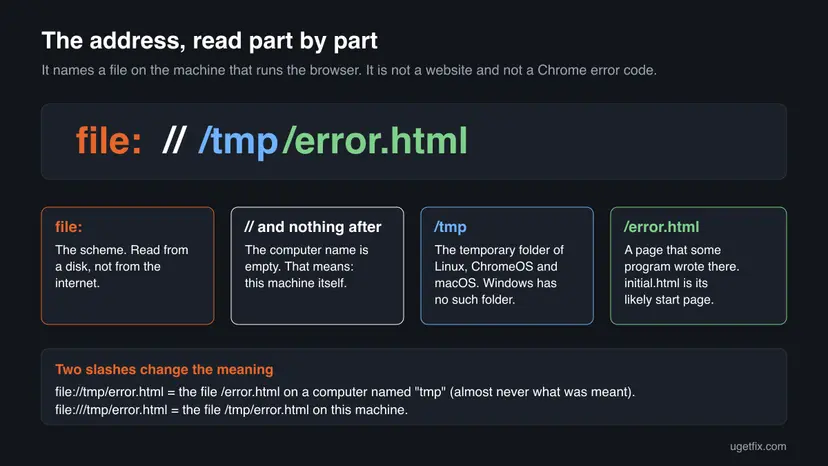
The text in the address bar is a file address. The standard for such addresses, RFC 8089, says that a file address with nothing between the second and third slash names a file on the local machine. So file:///tmp/error.html reads: the file error.html in the folder /tmp of the very machine that runs the browser. No website is involved, and no network.
/tmp is the folder for temporary files on Linux and other Unix-like systems. The Filesystem Hierarchy Standard says programs must not assume that anything in /tmp survives until they run again, and recommends emptying it at every boot. That is why a page there is often already gone when the browser asks for it.
| What you typed or saw | What it means |
|---|---|
file:///tmp/error.html | The file /tmp/error.html on this machine. This is the real form. |
File://tmp/error.html | With two slashes, tmp is read as the name of another computer and the file is /error.html there. Chrome's own policy documentation calls a file pattern with two slashes invalid. People type it this way from memory. |
file ///tmp/error.html | The same address with the colon lost in typing. |
file:///tmp/initial.html | A second page from the same folder. By its name it is a start page that some program shows first. We found no document that says which program. |
Chrome's list of network errors holds codes such as ERR_FILE_NOT_FOUND (-6) and ERR_ACCESS_DENIED (-10). It holds no error named after a file. Chrome also does not keep its error pages in files: its source code gives them the internal address chrome-error://chromewebdata/.
What opens file:///tmp/error.html: what is confirmed and what is not
We read the Chromium source code, Google's Chrome and Chromebook help, the ChromiumOS design documents and the snapd source code on 14 October 2026. None of them names a product that opens file:///tmp/error.html or file:///tmp/initial.html. We also found no router, hotspot or parental-control vendor document that does. So the exact program on your device has to be found on the device, and Fix 2 shows how.
- Confirmed: it comes from the device, not from a website. Chrome treats a redirect from a web server to a file address as unsafe and stops it with
ERR_UNSAFE_REDIRECT. A hotel sign-in page, a router or an internet provider cannot send Chrome to a file on your disk. - Confirmed: Chrome itself does not create it. Chrome's error pages have an internal address and are not written to
/tmp. - Confirmed: other programs do work this way. A program that wants to show a report or an error in the browser writes an HTML file to the temporary folder and starts the browser with that file. Kiosk shells and scripts that drive a browser do the same with a start page.
- Not confirmed: which program it is in your case. The names
error.htmlandinitial.htmlare generic. Many programs could use them. - Not confirmed: the captive portal theory. A sign-in network can be the trigger, because the device's own software may fall back to a local error page when the internet is closed. We found no vendor that documents this, so Fix 3 is offered as a test, not as a fact.
In the 90 days before this check, almost every search for this address that reached uGetFix came from a desktop computer in the United States, at an even daily rate including weekends. Phones and tablets were under 1 %. That pattern fits browsers that run on desktop or server machines much better than phones or TVs.
What Chrome does with file:///tmp/error.html on each kind of device
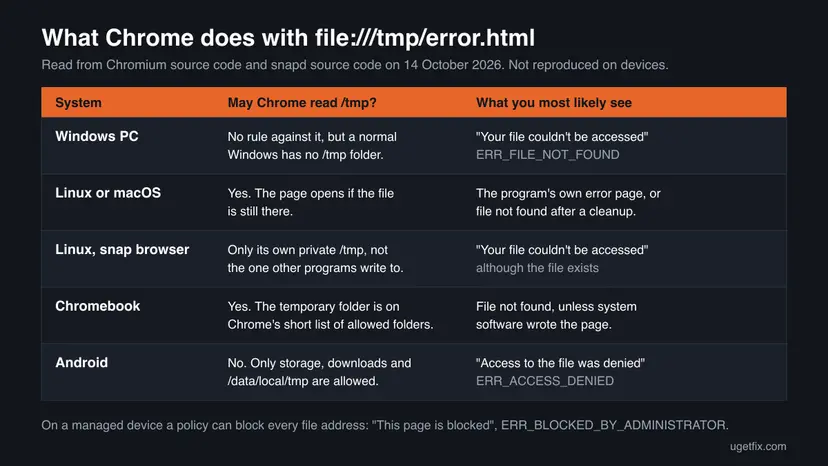
The same address ends differently on each system, because Chrome's right to read local folders differs. The rules below are read from Chrome's source code. We did not reproduce them on each device, and we say so in the table.
| Device | The rule in Chrome | What to expect |
|---|---|---|
| Windows PC | No folder restriction. A standard Windows installation has no /tmp folder: its temporary folder is %TEMP%. | Most likely Your file couldn't be accessed with ERR_FILE_NOT_FOUND. Not reproduced by us. The address almost surely comes from a startup page, a shortcut or a remote session to another machine. |
| Linux or macOS | No folder restriction. /tmp exists (on macOS it is a link to /private/tmp, checked on our Mac). | The page opens if the file is still there. Otherwise Your file couldn't be accessed. |
| Linux with a snap browser | snapd gives every snap its own private /tmp, kept under /tmp/snap-private-tmp/. | Your file couldn't be accessed although the file exists for other programs. Fix 4. |
| Chromebook | Chrome on ChromeOS may read only a short list of folders. The system temporary folder is on that list. | File not found, unless system or kiosk software wrote the page. On a school or work Chromebook also Fix 5. |
| Android phone, tablet or TV | Chrome on Android may read shared storage, download folders and /data/local/tmp. /tmp is not on the list. | Access to the file was denied with ERR_ACCESS_DENIED. Nothing you can change in Chrome. |
| Managed work or school device | The policy URLBlocklist can block every file address. Google's own example value contains file://*. | This page is blocked with ERR_BLOCKED_BY_ADMINISTRATOR. Fix 5. |
What causes the file:///tmp/error.html tab, from most to least likely
No vendor publishes numbers for this address, so the order below is our reading of the mechanisms we could confirm and of our search data. Each cause is tied to one fix.
| Cause | How you recognise it | Fix |
|---|---|---|
| A program or script launched the browser with a temporary page that is missing or already deleted. | The tab appears when another program starts, finishes or fails. The message is Your file couldn't be accessed. | Fix 1, then Fix 6 if the script is yours |
| The address is stored as a startup page, a Home button page, a bookmark or a shortcut target. | The tab opens every time Chrome starts, or when you select the Home button. | Fix 2 |
The browser is a snap package on Linux and cannot see the real /tmp. | The file exists in a file manager or terminal, but Chrome says it cannot be accessed. | Fix 4 |
| A kiosk, a sign-in screen or an embedded browser fell back to its local error page because the network is closed. | The page appears right after joining a hotel, school or guest network, or on a device you do not own. | Fix 3 |
| An administrator set the start page or blocks file addresses. | Managed by your organization in Chrome's menu, or This page is blocked. | Fix 5 |
| Unwanted software changed the startup page. | A startup page or shortcut you never set, back again after you remove it. | Fix 2, then Fix 7 |
A damaged cache, old cookies, an outdated Chrome and a bad internet connection do not create a file address. Guides that tell you to clear the cache, update or reinstall Chrome for this address repeat steps that have no link to it. A reinstall usually keeps your profile, so a stored startup page comes straight back.
How to fix file:///tmp/error.html in Chrome
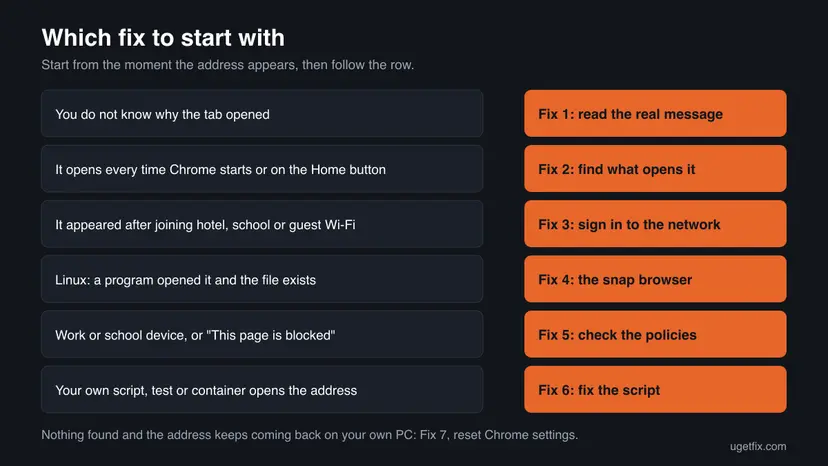
Fix 1 and Fix 2 are for everyone: they show what Chrome really reports and what opens the address. Fix 3 to Fix 6 are one case each: a sign-in network, a Linux snap browser, a managed device and your own script. Fix 7 is the last step on your own PC.
| What you see or have | Start with |
|---|---|
| The tab opened and you do not know why. | Fix 1 |
| The address opens every time Chrome starts, or on the Home button. | Fix 2 |
| It appeared right after you joined a hotel, school, airport or guest Wi-Fi, or it is on a kiosk screen. | Fix 3 |
| Linux: a program opened the tab, the file exists, Chrome says Your file couldn't be accessed. | Fix 4 |
| Work or school laptop or Chromebook, or the message This page is blocked. | Fix 5 |
Your own script, test, container or automation opens file:///tmp/error.html or file:///tmp/initial.html. | Fix 6 |
| Android: Access to the file was denied. | Fix 1, then close the tab: Chrome on Android may not read /tmp |
| Your own PC, nothing found, the address keeps coming back. | Fix 7 |
Fix 1. Read the message Chrome really shows and check whether the file exists
2 minutesNo riskEveryone who sees the address and does not know what opened it.
The address only says where Chrome was sent. The heading and the code on the tab say what went wrong there: the file is missing, the browser may not read the folder, or a policy blocks it. Each answer leads to a different fix.
- Stay on the tab that shows
file:///tmp/error.html. Do not reload it yet. - Read the heading in the middle of the page and the grey code under the text.
- Compare them with the table below.
- On Linux or macOS, open a terminal and run the command below. It shows whether the file exists, who owns it and when it was written.
- Note the moment the tab appeared: at Chrome start, after you started another program, or after you joined a network.
Linux or macOS terminal: does the file exist?
ls -l /tmp/error.html /tmp/initial.html| Heading on the tab | Code | Meaning | Next |
|---|---|---|---|
| Your file couldn't be accessed. Below it: It may have been moved, edited, or deleted. | ERR_FILE_NOT_FOUND | No file at that path, as far as this browser can see. | Fix 2. On Linux with the file present: Fix 4. |
| Access to the file was denied | ERR_ACCESS_DENIED | The browser may not read that folder (Android), or the file permissions forbid it. | Android: close the tab. Linux: Fix 6. |
| This page is blocked. Below it: Your organization doesn't allow you to view this site. | ERR_BLOCKED_BY_ADMINISTRATOR | A policy blocks file addresses. | Fix 5 |
| A page with its own text and design, no Chrome code. | None | The file exists. You are reading the error page of the program that wrote it. | Read its text: it names the real problem. Then Fix 2 or Fix 6. |
If the tab shows a designed page, the program that wrote it is telling you something: no connection, a failed sign-in, a failed job. Search for a product name, a logo or a support code on that page. It identifies the software far better than the address does.
It worked if: You know which of the four cases in the table is yours and when the tab appears.
If not: If the tab shows something that is not in the table, go on with Fix 2 and write down the exact heading for later.
Fix 2. Find what opens the address and remove it there
5 minutesLow riskThe tab opens at every Chrome start, on the Home button, or from a shortcut.
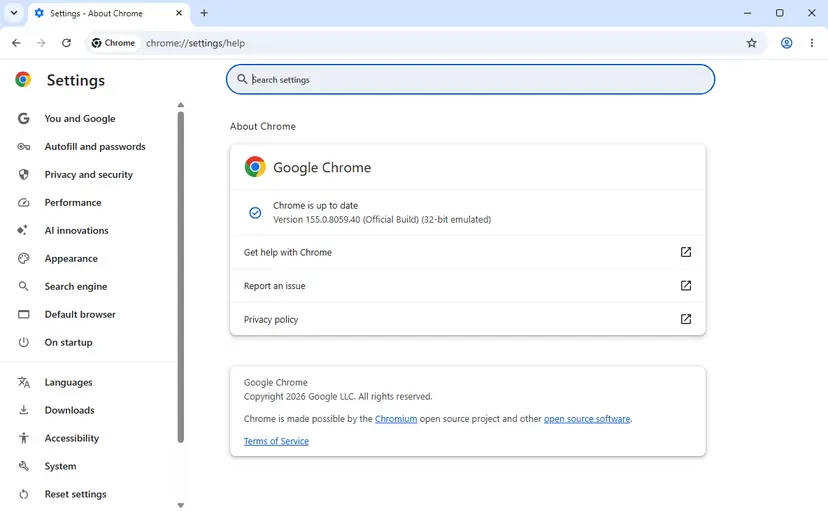
Chrome opens a file address only when something hands it over: a startup page, the Home button, a bookmark, or the command that launched the browser. Chrome shows that command on its version page, so you can see whether another program passed the address in.
- In Chrome, select More (three dots) at the top right, then Settings.
- Select On startup in the left menu. If Open a specific page or set of pages is selected, look for
file:///tmp/error.htmlorfile:///tmp/initial.htmlin the list. - Select More next to that entry, then Remove. Or select Open the New Tab page instead.
- Select Appearance. If Show home button is on and a custom address is entered under it, replace it or select the New Tab page.
- Type
chrome://versionin the address bar and press Enter. Read the row Command Line. - If the row ends with a file address or with an option that names one, the program or shortcut that started Chrome passes it in. Go to the steps below.
When the command line carries the address, the fix is outside Chrome:
- Windows shortcut. Right-click the Chrome shortcut you use, select Properties and read the Target box on the Shortcut tab. Delete anything that follows
chrome.exe", then select OK. - Another program. If the tab appears when a certain program starts or finishes, that program opens it. Look in its settings for an option that shows a report or a page in the browser, or update the program.
- Linux launcher. Check the menu entry or script that starts the browser for a file address at the end of its command.
- Remote session. If you reach the browser through a remote desktop or a cloud workspace, the address belongs to that remote machine. Its operator has to fix it.
If the startup setting cannot be changed, an administrator set it. Google's help says that on a work or school Chromebook the network administrator controls these pages. Go to Fix 5.
It worked if: Chrome starts on the New Tab page or on your own pages, and the Command Line row no longer carries a file address.
If not: If the entry comes back after you remove it, check the policies with Fix 5 and then reset Chrome with Fix 7.
Fix 3. Sign in to the network when the page appeared on hotel, school or guest Wi-Fi
5 minutesNo riskThe address appeared right after you joined a network that asks for a room number, a code or a consent click, or it is on a kiosk or shared screen.
A network with a sign-in page lets nothing through until you sign in. Software that needs the internet at start may then show its local error page. We could not confirm from a vendor that any such software uses this exact address, so treat this fix as a test.
- Open a new tab.
- Type the address below and press Enter. It is the plain test address that Chrome itself uses to detect a sign-in network.
- If a sign-in page of the hotel, school or provider opens, complete it.
- Open a normal website to confirm that the internet works.
- Close the
file:///tmp/error.htmltab and start the program or device function again that showed it.
Chrome's own connectivity test address
http://connectivitycheck.gstatic.com/generate_204- Chromebook. Google's help says that on a public network you get a prompt to go to a sign-in page in your browser. Select that prompt. ChromeOS decides that a network needs sign-in when its test request does not come back as an empty page with status 204.
- Windows PC. If no sign-in page opens and no site loads, follow How to check your internet connection in Windows.
- Kiosk, smart TV or other device you do not own. You cannot sign in for it. Tell the staff that the screen shows a local error page and that its network connection probably needs a sign-in or a restart.
The test address answers with an empty page when the internet is open. An empty white tab therefore means: no sign-in is needed, and this fix is not your case.
It worked if: The sign-in page opens, you complete it, websites load, and the local error page does not come back.
If not: If the test address gives an empty page, the network is open. Return to Fix 2 and look for the program that opens the address.
Fix 4. On Linux, let the snap browser reach the file
10 minutesLow riskLinux, the file exists in /tmp, another program opened it, and Chrome or Chromium says the file could not be accessed.
snapd, the service that runs snap packages, mounts a private /tmp for every snap. A browser installed as a snap looks into its own private folder and never sees the page that another program wrote into the real /tmp.
- Open a terminal and run the first command below. If the browser is listed, it is a snap.
- Run the second command to confirm that the page exists in the real
/tmp. - Copy the page to your home folder with the third command.
- Open the copy in the browser: type
file:///home/followed by your user name and/error.htmlin the address bar. - To fix it for good, set the program that writes the page to use a folder inside your home folder, or to send the page to a browser that is not a snap.
1. Is the browser a snap?
snap list | grep -i -E "chromium|firefox"2. Does the page exist?
ls -l /tmp/error.html3. Copy it where a snap browser may read it
cp /tmp/error.html ~/error.html| Folder | Can a snap browser read it? | Source |
|---|---|---|
/tmp | No. It sees its own private copy, stored under /tmp/snap-private-tmp/. | snapd source code |
| Your home folder, visible files | Yes, when the snap has the home interface, which allows access to non-hidden files in the home directory. | snapd source code |
| Hidden folders in your home folder | No. | snapd source code |
This case concerns browsers installed from the Snap Store, such as the Chromium snap. We did not check which browser each Linux distribution installs by default, so run the first command instead of guessing. Users report the same behaviour with the Firefox snap.
It worked if: The copy in your home folder opens and shows the page that the program wrote, with the real error text.
If not: If the file is not in /tmp at all, the program deleted it or never wrote it. Go to Fix 6.
Fix 5. Check whether your organisation manages the browser
5 minutesNo riskA work or school laptop or Chromebook, a greyed-out startup setting, or the message This page is blocked.
An administrator can set the pages Chrome opens at start and can block every file address with one policy. Chrome lists every policy in force, so you can see in a minute whether the address or the block comes from there.
- Select More (three dots) at the top right. If the bottom of the menu says Managed by your organization, the browser is managed.
- Type
chrome://managementin the address bar and press Enter to see who manages it. - Type
chrome://policyand press Enter. - Look in the list for the policy names in the table below.
- Select Export to JSON and send the file to your administrator with the exact heading from Fix 1.
| Policy | What it does here |
|---|---|
URLBlocklist | Blocks addresses. A value of file://* blocks every local file and gives This page is blocked. |
RestoreOnStartupURLs | The pages opened at start. If a file address is in the value, the administrator's configuration opens it. |
HomepageLocation | The address of the Home button. |
NewTabPageLocation | The address of every new tab. |
On a work or school device the policies are part of its security set-up. Report what you found. On your own PC, a browser that says it is managed although no one manages it is a reason to run Fix 7 and a malware scan: How to scan for malware with Microsoft Defender.
It worked if: You know whether a policy opens the address or blocks file addresses, and the administrator has the exported list.
If not: If the page says No policies set, the browser is not managed. Return to Fix 2, then use Fix 7.
Fix 6. Developers: make your script open a page that exists and that the browser may read
20 minutesLow riskYour own script, test suite, container or kiosk configuration opens file:///tmp/error.html or file:///tmp/initial.html.
A page in /tmp fails for three reasons that the browser reports the same way. The file was deleted before the browser read it, the browser runs in a container or sandbox with its own /tmp, or the address has the wrong number of slashes.
- Print the exact address your code hands to the browser. It must start with
file:///, three slashes, followed by the absolute path. - Check that the file exists at the moment the browser starts, from the same user and the same container as the browser.
- Keep the file until the page has loaded. Delete a temporary file only after the browser reports the load as finished.
- If the browser runs in a container, a snap or a remote machine, write the page inside that environment or mount the folder into it.
- If the page loads other local files or needs normal web features, serve the folder over
http://localhostinstead of opening it as a file.
Serve the folder locally instead of using a file address (Python 3)
cd /tmp && python3 -m http.server 8000
# then open http://localhost:8000/error.htmlfile://tmp/error.htmlwith two slashes names a computer calledtmp. Chrome's policy documentation calls that form invalid for file patterns.- A web page cannot redirect to your file. Chrome stops a server redirect to a file address with
ERR_UNSAFE_REDIRECT. Open the file directly or serve it. - On ChromeOS, Chrome reads local files only from a short list of folders that includes the system temporary folder. On Android the list holds shared storage, download folders and
/data/local/tmp. - Files in
/tmpmay be removed at boot or by a cleanup job. A start page such asinitial.htmlbelongs in a folder that is not cleaned.
If your product shows a local error page to users, put the product name and a support address on it. People who meet a bare file:///tmp/error.html have nothing to search for except the path.
It worked if: The browser shows your page, and the address bar holds either the correct file address or the localhost address.
If not: If the browser still reports that the file could not be accessed, compare the user and the mount namespace of the browser process with those of the writing process, then see the log section below.
Fix 7. Reset Chrome settings on your own PC
5 minutesRead the warningYour own computer, no policy, and the startup page or shortcut keeps returning after Fix 2.
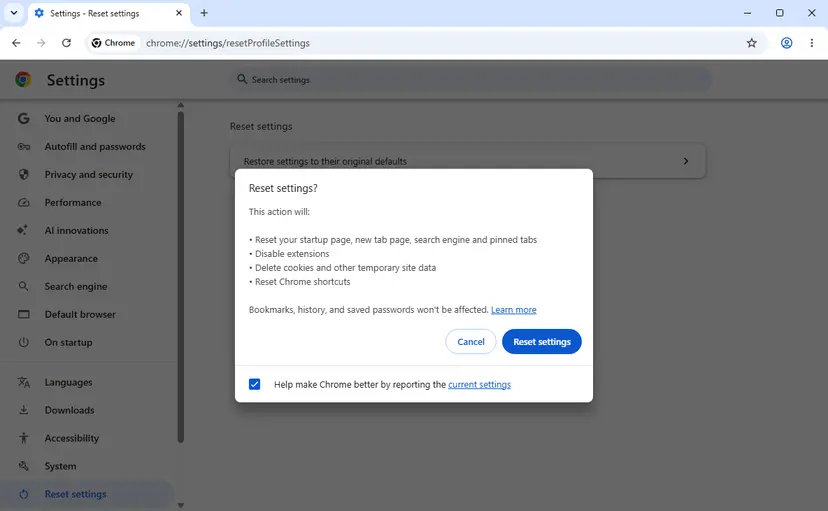
The reset puts the startup page, the new tab page and Chrome's shortcuts back to their defaults and turns extensions off in one step. That removes a stored file address that you could not find by hand.
The reset turns off all extensions, removes pinned tabs, resets the search engine and site permissions, and deletes cookies, so you are signed out of websites. Bookmarks, history and saved passwords stay. Note which extensions you use before you start, so you can turn them on again one by one.
- Select More (three dots), then Settings.
- Select Reset settings in the left menu.
- Select Restore settings to their original defaults.
- Read the list in the box, then select Reset settings.
- Close Chrome completely and open it again.
Turn your extensions back on one at a time at chrome://extensions and restart Chrome after each. If the address returns after one of them, remove that extension.
It worked if: Chrome opens on the New Tab page, and no tab with a file address appears after several restarts.
If not: If the tab still appears, another program opens it from outside Chrome. Read the Command Line row again (Fix 2) and continue with the section below.
It still failed: what to record and who can fix it
If the address is still not gone after the fixes, it still failed for one reason: the program that opens it has not been identified. Chrome cannot name that program, but it records enough to find it.
- Open
chrome://versionand copy the rows Command Line, Executable Path and Profile Path. The executable path shows which browser really runs, and on Linux whether it sits under/snap/. - Write down the exact heading and code from the tab (Fix 1).
- Write down what you did in the minute before the tab appeared: which program, which network, which device.
- On Linux or macOS, add the output of
ls -l /tmp/error.html /tmp/initial.html. The owner and the time of the file point to the program that wrote it. - On a managed device, add the file from Export to JSON on
chrome://policy.
| Where it happens | Who can fix it | What to send |
|---|---|---|
| A program on your computer opens the tab | The support of that program | The command line, the heading and code, the time of the file |
| Work or school device | Your administrator | The exported policies and the heading |
| Kiosk, hotel TV, in-car or other embedded screen | The operator or the device maker | A photo of the screen and the place and time |
| Remote desktop or cloud browser | The provider of that service | The address, the heading and what you were doing |
On a device you do not control, a local error page is a fault of that device's software or network. Nothing in your account, your phone or your home router causes it, and no setting of yours can repair it.
How to keep the file:///tmp/error.html tab from coming back
- Keep On startup set to Open the New Tab page or to pages you chose yourself.
- After installing a program, check the startup pages and the Home button once.
- Sign in to a hotel or guest network before you start programs that need the internet.
- On Linux, let programs write pages for the browser into your home folder when the browser is a snap.
- In your own scripts, keep the temporary page until the browser has loaded it.
- Do not clear the cache, reinstall Chrome or change DNS for this address: none of them touches a local file.
- Do not create a
/tmpfolder on Windows to silence the message. The program that opens the address is the thing to find. - Do not remove policies from a work or school device.
- Do not keep a start page in
/tmp: the folder may be emptied at boot.
The address itself is harmless: it points at your own machine, and a page there can do no more than any other local file you open. What matters is that a program opened your browser without telling you why. Once you know which one, the tab stops being a mystery.
Frequently asked questions
Is file:///tmp/error.html a virus?
No source connects this address with malware. It is a plain file address that points at the temporary folder of the machine running the browser, and many harmless programs show pages from there. One sign still deserves attention: a startup page or a shortcut target that you never set and that returns after you remove it. Google's help says a startup page that changed suddenly may mean unwanted software. In that case remove the entry, reset Chrome settings as in Fix 7 and run a scan with your security software.
What is file:///tmp/initial.html?
It is a second page in the same temporary folder. By its name it is the page that some program loads first, before it goes to its real content, and error.html is the page the same kind of program shows when that fails. We could not find a vendor document that names the program, so we do not name one. Everything on this page applies to both addresses: read the message on the tab, then find what hands the address to the browser with Fix 2.
Why do I get this address on my PC when Windows has no /tmp folder?
On a Windows PC the address almost never comes from Windows itself, because a standard installation keeps temporary files in %TEMP% and has no /tmp. The usual sources are a startup page or Home button address saved in Chrome, a shortcut whose target carries the address, or a program written for Linux. Another one is a browser that really runs on another machine through a remote desktop or cloud service. Fix 2 checks the first three in a few minutes. We did not reproduce the address on Windows ourselves.
Will clearing the cache, updating or reinstalling Chrome fix it?
No. Those steps are repeated in many guides, but none of them has a link to a file address. The cache holds copies of web pages, not instructions to open a local file. An update changes the browser, not the program or setting that hands it the address. A reinstall usually keeps your profile with its startup pages, so the tab returns. The one Chrome step that can help is the settings reset in Fix 7, because it clears startup pages and Chrome's shortcuts.
Can a website, a router or my internet provider send Chrome to this address?
No. Chrome refuses a redirect from a web server to a file address and reports ERR_UNSAFE_REDIRECT, as its list of network errors states. A hotel sign-in page, a router's block page or a provider's notice is always a web address that starts with http or https. A closed network can still be the trigger: software on the device may show its own local error page when it cannot reach the internet. That page is opened by the device, not by the network.
Why won't my HTML file open in Chrome?
Most often the address is wrong or the browser may not read the folder. A local file needs three slashes after file: and the full path. Check that the file exists and has not been moved. On Linux, a browser installed as a snap cannot read /tmp or hidden folders, so copy the file to a visible place in your home folder. On Android, Chrome reads only shared storage and download folders. On a managed device a policy may block all file addresses, and Chrome then shows This page is blocked.
What is the difference between file://tmp/error.html and file:///tmp/error.html?
The third slash. In file:///tmp/error.html the computer name is empty, which the standard RFC 8089 defines as the local machine, and the path is /tmp/error.html. In file://tmp/error.html the word tmp stands where the computer name belongs, so the address asks for the file /error.html on a computer called tmp. Chrome's policy documentation says a file pattern with only two slashes is invalid. People who type the address from memory usually drop one slash, which is why both forms are searched.
What does it mean on a Chromebook?
On ChromeOS, Chrome may read local files only from a short list of folders, and the system temporary folder is on that list. So the address is allowed, but there is normally no error.html in it and you get Your file couldn't be accessed. If it opens at every start on a school or work Chromebook, the start pages are set by the administrator: Google's help says you cannot change them yourself. Check chrome://management and report it. On public Wi-Fi, select the sign-in prompt first.
I see this on my PC in French or another language (sur mon PC). Does that change the fix?
No. The address is the same in every language, and only the text of Chrome's message is translated. The code under the message stays in English: ERR_FILE_NOT_FOUND, ERR_ACCESS_DENIED or ERR_BLOCKED_BY_ADMINISTRATOR. Use that code with the table in Fix 1 instead of the translated heading. The menu names in the fixes follow Chrome's own translation, in the same order: the settings page for startup, the appearance page for the Home button, and the reset page at the bottom of the left menu.
Sources
- Chromium source: net/base/net_error_list.h (FILE_NOT_FOUND -6, ACCESS_DENIED -10, BLOCKED_BY_ADMINISTRATOR -22, UNSAFE_REDIRECT -311) (github.com)
- Chromium source: components/error_page_strings.grdp (texts of the file error pages) (github.com)
- Chromium source: chrome/browser/net/chrome_network_delegate.cc (folders Chrome may read on ChromeOS and Android) (github.com)
Did this fix work?
One click, no account. It tells the next reader which guides are worth their time.
Questions and experiences: fix file:///tmp/error.html error in Google Chrome
Still broken, or found a fix we did not cover? Ask here: members and our editors answer. Reading is open; writing needs a free account.
…