
How to fix "Product Activation Failed" error in Epic Store?

Prefer to fix it yourself? The manual steps follow.
- 6methods
- 1 minute to read the code, 5 to 20 minutes for the fixes
- Easy
Applies to Epic Games Launcher on Windows 11 and Windows 10; the Epic Games Store in a browser
6 methods in this guide
Hello, I recently tried to claim the free Fallout 3 game I was really excited about on the Epic Games Store, and imagine my disappointment when I went to install it and received the "Product Activation Failed" error. This has never happened to me before. Please advise if there's anything I can do to fix this.
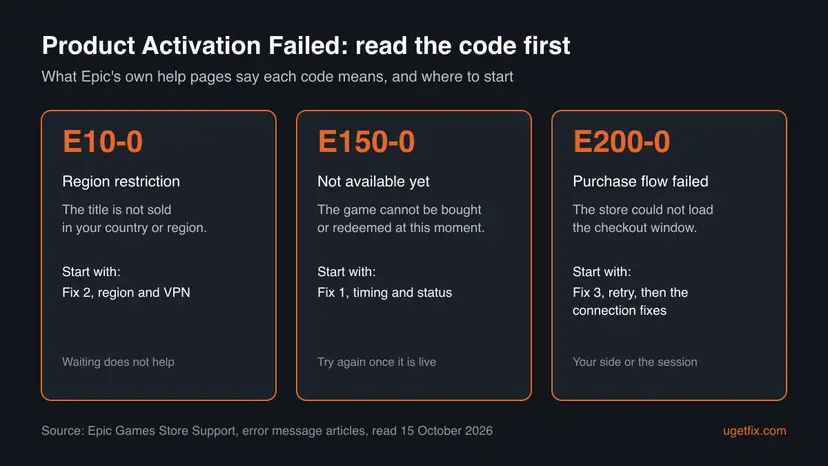
"Product Activation Failed" appears when the Epic Games Store refuses to add a game to your library. The code under it tells you why: Epic says E10-0 is a region restriction, E150-0 a game that is not available yet, and E200-0 a purchase window that did not load. Read the code before you change anything on your PC.
Look at the code under the message. With E150-0 the game cannot be bought or redeemed yet: check the giveaway's start time and try again once it is live (Fix 1). With E10-0 the title is blocked in your region, often because a VPN makes you look like you are elsewhere (Fix 2). With E200-0 the checkout did not load: retry, then sign out and in again (Fix 3).
| Error | "Product Activation Failed" with an error code such as E10-0, E150-0 or E200-0, when you buy or claim a game. |
|---|---|
| Where it appears | In the Epic Games Launcher or on the Epic Games Store website, at the moment you select Get, Buy Now or Place Order, including for weekly free games. |
| Main cause | Depends on the code. Epic: E10-0 "typically refers to country or region restrictions", E150-0 shows "if the game is not available for purchase or redemption yet", E200-0 occurs when the store "cannot load the purchase flow". |
| Fastest fix | E150-0: wait until the game is live and try again (Fix 1). E10-0: turn off the VPN or proxy and check the title is sold in your region (Fix 2). E200-0: retry, then sign out and in (Fix 3). |
| Also written as | E10-0, E10 0, e150 0, E150-0, E200-0, Product Activation Failed Epic Games, Epic Games activate fails, product activation failure. |
| Affects | Any Epic account on PC, in the launcher and in a browser. Microsoft ended support for Windows 10 on 14 October 2025, which does not change this error. |
| Epic's status | Not a bug. Epic Games Store Support has one short article per code, each listed under Error messages. |
| Is it your PC? | Only E200-0 points at your connection. E10-0 and E150-0 are decisions on Epic's side about where and when a game is sold. |
| Time to fix | Minutes for E200-0. For E150-0, as long as it takes the game to go live. E10-0 cannot be fixed on the PC when the game is not sold in your region. |
Facts checked on 15 October 2026. Steps written for the Epic Games Launcher and the Epic Games Store website on Windows 11 (25H2 and 26H2) and Windows 10 22H2, read against Epic Games Store Support's error message articles.
What "Product Activation Failed" means in the Epic Games Store, and what E10-0, E150-0 and E200-0 add
"Product Activation Failed" is the store's general refusal: the order to add a game to your account did not go through. It shows in the launcher and in a browser, and it can hit a paid game as well as a free weekly giveaway. The message on its own says nothing about the reason. The code in the same window does.
Epic Games Store Support has an article for each code under Epic Games Store > Error messages. We read all three on 15 October 2026. Each is only one to three sentences long, and the table below quotes them word for word.
| Code | Epic's explanation | What Epic tells you to do | Fix |
|---|---|---|---|
E10-0 | "This error typically refers to country or region restrictions for the title." | "Make sure that the title is available in your region." | Fix 2 |
E150-0 | "You may see the E150-0 error if the game is not available for purchase or redemption yet." | "Try again later once the game becomes available on the Epic Games Store." | Fix 1 |
E200-0 | "The E200-0 error occurs when the Epic Games Store cannot load the purchase flow." | Retry the purchase, then do the connection troubleshooting, then retry again. | Fix 3, Fix 6 |
- People search the codes in many spellings.
E10-0,e10 0,E150-0,e150 0ande150-0 epic gamesall mean the same codes as above. - The free game case is the most common. Weekly free games go live and end at a fixed time. A click shortly before the start is the classic E150-0 moment.
- E150-0 also shows up for Unreal Engine content. A 2018 thread in the r/unrealengine community reports "product activation failure error code: E150-0" for marketplace items. That is a user report. Epic's article covers only games on the Epic Games Store.
What causes Product Activation Failed, from most to least likely
Epic publishes no figures on how often each code appears, so the order below is ours. It follows Epic's three articles and the way the old guide's readers described the error: most of them were claiming a free game.
| Cause | How to tell | Fix |
|---|---|---|
| The game is not live yet, or the offer has not opened in the store. Epic's E150-0 article. | E150-0. You clicked a game that was announced as the next free game, or a preorder or release that has not started. | Fix 1 |
| A region restriction. The publisher does not sell the title in your country or region. Epic's E10-0 article. | E10-0. A VPN or proxy is on, you are travelling, or the game page says it is not available. | Fix 2 |
| The checkout window did not load. Epic's E200-0 article. | E200-0. The purchase window stayed blank, spun, or closed with the message. | Fix 3, Fix 4 |
| A stale session in the launcher. The launcher holds a sign-in or a store page the servers no longer accept. | Any code, often after the PC woke from sleep with the launcher open for hours. | Fix 3 |
| An outdated launcher. | Settings in the launcher offers an update. | Fix 5 |
| The network path. DNS, Winsock or the adapter on your PC. | E200-0 that returns after a retry, and other sites or launchers also misbehave. | Fix 6 |
The usual advice is "wait a few hours" for every code, plus running the launcher as administrator. Waiting only helps with E150-0, and with E200-0 during an outage. E10-0 is a sales rule and does not go away by itself. We found no Epic source that ties administrator rights to this error: it happens on the store's side before any file is installed.
How to fix Product Activation Failed in the Epic Games Store
Fix 1 is for E150-0, Fix 2 for E10-0 and Fix 3 for E200-0: start with the one that matches your code. Fixes 4 to 6 are for an E200-0 or any code that stays when the game is live and sold in your region.
| What you see | Start with |
|---|---|
| E150-0, while you claim a free game or buy a new release. | Fix 1 |
| E10-0, with a VPN or proxy on, or abroad. | Fix 2 |
| E200-0, or the purchase window stayed empty. | Fix 3 |
| The same code in the launcher every time, and you have not tried the website. | Fix 4 |
| The launcher's Settings page shows an update. | Fix 5 |
| E200-0 again after Fixes 3 and 4, and other online apps also struggle. | Fix 6 |
Fix 1. E150-0: check that the game is live, then try again
2 minutes, then waitingNo riskYour code is E150-0, or you clicked a free game or a new release close to its start time.
Epic's article says E150-0 appears when the game "is not available for purchase or redemption yet". Nothing on your PC can make a game available sooner, so the fix is to confirm the timing and try once it is open.
- Close the message and write down the code exactly as shown.
- Open the game's page in the store. Look for a start date, a countdown or a Coming Soon label instead of Get or Buy Now.
- For a free game, check the dates on the Free Games section of the store home page. A game marked as coming next cannot be claimed until its start time.
- In a browser, open
https://status.epicgames.comand expand Epic Games Store. Purchasing/Refunding should read Operational. - Once the game shows Get or Buy Now, try again once.
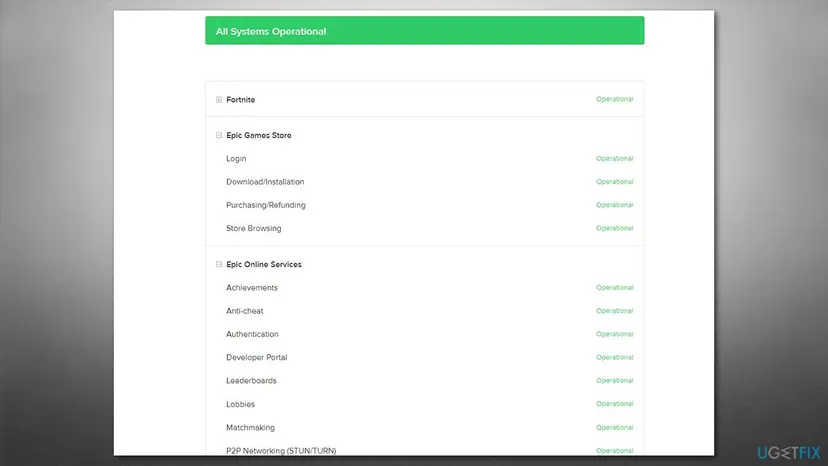
A free game can be claimed only during its giveaway week. If the code stays after the game is live and the status page is green, go straight to Fix 3 instead of waiting for hours.
It worked if: Once the game is live, Get opens the order window and the game appears in your Library.
If not: If the game is clearly live and E150-0 keeps coming back, try Fix 3, then Fix 4.
Fix 2. E10-0: turn off the VPN or proxy and check the title is sold in your region
5 minutesNo riskYour code is E10-0, you use a VPN or a proxy, or you are in another country than usual.
Epic's article says E10-0 "typically refers to country or region restrictions for the title". The store decides your region from your connection and account. A VPN exit in another country can put you in a region where the publisher does not sell the game.
- Disconnect the VPN app, if you use one, and close it.
- Press Win + I and open Network & internet > Proxy. Under Manual proxy setup, make sure Use a proxy server is off unless your workplace needs it.
- Fully exit the launcher: right-click the Epic icon in the notification area and select Exit.
- Start the launcher again and open the game's page.
- If the page says the title is not available in your region, the store will not sell it to you from there.
- If the page shows Get or Buy Now again, place the order once more.
Buying through a VPN in another country to get around a region block can break Epic's terms of service and put the account at risk. If the title is not sold where you live, the choices are to wait for it to come to your region or to buy it elsewhere where it is sold.
Some VPN apps keep a connection running after you close their window. If you are not sure, look for the VPN icon in the notification area and use its own disconnect button before you start the launcher again.
It worked if: The game's page shows the normal price or Get, and the order completes without a code.
If not: If the page still says not available with no VPN, the title is restricted in your region and no PC fix changes that. Ask Epic Support in the still broken section if you think your account's country is wrong.
Fix 3. E200-0: retry, then sign out, exit the launcher and sign in again
5 minutesNo riskYour code is E200-0, the purchase window stayed blank, or any code returns while the game is live and sold in your region.
Epic's first step for E200-0 is to retry the purchase. A full sign out and exit also throws away the launcher's stored session and store pages, which is what fails when the checkout cannot load after hours of the launcher sitting open.
- Close the message and place the order once more, as Epic's article says.
- Still failing: select your account icon in the top right corner of the launcher and select Sign Out.
- Open the notification area on the taskbar, right-click the Epic icon and select Exit.
- Wait a few seconds, then start the launcher again and sign in.
- Open the game's page and select Get or Buy Now once more.
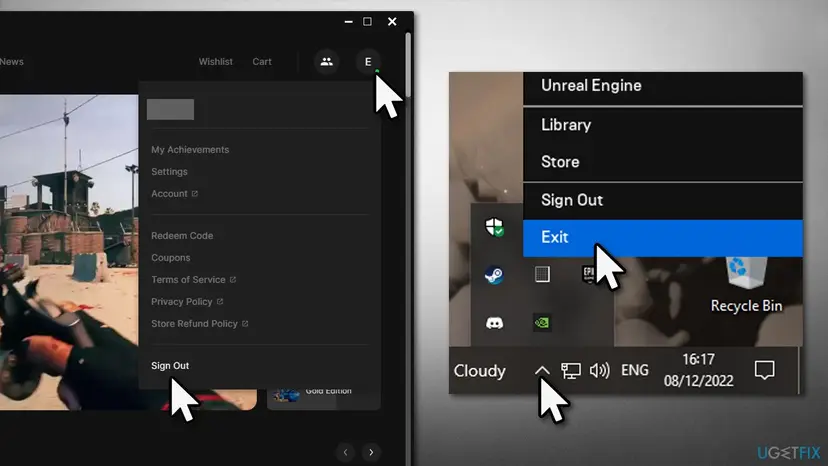
It worked if: The order window loads with the price or Free, and Place Order adds the game to your Library.
If not: If E200-0 returns, try the same order in a browser with Fix 4.
Fix 4. Claim or buy the game on the website instead of the launcher
3 minutesNo riskThe code stays in the launcher after Fix 3, or the launcher will not open the order window at all.
The store website and the launcher sell from the same account, but the website uses your browser instead of the launcher's built-in store page. If the order works there, the fault sits in the launcher, not your account or region.
- Open Chrome, Edge or Firefox and go to
https://store.epicgames.com. - Select Sign In and use the same Epic account as in the launcher.
- Open the game's page and select Get or Buy Now, then Place Order.
- Open the launcher and check Library. A game added on the website shows up there.
| Result on the website | What it means | Next |
|---|---|---|
| The order completes. | The account and region are fine. The launcher's store page is the problem. | Fix 5 |
| The same code, E10-0. | A region rule on the account or the connection. | Fix 2 |
| The same code, E200-0. | The connection on this PC, or Epic's side. | Status page in Fix 1, then Fix 6 |
| The same code on another network, such as a phone hotspot. | Not your PC. | Still broken |
It worked if: The game appears in your library, and you can install it from the launcher as usual.
If not: If the website works and the launcher does not, update the launcher with Fix 5.
Fix 5. Update the Epic Games Launcher
5 minutesNo riskThe order works on the website but not in the launcher, or the launcher's Settings shows an update.
The store inside the launcher is part of the launcher's own code. An old version can fail to load the current checkout. We could not confirm an Epic statement that ties an update to these three codes, so treat it as a repair of the launcher, not a sure fix.
- Select your account icon in the top right corner of the launcher.
- Select Settings.
- If an update is offered at the top, select Restart and Update.
- Wait for the launcher to restart and sign in if asked.
- Try the order again.
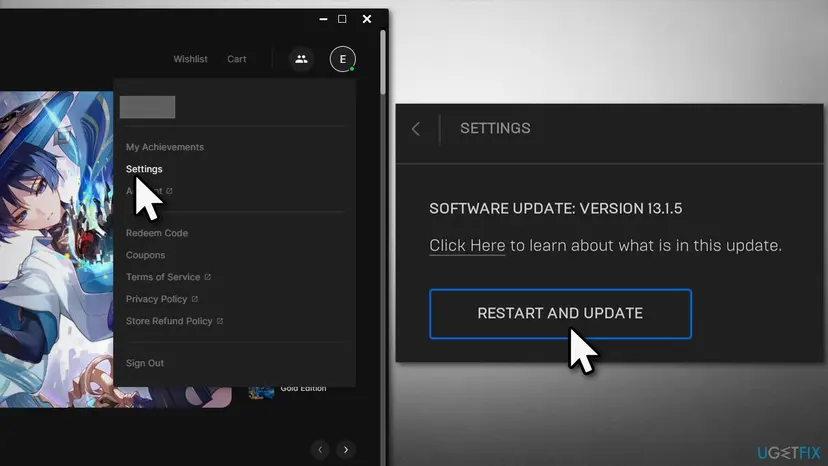
It worked if: The launcher restarts on the new version and the order window loads normally.
If not: If no update is offered and E200-0 stays, reset the connection with Fix 6.
Fix 6. Reset the network connection on Windows
10 minutesLow riskE200-0 returns after Fixes 3 and 4, on this PC only, and other online apps also have trouble.
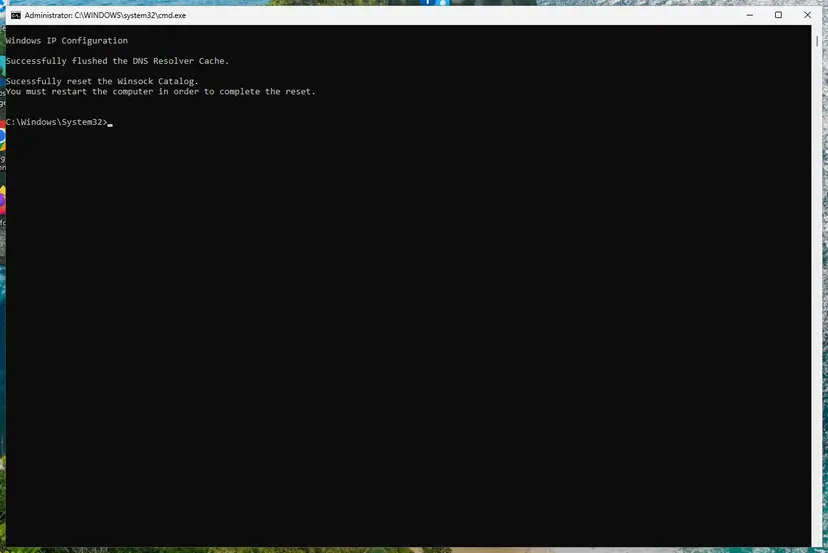
For E200-0, Epic's second step is connection troubleshooting. Flushing DNS and resetting Winsock and TCP/IP clears stale addresses and broken network settings that can stop the checkout from loading.
First test the basics with How to check your internet connection in Windows. Then reset the network stack as below. Step by step with pictures: Reset the network and flush DNS.
- Right-click Start and select Terminal (Admin), then Yes.
- Run
ipconfig /flushdnsto clear the stored website addresses. - Run
netsh winsock resetand thennetsh int ip reset. - Run
ipconfig /releaseand thenipconfig /renew. - Restart the PC, start the launcher and try the order again.
Write them down before the TCP/IP reset. The reset can return them to automatic, and you may need to enter them again.
It worked if: After the restart, the store loads normally and the order window opens.
If not: If E200-0 stays on every network, collect the details in the next section and contact Epic Support.
If Product Activation Failed is still there: what to record and how to reach Epic Support
At that point the store itself is refusing the order, and only Epic can see why. Every Epic help article ends with Contact us and the Epic Support Assistant. Prepare the details first so the case does not bounce back to you.
- Take a screenshot of the message with the code visible.
- Note the game, the time, whether it was the launcher or the website, and whether a VPN was on.
- Note the result of Fix 4: did the website order fail with the same code?
- Open any article under Epic Games Store > Error messages at
https://www.epicgames.com/helpand select Contact us. - Describe what you tried and attach the screenshot.
Epic's articles do not name a log for store orders. The launcher writes its logs to %LOCALAPPDATA%\EpicGamesLauncher\Saved\Logs, but we did not confirm this path against an Epic page today. Send that folder only if Support asks for it.
- When it is a region rule: E10-0 with no VPN, on any network. Only Epic can say whether the account's country is set correctly.
- When it is Epic's side: E200-0 on two networks and the website, while the status page shows a problem with purchasing.
- It is never hardware. These codes come from the store before anything is downloaded.
How to avoid Product Activation Failed next time
- Claim free games after they go live, not on the minute of the switch, and not on the last evening of the week.
- Keep a VPN off while you buy or claim. Turn it back on afterwards if you need it.
- Restart the launcher now and then. A launcher that has been open for days is the usual home of stale sessions.
- Let the launcher update. Accept Restart and Update when it appears.
- Keep the website as a backup. If the launcher fails, the same account works at
store.epicgames.com.
Steam has a similar cart error with its own code. If you also use Valve's store, see Steam error code 2.
Frequently asked questions
What does E10-0 mean on Epic Games?
It means the title is restricted in your country or region. Epic Games Store Support says the error "typically refers to country or region restrictions for the title" and asks you to make sure the title is available in your region. It appears together with "Product Activation Failed" when you buy or claim a game. The most common trigger on a PC is a VPN or proxy whose exit is in another country. Turn it off, exit the launcher fully and try again. If the game page still says it is not available, no setting on your PC changes that.
What is error E150-0 on the Epic Games Store?
It means the game cannot be bought or redeemed yet. Epic's article says you may see E150-0 if the game is not available for purchase or redemption yet, and to try again once it becomes available. This is typical for a free game clicked shortly before its giveaway starts, or for a release that has not opened. Check the start date on the game's page and the Purchasing/Refunding row at status.epicgames.com. Once the game shows Get or Buy Now, one more try is usually all it takes.
What does E200-0 mean, and why does the purchase window stay blank?
E200-0 means the Epic Games Store could not load the purchase flow, the window where you confirm the order. Epic's advice is to retry, then go through connection troubleshooting, then retry again. On the PC side, a stale launcher session is the usual cause: sign out, exit the launcher from the tray icon and sign in again. If that does not help, place the order on the store website in a browser, which tells you whether the launcher or the connection is at fault.
Why does Epic Games activation fail for a free game?
Most often because of timing or region. A free game can only be claimed during its giveaway week: before the start you get E150-0, and after the end the offer is gone. A VPN can put you in a region where the publisher does not give the game away, which shows as E10-0. Less often the checkout window fails to load, E200-0, which a retry or a fresh sign-in usually clears. Check the code first and pick the fix for that code.
What is "Action failed to initialize product" and how do I fix it?
We could not find this exact message in Epic's help articles, so we cannot say for sure where it comes from. If it appears in the Epic Games Launcher when you install or launch a game, it is a different stage from Product Activation Failed: the order went through, but the launcher could not prepare the game. In that case restart the launcher, check for an update with Fix 5 and try again. If it appears in another program, this page does not cover it.
What does commerce_service.validation_failed.invalid_product_configuration mean?
We found no Epic page that explains this text, so we cannot confirm its meaning. Read word by word, it says Epic's commerce service rejected the order because the product's own settings were not valid. That would be on the publisher's or Epic's side, not on your PC. If you see it, try again later, test the website as in Fix 4, and if it stays, send a screenshot to Epic Support as described in the still broken section.
Is Product Activation Failed caused by my PC or my antivirus?
Usually not. Two of the three codes, E10-0 and E150-0, are Epic's own sales rules about where and when a game is sold. Only E200-0 points at the connection, and even then a stale launcher session is more likely than a security program. We do not recommend turning off your antivirus for this error. Running the launcher as administrator also does not help: the error happens on the store's side before anything is installed.
Can I get around a region block or a game that is not out yet?
No, and you should not try. E10-0 means the publisher does not sell the title in your region, and E150-0 means it is not on sale yet. Tricks that change your apparent region can break Epic's terms of service and risk the account. Wait until the game is live, or until it is offered in your region. This page only covers legal copies bought or claimed on the Epic Games Store.
The message is in another language. Is it the same error?
Yes, if it sits in the Epic Games Store window and has a code such as E10-0, E150-0 or E200-0. The launcher and the website show the message in the language of your account or system. In Russian it reads as product activation did not succeed, and people search for it in Arabic, Turkish and Japanese too. The code is the same in every language, and the code decides the fix. Use the table at the top of this page.
Sources
- Epic Games Store Support: E10-0 error when purchasing games on the Epic Games Store (epicgames.com)
- Epic Games Store Support: E150-0 error when purchasing or redeeming a game on the Epic Games Store (epicgames.com)
- Epic Games Store Support: E200-0 error when purchasing on the Epic Games Store (epicgames.com)
Did this fix work?
One click, no account. It tells the next reader which guides are worth their time.
Questions and experiences: fix "Product Activation Failed" error in Epic Store
Still broken, or found a fix we did not cover? Ask here: members and our editors answer. Reading is open; writing needs a free account.
…