
TAP-Windows Adapter V9: what it is and how to fix or remove it on Windows 11 and 10

Prefer to fix it yourself? The manual steps follow.
- 7methods
- 5 to 20 minutes
- Easy
Applies to TAP-Windows Adapter V9 and TAP Provider V9 adapters installed by OpenVPN and VPN apps built on it, on Windows 11 and Windows 10
7 methods in this guide
Hello, I started using a VPN recently, and I noticed that I have something called TAP-Windows Adapter V9 installed on my Windows 10 computer. The worst part is that I cannot connect to the internet when the device is enabled. I am not sure what to do, as I do want to use the VPN, but I also want my stable internet connection back. I tried to disable it, but it simply re-enabled itself. Is there any way to fix this annoying issue?
TAP-Windows Adapter V9 is a virtual network adapter from the OpenVPN project that many VPN apps install so they can open a tunnel. It is safe and needs no fix while your VPN works. If the VPN fails, restart or reinstall the adapter through the VPN app; if you no longer use a VPN, remove the app first and then the adapter.
First find which VPN app owns the adapter (Fix 1). If you still use that VPN and it fails, disable and enable the adapter (Fix 2), then reinstall it through the VPN app (Fix 3). If you no longer use any VPN, uninstall the VPN app, then uninstall the TAP-Windows Adapter V9 device and its driver (Fix 4). Remove hidden phantom copies with Fix 5.
| Error | A TAP-Windows Adapter V9 device under Network adapters, often shown as Network cable unplugged, that the reader did not install, will not stay disabled, or breaks the VPN or the internet connection |
|---|---|
| Where it appears | Device Manager under Network adapters, and Control Panel > Network and Internet > Network Connections as a connection such as "Ethernet 2" or "Local Area Connection" |
| Main cause | A VPN app built on OpenVPN installed the driver; problems come from a broken copy, several VPN apps with conflicting TAP drivers, or a leftover from an uninstalled VPN |
| Fastest fix | Reinstall the adapter through the VPN app that owns it (Fix 3), or remove the app and then the adapter if you no longer use a VPN (Fix 4) |
| Also written as | TAP-Windows Adapter V9, Tap Windows Adapter V9 #2, TAP-Windows Provider V9, TAP Provider V9 for Private Tunnel, hardware ID tap0901 |
| Driver files | OemVista.inf, tap0901.sys and tap0901.cat; the official OpenVPN package installs into C:\Program Files\TAP-Windows |
| Affects | Windows 11 (25H2, 26H2) and Windows 10 22H2, 64-bit, 32-bit and ARM64; the NDIS 6 driver runs on Windows 7 and later |
| Vendor status | Maintained by the OpenVPN project as tap-windows6; not a Windows component and not malware when a VPN app installed it |
| Time to fix | 5 to 20 minutes |
Facts checked on 15 October 2026. Steps written for Windows 11 (25H2 and 26H2) and Windows 10 22H2.
What TAP-Windows Adapter V9 is and why it is on your PC
TAP-Windows Adapter V9 is a virtual network card. It has no hardware behind it: it is a driver from the OpenVPN project that lets a VPN app send your traffic through an encrypted tunnel as if it were a normal network connection. OpenVPN describes the current driver, tap-windows6, as an NDIS 6 driver "used by OpenVPN and other apps".
You get it when you install OpenVPN or a VPN app that uses OpenVPN inside. Many commercial VPN apps do this, so the adapter often appears without the reader ever choosing it. Windows itself never installs it.
- Device name
- TAP-Windows Adapter V9; extra copies get #2, #3 and so on
- Hardware ID
tap0901(OpenVPN 2.2 and later)- Driver files
OemVista.inf,tap0901.sys,tap0901.cat- Official install folder
C:\Program Files\TAP-Windows, withdevcon.exe,addtap.batanddeltapall.batin itsbinfolder- Renamed copies
- VPN apps may install the same driver under another name, for example TAP Provider V9 for Private Tunnel
- Status without a tunnel
- Network cable unplugged (Windows 10) or Disconnected: normal while the VPN is not connected
Yes, when a VPN app you installed put it there. It is an open source, signed driver. It only becomes a problem when it is broken, when two VPN apps fight over it, or when it is left behind after the VPN app is gone.
Why TAP-Windows Adapter V9 causes problems, from most to least common
Most often nothing is wrong: the adapter shows Network cable unplugged simply because the VPN is off. Of the real problems, a broken or outdated copy of the driver is the most common. Less often two VPN apps have installed different TAP drivers that conflict, which OpenVPN lists as a known cause of failed installs. Rarely the adapter is a leftover from a VPN app you removed long ago.
| Cause | How common | What you see | Fix |
|---|---|---|---|
| VPN is simply not connected | Most reports | Network cable unplugged or Disconnected, internet works | No fix needed |
| Adapter stuck or misconfigured | Common | VPN app hangs on connecting, or says the TAP adapter is disabled | Fix 2 |
| Broken or outdated TAP driver | Common | Yellow sign in Device Manager, VPN reports a TAP driver error | Fix 3 |
| Leftover from an uninstalled VPN app | Common | Adapter present, no VPN app on the PC | Fix 4 |
| Hidden phantom copies (#2, #3) | Less common | Several TAP adapters, some only visible with Show hidden devices | Fix 5 |
| Conflicting TAP drivers from several VPN apps | Less common | One VPN works and another fails, or every reinstall fails | Fix 6 |
| Windows network stack damaged after many changes | Rare | No internet even with the TAP adapter removed | Fix 7 |
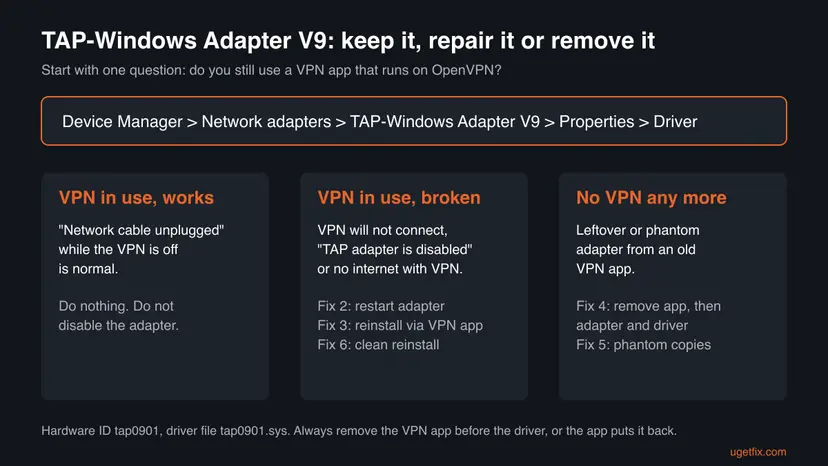
How to fix or remove TAP-Windows Adapter V9 on Windows 11 and Windows 10
Start with Fix 1: it tells you which VPN app owns the adapter, and that decides everything else. Fixes 2 and 3 are for people who still use the VPN. Fixes 4 and 5 are for people who want the adapter gone. You need an administrator account for all of them.
| What you see or have | Start with |
|---|---|
| You do not know where the adapter came from | Fix 1 |
| The VPN app will not connect or says the TAP adapter is disabled | Fix 2, then Fix 3 |
| A yellow sign on TAP-Windows Adapter V9 in Device Manager | Fix 3 |
| You no longer use any VPN and want the adapter gone | Fix 4 |
| Several TAP adapters, or phantom ones under hidden devices | Fix 5 |
| You use two VPN apps, or every reinstall fails | Fix 6 |
| No internet even after the adapter is removed | Fix 7 |
Fix 1. Find which VPN app installed TAP-Windows Adapter V9
3 minutesNo riskEveryone who sees the adapter, before changing anything.
The adapter belongs to a VPN app, and that app puts it back if you remove the driver alone. Knowing the owner tells you whether to repair the adapter through the app or remove the app first.
- Right-click Start and select Device Manager.
- Expand Network adapters and find TAP-Windows Adapter V9 (or a TAP adapter with another name).
- Right-click it, select Properties and open the Driver tab. Note Driver Provider, Driver Date and Driver Version.
- Open the Details tab, select Hardware Ids and check that it reads
tap0901. - Open Settings > Apps > Installed apps (Windows 10: Settings > Apps > Apps & features) and look for OpenVPN, OpenVPN Connect, a VPN app or TAP-Windows.

It worked if: You know whether a VPN app on the PC still uses the adapter, and whether there is more than one TAP adapter.
If not: If no VPN app is installed, go to Fix 4. If the adapter is not listed at all, see Fix 5 for hidden copies.
Fix 2. Disable and enable the TAP adapter in Network Connections
2 minutesNo riskPeople who still use the VPN and whose app hangs on connecting or reports that the TAP adapter is disabled.
A TAP adapter left in a stuck state after sleep or a failed connection often recovers when Windows restarts it. VPN apps also refuse to connect when the adapter is disabled, so it must be enabled for the VPN to work.
- Close the VPN app completely, including its icon in the notification area.
- Press Win + R, type
ncpa.cpland press Enter to open Network Connections. - Find the connection whose description reads TAP-Windows Adapter V9.
- Right-click it and select Disable. Wait about ten seconds.
- Right-click it again and select Enable.
- Start the VPN app and connect.
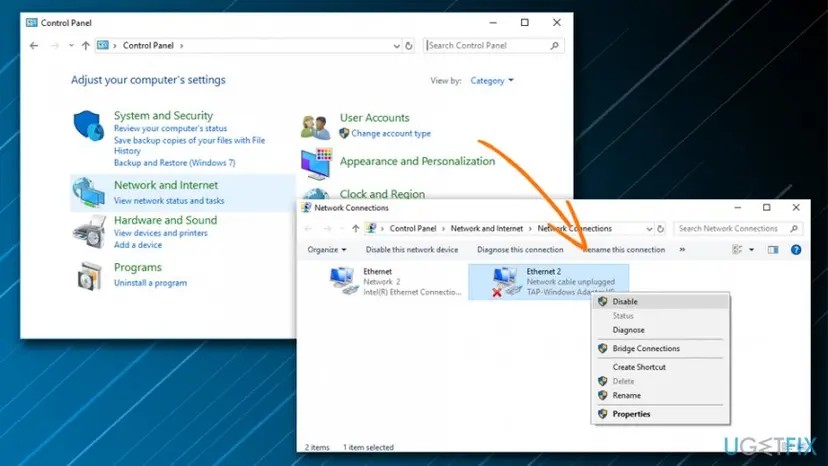
Disabling the adapter does not fix an internet problem for good: many VPN apps turn it back on at start, and the ones that do not will fail to connect. If you want it gone, use Fix 4.
It worked if: The connection changes from Network cable unplugged to a network name while the VPN is connected.
If not: If the VPN still fails or the adapter shows a yellow sign, go to Fix 3.
Fix 3. Reinstall TAP-Windows Adapter V9 through the VPN app
10 minutesLow riskPeople who use the VPN and see a yellow sign, a TAP driver error or a VPN that never connects.
Each VPN app ships the TAP driver version it was tested with. Removing the broken device and letting the app install its own copy replaces a damaged or outdated driver with the right one.
- In Device Manager, right-click TAP-Windows Adapter V9 and select Uninstall device.
- Leave Attempt to remove the driver for this device unticked (Windows 10: Delete the driver software for this device) and select Uninstall.
- Restart the PC.
- Open the VPN app. If it offers to install a missing driver or network adapter, accept.
- If it does not, open Settings > Apps > Installed apps, select the VPN app, then More > Modify or Repair if offered; otherwise uninstall it and install the latest version from the VPN provider's own site.
- Allow the driver when Windows asks whether to install software for the network adapter.
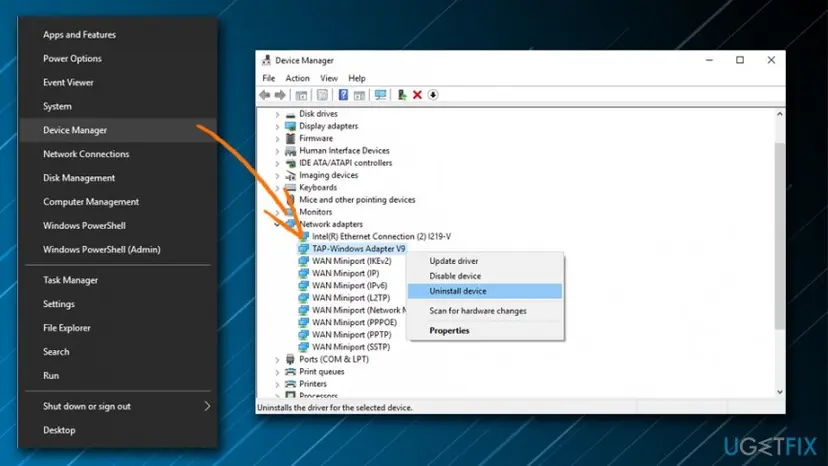
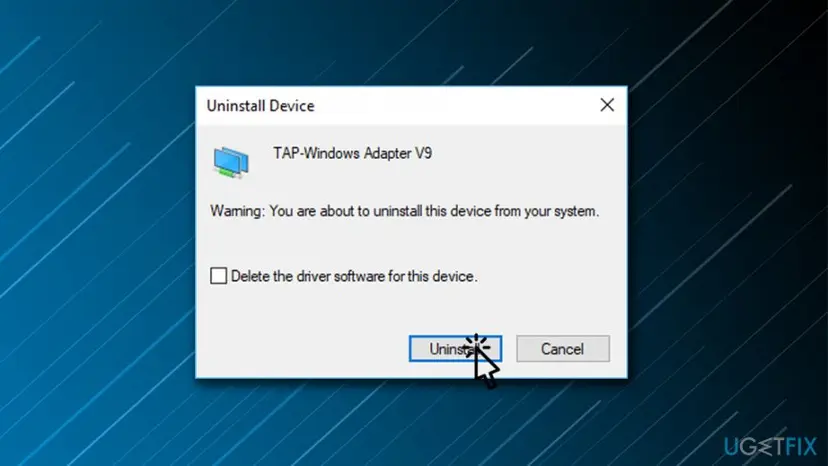
It worked if: A new TAP-Windows Adapter V9 appears under Network adapters without a warning sign, and the VPN connects.
If not: If the VPN app cannot install the driver, or the same error comes back, go to Fix 6.
Fix 4. Uninstall TAP-Windows Adapter V9 when you no longer use a VPN
10 minutesRead the warningPeople with no VPN app in use who want the adapter gone, or whose adapter keeps coming back.
The adapter re-enables itself because a VPN app or its service still installs it. Removing the app first stops that, and removing the driver package from the driver store stops Windows from setting the device up again.
Uninstalling a VPN app can delete its connection profiles. If you might use the VPN again, export your OpenVPN .ovpn profiles or note your account details before you start.
- Uninstall every VPN app that uses OpenVPN, and TAP-Windows if it is listed, from Settings > Apps > Installed apps.
- Restart the PC and open Device Manager. If TAP-Windows Adapter V9 is still under Network adapters, right-click it and select Uninstall device.
- Tick Attempt to remove the driver for this device and select Uninstall.
- Right-click Start and select Terminal (Admin) (Windows 10: Windows PowerShell (Admin)).
- Run
pnputil /enum-drivers /class Netand look for entries whose Original Name isoemvista.infwith an OpenVPN or TAP provider. Note their Published Name, such asoem42.inf. - Run
pnputil /delete-driver oem42.inf /uninstallwith your own number, once for each TAP entry. - Restart the PC.
List network driver packages, then delete the TAP one (Terminal as administrator)
pnputil /enum-drivers /class Net
pnputil /delete-driver oem42.inf /uninstall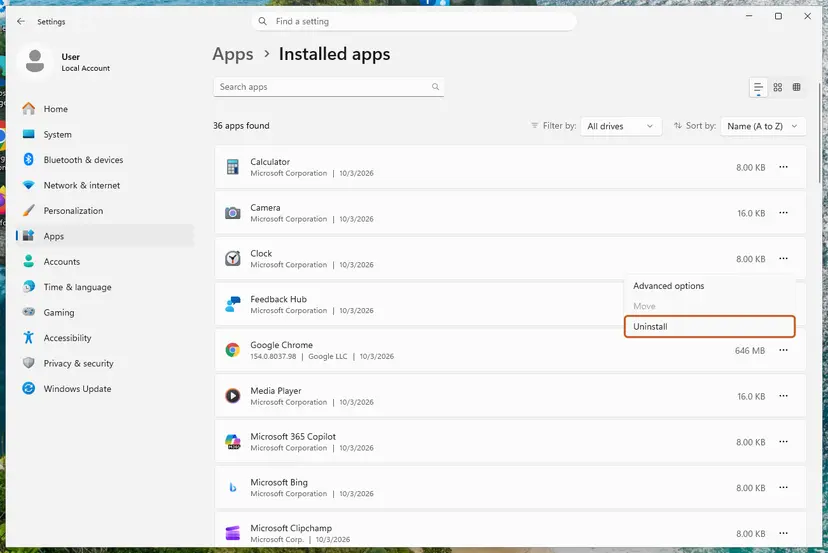
The /class filter of pnputil /enum-drivers exists from Windows 11 version 21H2. On Windows 10 run pnputil /enum-drivers alone and scroll through the list. The general uninstall steps are in Uninstall a program or app in Windows.
It worked if: No TAP adapter under Network adapters after the restart, and no oemvista.inf TAP entry in pnputil /enum-drivers.
If not: If a TAP adapter comes back, a VPN app or its service is still installed: check Installed apps again, then see Fix 5 for hidden copies.
Fix 5. Remove phantom TAP-Windows adapters that only show as hidden devices
5 minutesLow riskPeople with TAP-Windows Adapter V9 #2, #3 or more, or adapters listed only as hidden or disconnected devices.
Every VPN install or reinstall can add another TAP instance, and uninstalled ones stay in Windows as phantom devices. They are harmless one by one, but piles of them confuse VPN apps that pick the first TAP adapter they find.
- In Device Manager, select View > Show hidden devices.
- Expand Network adapters. Faded icons are phantom adapters that are not present now.
- Right-click each faded TAP-Windows Adapter V9 entry and select Uninstall device, then Uninstall.
- Or, in Terminal (Admin), list them with the first command below and remove each one by its Instance ID with the second.
- Restart the PC and check Device Manager again with hidden devices shown.
List disconnected network devices and remove one (Terminal as administrator)
pnputil /enum-devices /disconnected /class Net
pnputil /remove-device "ROOT\NET\0001"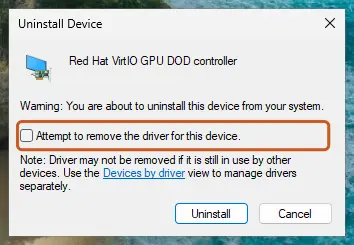
pnputil /enum-devices needs Windows 10 version 1903 or later and /remove-device needs version 2004 or later, so both work on Windows 10 22H2 and Windows 11. Replace ROOT\NET\0001 with the Instance ID that the list shows for the TAP adapter.
It worked if: Only the TAP adapters your current VPN needs remain, usually one, and no faded TAP entries.
If not: If removed copies keep returning, a VPN app is still adding them; go back to Fix 4 or Fix 6.
Fix 6. Do a clean TAP driver reinstall when VPN apps conflict
20 minutesRead the warningPeople who use more than one VPN app, or whose TAP driver install fails every time.
OpenVPN notes that almost every OpenVPN-based VPN service ships its own TAP driver, and a bad installer can leave a version that conflicts with the official one. Removing all of them and installing one clean copy is OpenVPN's own sequence for this.
This removes every VPN app on the PC. Copy your OpenVPN configuration files and note the login details of each VPN service before step 2.
- Back up the configuration files of every VPN app.
- Uninstall the official OpenVPN client with its own uninstaller, then every other VPN app. Some are not called OpenVPN at all.
- Remove every TAP adapter in Device Manager, including hidden ones (Fix 5).
- Delete every TAP driver package from the driver store with
pnputil(Fix 4, steps 5 and 6). - Restart the PC.
- Install only the VPN app you want to use, in its latest version, and let it install its TAP driver.
Install a second VPN app only after the first one works, and test it afterwards. If the second one breaks the first, they ship conflicting TAP drivers and you will have to choose one.
It worked if: One TAP-Windows Adapter V9 without a warning sign, and the VPN app connects.
If not: If even a clean install fails, read the driver log described in Still not working below.
Fix 7. Reset the Windows network stack if the internet stays down
10 minutesRead the warningPeople who still have no internet after the TAP adapter is repaired or removed.
VPN apps change routes, DNS and firewall rules. If an app was removed badly, those changes can outlive the TAP adapter. A network reset removes and reinstalls all network adapters and returns the settings to default.
Saved Wi-Fi passwords, manual IP and DNS settings, and other VPN and virtual adapters are removed. Note your Wi-Fi password and any manual settings first.
- Open an elevated command window. Right-click Start and select Terminal (Admin), or type cmd in the search box, right-click Command Prompt and select Run as administrator. Select Yes when Windows asks for permission.
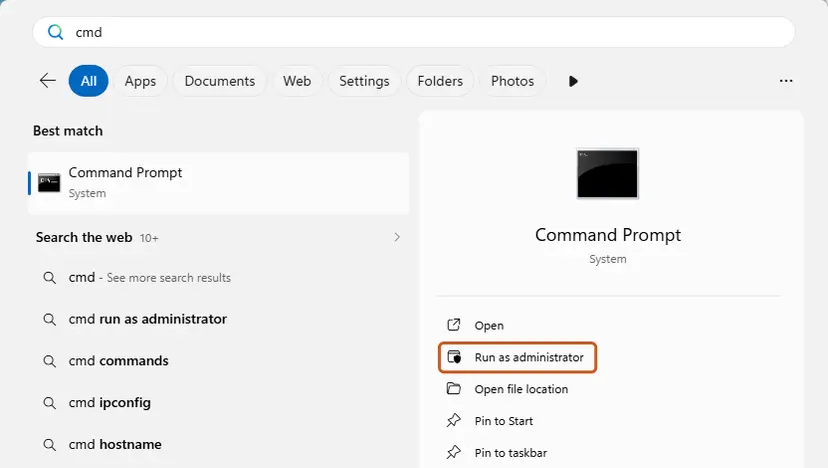
Search for cmd and choose Run as administrator. Screenshot: Windows 11 26H2. - Flush the DNS cache. Type the command below and press Enter. Windows forgets the website addresses it looked up earlier and asks for them again.
ipconfig /flushdns - Reset Winsock. Type the command below and press Enter. It returns the Windows sockets catalog to its default state.
netsh winsock reset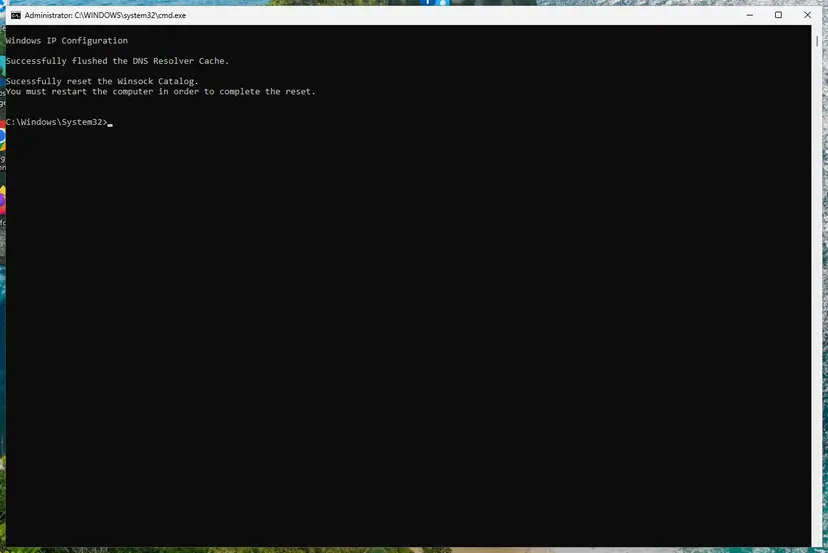
Both commands report success; the Winsock reset asks for a restart. Screenshot: Windows 11 26H2. - Reset TCP/IP. Type the command below and press Enter. If you entered an IP address or DNS server by hand, note it first: you may need to enter it again.
netsh int ip reset - Get a new IP address. Run these two commands one after the other. The connection drops for a moment between them.
ipconfig /release ipconfig /renew - Restart the PC. Restart Windows so the Winsock and TCP/IP resets take effect, then test the connection. If it still does not work, continue with the network reset below.
- Open Network reset. Open Settings > Network & internet > Advanced network settings and select Network reset.
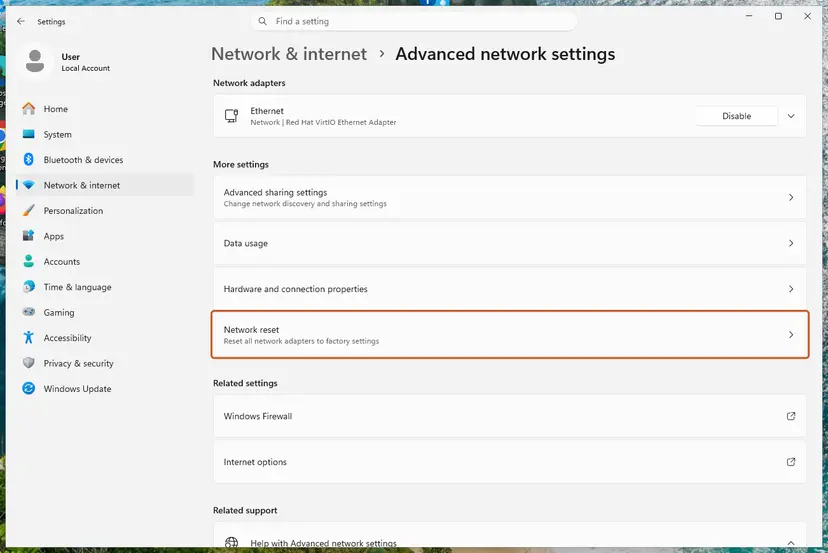
Network reset is under More settings in Advanced network settings. Screenshot: Windows 11 26H2. - Reset now. Select Reset now, then Yes to confirm. Windows removes and reinstalls all network adapters and restarts the PC.
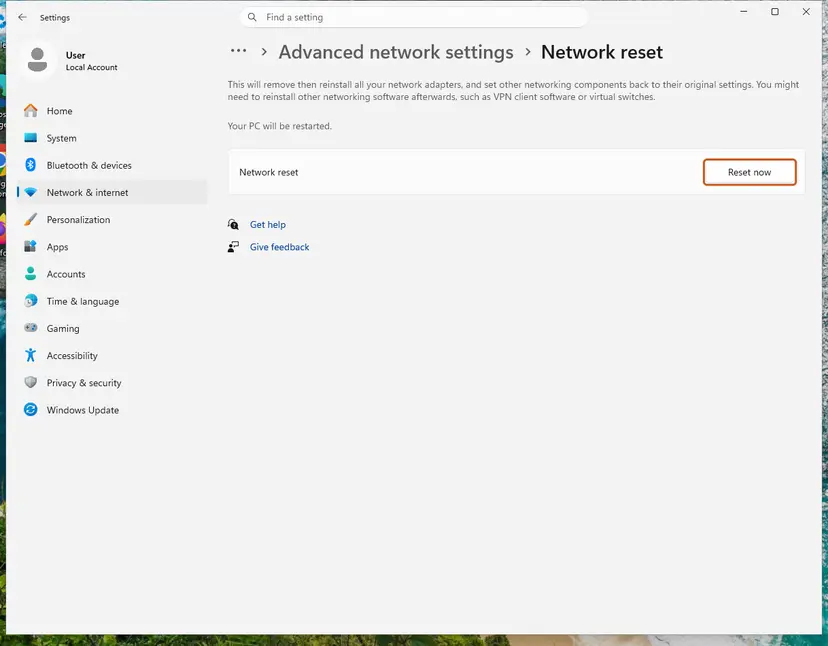
Network reset warns that VPN software or virtual switches may need to be reinstalled. Screenshot: Windows 11 26H2. - Reconnect. After the restart, connect to your Wi-Fi network again (you will need its password) and reinstall or reconfigure VPN software if it stopped working.
These steps were written for Windows 11 24H2 and later. The full page with the other versions and what each result means: Reset the network and flush DNS
It worked if: After the restart and reconnecting to Wi-Fi, websites load normally.
If not: If the internet still fails, follow How to check your internet connection in Windows; the problem is then outside the TAP adapter.
TAP-Windows Adapter V9 still not working: the log to read
Windows writes every driver install to C:\Windows\INF\setupapi.dev.log. Open it in Notepad, press Ctrl + End and search upward for tap0901. The lines below say whether the install failed while importing the driver into the driver store, copying it, or loading it. OpenVPN asks for exactly these lines in bug reports.
- Driver signature errors: the TAP driver in your VPN app is too old for Windows 11 or Windows 10 signing rules. Install the VPN provider's latest version; do not turn off driver signature checks.
- Access denied: run the VPN installer as administrator, or ask whoever manages the PC; company PCs often block driver installs.
- It installs on another PC but not on yours: OpenVPN says the problem is then in your system, not in the driver. Fix 6 and Fix 7 are the next steps.
- Your VPN provider has its own support page for TAP driver errors: use it, because some apps use a renamed TAP driver.
The VPN app's name and version, the Driver Provider and Driver Version from Fix 1, your Windows version from winver, and the setupapi.dev.log lines for tap0901.
Keep TAP-Windows Adapter V9 from causing problems again
- Keep one VPN app that uses OpenVPN, in its latest version.
- Uninstall a VPN app with its own uninstaller before trying another one.
- Check View > Show hidden devices after VPN changes and remove faded TAP copies.
- Download TAP driver installers from driver download sites.
- Leave the adapter disabled to fix the internet: it hides the cause.
- Turn off driver signature checks or Secure Boot to load an old TAP driver.
Windows 10 left support on 14 October 2025. TAP drivers still install on Windows 10 22H2, but VPN providers may stop testing their apps on it, so a TAP error there is one more reason to move to Windows 11.
Frequently asked questions
What is TAP-Windows Adapter V9?
It is a virtual network adapter driver from the OpenVPN project. VPN apps that use OpenVPN install it so they can pass your traffic through an encrypted tunnel as if it were a normal network card. It has no hardware behind it and Windows does not install it by itself. Its hardware ID is tap0901 and its driver file is tap0901.sys. If you installed a VPN app, that app is almost certainly where it came from (Fix 1 shows how to check).
Is TAP-Windows Adapter V9 safe?
Yes, when a VPN app you installed put it there. The driver is open source, maintained by the OpenVPN project and signed for Windows. It does nothing until a VPN app opens a tunnel through it. Be careful only if you never installed any VPN: then find out which program added it with Fix 1, and run a scan with How to scan for malware with Microsoft Defender if the program is unknown to you.
Can I disable or uninstall TAP-Windows Adapter V9?
You can, but only uninstall it if you no longer use a VPN. A VPN app that uses OpenVPN cannot connect without the adapter and will either turn it back on or fail. To remove it for good, uninstall the VPN app first, then the device and its driver package, as in Fix 4. Disabling it to fix an internet problem only hides the cause; use Fix 2 or Fix 3 instead.
What is TAP-Windows Provider V9 in Network adapters?
TAP-Windows Provider V9 is the same OpenVPN TAP driver shown with a different name. Some VPN apps rename the adapter so you can tell it apart from other TAP adapters, and the provider shown on the Driver tab may read OpenVPN Technologies, Inc. or the VPN company. Treat it like TAP-Windows Adapter V9: keep it while that VPN app is in use, and remove the app and then the adapter if you no longer use it.
What is TAP Provider V9 for Private Tunnel?
It is a TAP adapter installed by Private Tunnel, a VPN app that uses OpenVPN, under its own name. It works the same way as TAP-Windows Adapter V9. If you still use Private Tunnel, leave it alone. If you do not, uninstall Private Tunnel from Installed apps first, then remove the adapter and its driver package with Fix 4. If it keeps coming back, check for a second VPN app.
What is a phantom TAP-Windows Adapter V9?
It is a copy of the adapter that Windows still remembers but that is not present now, usually left by a VPN app that was reinstalled or removed. Device Manager hides these until you select View > Show hidden devices, and then shows them with faded icons. They take no resources, but many of them can confuse VPN apps. Fix 5 removes them one by one or with pnputil.
Why does TAP-Windows Adapter V9 say Network cable unplugged?
Because no VPN tunnel is open. The TAP adapter only reports a connection while a VPN app is connected through it, so Network cable unplugged or Disconnected is its normal state the rest of the time. It does not affect your normal Wi-Fi or Ethernet connection. If it still says this while the VPN app claims to be connected, restart the adapter (Fix 2) or reinstall it (Fix 3).
Why can I not connect to the internet when TAP-Windows Adapter V9 is enabled?
The adapter itself does not block the internet; the VPN app's settings do. A VPN that is connecting but never finishes, or a kill switch that blocks traffic while the VPN is down, cuts the connection. Close the VPN app and test again. If the internet then works, repair the VPN with Fix 3. If it stays down even with no VPN app running, remove leftovers (Fix 4) and reset the network (Fix 7).
What does "All TAP-Windows adapters on this system are currently in use or disabled" mean?
OpenVPN shows this when it cannot find a free TAP adapter: the only one is disabled, or another VPN connection is already using it. Enable the adapter in Network Connections (Fix 2) and close other VPN apps. If you need two tunnels at once, OpenVPN allows extra TAP instances; its addtap.bat script in C:\Program Files\TAP-Windows\bin adds one when run as administrator.
Where can I download the TAP-Windows Adapter V9 driver for Windows 11 or 10?
Get it from your VPN app: reinstalling the app installs the TAP driver version it needs (Fix 3). For the plain OpenVPN client, the TAP driver comes with the official OpenVPN installer from the OpenVPN project. Avoid stand-alone driver sites. The current tap-windows6 driver supports Windows 7 and later, including Windows 11 on ARM64 PCs.
Sources
- OpenVPN community wiki: Managing TAP-Windows drivers (community.openvpn.net)
- OpenVPN on GitHub: tap-windows6, TAP-Windows driver (NDIS 6) (github.com)
- Microsoft Learn: PnPUtil command syntax (learn.microsoft.com)
Did this fix work?
One click, no account. It tells the next reader which guides are worth their time.
Questions and experiences: TAP-Windows Adapter V9: what it is and how to fix or remove it on Windows 11 and 10
Still broken, or found a fix we did not cover? Ask here: members and our editors answer. Reading is open; writing needs a free account.
…