
How to fix Windows Activation error 0xC004F211?

Prefer to fix it yourself? The manual steps follow.
- 7methods
- 5 to 30 minutes
- Easy
Applies to Windows 11 and Windows 10 Home and Pro after a motherboard, CPU or other major hardware change; work and school PCs are covered separately
7 methods in this guide
Hello, I recently bought a new motherboard because my old one died, and I replaced it without problems. I booted Windows and everything seemed to work fine, but I noticed that I am being asked to activate Windows again. I tried, and I get the 0xC004F211 error instead of a successful activation. Please advise on any solutions.
Error 0xC004F211 means Windows noticed that the hardware changed, most often the motherboard, and can no longer find a licence that matches this PC. Whether you can fix it for free depends on the licence: a digital licence linked to your Microsoft account or a retail key can be reactivated, a licence preinstalled by the PC maker usually cannot. Start with the Activation troubleshooter.
Open Settings > System > Activation, select Troubleshoot, choose I changed hardware on this device recently, sign in with the Microsoft account the licence was linked to and pick your old PC from the list (Fix 1). No linked account? Enter the retail product key you bought (Fix 2). If Windows came preinstalled on the PC and you replaced the motherboard yourself, Microsoft says you may need a new licence (Fix 6).
| Error | 0xC004F211: "Windows reported that the hardware of your device has changed." |
|---|---|
| Where it appears | Settings > System > Activation (Windows 10: Settings > Update & Security > Activation), under Windows isn't activated, the first time you start Windows after a hardware change. |
| Main cause | A significant hardware change, such as a new motherboard, so Windows no longer finds a licence that matches the device. |
| Fastest fix | The Activation troubleshooter with I changed hardware on this device recently, signed in with the Microsoft account linked to the licence (Fix 1). |
| Also written as | 0xc004f211, C004F211, "Error code: 0xC004F211", "We can't activate Windows on this device at the moment", and the typo oxc004f211. Its sibling 0xC004F213 means no product key was found. |
| Affects | Windows 11 and Windows 10, Home and Pro. Windows 10 reached end of support on 14 October 2025, but its activation works the same way. |
| Microsoft's status | Expected behaviour, not a bug. Microsoft documents an exception path for licences linked to a Microsoft account, and says a preinstalled licence on a replaced motherboard may need a new licence. |
| When it is not fixable for free | An OEM licence (Windows came with the PC) after you changed the motherboard yourself, or a licence that was never linked and has no key. |
| Time to fix | About 5 minutes with a linked account or a retail key. A new licence takes as long as the purchase. |
Facts checked on 14 October 2026. Steps written for Windows 11 (25H2 and 26H2) and Windows 10 22H2.
What Windows activation error 0xC004F211 means
Microsoft's list of activation errors gives the code one line: "Windows reported that the hardware of your device has changed." Behind it is the way activation works. Microsoft describes activation as a process that pairs the product key or digital entitlement with the hardware configuration of the device. It does not judge whether your copy is genuine.
When Windows starts on hardware that differs a lot from what it was activated on, it looks for a licence that matches the new hardware and finds none. The motherboard is the example Microsoft gives every time. Its page on activation problems also names a replaced hard drive. A new graphics card, more memory or a new SSD for data on its own is not what Microsoft describes as significant.
| What you see | Where | What it tells you |
|---|---|---|
| Windows reported that the hardware of your device has changed. Error code: 0xC004F211 | Activation page, after Activate now or Troubleshoot | The licence on record belongs to the old hardware. |
| We can't activate Windows on this device at the moment. Error code: 0xC004F211 | Activation page on Windows 10 | The same code, with Windows 10's wording. |
| Windows isn't activated / Activate Windows watermark | Desktop, Settings home | Only the result. The code on the Activation page tells you why. |
| 0xC004F213: no product key was found on your device | Activation page | A close sibling. Microsoft lists it in the same row and gives the same steps. |
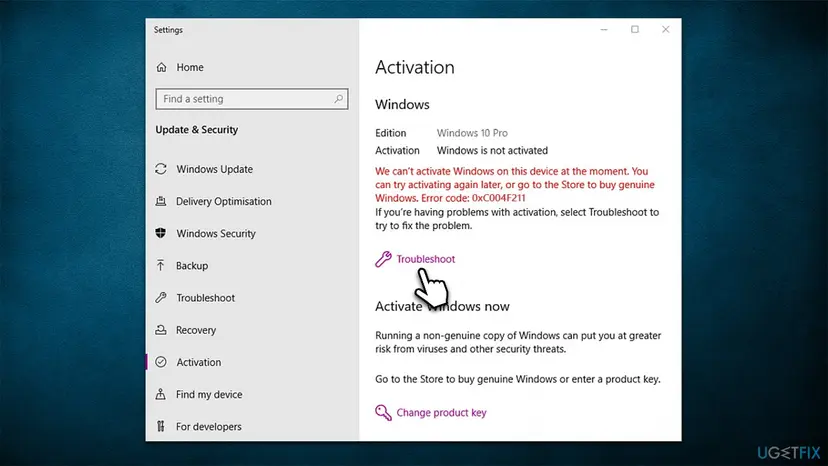
The error does not delete files or stop Windows from starting. Microsoft's licence terms say reactivation may be triggered by changes to your device's components and that you may receive reminders to get a proper licence. So you have time to pick the right fix, but the terms allow use only once Windows is properly activated.
Why error 0xC004F211 appears, from most to least common
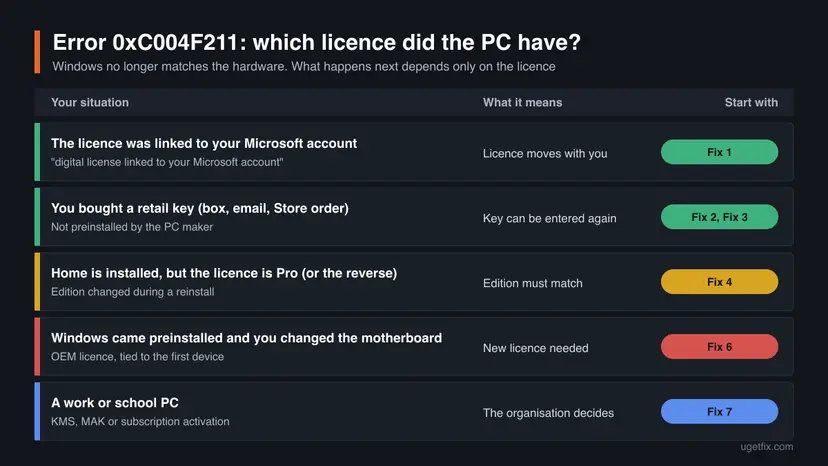
Every case starts with a hardware change, or with something Windows reads as one. What decides the fix is the kind of licence the PC had before the change. Find your row, then go to its fix.
| Cause | How often | How to tell | Fix |
|---|---|---|---|
| You replaced the motherboard (or the whole PC was rebuilt) and the digital licence was linked to your Microsoft account. | Most often | Before the change the Activation page said activated with a digital license linked to your Microsoft account. | Fix 1 |
| Same change, the licence came from a retail key you still have. | Often | You have a box card, a confirmation email or a Microsoft Store order. | Fix 2, Fix 3 |
| Windows was reinstalled with another edition after the repair, for example Pro on a Home licence. | Sometimes | The edition on the Activation page differs from what you bought. | Fix 4 |
| The licence was a digital one but never linked to an account, or you signed in with another account. | Sometimes | The troubleshooter does not list your old PC. | Fix 5 |
| Windows came preinstalled on the PC (OEM) and the motherboard was replaced. | Often after a DIY repair | A sticker or COA from the PC maker, no key of your own. | Fix 6 |
| A work or school PC whose activation is managed by the organisation. | Rarely at home | Settings says some settings are managed by your organisation. | Fix 7 |
Users also report the error on laptops where they changed nothing, for example after a repair under warranty. In that case the repair shop replaced the motherboard, and the licence question is for the manufacturer, see Fix 6. We found no Microsoft statement that a BIOS update alone triggers the code, so treat that as unconfirmed.
Find out which licence the PC had before the change
Microsoft's activation pages sort licences by how you got Windows. You do not need to remember a date or a receipt to start: the table below and two short commands tell you enough.
| How you got Windows | What you have | After a motherboard change |
|---|---|---|
| Free upgrade from Windows 10 (or from 7 or 8.1 in the past) | Digital licence | Reactivates with the troubleshooter if it was linked to your Microsoft account. |
| Bought in the Microsoft Store app | Digital licence tied to the buying account | Same as above. The buying email is the account to use. |
| Box copy or digital copy from a retailer | 25-character product key | Enter the same key again. The licence terms allow moving stand-alone software to another device you own. |
| Came with the PC, or a refurbished PC | Product key from the PC maker (OEM) | Microsoft: you may need to buy a new licence. The PC maker or refurbisher is the contact. |
| Volume licence, work or school | KMS, MAK or a subscription | Handled by the organisation's administrator. |
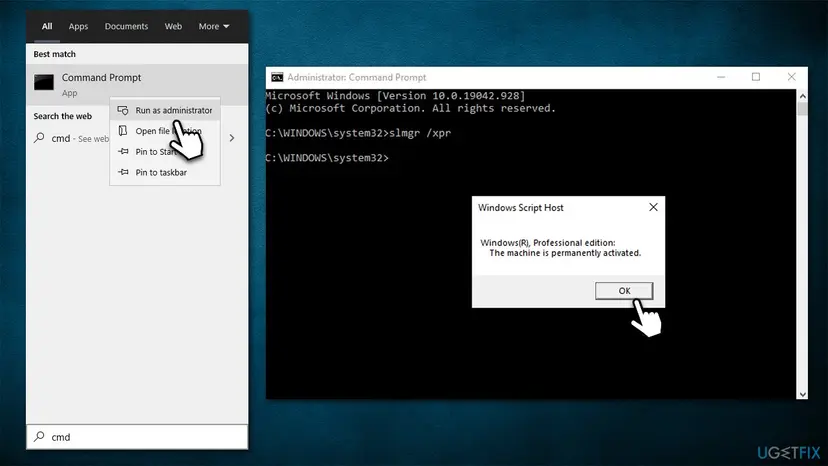
To see what Windows itself says, open Command Prompt (no administrator rights are needed for these two) and run:
Show the licence channel and the activation status
slmgr /dli
slmgr /xpr
slmgr /dliopens a Windows Script Host box. The Description line names the channel, for example RETAIL, OEM_DM or VOLUME_KMSCLIENT, and License Status shows whether Windows is licensed.slmgr /xprshows the expiration date. Microsoft notes that retail and MAK activation is perpetual, so on a home PC a working activation reads as permanently activated.- The channel is a strong hint, not a verdict: an upgrade from a preinstalled Windows keeps the preinstalled rules even when the key is later replaced.
Older guides read the key stored in the PC's firmware with a wmic command. Microsoft removed WMIC from supported Windows 11 versions, starting with the upgrade to 25H2. The PowerShell equivalent is (Get-CimInstance -ClassName SoftwareLicensingService).OA3xOriginalProductKey. Microsoft does not document that property in its public class reference, so we list it as a hint only. A key it returns on a replacement board belongs to that board, not to your old one.
How to fix Windows activation error 0xC004F211
Fixes 1 to 3 reactivate the licence you already have, in the order Microsoft gives them. Fix 4 is for a wrong edition, Fix 5 for a licence the troubleshooter cannot find. Fixes 6 and 7 are for a preinstalled licence and for work PCs, where the answer is a person, not a setting. Never use an activator tool or a cheap key site: see the last section.
| What you see or have | Start with |
|---|---|
| Before the change the Activation page said linked to your Microsoft account. | Fix 1 |
| You have a 25-character key you bought yourself. | Fix 2, then Fix 3 |
| The Activation page shows Home but you paid for Pro, or the reverse. | Fix 4 |
| The troubleshooter does not list your old PC, and you bought Windows from Microsoft. | Fix 5 |
| Windows came with the PC and you replaced the motherboard yourself. | Fix 6 |
| The PC was repaired under warranty by the manufacturer. | Fix 6, the manufacturer part |
| A work or school PC. | Fix 7 |
Fix 1. Reactivate with the Activation troubleshooter and your Microsoft account
5 minutesNo riskYour digital licence was linked to your Microsoft account before the hardware change.
This is the exception path Microsoft offers for moving a licence after a hardware change. The troubleshooter looks up the devices linked to your account, and you tell it that this PC is the old one with new parts.
You need an internet connection and an administrator account. If the PC is offline, check that first: How to check your internet connection in Windows
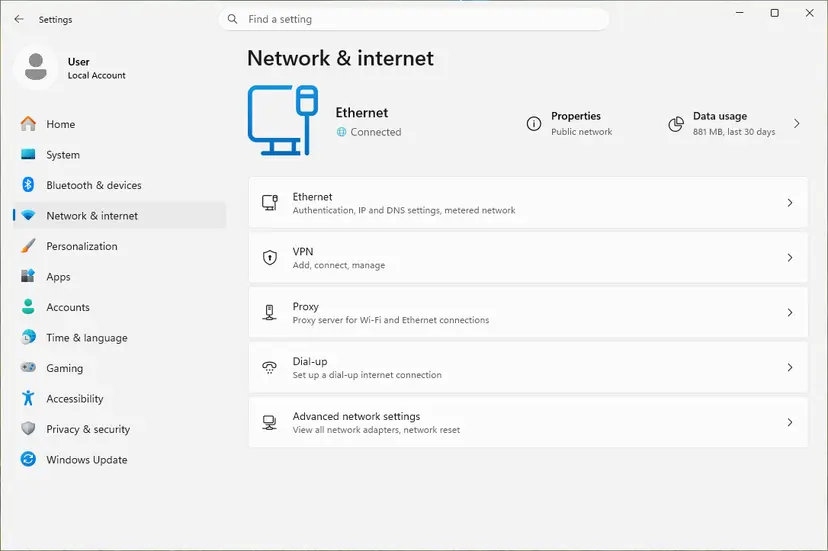
- Sign in to Windows with an administrator account. Settings > Accounts > Your info shows Administrator under your name.
- Open Settings > System > Activation. On Windows 10 it is Settings > Update & Security > Activation.
- Select Troubleshoot. It is shown only while Windows is not activated. The troubleshooter reports Windows can't be activated on your device.
- Select I changed hardware on this device recently, then Next.
- Enter the Microsoft account and password the licence was linked to, then select Sign in.
- In the list of devices linked to the account, find the old PC and tick This is the device I'm using right now.
- Select Activate.
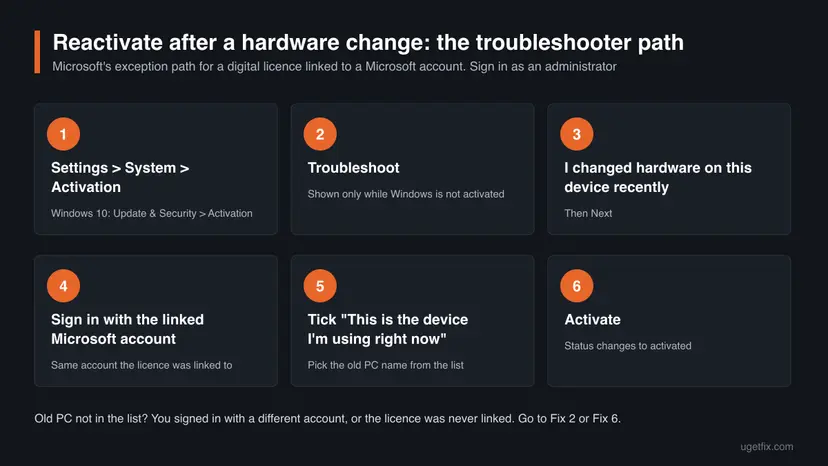
Users on Microsoft's forum report removing the old device from their Microsoft account before the change, and the troubleshooter then had nothing to offer. Leave the old device in the list at account.microsoft.com until Windows is activated again.
Microsoft adds a condition: the edition must be the same before and after the change. A Windows 11 Home licence does not reactivate Windows 11 Pro. If the edition differs, use Fix 4 first and come back here.
It worked if: The Activation page says Windows is activated with a digital license linked to your Microsoft account, and the watermark disappears after a restart.
If not: If the PC is not in the list, sign in with every Microsoft account you have used on it. Still nothing: go to Fix 2 if you have a key, or Fix 5.
Fix 2. Enter the product key you used before the change
3 minutesNo riskYou bought a retail key, or upgraded with a key, and the licence was not linked.
Microsoft's error list gives this as the second way for 0xC004F211: a key that was used on the device before the hardware change can be entered again. A retail key belongs to you, not to the motherboard.
- Find the key: the card in the retail box, the confirmation email from the shop, or your Microsoft account Order history if you bought it from Microsoft online.
- Open Settings > System > Activation (Windows 10: Settings > Update & Security > Activation).
- Select Change product key.
- Type the 25-character key in the form XXXXX-XXXXX-XXXXX-XXXXX-XXXXX and select Next.
- Select Activate and wait for the result.
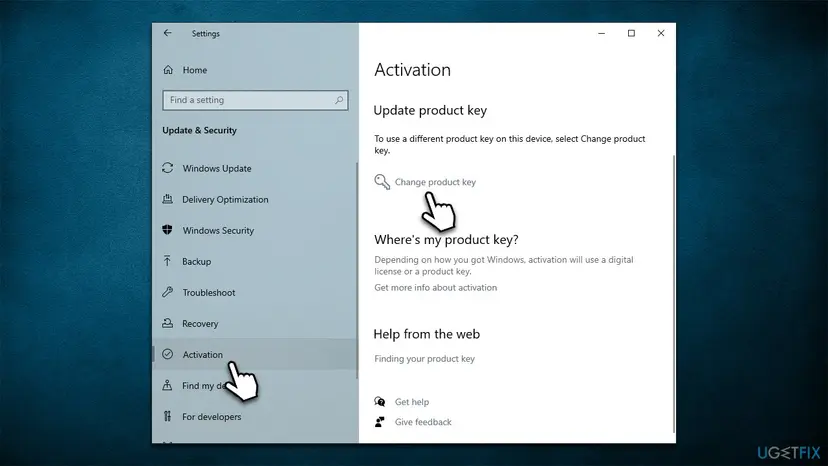
Older guides suggest typing the key from an old Windows 7 PC. Microsoft told device partners in September 2023 that the free upgrade offer ended in 2016 and the installation path for Windows 7 and 8 upgrades is now removed. Use a Windows 10 or Windows 11 key.
Microsoft keeps a record of product keys only for purchases from its own online store. A key from any other shop is in that shop's email or account, or in the box.
It worked if: The Activation page says Windows is activated, and the key's last five characters match the key you entered.
If not: If Settings refuses the key or the page hangs, enter it from Command Prompt in Fix 3, which shows a clearer message.
Fix 3. Install the key and activate from Command Prompt
5 minutesLow riskSettings does not accept the key, or you want the exact error message.
slmgr is the script Microsoft ships with Windows to install keys and start activation. It reports the result in its own words, which often explains what the Settings page hides, such as a key for another edition.
- Type cmd in the search box on the taskbar, select Run as administrator next to Command Prompt, then Yes.
- Install your key, replacing the X characters with it. Microsoft notes that an installed key is silently replaced, and that the PC should be restarted afterwards.
slmgr /ipk XXXXX-XXXXX-XXXXX-XXXXX-XXXXX - Restart the PC and open Command Prompt as administrator again.
- Start online activation:
slmgr /ato - Check the result in detail:
slmgr /dlv
If online activation keeps failing, Microsoft's activation help points to phone activation: type SLUI 04 in the search box on the taskbar, open it and follow the screen. Microsoft says it cannot be used for Windows Pro for Workstations or Pro Education. We could not confirm that the phone line accepts every key after a hardware change.
Do not use slmgr /rearm, /upk or /cpky here. They reset timers or remove keys and do nothing for this error.
It worked if: slmgr /ato reports that the product was activated successfully, and slmgr /dlv shows License Status: Licensed.
If not: A message that the key is for another edition means Fix 4. A message that the key is blocked or used too often means the key cannot move: Fix 5 or Fix 6.
Fix 4. Install the same edition your licence is for
10 minutes to 1 hourRead the warningWindows was reinstalled after the repair and the edition changed.
Microsoft says a digital licence and a product key reactivate only if the edition, Home or Pro, is the same before and after the hardware change. A repair shop or a reinstall can quietly change it.
| Your licence | Installed now | What to do |
|---|---|---|
| Pro | Home | Run the troubleshooter from Fix 1. Microsoft lists Upgrade to Windows 11 Pro, then Start upgrade, as the way to use a Pro licence. Your files stay. |
| Home | Pro | Microsoft's answer is a clean installation of Home with the media creation tool. Skip the product key during setup: a Home digital licence activates by itself. |
Installing Home over Pro this way removes your apps, settings and files from the system drive. Back up everything you want to keep first: Back up your files (Windows Backup, File History, Time Machine). Sign in with the Microsoft account linked to the licence when setup asks.
- Check the edition on Settings > System > Activation and compare it with your receipt, key card or Store order.
- If the licence is Pro and Home is installed, select Troubleshoot on the same page and follow Upgrade to Windows 11 Pro.
- If the licence is Home and Pro is installed, back up your files and create installation media from Microsoft's Windows 11 download page.
- During setup choose Windows 11 Home, and select I don't have a product key when asked.
- After setup, sign in with your Microsoft account and open Settings > System > Activation.
It worked if: The edition on the Activation page matches the licence and the status changes to activated, at once or after Fix 1.
If not: If the matching edition still shows 0xC004F211, run Fix 1 again now that the edition is right.
Fix 5. Ask Microsoft support to look up a licence the troubleshooter cannot find
15 to 30 minutesNo riskYou bought Windows from Microsoft or upgraded, but the old PC is missing from the list.
The troubleshooter only sees licences linked to the account you sign in with. Microsoft's reactivation page ends with one more step for everyone else: contact customer support, who can check a purchase that the account does not show.
- Collect your proof: the Microsoft Store order or confirmation email, the account it was bought with, and a photo of any key card.
- Run
slmgr /dlvin Command Prompt and save a screenshot of the window. - Note the exact error from the Activation page, 0xC004F211, and what you changed: motherboard, CPU or the whole PC.
- Open Microsoft's contact page at support.microsoft.com/contactus and choose Windows activation.
- Give support the facts above in one message.
One user on Microsoft's forum reports that the Contact support link on the Activation page failed with a message about organisational accounts when they signed in with a personal account. If that happens to you, start from the contact page in a browser instead.
It worked if: Support confirms the licence and reactivates Windows, or tells you plainly that the licence cannot move to the new hardware.
If not: If support says the licence was preinstalled on the old PC, read Fix 6. That answer is final under the licence terms.
Fix 6. A preinstalled (OEM) licence after a motherboard change: what Microsoft says
10 minutes, or the time of a purchaseNo riskWindows came with the PC, and its motherboard was replaced.
Microsoft's error list says it directly: if Windows came preinstalled on your device and you replaced the motherboard, you may need to purchase a new license. The Windows 11 OEM licence terms allow transferring a preinstalled licence only with the licensed device.
| Who changed the motherboard | What to do |
|---|---|
| The manufacturer or its service partner, under warranty or as a paid repair | Contact the manufacturer. Microsoft's product key page sends owners of PCs that came with Windows to the hardware maker, and its activation help says to reinstall the original version with the key included with the PC. |
| You or a third-party shop, with a board you bought | The preinstalled licence stays with the old board. Buy a licence: Settings > System > Activation > Go to Microsoft Store, or a retail key from an authorised seller. |
| You bought a refurbished PC that now shows the error | Microsoft says the refurbisher, not Microsoft, must provide the product key. Contact the seller. |
- Confirm it is an OEM licence: a sticker or certificate of authenticity from the PC maker, no key you bought yourself, and an OEM channel in
slmgr /dli. - If the manufacturer replaced the board, call them with the repair number and ask them to restore the Windows key on the new board.
- If you replaced it yourself, open Settings > System > Activation and select Go to Microsoft Store, or buy a Windows 11 key from an authorised retailer.
- Enter a bought key with Fix 2. A Store purchase activates by itself after it finishes.
- Once activated, link the licence to your Microsoft account so the next hardware change is a five-minute job.
Tools that promise to activate Windows for free change system files and run with full rights, and keys sold far below the retail price are often resold volume or OEM keys. Microsoft's licence terms say plainly that you may not bypass or circumvent activation. This page does not link to any of them, and you should not run them.
It worked if: You know which of the three cases is yours, and Windows activates with the manufacturer's key or a licence you bought.
If not: If the manufacturer refuses and you are sure your licence was retail, go back to Fix 2 with the retail key.
Fix 7. A work or school PC: let the organisation reactivate it
5 minutes plus the administrator's replyNo riskThe PC belongs to an employer or school and its activation is managed.
Organisations activate Windows with a volume key, a KMS server or a subscription tied to the work account. Microsoft says that in this situation activation is managed by your organisation and you need the system administrator.
- Do not enter a personal key and do not buy a licence in the Store on a work PC.
- Connect to the organisation's network or VPN, because a KMS client must reach the KMS host to activate.
- Open Command Prompt as administrator and save the output of:
slmgr /dlv - Send the administrator the error code, what was replaced, and the screenshot. A Description line with VOLUME_KMSCLIENT tells them the PC expects their KMS server.
- Let the administrator reactivate the device or replace it in their management system.
Microsoft's KMS documentation adds one detail the administrator can use: a client that activates logs event ID 12288 and event ID 12289 in the Application log. Only 12288, without 12289, means the PC could not reach the KMS host or got no answer.
It worked if: The administrator reactivates the PC, and slmgr /dlv shows License Status: Licensed again.
If not: If the administrator says the device was retired after the repair, they have to enrol it again. That is their process, not a setting on the PC.
If error 0xC004F211 is still there
When none of the fixes activated Windows, the question is no longer technical. It is whether the licence may move to this hardware. Collect the facts before you ask anyone.
| What to check | Where | What it tells you |
|---|---|---|
| Licence channel and status | slmgr /dli and slmgr /dlv in Command Prompt | RETAIL, OEM or VOLUME, and whether the key took. |
| Edition | Settings > System > Activation | Home and Pro licences do not cross. |
| Linked devices | account.microsoft.com, Devices | Whether the old PC is still on the account the troubleshooter uses. |
| Activation events | Event Viewer, Windows Logs > Application, source Security-SPP | The time and code of each attempt. We could not confirm a specific event ID for 0xC004F211. |
- Retail key or Store purchase, and still refused: Microsoft support (Fix 5) with the screenshots above.
- Preinstalled licence: the PC maker after a warranty repair, otherwise a new licence (Fix 6).
- Work or school PC: the administrator (Fix 7).
The old guide suggested a full reset. A reinstall on the same new hardware asks the same licence question and gets the same answer. It helps only when the edition was wrong (Fix 4) or the system is damaged in other ways.
How to avoid error 0xC004F211 at the next hardware change
Microsoft calls linking the licence to your Microsoft account essential, because it is what makes the troubleshooter work later. It takes a minute, and it has to happen while Windows is still activated on the old hardware.
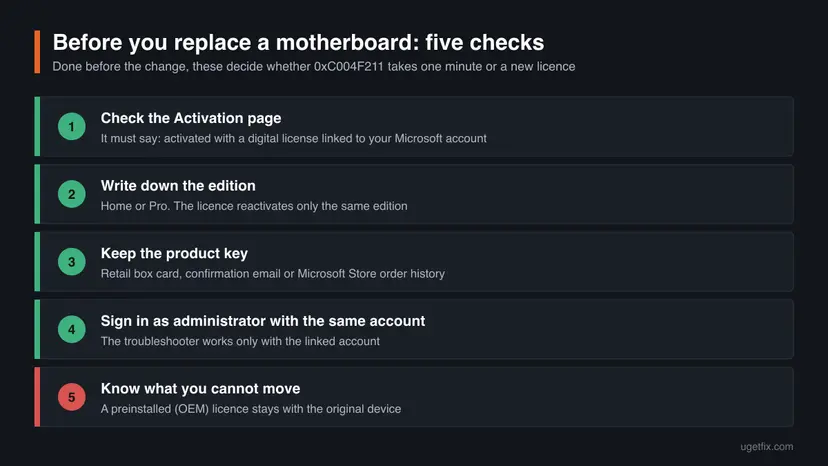
- Open Settings > System > Activation before the change. If it says only activated with a digital license, select Add an account and sign in with your Microsoft account.
- Keep the retail key card, the shop's email or the Store order where you can find it.
- Reinstall the same edition after a repair, and tell the repair shop which one you have.
- Ask a repair shop whether the replacement board will carry the manufacturer's Windows key.
- Do not remove the old PC from your Microsoft account before the new one is activated.
- Do not run activator tools or registry tricks from forums or videos.
- Do not buy keys from marketplaces at a fraction of the retail price.
- Do not assume a Microsoft 365 subscription covers Windows. A volunteer moderator on Microsoft's forum points out that it does not.
Frequently asked questions
What does error code 0xC004F211 mean?
It means Windows found that the hardware of your device changed and can no longer find a licence that matches it. Microsoft's list of activation errors gives the message "Windows reported that the hardware of your device has changed." The usual trigger is a new motherboard. Windows keeps working, but it shows as not activated until you reactivate it with your Microsoft account, enter your product key again or, for a preinstalled licence, get a new one.
Can I fix 0xC004F211 on Windows 11 for free?
Yes, if the licence can move. A digital licence linked to your Microsoft account reactivates with the Activation troubleshooter at no cost, and a retail key you bought can be entered again. It is not free when Windows came preinstalled on the PC and you replaced the motherboard yourself. Microsoft says you may need to buy a new licence then, because the preinstalled licence belongs to the original device.
Is 0xC004F211 different on Windows 10?
No. Windows 10 shows the same code, sometimes with the wording "We can't activate Windows on this device at the moment". The fixes are the same, only the path differs: Settings > Update & Security > Activation instead of Settings > System > Activation. The troubleshooter's hardware option needs Windows 10 version 1607 or later. Windows 10 reached end of support on 14 October 2025, so consider moving to Windows 11 when you reactivate.
Why do I get 0xC004F211 when I did not change any hardware?
Most often the hardware did change without you doing it: a laptop sent for repair can come back with a new motherboard. In that case the manufacturer is responsible for the Windows key on the new board, so contact them with the repair number. Users on Microsoft's forum also report the error with no repair at all. We found no Microsoft explanation for that case, so run Fix 1 and then contact Microsoft support.
Can I move an OEM Windows licence to a new motherboard?
Not under Microsoft's terms. The Windows 11 OEM licence terms let you transfer a preinstalled licence to another user only together with the licensed device, and Microsoft's error list says a replaced motherboard on such a PC may need a new licence. The exception is a repair by the manufacturer, who can supply the key for the replacement board. If you built the PC with a retail key, the rules for stand-alone software apply instead.
The troubleshooter does not show my old PC. What now?
Make sure you sign in with the same Microsoft account the licence was linked to. Microsoft says the troubleshooter works only with that account. Try every account you ever used on the PC, and check that the old device is still listed on your Microsoft account. If it is not there and you never linked the licence, use your product key (Fix 2) or contact Microsoft support with your proof of purchase (Fix 5).
Can I use my old Windows 7 or Windows 8 key to fix 0xC004F211?
Do not count on it. Microsoft told its device partners in September 2023 that the free upgrade offer for Windows 10 and 11 ended on 29 July 2016 and that the installation path for the Windows 7 and 8 upgrade has been removed. Old guides still suggest this, but a Windows 7 or 8 key is no longer a supported way to activate Windows 11. Use a Windows 10 or Windows 11 key.
Is there a free Windows activation key or tool that fixes 0xC004F211?
No legitimate one. Free keys posted online are generic or stolen, and activation tools change system files and run with full rights on your PC. Microsoft's licence terms say you may not bypass or circumvent activation, and such tools can bring malware with them. The legal ways are the ones on this page: your linked account, your own key, the PC maker after a warranty repair, or a licence bought through Settings > System > Activation > Go to Microsoft Store or an authorised retailer.
What happens if I leave Windows unactivated after 0xC004F211?
Windows keeps starting and your files stay where they are, but you get reminders to activate. Users also report a watermark and locked personalisation settings, which Microsoft's activation pages do not list. More important is the licence: the Windows 11 terms say you may use the software only if it is properly licensed and activated. Use the time to find your key or wait for the manufacturer, then activate.
Does a work PC with 0xC004F211 need a new licence?
That is for the organisation to decide. Work and school PCs are usually activated through a KMS server, a multiple activation key or a subscription tied to the work account. Microsoft says activation is then managed by your organisation. Do not enter a personal key or buy a licence in the Store. Send the error code and the output of slmgr /dlv to the administrator and let them reactivate the device.
Sources
- Microsoft Support: Get help with Windows activation errors (support.microsoft.com)
- Microsoft Support: Reactivating Windows after a hardware change (support.microsoft.com)
- Microsoft Support: Using the Windows Activation troubleshooter (support.microsoft.com)
Did this fix work?
One click, no account. It tells the next reader which guides are worth their time.
Questions and experiences: fix Windows Activation error 0xC004F211
Still broken, or found a fix we did not cover? Ask here: members and our editors answer. Reading is open; writing needs a free account.
…