
How to fix error AADSTS90100: Login parameter is empty or not valid error in Windows?

Prefer to fix it yourself? The manual steps follow.
- 7methods
- 2 to 20 minutes
- Easy
Applies to Personal, work and school Microsoft accounts signing in through login.microsoftonline.com in a browser, Teams, Outlook, the Microsoft Store and other apps on Windows 11 and Windows 10
7 methods in this guide
Hello. I wanted to access my Microsoft account in my browser to change a few settings, but I couldn't because of the AADSTS90100: Login parameter is empty or not valid error. How do I access my account now?
AADSTS90100 comes from Microsoft's sign-in service: a value the sign-in page needs, such as flowtoken, ctx or login, arrived empty or broken. Your password and Windows are fine. Close the page, type office.com into a new tab and sign in from the start.
AADSTS90100 means Microsoft's sign-in page received one of its own values empty or damaged. The word before parameter (flowtoken, ctx, login) names which one. It is not a wrong password. Close every sign-in tab, type https://www.office.com into a new tab and sign in from the start (Fix 1). If it repeats, try a private window (Fix 2), then clear Microsoft's cookies (Fix 3).
| Error | AADSTS90100: {name} parameter is empty or not valid. The most common forms are flowtoken parameter is empty or not valid, ctx parameter is empty or not valid and login parameter is empty or not valid. |
|---|---|
| Where it appears | On a Microsoft sign-in page at login.microsoftonline.com, in a browser or in the sign-in window of Teams, Outlook, the Microsoft Store and other apps, usually right after you enter the address or the password. |
| Main cause | The sign-in page lost track of the sign-in it started: an old or reopened sign-in page, damaged Microsoft cookies, or an extension that strips data from the page. |
| Fastest fix | Close the sign-in tab, type office.com into a new tab and sign in again from the first screen (Fix 1). |
| Also written as | aadsts90100, AADSTS90100 error, flowtoken parameter is empty, ctx parameter is empty or invalid, cancelUrl parameter is empty or not valid. |
| Affects | Any Microsoft account sign-in that goes through Microsoft Entra ID: Microsoft 365, Outlook, Teams, OneDrive, the Azure portal and company web apps, on any browser and system. |
| Microsoft's status | Microsoft lists it as a request error, not an outage. Microsoft staff on Microsoft Q&A advise clearing cache and cookies, trying another browser and signing in at the portal directly. No update is announced for it. |
| Time to fix | 2 minutes for a fresh sign-in. Up to 20 minutes if cookies, extensions or a desktop app need attention. |
Facts checked on 15 October 2026. Steps written for Microsoft sign-in pages in Microsoft Edge and Google Chrome on Windows 11 (25H2 and 26H2) and Windows 10 22H2, read against Microsoft's error lookup and Microsoft Q&A.
What AADSTS90100 means: flowtoken, ctx and login parameter is empty
AADSTS codes come from Microsoft Entra ID, the sign-in service behind work, school and many personal Microsoft accounts. AADSTS stands for the Azure AD security token service, the old name of the same service. Microsoft's own error lookup at login.microsoftonline.com/error gives code 90100 one message: {name} parameter is empty or not valid.
The {name} part is filled in on your screen. It names the value the sign-in service expected and did not get. A parameter here is not something you typed. It is a piece of data the sign-in page or the app sends along in the background.
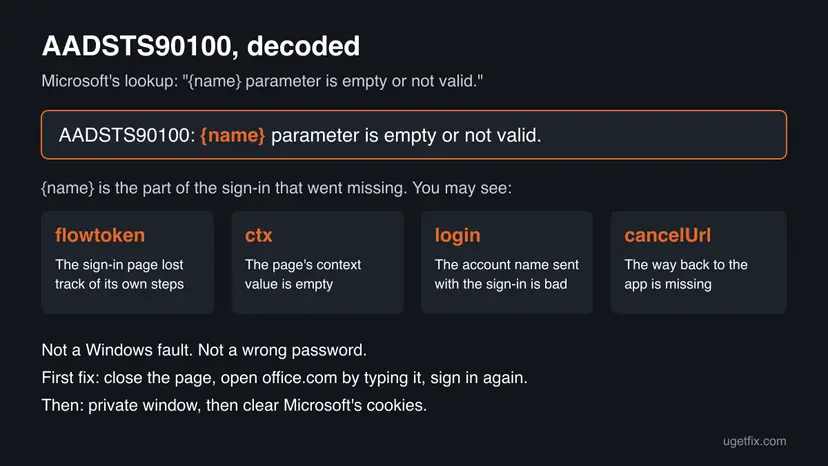
| What you see | What went missing | Start with |
|---|---|---|
| AADSTS90100: flowtoken parameter is empty or not valid. | The value that ties the screens of one sign-in together. In our reading, the page lost the sign-in it had started. | Fix 1, then Fix 3 |
| AADSTS90100: ctx parameter is empty or not valid | The context value the sign-in page carries between screens. | Fix 1, then Fix 3 |
| AADSTS90100: login parameter is empty or not valid. | The account name the app sent with the request. A developer on Microsoft Q&A traced it to the login_hint value when a user had signed in before. | Fix 2, then Fix 5 |
| AADSTS90100: cancelUrl parameter is empty or not valid | The address the page returns to if you cancel. | Fix 1, then Fix 6 |
A wrong password gives its own message on the password screen. AADSTS90100 is about the request, not about you. That is why system file checks, driver updates and a new Windows profile do nothing for it.
AADSTS90100 and the sign-in codes it is confused with
Some AADSTS codes look alike because they all say a request was incomplete. Read the number on your screen before you start, because the fix differs.
| Code | Microsoft's meaning | What you do |
|---|---|---|
AADSTS90100 | {name} parameter is empty or not valid. | Start a fresh sign-in (this guide). |
AADSTS90019 | MissingTenantRealm: Entra ID could not find the organisation in the request. | Sign in with your full work address, not only a user name. |
AADSTS90014 | MissingRequiredField: an expected field is not in the credential. | Usually an app setup problem; tell IT. |
AADSTS900144 | The request body must contain a named parameter. A developer error. | Tell the app's developer or IT. |
AADSTS50058 | No signed-in user or no valid session for a silent sign-in. | See our guide to Microsoft login error code 50058. |
AADSTS50196 | LoopDetected: the app sent the same request too often. | Close the app or tab, wait a few minutes, sign in once. |
What causes AADSTS90100, ranked
The order below is our reading of Microsoft's lookup and of the cases on Microsoft Q&A. It is not a statistic. Each cause points at the fix that tests it.
| How often | Cause | Typical sign | Fix |
|---|---|---|---|
| Most often | An old sign-in page: left open for a long time, reopened from history, a bookmark or the Back button | The error comes after you type the password, and a new tab works. | Fix 1 |
| Often | Damaged or stale Microsoft cookies in the browser | It works in a private window but not in a normal one. | Fix 2, Fix 3 |
| Often | An ad, privacy or script blocking extension that strips data from the sign-in page | It fails in one browser with extensions, works in another. | Fix 4 |
| Less often | Two Microsoft accounts in one browser, and the app asks for the other one | The login form of the error, or the wrong account's name on the page. | Fix 5 |
| Less often | A desktop app with a stale sign-in window: Teams, Outlook, the Microsoft Store | Only that app fails; the same account works on the web. | Fix 6 |
| Rarely | A wrong PC clock or a proxy, VPN or filter that changes the sign-in traffic | Every browser on this PC fails; another device on another network works. | Fix 7 |
Many pages call AADSTS90100 a wrong user name or password, or a Microsoft outage. Microsoft's lookup says only that a parameter was empty or not valid, and Microsoft staff on Q&A treat it as a browser data problem when a private window works. A password reset does not touch it.
How to fix AADSTS90100: login, flowtoken or ctx parameter is empty or not valid
Start with Fix 1. It takes two minutes and clears most cases, because the error is tied to one broken sign-in attempt. If it returns, Fix 2 tells you in one test whether the browser is the cause. Success looks the same every time: you reach your account, mailbox or app instead of the error page.
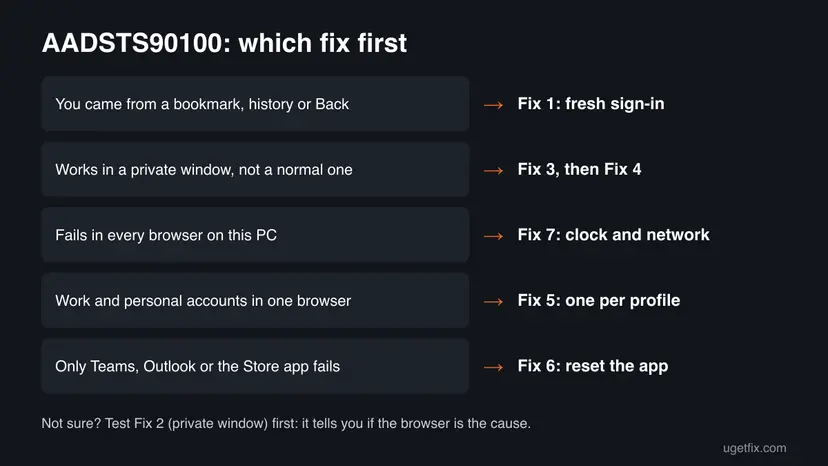
| Your case | Start with | Then |
|---|---|---|
| You came to the sign-in page from a bookmark, history, an old tab or the Back button | Fix 1 | Fix 3 |
| It works in a private window or another browser, but not in your normal one | Fix 3 | Fix 4 |
| You use a work and a personal account in the same browser, or the message says login parameter | Fix 5 | Fix 3 |
| Only Teams, Outlook or the Microsoft Store app shows it; the web works | Fix 6 | Fix 3 |
| Every browser on this PC fails, another device works | Fix 7 | Fix 4 |
Fix 1. Start a fresh sign-in from a typed address
2 minutesNo riskEveryone, first. Most of all when you reached the sign-in page from a bookmark, a browser history entry, an old tab or the Back button.
Values like flowtoken and ctx belong to one sign-in attempt. A page saved in a bookmark or left open too long carries values that no longer match, so the service rejects them. A new start creates new ones.
- Close every tab that shows a Microsoft sign-in page or the error.
- Open a new tab and type the address yourself:
https://www.office.comfor Microsoft 365, orhttps://account.microsoft.comfor a personal Microsoft account. - Select Sign in and type your full email address. Do not pick an old entry from the browser's history list.
- Enter your password and complete the second check if it asks. Do not press Back during the sign-in.
- When you are in, open the page or app you wanted from there.
Microsoft staff on Microsoft Q&A suggest the same: sign in directly at the Microsoft 365 portal. Delete any bookmark that points to a login.microsoftonline.com address, and bookmark the portal instead.
It worked if: The sign-in finishes and your account, mailbox or app opens without the error.
If not: If the same error appears on a fresh page, test the browser with Fix 2.
Fix 2. Test the sign-in in a private window or another browser
2 minutesNo riskThe error comes back on a fresh sign-in, and you want to know if your browser's stored data is the cause.
A private window starts without your cookies and, in most browsers, without extensions. If the sign-in works there, the cause sits in your normal profile's data, as Microsoft staff concluded in the Q&A case.
- In Edge, press Ctrl + Shift + N to open an InPrivate window. In Chrome, the same keys open an Incognito window. In Firefox, press Ctrl + Shift + P.
- Type
https://www.office.comand sign in as in Fix 1. - If you have a second browser, try the same sign-in there too.
- Note the result: works in private, works in the other browser, or fails everywhere.
| Result | What it means | Next |
|---|---|---|
| Works in the private window | Cookies, cache or an extension in your normal profile | Fix 3, then Fix 4 |
| Works only in the other browser | Something in the first browser | Fix 3 and Fix 4 in that browser |
| Fails everywhere on this PC | Not the browser | Fix 7 |
It worked if: You know where the cause is, and you may already be signed in through the private window.
If not: Use the table above to pick the next fix. A private window is a test, not a permanent fix: it forgets the sign-in when you close it.
Fix 3. Clear Microsoft's cookies and the browser cache
5 minutesLow riskThe sign-in works in a private window but not in your normal one, or the error loops after a fresh sign-in.
Stale or damaged Microsoft cookies make the sign-in page start from a half-finished state, and the page's values come out empty. Microsoft staff on Q&A name clearing cache and cookies as the fix for this error.
Know your passwords first, or remove only the cookies of Microsoft's sign-in sites as in step 4.
- Close every Microsoft 365, Outlook, Teams and Microsoft account tab.
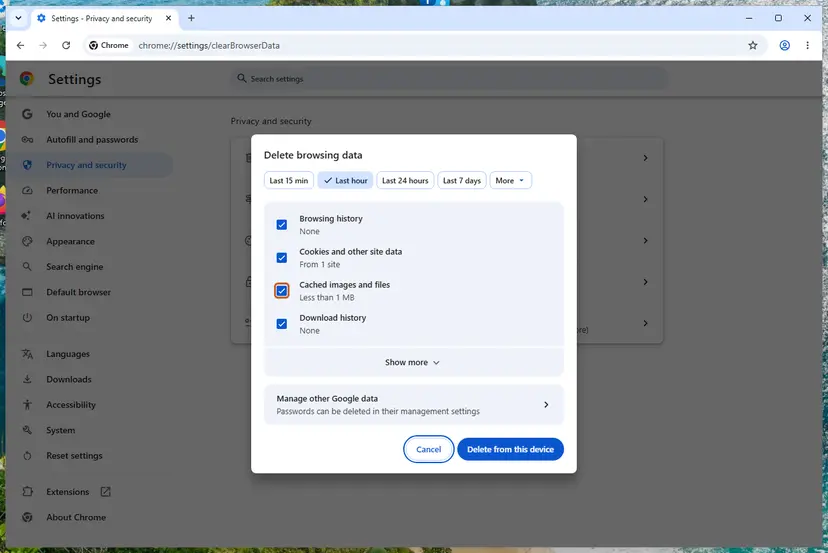
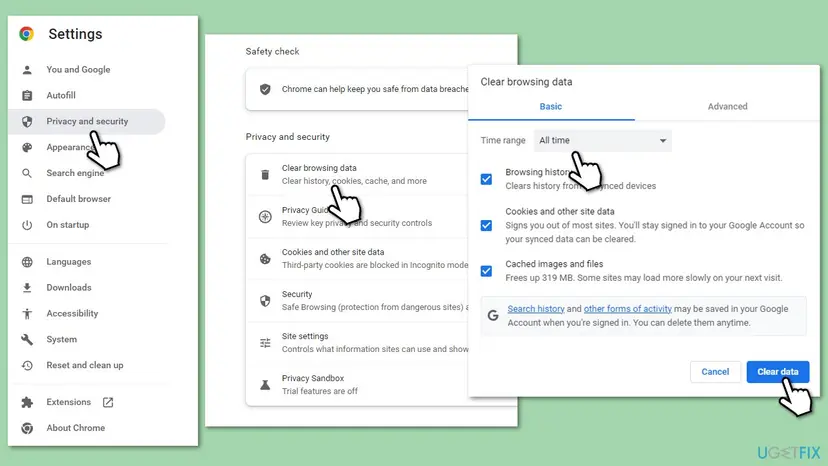
- Press Ctrl + Shift + Delete in Edge or Chrome.
- Choose All time, check Cookies and other site data and Cached images and files, and confirm. Full steps for each browser: Clear the browser cache and cookies.
- To keep other sites signed in, open the browser's cookie settings instead, search the stored site data for
microsoftonlineandlive.com, and delete only those entries. - Restart the browser and sign in as in Fix 1.
It worked if: After a restart of the browser, the sign-in finishes in a normal window.
If not: If it still works only in a private window, an extension is the likely cause: go to Fix 4.
Fix 4. Turn off blocking extensions and allow Microsoft's sign-in cookies
5 minutesLow riskThe sign-in works in a private window even after Fix 3, or you use an ad, privacy, script or cookie blocking extension.
The sign-in page passes its values through scripts and cookies on login.microsoftonline.com. An extension that blocks scripts or cookies there can leave a value empty, which is exactly what AADSTS90100 reports.
- In Edge, type
edge://extensionsin the address bar. In Chrome, typechrome://extensions. - Switch off every ad, privacy, script or cookie blocking extension with its toggle.
- Restart the browser and sign in as in Fix 1.
- If it works, switch the extensions back on one at a time and sign in after each, to find the one that breaks it.
- In that extension's settings, allow
login.microsoftonline.comandlogin.live.com, or leave it off for Microsoft sites.
If your browser blocks third-party cookies, add [*.]microsoftonline.com to the sites always allowed to use cookies. The browser steps are in our guide to Microsoft login error code 50058, Fix 2, where blocked cookies are the main cause.
It worked if: The sign-in works in a normal window with your extensions on, and Microsoft's sites are allowed in the blocker.
If not: If you use a work and a personal account in the same browser, separate them with Fix 5.
Fix 5. Keep one Microsoft account per browser profile
5 minutesNo riskYou use a work and a personal account, or two work accounts, in one browser, or your error says login parameter is empty or not valid.
The login form of the error points at the account name sent with the request. On Microsoft Q&A, a developer found it appeared when the app named one account and the browser already held a sign-in from before. Separate profiles keep the accounts from mixing.
- Go to
https://www.office.com, select your picture at the top right and sign out of every account listed. - In Edge or Chrome, select the profile icon at the top of the window and add a new profile.
- Use the first profile for one account only, for example work.
- Use the new profile for the other account, for example personal, and sign in there.
- Open each app or link from the profile of its account from now on.
It worked if: Each profile signs in to its own account and the login form of the error is gone.
If not: If only a desktop app still fails, go to Fix 6.
Fix 6. Reset the sign-in of Teams, Outlook or the Microsoft Store app
10 minutesLow riskOnly a desktop app shows AADSTS90100 in its own sign-in window, while the same account works on the web.
Desktop apps open Microsoft's sign-in page inside their own window and keep its data apart from your browser. Clearing the browser does not touch it, so the app's own data and stored credentials must be cleared instead.
- Quit the app, also from the hidden icons next to the clock.
- Select Start, type
credential manager, open it and select Windows Credentials. - Under Generic Credentials, remove the entries that start with MicrosoftOffice, msteams or teams with Remove, then Yes.
- For the new Teams and other Store apps, reset the app's data: How to repair or reset an app in Windows. Resetting signs you out of that app.
- For the Microsoft Store itself, type
wsresetin the Start search and press Enter. Full steps: Reset the Microsoft Store. - Open the app and sign in again.
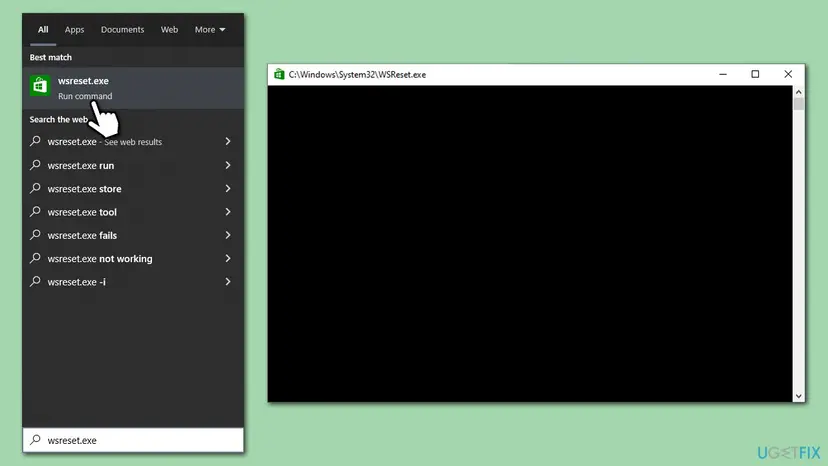
It worked if: The app asks for your account as on a new PC, and the sign-in finishes.
If not: If every app and browser on this PC fails, check the clock and the network with Fix 7.
Fix 7. Check the PC clock and the network path
10 to 20 minutesLow riskThe error appears in every browser and app on this PC, while a phone on mobile data signs in fine.
Sign-in data is time-stamped and travels through any proxy, VPN or filter between you and Microsoft. A wrong clock or a filter that rewrites the traffic can spoil the values the page sends.
- Make sure the date, time and time zone are set automatically: How to fix the date and time in Windows.
- Turn off any VPN or proxy app and try the sign-in again.
- Try another network, for example a phone hotspot. If it works there, a company or home filter is in the way; tell whoever runs the network.
- If other sites also load badly, check the connection: How to check your internet connection in Windows.
Reset the network settings only when other sites fail too, because it removes saved Wi-Fi networks, VPN adapters and proxy settings: Reset the network and flush DNS. Windows 10 left support on 14 October 2025; a PC without Extended Security Updates no longer gets fixes for its network and sign-in parts.
It worked if: The clock is right, the sign-in works on this PC, or you know the network is the cause.
If not: If nothing works, collect the details in the next section and send them to IT or Microsoft support.
If AADSTS90100 is still there: what to send to IT or the app's developer
When the error repeats on every browser and device, the cause is in the request the app builds, not on your PC. Only an administrator or the app's developer can change that. The error page holds the details they need.
- On the error page, select More details or Troubleshooting details if shown.
- Copy the Request Id, Correlation Id and Timestamp.
- Note the exact word before parameter (flowtoken, ctx, login, cancelUrl), the app and the link you started from.
- Send it to your IT help desk. For a personal account, use Microsoft's account support.
In the Microsoft Q&A case, the login form appeared when the app passed login_hint to a user who had signed in before, and removing login_hint was the developer's workaround. Check what your app sends in that value, and test the sign-in in a clean browser profile.
How to keep AADSTS90100 from coming back
- Bookmark the portal, not the sign-in page. Use
office.comoraccount.microsoft.com, never alogin.microsoftonline.comaddress. - Do not reuse old sign-in tabs. If a sign-in page sat open for a long time, close it and start again.
- Do not press Back during a sign-in. Start over from the portal instead.
- Allow Microsoft's sign-in sites in ad, privacy and cookie blocking extensions.
- Keep one account per browser profile when you have work and personal accounts.
- Keep the clock on automatic in Windows date and time settings.
Frequently asked questions
What does AADSTS90100 mean?
It means Microsoft's sign-in service received a request in which one value was empty or not valid. Microsoft's error lookup gives the message as {name} parameter is empty or not valid, and the name on your screen tells you which value it was. It is not a wrong password and not a Windows fault. In most cases a fresh sign-in from a typed address, as in Fix 1, clears it.
How do I fix flowtoken parameter is empty or not valid?
Close every sign-in tab, type office.com into a new tab and sign in from the first screen, without the Back button. The flowtoken links the screens of one sign-in, so an old or reopened page fails. If it returns, test a private window. If the private window works, clear Microsoft's cookies (Fix 3) and switch off blocking extensions (Fix 4).
What does ctx parameter is empty or not valid mean?
It is the same error, AADSTS90100, with ctx as the missing value. Microsoft does not document what ctx holds, but it travels with the sign-in page between its screens, like flowtoken. The fixes are the same: start a fresh sign-in from a typed address, then clear Microsoft's cookies and check extensions. Searches for ctx parameter is empty or invalid lead to the same error.
What is the difference between the login, flowtoken and ctx forms?
They name different missing values in one error code. Flowtoken and ctx belong to the sign-in page itself, so a fresh page and cleared cookies fix them. Login is the account name an app sends with its request. A developer on Microsoft Q&A traced it to the login_hint value, so for the login form separate your accounts (Fix 5) or ask the app's maker.
Is AADSTS90100 a Microsoft outage?
Usually not. Microsoft lists it as a request error, and in the Microsoft Q&A case staff noted that the user could sign in through a private window, which means the service worked. If the error appears for many people in your organisation at once, IT can check the Microsoft 365 service health page. For one person on one PC, the browser or app is the cause.
Will resetting my password fix AADSTS90100?
No. The error is about a value in the request, not about your password. A wrong password gives its own message on the password screen. Resetting it only adds work and signs you out of other devices. Start a fresh sign-in from office.com or account.microsoft.com, and clear Microsoft's cookies if the error returns.
Why does the sign-in work in incognito but not in my normal browser?
Because a private window starts without your cookies and usually without extensions. When it works there, something stored in your normal profile breaks the sign-in. Clear the cookies of microsoftonline.com and live.com (Fix 3), then switch off ad, privacy and script blockers one by one (Fix 4). Do not keep using a private window: it forgets the sign-in when you close it.
Does this guide help with AADSTS90100 on a phone or a Mac?
Partly. The error means the same on every system, because it comes from Microsoft's sign-in service. The idea of each fix works everywhere: start the sign-in fresh, try a private tab, clear Microsoft's cookies, and sign out and in again in the app. Only the Windows steps, such as Credential Manager and wsreset, are Windows only.
I searched for this error in another language. Is this page for me?
Yes, if your screen shows AADSTS90100. Readers search for it with questions such as what does this mean, how do I fix it or please help me, in Arabic, Thai, Vietnamese, Spanish, Danish, Finnish and Dutch. The answer is the same: the sign-in page lost one of its values, your password is fine, and a fresh sign-in from a typed address fixes most cases. Then follow Fix 2 and Fix 3.
Sources
- Microsoft: Entra error lookup for code 90100 ({name} parameter is empty or not valid) (login.microsoftonline.com)
- Microsoft Learn: Microsoft Entra authentication and authorization error codes (related AADSTS codes and the error lookup) (learn.microsoft.com)
- Microsoft Q&A: AADSTS90100 login parameter is empty or not valid (answers by Microsoft staff, developer report on login_hint) (learn.microsoft.com)
Did this fix work?
One click, no account. It tells the next reader which guides are worth their time.
Questions and experiences: fix error AADSTS90100: Login parameter is empty or not valid error in Windows
Still broken, or found a fix we did not cover? Ask here: members and our editors answer. Reading is open; writing needs a free account.
…