
How to fix the date and time in Windows
A wrong clock breaks more than the taskbar: websites show certificate errors, Microsoft Store and Windows Update fail, and sign-ins are rejected. Let Windows set the time from the internet, check the time zone, and resync the Windows Time service if the clock does not follow.
- Time
- 5 minutes
- Level
- Easy
- You need
- An internet connection. An administrator account for the commands.
Before you start
- Compare the taskbar clock with a phone or another device, so you know whether the minutes or the hours are wrong.
- On a work or school PC the time comes from the organization's network. If it is wrong there, tell your administrator.
Windows 11
Steps written for Windows 11 25H2 and 26H2.
Open Date & time
Select Start > Settings > Time & language > Date & time.
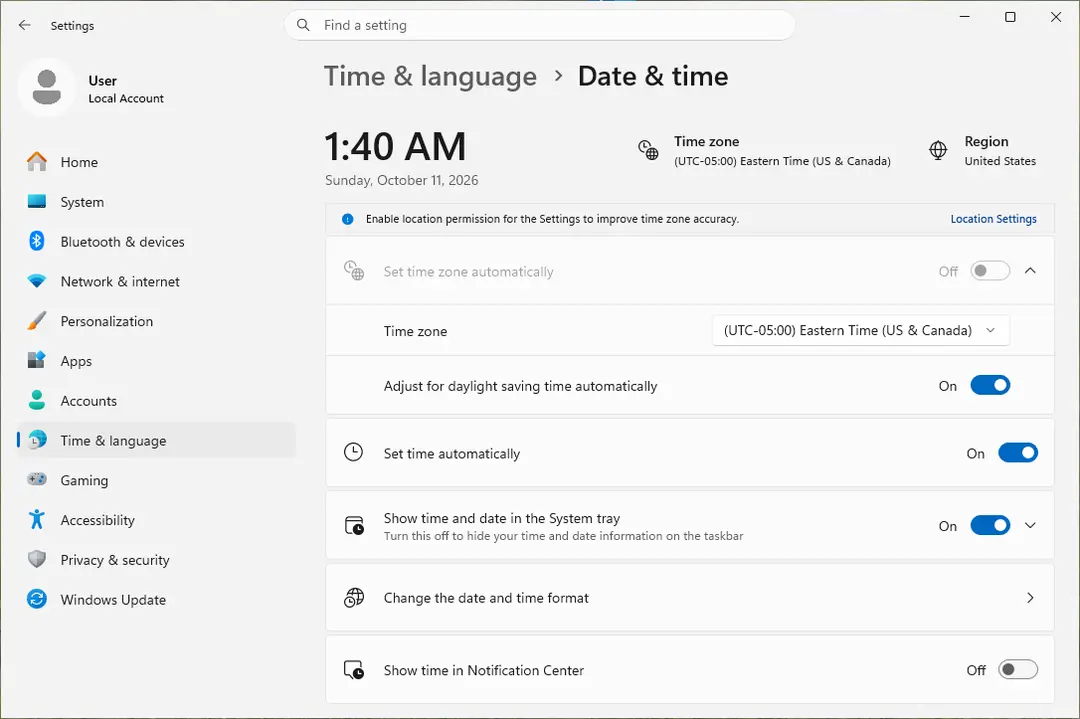
Date & time: the time zone and Set time automatically. Screenshot: Windows 11 26H2 Turn on automatic time
Make sure Set time automatically is On.
Check the time zone
A clock that is wrong by exactly one or more hours has the wrong time zone. Turn Set time zone automatically On, or turn it Off and pick your zone in the list next to Time zone.
Sync the clock now
Under Additional settings, select Sync now. Windows asks the time server for the current time and corrects the clock.
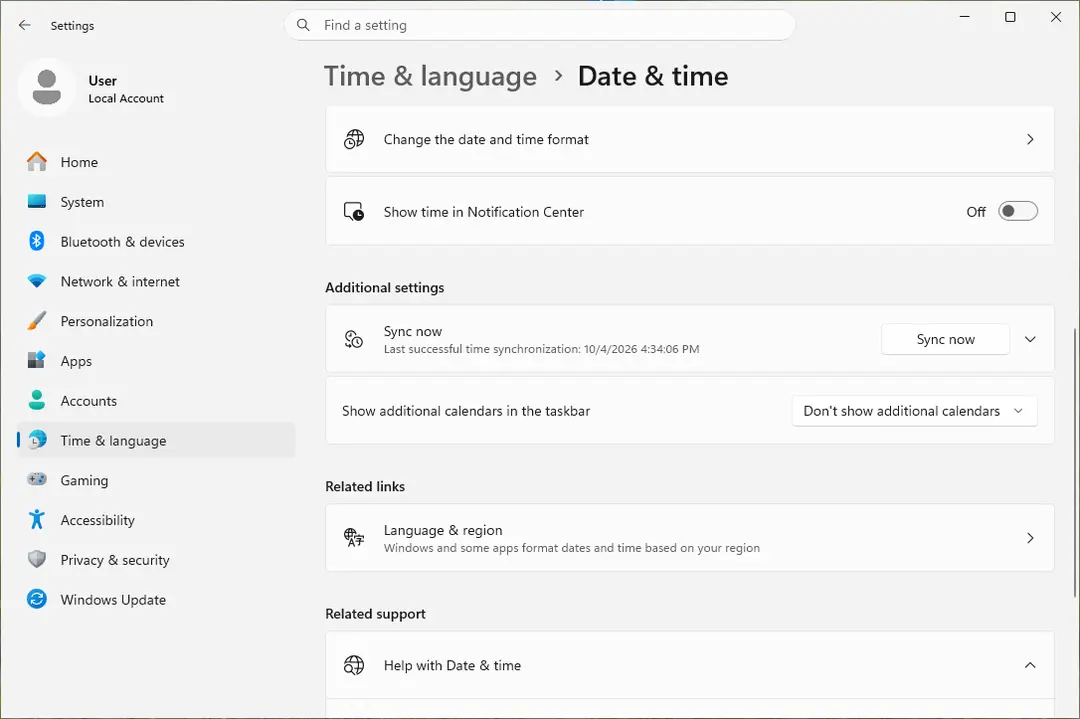
Sync now is under Additional settings. Screenshot: Windows 11 26H2 Open Command Prompt as administrator
If Sync now fails or the clock is still wrong, resync the Windows Time service by hand. Select Search, type command prompt, select Run as administrator, then select Yes.
Start the service and resync
Type the two commands below and press Enter after each. The first starts the Windows Time service. If Windows answers that the service is already started, go on. The second tells the PC to resynchronize its clock as soon as possible.
net start w32time w32tm /resyncSet the time by hand as the last step
If the PC has no internet connection, turn Set time automatically Off and select Change next to Set the date and time. Enter the date and time and select Change.
Windows 10
Steps written for Windows 10 22H2.
Microsoft ended support for Windows 10 on October 14, 2025.
Open Date & time
Select Start > Settings > Time & language > Date & time.
Turn on automatic time
Make sure Set time automatically is On.
Check the time zone
A clock that is wrong by exactly one or more hours has the wrong time zone. Turn Set time zone automatically On, or turn it Off and pick your zone in the list under Time zone.
Sync the clock now
Under Synchronize your clock, select Sync now. Windows asks the time server for the current time and corrects the clock.
Open Command Prompt as administrator
If Sync now fails or the clock is still wrong, resync the Windows Time service by hand. In the search box on the taskbar, type command prompt, select Run as administrator, then select Yes.
Start the service and resync
Type the two commands below and press Enter after each. The first starts the Windows Time service. If Windows answers that the service is already started, go on. The second tells the PC to resynchronize its clock as soon as possible.
net start w32time w32tm /resyncSet the time by hand as the last step
If the PC has no internet connection, turn Set time automatically Off and select Change under Set the date and time manually. Enter the date and time and select Change.
How to tell it worked
After a successful sync the taskbar clock matches your phone. Websites that showed a certificate or date error load again after you reload them.
If summer or winter time is the only thing that is wrong and Set time zone automatically is off, turn on Adjust for daylight saving time automatically on the same page.
If the clock still will not sync
- Check that the PC is online. The resync needs to reach a time server over the network.
- Run the resync again and let Windows look for its time sources once more:
w32tm /resync /rediscover - If the service itself is broken, register it again. Run these in Command Prompt as administrator, one by one:
net stop w32timew32tm /unregisterw32tm /registernet start w32timew32tm /resync - If the service refuses to start, see Check and restart Windows services and repair system files with Run DISM and SFC to repair Windows system files.
If the clock is wrong again after every shutdown
When the date jumps back to an old year each time the PC has been switched off, Windows is not the cause. A small battery on the motherboard (the CMOS battery) keeps the clock running while the PC is off. When that battery or the clock chip fails, the time falls back to the default of the BIOS at the next start.
Windows corrects the time again once it is online, so the fault shows mostly right after starting. The lasting fix is a new CMOS battery. On a laptop, or if you do not want to open the case, ask the manufacturer or a repair shop. Wrong changes in the BIOS can stop the PC from starting, so change there only the date and time.
How to undo it
Every setting on the Date & time page is a switch: turn it back to where it was. The resync commands change nothing but the clock.
Used in 60 guides
How to fix "This site can't be reached" in Chrome on Windows?
Bluebook not opening on Windows: fix "An unexpected error has occurred"
How to fix Discord stuck at gray screen on Windows?
How to fix Windows 10 activation error code 0xC004F074?
How to fix 0x80070102 error when playing games on Windows?
How to fix Clock app not working in Windows?
How to fix "The timestamp signature and/or certificate could not be verified or is malformed"
How to fix Time synchronization failed with time.windows.com?
How to fix "We couldn't connect to the update service" Windows update error?
How to fix error 0x8000000b when you add an email account in Windows
How to fix Microsoft Store error 0x80048839?
How to fix Hanging or crashing apps in Windows Store Apps troubleshooter?
How to fix Windows activation error 0x8007251D?
How to fix missing currency in Calculator app on Windows?
How to fix 0x80180018 error when adding a second account in Windows?
How to fix File system error (-2147163901) in Windows?
How to fix "We can't start this add-in because it isn't set up properly" in Office?
How to fix Microsoft Store error 0x800704C6
How to fix Microsoft Store error 0x800713AB?
How to fix Windows activation error 0xC004F009?
How to fix Microsoft Store error 0x8D050003 in Windows
How to fix Windows activation error 0x8007232B?
How to fix error AADSTS90100: Login parameter is empty or not valid error in Windows?
How to fix SSL_ERROR_HANDSHAKE_FAILURE_ALERT error in Windows?
How to fix DirectX error "Setup could not download the file" in Windows?
How to fix Grounded "Hosting Game Error" in Windows?
How to fix Microsoft account login error 0x80048820 in Windows?
How to fix Windows activation error 0xC004C020?
How to fix Microsoft Store error 0x80248014
[Fix] Can't install Cross Device Experience Host in Windows?
How to fix error 0x80240037 in Microsoft Store and Windows Update
How to fix .NET Framework installation error 0x800c0006 in Windows?
How to fix Office 365 sign-in error 0xcaa70010 in Windows?
How to fix Microsoft Office activation error 0x4004F00C in Windows?
How to fix Microsoft Teams error CAA20008 in Windows?
How to fix File System Error (-2147416359) in Windows?
How to fix Microsoft Teams error CAA90019 in Windows?
How to fix troubleshooter error "I'm sorry. I was unable to run the Windows Update diagnostic"?
How to fix Windows update error 0x800B010F?
How to fix Steam error code 50 in Windows?
How to fix 0x80048823 error in Windows?
How to fix 0x80072F0D error in Windows?
How to fix sign in error CAA2000C in Windows?
How to fix Microsoft Store error "Pardon the interruption" in Windows?
[Fix] Windows or Microsoft Office activation error 0xc004c060
How to fix Windows update error 0x8024500c?
How to fix Microsoft Teams error CAA90063 in Windows?
How to fix Office installation error 30094 in Windows?
How to fix Xbox app error 0x80004005 in Windows?
How to fix OneDrive error code 0x8004e4be in Windows?
How to fix error tag 4vt9f in Microsoft Office apps?
How to fix Windows update error 0x80070241 in Windows?
How to fix Microsoft Teams error 0xcaa80000 in Windows?
How to fix VAN 0 Error Code in Valorant?
How to fix Microsoft Teams Error tag 7ita9 in Windows?
How to fix Xbox app error 0x89235106 in Windows?
How to fix Steam error code 2 in Windows?
How to fix Teams error tag 48v35 in Windows?
How to fix "sent an invalid response" ERR_SSL_PROTOCOL_ERROR on Google Chrome?
How to fix "Something went wrong while attempting to sign you in" Steam error in Windows?
Sources
- Microsoft Support: Set time, date, and time zone settings in Windows (read Oct 11, 2026)
- Microsoft Support: Troubleshoot problems updating Windows (Verify Date and Time settings, Sync now) (read Oct 11, 2026)
- Microsoft Learn: Windows Time service tools and settings (w32tm) (read Oct 11, 2026)
- Microsoft Q&A: Can't sync PC time with any time server (register the service again) (read Oct 11, 2026)
- Microsoft Q&A: Why does my date and time keep resetting when I shut down my computer (CMOS battery) (read Oct 11, 2026)