
How to fix Microsoft account login error 0x80048820 in Windows?

Prefer to fix it yourself? The manual steps follow.
- 7methods
- 5 to 45 minutes
- Intermediate
Applies to Personal Microsoft accounts in the Microsoft Store, the Xbox app, the Minecraft Launcher, Outlook, OneDrive and Windows Settings on Windows 11 and Windows 10
7 methods in this guide
Every time I try to sign in to Outlook on my Windows 11 laptop, I keep getting error 0x80048820. I haven't changed anything recently, and my internet is working fine. It just won't let me log in with my Microsoft account. Is this a Windows issue or something with my Outlook app?
0x80048820 means a Windows app could not sign you in to your Microsoft account. Microsoft support staff tie it to the sign-in data saved on the PC, the clock or the network, not to lost purchases. Test the account in a browser, then clear the saved Microsoft sign-ins in Credential Manager.
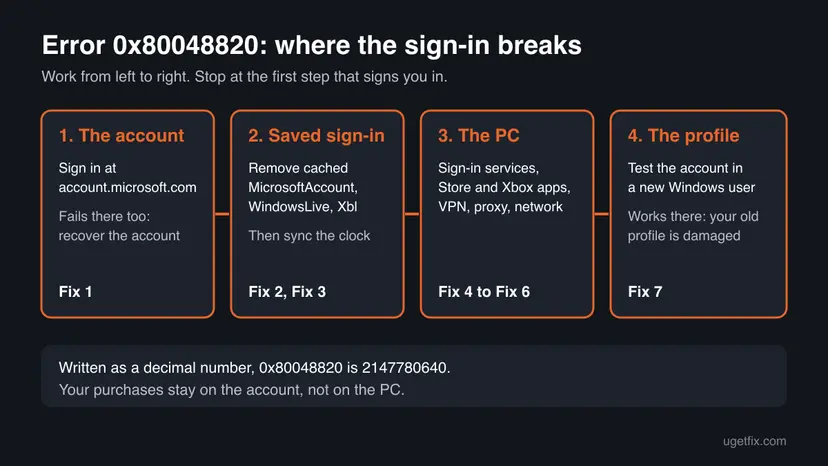
0x80048820 is a Microsoft account sign-in error from Windows, not from one app. Sign in at account.microsoft.com in a browser first (Fix 1). If that works, the account is fine: remove the saved MicrosoftAccount, WindowsLive and Xbl entries in Credential Manager and restart (Fix 2), then sync the clock (Fix 3). If every fix fails, test the account in a new Windows user profile (Fix 7).
| Error | A sign-in window that fails with the code 0x80048820. Users report it with the text Something went wrong. Old Windows Live Mail showed Sorry, we were unable to sign you in to Windows Live ID at this time. Please try again later. |
|---|---|
| Where it appears | When you sign in to the Microsoft Store, the Xbox app, the Minecraft Launcher, Outlook, OneDrive or Settings > Accounts with a personal Microsoft account. |
| Main cause | Damaged sign-in data saved on the PC for this account, which Microsoft support staff name first. Next come a wrong clock, the network, and a damaged Windows user profile. |
| Fastest fix | Test the account at account.microsoft.com, then remove the Microsoft and Xbox entries in Credential Manager and restart (Fix 1 and Fix 2). About 10 minutes. |
| Also written as | 0x80048820, 80048820, error code 0x80048820, decimal 2147780640. Searches in other languages: erro 0x80048820, ошибка 0x80048820. |
| Affects | Personal Microsoft accounts on Windows 11 and Windows 10 22H2. The same account usually still works in a browser and in apps on other devices. |
| Microsoft's status | No public Microsoft document defines the code. Microsoft support staff on Microsoft Q&A call it a common sign-in issue and say your purchases are not lost. |
| Time to fix | 10 minutes for Fix 1 to Fix 3. Up to 45 minutes with the network reset and the new profile test. Nothing to download. |
Facts checked on 15 October 2026. Steps written for Microsoft Store, Xbox app, Minecraft Launcher and Outlook sign-in on Windows 11 (25H2 and 26H2) and Windows 10 22H2, read against Microsoft Q&A answers by Microsoft support staff.
What Microsoft account login error 0x80048820 means
You open the Microsoft Store, the Xbox app, the Minecraft Launcher or Outlook and select Sign in. Instead of your profile, the window fails with 0x80048820. Users report the text Something went wrong next to it. Some see it in every Microsoft app on the PC at once, while other accounts on the same PC sign in without trouble.
All of those apps sign in through one shared Windows component, the Microsoft account sign-in that Windows keeps for each user. The code says that sign-in did not finish on this PC. Microsoft support staff call it a common sign-in issue caused by local sign-in data or time and network sync problems, not by lost purchases.
| Where you see it | How it looks | Start with |
|---|---|---|
| Microsoft Store, Xbox app | Something went wrong and 0x80048820 after you pick your account | Fix 1, Fix 2 |
| Minecraft Launcher, a game from the Store | 0x80048820 at sign-in, the game will not start | Fix 2, Fix 5 |
| Outlook, OneDrive, Settings | The sign-in or verify window closes with 0x80048820 | Fix 1, Fix 2, Fix 3 |
| Windows Live Mail (retired) | Sorry, we were unable to sign you in to Windows Live ID at this time. Please try again later. | Move to the Outlook app |
A Microsoft support answer on Microsoft Q&A says a Minecraft licence is tied to the Microsoft account, not to the device. When the sign-in works again, your games and apps reappear. Do not buy a game a second time to get past this error.
What causes error 0x80048820, ranked
Microsoft has not published a cause. The order below follows the answers Microsoft support staff give for this code on Microsoft Q&A and what users report there. It is our reading, not a statistic.
| How often | Cause | Typical sign | Fix |
|---|---|---|---|
| Most often | Damaged sign-in data saved on the PC for this account | The account works in a browser and other accounts sign in on this PC. | Fix 2 |
| Often | A wrong clock or time zone, so the secure sign-in is refused | The taskbar time is off, or the PC was off for weeks. | Fix 3 |
| Often | A problem with the account itself: locked, hacked or a recovery in progress | The sign-in fails at account.microsoft.com too, or the password was changed without you. | Fix 1 |
| Less often | A stopped sign-in service, or a damaged Store, Xbox app or Gaming Services | Only Store and Xbox sign-ins fail, or wsreset.exe closes at once. | Fix 4, Fix 5 |
| Less often | A VPN, a proxy or a network setting in the way | A VPN app is on, or the PC came from work. | Fix 6 |
| Rarely | A damaged link between this account and your Windows user profile | Everything above is clean and only this account fails in this Windows user. | Fix 7 |
Many pages list Windows Update and a system file scan first. They rarely touch a sign-in for one account, and a Microsoft support answer for this code says cache resets cannot fix a damaged profile link. Those repairs are kept for the last section.
How to fix Microsoft account login error 0x80048820
Fix 1 is a two-minute test that tells you whether the account or the PC is the cause. Fix 2 and Fix 3 solve most cases where the browser works. Try the sign-in after each fix: success looks the same in every app, the window closes and your account name appears.
| Your case | Start with | Then |
|---|---|---|
| The sign-in fails in a browser too | Fix 1 | Account recovery |
| The browser works, every Microsoft app on the PC fails | Fix 2 | Fix 3 |
| The clock is wrong or the PC was off for weeks | Fix 3 | Fix 2 |
| Only the Store, the Xbox app or Minecraft fails | Fix 5 | Fix 4 |
| A VPN or proxy is set, or the error is on one network only | Fix 6 | Fix 2 |
| Other accounts sign in on this PC, yours never does | Fix 2 | Fix 7 |
Fix 1. Sign in to your Microsoft account in a browser and check Microsoft's status
3 minutesLow riskEveryone first. It decides whether the problem is the account or the PC.
A Microsoft support answer for 0x80048820 says that if the account works at account.microsoft.com, the issue is local to the PC and not the account or its purchases.
- Open Edge or another browser and go to
https://account.microsoft.com. - Select Sign in and use the account that shows 0x80048820 in the app.
- If your account page opens, the account is fine. Go to Fix 2.
- If the password is refused or you are asked to verify your identity, follow the steps on screen.
- If the password was changed without you, or the security info is not yours, stop and recover the account as the last section explains.
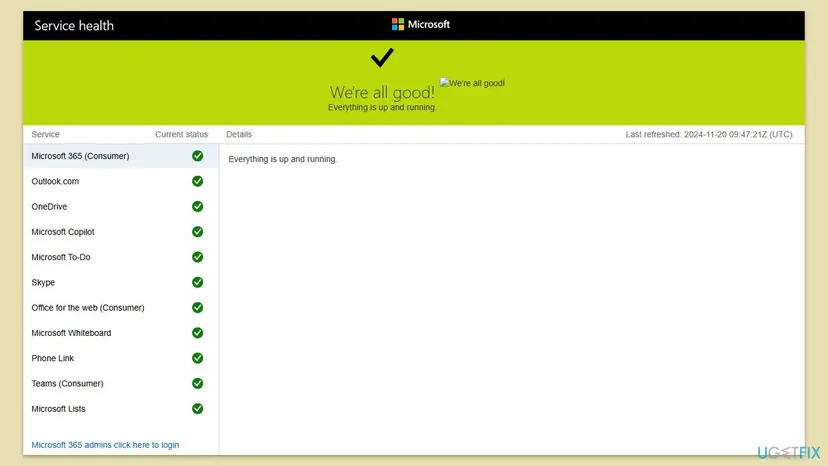
While the browser is open, check Microsoft's Service health page for Outlook.com and the other consumer services. If one is down, wait and try again later: no change on the PC helps during an outage.
It worked if: Your account page opens in the browser. The cause is on this PC, and Fix 2 is next.
If not: If the account fails online too, recover it first, as described in the last section.
Fix 2. Remove the saved Microsoft and Xbox sign-ins in Credential Manager
5 minutesLow riskThe account works in a browser, but apps on this PC show 0x80048820.
Microsoft support staff name local sign-in data as the usual cause of this code. Windows keeps that data as entries in Credential Manager, and a damaged entry is sent again on every try until you remove it.
- Select Start, type
Credential Managerand open it. - Select Windows Credentials.
- Under Generic Credentials, look for entries whose names contain
MicrosoftAccount,WindowsLive,XblorXblGrts. - Expand each one with the arrow and select Remove, then Yes.
- Restart the PC.
- Open the app and sign in again with your email and password.
That is normal on some PCs. The data is then not stored as a generic credential, and Fix 3 and Fix 4 are the next checks. Removing these entries never deletes your account, files or games: Windows only asks you to sign in again.
It worked if: After the restart the app asks for your password once and then signs in.
If not: If the error comes back right away, check the clock with Fix 3.
Fix 3. Set the time automatically and sync the clock
3 minutesLow riskThe taskbar time or time zone is wrong, the PC was off for weeks, or Fix 2 did not help.
A Microsoft sign-in is a secure exchange with a time stamp. Microsoft support staff list the time settings first for 0x80048820, because a clock that is off makes the server refuse the sign-in.
- Press Win + I and open Time & language > Date & time.
- Turn on Set time automatically and Set time zone automatically.
- Under Additional settings, select Sync now. On Windows 10 the Sync now button is on the same page under Synchronize your clock.
- Check that the taskbar clock shows the right time and sign in again.
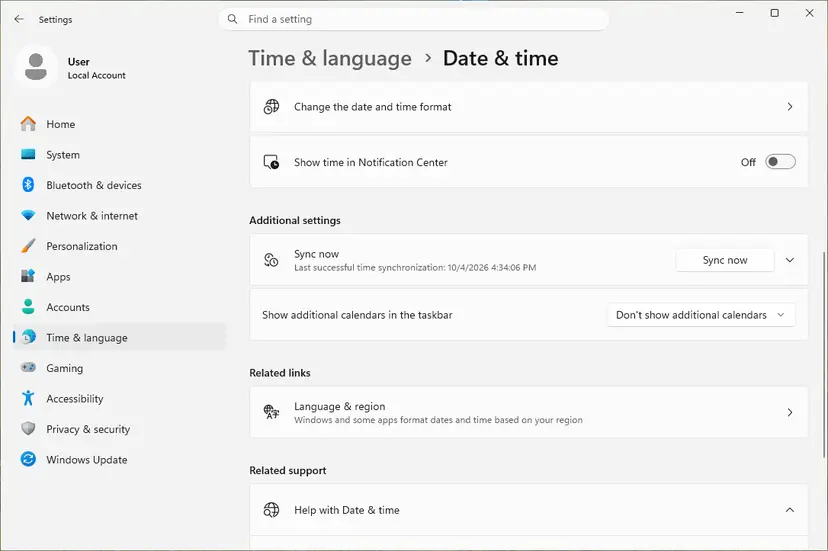
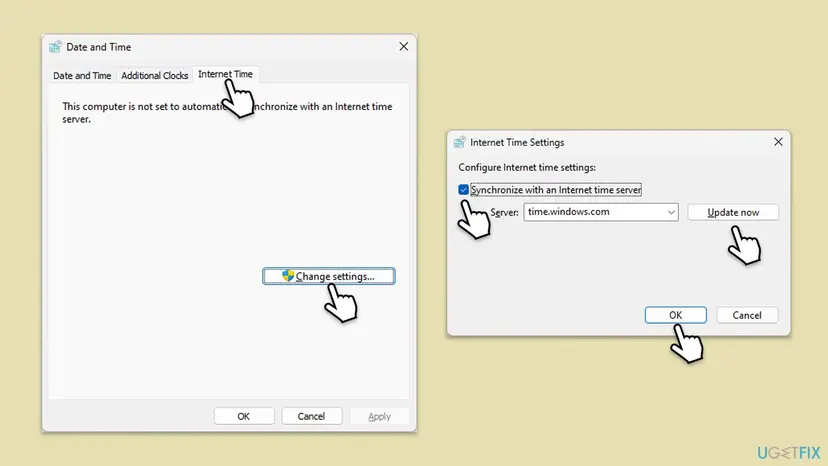
If Sync now fails, use the Control Panel path: Clock and Region > Date and Time > Internet Time > Change settings, tick Synchronize with an Internet time server and select Update now. Every screen: How to fix the date and time in Windows.
It worked if: The clock and time zone are right, and the sign-in finishes.
If not: If the clock was already right, check the sign-in services with Fix 4.
Fix 4. Check that the Microsoft Account Sign-in Assistant service can run
5 minutesLow riskEvery Microsoft app on the PC fails, or a tweak or privacy tool was used to turn off services.
Windows apps sign you in through the Microsoft Account Sign-in Assistant service, and Store apps rely on the State Repository Service. Microsoft support staff ask users with this code to make sure both can start.
- Press Win + R, type
services.mscand press Enter. - Find Microsoft Account Sign-in Assistant and double-click it.
- If Startup type is Disabled, set it to Manual and select Apply.
- If Service status is Stopped, select Start, then OK.
- Do the same for State Repository Service.
- Restart the PC and sign in again.
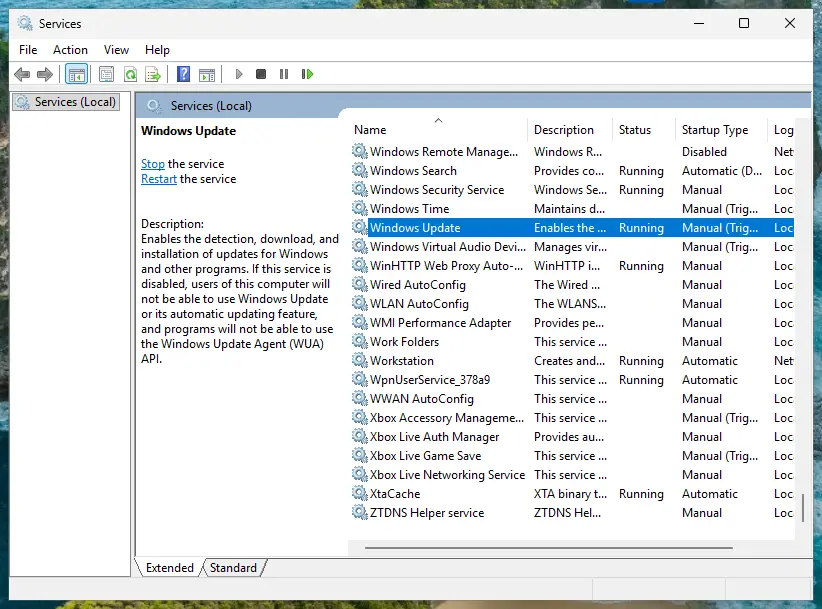
Change only these two services. The full steps for Services: Check and restart Windows services.
It worked if: Both services start without an error and the app signs in after the restart.
If not: If a service will not start, note its error and run the repairs in the last section. Otherwise go to Fix 5.
Fix 5. Reset the Microsoft Store cache and repair the Store, Xbox app and Gaming Services
10 minutesLow riskOnly the Microsoft Store, the Xbox app or a Store game such as Minecraft shows 0x80048820.
The Store and the Xbox app keep their own cached account state. Microsoft support staff suggest wsreset.exe for this code, and a repair of the Store, the Xbox app and Gaming Services when that is not enough.
- Close the Microsoft Store and the Xbox app.
- Press Win + R, type
wsreset.exeand select OK. - Wait. A blank window stays open for about ten seconds, then the Store opens. Try the sign-in.
- If it still fails, open Settings > Apps > Installed apps, select the three dots next to Microsoft Store and select Advanced options.
- Select Repair. If that does not help, select Reset.
- Do the same for Xbox and Gaming Services, then restart the PC.
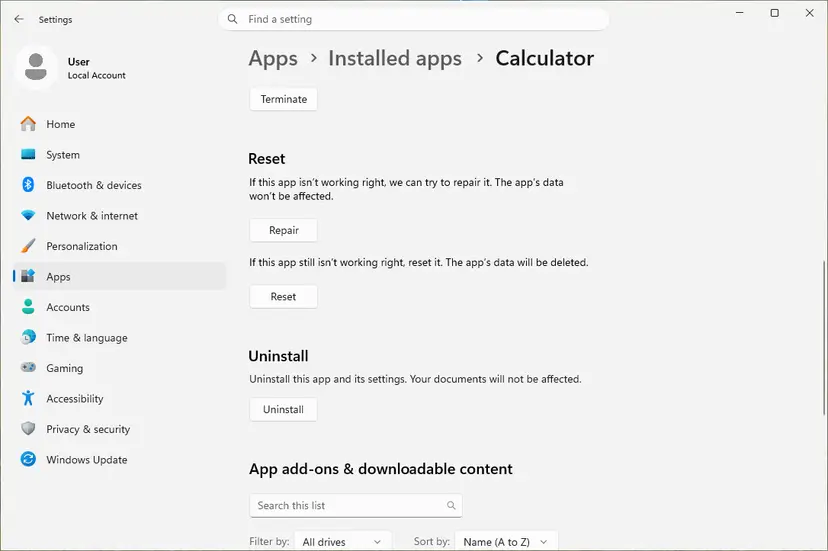
If the wsreset.exe window flashes and closes at once, users report that it did not help them. Go straight to Repair then. Every screen: Reset the Microsoft Store and How to repair or reset an app in Windows.
It worked if: The Store shows your account picture in the top corner, and the Xbox app and Minecraft sign in.
If not: If they still refuse the account, check the network with Fix 6.
Fix 6. Turn off the VPN and proxy and reset the network
10 minutesLow riskA VPN or proxy is set, the PC came from work, or the error appears on one network only.
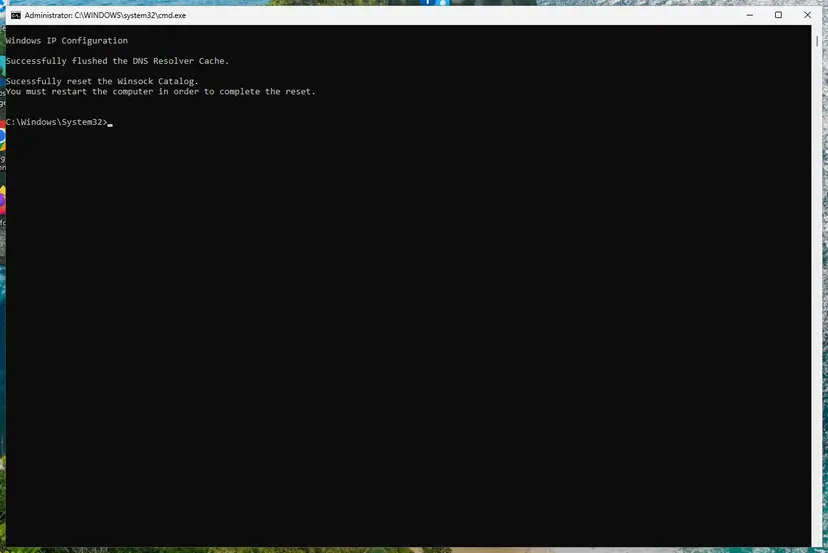
Microsoft support staff ask about a VPN first for this code and suggest a Winsock and IP reset with a DNS flush. A VPN, a proxy or a stale network setting can stop the PC from reaching Microsoft's sign-in service.
- Disconnect your VPN app and close it from the taskbar corner.
- Press Win + I and open Network & internet > Proxy. Next to Use a proxy server, select Set up and turn it Off, then Save.
- Right-click Start and open Terminal (Admin). On Windows 10 open Windows PowerShell (Admin). Run these commands one by one:
netsh winsock reset netsh int ip reset ipconfig /release ipconfig /renew ipconfig /flushdns - Restart the PC and sign in again.
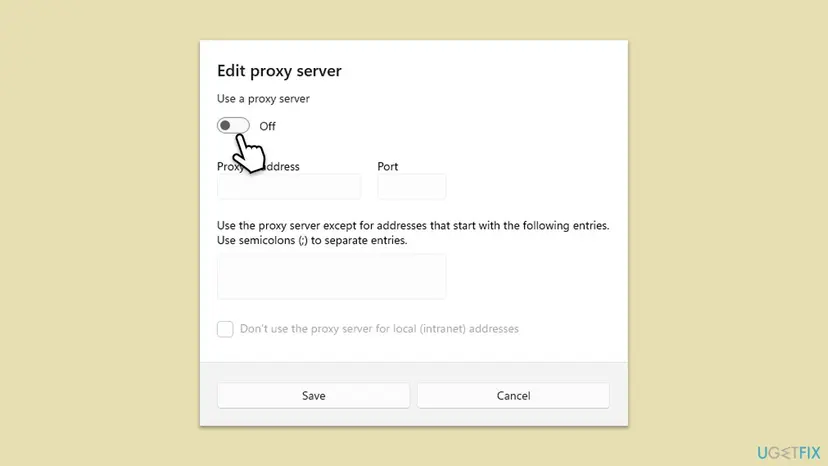
On a PC your employer manages, the proxy may be required: ask IT first. Every command: Reset the network and flush DNS.
It worked if: With no VPN and no proxy, the app signs in after the restart.
If not: If the error stays on every network, test a new Windows user profile with Fix 7.
Fix 7. Test the account in a new Windows user profile
15 minutesLow riskFix 1 to Fix 6 did not help, the account works in a browser, and other accounts sign in on this PC.
When cache and credential resets fail, a Microsoft support answer for this code points to a damaged link between this Microsoft account and your Windows user profile. A new profile has a clean link, so it shows whether the old profile is the cause.
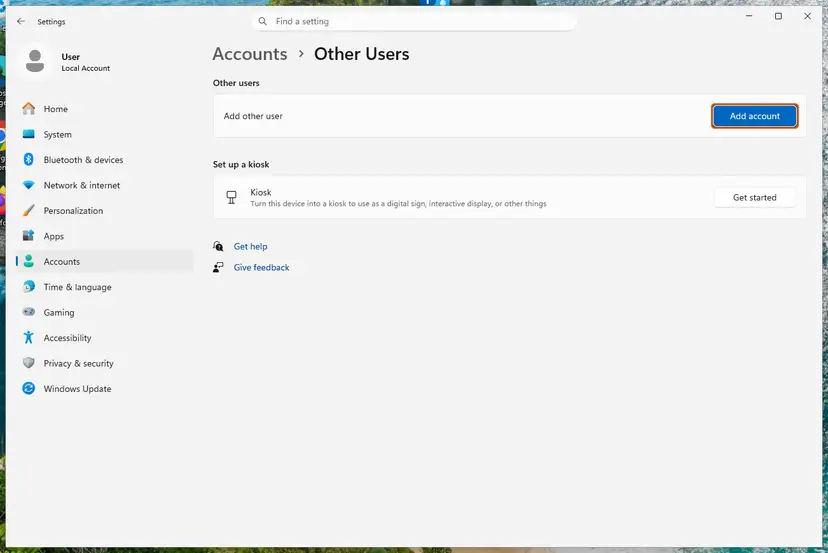
- Press Win + I and open Accounts > Other users. On Windows 10 open Accounts > Family & other users.
- Next to Add other user, select Add account.
- Type the email of the Microsoft account that shows 0x80048820 and finish the steps.
- Sign out, then sign in to Windows as the new user.
- Open the Microsoft Store or the Xbox app and sign in.
It worked if: In the new profile the app signs in. Your old profile is damaged: move your files to the new profile and use it from now on.
If not: If the error appears in the new profile too, the cause is the account or Windows itself. Read the next section.
If 0x80048820 is still there: account recovery, repairs and support
When the error stays in a new Windows profile, the cause is either the account or Windows' own sign-in parts. Work through this list in order.
- If you think the account was hacked: a Microsoft support answer for this code calls that a security incident that general troubleshooting cannot fix. Use the Microsoft account recovery form at
https://account.live.com/acsrfrom a device you used before. - Update Windows: press Win + I, open Windows Update and select Check for updates. Fixes for the sign-in parts arrive this way.
- Repair system files: if every account fails in every profile, run the repair: Run DISM and SFC to repair Windows system files.
- Contact Microsoft: at
https://support.microsoft.com/contact, choose account issues and chat with a support agent. Say which fixes you tried.
| What you see | Likely reason | Who can fix it |
|---|---|---|
| The account fails in the browser too | Locked, hacked or recovering account | Account recovery, then Microsoft support |
| Works in a new Windows profile, not in yours | Damaged profile link to the account | You: move to the new profile |
| Every account fails in every profile | Windows sign-in components | System file repair, then Microsoft support |
| A second purchase of the same game | Bought while the sign-in failed | Microsoft support, after the sign-in works |
Windows 10 left support on 14 October 2025. Without Extended Security Updates it no longer gets fixes for its sign-in components, so an old Windows 10 PC can keep this error where Windows 11 does not.
How to keep 0x80048820 from coming back
Once the saved sign-in is clean and the clock is right, the error does not return on its own. It comes back when something changes the sign-in path again.
- Keep automatic time and time zone on.
- Disconnect a VPN before you sign in to the Store or the Xbox app, and reconnect afterwards.
- Do not turn off services with tweak tools: the Microsoft Account Sign-in Assistant is needed for every app sign-in.
- Keep your account's security info current, a phone number and a second email, so you can recover it quickly.
- Keep Windows updated.
Frequently asked questions
What is error 0x80048820?
It is a Microsoft account sign-in error in Windows. An app such as the Microsoft Store, the Xbox app, the Minecraft Launcher or Outlook asked Windows to sign you in, and the sign-in did not finish. Microsoft has not published a definition. Its support staff call it a common issue caused by local sign-in data or time and network sync problems. Start with Fix 1 and Fix 2.
Is 0x80048820 a Windows problem or an Outlook problem?
Usually Windows. Outlook, the Store and the Xbox app all use the same Microsoft account sign-in that Windows keeps for your user, so one damaged saved sign-in breaks all of them. Test the account at account.microsoft.com first. If it works there, clear the saved sign-ins in Credential Manager (Fix 2) and sync the clock (Fix 3) before you reinstall or repair Outlook.
Will I lose Minecraft or my Store purchases?
No. A Microsoft support answer for this code says a Minecraft licence is tied to the Microsoft account, not to the PC. Your games and apps come back once the sign-in works. Do not buy the game again to get past the error. If you already did, contact Microsoft support after the sign-in is fixed and ask about the second purchase.
Does 0x80048820 mean my account was hacked?
Not usually. Most cases are a damaged saved sign-in or a wrong clock, and the account works fine in a browser. It points to a hack when the password was changed without you, the security info is not yours, or you cannot sign in at account.microsoft.com either. Then use the recovery form at account.live.com/acsr, as Microsoft support advises.
Is 0x80048820 the same as 0x80048823?
They are close relatives: both are Microsoft account sign-in errors in the same apps and differ only in the last digit. For 0x80048820, Microsoft support staff point to saved sign-in data, the clock and the Windows profile. For 0x80048823 they point mostly to the network path, a proxy or the hosts file. If you see that code, use our guide to error 0x80048823.
Why does wsreset close after a second and nothing changes?
Normally the blank wsreset.exe window stays open for about ten seconds and then opens the Store. Users report that it flashes and closes when the problem is not the Store cache. That fits 0x80048820, which usually sits in the saved sign-in or the Windows profile. Use Fix 2 and Fix 4, then repair the Store and the Xbox app in Fix 5.
Other accounts sign in on my PC but mine does not. Why?
Then the PC, the network and the apps work, and the problem belongs to your account on this PC. Remove its saved sign-ins with Fix 2 first. If that does not help, a Microsoft support answer points to a damaged link between your account and your Windows user profile. Test it in a new Windows user with Fix 7.
What does Sorry, we were unable to sign you in to Windows Live ID mean?
It is the old form of the same code from Windows Live Mail, often with Server Error 0x80048820. Windows Live Mail is a retired program that Microsoft no longer updates, so a fix on the PC rarely helps it for long. Add your account to the Outlook app or the Mail app instead. If those show 0x80048820 too, follow the fixes on this page.
Should I reinstall Windows to fix 0x80048820?
Rarely, and only last. The error usually lives in the saved sign-in or one Windows profile, and Fix 2 or Fix 7 fixes it in minutes. A new Windows user is a much smaller step than a reinstall and shows the same thing. Repair system files first if every account fails in every profile: Run DISM and SFC to repair Windows system files.
Is this guide available in other languages?
No, this guide is in English only. Searches such as erro 0x80048820 or ошибка 0x80048820 land here because they contain the code. The fixes do not depend on the language of Windows: wsreset.exe, services.msc and the network commands work the same everywhere. Only the names of menus and buttons are translated, so follow the order of the steps.
Sources
- Microsoft Q&A: I keep getting error 0x80048820 (Microsoft support answers on the time, Store cache, Credential Manager and a new Windows profile) (learn.microsoft.com)
- Microsoft Q&A: I can't login to Microsoft Store or any game (login error 0x80048820) (sign-in services, network reset, Store and Xbox repair, account recovery) (learn.microsoft.com)
- Microsoft Q&A: Error code 0x80048820, Sorry, we were unable to sign you in to Windows Live ID (the Windows Live Mail form of the error) (learn.microsoft.com)
Did this fix work?
One click, no account. It tells the next reader which guides are worth their time.
Questions and experiences: fix Microsoft account login error 0x80048820 in Windows
Still broken, or found a fix we did not cover? Ask here: members and our editors answer. Reading is open; writing needs a free account.
…