
How to fix Microsoft Office activation error 0x4004F00C in Windows?

Prefer to fix it yourself? The manual steps follow.
- 8methods
- 5 to 30 minutes
- Intermediate
Applies to Office 2016, 2019, 2021 and 2024 (retail and volume editions), Office LTSC 2021 and 2024, and Microsoft 365 apps on Windows
8 methods in this guide
- What the error means
- Why it appears
- The fixes
- 1. Sign in with the right account
- 2. Read the licence status
- 3. Install your own key
- 4. Remove the extra Office copy
- 5. Work or school activation
- 6. Date, time and rights
- 7. Connection and security tools
- 8. Contact Microsoft support
- If it is still there
- Avoid it next time
- FAQ
Hi, I upgraded my Windows recently, so I lost my Microsoft Office. I reinstalled it and attempted to activate it, but received error 0x4004F00C. It would be nice to receive some tips on how to solve this, please.
Error 0x4004F00C means Office is installed but not activated yet, so it runs on a grace period that will end. It is a licensing status, not a damaged program. Sign in with the account that bought Office, or check with ospp.vbs /dstatus which licence the PC holds.
0x4004F00C says Office is running within its grace period: it is installed but has not activated. If you bought Office or have Microsoft 365, sign in to Office with the account that bought it (Fix 1). If that does not work, read the licence type with cscript ospp.vbs /dstatus (Fix 2): a RETAIL licence needs your key, a volume licence needs your organisation.
| Error | 0x4004F00C. The licensing tool describes it as: "The Software Licensing Service reported that the application is running within the valid grace period." |
|---|---|
| Where it appears | In the Office activation message, on File > Account in Word or Excel, and in the output of cscript ospp.vbs /dstatus next to LICENSE STATUS: ---OOB_GRACE---. |
| Main cause | Office was installed or reinstalled, for example after a Windows upgrade, and was never activated with the account or key it belongs to. |
| Fastest fix | Sign in to Office with the Microsoft account that bought it (Fix 1). Otherwise install your own key with ospp.vbs /inpkey and run /act (Fix 3). |
| Also written as | 0x4004f00c, error code: 0x4004F00C, OOB_GRACE, and in the title bar later Unlicensed Product. |
| Affects | Office 2016, 2019, 2021 and 2024, Office LTSC, and Microsoft 365 apps. Office 2016 and 2019 left support on 14 October 2025, but they still activate the same way. |
| Microsoft's status | Not a bug. It is the normal state of Office before activation. Microsoft's activation help starts with the right account, one copy of Office and the subscription status. |
| When it is not fixable | A volume (KMS) edition on a home PC with no organisation behind it. Volume editions are licensed through organisations, so install Office you own instead. |
| Time to fix | About 5 minutes by signing in. 15 to 30 minutes when you need the commands or a reinstall. |
Facts checked on 15 October 2026. Steps written for Windows 11 (25H2 and 26H2) and Windows 10 22H2.
What Office error 0x4004F00C means
0x4004F00C is not a crash code. It is the status Office reports while it runs without activation. When you check the licence with Microsoft's Office Software Protection Platform script, the line reads LICENSE STATUS: ---OOB_GRACE---, and the description says the application is running within the valid grace period.
In plain words: Office is installed and works for now, but it has not proved that it is licensed. The REMAINING GRACE line shows how many days are left. When they run out and activation still fails, Microsoft says the title bar shows Unlicensed Product and most features of Office are disabled.
| Where you see it | What you see | What it tells you |
|---|---|---|
| An Office app, after setup or a reinstall | A request to activate, then an error with the code 0x4004F00C | Activation did not finish. The account or key was not accepted or not given. |
Command Prompt, cscript ospp.vbs /dstatus | ERROR CODE: 0x4004F00C with LICENSE STATUS: ---OOB_GRACE--- | Which Office licence is installed, its channel, and the days of grace left. |
| Office title bar after the grace period | Unlicensed Product or Non-commercial use / Unlicensed Product | The grace period ended without activation. |
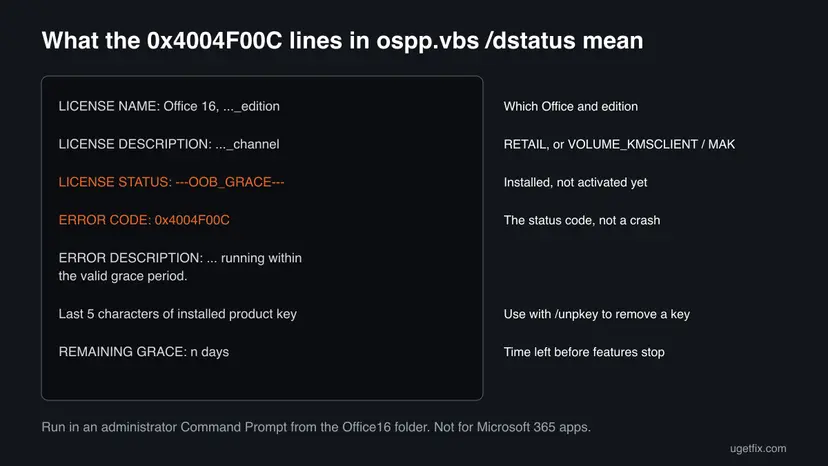
Your files are safe and Office still opens. The real question is which licence is installed and why it did not activate. Fix 2 answers that in one command.
Why error 0x4004F00C appears, from most to least common
Every cause comes down to one thing: Office did not get the proof it needs. The licence channel shown by Fix 2 tells you which cause is yours.
| Cause | How often | How to tell | Fix |
|---|---|---|---|
| Office was reinstalled, for example after a Windows upgrade, and nobody signed in with the buying account. | Most often | The product is listed at account.microsoft.com/services. | Fix 1 |
| A retail Office has no key, or an old key from another install. | Often | /dstatus shows a RETAIL channel and a key ending you do not recognise. | Fix 3 |
| Two Office products are installed and the wrong one asks for activation. | Often | Programs and Features lists more than one Office. | Fix 4 |
| A volume (KMS client) edition cannot reach the organisation's KMS host. | Sometimes | /dstatus shows VOLUME_KMSCLIENT channel on a work or school PC. | Fix 5 |
| A volume edition was installed on a home PC. | Sometimes | VOLUME_KMSCLIENT or LTSC Professional Plus on a PC no organisation manages. | Fix 4 |
| Wrong date, time or time zone, missing rights, or a blocked connection. | Rarely | The account and key are right, but activation still fails. | Fix 6, Fix 7 |
How to fix Office activation error 0x4004F00C
Fix 1 is for Office bought from Microsoft or a Microsoft 365 plan, which covers most readers. Fix 2 tells you which licence the PC holds. Fixes 3 to 5 act on what Fix 2 shows. Fixes 6 to 8 are the checks Microsoft lists when the right licence still does not activate.
| What you see or have | Start with |
|---|---|
| You bought Office or Microsoft 365 and reinstalled it, for example after a Windows upgrade. | Fix 1 |
| You do not know which Office is installed or where it came from. | Fix 2 |
| You have a retail product key from a box card or a store email. | Fix 3 |
| Programs and Features shows two Office products, or a volume edition on a home PC. | Fix 4 |
| A work or school PC whose Office is activated by the organisation. | Fix 5 |
| The licence is right and activation still fails. | Fix 6, then Fix 7 |
Fix 1. Sign in to Office with the account that bought it
5 minutesNo riskYou bought Office from Microsoft, redeemed a key to your account, or have a Microsoft 365 plan, as in the reader's question above.
Office bought from Microsoft is tied to a Microsoft account and activates when you sign in with it. After a reinstall Office starts in its grace period until that sign-in happens, which is exactly what 0x4004F00C reports.
- In a browser, sign in to account.microsoft.com/services with the email you think you used to buy Office.
- Check that your Office product or Microsoft 365 plan is listed. If it is not, try your other personal addresses, or your work or school account.
- If the plan is under Cancelled subscriptions, renew it on the same page.
- Close all Office apps, then open Word.
- When Office asks you to sign in, use the account that showed the product. If it does not ask, go to File > Account and select Sign in or Switch account.
- Restart Word and open File > Account: the product should show as activated, with no request to activate.
For a Microsoft 365 plan, open aka.ms/SARA-OfficeActivation-OF, select Open when the browser asks to open Get Help, and follow the prompts. Run it on the PC with the problem. It needs Windows 10 or later.
Older guides told you to download SetupProd_Act.exe, the Microsoft Support and Recovery Assistant installer. Microsoft's current activation page starts the troubleshooter through the Get Help app instead, so you do not need that file.
It worked if: File > Account shows the product as activated and shows the account you signed in with.
If not: If Office says "We couldn't find any Office products", the account is wrong or the licence is a key: go to Fix 2.
Fix 2. Check which Office licence the PC holds with ospp.vbs /dstatus
5 minutesNo riskSigning in did not help, or you do not know where this Office came from.
The licence report shows the edition, the channel (RETAIL or a volume channel), the last five characters of the key and the grace days left. That tells you which of the next fixes applies, instead of guessing.
- Press Win, type cmd, right-click Command Prompt and select Run as administrator. Select Yes.
- Go to the Office folder. For 64-bit Office:
cd "C:\Program Files\Microsoft Office\root\Office16" - For 32-bit Office on 64-bit Windows, use this folder instead:
cd "C:\Program Files (x86)\Microsoft Office\root\Office16" - Show the licence report:
cscript ospp.vbs /dstatus - Read LICENSE NAME, LICENSE DESCRIPTION, LICENSE STATUS and Last 5 characters of installed product key. Write them down.
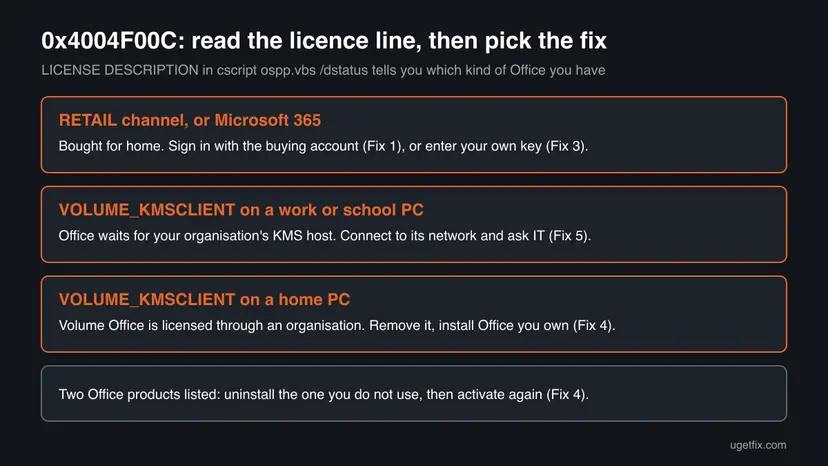
| LICENSE DESCRIPTION shows | What it means | Go to |
|---|---|---|
| A RETAIL channel | Office bought for home or small business, activated by a key or an account. | Fix 3 |
| VOLUME_KMSCLIENT channel | A volume edition that activates against an organisation's KMS host. | Fix 5 at work, Fix 4 at home |
| A MAK channel | A volume edition with a Multiple Activation Key from an organisation. | Fix 5 |
| More than one licence block | Two Office products or old keys are installed. | Fix 4, or remove the old key in Fix 3 |
Microsoft says ospp.vbs does not work for Microsoft 365 Apps. If the folder has no ospp.vbs or the report is empty, you have Microsoft 365: go back to Fix 1. Admins can use Microsoft's PowerShell script vnextdiag.ps1 to read the licence.
Older versions may have no root folder in the path, and the old guide's office15 folder belongs to Office 2013. Office 2016, 2019, 2021 and 2024 all use Office16.
It worked if: The report lists one Office licence with its channel and ERROR CODE: 0x4004F00C. You now know the channel and the key ending.
If not: If Command Prompt cannot find ospp.vbs, you are in the wrong folder: try the other path in step 3.
Fix 3. Remove the old key and install your own retail key
5 to 10 minutesLow riskFix 2 shows a RETAIL channel, and you have a genuine 25-character key from a box card, a store email or your Microsoft account.
After a reinstall Office may carry a key that is not yours, or none at all. Microsoft's script replaces the installed key with yours and asks the activation server again, which ends the grace period.
- Open Command Prompt as administrator in the Office16 folder, as in Fix 2.
- If
/dstatusshowed a key ending that is not yours, remove it. Replace XXXXX with those five characters:cscript ospp.vbs /unpkey:XXXXX - Install your key:
cscript ospp.vbs /inpkey:XXXXX-XXXXX-XXXXX-XXXXX-XXXXX - Activate:
cscript ospp.vbs /act - If it fails, show the failure history and the meaning of any new code:
cscript ospp.vbs /dhistoryacterr cscript ospp.vbs /ddescr:0x4004F00C - Run
cscript ospp.vbs /dstatusagain and check that LICENSE STATUS no longer says OOB_GRACE.
/unpkey removes a licence from this PC. Before you run it, write down the full key you will install, and remove only the key ending shown next to the old licence. Never use slmgr /upk without an Activation ID: Microsoft warns that it also removes the Windows product key.
It worked if: /act reports that the product activated successfully, and /dstatus no longer shows OOB_GRACE or 0x4004F00C.
If not: If activation reports another code, read it with /ddescr. If a key bought from Microsoft is refused, go to Fix 8. A key that Microsoft no longer accepts gives 0xC004C060, covered in our guide to Office activation error 0xC004C060.
Fix 4. Uninstall the extra or wrong Office copy, then repair the one you keep
15 to 30 minutesLow riskPrograms and Features lists two Office products, or Fix 2 shows a volume edition on a home PC that no organisation manages.
Microsoft says two Office installs can cause activation conflicts. A volume edition, such as Office LTSC Professional Plus, waits for an organisation's licence that a home PC never gets, so it stays in its grace period.
- Close all Office apps.
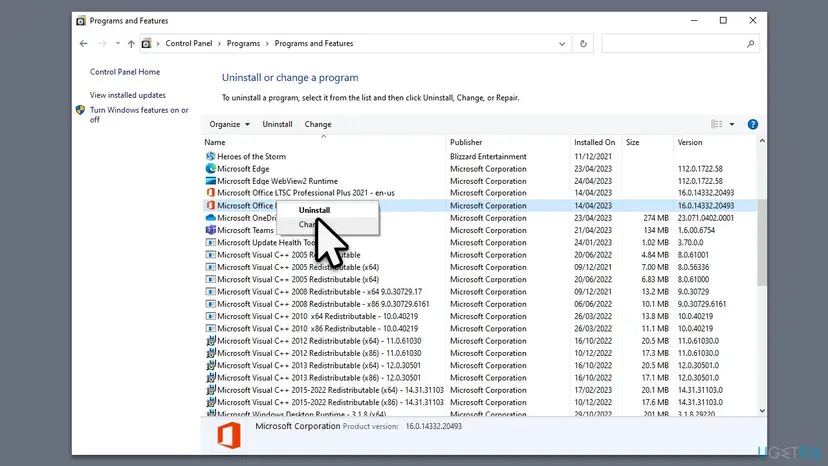
- Press Start, type Control Panel, open it, and select Programs > Programs and Features.
- Type office in the Search Programs and Features box in the upper corner.
- Right-click the version you are not using and select Uninstall. At home, that is the volume edition with no organisation behind it.
- Restart the PC when the uninstall is finished.
- Install the Office you own from account.microsoft.com/services, or keep the remaining copy, and sign in as in Fix 1.
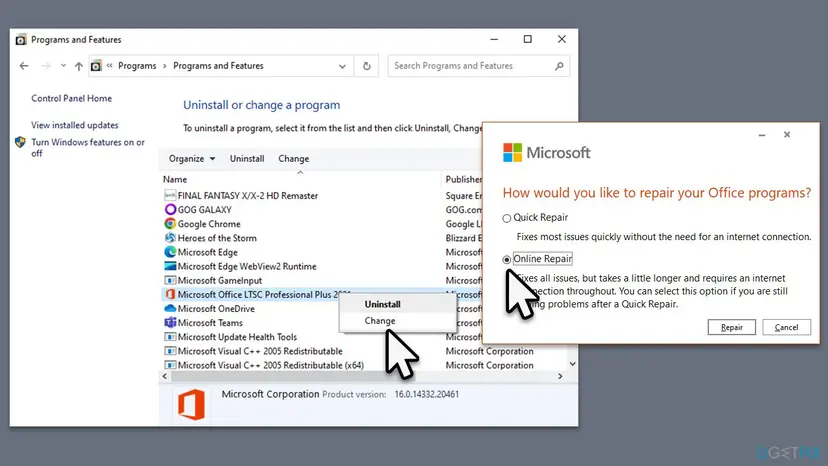
If the one remaining copy still will not activate, Microsoft's next step is an online repair. Right-click it, select Change, choose Online Repair and select Repair. Step by step: How to repair Microsoft 365 or Office
Uninstalling or repairing Office does not delete your documents. Files in Documents or OneDrive stay where they are.
It worked if: Only one Office product is listed, and it activates after you sign in or enter your key.
If not: If the only copy is a volume edition on a work PC, go to Fix 5. Otherwise go to Fix 6.
Fix 5. Work or school PC: let Office reach your organisation's KMS host
5 to 15 minutesNo riskFix 2 shows VOLUME_KMSCLIENT channel or a MAK channel on a PC that your employer or school manages.
A KMS client edition activates only when it contacts the organisation's Key Management Service host, by default on port 1688. Away from the organisation's network, it stays in OOB_GRACE and reports 0x4004F00C.
- Connect the PC to the organisation's network, in the office or through its VPN.
- Open Command Prompt as administrator in the Office16 folder, as in Fix 2.
- Trigger activation:
cscript ospp.vbs /act - Check whether a KMS host answered:
cscript ospp.vbs /dhistorykms - Send the
/dstatusand/dhistorykmsoutput to your IT department.
Microsoft's KMS settings such as /sethst are for administrators pointing Office at their own KMS host. A KMS server address found online is not a licence, and this page does not cover it. If no organisation licenses your Office, use Fix 4.
It worked if: /dhistorykms shows a successful contact, and /dstatus no longer shows OOB_GRACE.
If not: If the KMS host cannot be reached on the organisation's network, only IT can fix it. At home, go to Fix 4.
Fix 6. Check the date, time and time zone, and run Office as administrator
5 minutesNo riskThe account or key is right, but activation still fails.
Microsoft lists a wrong date, time or time zone as a reason activation can fail. It also says running Office as administrator helps fix permission problems that stop activation from finishing.
- Close all Office apps.
- Open Settings > Time & language > Date & time.
- Turn on Set time automatically and, if shown, Set time zone automatically. Otherwise check that your time zone is correct.
- Press Start, type Word, right-click it and select Run as administrator. Select Yes.
- Try to activate again from File > Account.
- If Office has updates waiting, install them: Microsoft says updates can contain activation fixes.
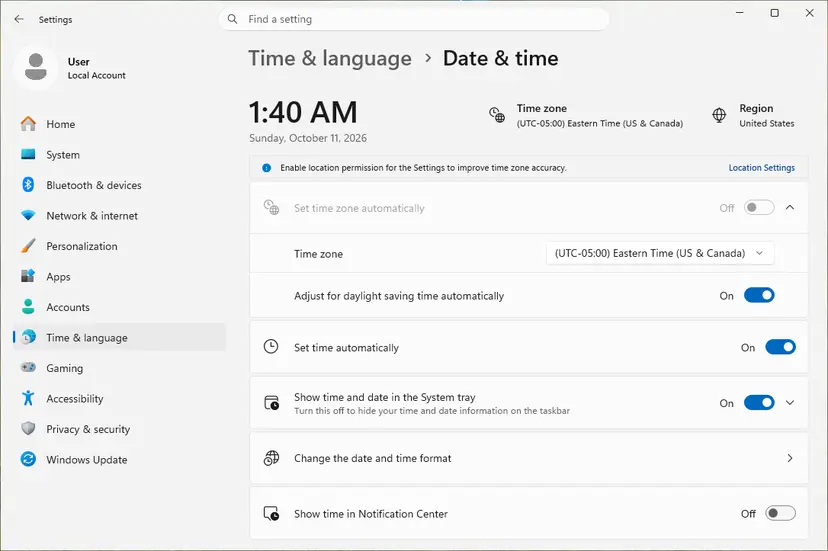
Step by step with all clock options: How to fix the date and time in Windows. For running an app with full rights: How to run a program as administrator or in compatibility mode
It worked if: Office activates after you sign in or select Activate.
If not: If it still fails, the connection to Microsoft's servers is likely blocked: Fix 7.
Fix 7. Check the proxy, VPN, firewall and antivirus for one test
10 minutesLow riskThe licence is right, the clock is right, and activation still fails, often on a PC used both at home and at work.
Activation needs a direct connection to Microsoft's licensing servers. Microsoft lists the firewall, the antivirus and proxy settings as the connectivity checks when Office will not activate.
- Open Settings > Network & internet > Proxy.
- Under Manual proxy setup, check whether a proxy is on. If you turned it on yourself, turn it off for the test.
- Disconnect any VPN that is not your organisation's.
- Pause your antivirus for one activation test, then turn it back on at once: Turn off Microsoft Defender protection for a moment
- Activate again from File > Account or with
cscript ospp.vbs /act. - Turn the proxy, VPN and antivirus back to how they were.
Microsoft says Office on Windows 7 needs TLS 1.2 enabled by default to activate, through a Windows update for WinHTTP. Windows 7 itself is no longer supported, so moving to Windows 11 is the lasting fix.
It worked if: Activation succeeds with the proxy or VPN off, which tells you what was blocking it.
If not: If it fails with every tool off, go to Fix 8.
Fix 8. Contact Microsoft support with your proof of purchase
15 to 30 minutesNo riskYou bought Office from Microsoft or an authorised retailer, and Fixes 1 to 7 did not activate it.
Microsoft's activation help ends with contacting Office support. Support can look up a purchase and the state of a key, which nothing on the PC can do.
- Collect the order email or number, the account used to buy, and the key card if you have one.
- Save the output of
cscript ospp.vbs /dstatusand/dhistoryacterrto a text file. - Open support.microsoft.com/contactus and choose Office activation.
- Give support the facts in one message: version, licence channel, error code and what you tried.
It worked if: Support activates the licence or tells you plainly why the key cannot be used.
If not: If support says the key was not sold by Microsoft, ask the seller for a refund and buy Office from Microsoft or an authorised retailer.
If error 0x4004F00C is still there
The licence report is the log for this error. Read these lines before you ask anyone for help, because they answer most of the support questions at once.
| What to check | Command or place | What it tells you |
|---|---|---|
| Licence channel and grace days | cscript ospp.vbs /dstatus | RETAIL or volume, and how long Office keeps working. |
| Why retail or MAK activation failed | cscript ospp.vbs /dhistoryacterr | The failure history, with the codes Office got back. |
| Whether a KMS host answered | cscript ospp.vbs /dhistorykms | Work or school PCs only. |
| Meaning of any other code | cscript ospp.vbs /ddescr:<code> | Microsoft's description of that code. |
| Is Office on your account? | account.microsoft.com/services | Listed: sign in with that account. Not listed: the licence is a key or comes from elsewhere. |
0x4004F00C is about the licence. Drivers, disk checks and system file repairs do not change it, and older guides that list them are aiming at another problem.
How to avoid error 0x4004F00C next time
The error comes back most often after a reinstall of Windows or Office. A few habits make the next reinstall activate on the first sign-in.
- Redeem every Office key to your Microsoft account, so a reinstall activates by signing in.
- Keep the order email and note which account bought Office.
- Install Office from account.microsoft.com/services, which gives you the edition you own.
- Keep the clock set automatically.
- Install a second Office version next to the one you use.
- Install a volume or LTSC edition on a home PC.
- Use activator tools or KMS addresses from the internet.
Frequently asked questions
What does error code 0x4004F00C mean?
It means Office is installed but not activated, and it runs within a grace period. The licensing tool describes it as the Software Licensing Service reporting that the application is running within the valid grace period. The licence status line reads OOB_GRACE. Office works until the grace days run out. Then the title bar shows Unlicensed Product and most features are disabled.
How do I fix 0x4004F00C in Office 2016?
Office 2016 activates the same way as later versions. Sign in with the account that bought it, or run cscript ospp.vbs /dstatus from the Office16 folder to see the licence channel. With a retail key, install it with /inpkey and run /act. With a volume edition, it needs your organisation's KMS host. Office 2016 left support on 14 October 2025, so it gets no more fixes.
Is 0x4004F00C an Office activation error or a Windows error?
It is an Office activation status. It comes from the licensing service that Office uses on Windows, which is why some pages call it a Windows error. Windows activation is separate and is checked under Settings > System > Activation. Fixing Office activation does not change Windows activation, and the reverse is also true.
How many days of grace do I have?
The number is in the REMAINING GRACE line of cscript ospp.vbs /dstatus, in days and minutes. It differs between versions and editions, so read it on your PC instead of trusting a number from a forum. In the output posted on Microsoft Q&A for a volume edition it read 30 days. Users also report messages saying only a few days are left.
What is SetupProd_Act.exe?
It is the installer of the Microsoft Support and Recovery Assistant for Office activation, which older guides told you to download. Microsoft's current activation page starts the Microsoft 365 activation troubleshooter through the Get Help app instead, from aka.ms/SARA-OfficeActivation-OF. It runs on Windows 10 or later. If you already have SetupProd_Act.exe, only run a copy you downloaded from Microsoft.
Does 0x4004F00C appear on Windows 7?
It can, because Office on Windows 7 uses the same licensing. Microsoft notes that Office on Windows 7 needs TLS 1.2 enabled by default before it can activate, which needs a Windows update for WinHTTP. Windows 7 no longer gets support, and newer Office versions do not support it. Moving to Windows 11 is the lasting fix.
Why does my Office say VOLUME_KMSCLIENT?
It means you have a volume licensed edition, such as Office LTSC Professional Plus, that activates against an organisation's Key Management Service host. On a work or school PC, connect to the organisation's network and ask IT. On a home PC that no organisation manages, this edition has no licence to activate with. Uninstall it and install Office you own.
Will I lose my documents if I reinstall Office?
No. Uninstalling, repairing or reinstalling Office removes program files, not your documents. Files in Documents, on the desktop or in OneDrive stay where they are. Settings such as recent files lists and custom templates may need to be set again. If you want extra safety, copy your important files to OneDrive or a USB drive before you start.
Can I use a KMS activator to get rid of 0x4004F00C?
No, and this page does not explain one. KMS is a Microsoft service that organisations run for their own volume licences. Tools and server addresses that promise free activation are not a licence, change system settings, and can carry malware. If you do not have a licence, buy Office or Microsoft 365 from Microsoft or an authorised retailer.
I do not speak English. Is this the right page?
Yes, if you see code 0x4004F00C in Office. People search for it in Indonesian, Hindi, Spanish, Thai and Arabic, asking how to fix it or what it is. The answer is the same: Office is installed but not activated. Sign in with the account that bought it, then follow Fix 2 if that does not help.
Sources
- Microsoft Support: Unlicensed Product and activation errors in Office (support.microsoft.com)
- Microsoft Learn: Tools to manage volume activation of Office (learn.microsoft.com)
- Microsoft Q&A: Office Professional Plus KMS version, activation error 0x4004F00C (ospp.vbs output) (learn.microsoft.com)
Did this fix work?
One click, no account. It tells the next reader which guides are worth their time.
Questions and experiences: fix Microsoft Office activation error 0x4004F00C in Windows
Still broken, or found a fix we did not cover? Ask here: members and our editors answer. Reading is open; writing needs a free account.
…