
How to fix error 0x8000000b when you add an email account in Windows

Prefer to fix it yourself? The manual steps follow.
6 methods in this guide
Hello. I recently bought an HP laptop, and I would like to add my email to it, but as soon as I try doing so, I receive an error 0x8000000b. Please help me fix this problem. Thanks.
Error 0x8000000b appears when the Windows Mail and Calendar app fails to add an email account, most often Gmail. Microsoft ended support for Mail and Calendar on 31 December 2024, so the lasting fix is to move the account to the new Outlook for Windows. Then remove the old app and what it leaves behind.
Error 0x8000000b means the old Mail and Calendar app could not add your account. Microsoft stopped that app on 31 December 2024: it can no longer send or receive mail. First save any mail that exists only on the PC, then open Outlook (the new Outlook for Windows), add the account under Settings > Accounts, and uninstall Mail and Calendar when the account works there.
| Program | Mail and Calendar, the built-in Windows Mail, Calendar and People apps (one package). |
|---|---|
| Publisher | Microsoft Corporation. It came preinstalled on Windows 10 and older Windows 11 builds. |
| Safe to remove | Yes. Support ended on 31 December 2024 and Windows does not need it. Export any mail stored only on the PC first. |
| Leaves behind | Its local data folder under %LOCALAPPDATA%\Packages, email account entries in Settings > Accounts, and saved sign-ins in Credential Manager. |
| Error message | "Something went wrong", "We're sorry, but we weren't able to do that.", "Error code: 0x8000000b". |
| Official replacement | The new Outlook for Windows, built into Windows 11 and free from Microsoft Store on Windows 10. |
| Needs restart | No, but a restart after the uninstall makes sure no Mail process holds its files. |
| Time | 15 to 30 minutes, longer when you export local mail first. |
| What stops working | Nothing that still works today. The old Mail and Calendar app can no longer send or receive mail or events. |
Facts checked on 16 October 2026. Steps written for Windows 11 (25H2 and 26H2) and Windows 10 22H2, read against Microsoft Support and Microsoft Q&A.
What error 0x8000000b is and which app shows it
Error 0x8000000b is shown by the Windows Mail and Calendar app when it cannot finish adding an email account. The message reads, word for word:
Something went wrong. We're sorry, but we weren't able to do that. Error code: 0x8000000b
In the Microsoft Q&A report we read, the user typed the Gmail address, the password and the code sent to the phone, clicked Agree, and only then got the error. The same happened with several Google accounts, and with a new Google account made from the app.
| Part | What it is | How you meet it |
|---|---|---|
| Mail and Calendar. | Microsoft's built-in mail, calendar and contacts app for Windows 10 and older Windows 11 builds. | Mail and Calendar in the Start menu, one entry Mail and Calendar in the installed apps list. |
| People. | The contacts part of the same app family. | Opened from inside Mail. Its support ended on the same day. |
| New Outlook for Windows. | The replacement. Microsoft says Windows 11 devices now ship with it as the default mail app, free for everyone. | Outlook in the Start menu. It is a separate app and stays when you remove Mail. |
Microsoft's support page is clear: support for Windows Mail, Calendar and People ended on 31 December 2024, and you can no longer send and receive email or events with them. A fix that makes Mail accept the account again would not give you working mail, so this guide moves the account to Outlook and then removes the old app.
Before you remove Mail and Calendar: what is lost and how to keep it
What you lose depends on how each account was connected. Check this before Step 1.
| Account type | Where the mail lives | What to do first |
|---|---|---|
| Outlook.com, Hotmail, Live, Microsoft 365. | On Microsoft's servers. | Nothing. It appears again in Outlook after you sign in. |
| Gmail, Yahoo or iCloud added with their own button. | On the provider's servers. Microsoft says calendar data can take a few minutes to sync to new Outlook. | Nothing, other than knowing the password. |
| Any account added as IMAP or POP only. | Microsoft says email, calendar and contact files may be saved only on your PC, because IMAP and POP do not sync all data to a mailbox. | Export them with Microsoft's steps before you uninstall (Step 1). |
- Have the password of every account ready. Google accounts also need the phone or app you use for the second sign in step.
- Do not delete the app's folder by hand while you still need its local mail.
- Your own files outside the app are not touched. For a general backup: Back up your files (Windows Backup, File History, Time Machine).
How to move off Mail and Calendar and remove it, step by step
Do the steps in order: save local data, add the account in Outlook, fix what blocks the sign in, then uninstall the old app. Steps 4 and 5 are only for when Outlook refuses the account too.
Step 1. Save mail, contacts and events that exist only on this PC
10 minutesLow riskOne of your accounts in Mail was added as IMAP or POP, or you are not sure.
Microsoft says local emails, events and contacts in Mail, Calendar and People stay exportable after support ended. Once the app is uninstalled, its local data goes with it.
- Open Mail from the Start menu and select Accounts in the left pane.
- Write down each account and how it was added: with a provider button (Outlook.com, Google, Yahoo, iCloud) or as Internet email (IMAP or POP).
- For each IMAP or POP account, follow Microsoft's article Export emails and contacts from Windows Mail or People.
- Save the exported files in a folder outside the app, for example in Documents.
- Open one exported message or contact file to check that it is readable.
If Mail no longer starts, its local data is still in the package folder listed in the leftovers table. Do not delete that folder until you have tried Step 5 or asked for help with the export.
It worked if: Every account is on your list, and the IMAP or POP ones have exported files in a folder you chose.
If not: If every account is Outlook.com, Gmail, Yahoo or iCloud, nothing needs exporting. Go on to Step 2.
Step 2. Add the account in the new Outlook for Windows
5 minutesNo riskEveryone who saw 0x8000000b in Mail and still wants this email on the PC.
Microsoft recommends new Outlook or Outlook.com in place of Mail and Calendar. Outlook signs in to Gmail and other providers in its own way, so the Mail sign in that ended in 0x8000000b is not used at all.
- Open Outlook from the Start menu. On Windows 10 install Outlook for Windows from Microsoft Store first.
- Select Settings (the gear icon), then Accounts, then Email accounts.
- Select Add account and type the full email address.
- Follow your provider's sign in page. For Gmail, sign in with Google and allow access when Google asks.
- Wait a few minutes for the folders and the calendar to fill.
It worked if: The account shows in Outlook's folder list, new mail arrives and you can send a test message to yourself.
If not: If Outlook shows the same 0x8000000b or another sign in error, go to Step 3.
Step 3. Add a Gmail account by hand with the IMAP settings
10 minutesLow riskOutlook or Mail refuses a Gmail account with 0x8000000b during the normal sign in.
An independent write up blames the error on a clash between Google's security policy and the mail app. The manual Internet email setup avoids the step that fails and talks to Google's IMAP and SMTP servers directly.
- In Gmail on the web, open Settings > See all settings > Forwarding and POP/IMAP. If an IMAP access option is shown, select Enable IMAP and Save Changes.
- In Outlook, open Settings > Accounts > Add account, then choose Advanced setup and Internet email.
- Fill in your name, Gmail address and password.
- In Incoming email server type
imap.gmail.com:993and choose IMAP4 as the account type. - In Outgoing email server type
smtp.gmail.com:465. - Tick Outgoing server requires authentication, Use same user name and password for sending email and Require SSL for incoming email.
- Select Sign in and wait a few minutes.
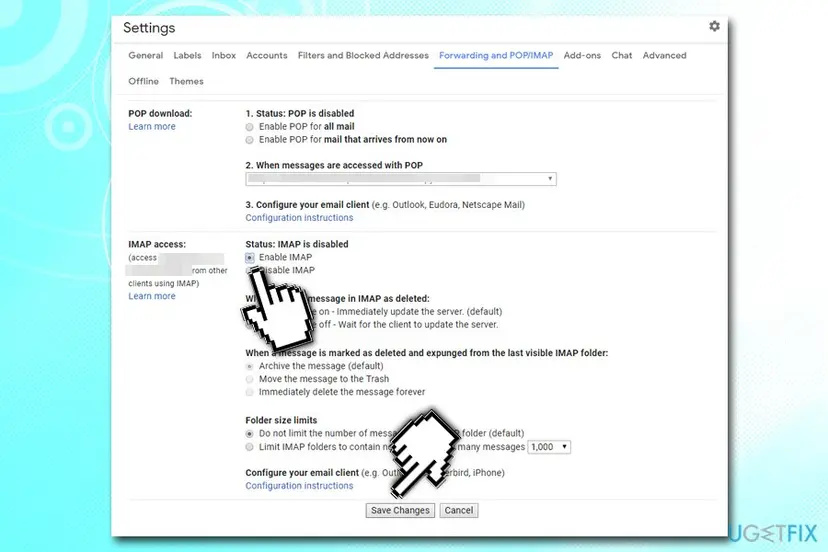
Google decides which passwords a mail app may use, and its rules have changed over the years. We could not confirm today's rule, so check Google's account help if the manual setup is refused.
It worked if: Outlook accepts the account without an error and the Gmail folders appear in the list.
If not: If the sign in still fails, sign in to Gmail in a browser to rule out a wrong password, then go to Step 4.
Step 4. Set the PC's date, time and time zone correctly
3 minutesNo riskThe taskbar clock is wrong, or the PC is new and was never connected long enough to set it.
Mail sign ins use secure connections and time limited codes, and a wrong clock can make the provider reject them. The old guide and the Microsoft Q&A moderator both list a clock check among the first things to try.
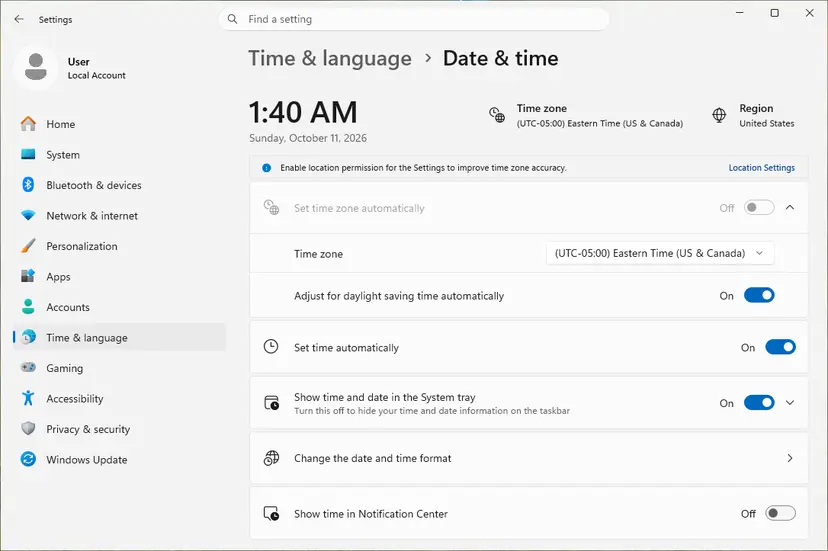
- Open Date & time. Select Start > Settings > Time & language > Date & time.
- Turn on automatic time. Make sure Set time automatically is On.
- Check the time zone. A clock that is wrong by exactly one or more hours has the wrong time zone. Turn Set time zone automatically On, or turn it Off and pick your zone in the list next to Time zone.
These steps were written for Windows 11 25H2 and 26H2. The full page with the other versions and what each result means: How to fix the date and time in Windows
It worked if: The clock matches your phone to the minute, and the account then signs in without the error.
If not: If the clock was right or the error stays, go to Step 5.
Step 5. Repair or reset the app that shows the error
5 minutesRead the warningThe account still fails in Outlook, or you need Mail to open once more to export local mail.
The Microsoft Q&A moderator advises resetting the Mail app at Advanced options > Reset when removing and adding the account again does not help. Repair keeps the app's data, Reset clears its saved accounts and cache.
Reset removes the app's own data on this PC, which for Mail can include IMAP or POP mail that was never exported. Do Step 1 first and try Repair before Reset.
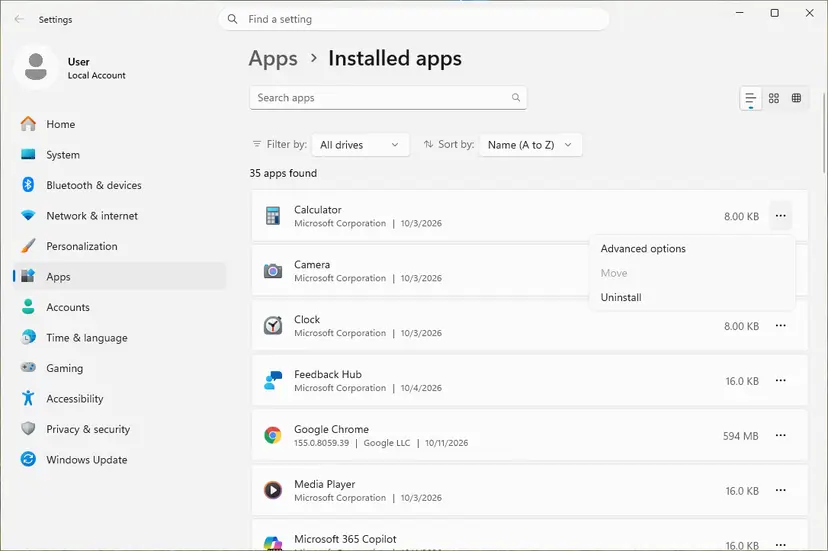
- Open Installed apps. Select Start > Settings > Apps > Installed apps.
- Open the app's advanced options. Find the app in the list, select the three dots next to it and select Advanced options. Some apps do not have this option: for those, see the section about desktop programs below.
- Repair first. On the page that opens, select Repair if it is there. The app's data stays. Open the app and check whether it works.
- Reset if Repair did not help. Select Reset. This deletes the app's data on this PC, including sign-in details and settings. Open the app and set it up again.
These steps were written for Windows 11 25H2 and 26H2. The full page with the other versions and what each result means: How to repair or reset an app in Windows
It worked if: The app opens on its welcome screen and the account can be added without 0x8000000b.
If not: If Outlook still refuses the account, sign in at Outlook.com in a browser and add the account there. If Mail is the problem, go on to Step 6 and remove it.
Step 6. Uninstall Mail and Calendar
5 minutesLow riskYour accounts work in Outlook and any local mail is exported.
The old app can no longer send or receive mail, so keeping it only leaves a second inbox that shows errors. Removing it also stops Windows from opening it for mail links.
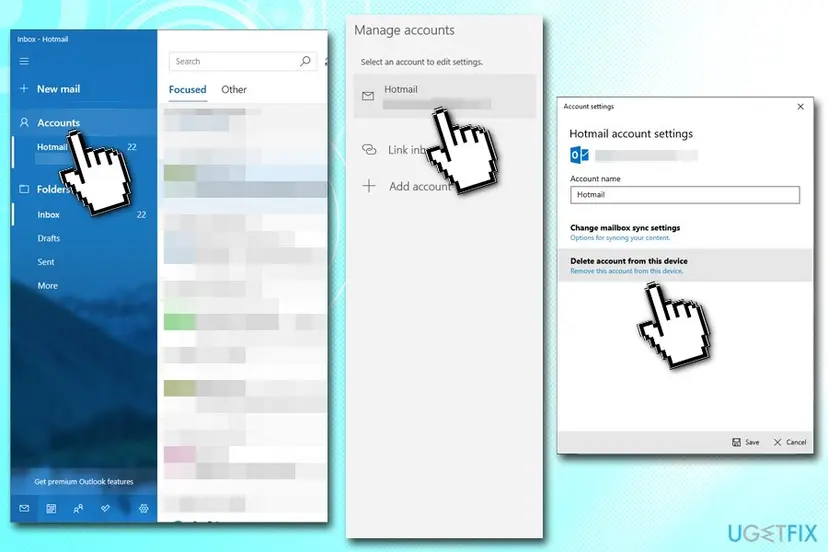
- In Mail, select Accounts, choose each account, then Delete account from this device and Save. This removes the account from the app, not from the provider.
- Close Mail and Calendar.
- Open Settings > Apps > Installed apps (Windows 10: Apps > Apps & features) and type
Mailin the search box. - Select the three dots next to Mail and Calendar (Windows 10: select the entry) and choose Uninstall, then confirm.
The normal uninstall in detail: Uninstall a program or app in Windows. If there is no Uninstall button, remove the package with PowerShell. In the list from Get-AppxPackage *windowscommunicationsapps* the Name column shows microsoft.windowscommunicationsapps; check that it is there before you remove it.
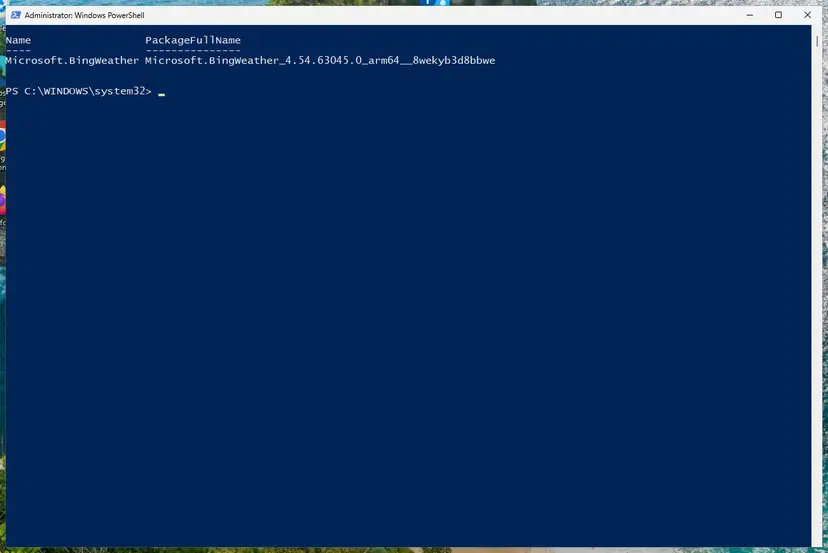
- Open PowerShell as administrator. Right-click Start and select Terminal (Admin). Select Yes when Windows asks for permission.
- Find the package name. List the installed apps with the command below. To narrow the list, put part of the name between asterisks, for example Get-AppxPackage *Weather* | Select-Object Name, PackageFullName.
Get-AppxPackage | Select-Object Name, PackageFullName - Remove the app. Run the command below with the name you found. It removes the app for your account.
Get-AppxPackage *Microsoft.BingWeather* | Remove-AppxPackage
These steps were written for Windows 11 and Windows 10 (the commands are the same). The full page with the other versions and what each result means: Remove built-in Windows apps with PowerShell
It worked if: Mail and Calendar is gone from Installed apps and from the Start menu, and Outlook still shows your accounts.
If not: If the entry stays or the uninstall fails, see the section on when it will not uninstall below.
What Mail and Calendar leaves behind and where to find it
Microsoft does not publish a list of leftovers for this app. These are the places a removed Store app and its accounts normally leave something. Check them after Step 6.
| Where | What it is | Delete it? |
|---|---|---|
Folder %LOCALAPPDATA%\Packages, the subfolder whose name starts with microsoft.windowscommunicationsapps. | The app's own data on this PC, including mail and calendar items of IMAP and POP accounts. | Windows usually removes it with the app. If it stays, delete it only after the export in Step 1. |
| Settings > Accounts > Email & accounts. | Email accounts that Windows keeps for apps. An account added in Mail can stay listed here. | Remove an account here only if no other app, such as Calendar in Outlook, uses it. |
| Credential Manager, Windows Credentials. | Saved sign ins. Mail and Outlook store passwords here. We could not confirm the exact entry names Mail uses. | Remove only entries that clearly name the old mail account and that Outlook does not need. |
| Default app for mail links. | Windows may still try to open mailto: links with an app that is gone. | Set Outlook in Settings > Apps > Default apps. |
| Registry keys. | Microsoft names none for this removal. We could not confirm any key. | No. Do not search and delete by name. |
| The new Outlook for Windows. | A separate app that replaces Mail. | No, keep it. |
Mail and Calendar will not uninstall or 0x8000000b comes back
| What you see | Why | Way out |
|---|---|---|
| The Uninstall button is grey or missing. | Some Windows builds treat preinstalled apps as part of the system image. | Use PowerShell as in Step 6: Remove built-in Windows apps with PowerShell. |
| The uninstall fails because the app is in use. | A Mail or Calendar process still runs in the background. | Restart the PC and uninstall before you open Mail again. |
| The entry is gone but Mail still opens from a link. | The default app for mail links was not changed. | Set Outlook as the default for mailto: links. |
| Outlook shows 0x8000000b for Gmail as well. | The Google sign in step fails, as it did in Mail. | Use the manual IMAP setup in Step 3, then check the clock in Step 4. |
| Mail cannot be opened for the export. | The app is damaged or blocked after support ended. | Try Repair in Step 5. Keep the package folder until the export is done. |
Security software that inspects mail connections can also break a sign in. To test this, pause protection for one try and turn it back on straight after: Turn off Microsoft Defender protection for a moment. Never leave it off.
How to check that Mail and Calendar is gone and your mail works
- Settings > Apps > Installed apps: typing
Mailshows no Mail and Calendar entry. - Start menu: there is no Mail or Calendar tile, only Outlook.
- PowerShell:
Get-AppxPackage *windowscommunicationsapps*returns nothing. - File Explorer:
%LOCALAPPDATA%\Packageshas no folder that starts withmicrosoft.windowscommunicationsapps, or you kept it on purpose until the export is done. - Outlook: send a test message to yourself from each account and check that it arrives.
If all five checks pass, the old app is removed and no setting still points to it. Error 0x8000000b cannot come back from Mail, because the app that showed it is no longer on the PC.
Frequently asked questions
What does error code 0x8000000b mean?
It means the Windows Mail and Calendar app failed while adding an email account. The full message is "Something went wrong. We're sorry, but we weren't able to do that." followed by the code. Microsoft does not publish a meaning for this code in Mail. Users report it mostly with Gmail, after typing the password and the phone code and clicking Agree. Because Microsoft ended support for Mail and Calendar on 31 December 2024, the useful fix today is to add the account in the new Outlook for Windows instead.
Can I still fix error 0x8000000b and keep using the Mail app?
Not in a way that lasts. Microsoft's support page says support for Windows Mail, Calendar and People ended on 31 December 2024 and that you can no longer send and receive email or events with them. Even if the account were added, the app would not sync. Use the new Outlook for Windows or Outlook.com, which Microsoft recommends. Keep Mail only long enough to export mail that exists only on the PC, then remove it as in Step 6.
Is it safe to uninstall Mail and Calendar?
Yes. Windows does not depend on it, and since support ended it no longer sends or receives mail. Before you remove it, export any email, events and contacts of IMAP or POP accounts, because Microsoft says those may be stored only on the PC. Accounts such as Outlook.com, Gmail, Yahoo or iCloud keep their mail on the provider's servers, so nothing is lost there. The new Outlook for Windows is a separate app and stays installed.
Does error 0x8000000b also appear in the new Outlook app?
An independent write up updated in 2025 describes 0x8000000b when adding a Gmail account to the new Outlook app as well, and blames a clash with Google's security policy. Its fix is the manual Internet email setup with imap.gmail.com:993, account type IMAP4 and smtp.gmail.com:465, as in Step 3. If that fails, it suggests resetting the app or installing it again, which is Step 5. We did not see Microsoft confirm this case on its own pages.
What are the Gmail server settings for a mail app on Windows?
For the manual setup, the incoming server is imap.gmail.com:993 with the account type IMAP4, and the outgoing server is smtp.gmail.com:465. Tick that the outgoing server requires authentication, that the same user name and password are used for sending, and that SSL is required for incoming mail. The old version of this guide gave port 46 for outgoing mail, which was a typo. Google decides which passwords it accepts from mail apps, so check its help if it refuses yours.
Will deleting the account from Mail delete my emails?
For accounts whose mail lives on the provider's servers, no. Delete account from this device only removes the account from the app on this PC, and your mail stays online and appears in Outlook after you sign in. For IMAP or POP accounts, some mail, events and contacts may exist only on the PC, as Microsoft notes. Export them first with Microsoft's export article, as Step 1 explains, and only then delete the account and uninstall the app.
Does turning off Windows Defender fix 0x8000000b?
The old version of this guide told readers to turn off real time protection, and we no longer advise that as a fix. Security software that inspects mail connections can block a sign in, so you may pause it for one test and turn it back on at once, using the steps in Turn off Microsoft Defender protection for a moment. If the account then works, add an exception in that security program rather than leaving protection off. In most cases the cause is the sign in method, which Steps 2 and 3 address.
Why does my new laptop show 0x8000000b right after setup?
A new PC often has an old Mail app from its factory image, and a clock or time zone that is not set yet. The question at the top came from a new HP laptop, and the Microsoft Q&A case from a new ASUS laptop. Connect to the internet, turn on automatic time as in Step 4, install pending updates, and add the account in the new Outlook for Windows rather than in Mail. Remove Mail afterwards so new mail links do not open it.
Is code erreur 0x8000000b or ошибка 0x8000000b the same error?
Yes. "Code erreur 0x8000000b", "código de error 0x8000000b" and "ошибка 0x8000000b" are the same Mail and Calendar error shown on a French, Spanish or Russian Windows. The code does not change with the language, only the text around it. Searches for close codes such as 0x800000b, 0x80000b or 0x0000000b are usually the same code typed with a digit missing. This page is about the email account error; if your code really differs, look up that exact code.
Sources
- Microsoft Support: Windows Mail, Calendar and People are becoming new Outlook (support ended 31 December 2024, export of local data) (support.microsoft.com)
- Microsoft Q&A: Cannot add my Gmail account to Mail app (Error code: 0x8000000b), moderator answer on deleting the account and resetting the app (learn.microsoft.com)
- The Windows Club: Fix 0x8000000b error in Outlook (new) app (Gmail IMAP and SMTP settings) (thewindowsclub.com)
Did this fix work?
One click, no account. It tells the next reader which guides are worth their time.
Questions and experiences: fix error 0x8000000b when you add an email account in Windows
Still broken, or found a fix we did not cover? Ask here: members and our editors answer. Reading is open; writing needs a free account.
…