
How to Uninstall Tor Browser on Windows 11 and 10

Prefer to fix it yourself? The manual steps follow.
5 methods in this guide
I used to use Tor Browser for some time, but since the last update it just stopped working. It has been malfunctioning before, but these were minor problems, which I resolved by reloading it. This time is different. Actually, I would like to uninstall Tor Browser, but I can't find its uninstaller. Do you have a tutorial on how to remove Tor?
Tor Browser from the Tor Project has no uninstaller, so you will not find it in the Windows list of programs. You remove it by closing it and deleting its folder. This page shows where that folder is, how to find it when it is not on the Desktop, and what to do when it will not delete.
Tor Browser does not use the Windows uninstaller, and the Tor Project says removal means deleting its folder. Close Tor Browser, find the Tor Browser folder (the default place is the Desktop), delete it and its Desktop shortcut, then empty the Recycle Bin. The settings file torrc sits inside that folder, so your Tor Browser settings go with it. No restart is needed.
| Program | Tor Browser for Windows, a web browser from the Tor Project that you install as a folder and that does not register itself as a normal Windows program. |
|---|---|
| Publisher | Tor Project Inc. Official site torproject.org, help at support.torproject.org. |
| Safe to remove | Yes. Windows does not need it and your other browsers are not affected. You only lose Tor Browser and the settings saved in its folder. |
| Leaves behind | Usually a Desktop shortcut and the downloaded installer file. Tor Project's instructions name no registry keys, services or scheduled tasks. |
| Official removal tool | None. The Tor Project says the system uninstall utility is not used: you delete the Tor Browser folder. |
| Needs restart | No. Restart only if Windows says a file in the folder is still in use. |
| Time | About 5 minutes, or 10 if you first have to find the folder. |
| What stops working | Only Tor Browser. After you empty the Recycle Bin its saved settings cannot be brought back. |
Facts checked on 16 October 2026. Steps written for Windows 11 (25H2 and 26H2) and Windows 10 22H2, read against the Tor Project's own support pages.
What Tor Browser is and why it is not in the program list
Tor Browser is the web browser made by the Tor Project. It runs on Windows 10 and Windows 11, and the Tor Project's install page says the installer places it in your Downloads or Desktop folder, with a shortcut on the Desktop unless you cleared that option. What you get is a folder named Tor Browser, not a program under Program Files.
That is why people cannot find an uninstaller. The Tor Project states that Tor Browser does not integrate with the standard uninstall utilities of your system. Removal is a matter of deleting the folder and any related data, which is the whole job here.
| What you see | What it is | Where |
|---|---|---|
| A folder named Tor Browser. | The browser itself, with its settings inside. | Desktop or Downloads by default, or the folder you picked. |
| A Tor Browser shortcut. | A link the installer makes on the Desktop unless you turned it off. | Desktop. |
| A Tor entry in Installed apps. | Not what the Tor Project describes. It may be a different package that carries Tor. | Settings > Apps > Installed apps. |
Some users report that a Tor component arrived bundled with other software they installed. If a Tor entry shows up in Installed apps, check its publisher: the Tor Project's own package is not listed there. Step 4 removes such an entry.
Before you start: what you lose and what to keep
Deleting the folder deletes everything Tor Browser stored on this PC. The Tor Project shows the data folder inside the browser folder: on Windows the torrc configuration file is at Browser\TorBrowser\Data\Tor\torrc. Anything you saved inside the Tor Browser folder goes too, so look through it first.
| Data | Where it lives | Keep it? |
|---|---|---|
Your edits to torrc, such as bridge lines. | Browser\TorBrowser\Data\Tor\torrc inside the Tor Browser folder. | Copy the file to another folder only if you plan to install Tor Browser again. |
| Files you saved into the Tor Browser folder. | Anywhere inside the folder. | Move them out before you delete it. |
The downloaded installer .exe. | Usually Downloads. | Not needed. Delete it with the folder. |
You do not need an administrator account when the folder is on your own Desktop or in Downloads. A folder in a protected place such as Program Files asks for administrator approval when you delete it.
How to uninstall Tor Browser completely, step by step
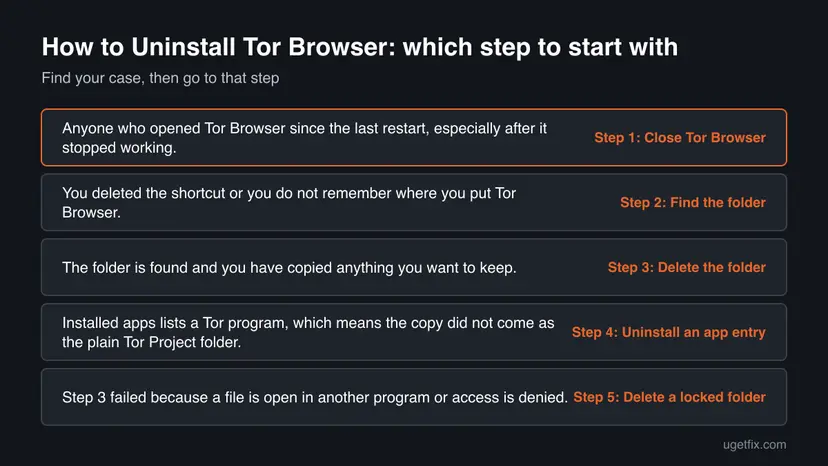
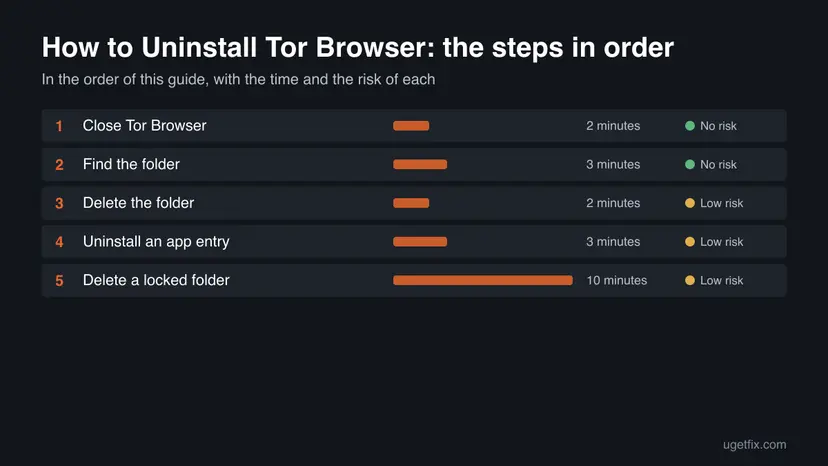
Do the steps in order. Step 4 is only for a Tor entry in Installed apps, and Step 5 only when Windows will not delete the folder. If the removal fails, go to the section "Tor Browser will not uninstall" below.
Step 1. Close Tor Browser and end its processes
2 minutesNo riskAnyone who opened Tor Browser since the last restart, especially after it stopped working.
Windows will not delete a folder while a program from it is running. After a failed update a copy of Tor Browser can stay open without a window, and it keeps the files locked.
- Close every Tor Browser window with the X button.
- Press Ctrl + Shift + Esc to open Task Manager.
- Look for any entry with Tor in its name, select it and click End task.
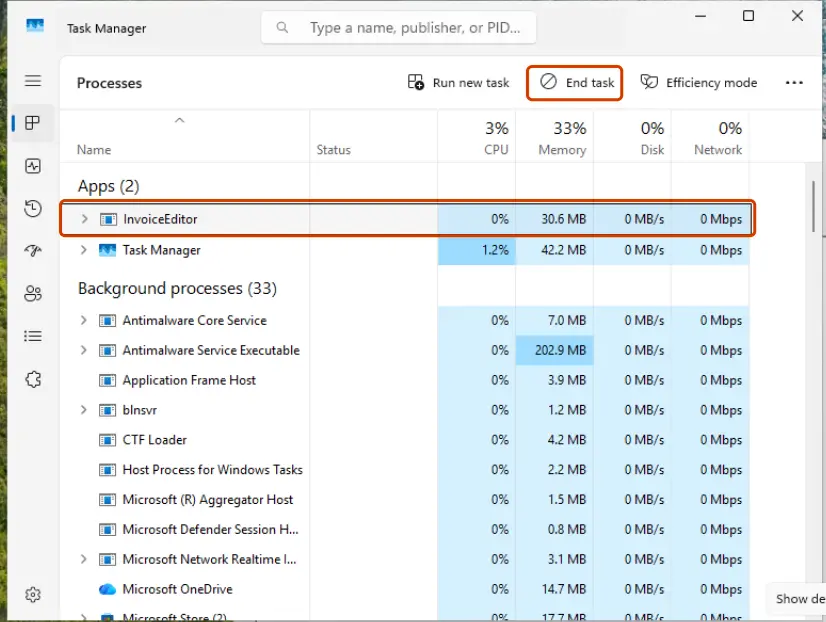
Other ways to close a program that will not quit: Close a frozen app (Task Manager, Force Quit).
It worked if: Task Manager shows no entry with Tor in its name.
If not: Restart the PC, do not open Tor Browser, and go on with Step 2.
Step 2. Find the Tor Browser folder
3 minutesNo riskYou deleted the shortcut or you do not remember where you put Tor Browser.
The Tor Project says the folder is on the Desktop by default but can also be in Downloads or a folder you chose, so you have to confirm the right one before you delete anything.
- Look on the Desktop for a folder named Tor Browser, then open Downloads and look there.
- If the Tor Browser shortcut still exists, right-click it, select Properties, then click Open File Location.
- Still nothing: open File Explorer, select This PC and type
Tor Browserin the search box. The search can take a few minutes. - Open the folder and check that it holds a Browser folder and a file that starts Tor Browser.
A faster search from the command line looks only inside your user folder and does not need administrator rights. Open Command Prompt and run:
Command Prompt
dir /s /b /ad "%USERPROFILE%\*Tor Browser*"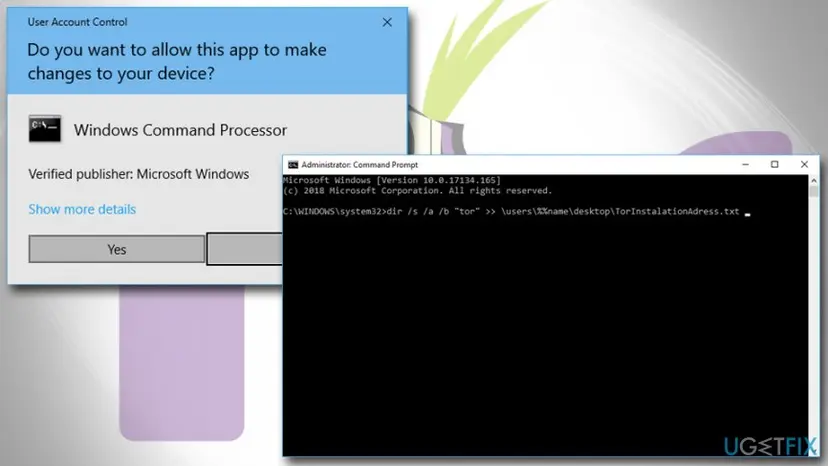
It worked if: You have the full path of the folder, for example one on the Desktop.
If not: Search the whole drive with dir /s /b /ad "C:\*Tor Browser*", which is slow and prints some Access denied lines. If nothing is found, Tor Browser may already be gone.
Step 3. Delete the Tor Browser folder and its shortcut
2 minutesLow riskThe folder is found and you have copied anything you want to keep.
This is the removal method the Tor Project gives for Windows. The program, the helper files and the data folder are all inside one folder, so one delete removes them together.
- Right-click the Tor Browser folder and select Delete. On Windows 11 the command is the trash can icon.
- Delete the Tor Browser shortcut on the Desktop, if there is one.
- Right-click the Recycle Bin icon and select Empty Recycle Bin.
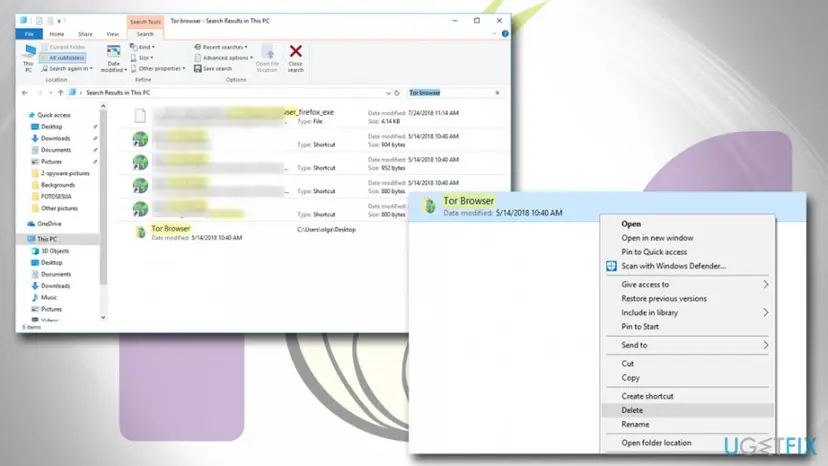
The Tor Project's own instructions end with emptying the Trash. On Windows that is the Recycle Bin. Until you empty it, the folder can still be restored.
It worked if: The folder and the shortcut are gone from the Desktop and from Downloads.
If not: If Windows says the folder or a file in it is open in another program, repeat Step 1, then try again. If that fails, go to Step 5.
Step 4. Uninstall a Tor entry in Windows Installed apps
3 minutesLow riskInstalled apps lists a Tor program, which means the copy did not come as the plain Tor Project folder.
A program that registered itself with Windows has its own uninstaller, and Microsoft recommends removing such programs from Settings. Deleting the files of a registered program would leave a broken entry behind.
- Select Start > Settings > Apps > Installed apps. On Windows 10 the page is Apps & features.
- Type
Torin the search box above the list and look at the publisher of each hit. - On Windows 11, select More (three dots) next to the entry, then Uninstall. On Windows 10, select the entry, then Uninstall.
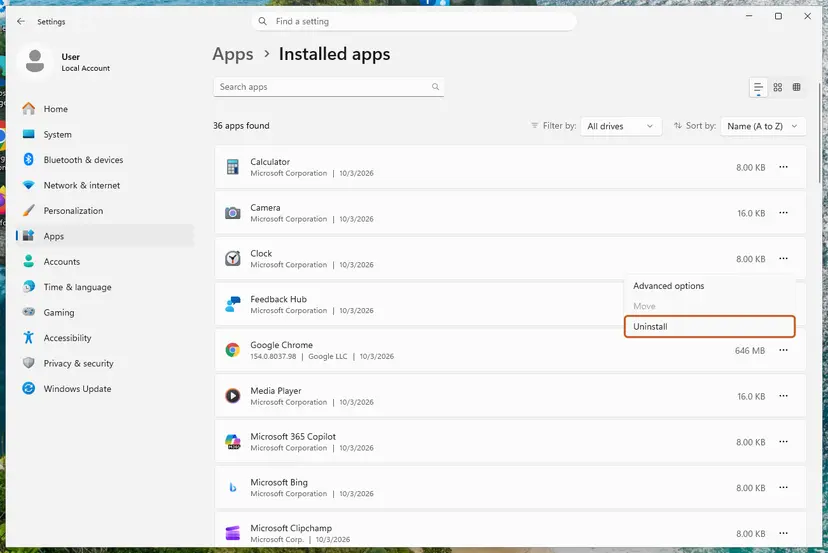
More ways to remove a program, including Control Panel: Uninstall a program or app in Windows. Only remove entries you recognise, and do not remove a program just because its name contains the letters tor.
It worked if: The search for Tor in Installed apps returns nothing you installed on purpose.
If not: If there was no Tor entry, skip this step. If the uninstall fails, see the failures table below.
Step 5. Delete a folder that Windows says is in use
10 minutesLow riskStep 3 failed because a file is open in another program or access is denied.
A locked file means some process still holds it. Restarting clears every process, so the folder can be deleted before anything opens it again. Safe Mode loads even fewer programs.
- Restart the PC and do not open Tor Browser or any browser from the folder.
- Delete the Tor Browser folder right after you sign in, then empty the Recycle Bin.
- If Windows still refuses, start Windows in Safe Mode, delete the folder there and restart normally.
The steps for Safe Mode on Windows 11 and 10: Start Windows or a Mac in Safe Mode.
It worked if: The folder deletes without an error.
If not: Check the access-denied row in the failures table below, then run a Microsoft Defender scan with How to scan for malware with Microsoft Defender.
What Tor Browser leaves behind and where to find it
These are the places that matter. The Tor Project's uninstall instructions list only the folder or application and its related data, so a clean removal is mostly files you can see in File Explorer.
| Where | What it is | Delete it? |
|---|---|---|
| The Tor Browser folder on the Desktop, in Downloads or where you chose. | The browser, its helper files and its data folder. | Yes, in Step 3. |
| The Tor Browser shortcut on the Desktop. | A link the installer creates unless that option was cleared. | Yes. It points at a folder that no longer exists. |
The downloaded Tor Browser .exe installer. | The file you downloaded, normally in Downloads. | Yes, if you do not need it again. |
| Registry keys, services, scheduled tasks. | None are named in the Tor Project's instructions. | Nothing to delete. Do not search for them. |
Older guides say to search the registry for "Tor" and delete every hit. The search also matches words such as Store, History and Directory, which contain those letters, and the Tor Project names no keys to remove. Deleting them can damage Windows, so leave the registry alone.
Tor Browser will not uninstall: each failure and its way out
| What you see | Likely cause | Way out |
|---|---|---|
| No Tor Browser in Installed apps. | This is normal. The Tor Project says it does not use the system uninstaller. | Do Steps 2 and 3. |
| Windows says the folder or a file in it is open in another program. | Tor Browser or a helper process is still running. | Do Step 1, then retry. If it fails again, do Step 5. |
| Windows asks for administrator permission or says access is denied. | The folder is in a protected place or belongs to another user. | Sign in with an administrator account and delete it there. |
| The shortcut opens nothing or says the item is gone. | The folder was moved or deleted earlier. | Delete the shortcut and do Step 2 to check for another copy. |
| A Tor entry in Installed apps fails to uninstall. | It is a different package that registered itself with Windows. | Restart, try again, then use Uninstall a program or app in Windows and scan with How to scan for malware with Microsoft Defender. |
If you do not recognise the program that carries Tor, a scan is sensible. Do not turn the antivirus off to delete a folder; a restart or Safe Mode does the same job.
How to confirm Tor Browser is gone
Run these checks after Step 3 or after the restart. A clean result in every row means Tor Browser is removed for this Windows user.
| Check | How | Clean result |
|---|---|---|
| Folder. | Search Tor Browser on the Desktop and in Downloads, or run the dir command from Step 2. | No folder with that name. |
| Shortcut. | Look at the Desktop and the Start menu. | No Tor Browser shortcut. |
| Processes. | Task Manager > Processes. | No entry with Tor in its name. |
| Apps list. | Settings > Apps > Installed apps, search Tor. | No Tor program you did not install. |
| Recycle Bin. | Open the Recycle Bin. | No Tor Browser folder. |
If you only want a working Tor Browser again
Your question says Tor Browser stopped working after an update, so you may only want a fresh copy. Delete the old folder first with Steps 1 to 3, then install again. The Tor Project's install page says to download the Windows .exe from its download page for the desktop browser, at download.torproject.org/tor-browser-for-desktop/, and recommends verifying its signature.
Choose a folder you will remember when the installer shows its path, because the install page says that is the easy way to avoid losing the folder again. Tor Browser supports Windows 10 and 11. Windows 10 22H2 has been out of Microsoft support since 14 October 2025, so move to Windows 11 when you can.
Frequently asked questions
How do I uninstall Tor Browser on Windows 11?
Close Tor Browser, find the Tor Browser folder, which is on the Desktop by default, and delete it. Then delete the Tor Browser shortcut on the Desktop and empty the Recycle Bin. Windows 11 has no uninstall button for it, because the Tor Project says the browser does not use the system uninstall utility. The steps are the same on Windows 10. Use Step 2 above if you cannot find the folder, and Step 1 first if Windows says the folder is in use.
Why is Tor Browser not in the list of installed apps?
Tor Browser is not installed in the usual way. The Tor Project says it does not integrate with your system's standard uninstall utilities, so it never adds an entry under Installed apps or Programs and Features. It lives in one folder instead. If you see a Tor entry in that list, it is a different package, so check its publisher before you remove it. Removing it in Settings is safe if you recognise it as something you installed.
Where is the Tor Browser folder on Windows?
By default the Tor Project's installer puts the Tor Browser folder in your Downloads or Desktop folder and creates a shortcut on the Desktop unless you cleared that option. If you chose another path during setup, the folder is there. Right-click the shortcut, select Properties and click Open File Location to jump to it, or use the dir search shown in Step 2 to find a folder with Tor Browser in its name.
Does deleting the Tor Browser folder remove everything?
For the browser, yes. The Tor Project's own instructions for Windows are to delete the Tor Browser folder and empty the Trash, which is the Recycle Bin on Windows. The settings file torrc is stored inside that folder at Browser\TorBrowser\Data\Tor, so it goes with it. Files you downloaded or saved to other places stay where they are. The Desktop shortcut and the installer file are separate and you delete them yourself.
Is it safe to delete the Tor Browser folder?
Yes. Windows does not depend on Tor Browser and no other app needs it. Deleting the folder removes only the browser and what it stored. Just be sure you picked the right folder and that no files you want to keep are inside it. Emptying the Recycle Bin is permanent, so check the folder first, and copy your torrc file out if you edited it and plan to reinstall.
Can I uninstall Tor Browser and keep my settings?
The settings live inside the folder, so deleting it removes them. If you edited the torrc file, for example to add bridges, copy it from Browser\TorBrowser\Data\Tor to another folder before you delete anything. After you install Tor Browser again you can put that file back in the same place. Check the Tor Project's torrc page first, because a file from an older version may not suit a newer one.
Tor Browser stopped working after an update. Should I uninstall it?
Removing it and installing a fresh copy is a reasonable fix. Delete the old folder completely first, as in Steps 1 to 3, rather than installing on top of it, then get the new version from the Tor Project's download page and verify the signature. The Tor Project's support site also has a troubleshooting section for connection problems, which is worth reading if the same fault returns after a clean install.
How do I uninstall Tor Browser on a Mac, Linux or Android?
The Tor Project describes each. On a Mac, move the Tor Browser application from Applications to the Trash, then move the TorBrowser-Data folder from ~/Library/Application Support to the Trash and empty it. On Linux, run the unregister command from the tor-browser folder if you registered it, then delete the folder. On Android, uninstall it from Google Play, F-Droid or Settings > Apps. This guide covers Windows.
Do I need administrator rights to remove Tor Browser?
Not for a folder on your own Desktop or in Downloads, because those belong to your account. Windows asks for administrator approval when the folder is in a protected location such as Program Files or in another user's profile. In that case, sign in with an administrator account or approve the prompt, then delete the folder. Never turn off antivirus or User Account Control to get past it.
Sources
- Tor Project Support: Uninstalling Tor Browser (delete the folder, no system uninstall utility, Windows, macOS, Linux, Android) (support.torproject.org)
- Tor Project Support: Installing Tor Browser (Windows 10 and 11, default folder, Desktop shortcut, signature check) (support.torproject.org)
- Tor Project Support: Editing the torrc file (location inside the Tor Browser folder on Windows) (support.torproject.org)
Did this fix work?
One click, no account. It tells the next reader which guides are worth their time.
Questions and experiences: Uninstall Tor Browser on Windows 11 and 10
Still broken, or found a fix we did not cover? Ask here: members and our editors answer. Reading is open; writing needs a free account.
…