
Boot in Safe Mode: Windows 11 and Windows 10
Safe Mode starts the system with a minimal set of drivers and programs. If a problem does not happen there, something that normally loads at startup is causing it.
- Time
- 2 to 5 minutes
- Level
- Easy
- You need
- On Windows with device encryption or BitLocker, you may be asked for the BitLocker recovery key.
Before you start
- Save your work: every method restarts the PC.
- If your drive is encrypted, have the BitLocker recovery key ready (it is usually stored in your Microsoft account).
Windows 11 and 10
Steps written for Windows 11 24H2 and later; Windows 10 22H2.
Use this when Windows still starts. The recovery screens are the same on Windows 11 and Windows 10.
Restart from Settings…
Open Settings > System > Recovery. Next to Advanced startup, select Restart now and confirm. On Windows 10 the path is Settings > Update & Security > Recovery.
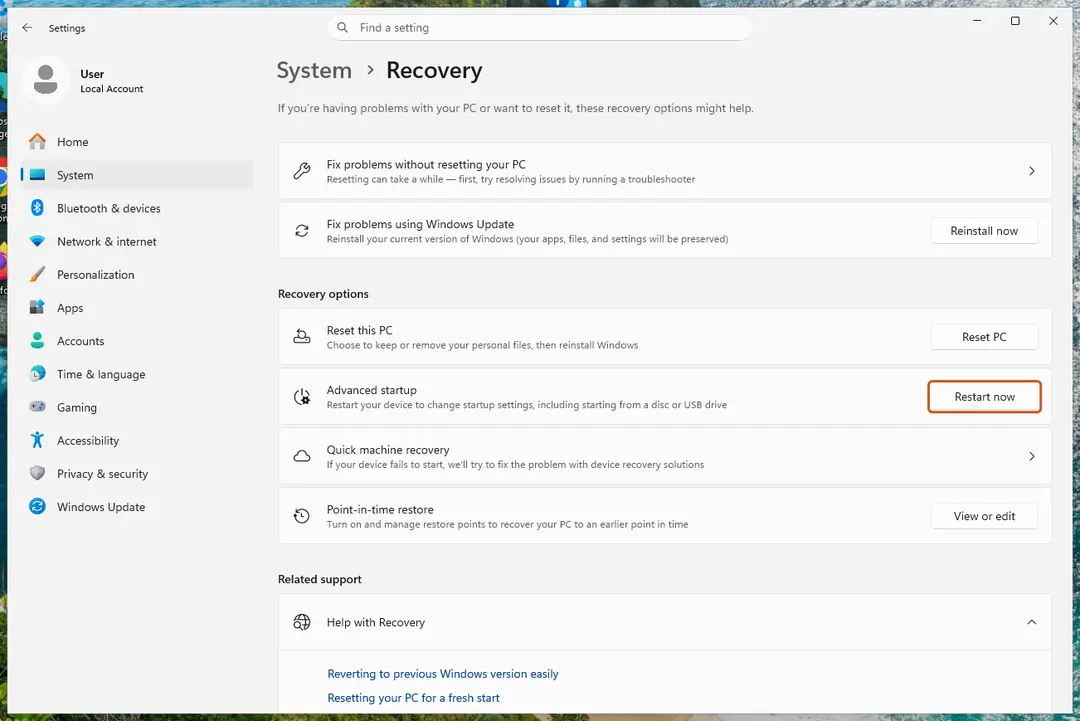
Advanced startup restarts the PC into the recovery screens. Screenshot: Windows 11 26H2 …or hold Shift and select Restart
Instead of Settings you can select Start > Power, hold Shift and select Restart. This also works from the power button on the sign-in screen.
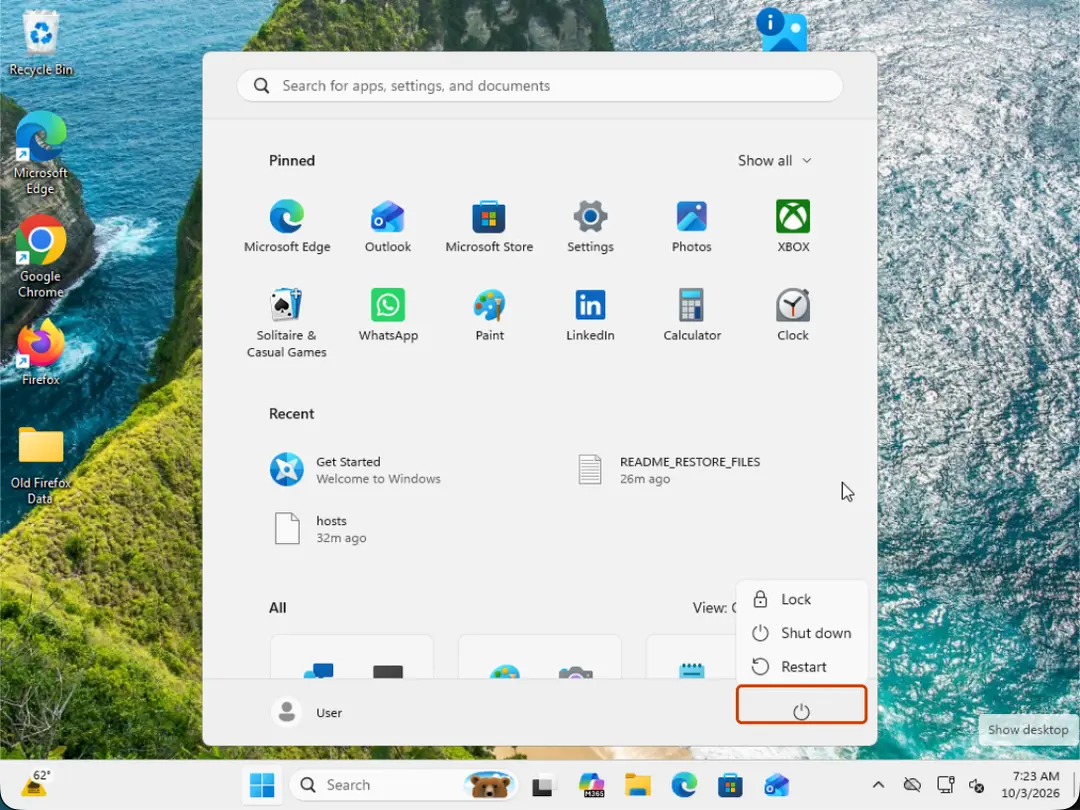
Hold Shift while you select Restart. Screenshot: Windows 11 26H2 Select Troubleshoot
On the blue Choose an option screen, select Troubleshoot.
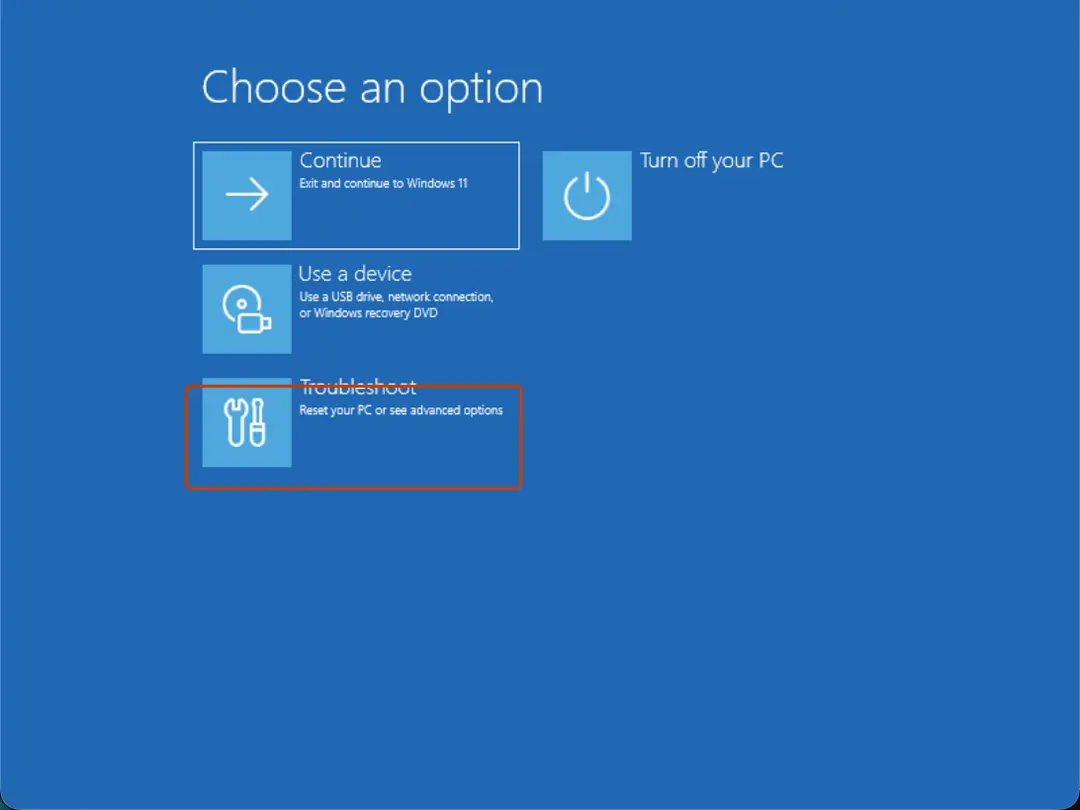
Choose an option: select Troubleshoot. Screenshot: Windows 11 26H2 Open Startup Settings
Select Advanced options > Startup Settings.
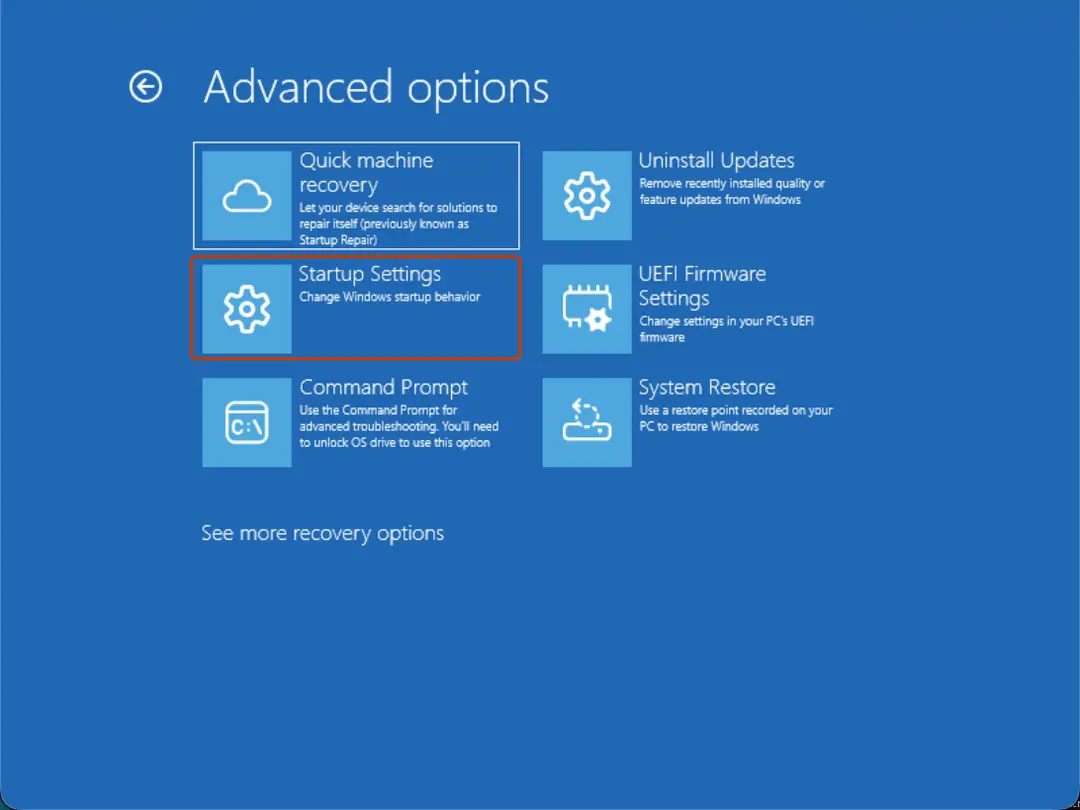
Advanced options: select Startup Settings. On 26H2 the first tile is Quick machine recovery, previously Startup Repair. Screenshot: Windows 11 26H2 Restart
On the Startup Settings page, select Restart. The PC restarts and shows a numbered list.
Choose Safe Mode
Press 4 or F4 for Enable Safe Mode. Press 5 or F5 for Enable Safe Mode with Networking if you need the internet, for example to download a scanner or a driver.
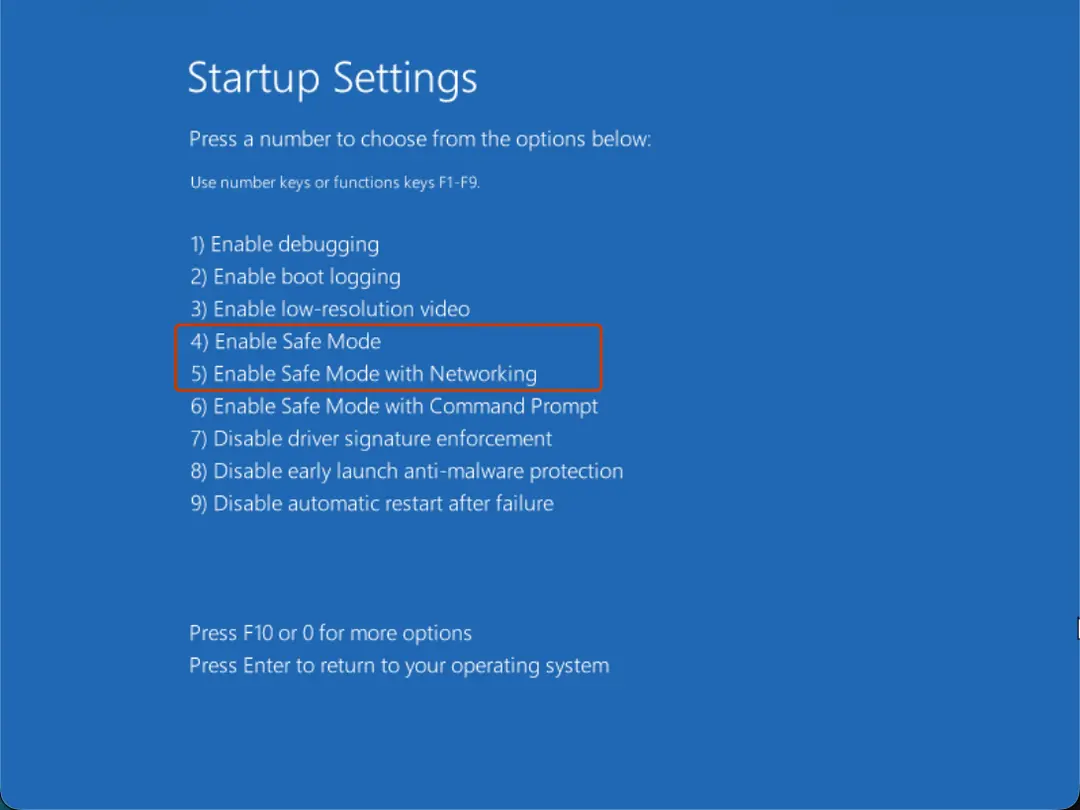
Press 4 for Safe Mode or 5 for Safe Mode with Networking. Screenshot: Windows 11 26H2 Leave Safe Mode
When you are done, restart the PC normally. Windows starts in normal mode again.
If it keeps starting in Safe Mode
Press Windows key + R, type
msconfigand press Enter. On the Boot tab, clear Safe boot, select OK and restart.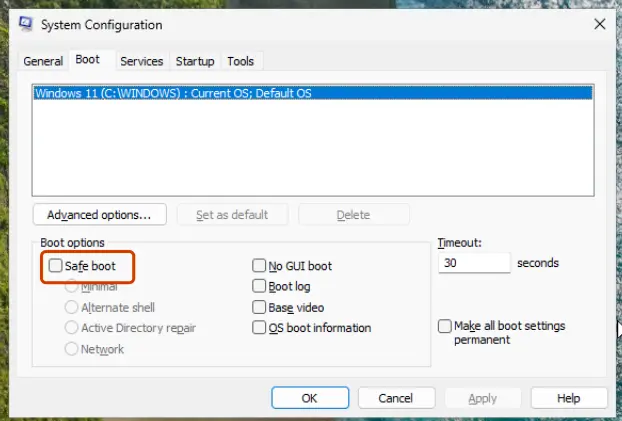
Clear Safe boot so the PC starts normally again. Screenshot: Windows 11 26H2
Windows will not start
Steps written for Windows 11 and Windows 10, from the Windows Recovery Environment.
If Windows fails to start several times in a row it opens the recovery environment on its own. If it does not, force it as below.
Force the recovery screens
Turn on the PC. As soon as the maker's logo appears, hold the power button until the PC turns off. Do this twice. On the third start Windows should open the recovery environment. If you see a screen with Advanced options, select it.
Select Troubleshoot
On the Choose an option screen, select Troubleshoot.
Choose an option: select Troubleshoot. Screenshot: Windows 11 26H2 Open Startup Settings
Select Advanced options > Startup Settings.
Advanced options: select Startup Settings. On 26H2 the first tile is Quick machine recovery, previously Startup Repair. Screenshot: Windows 11 26H2 Restart
On the Startup Settings page, select Restart. The PC restarts and shows a numbered list.
Choose Safe Mode
Press 4 or F4 for Enable Safe Mode. Press 5 or F5 for Enable Safe Mode with Networking if you need the internet, for example to download a scanner or a driver.
Press 4 for Safe Mode or 5 for Safe Mode with Networking. Screenshot: Windows 11 26H2
Which Safe Mode to choose on Windows
| Key | Option | Use it to |
|---|---|---|
| 4 / F4 | Enable Safe Mode | Test whether the problem goes away, uninstall a program or driver, run a malware scan. |
| 5 / F5 | Enable Safe Mode with Networking | The same, with internet access to download a tool or driver. |
| 6 / F6 | Enable Safe Mode with Command Prompt | Work with commands only, for example when the desktop does not load. |
| Enter | Start Windows normally. |
If the recovery screens never appear
Start the PC from a Windows installation USB drive (made with Microsoft's media creation tool on another PC). Select your language, then Repair your computer instead of installing. You reach the same Choose an option screen. If Windows itself is damaged, try the repair tools there: see Run Startup Repair and Run DISM and SFC to repair Windows system files.
Used in 94 guides
How to uninstall Bonjour on Windows 11 and 10
How to fix the BthA2DP.sys blue screen (BSOD) in Windows 11 and 10
How to Uninstall Tor Browser on Windows 11 and 10
How to fix Windows update stuck on "Working on updates"?
How to uninstall UltraViewer completely and stop remote access
How to fix the bthmodem.sys blue screen (BSOD) in Windows
How to fix the FAST_ERESOURCE_PRECONDITION_VIOLATION blue screen (0x1C6) in Windows
How to fix Exception on Invalid Stack Black Screen error in Windows?
How to fix error code 0xe06d7363 on Windows?
How to uninstall TeraCopy on Windows
How to fix Blue Screen error 0xc00002e3 in Windows 10?
How to fix "Camera is being used by another application" error in Windows 24H2?
How to fix the WdFilter.sys blue screen (BSOD) on Windows
How to fix File System error (-1073741818) in Windows?
How to fix the 0x000000BE blue screen error (ATTEMPTED_WRITE_TO_READONLY_MEMORY) in Windows
How to fix the IntcAudioBus.sys blue screen (BSOD) in Windows
How to fix the Reference By Pointer BSOD (0x18) in Windows 10 and 11
How to fix BSOD 139 (KERNEL_SECURITY_CHECK_FAILURE) in Windows
How to fix the rtwlane.sys blue screen error in Windows 11 and 10
How to fix Media Creation Tool error 0x8007043C - 0x90018 in Windows?
How to fix cdp.dll error in Windows?
How to fix "File record segment is unreadable"?
How to fix the Microcode Revision Mismatch BSOD in Windows
How to fix the K7Sentry.sys blue screen (BSOD) error in Windows
How to fix secur32.dll error in Windows?
How to fix "DLL is either not designed to run on Windows or it contains an error"?
How to fix the nt_wrong_symbols.sys BSOD on Windows 10 and 11
How to uninstall Advanced IP Scanner completely
How to fix "Please insert the external storage media and press OK" error in Windows 10?
How to fix Microsoft Store error 0x80073D23 in Windows?
How to fix PhotoCaptureFileCreationFailed camera error in Windows?
AsIO.sys "A driver cannot load on this device": how to fix it in Windows 11 and 10
How to uninstall Opera Stable, and should you remove it?
How to fix Snipping Tool opening automatically in Windows?
How to fix File System Error (-1073741515) in Windows 10?
How to fix webcam error code 0xA00F4243(0xC00D3704) on Windows?
How to fix Windows stuck in Recovery Mode?
How to fix the vgk.sys blue screen error in Windows
How to fix 0x80090027 (PIN isn't available) error in Windows
How to fix Windows 10 stuck at "Choose your keyboard layout" screen?
How to fix blue screen error code 133 (DPC_WATCHDOG_VIOLATION) in Windows
How to fix "You can't sign in with this account" error in Windows?
LogMeIn keeps popping up: stop LogMeIn Rescue or Hamachi opening automatically in Windows
How to fix the bhtsddr.sys blue screen (BSOD) in Windows
How to fix error 0x80004001 (Not implemented) in Windows?
How to fix "ExplorerFrame.dll was loaded but the entry-point DllRegisterServer was not found"?
[Fix] Can't disable HDR in Windows
How to fix the SYSTEM_LICENSE_VIOLATION (0x9A) blue screen in Windows 10 and 11
Fix "This app can't open. Check the Store for more info about Realtek Audio Console"
How to fix File System Error (-1073741521) in Windows?
How to fix error code 0xc0000242 when Windows will not start
How to fix File System error (-1073741792) in Windows?
How to fix the amdkmdag.sys error (blue screen) in Windows 10 and 11
How to fix 0xA00F429F camera error in Windows?
How to fix the session 1 initialization failed BSOD (SESSION1_INITIALIZATION_FAILED, 0x6D)
How to fix the Netwsw00.sys BSOD in Windows
How to fix File System Error (-2018374635) in Windows?
How to fix the mtkwl6ex.sys blue screen (BSOD) in Windows
How to fix "The digital signature for this file couldn't be verified" (0xc0000428) in Windows
How to fix "An error occurred while applying security information" in Windows?
How to fix Camera app error 0xA00F4240 in Windows?
How to fix File System error (-2144926975) in Windows?
How to fix "dxcore.dll is either not designed to run on Windows or it contains an error"?
How to fix "Can't open this item. It might have been moved, renamed, or deleted" on Windows
How to fix AMD driver error 182 in Windows?
How to fix "Unable to delete all specified values" Registry Editor error in Windows?
How to fix File System error (-1073740791) in Windows?
How to fix "Can't start your camera" error 0xA00F429E in Windows?
How to fix webcam error code 0xA00F4271 (0x80070001) on Windows?
How to fix the I01 initialization failed BSOD (IO1_INITIALIZATION_FAILED, 0x69) in Windows
How to fix "You require permission from SYSTEM to make changes" in Windows?
How to fix logonUI.exe error in Windows?
Your credentials could not be verified: how to fix it in Windows?
How to fix Windows Push Notifications User Service high CPU or memory usage in Windows?
How to fix "The description for Event ID 153 from source nvlddmkm cannot be found" in Windows?
How to fix Windows update error 0x80071a2d?
Your device is offline. Try a different sign-in method: how to fix it in Windows?
What is Web Indexing Service (Bright Data) and how to uninstall it in Windows
How to fix StartMenuExperienceHost.exe error in Windows?
How to fix Capability Access Manager Service high CPU usage in Windows?
How to fix Camera app error 0xA00F4293 in Windows?
[Fix] DCOM got error "1084" attempting to start the service in Windows
How to fix the WIN32K_CRITICAL_FAILURE (0x164) blue screen in Windows
How to fix the MUI_NO_VALID_SYSTEM_LANGUAGE (0x12A) blue screen in Windows
How to fix "Could not call proc" error in Windows?
How to fix Fatal Error C0000022 on Windows?
How to fix Windows stuck on "Updates are underway" screen?
How to fix AMDRSServ.exe - System Error in Windows?
How to fix Steam_api.dll missing or not found error?
How to fix winmm.dll missing or not found error in Windows?
How to fix SecurityHealthSystray.exe Bad Image error in Windows?
How to fix Event ID 6008 "The previous system shutdown was unexpected" in Windows?
NVIDIA DXCache: safe to delete, but games rebuild it. What it is and how to clear it
How to uninstall BlueStacks completely from Windows 11 and 10
Sources
- Microsoft Support: Windows startup settings (Safe Mode) (read Oct 3, 2026)
- Microsoft Support: Windows recovery environment (read Oct 3, 2026)