
How to fix the WdFilter.sys blue screen (BSOD) on Windows

Prefer to fix it yourself? The manual steps follow.
- 7methods
- 10 to 60 minutes
- Intermediate
Applies to Windows 11 and Windows 10 PCs with Microsoft Defender Antivirus
7 methods in this guide
I have been using Windows 10 for quite a long time. As far as I remember, I did not make any important changes or upgrade the system. However, each time I boot up my laptop and start using it, it hits a BSOD that points to a WdFilter.sys file. Is there something I could do by myself?
WdFilter.sys is the Microsoft Defender Antivirus mini-filter driver, the part of Defender that checks every file a program opens. When a blue screen names it, Defender was running at the moment of the crash, but the fault is often another driver beside it. Update Defender first, then look for a second antivirus, cloud drive or backup tool.
WdFilter.sys is part of Microsoft Defender, not a virus, and you should not remove or disable it. Install the newest Defender platform and security intelligence updates first (Fix 1). If the blue screen comes back, update or remove the other program that filters files beside Defender, such as a second antivirus, a cloud drive or a backup tool (Fix 2). A single crash that never returns needs no repair.
| Error | A stop screen (blue, or black on Windows 11 24H2 and later) with What failed: WdFilter.sys under a stop code such as SYSTEM_SERVICE_EXCEPTION or REGISTRY_FILTER_DRIVER_EXCEPTION. |
|---|---|
| Where it appears | At startup, soon after sign-in, or while files are opened, copied or synced. The PC freezes, shows the stop screen and restarts. |
| Main cause | A clash between Defender's file filter and another filter driver (third-party antivirus, cloud sync, backup), or an outdated Defender platform. |
| Fastest fix | Install the latest Defender platform update (KB4052623) and security intelligence update (KB2267602), then restart (Fix 1). |
| Also written as | wdfilter sys, wd filter.sys, WdFilter, "WdFilter.sys failed", and in boot logs BOOTLOG_NOT_LOADED \SystemRoot\system32\drivers\wd\WdFilter.sys. |
| What the file is | The Microsoft Defender Antivirus Mini-Filter Driver (formerly Windows Defender), service name WdFilter, file in C:\Windows\System32\drivers\wd. |
| Affects | Windows 11 and Windows 10. Windows 10 left support on 14 October 2025; Defender still gets updates there only as long as Microsoft ships them. |
| Vendor status | No known open WdFilter.sys bug listed by Microsoft. Platform versions older than the last two releases are no longer supported, so an old platform is a real risk. |
| Where the cause is logged | C:\Windows\Minidump, one .dmp file per crash; WinDbg's !analyze -v names the drivers involved. |
| Time to fix | 10 minutes for Fix 1. 20 to 40 minutes to find a clashing driver in Fix 2. |
Facts checked on 16 October 2026. Steps written for Windows 11 (25H2 and 26H2) and Windows 10 22H2.
What WdFilter.sys is and why a blue screen names it
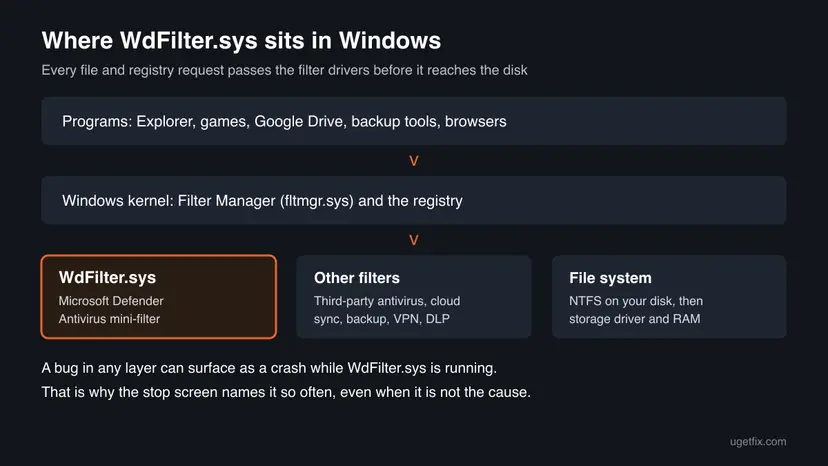
WdFilter.sys is a kernel driver of Microsoft Defender Antivirus, the antivirus built into Windows 11 and Windows 10. In the list of services it appears as Microsoft Defender Antivirus Mini-Filter Driver (older builds said Windows Defender), with the short name WdFilter. It sits between programs and the disk and lets Defender look at files and registry changes as they happen. That is how real-time protection works.
Because it runs in the kernel, an error inside it or in a driver it works with cannot be caught. Windows stops with a bug check, the screen Microsoft calls a stop code error, and writes What failed: WdFilter.sys under the code. The name says which driver was running, not always which driver was wrong.
| Stop code | Number | What it means here |
|---|---|---|
SYSTEM_SERVICE_EXCEPTION | 0x3B | A driver hit an error while handling a system call. The most common code with WdFilter.sys. |
REGISTRY_FILTER_DRIVER_EXCEPTION | 0x135 | A driver that watches registry changes failed. WdFilter.sys is one; other security tools are too. |
KMODE_EXCEPTION_NOT_HANDLED | 0x1E | A kernel driver raised an error nothing handled. |
PAGE_FAULT_IN_NONPAGED_AREA | 0x50 | A driver read memory that was not valid. Can also point to bad RAM. |
KERNEL_SECURITY_CHECK_FAILURE | 0x139 | Kernel data was found damaged. One Microsoft Q&A user saw it with WdFilter.sys in the dump. |
DRIVER_OVERRAN_STACK_BUFFER | 0xF7 | A driver wrote past the end of a buffer. |
If you turned on boot logging, C:\Windows\ntbtlog.txt may hold the line BOOTLOG_NOT_LOADED \SystemRoot\system32\drivers\wd\WdFilter.sys. The boot log lists many drivers this way on healthy PCs. On its own it does not mean the file is missing or broken, and it is not a stop code.
Why WdFilter.sys crashes: the causes, most common first
Defender's driver is installed on hundreds of millions of PCs and updated every month, so a crash that only one PC sees usually has a local reason. Rank the causes like this and match each one to a fix.
| How often | Cause | Sign | Fix |
|---|---|---|---|
| Most often | An outdated or half-installed Defender platform | Defender shows an old platform version or failed updates | Fix 1 |
| Often | Another filter driver beside WdFilter: a second antivirus, cloud drive, backup, VPN or encryption tool | Crashes while files sync or are scanned; the dump also names a third-party driver | Fix 2 |
| Less often | A fresh Defender platform update that does not agree with this PC | Crashes began the day after a Defender or Windows update | Fix 3 |
| Less often | Changed or damaged Defender driver settings | Windows stops at boot every time | Fix 4 |
| Rarely | Faulty RAM, an overclock, or an old storage or graphics driver | Different stop codes, other drivers named too | Fix 5, Fix 6 |
| Rarely | Damaged Windows system files | SFC reports files it could not repair | Fix 7 |
On Microsoft Q&A, an independent advisor who read a user's single WdFilter.sys minidump found only generic errors. The advice was that a background update most likely caused a one-time clash and nothing more was needed. If the PC crashed once and has run fine since, install updates (Fix 1) and watch.
Check what the crash dump really says
The stop screen shows only one name. The crash dump shows which other drivers were active, which is how you find the real partner in a clash.
- Open File Explorer and go to
C:\Windows\Minidump. Windows writes one small.dmpfile per crash and names it by date. - Install Microsoft's debugger: open Terminal and run
winget install Microsoft.WinDbg. - Start WinDbg as administrator and open the newest
.dmpfile. - Type
!analyze -vand press Enter. Wait until the analysis ends. - Read IMAGE_NAME, MODULE_NAME and the STACK_TEXT lines. Note every driver name that is not from Microsoft.
- Unable to load image WdFilter.sys
- A debugger warning that it has no symbols for the file. It does not mean the file is missing on your PC.
- Only WdFilter.sys and Windows files
- Start with Fix 1 and Fix 3.
- A third-party driver in the stack
- That program is the first suspect. Go to Fix 2.
Is WdFilter.sys a virus, and can you turn it off
The genuine WdFilter.sys is a Microsoft file in C:\Windows\System32\drivers\wd, signed by Microsoft. Right-click it, select Properties and open Digital Signatures to check. A file with this name in another folder, or without a Microsoft signature, is worth a scan: How to scan for malware with Microsoft Defender
Turning the driver off is not a fix. Without it Defender cannot see files as they open, so the PC has no real-time protection. Tamper Protection also blocks most attempts to change it. You may pause real-time protection for one short test, and it turns itself back on: Turn off Microsoft Defender protection for a moment
Deleting or renaming the file, or copying one from a DLL or driver site, can stop Windows from starting and leaves the PC unprotected. Defender restores its own drivers through its updates in Fix 1.
How to fix the WdFilter.sys blue screen
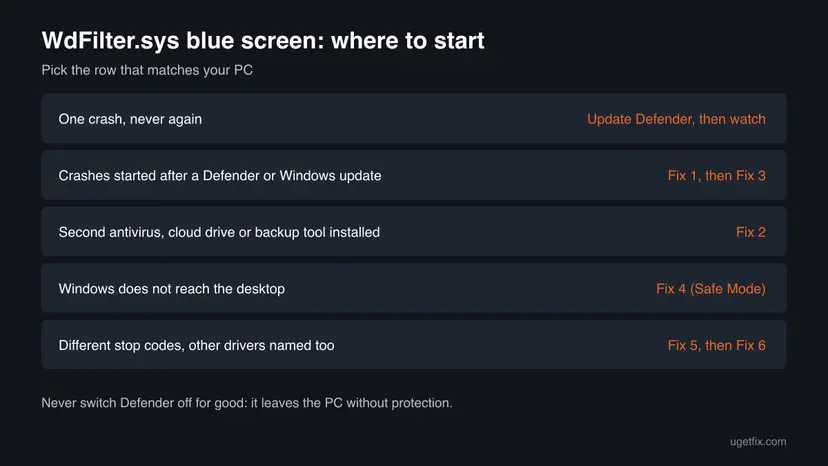
Start with Fix 1 on every PC. Fix 2 is the answer when another security, sync or backup tool is installed. Fix 3 is for crashes that began right after a Defender update. Fix 4 gets a PC that does not start back to the desktop. Fixes 5 to 7 rule out hardware and Windows files.
| What you see | Start with | Then |
|---|---|---|
| One crash that has not returned | Fix 1 | Watch for a week |
| Crashes began after a Defender or Windows update | Fix 1 | Fix 3 |
| A second antivirus, cloud drive, backup or VPN tool is installed | Fix 2 | Fix 1 |
| The dump names a third-party driver beside WdFilter.sys | Fix 2 | Fix 6 |
| Windows does not reach the desktop | Fix 4 | Fix 1 |
| Different stop codes, other drivers named too | Fix 5 | Fix 6 |
Fix 1. Install the latest Defender platform and security intelligence updates
10 minutesNo riskEvery PC with this crash, and the only step needed after a single crash.
WdFilter.sys is replaced with each Defender platform update, which Microsoft ships monthly as KB4052623. Microsoft supports only the newest platform versions; anything older than the last two gets no fixes, so an outdated driver is the first thing to remove.
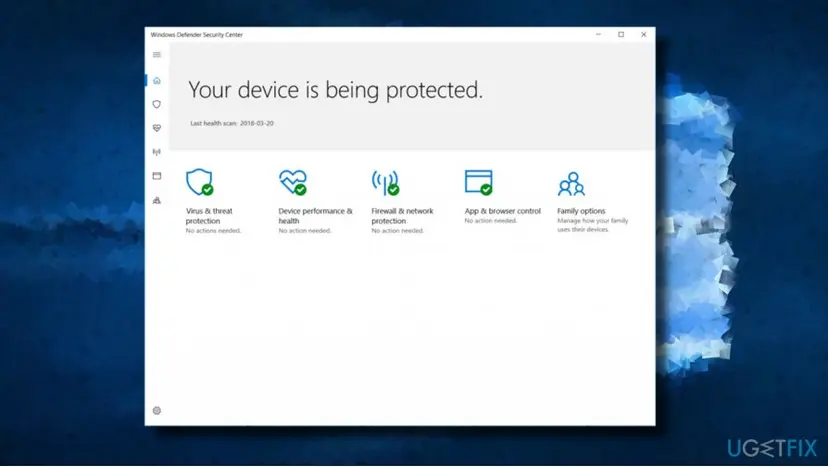
- Press Win + I, open Windows Update (on Windows 10: Update & Security > Windows Update) and select Check for updates. Install everything offered, including Update for Microsoft Defender Antivirus antimalware platform (KB4052623) and Security Intelligence Update for Microsoft Defender Antivirus (KB2267602).
- Open Windows Security, select Virus & threat protection, then Protection updates and Check for updates.
- Still in Windows Security, open Settings > About and note the Antimalware Client Version (the platform version, starting with 4.18).
- Restart the PC so the new WdFilter.sys loads.
If the updates fail in the app, force them from an elevated Command Prompt (Microsoft's own commands):
cd /d "%ProgramFiles%\Windows Defender"
MpCmdRun.exe -SignatureUpdateIf Defender shows version 0.0.0.0 or its updates never install, fix that first: Defender security intelligence version 0.0.0.0.
It worked if: Protection updates reports that the security intelligence is up to date, the platform version is current, and no new file appears in C:\Windows\Minidump.
If not: If the blue screen returns on an updated PC, look for the other filter driver in Fix 2.
Fix 2. Find and update or remove the program that filters files beside Defender
20 to 40 minutesLow riskA second antivirus, a cloud drive (Google Drive, OneDrive, Dropbox), a backup, VPN, encryption or data-loss tool is installed, or the dump names a third-party driver.
Every file request passes all filter drivers in turn, so a faulty one often crashes while WdFilter.sys holds the same request. In one Microsoft Q&A case the crash came while Task View loaded files from a Google Drive virtual disk, and the advice was to uninstall Google Drive and install its latest version.
- Right-click Start and select Terminal (Admin) (on Windows 10: Windows PowerShell (Admin)).
- List the file system filter drivers that are loaded now.
WdFilteris Defender; every other name that is not a Microsoft driver belongs to a program you installed.fltmc filters - Search each unknown filter name online together with the word driver, or open the file's Properties > Details in
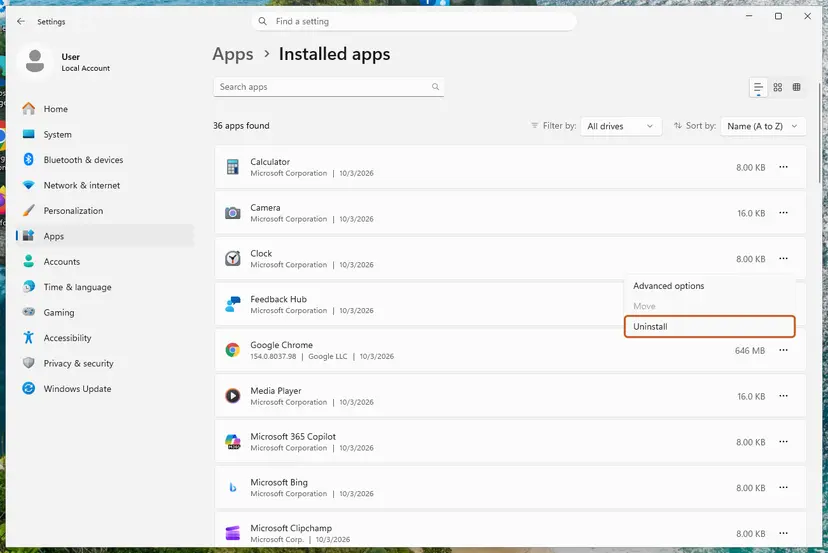
C:\Windows\System32\driversto see the company. - Update that program to its newest version from its maker's site. If you no longer need it, uninstall it: Uninstall a program or app in Windows
- If you run a second antivirus, keep only one. Two real-time scanners filtering the same files is a known recipe for crashes.
- Restart and use the PC as before: open, copy and sync the same files that were in use at the crash.
If fltmc shows nothing unusual, test with a clean boot, which starts Windows with Microsoft services only. If the crashes stop, turn the other services back on in groups until the culprit returns. Step by step: How to perform a clean boot in Windows
It worked if: fltmc filters lists only the filters you still need, and the PC runs through a normal day of work without a stop screen.
If not: If no third-party filter is involved and the crash started after an update, roll back Defender's platform in Fix 3.
Fix 3. Roll back a Defender platform update that started the crashes
10 minutesLow riskThe blue screens began right after a Defender or Windows update, and Fix 1 and Fix 2 did not stop them.
Microsoft gives Defender its own rollback commands for exactly this case: if you run into problems after an update, you can go back to the previous platform or the version shipped with Windows. That swaps WdFilter.sys for the earlier copy.
- Press Win, type
cmd, right-click Command Prompt and select Run as administrator. - Go to Defender's program folder.
cd /d "%ProgramFiles%\Windows Defender" - Roll the platform back to the previous version.
MpCmdRun.exe -RevertPlatform - Restart the PC and use it as before.
- If the crashes stop, check Windows Update again in a few weeks. A newer platform replaces the rolled-back one automatically.
| What to roll back | Command |
|---|---|
| The platform, to the previous version | MpCmdRun.exe -RevertPlatform |
| The platform, to the version shipped with Windows | MpCmdRun.exe -ResetPlatform |
| The antivirus engine, to the previous version | MpCmdRun.exe -RemoveDefinitions -Engine |
| Security intelligence, to the previous or original version | MpCmdRun.exe -RemoveDefinitions -All |
Old platform versions lose support after two newer releases. Use the rollback to stop the crashes and confirm the cause, then install the next platform update when it arrives.
It worked if: Settings > About in Windows Security shows a lower Antimalware Client Version, and the PC no longer crashes.
If not: If Windows does not reach the desktop at all, start in Safe Mode with Fix 4. Otherwise test the hardware in Fix 5.
Fix 4. Start in Safe Mode and check the Defender driver settings when Windows does not boot
20 minutesLow riskWindows crashes with WdFilter.sys before or right after the sign-in screen, every time.
Safe Mode starts Windows with a minimal set of drivers, so you can reach the desktop and run Fixes 1 to 3. A WdFilter service that was set to a non-default start by a tweak tool or a broken antivirus removal can also stop the boot.
After two failed starts in a row Windows opens the recovery screens. From there, start in Safe Mode with Networking so you can download updates. Step by step: Start Windows or a Mac in Safe Mode
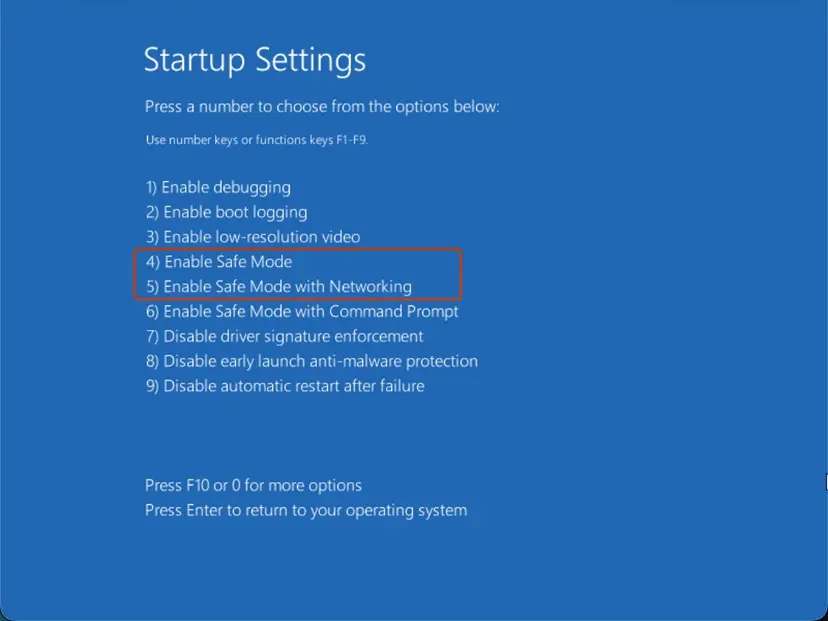
- In Safe Mode, run Fix 1 and Fix 2. Remove any second antivirus there if it will not uninstall in a normal start.
- Open Command Prompt as administrator.
- Check the WdFilter service. On a healthy PC START_TYPE reads 0 BOOT_START.
sc.exe qc WdFilter - Only if it shows another start type, restore the default and restart.
sc.exe config WdFilter start= boot - If Windows answers Access is denied, Tamper Protection is guarding the setting. Leave it as it is: it was not changed by hand.
- If Safe Mode does not start either, use the recovery screens: Run Startup Repair or roll back with Undo recent changes with System Restore.
It worked if: Windows starts normally after the restart, and sc.exe qc WdFilter shows BOOT_START.
If not: If the PC only starts in Safe Mode, a driver outside Defender is the likely cause. Go to Fix 5 and Fix 6.
Fix 5. Rule out memory, overclocks and other drivers
60 minutes or moreLow riskThe stop codes change from crash to crash, other drivers are named too, or Fixes 1 to 3 did not help.
WdFilter.sys reads a great deal of memory because it inspects files as they open. Unstable RAM or a buggy storage or graphics driver often shows up first in such a busy driver, so the stop screen blames it.
- Reset any CPU, GPU or memory overclock to default, and turn off the memory profile (XMP or EXPO) in the BIOS for the test.
- Test the RAM with the tool built into Windows: How to test your RAM with Windows Memory Diagnostic
- Update the storage, chipset and graphics drivers, or roll back one that arrived just before the crashes: Update, roll back or reinstall a driver
- Install the newest BIOS from your PC or motherboard maker's support page, after reading its release notes.
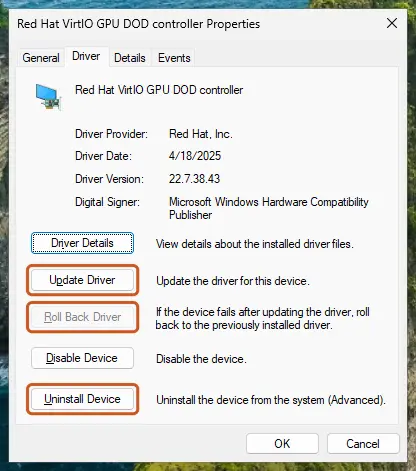
Errors in the memory test, many different stop codes, or crashes in Safe Mode point to hardware. Defender only reveals the fault, and replacing or reseating the part is the fix.
It worked if: The memory test reports no errors and the PC runs a full day at default settings without a stop screen.
If not: If the memory test finds errors, the RAM needs replacing. If not, let Driver Verifier hunt for the faulty driver in Fix 6.
Fix 6. Let Driver Verifier find the faulty driver
1 to 2 days of normal useRead the warningCrashes continue, hardware tests pass, and the dumps do not name a clear culprit. For experienced users.
Driver Verifier puts third-party drivers under strict checks so that a faulty one crashes at once and is named in the dump, instead of hiding behind WdFilter.sys.
The PC will likely blue-screen, and a bad driver can stop it from booting. Save your work, create a restore point first and know how to reach Safe Mode (Start Windows or a Mac in Safe Mode). Turn Verifier off with verifier /reset as soon as you have the name.
- Open Command Prompt as administrator, type
verifierand press Enter. - Select Create standard settings and Next.
- Select Select driver names from a list and Next.
- Tick the drivers whose Provider is not Microsoft Corporation, then select Finish and restart.
- Use the PC normally. When it crashes, read the newest dump as in the section on reading the crash dump. The driver named there is the culprit.
- Turn Verifier off and restart, from a normal start or Safe Mode.
verifier /reset - Update or uninstall the program that owns the named driver.
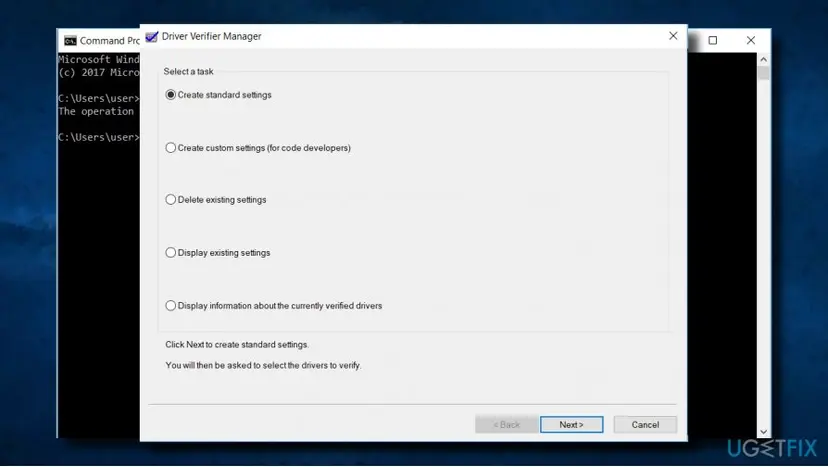
It worked if: A new dump names a third-party driver, and after you update or remove its program and run verifier /reset the crashes stop.
If not: If Verifier runs for two days without a crash, reset it and repair Windows files in Fix 7.
Fix 7. Repair Windows system files as a last check
20 minutesNo riskSFC has never run on this PC, or the dumps also name Windows files.
Defender's driver comes from its own updates, so this repair does not replace WdFilter.sys. It rules out damaged Windows components that the filter stack depends on, which is why it comes last.
DISM fetches clean copies of Windows components and SFC replaces damaged system files. Step by step with screenshots: Run DISM and SFC to repair Windows system files
In an elevated Command Prompt, one after the other:
DISM.exe /Online /Cleanup-Image /RestoreHealth
sfc /scannow
It worked if: SFC reports that it found no integrity violations or that it repaired them, and the PC stops crashing.
If not: Collect the dumps and contact support as the next section describes.
Still crashing: what to collect and where to send it
A bug inside WdFilter.sys can only be fixed by Microsoft, and a clash with another program only by its maker. Give either of them what they need to reproduce the crash.
- The three newest
.dmpfiles fromC:\Windows\Minidump, zipped. Microsoft Q&A advisors also ask for the fullC:\Windows\MEMORY.DMPwhen it exists. - Your Windows edition and version from Settings > System > About.
- The Defender Antimalware Client Version from Windows Security > Settings > About.
- The output of
fltmc filtersfrom Fix 2. - What you were doing at the crash: starting up, syncing, copying, gaming.
| Where to report | When |
|---|---|
| Microsoft Q&A or the Get Help app | Only WdFilter.sys and Windows files appear in the dumps |
| The maker of the third-party antivirus, sync or backup tool | Its driver appears beside WdFilter.sys |
| Your PC maker or a repair shop | Memory test errors, or crashes in Safe Mode |
How to keep the WdFilter.sys blue screen from coming back
- Let Windows Update install Defender platform and intelligence updates every month.
- Keep one real-time antivirus only.
- Update cloud drive, backup and VPN tools when their makers release new versions.
- Keep storage, chipset and graphics drivers current.
- Turn off Defender or its driver for good to stop the crash.
- Delete, rename or download WdFilter.sys.
- Use registry tweak tools that change Defender services.
- Leave Driver Verifier running after the test.
Windows 10 left support on 14 October 2025. A PC that can run Windows 11 gets the full stream of Windows fixes beside Defender's own updates.
Frequently asked questions
What is WdFilter.sys?
WdFilter.sys is the Microsoft Defender Antivirus Mini-Filter Driver, a kernel driver that comes with Windows 11 and Windows 10. It sits between programs and the disk and lets Defender inspect files and registry changes the moment they happen, which is what real-time protection means. Its service name is WdFilter, and the file lives in C:\Windows\System32\drivers\wd. Defender updates it through its monthly platform update. It is normal for it to be loaded all the time, and seeing it in Task Manager tools or boot logs is no reason for worry.
Is WdFilter.sys a virus?
No. The genuine file is a Microsoft driver signed by Microsoft, and it is part of the antivirus that protects your PC. To check your copy, right-click it in C:\Windows\System32\drivers\wd, select Properties and open Digital Signatures. A file with this name somewhere else, or one without a Microsoft signature, deserves a full scan with Microsoft Defender. Malware does sometimes borrow the names of system files, which is why the folder and the signature matter more than the name.
Why does the blue screen say WdFilter.sys failed?
The stop screen names the driver that was running when Windows stopped. WdFilter.sys handles a very large share of all file and registry activity, so it is often in the middle of the work when another driver, bad memory or an old Defender platform causes the error. That is why WdFilter.sys failed appears so often. The crash dump in C:\Windows\Minidump shows the other drivers involved; read it as described in this guide before you change anything.
How do I fix REGISTRY_FILTER_DRIVER_EXCEPTION with WdFilter.sys?
REGISTRY_FILTER_DRIVER_EXCEPTION (0x135) means a driver that watches registry changes hit an error it did not handle. WdFilter.sys watches the registry for Defender, and so do many third-party security, backup and system tools. Install the latest Defender updates first (Fix 1). Then run fltmc filters and remove or update any second antivirus or monitoring tool (Fix 2). If the code appeared right after a Defender update, roll the platform back with MpCmdRun.exe -RevertPlatform (Fix 3).
How do I fix SYSTEM_SERVICE_EXCEPTION caused by WdFilter.sys?
SYSTEM_SERVICE_EXCEPTION (0x3B) with WdFilter.sys is the most common form of this crash. Work through the fixes in order: update Defender, then look for a second filter driver such as a cloud drive, backup or antivirus program, then roll back a fresh Defender platform. If the stop code changes between crashes and other drivers are named too, test the memory and update storage and graphics drivers, because a busy driver like WdFilter.sys often hits faulty hardware first.
How do I disable WdFilter?
You should not, and on a normal PC you cannot do it cleanly. WdFilter is the part of Defender that sees files as they open; with it off the PC has no real-time protection. Tamper Protection blocks changes to it, which is why guides that edit its service often end in Access is denied. If you must test whether Defender is involved, pause real-time protection once in Windows Security and it turns itself back on. If you install another antivirus, Defender steps back on its own. People who search in Russian, "wdfilter как отключить" or "как отключить", ask the same thing: the answer is the same.
What does BOOTLOG_NOT_LOADED WdFilter.sys mean?
It is a line in the boot log, C:\Windows\ntbtlog.txt, which Windows writes only when boot logging is turned on. The log marks many drivers as BOOTLOG_NOT_LOADED on healthy PCs, for example drivers that load later in the start or are not needed in that mode. The line \SystemRoot\system32\drivers\wd\WdFilter.sys on its own is not an error and not a stop code. Only if Windows also fails to start or crashes with WdFilter.sys named is there something to fix, starting with Fix 4.
What is zdpfilter.sys? Is it the same as WdFilter.sys?
No. zdpfilter.sys is a different driver with a similar name, and this page is about Microsoft Defender's WdFilter.sys. We could not confirm which company makes zdpfilter.sys, so check it on your own PC: open C:\Windows\System32\drivers, right-click the file, select Properties and read the company on the Details tab and the signer on Digital Signatures. If it is a filter driver from a security or data protection product, the method in Fix 2 applies: update or remove that product if it clashes with Defender.
Can I download WdFilter.sys to replace a broken one?
No. Driver and DLL download sites offer files of unknown origin, and a wrong version of a kernel driver can stop Windows from starting. WdFilter.sys arrives with Microsoft Defender's platform update, KB4052623, through Windows Update or Windows Security. If you think the file is damaged, install the newest platform update (Fix 1), or reset Defender to the version shipped with Windows with MpCmdRun.exe -ResetPlatform and then update again.
Is a single WdFilter.sys blue screen dangerous?
Usually not. On Microsoft Q&A an independent advisor read one user's single WdFilter.sys minidump, found only generic errors, and judged that a background Windows update had most likely caused a one-time clash. Install the pending Defender and Windows updates, restart, and watch the PC for a week. If more crashes follow, especially with the same driver named, work through the fixes in this guide in order.
Sources
- Microsoft Learn: Microsoft Defender Antivirus security intelligence and product updates and support (learn.microsoft.com)
- Microsoft Q&A: Unable to Load Image WdFilter.sys Issue After Upgrading to Windows 10 1803 (learn.microsoft.com)
- Microsoft Q&A: BSOD problem wdfilter.sys (learn.microsoft.com)
Did this fix work?
One click, no account. It tells the next reader which guides are worth their time.
Questions and experiences: fix the WdFilter.sys blue screen (BSOD) on Windows
Still broken, or found a fix we did not cover? Ask here: members and our editors answer. Reading is open; writing needs a free account.
…