
Run Startup Repair in Windows 11 (fix the Automatic Repair loop)
Startup Repair checks why Windows does not start (damaged boot files, boot configuration, drivers) and tries to fix it. In current Windows 11 it runs from the Quick machine recovery tile.
- Time
- 5 to 30 minutes
- Level
- Easy
- You need
- The password of an administrator account. If the drive is encrypted, the BitLocker recovery key.
Windows will not start
Steps written for Windows 11 and Windows 10, from the Windows Recovery Environment.
In Windows 11 26H2 the tile is called Quick machine recovery; its description says it was previously known as Startup Repair. In Windows 10 and older Windows 11 versions it is called Startup Repair.
Open the recovery environment
After repeated failed starts Windows opens it by itself (Automatic Repair: select Advanced options). If Windows still starts, open Settings > System > Recovery and select Restart now next to Advanced startup. From the sign-in screen, hold Shift and select Power > Restart.
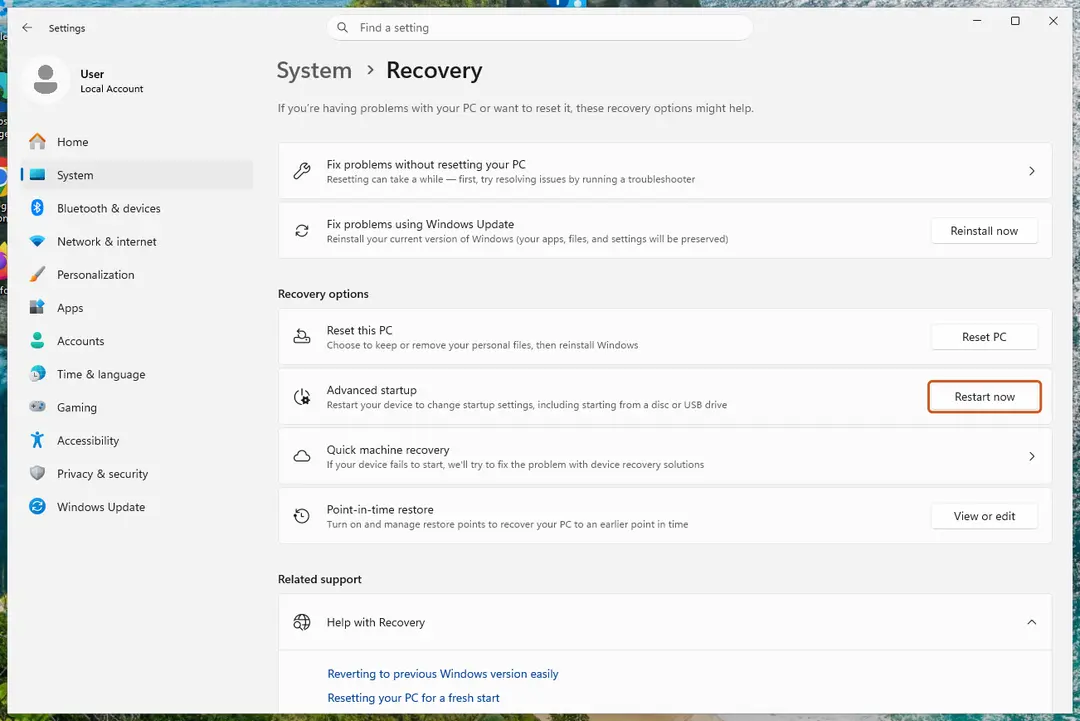
From a working desktop, Advanced startup opens the recovery environment. Screenshot: Windows 11 26H2 Select Troubleshoot
On Choose an option, select Troubleshoot.
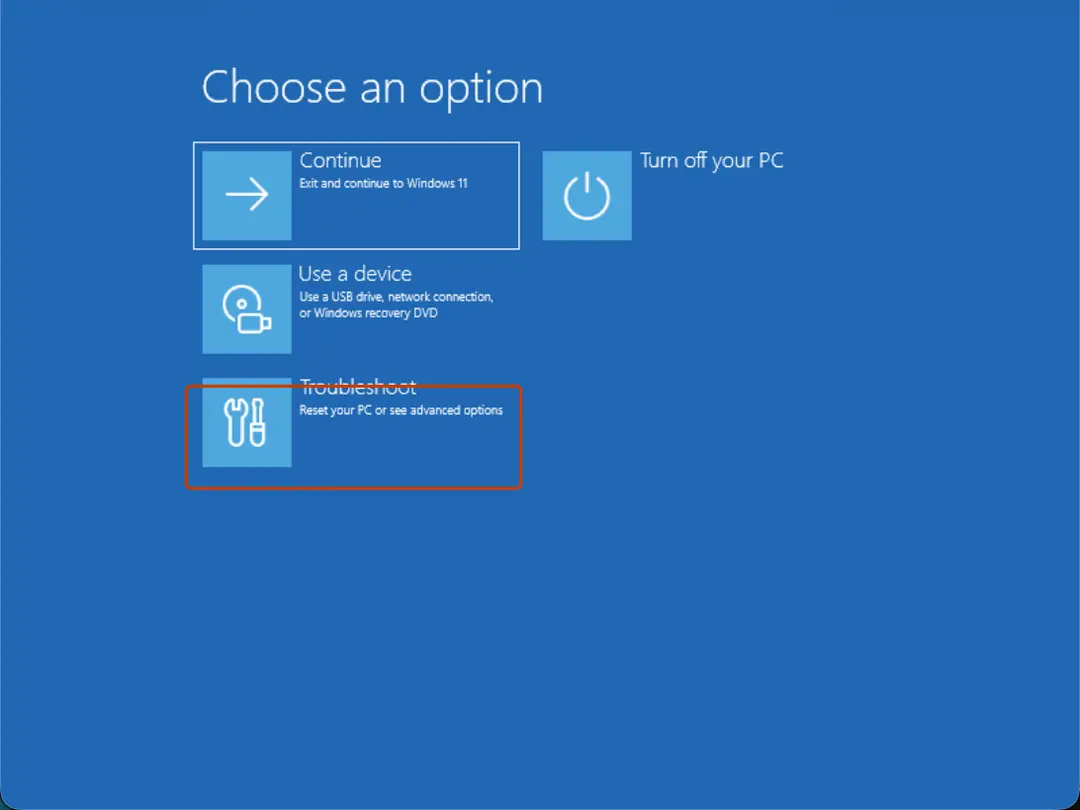
Choose an option: Troubleshoot. Screenshot: Windows 11 26H2 Open Advanced options
Select Advanced options.
Start the repair
Select Quick machine recovery (or Startup Repair on older versions).
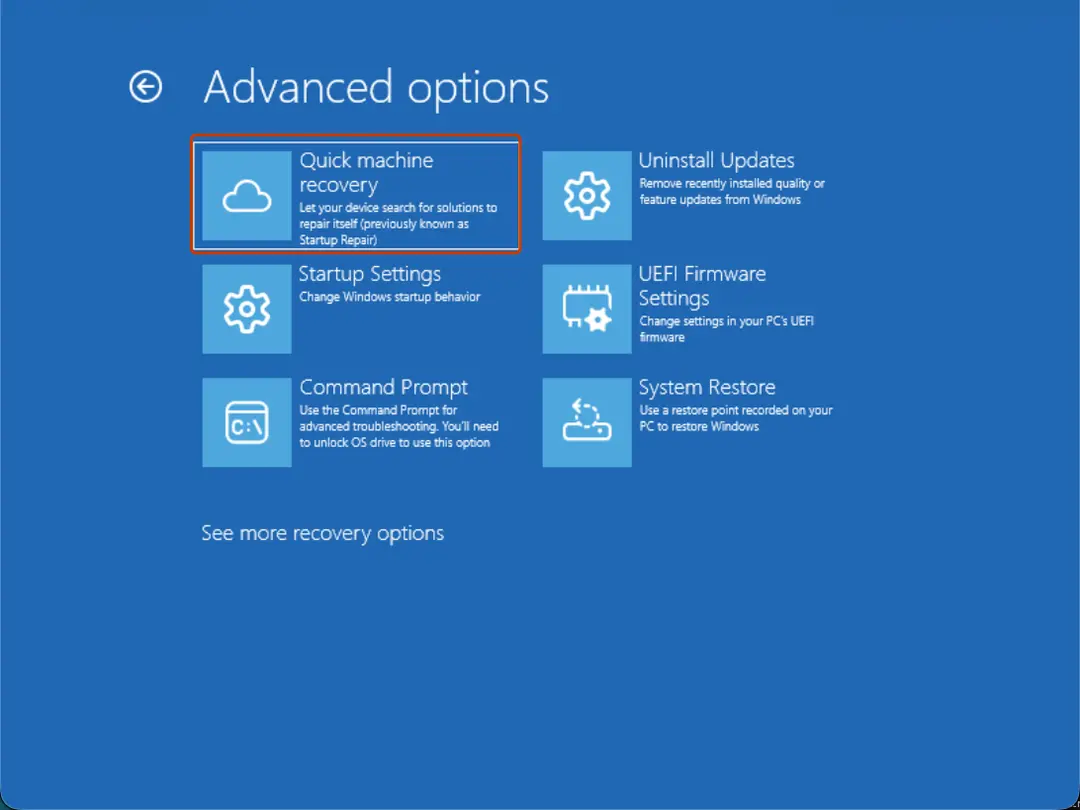
Quick machine recovery is the former Startup Repair tile. Screenshot: Windows 11 26H2 Sign in if asked
Choose an administrator account and type its password. If Windows asks for the BitLocker recovery key, enter it.
Wait for the result
The check can take a while. If it fixes the problem, the PC restarts into Windows. If it cannot, it says so and shows where its log file is; select Advanced options and continue below.
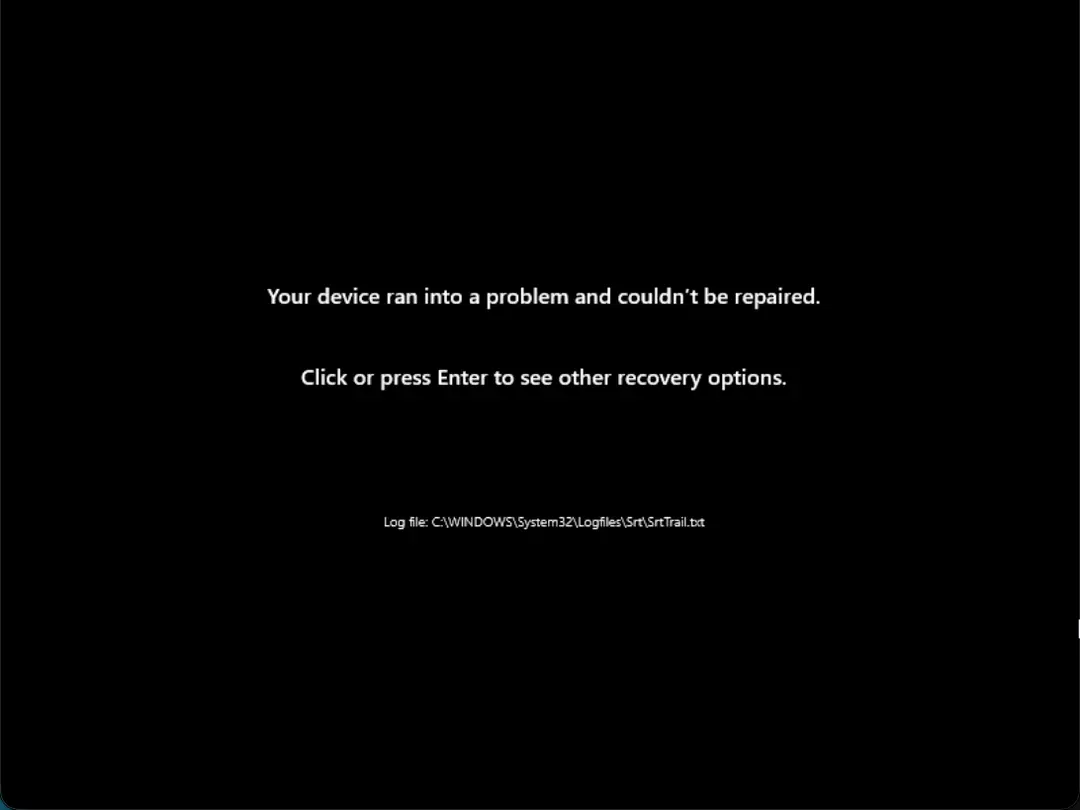
This message means the repair found nothing it could fix. Screenshot: Windows 11 26H2
If the PC stays in the Automatic Repair loop
Startup Repair fixes boot files, not every cause. From Advanced options, try these in order and test after each:
- Uninstall Updates, if the problem started after an update.
- System Restore to a point before the problem: Undo recent changes with System Restore.
- Startup Settings > Safe Mode, then remove a recent driver or app: Start Windows or a Mac in Safe Mode.
- Command Prompt for an offline system file scan (Run DISM and SFC to repair Windows system files) and a disk check (Check a disk for errors (chkdsk)).
- As a last step, reinstall Windows and keep your files: Reinstall Windows without losing files.
Read the repair log
The result screen names the log file, C:\WINDOWS\System32\Logfiles\Srt\SrtTrail.txt. In the recovery environment's Command Prompt the drive letter is often different; find it with dir D:\Windows (try C:, D:, E:), then open the file with notepad D:\Windows\System32\Logfiles\Srt\SrtTrail.txt. It lists each test the repair ran and its result.
What Quick machine recovery adds
On Windows 11 version 24H2 and later, Quick machine recovery builds on Startup Repair: when it is turned on and the PC has a network connection, it also looks on Windows Update for a fix Microsoft has published for a known, widespread startup problem. Its settings are in Settings > System > Recovery > Quick machine recovery.
If the recovery environment does not open
Start the PC from a Windows installation USB drive (made on another PC), select Next, then Repair your computer. It opens the same Choose an option screen.
Used in 46 guides
How to fix Windows stuck at shutting down screen?
How to fix Windows update stuck on "Working on updates"?
How to fix the FAST_ERESOURCE_PRECONDITION_VIOLATION blue screen (0x1C6) in Windows
How to fix Exception on Invalid Stack Black Screen error in Windows?
How to fix Blue Screen error 0xc00002e3 in Windows 10?
How to fix the WdFilter.sys blue screen (BSOD) on Windows
How to fix the 0x000000BE blue screen error (ATTEMPTED_WRITE_TO_READONLY_MEMORY) in Windows
How to fix BSOD 139 (KERNEL_SECURITY_CHECK_FAILURE) in Windows
How to fix the rtwlane.sys blue screen error in Windows 11 and 10
How to fix Media Creation Tool error 0x8007043C - 0x90018 in Windows?
How to fix the Reference By Pointer BSOD (0x18) in Windows 10 and 11
How to fix System Restore error 0xc000a004 in Windows?
How to fix secur32.dll error in Windows?
How to fix "Unknown Hard Error" on Windows 10?
How to fix "Please insert the external storage media and press OK" error in Windows 10?
How to fix Windows stuck in Recovery Mode?
How to fix Windows installation error 0x80070002 - 0x20009?
How to fix the ACPI.sys error and blue screen in Windows
How to fix Windows 10 stuck at "Choose your keyboard layout" screen?
How to fix 0x80090027 (PIN isn't available) error in Windows
How to fix blue screen error code 133 (DPC_WATCHDOG_VIOLATION) in Windows
How to fix the bhtsddr.sys blue screen (BSOD) in Windows
How to fix the SYSTEM_LICENSE_VIOLATION (0x9A) blue screen in Windows 10 and 11
How to fix the fvevol.sys blue screen (BSOD) error in Windows
How to fix error code 0xc0000242 when Windows will not start
How to fix 0xc0000139 BSOD error in Windows?
How to fix the pdc.sys BSOD error in Windows
How to fix the session 1 initialization failed BSOD (SESSION1_INITIALIZATION_FAILED, 0x6D)
How to fix "The resource loader cache doesn't have loaded MUI entry" 0x80073B01 in Windows
How to fix the Netwsw00.sys BSOD in Windows
How to fix Windows boot error code 0xc0000229 (BlInitializeLibrary failed)
How to fix the mtkwl6ex.sys blue screen (BSOD) in Windows
How to fix "The application was unable to start correctly" 0xc000102 error in Windows?
How to fix "The digital signature for this file couldn't be verified" (0xc0000428) in Windows
How to fix 0xC0000719 error in Windows?
How to fix "New CPU installed, fTPM/PSP NV corrupted or fTPM/PSP NV structure changed"?
How to fix the envirtahci.sys blue screen (BSOD) in Windows
How to fix the I01 initialization failed BSOD (IO1_INITIALIZATION_FAILED, 0x69) in Windows
[Fix] DCOM got error "1084" attempting to start the service in Windows
How to fix the WIN32K_CRITICAL_FAILURE (0x164) blue screen in Windows
How to fix the MUI_NO_VALID_SYSTEM_LANGUAGE (0x12A) blue screen in Windows
How to fix Fatal Error C0000022 on Windows?
How to fix Windows stuck on "Updates are underway" screen?
How to fix winmm.dll missing or not found error in Windows?
How to fix Event ID 6008 "The previous system shutdown was unexpected" in Windows?
How to fix KB5121003 errors in Windows 11?
Sources
- Microsoft Support: Startup Repair (read Oct 3, 2026)
- Microsoft Support: Quick machine recovery in Windows (read Oct 3, 2026)
- Microsoft Support: Windows Recovery Environment (read Oct 3, 2026)
- Microsoft Support: Recovery options in Windows (read Oct 3, 2026)