
How to fix the WIN32K_CRITICAL_FAILURE (0x164) blue screen in Windows

Prefer to fix it yourself? The manual steps follow.
- 7methods
- 10 to 60 minutes
- Intermediate
Applies to Windows 11 and Windows 10 PCs that show the stop code WIN32K_CRITICAL_FAILURE (0x00000164)
7 methods in this guide
Hello, my computer crashed today with a BSOD that referenced WIN32K_CRITICAL_FAILURE. I went on with my day, and then it happened again. Please help me resolve this, as I need my PC to be stable. Thanks for the advice.
WIN32K_CRITICAL_FAILURE, bug check 0x164, means Win32k, the kernel part of Windows that draws windows and handles input, found a state it could not survive and stopped the PC. Most often a graphics driver or an app that hooks into drawing is behind it. Roll back or cleanly reinstall the graphics driver first.
The stop code means the Windows graphics and window subsystem hit a fault it could not recover from. Roll back the graphics driver if the crashes began after a driver update, or reinstall the newest one from your GPU maker (Fix 1). Then update or remove the app that was open when it crashed (Fix 2). If the PC crashes on every start, repair it from the recovery environment (Fix 4).
| Error | A stop screen with Stop code: WIN32K_CRITICAL_FAILURE, bug check value 0x00000164. Sometimes the line What failed: names win32kbase.sys, win32kfull.sys or win32k.sys. |
|---|---|
| Where it appears | While a game, video, streaming client or overlay draws on screen, on the desktop at random, or during startup in a repair loop. The PC restarts by itself. |
| Main cause | A graphics driver or a program that hooks into window drawing and input passed Win32k something broken. Damaged system files and unstable hardware come after that. |
| Fastest fix | Roll back or cleanly reinstall the graphics driver (Fix 1). |
| Also written as | WIN32K_CRITICAL_FAILURE (0x164), win32k critical failure, win32 critical failure, windows critical failure 0x164, 0x00000164, bugcheck 0x164. |
| Affects | Windows 11 and Windows 10. Windows 10 left support on 14 October 2025, so Win32k fixes for it now arrive only through Extended Security Updates. |
| Vendor status | Microsoft documents the code for developers only and says to read it with the !analyze debugger command. There is no general fix or known issue entry. |
| Where the cause is logged | C:\Windows\Minidump, one .dmp file per crash. WinDbg shows Arg1 (the failure type), PROCESS_NAME and IMAGE_NAME. |
| Time to fix | 10 to 20 minutes for Fix 1 to 3. 30 to 60 minutes when the PC no longer starts or the memory has to be tested. |
Facts checked on 15 October 2026. Steps written for Windows 11 (25H2 and 26H2) and Windows 10 22H2.
What WIN32K_CRITICAL_FAILURE (0x164) means
Microsoft's bug check reference says only this: the WIN32K_CRITICAL_FAILURE bug check has a value of 0x00000164, and it indicates that Win32k has encountered a critical failure. Win32k is the kernel mode part of the Windows graphical subsystem. It holds the window manager, the GDI drawing engine and the bridge to DirectX.
Since Windows 10, win32k.sys loads two helpers, win32kbase.sys and win32kfull.sys. That is why the stop screen or a crash tool may name any of the three. They are genuine Windows files, so the file named on the screen is the place where the fault was caught, not the program that caused it.
| What you see | What it is |
|---|---|
| Stop code: WIN32K_CRITICAL_FAILURE | The text on the Windows 11 and Windows 10 stop screen |
0x164, 0x00000164, bugcheck 0x164 | The same code as a number, in Event Viewer, Reliability Monitor and crash tools |
| What failed: win32kbase.sys or win32kfull.sys | The Win32k file that was running when Windows stopped |
| Win32k critical failure, win32 critical failure, win 32k critical failure | Typed names of the same stop code |
0x50 in win32k.sys on Windows 7 | A different, older stop code on Windows 7 SP1. Microsoft tied it to a font update and released a hotfix |
Microsoft says the screen colour and message of a stop code error vary with the Windows 11 version. On Windows 11 24H2 and later the screen is black. The text Your device ran into a problem and needs to restart and the stop code line stay the same.
Why Win32k crashes: the causes, most common first
Win32k serves every program that opens a window, so the crash follows whatever handed it bad data. Crash analysis tools used on Windows forums describe 0x164 as possibly caused by the graphics driver. Real dumps also name the app that made the last call, such as a game streaming client.
| How often | Cause | Sign | Fix |
|---|---|---|---|
| Most often | A faulty, outdated or half-installed graphics driver | Crashes in games, video or with several monitors, or right after a driver update | Fix 1 |
| Often | An app that hooks into drawing or input: game clients, overlays, screen recorders, remote desktop tools | Crashes only while one app runs; the dump's PROCESS_NAME names it | Fix 2 |
| Often | A fresh Windows update or an Insider preview build | The first crash came a day or two after an update | Fix 3 |
| Less often | Damaged Windows system files | Crash during startup, Automatic Repair loop, Arg1 0x3 | Fix 4, Fix 5 |
| Less often | A damaged third-party font or a pointer device driver | Arg1 0xA, 0xB (fonts) or 0x5 (touchpad, pen, touch screen) | Fix 2 |
| Rarely | Unstable or failing hardware: RAM, overclock, failing disk | Random stop codes, or NTFS_FILE_SYSTEM beside 0x164 | Fix 6 |
Find the cause in the crash dump
Microsoft's only advice for 0x164 is to run the !analyze debugger command. It takes ten minutes and tells you which fix to start with, so do it if the PC still starts. Windows writes a small dump for every crash.
- Open File Explorer and go to
C:\Windows\Minidump. Each file is named by the date of the crash. - Install Microsoft's debugger: open Terminal and run
winget install Microsoft.WinDbg. - Start WinDbg as administrator, select File > Open dump file and open the newest
.dmpfile. - Type
!analyze -vin the command box and press Enter. Wait until the analysis ends. - Write down Arg1 under
WIN32K_CRITICAL_FAILURE (164), then the lines PROCESS_NAME and IMAGE_NAME further down.
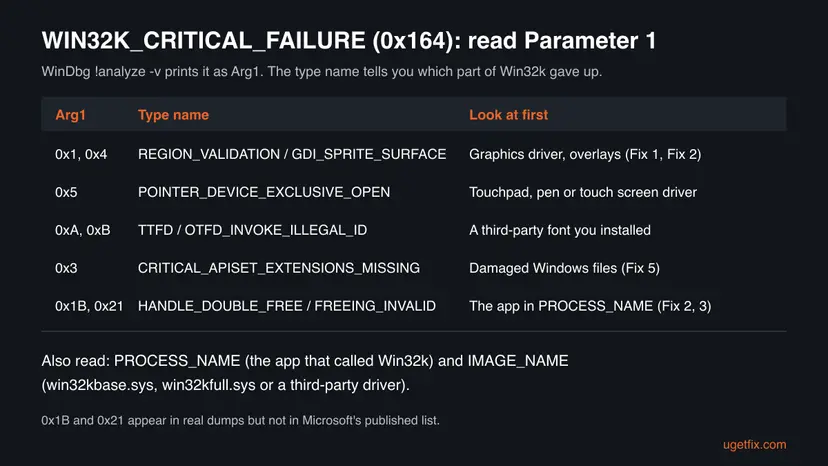
Microsoft's public list of Arg1 values stops at 0x10. Newer builds use more: dumps posted on the NVIDIA forum show 0x21 FREEING_INVALID_MEMORY and 0x1B USER_HANDLE_DOUBLE_FREE, with GeForceNOW.exe as the process. WinDbg prints the name of the type even when the public list does not.
If !analyze -v names a third-party driver, such as a graphics, touchpad or security driver, start with that driver. If it names win32kbase.sys or win32kfull.sys, the PROCESS_NAME line is the better clue.
How to fix the WIN32K_CRITICAL_FAILURE blue screen
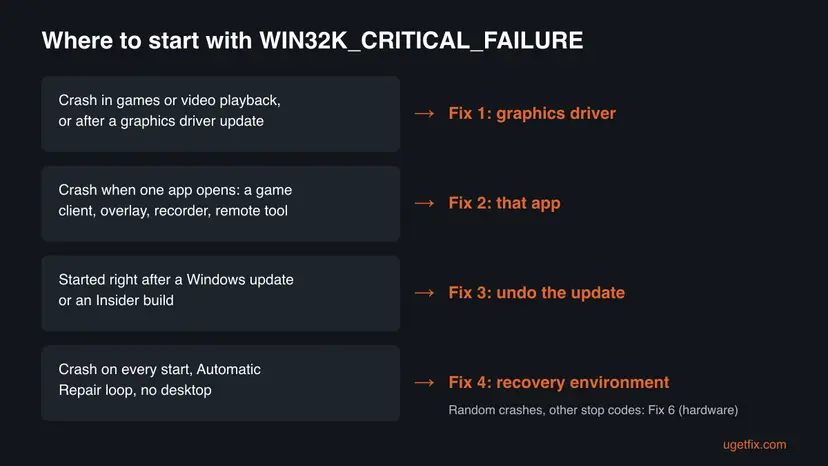
Start with Fix 1 unless the dump or the timing points elsewhere. Fixes 2 and 3 cover crashes tied to one app or one update. Fix 4 is for a PC that no longer starts. Fixes 5 to 7 are the general repairs, in order of cost.
| What you see | Start with | Then |
|---|---|---|
| Crashes in games or video, or after a graphics driver update | Fix 1 | Fix 2 |
| Crashes only while one app runs, or PROCESS_NAME names an app | Fix 2 | Fix 1 |
| The first crash came right after a Windows update or an Insider build | Fix 3 | Fix 1 |
| The PC crashes on every start or stays in Automatic Repair | Fix 4 | Fix 7 |
Arg1 is 0x3, or SFC was never run | Fix 5 | Fix 6 |
| Random stop codes, or NTFS_FILE_SYSTEM appears too | Fix 6 | Fix 5 |
Fix 1. Roll back or cleanly reinstall the graphics driver
15 minutesLow riskCrashes happen in games, video playback or with several monitors, or they began after a graphics driver update.
Win32k hands every drawing call to the graphics driver through DirectX. A driver that returns a broken surface or region is the most common reason Win32k stops the PC with 0x164.
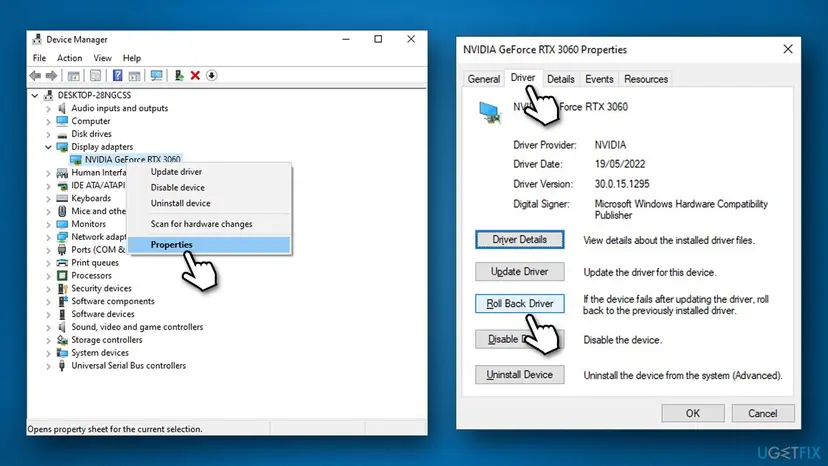
- Right-click Start and select Device Manager.
- Expand Display adapters, right-click your graphics card and select Properties.
- Open the Driver tab. If the crashes began after a driver update and Roll Back Driver is available, select it, choose a reason and select Yes.
- If the button is greyed out, download the newest driver for your exact card from NVIDIA, AMD or Intel, or from your laptop maker's support page.
- Install it with the clean install option the installer offers, or select Uninstall Device first and then run the new installer.
- Restart the PC and use it the way it used to crash. Step by step with screenshots: Update, roll back or reinstall a driver
Laptops often have an Intel or AMD chip in the processor and a separate NVIDIA or AMD card. Both appear under Display adapters. Update both, because Win32k talks to the one that drives the screen.
It worked if: Device Manager shows the new or older driver version on the Driver tab, and the game or video that crashed now runs through a long session.
If not: If the crash comes back with the same app open each time, go to Fix 2.
Fix 2. Update or remove the app that was running when Windows crashed
10 minutesLow riskThe crash happens only while one program runs, or the dump's PROCESS_NAME names a program.
Win32k crashes in the middle of a call from a running program. In the GeForce NOW case on the NVIDIA forum, a newer version of the app stopped the 0x164 crashes on the same Windows build.
Programs that often sit close to Win32k are game streaming clients, game and chat overlays, screen recorders, remote desktop and remote support tools, and window or wallpaper tweakers. One of them can pass Win32k a handle it already freed, which is what the 0x1B and 0x21 types describe.
- Note the app named in PROCESS_NAME, or the app you had open at each crash.
- Update it to its newest version from its own website or store.
- If it still crashes, turn off its overlay or capture feature in its settings and test again.
- If that does not help, uninstall it for a test: Uninstall a program or app in Windows
- If Arg1 was
0xAor0xB, open Settings > Personalization > Fonts, select fonts you installed recently and select Uninstall. - If Arg1 was
0x5, update or reinstall the touchpad, pen or touch screen driver as in Fix 1.
It worked if: The app or task that used to trigger the crash runs for a full session without a new file in C:\Windows\Minidump.
If not: If the crashes started on a certain day with no new app, check the update history in Fix 3.
Fix 3. Undo the latest Windows update or leave the Insider preview
15 minutesLow riskThe first crash came shortly after a Windows update, or the PC runs an Insider preview build.
A new build changes Win32k itself. On the NVIDIA forum, 0x164 crashes started on Canary build 27858 and Dev build 26120.3964 and did not happen on the build before.
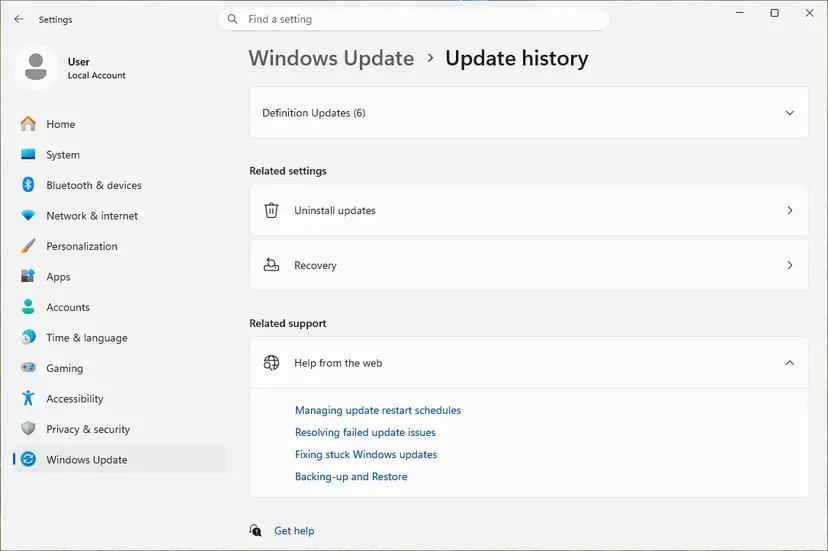
- Open Settings > Windows Update > Update history (on Windows 10: Settings > Update & Security > Windows Update > View update history).
- Compare the date of the newest update with the date of the first crash.
- If they match, select Uninstall updates and remove that update. Step by step: How to uninstall a Windows update
- Pause updates for a week so it does not return before a fixed version arrives.
- On an Insider build, open Settings > Windows Update > Windows Insider Program and turn on Stop getting preview builds, then send the dump through Feedback Hub.
It worked if: The update is gone from the list of installed updates and the PC runs for several days without the stop code.
If not: If no update matches the date, or removing it changed nothing, run the file repair in Fix 5.
Fix 4. Repair Windows from the recovery environment when it crashes on every start
30 minutesRead the warningThe stop code appears during startup, the desktop never loads, or the PC stays in Automatic Repair.
When Win32k fails before sign-in, Windows itself cannot load its own window system. The repair has to run from the recovery environment, which uses its own copy of Windows.
Startup Repair and Safe Mode change nothing in your files. System Restore removes apps and drivers installed after the restore point. Have your BitLocker recovery key ready, because the recovery environment can ask for it.
- Turn the PC on and, when the logo appears, hold the power button until it shuts down. Do this twice; the third start opens Automatic Repair.
- Select Advanced options > Troubleshoot > Advanced options.
- Run Startup Repair (called Quick machine recovery on newer Windows 11 builds). Step by step: Run Startup Repair
- If that fails, select Uninstall Updates > Uninstall latest quality update.
- If that fails too, select System Restore and pick a point from before the first crash: Undo recent changes with System Restore
- If you can reach Startup Settings, start in Safe Mode and roll back the graphics driver as in Fix 1: Start Windows or a Mac in Safe Mode
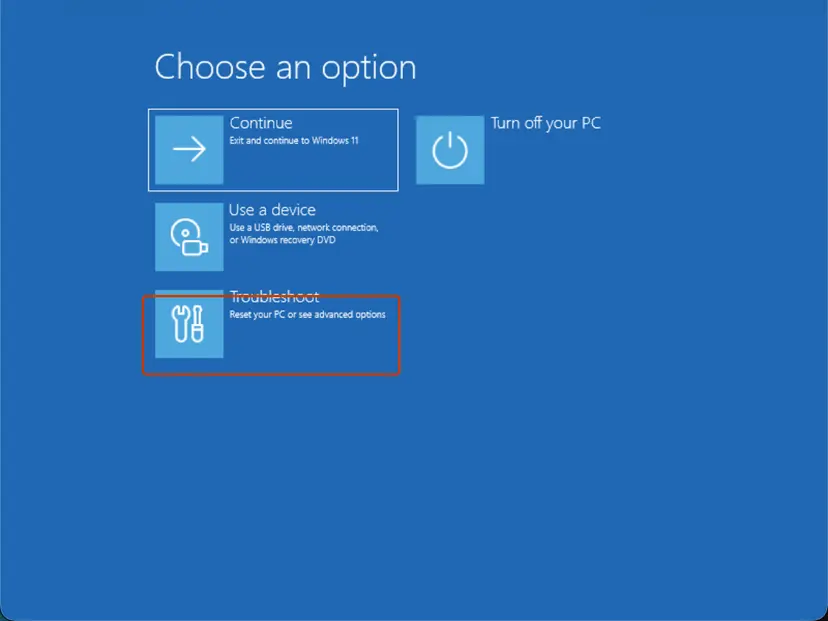
When every option in the recovery environment fails, create a Windows 11 USB drive with the Media Creation Tool on another PC. Boot from it and choose Repair your computer instead of installing. In a Microsoft Q&A boot loop case with 0x164, that is what got the PC working again.
It worked if: Windows reaches the sign-in screen and the desktop loads without the stop code.
If not: If Windows starts now, continue with Fix 5. If it still loops, go to Fix 7.
Fix 5. Repair damaged Windows system files with DISM and SFC
20 minutesNo riskArg1 is 0x3, the crash happened during startup, or SFC has never run on this PC.
Win32k depends on many system files and API sets. Type 0x3 means a critical one is missing, and a damaged copy of win32kbase.sys or win32kfull.sys would also stop it.
DISM fetches clean copies of Windows components first, then SFC replaces damaged system files with them. Step by step with screenshots: Run DISM and SFC to repair Windows system files
In Terminal (Admin), one after the other:
DISM.exe /Online /Cleanup-Image /RestoreHealth
sfc /scannow
If Windows does not start, run SFC offline from the recovery environment's Command Prompt. Check the letter of the Windows drive with dir first, because it is often not C: there.
In the recovery Command Prompt (replace C: with the Windows drive):
sfc /scannow /offbootdir=C:\ /offwindir=C:\WindowsIt worked if: SFC reports that it found no integrity violations or that it repaired them, and the next restart brings no stop code.
If not: If SFC cannot repair some files, or the crash returns, check the hardware in Fix 6.
Fix 6. Rule out unstable hardware: memory, overclock and disk
60 minutes or moreLow riskStop codes change from crash to crash, NTFS_FILE_SYSTEM appears beside 0x164, or nothing above helped.
Win32k keeps its objects in memory. Bad RAM or an unstable overclock can corrupt them, and Win32k then finds a handle or region that makes no sense and stops.
- Reset every CPU and GPU overclock to default, and turn off the memory profile (XMP or EXPO) in the BIOS for the test.
- Test the RAM with the tool built into Windows: How to test your RAM with Windows Memory Diagnostic
- Check the system disk for errors, especially if NTFS_FILE_SYSTEM also appeared: Check a disk for errors (chkdsk)
- Update the BIOS and chipset driver from your PC or motherboard maker's support page.
- If you added hardware before the crashes began, remove it and test again, as Microsoft's stop code checklist advises.
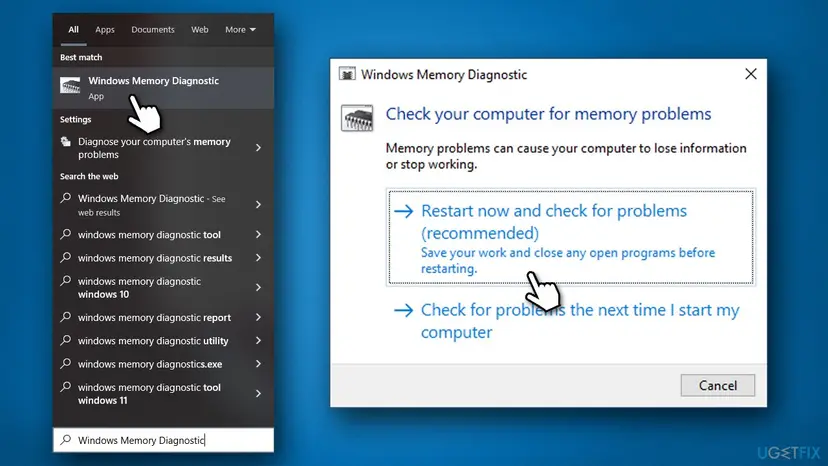
Hardware faults that Windows survives often leave a LiveKernelEvent in Reliability Monitor before a blue screen. Our guide to the LiveKernelEvent 124 error explains how to read those entries.
It worked if: The memory test reports no errors, CHKDSK finds no bad sectors, and the PC runs for days at default clocks without a stop code.
If not: If the memory test reports errors, replace or reseat the RAM. If the hardware is clean, go to Fix 7.
Fix 7. Reinstall Windows and keep your files
60 minutes or moreRead the warningEvery fix above failed and the dumps keep naming Win32k files with no clear app or driver behind them.
A reinstall replaces every Win32k file and the whole driver store at once. It removes a cause that the dumps could not name, while your personal files stay.
The in-place repair through Windows Update keeps files and apps. Reset PC with Keep my files keeps documents, pictures and the desktop, but removes the apps you installed. Back up your files to an external drive or cloud storage before you start: Back up your files (Windows Backup, File History, Time Machine)
- Back up your files and note the apps you will need to install again.
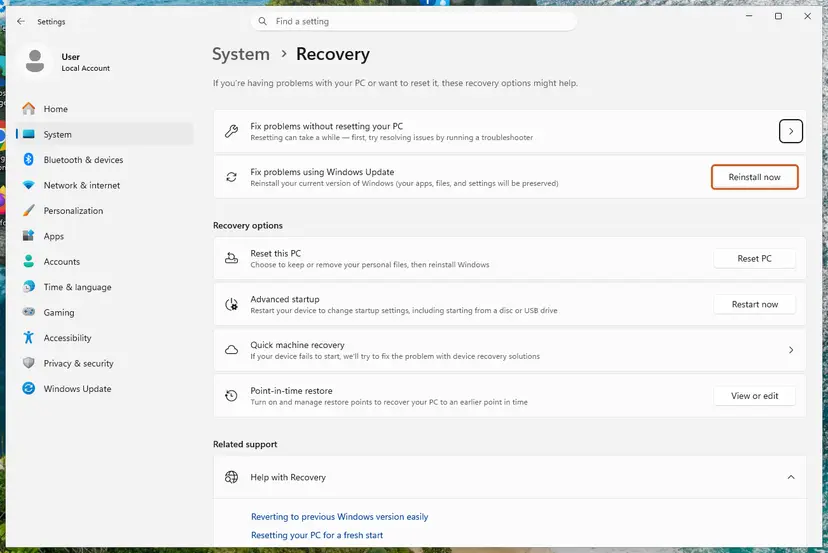
- Open Settings > System > Recovery (on Windows 10: Settings > Update & Security > Recovery).
- On Windows 11, select Reinstall now under Fix problems using Windows Update for an in-place repair that keeps files and apps, if your version shows it.
- If that is missing or did not help, select Reset PC, then Keep my files and Cloud download.
- After the reset, install the graphics driver from the card maker first, then your apps one at a time. Full method: Reinstall Windows without losing files
It worked if: Windows starts with a fresh system, and the crash does not return after you install the graphics driver and your apps one by one.
If not: If the stop code returns on a clean Windows before any app is installed, the cause is hardware. Contact your PC maker or a repair shop.
Still crashing: what to collect and whom to ask
Win32k belongs to Microsoft, but the bug usually sits in a driver or app that calls it. Collect the facts once, then send them to the vendor that the dump points at. On Microsoft Q&A, independent advisors ask for the Minidump files before they can say more.
- The three newest
.dmpfiles fromC:\Windows\Minidump, zipped. - The Arg1, PROCESS_NAME and IMAGE_NAME lines from
!analyze -v. - Your Windows edition and build from Settings > System > About.
- Your graphics card and driver version from Device Manager.
- What you were doing at each crash: a game, a video, waking the PC, startup.
| Where to report | When |
|---|---|
| Your graphics card maker's support or forum | IMAGE_NAME or the timing points at the graphics driver |
| The support of the app in PROCESS_NAME | The crash follows one program |
| Microsoft Q&A or Feedback Hub | Win32k files only, after a Windows update or on an Insider build |
| Your PC maker or a repair shop | Memory test errors, or crashes on a clean reinstall |
How to keep WIN32K_CRITICAL_FAILURE from coming back
- Install graphics drivers from the card maker or the PC maker, and keep the previous version's installer.
- Update game clients, overlays and remote tools before a big Windows update arrives.
- Keep at least 10 to 15 % of the system disk free, as Microsoft's stop code checklist advises.
- Create a restore point before you change drivers.
- Run preview builds of Windows on a PC you need every day.
- Install fonts from unknown sites.
- Keep an overclock or memory profile that has never passed a stability test.
- Download win32k files from DLL sites; SFC restores the genuine ones.
Windows 10 left support on 14 October 2025. A PC that stays on it gets Win32k security and stability fixes only through Extended Security Updates, so moving to Windows 11 keeps those fixes coming.
Frequently asked questions
What is win32k.sys?
Win32k.sys is a genuine Windows kernel driver, stored in C:\Windows\System32. It is the kernel mode part of the window system: it manages windows, menus, mouse and keyboard input and the GDI drawing engine, and it passes graphics work to DirectX. On Windows 10 and 11 it loads two helpers, win32kbase.sys and win32kfull.sys. Do not delete or replace it. If you suspect damage, run DISM and SFC as in Fix 5.
What does win32k critical failure mean?
It means Win32k, the part of Windows that draws windows and handles input, checked its own data and found something it could not safely continue with. Rather than draw garbage or corrupt memory, Windows stops with bug check 0x164 and restarts. The cause is usually outside Win32k: a graphics driver, an app that hooks into drawing, a damaged font or system file, or unstable memory. The dump's Arg1 tells you which kind.
What is error 0x164 or 0x00000164?
0x164 is the number of the WIN32K_CRITICAL_FAILURE bug check, and 0x00000164 is the same value written with eight digits. You see the number in Event Viewer, in Reliability Monitor and in crash tools such as WinDbg, while the stop screen shows the name. Both point to the same problem and the same fixes. Search for the name or the number, the answer is this page.
Is WIN32K_CRITICAL_FAILURE different on Windows 11?
The code and its causes are the same on Windows 11 and Windows 10. What differs is the screen: on Windows 11 24H2 and later the stop screen is black instead of blue, and the recovery environment offers Quick machine recovery in place of Startup Repair on newer builds. Windows 11 also gets new Win32k code in every feature update, so crashes that start after an update are more common there.
Why do I get win32k critical failure on startup?
A crash before the desktop appears means Win32k failed while Windows loaded its window system, the graphics driver or a startup app. The usual reasons are a broken graphics driver, a bad update, or damaged system files. Let Windows open Automatic Repair, then try Startup Repair, uninstalling the latest update and System Restore, in that order, as in Fix 4. Safe Mode loads a basic display driver, which helps you remove a faulty one.
Can a game or GeForce NOW cause the 0x164 crash?
Yes. Any program that draws on screen calls Win32k, and a bug in that program or in its overlay can trigger the stop code. In a case on the NVIDIA forum, the GeForce NOW app crashed Windows 11 preview builds with 0x164, and a newer app version fixed it. If the dump's PROCESS_NAME names a game, launcher or streaming client, update that program first, then the graphics driver.
Is WIN32K_CRITICAL_FAILURE a sign of a virus?
Not usually. The stop code comes from Windows itself, and win32k.sys, win32kbase.sys and win32kfull.sys are signed Microsoft files. Malware that injects into other programs can make them crash, but nothing ties 0x164 to malware in particular. If you also see pop-ups, unknown programs or a disabled antivirus, run a full scan with Microsoft Defender. Otherwise, follow the driver and app fixes on this page.
Can bad RAM cause win32k critical failure?
It can, though it is not the most common cause. Win32k keeps its windows and drawing objects in memory, so a bit flip from faulty RAM or an unstable overclock can turn one into garbage. Signs of hardware are stop codes that change from crash to crash, crashes in many different programs, or errors in Windows Memory Diagnostic. Turn off XMP or EXPO for a test and run the memory test as in Fix 6.
I don't speak English. What should I do about this screen?
This page is about the stop code WIN32K_CRITICAL_FAILURE (0x164) in Windows, also asked as "como resolver?", "что делать" or "lỗi này sửa sao". In short: update or roll back the graphics driver first, then update the app you had open, then undo the latest Windows update. If the PC does not start, open the recovery environment and use Startup Repair. A browser translation of this page shows every step in your language.
Sources
- Microsoft Learn: Bug Check 0x164 WIN32K_CRITICAL_FAILURE (learn.microsoft.com)
- Microsoft Support: Troubleshooting Windows unexpected restarts and stop code errors (support.microsoft.com)
- Microsoft Learn: How to read the small memory dump file (learn.microsoft.com)
Did this fix work?
One click, no account. It tells the next reader which guides are worth their time.
Questions and experiences: fix the WIN32K_CRITICAL_FAILURE (0x164) blue screen in Windows
Still broken, or found a fix we did not cover? Ask here: members and our editors answer. Reading is open; writing needs a free account.
…