
How to extract audio from YouTube videos: what is allowed and what works

Prefer to fix it yourself? The manual steps follow.
- 5methods
- 5 to 15 minutes
- Easy
Applies to Extracting audio from YouTube videos you own or have permission to use, in a desktop browser, with Audacity on Windows 11 and Windows 10
5 methods in this guide
Hey, is there a still working site or different method that allows converting YouTube videos to audio files? I found only pages filled with adware, and useless as file converter utilities. There are a few versions of video files that I uploaded on the platform. I need to use the audio from those, but the main project is lost on my behalf, and there is nothing else I can do. Can you offer any solutions?
You can extract the audio of a video you uploaded: download it from YouTube Studio, then pull the sound out of the file with Audacity. For someone else's video, YouTube's Terms of Service do not allow a download without permission, so the safe route is to ask for the file. This guide shows both, and why converter sites are the risky part.
If the video is yours, open YouTube Studio, select Content, open the video's menu and select Download (Method 1). You get an MP4, and Audacity turns its sound into an MP3 (Method 3). For a video that belongs to someone else, YouTube's Terms do not allow a download without permission, so ask the uploader (Method 5). Skip converter sites.
| What it is | Getting the sound of a YouTube video into its own audio file, such as an MP3, to edit it, keep it or reuse it. |
|---|---|
| Safe to do | Yes for videos you uploaded, and for videos whose owner gave you permission. For other videos YouTube's Terms say no. |
| What you gain | An audio file you control. For your own uploads it can replace a lost project file when the video is all that is left. |
| Side effect | Quality is limited by what YouTube kept. The file you download is an MP4 at 720p or 360p, so its sound was already compressed. |
| Best way for your own video | YouTube Studio > Content > Menu > Download, then import the MP4 into Audacity and export MP3. |
| Download limit | One video can be downloaded up to five times in 24 hours. Videos with a strike or a preapproved audio track cannot be downloaded. |
| Other people's videos | YouTube says you can't download them. Offline viewing in the YouTube app needs YouTube Premium and gives no audio file. |
| Tools needed | A browser, plus Audacity and its optional FFmpeg library to read the MP4. Windows 11 and Windows 10 both work. |
Facts checked on 16 October 2026. Steps written for YouTube Studio in a desktop browser and Audacity on Windows 11 25H2 and Windows 10 22H2, read against YouTube Help, the YouTube Terms of Service and the Audacity manual and support pages.
What extracting audio from a YouTube video means, and the ways to do it
Extracting audio means keeping only the sound track of a video. Many people use YouTube as a music library, so they look for a way to save a song as an MP3. Others, like the reader who wrote to us, only want the sound of their own old uploads because the original project is gone.
There are three honest routes. You can download the video file and pull the sound out of it, you can record what your computer plays, or you can ask the owner for the audio. A fourth route, the free converter website, is the one that causes the adware and pop-ups you may already have met.
| Route | How it works | Where it fits | Method in this guide |
|---|---|---|---|
| Download your own video, then extract | YouTube Studio gives you an MP4 of a video you uploaded. An audio editor then saves its sound as MP3. | Your own uploads, including a lost project | Methods 1, 2 and 3 |
| Record the playback | An audio editor records the sound the computer plays while the video runs. | Videos you may use but cannot download | Method 4 |
| Ask for the file | The uploader or rights holder sends the audio or allows the use. | Someone else's video | Method 5 |
| Converter website | You paste a link and a site returns a file. | Not recommended: ads, redirects and unwanted programs | None |
YouTube's Terms of Service list what you may not do with its content. You may not "access, reproduce, download, distribute, transmit, broadcast, display, sell, license, alter, modify or otherwise use" it, unless the Service allows it or you have prior written permission from YouTube and the rights holders. Downloading your own upload is allowed through YouTube Studio, which is why this guide starts there.
The old version of this guide said that saving a video for your own use is probably fine. That claim does not match the Terms above, so it is removed. Sharing extracted audio is a separate problem: copying music you do not own can break copyright law, whatever tool you used.
What each route gives you and what it costs
Nothing here makes your computer faster. What you weigh is quality, time, risk and whether YouTube allows the route. The table puts the routes side by side, using what YouTube Help and the Audacity manual state.
| Route | What you get | What it costs | Allowed by YouTube? |
|---|---|---|---|
| Studio download, then Audacity | An MP4 of your upload in 720p or 360p, then an MP3 or other audio file | Up to five downloads per video per day. You install Audacity and FFmpeg once. | Yes, for videos you uploaded |
| Google Takeout | All the videos you uploaded in one export | A larger download that Google has to prepare first | Yes, for your own uploads |
| Record with Audacity | A digital copy of the playback, with no analog step on Windows | It takes as long as the video. Silence pauses the recording and system sounds are captured too. | Only where you have the rights. The Audacity manual warns that copyright or website restrictions may prevent recording. |
| Ask the owner | The original audio file, often better than what YouTube kept | Waiting for an answer, and a no is possible | Yes, with written permission |
| Converter website | A file, if the site still works | Ads, pop-ups, redirects and unwanted programs, as the old guide warned | Not for other people's videos |
Quality needs one plain sentence. A converter cannot add detail that the source does not have. Choosing a high bit rate in an export dialog makes a bigger file, not a better one, when the sound came from a compressed MP4.
Who should extract the audio this way, and who should not
The right route depends on whose video it is. Use this list before you install anything, because the wrong first step is usually a converter website.
- You uploaded the video from your own channel and need its sound again.
- You lost the project file and the YouTube upload is the only copy left.
- The uploader added a download link for the audio in the description.
- You hold a licence or written permission from the rights holder.
- The video is a song or a clip someone else owns and you want it for your own collection.
- You plan to share, sell or reuse the audio in your own video without a licence.
- A website asks you to install a program or an extension to get the file.
- The video was removed or carries a strike, so Studio will not download it.
If you are not sure who owns the sound, assume it is not yours. A song in the background of your own video still belongs to its rights holder, and YouTube blocks the download of videos that use a preapproved audio track.
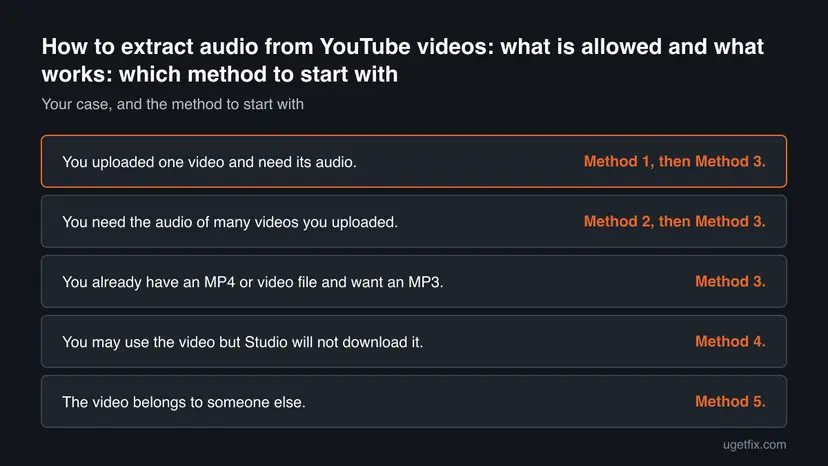
How to extract audio from a YouTube video
Methods 1 and 2 get the video file from YouTube, and only work for videos you uploaded. Method 3 turns that file into audio. Method 4 records playback when no file exists, and Method 5 covers videos that belong to someone else. Start with Method 1 if the video is yours.
| Your case | Start with |
|---|---|
| You uploaded one video and need its audio. | Method 1, then Method 3. |
| You need the audio of many videos you uploaded. | Method 2, then Method 3. |
| You already have an MP4 or video file and want an MP3. | Method 3. |
| You may use the video but Studio will not download it. | Method 4. |
| The video belongs to someone else. | Method 5. |
Method 1. Download your own video from YouTube Studio
3 minutesNo riskYou uploaded the video and need a file with its sound, for example after losing the original project.
YouTube lets the owner of a video download an MP4 of it from YouTube Studio. That file contains the video's sound, so it is a legal and ad-free way to get the audio back.
- Open YouTube Studio and sign in with the Google Account that owns the channel.
- In the left panel, select Content.
- Find the video, move to its row and select Menu (the three dots).
- Select Download. Your browser saves an MP4 file, usually in the Downloads folder.
- Check that the file plays, then go to Method 3 to turn its sound into an MP3.
YouTube Help says you get an MP4 in either 720p or 360p, depending on the video size. If you blurred or trimmed the video, you can download it and upload it again to publish the change.
The Download option is not shown for every video. A removed video, a copyright or Community Guidelines strike, a video with a preapproved audio track, and a fifth download within 24 hours all block it. See the "Still no download" section below.
It worked if: An MP4 file of your video appears in the Downloads folder and plays with sound in Windows.
If not: If Download is missing or greyed out, check the list in the Still no download section, or use Method 2 to export everything you uploaded.
Method 2. Export all your uploads with Google Takeout
10 minutes to start, then waitingNo riskYou need the audio of many videos you uploaded, or the Studio download is not offered for one of them.
YouTube Help points to Google Takeout as the way to download all the videos you uploaded in one go, which saves repeating Method 1 for each video and avoids the limit of five downloads a day per video.
- Sign in to the Google Account that owns the channel in your browser.
- Open Google Takeout from the link in YouTube's help page for downloading your uploaded videos.
- Choose the YouTube data you want and keep only your videos if the options allow it, because the full export of a channel can be very large.
- Follow Takeout's prompts to pick the file type and create the export. Google prepares it before you can download it.
- When the export is ready, download it and unzip it, then open the videos in the folder you extracted.
Takeout changes its labels from time to time, so follow the names on the screen. Each video comes out as a video file, so you still need Method 3 to turn it into audio.
Delete the export once you have the audio you need. It holds copies of your channel data and can fill a drive quickly.
It worked if: You have a folder with the video files you uploaded, ready to open in Audacity.
If not: If a video is missing from the export, check whether it was removed from YouTube, then ask whether you still have the original file on an old phone, camera card or backup.
Method 3. Pull the audio out of the MP4 with Audacity
10 minutesNo riskYou already have an MP4 or another video file of your own and want only the sound, as an MP3 or another audio file.
Audacity can import the audio track of most video files once its optional FFmpeg library is installed, and it can save the result as MP3. You work offline, and nothing is uploaded to a website.
- Install Audacity from its official website, then open it once.
- Install the free FFmpeg library for Audacity by following Audacity Support's page Installing FFmpeg, then restart Audacity. Audacity cannot import audio from most video files without it.
- Select File, then Import, then Audio, and choose your MP4. Menu names can differ slightly between Audacity versions.
- Wait until the sound track appears. Play it once to check the sound, and trim any part you do not need.
- Select File, then Export Audio, choose MP3 and pick a folder and a file name.
- Select Save, and play the new file in Windows to confirm it works.
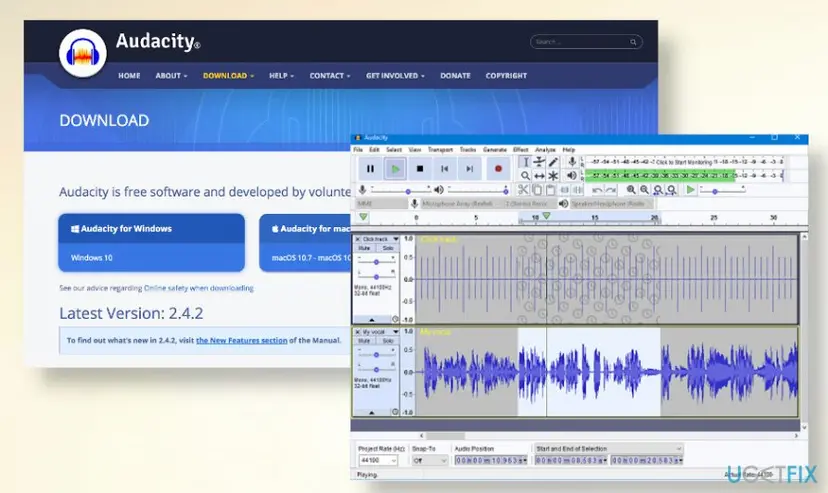
The Audacity manual says FFmpeg imports audio from most video files that are not protected by digital rights management. On Windows and macOS, Audacity includes the MP3 encoder, so you do not need a separate library for the export.
It worked if: Audacity shows the video's sound as a track, and your exported MP3 plays from the folder you chose.
If not: If the MP4 does not import, install or locate FFmpeg again under Edit > Preferences > Libraries with the Locate button. If the import fails with a file that plays normally, download the video again with Method 1.
Method 4. Record the sound with Audacity (WASAPI loopback)
30 minutes, or as long as the video playsLow riskYou have the right to use the audio, but there is no downloadable file, and you can play the video on your PC.
On Windows, Audacity can record the digital stream that goes to your speakers. Audacity's manual calls the WASAPI loopback input the recommended way to record computer playback, and it avoids a trip through the analog sound card.
- Close apps that make sounds, and turn off system notification sounds, because loopback records everything sent to the device.
- Open Audacity and open the Audio Setup button in the toolbar, or Edit > Preferences > Devices in older versions.
- Set the Host to Windows WASAPI.
- Set the Recording Device to the loopback of the device you listen with, for example Speakers (loopback).
- Make sure playthrough is switched off in Audacity's menus, as the manual advises, or you will hear and record echoes.
- Start the video first, then press Record in Audacity. Press Stop when the part you want ends.
- Select File, then Export Audio, and save the recording as MP3.
Recording is still a copy of someone's work. Audacity's manual says that copyright or website restrictions may prevent you from recording or distributing material, so check first. Use this method only for sound you may use.
WASAPI loopback records only while a signal is present. When the video goes silent, recording pauses and starts again with the next sound, so gaps can be shorter than they were. On some devices, mono recording gives an error, and then you switch the toolbar to two recording channels.
It worked if: Audacity shows a waveform that follows the video's sound, and the exported file has no echo and no system beeps.
If not: If the track stays flat, check that the video is playing on the device that you picked a loopback for, and start the playback before you press Record.
Method 5. Ask the owner, use a download link, or save offline in the app
5 minutes to ask, then waitingNo riskThe video belongs to someone else, and you want its audio.
YouTube's Terms allow downloads with the Service's own tools or with written permission from YouTube and the rights holder. Asking the owner is the route that stays inside those rules and often returns a better file than YouTube's copy.
- Read the video description. Some uploaders add a link where the audio can be downloaded for free. Use that link only.
- Look at the channel's About page or the description for a contact address, and write to the uploader. Say what you want, what you will use it for and for how long.
- Keep the reply. A written yes is the permission the Terms ask for.
- To listen without a connection, use offline viewing in the YouTube app. It needs YouTube Premium and stays inside the app, so it gives no audio file.
YouTube Help states plainly that you cannot download other users' videos. A tool that claims to do it is working around that rule, which is also why such tools are full of ads.
It worked if: You have either the uploader's own link or file, written permission, or offline viewing inside the app.
If not: If nobody answers, look for the track on a store or streaming service where you can buy or license it.
Still no download, or the audio will not open
Most failures come from a short list of limits that YouTube Help and the Audacity manual spell out. Check them in this order before you try another tool.
- Download is missing in Studio. YouTube Help lists four reasons: the video was removed from YouTube, it has a copyright or Community Guidelines strike, it uses a preapproved audio track, or you already downloaded it five times in the last 24 hours. Wait a day for the last one.
- You are not signed in as the owner. The option exists only for videos you uploaded, so check the account in the top corner of YouTube Studio.
- Audacity will not open the MP4. Install FFmpeg and restart Audacity, as in Method 3. Files protected by digital rights management cannot be imported.
- The recording is silent. Pick the loopback of the device that actually plays the video, and start the video first. WASAPI records only while a signal is present.
- The exported file will not play. Delete it, export again, and update Audacity if it reports an encoder error. The old advice to try another tool remains fair when the same file fails twice.
- You hear echoes in the recording. Switch off playthrough in Audacity, as the manual says.
If a file that was extracted by a converter website sounds wrong or will not open, do not keep trying new sites. Download your own video with Method 1 and use Method 3 instead.
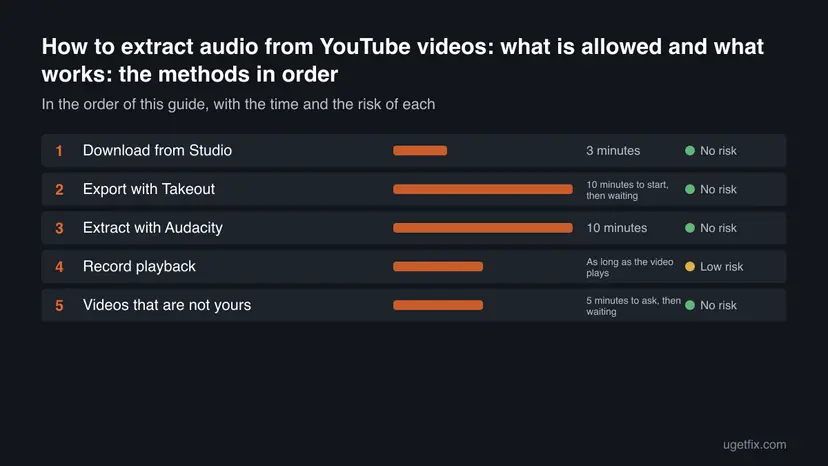
Clean up, undo and stay safe afterwards
Nothing in Methods 1 to 5 changes Windows or YouTube in a way you cannot reverse. The table lists what each step left behind and how to remove it, including what to check if you tried a converter website first.
| What you did | How to put it back |
|---|---|
| Downloaded the MP4 or the Takeout export | Delete the file or the unzipped folder, and empty the Recycle Bin if you need the space. |
| Installed Audacity | Open Settings > Apps > Installed apps and uninstall it. Your exported audio files stay where you saved them. |
| Installed the FFmpeg library for Audacity | Uninstall FFmpeg for Audacity from the same Installed apps list. Audacity then cannot import MP4 files again until you reinstall it. |
| Changed the Audacity host to WASAPI | Open Audio Setup or Edit > Preferences > Devices again and pick your earlier host and microphone. |
| Used a converter website before | Open your browser's extensions page and remove any you do not recognize. In Installed apps remove programs you did not choose to install, and run a Microsoft Defender scan. |
No source we read gives a single list of the programs that converter websites install, so the check above is general. Anything you do not remember installing is worth removing.
Myths about extracting audio from YouTube
- "It is fine for personal use." YouTube's Terms say you may not download content unless the Service allows it or you have written permission. A personal reason does not change that, and YouTube Help says you can't download other users' videos.
- "A converter site is the only way to get the audio of my own video." The owner has a better way: Studio's Download option or Google Takeout. You never need to paste a link into a website for your own upload.
- "A 320 kbps setting gives better sound than the video." Export settings cannot restore detail that is not in the source. The MP4 you download from Studio is 720p or 360p, and its sound is already compressed.
- "Recording playback is not downloading, so it is always allowed." Audacity's manual warns that copyright or website restrictions may prevent you from recording. The method is for sound you may use.
- "Any converter that works today is safe." The old guide warned that many of these sites show pop-ups and redirects and can lead to unwanted programs. A site that works does not prove it is clean.
One claim from the old guide stays in doubt: that you may extract any video you love for private use. We found nothing in YouTube's own pages that supports it, so we do not repeat it.
Frequently asked questions
Can I extract audio from my own YouTube video?
Yes. Sign in to YouTube Studio, select Content, open the video's Menu and choose Download. You get an MP4 in 720p or 360p, and Audacity turns its sound into an MP3 or another audio file. YouTube also points to Google Takeout for downloading all your uploads at once. A video that was removed or carries a strike cannot be downloaded this way.
Is there a site that still extracts audio from YouTube without adware?
We do not recommend any converter website. The old guide listed several, and the reader who wrote to us found only pages full of adware. YouTube's Terms also do not allow downloading other people's videos without permission. For your own videos use YouTube Studio, which has no ads and needs no extra program. For someone else's video, ask the uploader.
How do I extract audio from a YouTube video on Windows?
For a video you own, download the MP4 from YouTube Studio, install Audacity and its FFmpeg library, import the MP4 and export it as MP3. If you only need to capture what plays and you have the rights, Audacity can record with the Windows WASAPI host and a loopback device. Both ways work on Windows 11 and Windows 10.
Is it legal to extract audio from YouTube?
It depends on whose video it is and what you do with the audio. YouTube's Terms ban downloading content unless the Service allows it or you have written permission, and YouTube Help says you can't download other users' videos. Sharing music you do not own can also break copyright law. Your own uploads are the clear case where it is allowed.
Why is the Download option missing in YouTube Studio?
YouTube Help lists four reasons. The video was removed from YouTube, it has a copyright or Community Guidelines strike, it uses a preapproved audio track, or you downloaded it five times in the last 24 hours. Also check that you are signed in to the account that uploaded it, because other accounts do not see the option.
What quality does the extracted audio have?
It cannot be better than the file you start from. The MP4 that Studio gives you is 720p or 360p, depending on the video size, and its sound was compressed when it was uploaded. Exporting at a higher bit rate only makes a larger file. If you still have the original recording, use that, because it has the full quality.
Why will Audacity not open my MP4 file?
Audacity needs its optional FFmpeg library to import audio from most video files. Install it by following Audacity Support's page Installing FFmpeg, restart Audacity, and import the file again. If Audacity still refuses, check whether the file is protected by digital rights management, which Audacity cannot import, or download the video again.
Why is my Audacity recording of a YouTube video silent?
Check that the Host is Windows WASAPI and that the recording device is the loopback of the device that plays the video, such as Speakers (loopback). Start the video before you press Record. Audacity's manual says WASAPI loopback records only while a signal is present and pauses when there is none.
Can I get the audio of someone else's video legally?
Yes, with permission. Use a download link that the uploader put in the description, or ask the uploader or rights holder in writing. YouTube's Terms allow use with prior written permission from YouTube and the rights holder. YouTube Premium lets you watch videos offline in the app, but it gives no audio file.
Sources
- YouTube Help: Download YouTube videos that you've uploaded (support.google.com)
- YouTube Terms of Service (youtube.com)
- Audacity Manual: Tutorial, Recording Computer Playback on Windows (manual.audacityteam.org)
Did this fix work?
One click, no account. It tells the next reader which guides are worth their time.
Questions and experiences: extract audio from YouTube videos: what is allowed and what works
Still broken, or found a fix we did not cover? Ask here: members and our editors answer. Reading is open; writing needs a free account.
…