
How to fix Windows Defender Security Intelligence version 0.0.0.0?

Prefer to fix it yourself? The manual steps follow.
- 8methods
- 5 to 45 minutes
- Intermediate
Applies to Microsoft Defender Antivirus (formerly Windows Defender) in the Windows Security app on Windows 11 and Windows 10
8 methods in this guide
- What 0.0.0.0 means
- Causes, ranked
- The fixes
- 1. Check versions and antivirus
- 2. Reset the Defender engine
- 3. Install definitions by hand
- 4. Install the platform update
- 5. Remove the other antivirus
- 6. Clear Defender policies
- 7. Check for malware
- 8. Repair Windows
- Still 0.0.0.0: logs to read
- Keep it from coming back
- FAQ
Hello, my Windows Defender is not updating. Every time I get a message saying my definitions are out of date, I click the Update button, but nothing really happens and the problem keeps coming back. I think the problem lies with Defender itself, as it shows "Security Intelligence version 0.0.0.0." Is there any way to fix this?
When Windows Security shows Security intelligence version 0.0.0.0, Microsoft Defender has no working definitions, so it cannot recognise current threats and the update button seems to do nothing. Most often the engine or platform files are damaged, less often another antivirus or a policy has switched Defender off. Start by checking which antivirus is active, then reset the Defender engine.
Version 0.0.0.0 is not a real version: it means Defender has no definitions loaded. Check in Windows Security > Virus & threat protection that Defender is the active antivirus (Fix 1). Then, in an administrator Command Prompt, remove the broken definitions, reset the platform and download fresh ones with MpCmdRun.exe (Fix 2). If the update still fails, install the mpam-fe.exe package from Microsoft by hand (Fix 3).
| Error | Security intelligence version: 0.0.0.0 with Version created on: Not available, together with a warning that the definitions are out of date. |
|---|---|
| Where it appears | Windows Security > Virus & threat protection > Protection updates. MpCmdRun and Get-MpComputerStatus can show 0.0.0.0 for the engine and the service as well. |
| Main cause | The Defender engine or platform files are missing or half replaced after a failed update, so new definitions cannot load. |
| Fastest fix | Microsoft's reset: MpCmdRun.exe -RemoveDefinitions -All, -ResetPlatform, -WdEnable, then -SignatureUpdate -MMPC (Fix 2). |
| Also written as | Security intelligence version 0.0.0.0, antivirus version 0.0.0.0, engine version 0.0.0.0, definitions version 0.0.0.0, Defender 0.0.0.0. |
| Affects | Windows 11 and Windows 10. Reports on Microsoft Q&A start in 2022, on Windows 11 and Windows 10 Pro. |
| Healthy versions today | On 15 October 2026 Microsoft listed security intelligence 1.461.41.0, engine 1.1.26090.9 and platform 4.18.26090.9. |
| Vendor status | No known issue is open. Microsoft documents the repair steps for a Defender that will not start or update. |
| Where the cause is logged | Event Viewer: Applications and Services Logs > Microsoft > Windows > Windows Defender > Operational, events 5001 and 5007. |
| Time to fix | 5 minutes to check, 10 to 45 minutes to reset and update Defender. |
Facts checked on 15 October 2026. Steps written for Windows 11 (25H2 and 26H2) and Windows 10 22H2.
What Security Intelligence version 0.0.0.0 means in Microsoft Defender
Security intelligence is Microsoft's name for Defender's definitions, the list of known threats that the engine compares files with. A real version looks like 1.461.41.0. Defender shows 0.0.0.0 when it has no definitions it can read, so the number is a placeholder, not an old version.
Open Windows Security > Virus & threat protection > Protection updates and you see the problem in two lines: Security intelligence version: 0.0.0.0 and Version created on: Not available. Users on Microsoft Q&A describe the same pattern: a warning that the definitions are out of date keeps coming back, and Check for updates says it is done without changing anything.
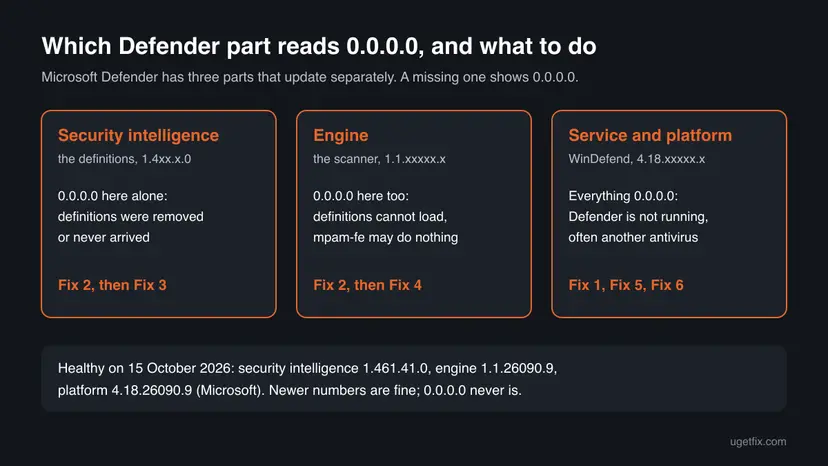
- Three parts, three versions. Defender is the platform (the service and its program files, 4.18.x), the engine (1.1.x) and the security intelligence (1.4xx.x). Microsoft updates them separately.
- Only the definitions read 0.0.0.0. The engine works but has nothing to scan with. An update or a manual package usually fixes it.
- The engine reads 0.0.0.0 too. The definitions have nothing to load into. Users report that the manual
mpam-fe.exepackage then runs for a second and does nothing. - Everything reads 0.0.0.0. The Defender service is not running at all, which points at another antivirus, a policy or malware.
Treat it as unprotected until the number changes. Without definitions, Defender cannot recognise known threats. Do not open unknown files or downloads until a real version appears in Protection updates.
What causes Security Intelligence version 0.0.0.0, from most to least common
Most often a Defender update stopped half way and left the engine or platform files unusable. Less often another antivirus, or its leftovers, switched Defender off. Rarely a policy, a tweak tool, malware or damaged Windows files keep Defender from working.
| Cause | How often | How to tell | Fix |
|---|---|---|---|
| The engine or platform files are damaged after a failed update. | Most often | Defender is the active antivirus, but updates do nothing and the version stays 0.0.0.0. | Fix 2, Fix 3, Fix 4 |
| The definitions were removed and never downloaded again. | Often | Only the security intelligence line reads 0.0.0.0, the engine has a number. | Fix 2, Fix 3 |
| Another antivirus, or the leftovers of one, has switched Defender off. | Sometimes | Windows Security names another program, or one was installed in the past. | Fix 5 |
| A Group Policy or a "disable Defender" tweak turns Defender off. | Sometimes | Values under HKLM\SOFTWARE\Policies\Microsoft\Windows Defender, or a work or school PC. | Fix 6 |
| Malware stopped Defender. | Rarely | Defender falls back to 0.0.0.0 after every repair. | Fix 7 |
| Damaged Windows system files. | Rarely | Other Windows parts fail as well. | Fix 8 |
The Windows Security window itself is rarely the cause. It only shows what the Defender service reports. Resetting the window, which older guides suggest, does not bring missing definitions back.
How to fix Windows Defender Security Intelligence version 0.0.0.0
Fix 1 takes five minutes and tells you which fix you need. Fix 2 is Microsoft's own repair and ends most cases. Fixes 3 and 4 install the files by hand when the automatic update keeps failing. Fixes 5 to 8 are for a Defender that is switched off or blocked.
| What you see or what your PC has | Start with |
|---|---|
| Defender is the active antivirus, only the definitions read 0.0.0.0 | Fix 2, then Fix 3 |
The engine version reads 0.0.0.0 too, and mpam-fe.exe does nothing | Fix 2, then Fix 4 |
| Windows Security names another antivirus, or one was installed before | Fix 5 |
| A work or school PC, or you ran a tool that "disables Defender" | Fix 6 (on a work PC, your administrator) |
| Defender returns to 0.0.0.0 after every repair | Fix 7 |
| Nothing above helped | Fix 8 |
Fix 1. Check which antivirus is active and which Defender part reads 0.0.0.0
5 minutesNo riskEveryone with version 0.0.0.0. It decides which of the next fixes you need.
The same 0.0.0.0 has different causes. If another antivirus is active, Defender is switched off on purpose. If Defender runs but the engine is missing, only a reset helps. Two commands tell the cases apart.
- Select Start, type Windows Security and open the app.
- Select Virus & threat protection. If the page names another program as your antivirus, Defender is off on purpose. Go to Fix 5.
- If the page shows Threat service has stopped. Restart it now., select Restart now once and wait a minute.
- Right-click Start and select Terminal (Admin). On Windows 10 select Windows PowerShell (Admin).
- Ask Defender for its state.
AMRunningModeshould read Normal, and the other three values True.Get-MpComputerStatus | Select-Object AMRunningMode, AMServiceEnabled, AntivirusEnabled, RealTimeProtectionEnabled - List the Defender services, with the command from Microsoft's troubleshooting page.
Get-Service WinDefend, WdBoot, WdFilter, WdNisSvc, WdNisDrv, SecurityHealthService, wscsvc | Format-Table -Auto DisplayName, Name, StartType, Status - Compare the result with the table below.
| Service | Name | Expected start type | Expected status |
|---|---|---|---|
| Microsoft Defender Antivirus Service | WinDefend | Automatic | Running |
| Microsoft Defender Antivirus Mini-Filter Driver | WdFilter | Boot | Running |
| Microsoft Defender Antivirus Network Inspection Service | WdNisSvc | Manual | Running |
| Microsoft Defender Antivirus Boot Driver | WdBoot | Boot | Stopped (normal after start-up) |
| Windows Security Service | SecurityHealthService | Manual | Running |
| Security Center | wscsvc | Automatic | Running |
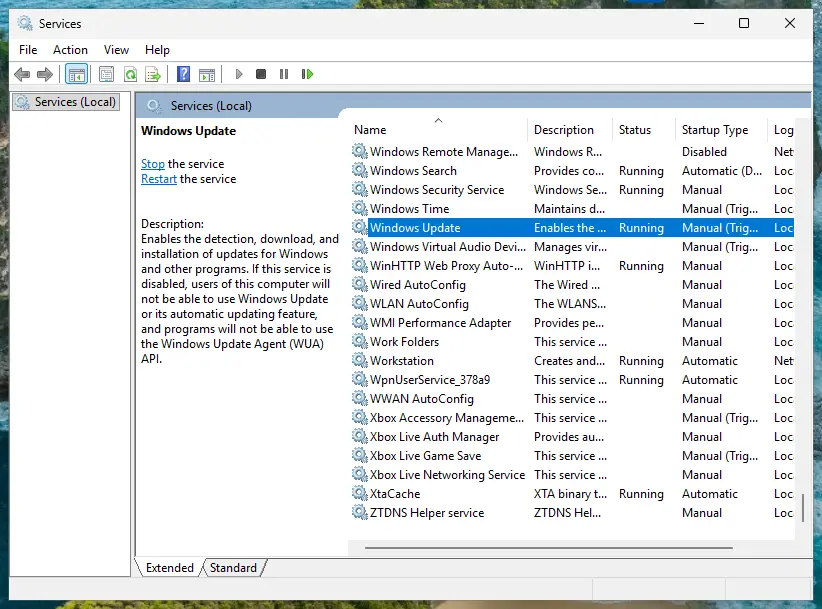
It worked if: You know which antivirus is active and whether WinDefend is running. Defender active and running with 0.0.0.0 means the files are broken: go to Fix 2.
If not: Another antivirus is named: Fix 5. No other antivirus and WinDefend is stopped: Fix 6.
Fix 2. Reset the Defender engine, definitions and platform with MpCmdRun
10 minutesLow riskDefender is the active antivirus, but the version stays at 0.0.0.0 and Check for updates changes nothing.
A failed update can leave the engine half replaced, and then new definitions have nothing to load into. Microsoft's repair removes the definitions and engine, puts the platform back to the copy that ships with Windows and downloads everything fresh.
- Select Start, type cmd, right-click Command Prompt and select Run as administrator.
- Go to the Defender folder. MpCmdRun is not in the PATH, so without this step the command is not recognised.
cd /d "%ProgramFiles%\Windows Defender" - Remove the security intelligence and the engine.
MpCmdRun.exe -RemoveDefinitions -All - Put the platform back to the version that came with Windows.
MpCmdRun.exe -ResetPlatform - Switch Defender on again.
MpCmdRun.exe -WdEnable - Download fresh definitions straight from Microsoft.
MpCmdRun.exe -SignatureUpdate -MMPC - Restart the PC and open Windows Security > Virus & threat protection > Protection updates.
Microsoft's own steps first look for the newest platform folder under %ProgramData%\Microsoft\Windows Defender\Platform\ and fall back to %ProgramFiles%\Windows Defender. We use the second path because it exists on every PC and holds the same MpCmdRun.exe.
If only the definitions read 0.0.0.0, you can try Microsoft's shorter cache clear before the full reset: MpCmdRun.exe -removedefinitions -dynamicsignatures and then MpCmdRun.exe -SignatureUpdate, from the same folder.
It worked if: MpCmdRun.exe -SignatureUpdate -MMPC ends without an error, and Protection updates shows a real security intelligence version such as 1.461.x.0 with today's date.
If not: If the version is still 0.0.0.0, install the definitions package by hand with Fix 3.
Fix 3. Install the latest security intelligence package from Microsoft by hand
5 to 10 minutesNo riskThe reset ran, but automatic updates still fail, or the PC cannot reach Windows Update.
Microsoft publishes the full definitions as one file that installs without Windows Update. It skips whatever blocks the normal update path and puts a complete set in place.
- Open Microsoft's page Latest security intelligence updates for Microsoft Defender Antivirus (link in the sources).
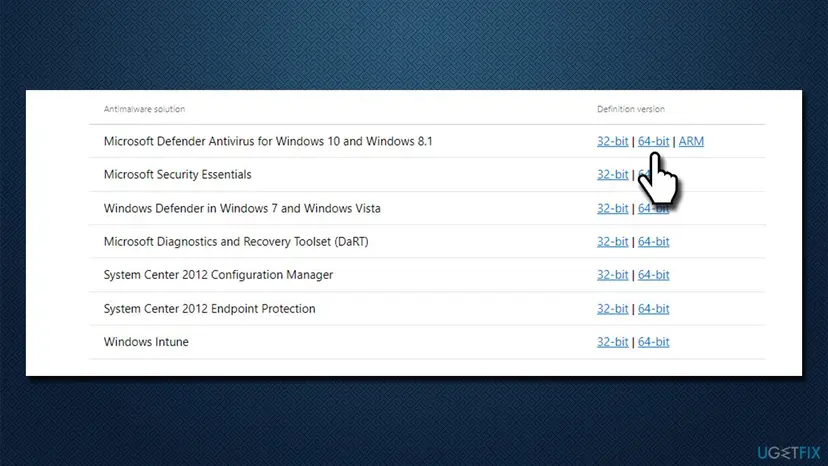
- In the table, find Microsoft Defender Antivirus for Windows 11, Windows 10, Windows 8.1, and Windows Server.
- Select 64-bit on a 64-bit Windows, ARM on an ARM PC, or 32-bit on a 32-bit Windows. Microsoft names the file
mpam-fe.exeormpam-feX64.exe. - Run the downloaded file. Microsoft says you simply launch it to install the latest security intelligence. It shows no window.
- Wait a minute, then open Protection updates again and read the version.
Users on Microsoft Q&A report exactly this when the engine also reads 0.0.0.0: the package has no engine to install into. Then the platform itself needs replacing, which is Fix 4.
It worked if: Protection updates shows the version Microsoft lists on its page, or a newer one, and Version created on shows a date.
If not: If the version stays 0.0.0.0 and the engine reads 0.0.0.0 too, install the platform update with Fix 4.
Fix 4. Install the Defender platform update KB4052623 from the Microsoft Update Catalog
10 to 15 minutesLow riskThe engine version reads 0.0.0.0, and both the reset and the manual package changed nothing.
The platform holds the Defender service and engine loader. Microsoft ships it as the update named Update for Microsoft Defender antimalware platform (KB4052623). In the most helpful answer on Microsoft Q&A, a user fixed 0.0.0.0 by installing it by hand and then updating the definitions.
- Open the Microsoft Update Catalog at
catalog.update.microsoft.comand search for KB4052623. - Pick the newest Update for Microsoft Defender Antivirus antimalware platform entry and select Download.
- Save the files the download window lists to one folder. Users report that the 64-bit installer is the
.exefile whose name ends in453AF1.exe, and the 32-bit one ends inDA451B.exe. - Run the installer for your Windows. It shows no progress window, as users note.
- Open
C:\ProgramData\Microsoft\Windows Defender\Platform\and check that a new folder named after the version appeared. - Open an administrator Command Prompt in that new folder and update the definitions. Replace the folder name with the one you found.
cd /d "C:\ProgramData\Microsoft\Windows Defender\Platform\<version folder>" MpCmdRun.exe -SignatureUpdate - Restart and check Protection updates.
We could not confirm the file name endings for every current release of the platform update. If the names differ, pick the .exe that matches your Windows (x64, x86 or ARM64). An installer that is not for your platform tells you so and changes nothing.
It worked if: A new folder under Platform, a real engine version, and a security intelligence version that matches Microsoft's page. One user on Microsoft Q&A found that Windows Update then kept Defender current on its own.
If not: If no platform folder appears or Defender still reads 0.0.0.0, something switches Defender off. Check Fix 5 and Fix 6.
Fix 5. Uninstall the other antivirus completely, including its leftovers
15 to 30 minutesLow riskWindows Security names another antivirus, or one was installed in the past, even as a trial that came with the PC.
Microsoft's repair steps say to uninstall non-Microsoft antivirus software when Defender should be your main antivirus. While another product is registered, Defender stays off and its versions can read 0.0.0.0.
If you pay for the other antivirus and want to keep it, nothing is broken. Defender is meant to be off and 0.0.0.0 does not matter, because the other program protects the PC. Remove it only if you want Microsoft Defender back.
- Uninstall from the Start menu. Select Start > All apps and find the app. Right-click it (or press and hold) and select Uninstall.
- Or uninstall in Settings. Select Start > Settings > Apps > Installed apps. Find the app, select More (the three dots) > Uninstall, and confirm.
- Or uninstall from Control Panel. Some programs can only be removed here. Type Control Panel in the search box on the taskbar and open it, then select Programs > Programs and Features. Right-click the program and select Uninstall or Uninstall/Change, then follow the program's own uninstaller.
- Restart if the uninstaller asks. Some programs finish removing their files only after a restart.
These steps were written for Windows 11 24H2 and 25H2. The full page with the other versions and what each result means: Uninstall a program or app in Windows
- Restart the PC after the uninstaller ends, even if it does not ask.
- Open the support site of the antivirus maker and search for its removal tool. Run it and restart again.
- Open Windows Security > Virus & threat protection. Defender should now be listed as active.
- Run Fix 2 once more, because Defender may need fresh definitions after a long time switched off.
It worked if: Windows Security shows Microsoft Defender Antivirus as active, and after Fix 2 Protection updates shows a real version.
If not: If no other antivirus is left and Defender stays off, remove the policies with Fix 6.
Fix 6. Remove the policies and tweaks that turn Defender off
10 minutesRead the warningNo other antivirus is installed, but WinDefend stays stopped, or you once used a tool or script that "disables Defender".
Group Policy, privacy tools and scripts switch Defender off by writing values under the policies key. Windows obeys them at every start. Microsoft's repair steps back up this key and then delete it.
Deleting the key removes every Defender policy on the PC, including exclusions and scan schedules set as policy. The backup in step 2 brings them back. On a work or school PC do not delete anything: only the administrator can change these policies.
Before any registry change, keep a copy of the registry: Back up the registry before editing it
- Right-click Start and select Terminal (Admin). On Windows 10 select Windows PowerShell (Admin).
- Back up the Defender policies, as Microsoft's repair steps do.
New-Item -Path "C:\DefenderTemp" -ItemType Directory; reg export "HKLM\SOFTWARE\Policies\Microsoft\Windows Defender" C:\DefenderTemp\_DefenderAVBackup.reg - If the export reports that the key does not exist, no policy turns Defender off. Skip to Fix 7.
- Delete the policies with Microsoft's command.
Remove-Item -Path 'HKLM:\SOFTWARE\Policies\Microsoft\Windows Defender' -Force - In an administrator Command Prompt, switch Defender back on.
cd /d "%ProgramFiles%\Windows Defender" MpCmdRun.exe -WdEnable - Restart the PC and run Fix 2 again.
If a policy comes back after the restart, check the Local Group Policy Editor on Windows Pro, which shows Defender settings under Windows Components: Open the Local Group Policy Editor. Microsoft's steps end by checking that Tamper Protection is on in Virus & threat protection settings > Manage settings.
It worked if: After the restart WinDefend is running, AMRunningMode reads Normal and Fix 2 brings a real version.
If not: If Defender still turns off by itself, check for malware with Fix 7.
Fix 7. Check for malware with the Microsoft Safety Scanner
20 minutes to several hoursNo riskDefender returns to 0.0.0.0 or switches itself off again after Fixes 2 to 6.
Stopping or breaking the built-in antivirus is a common first move of malware. Microsoft puts a run of the Safety Scanner into its repair steps, because the scanner works while Defender is down.
- Download the Microsoft Safety Scanner from Microsoft's site on another browser tab. Pick the 64-bit file on a 64-bit Windows.
- Run it, choose the most thorough scan it offers and start it.
- Remove what it finds and restart when asked.
- Repeat Fix 2 and check whether the version stays real after two restarts.
Once Defender works again, run its own full scan as well: How to scan for malware with Microsoft Defender
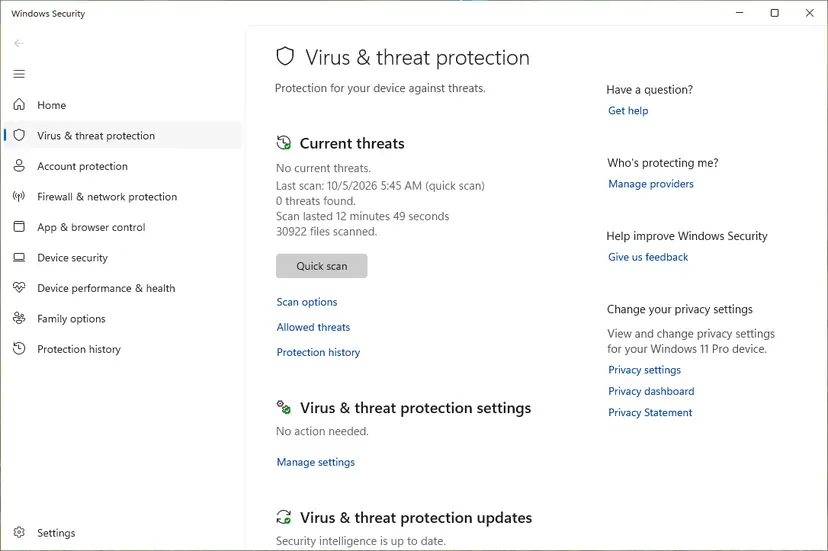
It worked if: The scanner finds nothing or removes a threat, and Defender keeps a real version after restarts.
If not: If the scan is clean and Defender still fails, repair Windows with Fix 8.
Fix 8. Repair Windows system files, then repair Windows in place
20 to 90 minutesLow riskFixes 1 to 7 did not help, and other Windows parts fail as well.
Defender relies on Windows services, drivers and the component store. DISM and SFC repair damaged Windows files, and a repair install replaces Windows while keeping your apps and files. Some users on Microsoft Q&A report that SFC finds nothing in this case, so treat it as the last step.
- Open an elevated command window. Right-click Start and select Terminal (Admin), or type cmd in the search box, right-click Command Prompt and select Run as administrator. Select Yes when Windows asks for permission.
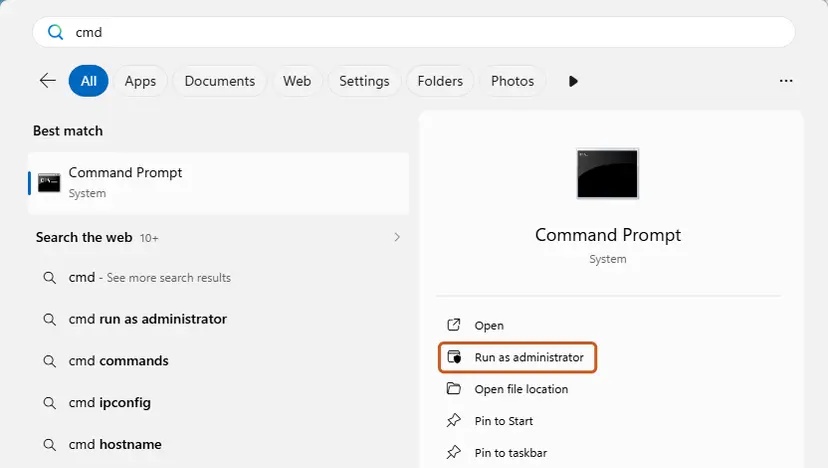
Search for cmd and choose Run as administrator. Screenshot: Windows 11 26H2. - Run DISM first. Type the command below and press Enter. DISM downloads clean copies of damaged components from Windows Update, so it can take several minutes. Wait until it says The operation completed successfully.
DISM.exe /Online /Cleanup-Image /RestoreHealth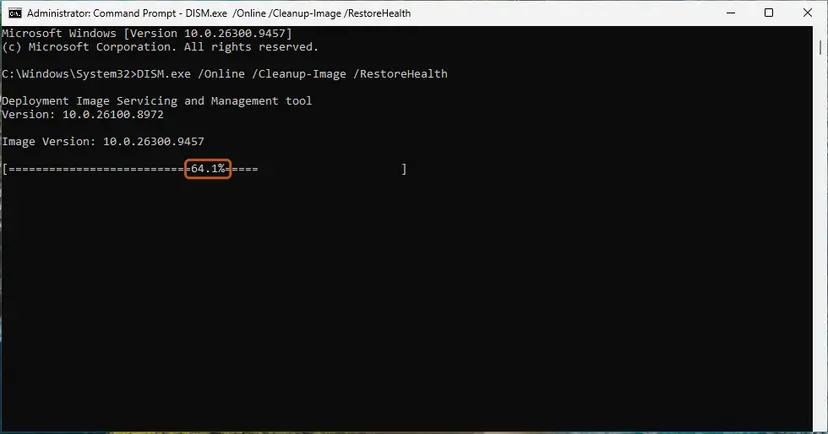
DISM /RestoreHealth running. Screenshot: Windows 11 26H2. - Run System File Checker. In the same window, type the command below and press Enter. Do not close the window until the verification reaches 100%.
sfc /scannow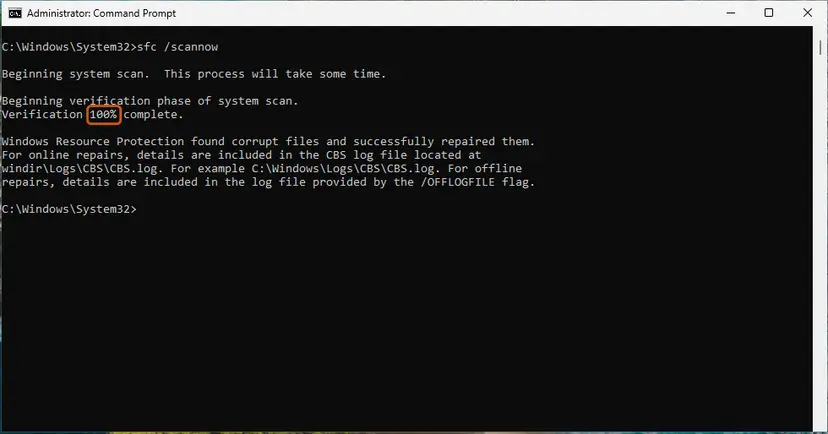
sfc /scannow at 100%. Screenshot: Windows 11 26H2. - Read the result and restart. Compare the last message with the table below this guide, then restart the PC so that repaired files are loaded.
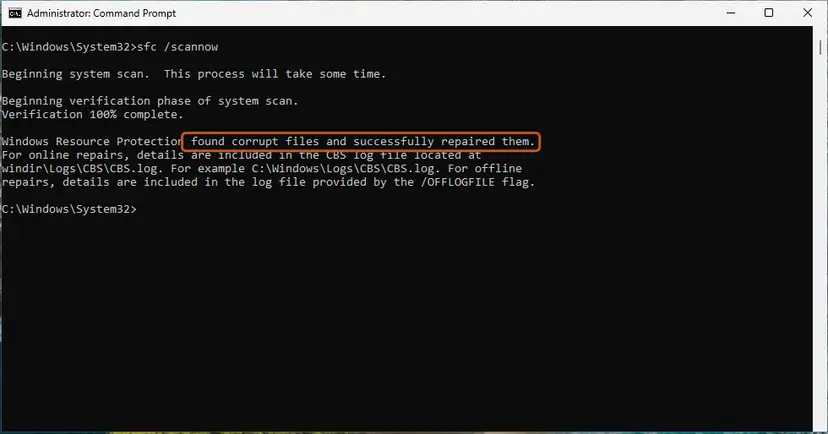
The result line tells you what SFC did. Screenshot: Windows 11 26H2.
These steps were written for Windows 11 24H2 and 25H2. The full page with the other versions and what each result means: Run DISM and SFC to repair Windows system files
- Restart and check Protection updates again.
- If it still reads 0.0.0.0 on Windows 11, open Settings > System > Recovery and select Reinstall now next to Fix problems using Windows Update.
- Keep the PC plugged in and online until it restarts into Windows.
- Run Fix 2 once more.
Routes for Windows 10 and other options: Reinstall Windows without losing files. Windows 10 left support on 14 October 2025. Microsoft still lists Defender definitions for it, but Windows itself gets no fixes without Extended Security Updates.
It worked if: SFC reports no integrity violations or repaired files, and after the repair Defender shows a real version.
If not: If a freshly repaired Windows still shows 0.0.0.0, collect the logs in the next section and contact Microsoft support.
If Defender still shows 0.0.0.0: the logs to read and what to send
When nothing helps, stop changing settings and collect evidence. Defender writes why it stopped into its event log, and MpCmdRun writes every command it ran.
| Where | What to look for |
|---|---|
| Event Viewer: Applications and Services Logs > Microsoft > Windows > Windows Defender > Operational | Event 5001 (real-time protection was disabled) and event 5007 (configuration changed). Microsoft notes that an unexpected 5007 might be the result of malware. |
| The same log, update events | Failed security intelligence updates with an error code. Search that code on its own. |
MpCmdRun.log in your Temp folder | The command, the time and the result of every MpCmdRun run, including the failed update. |
- What to send to Microsoft support: the screenshot of Protection updates, the output of both commands in Fix 1, the Windows build from
winverand the event 5007 text. - Is it hardware? Almost never. A version number is set by software. Suspect the drive only if SFC finds new damage after every repair: Check a disk for errors (chkdsk)
How to keep Defender from falling back to version 0.0.0.0
- Let Windows Update install Defender updates and restart when it asks.
- Use one antivirus at a time, and remove a trial completely when you stop using it.
- Keep Tamper Protection on, so other apps cannot switch Defender off quietly.
- Look at Protection updates once a month: the date should be recent.
- Do not delete files in the Defender folders by hand. Use
MpCmdRun.exe -ResetPlatforminstead. - Do not run "debloat" or privacy tools that disable Defender, unless another antivirus protects the PC.
- Do not shut down the PC by holding the power button while an update installs.
- Do not change Defender policies on a work or school PC.
Frequently asked questions
What does Security Intelligence version 0.0.0.0 mean?
It means Microsoft Defender has no security intelligence it can use. Security intelligence is the set of definitions Defender compares files with, and a real version looks like 1.461.41.0. The zeros are a placeholder that appears when the definitions were removed, never downloaded or cannot load because the engine is damaged. Version created on then reads Not available. Until a real version appears, Defender cannot recognise known threats. Microsoft's reset with MpCmdRun (Fix 2) fixes most cases.
Why does Check for updates do nothing when the version is 0.0.0.0?
The button asks the Defender service to download definitions. If the engine is missing or the platform is half replaced, the download has nowhere to go, and Windows Security still reports that the check finished. That is why the out of date warning keeps coming back. Reset the engine and platform first with MpCmdRun (Fix 2), which removes the broken files and downloads a complete set. If that fails, install the mpam-fe package by hand (Fix 3) or the platform update (Fix 4).
Is my PC unprotected when Defender shows 0.0.0.0?
Treat it as unprotected. Without definitions, Defender cannot match files against known threats, so the version number is the warning sign. Cloud protection and other Windows defences may still work in part, but we could not confirm how much they cover without definitions. Fix it before you open unknown attachments or downloads. If Defender keeps falling back to 0.0.0.0, scan the PC with the Microsoft Safety Scanner, which works on its own (Fix 7).
The mpam-fe.exe file runs but the version stays 0.0.0.0. Why?
The package only holds definitions. It needs a working engine and platform to install into. Users on Microsoft Q&A report that when the engine also reads 0.0.0.0, mpam-fe.exe runs for a second and changes nothing. Reset the platform with MpCmdRun.exe -ResetPlatform (Fix 2), then run the package again. If it still fails, install the platform update KB4052623 from the Microsoft Update Catalog and then update the definitions from the new platform folder (Fix 4).
Does resetting the Windows Security app fix version 0.0.0.0?
Usually not. Older guides suggest the PowerShell command Get-AppxPackage Microsoft.SecHealthUI -AllUsers | Reset-AppxPackage. It resets the Windows Security window, not the Defender engine or its definitions, and the window only shows what the service reports. On some Windows 10 versions the Reset-AppxPackage command is not even recognised, as users report. Use it only if the window itself is broken or blank, and fix the definitions with Fix 2 and Fix 3.
Do I need to reinstall Windows to fix Defender 0.0.0.0?
Rarely, and never as the first step. A clean install erases your apps and settings, while the fixes on this page change only Defender files. Microsoft's own repair is a reset with MpCmdRun, a manual definitions update and the removal of other antivirus and policies. If all of that fails, repair Windows in place with Reinstall now in Settings > System > Recovery, which keeps your files and apps (Fix 8). Back up your files before any repair install.
What is the Defender MoCAMP version?
MoCAMP appears in some Defender update and file names. We could not confirm an official Microsoft definition of the name, so we do not explain it here. The numbers that matter for this problem are the three shown by Defender: the platform version (4.18.x), the engine version (1.1.x) and the security intelligence version (1.4xx.x). Microsoft lists the current ones on its security intelligence download page. If any of them reads 0.0.0.0, start with Fix 1.
Where does https://aka.ms/windowsdefender lead?
It is a short Microsoft link, and we could not confirm today which page it opens. For this problem you do not need it. The page that matters is Microsoft's Latest security intelligence updates for Microsoft Defender Antivirus, linked in the sources below. It lists the current versions and the mpam-fe download for Windows 11 and Windows 10. Never download Defender updates from any other site: Microsoft is the only publisher of these files.
This page is in English. Can I follow it on Windows in another language?
Yes. The commands, the folder paths and the version numbers are the same on Windows in every language, so Fix 2 works as written. Only the menu names in Windows Security and Settings are translated, for example Virus & threat protection and Protection updates. Look for the same place in the same order. Searches such as "nie", "olha", "ini ap" or "keterangannya seperti ini" brought some readers here, and this page answers only the Defender 0.0.0.0 problem.
Sources
- Microsoft Learn: Troubleshoot Microsoft Defender Antivirus service startup problems (services, events 5001 and 5007, MpCmdRun reset and policy steps) (learn.microsoft.com)
- Microsoft Security Intelligence: Latest security intelligence updates for Microsoft Defender Antivirus (versions of 15 October 2026, mpam-fe.exe) (microsoft.com)
- Microsoft Q&A (user reports and accepted answer): Windows Defender, Security Intelligence version 0.0.0.0 (learn.microsoft.com)
Did this fix work?
One click, no account. It tells the next reader which guides are worth their time.
Questions and experiences: fix Windows Defender Security Intelligence version 0.0.0.0
Still broken, or found a fix we did not cover? Ask here: members and our editors answer. Reading is open; writing needs a free account.
…