
Open the Local Group Policy Editor (gpedit.msc)
The Local Group Policy Editor changes Windows settings that the Settings app does not show. It is part of the Pro, Enterprise and Education editions.
- Time
- A few minutes
- Level
- Medium
- You need
- An administrator account and Windows 11 or 10 Pro, Enterprise or Education.
Before you start
- Check your edition: open Settings > System > About and look at Edition under Windows specifications. On a Home edition, read Windows Home below this guide instead.
- Write down each setting before you change it, so you can set it back.
Windows 11 and 10
Steps written for Windows 11 and Windows 10, Pro, Enterprise and Education (the steps are the same).
Open the Run box
Press Windows key + R.
Start the editor
Type the command below and select OK. Select Yes if Windows asks for permission.
gpedit.msc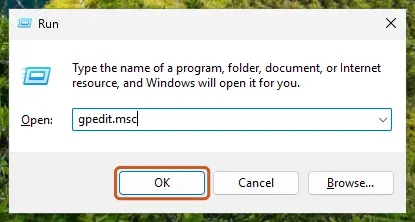
Type gpedit.msc in the Run box and select OK. Screenshot: Windows 11 26H2 Go to the folder the guide names
In the left pane, expand Computer Configuration (settings for the whole PC) or User Configuration (settings for users), then open Administrative Templates and the folders your guide lists.
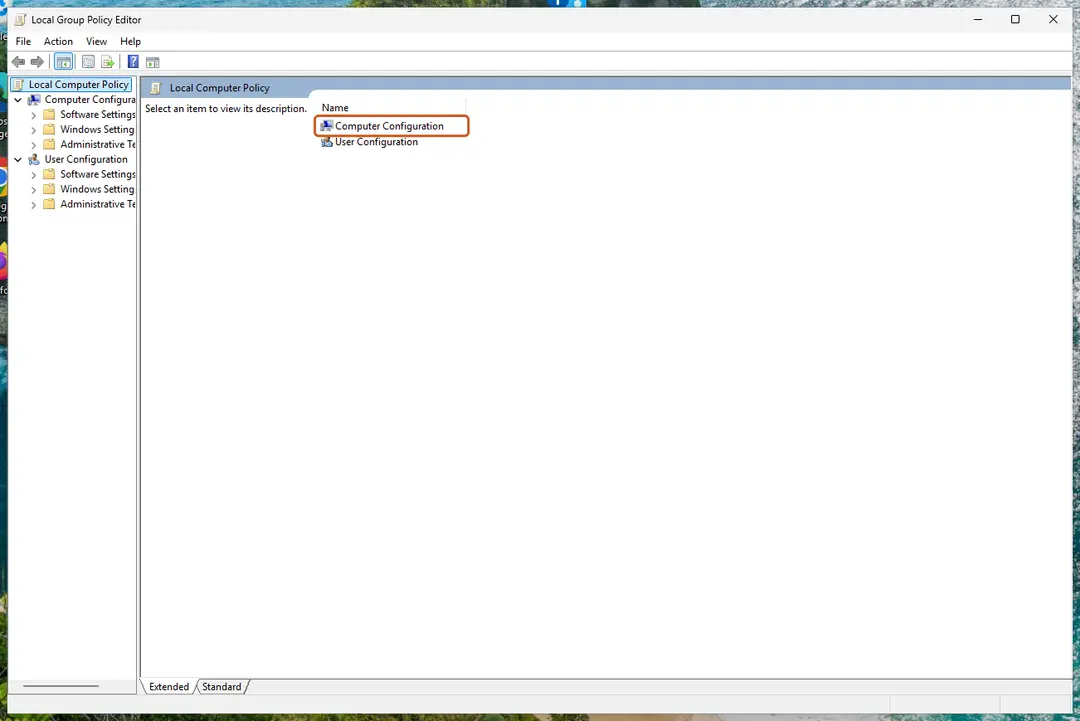
The two main branches of the Local Group Policy Editor. Screenshot: Windows 11 26H2 Open the policy
In the right pane, double-click the policy name.
Change the setting
Select Enabled, Disabled or Not Configured as the guide says, fill in any values under Options, and select OK.
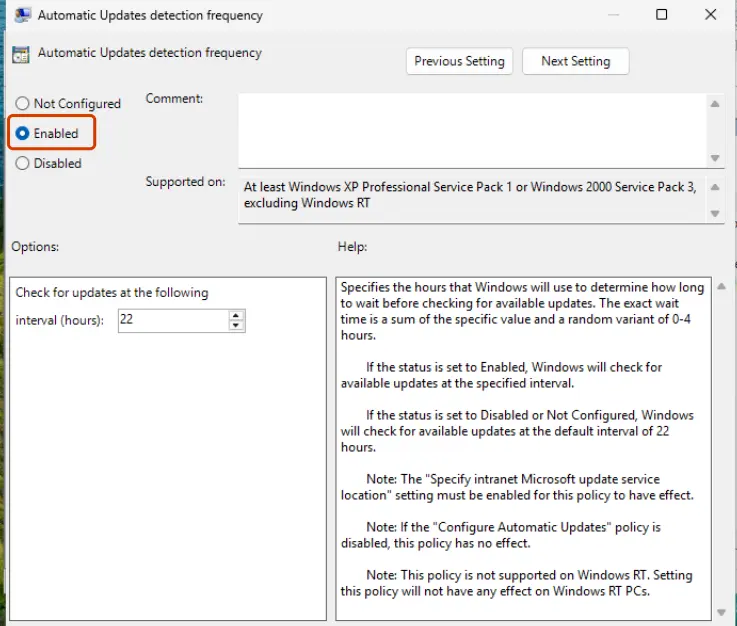
Choose Enabled, Disabled or Not Configured; the Help box explains what each does. Screenshot: Windows 11 26H2 Apply the change
Restart the PC, or open Terminal as administrator and run the command below to apply the change now.
gpupdate /force
Undo a change
Open the same policy and select Not Configured. Windows then uses its default behaviour again. Run gpupdate /force or restart.
See every policy you have changed
Open Computer Configuration (or User Configuration) > Administrative Templates > All Settings, then select the State column header. Enabled and Disabled policies are listed together.
Windows Home
Windows 11 Home and Windows 10 Home do not include the Local Group Policy Editor, so gpedit.msc reports that Windows cannot find it. Most policies have a registry value that does the same thing; when your guide gives one, back up the registry first: Back up the registry before editing it. Scripts that add gpedit to Home install packages Microsoft does not support for that edition, so we do not recommend them.
Used in 52 guides
How to fix "Download failed" error on Brave browser?
How to fix "Windows couldn't complete the requested changes" error 0x800f0907?
How to fix "We couldn't connect to the update service" Windows update error?
How to fix Local Security Policy missing in Windows 10?
How to fix missing Windows Security icon in taskbar?
Windows 11 calendar not opening on second monitor: click the clock on any screen
How to fix "WLAN Extensibility Module has stopped" network error in Windows
How to fix "Printer settings could not be saved" error in Windows?
How to fix Microsoft Store error 0x80073D21 in Windows?
How to fix Microsoft Store log in error 0x800704ec in Windows?
How to fix IntelliGo Extension 100.1.4.1273 download error in Windows
How to unpause Windows updates when Resume updates does not work
How to fix Microsoft Store error 0x80073D23 in Windows?
How to fix Media Creation Tool error 0x80070005 - 0xA001B in Windows?
How to fix "Your Remote Desktop Services session has ended" error in Windows?
How to fix "Cloud-delivered protection is off. Your device may be vulnerable"?
How to fix error code 0x80240438 on Windows 10?
How to fix Windows Defender Security Intelligence version 0.0.0.0?
How to disable sleep mode in Windows 11 and 10 (and when you should not)
How to fix Microsoft Store error 0x80073CFF?
How to fix HRESULT: 0x8002802B error in Microsoft Word or Excel?
How to fix error 0x80070659 in Windows?
How to fix User Account Control (UAC) "Yes" button missing in Windows?
How to fix The security log is now full (Event ID 1104) in Windows?
How to fix Microsoft Edge translator not working?
[Fix] Error code 0x800f0950: installing Language packs on Windows?
How to fix "MMC could not create the snap-in" error in Windows?
How to fix "Do Not Disturb" constantly turning itself on in Windows?
How to fix Windows update error 0x80244011?
How to fix "You do not have sufficient rights to perform this operation" error in Windows?
How to fix .NET Framework error code 0x80072EE6 in Windows?
How to fix Language Pack download stuck in Windows?
How to fix Windows update error 0x8024500c?
How to fix 0x00000bc4 "No printers were found" error in Windows?
How to fix Windows Defender error code 0x800106ba on Windows 10 and Windows 11?
How to fix error 0x80070043 - The network name cannot be found in Windows?
How to fix Microsoft Store error 0x80073D01?
How to fix "Installation has failed" error in Microsoft Teams?
How to fix printing error 0x00000771 (Operation could not be completed) in Windows?
How to fix Alt + F4 not working in Windows?
How to fix printing error 0x00000709 (Operation could not be completed) in Windows?
How to fix "We can't set up mobile hotspot" error in Windows?
How to fix "The network path was not found" with an Error Code 0x80070035 on Windows?
How to fix printing error 0x000006BA in Windows?
[Fix] Can't cancel download of apps after pressing Cancel button in Windows
How to fix printer error code 0x00000040 in Windows?
How to fix 0x00000006 Printer error in Windows?
How to fix "Unable to install printer" 0x000003eb error in Windows?
How to fix "Your Internet security settings prevented one or more files from being opened"?
How to fix ERR_QUIC_PROTOCOL_ERROR on Google Chrome?
How to uninstall OneDrive from Windows 10?
How to downgrade from Windows version 24H2 to 23H2?
Sources
- Microsoft Learn: Open the Local Group Policy Editor (read Oct 3, 2026)
- Microsoft Learn: gpupdate command reference (read Oct 3, 2026)