
How to fix "Cloud-delivered protection is off. Your device may be vulnerable"?

Prefer to fix it yourself? The manual steps follow.
- 8methods
- 1 to 30 minutes
- Easy to intermediate
Applies to Microsoft Defender Antivirus in the Windows Security app on Windows 11 and Windows 10
8 methods in this guide
Hi, I have noticed that Windows Security is displaying a yellow exclamation mark, so I clicked the icon in the taskbar. Apparently, there is a message saying, "Cloud-delivered protection is off. Your device may be vulnerable." I am not sure how this happened, but I'd like to fix it as soon as possible, seeing how it could be a security issue.
This Windows Security warning means Microsoft Defender has stopped checking new files with Microsoft's cloud service, which Microsoft turns on by default and recommends keeping on. Most often a person, a tweak tool or another antivirus switched it off, so start by turning it back on in Virus & threat protection settings.
Open Windows Security > Virus & threat protection, select Manage settings and set Cloud-delivered protection and Automatic sample submission to On (Fix 1). If the switch is greyed out with This setting is managed by your administrator, a policy locks it: on a work PC ask your IT team, on your own PC clear the policy (Fixes 5 and 6). If it keeps turning off by itself, scan for malware (Fix 7).
| Error | Cloud-delivered protection is off. Your device may be vulnerable. with a yellow warning sign on the Windows Security icon. |
|---|---|
| Where it appears | Windows Security > Virus & threat protection, under Virus & threat protection settings, and again on the Manage settings page next to the switch. |
| Main cause | The Cloud-delivered protection switch was turned off, by hand, by a tweak tool or by another security program. |
| Fastest fix | Select Turn on under the warning, or set the switch to On in Manage settings (Fix 1). |
| Also written as | Cloud delivered protection is off, cloud-delivered protection on or off, automatic sample submission is off your device may be vulnerable, managed by your administrator. |
| Affects | Windows 11 and Windows 10. Microsoft lists Windows as the supported system for cloud protection. |
| Vendor status | Not a bug. Microsoft turns cloud protection on by default and recommends keeping it on, because features such as block at first sight depend on it. |
| Greyed-out switch | Microsoft: if Group Policy manages these settings, they appear dimmed in Windows Security and cannot be changed locally. |
| Check from PowerShell | Get-MpPreference | Select-Object MAPSReporting, SubmitSamplesConsent: MAPSReporting 2 means cloud protection is on. |
| Time to fix | 1 minute with the switch, 10 to 30 minutes when a policy or malware is involved. |
Facts checked on 15 October 2026. Steps written for Windows 11 (25H2 and 26H2) and Windows 10 22H2.
What "Cloud-delivered protection is off. Your device may be vulnerable" means
Cloud-delivered protection, which Microsoft also calls cloud protection or MAPS, lets Microsoft Defender Antivirus send details of a suspicious file to Microsoft's cloud service and get a verdict back. Microsoft says it is enabled by default and recommends keeping it on. When the switch is off, Windows Security shows a yellow sign and the warning Cloud-delivered protection is off. Your device may be vulnerable.
Your PC is not infected because of this message, and Defender's normal scanning still runs. What you lose is the fast cloud check. Microsoft lists the features that only work with cloud protection on, and the important ones for a home PC are in the table below.
| Feature | What it does | Without cloud protection |
|---|---|---|
| Block at first sight | Asks the cloud about a new suspicious file and blocks new malware within seconds, as Microsoft describes it. | Not available |
| Checking metadata in the cloud | Machine learning models in the cloud check a suspicious file's details. | Not available |
| Automatic sample submission | Sends suspicious files to Microsoft for analysis. Microsoft says it relies on cloud protection. | Off as well, with its own warning |
| Some attack surface reduction rules | Block risky app behaviour. Microsoft notes some of these rules need cloud protection. | Some rules stop working |
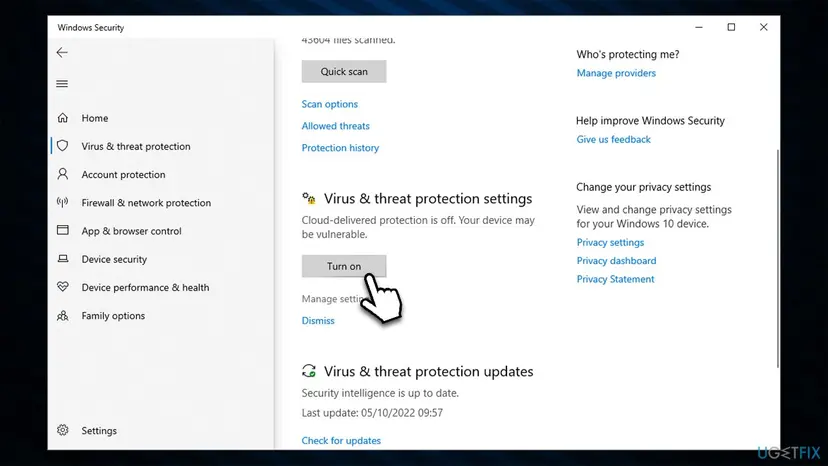
Windows Security shows the same kind of warning for Automatic sample submission is off. Your device may be vulnerable. The two settings sit next to each other and work together, and Microsoft says to turn both on. Every fix on this page covers both switches.
Why cloud-delivered protection is off, from most to least common
Most often the switch was simply turned off, by you, another user, or a privacy or tweak tool. Less often another antivirus took over, or a policy locks the switch, which you see as This setting is managed by your administrator. Rarely malware turns it off again every few minutes.
| Cause | How often | How to tell | Fix |
|---|---|---|---|
| The switch was turned off by hand or by a tweak tool. | Most often | The switch is Off and you can move it. | Fix 1 |
| A setting changed outside the app and the switch does not stick. | Sometimes | The switch moves but flips back after a restart. | Fix 2 |
| Another antivirus is registered as your main protection. | Sometimes | Virus & threat protection names another program. | Fix 3 |
| Your employer or school manages the PC. | Sometimes | Greyed-out switch on a work or school PC. | Fix 4 |
| A local Group Policy or registry policy left by a tool or old malware. | Sometimes | Greyed-out switch on a home PC no one manages. | Fix 5, Fix 6 |
| Malware keeps switching protection off. | Rarely | The switch turns off by itself every few minutes. | Fix 7 |
Users on Microsoft Q&A report both of the harder cases: a greyed-out switch that appeared after a virus was cleaned up with another security program, and a switch that turned itself off every few minutes until the infection was removed.
How to fix "Cloud-delivered protection is off. Your device may be vulnerable"
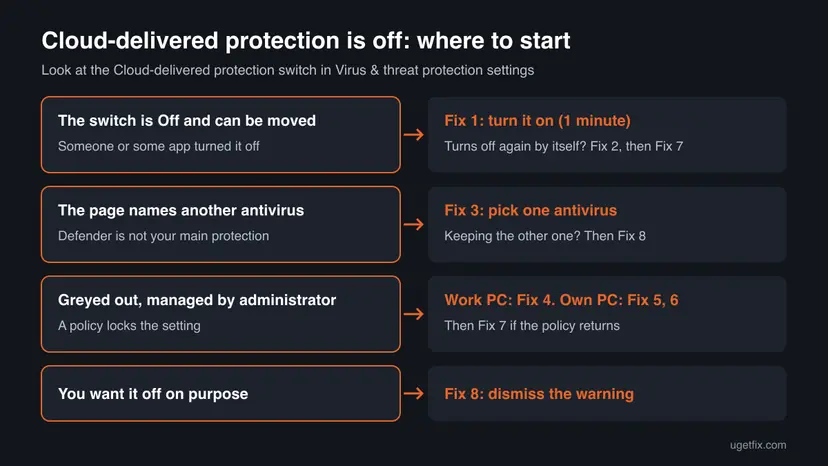
Fix 1 takes a minute and ends most cases. Fix 2 sets the same thing from PowerShell when the switch will not stay on. Fix 3 is for PCs with another antivirus. Fixes 4 to 6 unlock a switch marked as managed by your administrator, Fix 7 is for a switch that turns off by itself, and Fix 8 is only for readers who want the feature off.
| What you see or what your PC has | Start with |
|---|---|
| The switch is Off and you can move it | Fix 1 |
| The switch turns On but is Off again after a restart | Fix 2, then Fix 7 |
| Virus & threat protection names another antivirus | Fix 3 |
| Greyed out with "managed by your administrator" on a work or school PC | Fix 4 |
| Greyed out with "managed by your administrator" on your own PC | Fix 5 (Pro), Fix 6 (Home or Pro) |
| The switch turns off by itself every few minutes | Fix 7 |
| You want cloud protection off and only the warning gone | Fix 8 |
Fix 1. Turn cloud-delivered protection and automatic sample submission back on in Windows Security
1 minuteNo riskEveryone who sees the warning and can move the switch.
Microsoft's own steps for a home PC are exactly these: in Manage settings, turn on Cloud-delivered protection and Automatic sample submission. Nothing else is broken in most cases.
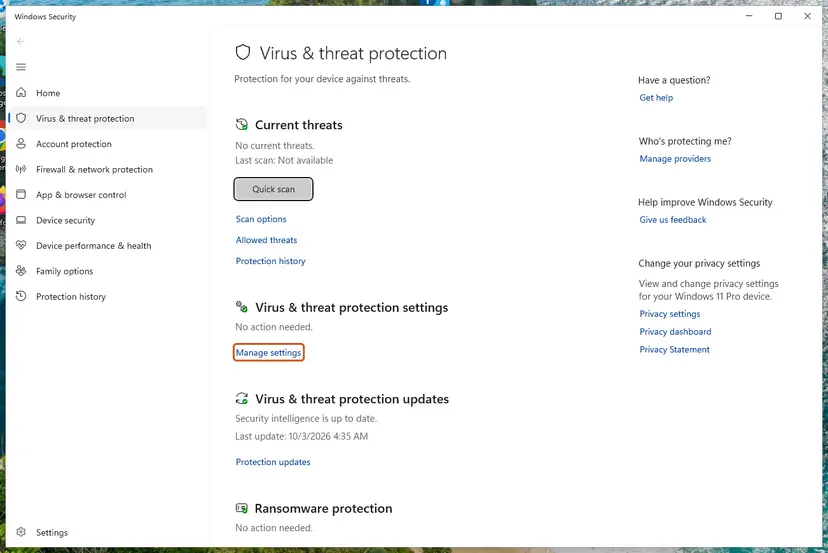
- Select Start, type Windows Security and open the app. You can also select the shield icon with the yellow sign in the taskbar corner.
- Select Virus & threat protection.
- Under Virus & threat protection settings, select Turn on if the button is there. If not, select Manage settings.
- Set Cloud-delivered protection to On.
- Set Automatic sample submission to On as well.
- Select Yes when User Account Control asks for permission.
It worked if: The yellow sign disappears from Virus & threat protection, and the switch stays On after a restart.
If not: If the switch is greyed out, go to Fix 4. If it flips back to Off, use Fix 2.
Fix 2. Turn cloud protection on with PowerShell and check that it stuck
5 minutesNo riskThe switch moves but is Off again after a restart, or Windows Security will not open properly.
The switch in Windows Security writes the Defender preference called MAPSReporting. Microsoft documents the PowerShell commands that set and read it, so you can see the real value instead of trusting the window.
- Right-click Start and select Terminal (Admin). On Windows 10 select Windows PowerShell (Admin).
- Turn cloud protection on, with Microsoft's command.
Set-MpPreference -MAPSReporting Advanced - Turn on automatic submission of safe samples.
Set-MpPreference -SubmitSamplesConsent SendSafeSamples - Read the values back.
Get-MpPreference | Select-Object MAPSReporting, SubmitSamplesConsent, CloudBlockLevel - Restart the PC and run the last command once more.
| Value | Means |
|---|---|
MAPSReporting = 2 | Cloud protection is on (Advanced). |
MAPSReporting = 0 | Cloud protection is off. |
SubmitSamplesConsent = 1 | Safe samples are sent automatically. |
SubmitSamplesConsent = 3 | All samples are sent automatically. |
Microsoft says that on Windows 10 and Windows 11 there is no difference between the Basic and Advanced options: both give the same cloud protection and share the same information. Advanced is simply the value its command uses.
It worked if: MAPSReporting reads 2 after the restart and the warning is gone.
If not: If the value is back to 0 after a restart, something resets it: check for another antivirus (Fix 3), a policy (Fix 6) or malware (Fix 7).
Fix 3. Check which antivirus protects the PC and keep only one
10 to 20 minutesLow riskVirus & threat protection names another program, or you installed a second security product, even a free scanner.
When another antivirus registers as the main protection, Defender steps back and its settings can show as off or locked. On Microsoft Q&A, an advisor pointed to exactly this after a user installed a paid version of another security program.
- Open Windows Security > Virus & threat protection.
- Read the top of the page. If it names another program, that program is your main antivirus.
- Select Manage providers under Who's protecting me? to see every registered security product.
- Decide which antivirus you want. If you keep the other one, cloud protection in Defender does not matter: go to Fix 8 to hide the warning.
- If you want Defender back, uninstall the other product, then restart.
- Uninstall from the Start menu. Select Start > All apps and find the app. Right-click it (or press and hold) and select Uninstall.
- Or uninstall in Settings. Select Start > Settings > Apps > Installed apps. Find the app, select More (the three dots) > Uninstall, and confirm.
- Or uninstall from Control Panel. Some programs can only be removed here. Type Control Panel in the search box on the taskbar and open it, then select Programs > Programs and Features. Right-click the program and select Uninstall or Uninstall/Change, then follow the program's own uninstaller.
- Restart if the uninstaller asks. Some programs finish removing their files only after a restart.
These steps were written for Windows 11 24H2 and 25H2. The full page with the other versions and what each result means: Uninstall a program or app in Windows
After the restart, go back to Fix 1. A sister guide covers the case where Defender stays switched off completely after another antivirus: Windows Defender Security Intelligence version 0.0.0.0.
It worked if: Manage providers lists Microsoft Defender Antivirus as on, and Fix 1 now works.
If not: If the switch is still greyed out with no other antivirus installed, a policy locks it: Fix 4 to Fix 6.
Fix 4. On a work or school PC, ask the administrator who manages the setting
5 minutes, then your IT team's timeNo riskThe switch is greyed out and shows This setting is managed by your administrator on a PC your employer or school gave you or enrolled.
Organisations set cloud protection centrally with Microsoft Intune, the Microsoft Defender portal, Configuration Manager or Group Policy. Microsoft says a setting managed this way appears dimmed and cannot be changed locally.
- Open Windows Security > Virus & threat protection > Manage settings and take a screenshot of the greyed-out switch.
- Press Win + R, type
winverand select OK. Note the Windows version and build. - Send both to your IT team and ask whether cloud protection is turned off on purpose.
- After they change the policy, restart the PC and check the switch again.
- Do not change policies or the registry on a managed PC. The policy comes back at the next sync, and you may break your company's rules.
- Tell IT exactly what you see: the warning text, the greyed-out switch and the Windows version from
winver. - What IT changes: in Intune or the Defender portal, the setting Allow cloud protection set to Allowed. Turns on Cloud Protection (Default), and Submit samples consent.
An organisation may keep cloud protection off for its own reasons. Then the warning is expected and only the administrator can decide otherwise.
It worked if: After the administrator's change reaches the PC, the switch shows On and is no longer your concern.
If not: If the PC is your own and nobody manages it, the policy is a local leftover: go to Fix 5.
Fix 5. Set the MAPS policies back to Not configured in the Local Group Policy Editor
5 to 10 minutesLow riskYour own PC with Windows 11 or 10 Pro, Enterprise or Education, and the switch says This setting is managed by your administrator.
Microsoft says the MAPS policies configure cloud-delivered protection. If a tool or an earlier owner set Join Microsoft MAPS to Disabled, Windows Security locks the switch. Setting the policy to Not configured hands the choice back to the app.
Open the editor with gpedit.msc. Windows Home does not include it; use Fix 6 there. Step by step: Open the Local Group Policy Editor
- Go to Computer Configuration > Administrative Templates > Windows Components > Microsoft Defender Antivirus > MAPS. Older builds may name the folder Windows Defender Antivirus.
- Double-click Join Microsoft MAPS, select Not Configured and select OK.
- Double-click Send file samples when further analysis is required, select Not Configured and select OK.
- Optional: set Join Microsoft MAPS to Enabled with Advanced MAPS instead, to lock cloud protection on.
- In an administrator Terminal, apply the change right away.
gpupdate /force - Restart the PC and open Virus & threat protection > Manage settings.
Microsoft notes that setting sample submission to Never send lowers the protection state of the device and disables block at first sight. Always prompt also lowers it.
It worked if: The managed by your administrator line is gone and Fix 1 turns the switch on, or it is already on.
If not: If the switch is still greyed out, the policy sits in the registry without a Group Policy entry: Fix 6.
Fix 6. Remove the leftover Defender policies from the registry
10 minutesRead the warningYour own PC, any edition, still shows This setting is managed by your administrator after Fix 5, or it runs Windows Home.
Tweak tools and some malware write Defender policies straight into the registry, under the same policies key Microsoft names for Defender's Group Policy settings. Windows Security reads them and locks the switch.
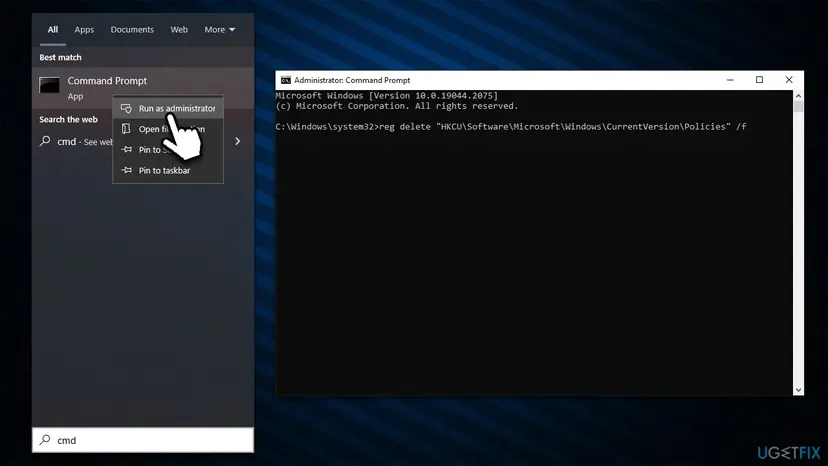
Deleting the Defender policies key removes every Defender policy on the PC, including exclusions set as policy. The export in step 2 brings them back. Never do this on a work or school PC. Older guides told readers to delete whole policy branches such as HKLM\Software\Policies; that also removes Windows Update, browser and other policies, so do not.
Before any registry change, keep a copy of the registry: Back up the registry before editing it
- Right-click Start and select Terminal (Admin). On Windows 10 select Windows PowerShell (Admin).
- Export the Defender policies to a file.
New-Item -Path "C:\DefenderTemp" -ItemType Directory reg export "HKLM\SOFTWARE\Policies\Microsoft\Windows Defender" C:\DefenderTemp\DefenderPolicies.reg - See which policies are there.
reg query "HKLM\SOFTWARE\Policies\Microsoft\Windows Defender" /s - If the export says the key does not exist, no Defender policy is set. Skip to Fix 7.
- If you only see
DisableAntiSpyware, remove that one value, as advisors on Microsoft Q&A suggest.reg delete "HKLM\SOFTWARE\Policies\Microsoft\Windows Defender" /v DisableAntiSpyware /f - If other cloud or sample values are listed, remove the whole Defender policies key.
Remove-Item -Path 'HKLM:\SOFTWARE\Policies\Microsoft\Windows Defender' -Recurse -Force - Restart (not shut down) the PC and repeat Fix 1.
It worked if: reg query finds no Defender policies, the switch is no longer greyed out and stays On after a restart.
If not: If the policy comes back after a restart, a program or malware writes it again: Fix 7.
Fix 7. Scan for malware that keeps switching protection off
20 minutes to several hoursNo riskThe switch turns off by itself every few minutes or after each restart, or a policy keeps coming back.
Turning off security settings is a common move of malware. On Microsoft Q&A, a user whose switch kept turning off found over 250 infected files, and the support reply started with the Microsoft Safety Scanner.
- Download the Microsoft Safety Scanner from Microsoft's site and run it.
- Choose the full scan and let it finish.
- Remove what it finds and restart.
- Run Defender's own full scan as well, and the offline scan if anything was found.
- Open Windows Security. Select Start, type Windows Security and open the app.
- Open Virus & threat protection. Select Virus & threat protection. Under Current threats you see when the last scan ran, how long it took and how many files it checked.
- Run a quick scan. Select Quick scan. If Windows Security thinks a deeper scan is needed, it tells you when the quick scan is done.
- Open Scan options. If the quick scan finds nothing and you still suspect an infection, select Scan options under Current threats.
- Run a full scan. Select Full scan and start it. It checks every file and program on the device, so it takes much longer than a quick scan. Leave the PC on until it ends.
- Or scan one folder. To check only a download or a USB drive, select Custom scan in Scan options and choose the folder. You can also right-click a file or folder in File Explorer and select Scan with Microsoft Defender. On Windows 11 you may have to select Show more options first.
- Read Protection history. Go back to the first page of Windows Security and select Protection history. Select a card to expand it and see the details.
These steps were written for Windows 11 25H2 and 26H2, Windows 10 22H2. The full page with the other versions and what each result means: How to scan for malware with Microsoft Defender
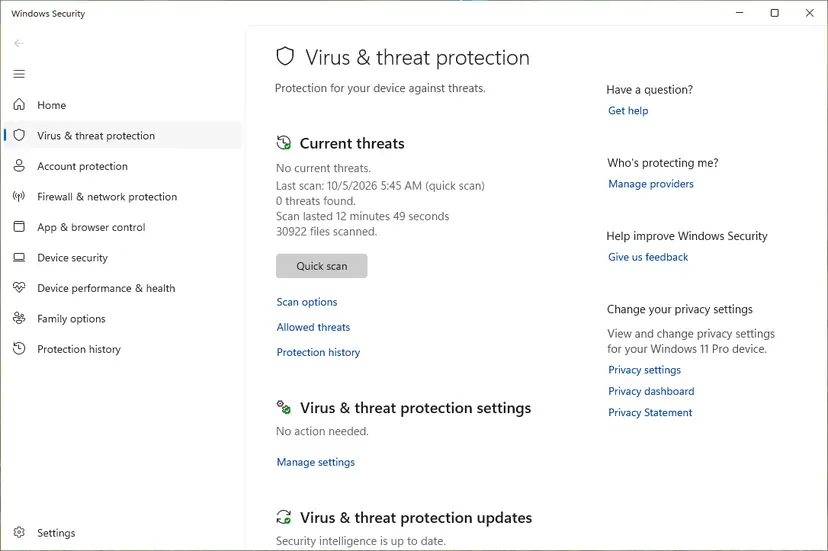
When the scans are clean, run Fix 2 and Fix 6 again, because malware often leaves its policies behind.
It worked if: The scans come back clean, and the switch stays On after two restarts.
If not: If it still turns off with clean scans, collect the logs in the next section.
Fix 8. Dismiss the warning if you keep cloud protection off on purpose
1 minuteLow riskYou use another antivirus, or you decided to keep cloud protection off, and only want the yellow sign gone.
Windows Security lets you dismiss this warning. It changes nothing in the protection itself, it only hides the reminder. Microsoft recommends keeping cloud protection on, so do this only knowingly.
- Open Windows Security > Virus & threat protection > Manage settings.
- Under Cloud-delivered protection, select Dismiss next to the warning.
- Do the same under Automatic sample submission if that warning shows too.
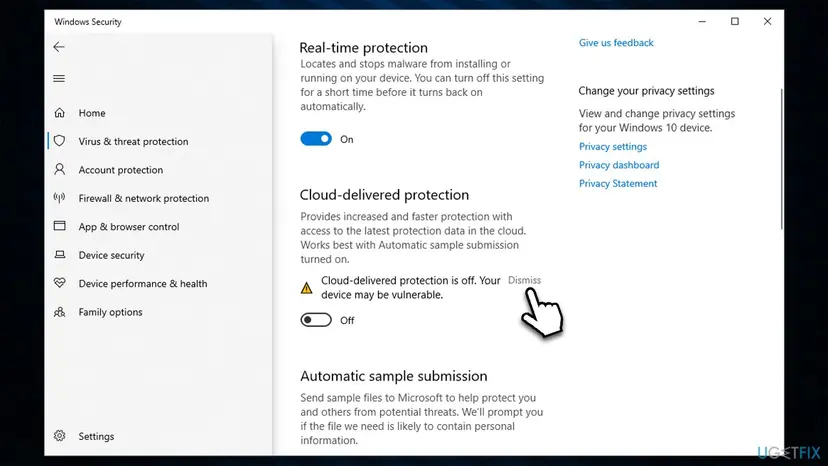
It worked if: The yellow sign is gone from Windows Security, while the switch stays Off.
If not: If you change your mind, Fix 1 turns the feature on again at any time.
If cloud-delivered protection still turns off: what to read and what to send
When the switch keeps going back to Off with clean scans and no policies, collect what Windows records instead of changing more settings.
| Where | What to look for |
|---|---|
Get-MpPreference in an admin Terminal | MAPSReporting and SubmitSamplesConsent right after a restart, and again once the switch flips. |
reg query "HKLM\SOFTWARE\Policies\Microsoft\Windows Defender" /s | Any value that returns after you removed it: note its name and time. |
| Event Viewer: Applications and Services Logs > Microsoft > Windows > Windows Defender > Operational | Configuration change events at the moment the switch turned off. |
| Windows Security > Virus & threat protection > Manage settings | Whether Tamper Protection is on; it blocks other apps from changing Defender settings. |
- What to send to Microsoft support: a screenshot of the warning, the
Get-MpPreferenceoutput, thereg queryoutput and your Windows build fromwinver. - Is it hardware? No. This is a software setting, and no hardware fault turns it off.
How to keep cloud-delivered protection on
- Keep Tamper Protection on, so other apps cannot change Defender settings quietly.
- Use one real-time antivirus at a time.
- Keep Automatic sample submission on together with cloud protection.
- Glance at Windows Security after you install a privacy or optimisation tool.
- Do not run debloat or privacy scripts that disable Defender features unless you know each change.
- Do not delete whole policy branches of the registry to unlock one setting.
- Do not set sample submission to Never send: Microsoft says it disables block at first sight.
- Do not change Defender policies on a work or school PC.
Frequently asked questions
What is cloud-delivered protection?
It is the part of Microsoft Defender Antivirus that checks suspicious files with Microsoft's cloud service. When Defender meets an unknown file, it sends the file's details to the cloud, where machine learning models and analysis decide whether it is a threat. Microsoft says block at first sight uses it to stop new malware within seconds. It is on by default in Windows 11 and Windows 10, and you find it in Windows Security under Virus & threat protection > Manage settings.
Should cloud-delivered protection be on or off?
On, for almost everyone. Microsoft enables it by default and recommends keeping it on, because features such as block at first sight, cloud metadata checks and some attack surface reduction rules only work with it. The only common reason to leave it off is that another antivirus protects the PC, or your organisation decided so. Microsoft says that on Windows 10 and 11 the Basic and Advanced options share the same information, so there is no privacy level to choose between.
What does "Your device may be vulnerable" mean?
It means one Windows Security protection is off, not that your PC is infected. Windows Security shows this line under any switched-off protection, such as cloud-delivered protection, automatic sample submission or real-time protection. Defender still scans files with its local definitions. You lose the faster cloud checks until you turn the switch on again in Virus & threat protection settings (Fix 1). If the message appears by itself and returns after you fix it, scan for malware (Fix 7).
Why does it say "This setting is managed by your administrator"?
A policy controls the setting, so Windows Security greys it out. Microsoft says settings managed by Group Policy appear dimmed and cannot be changed locally. On a work or school PC that policy comes from your IT team, so ask them (Fix 4). On your own PC it is usually a leftover from a tweak tool, another security program or old malware. Reset the MAPS policy in gpedit.msc (Fix 5) or remove the Defender policies from the registry after a backup (Fix 6).
Why does cloud-delivered protection keep turning off by itself?
Something keeps changing it back. The usual suspects are another antivirus that registers as the main protection, a policy written by a tool, or malware. On Microsoft Q&A, a user whose switch turned off every few minutes found hundreds of infected files. Check with Get-MpPreference whether MAPSReporting returns to 0 after a restart (Fix 2), look for other antivirus software (Fix 3), then run the Microsoft Safety Scanner and an offline Defender scan (Fix 7).
How do I turn on cloud-delivered protection in Windows 11?
Open Windows Security, select Virus & threat protection, then Manage settings under Virus & threat protection settings, and set Cloud-delivered protection to On. Turn on Automatic sample submission next to it too, as Microsoft advises. If you prefer a command, run Set-MpPreference -MAPSReporting Advanced in an administrator Terminal and check the result with Get-MpPreference: MAPSReporting should read 2. The steps are the same on Windows 10 22H2.
What is "Automatic sample submission is off. Your device may be vulnerable"?
It is the twin warning for the switch right below cloud-delivered protection. Automatic sample submission sends suspicious files to Microsoft for analysis, and Microsoft says it relies on cloud protection. Turn it on in the same Manage settings page (Fix 1), or with Set-MpPreference -SubmitSamplesConsent SendSafeSamples (Fix 2). Safe samples means Windows asks before sending files that are likely to hold personal information.
Does turning on cloud protection send my files to Microsoft?
Mostly it sends information about suspicious files, such as where they came from and what Defender did. Automatic sample submission can send the suspicious file itself for analysis. With the Send safe samples option, Microsoft says files likely to contain personal information prompt you first. The details of what is collected are in the Microsoft Privacy Statement. If you do not want to share samples at all, know that Microsoft says Never send disables block at first sight.
Is the old "reg delete Policies" fix safe?
No. Some older guides, including an earlier version of this page, told readers to delete whole branches such as HKLM\Software\Policies and HKCU\Software\Policies. That removes every policy on the PC, including Windows Update, browser and security settings that have nothing to do with this warning. Remove only the Defender policies, after exporting them to a file and backing up the registry (Fix 6), and never on a work or school PC.
This page is in English. Can I follow it on Windows in another language?
Yes. The commands, registry paths and PowerShell values are the same on Windows in every language, so Fix 2 and Fix 6 work as written. Only the menu names in Windows Security are translated, such as Virus & threat protection and Manage settings, and they sit in the same place. This page answers only the cloud-delivered protection warning in Windows Security; it is normal to see it after the switch was turned off, and it is fixed with Fix 1.
Sources
- Microsoft Learn: Configure cloud protection in Microsoft Defender Antivirus (features that need it, Windows Security steps, Group Policy MAPS path, PowerShell values) (learn.microsoft.com)
- Microsoft Q&A (user reports and advisor answers): "This setting is managed by your administrator" for Cloud-delivered protection (learn.microsoft.com)
- Microsoft Q&A (user reports and support reply): Cloud-delivered protection keeps turning off (learn.microsoft.com)
Did this fix work?
One click, no account. It tells the next reader which guides are worth their time.
Questions and experiences: fix "Cloud-delivered protection is off. Your device may be vulnerable"
Still broken, or found a fix we did not cover? Ask here: members and our editors answer. Reading is open; writing needs a free account.
…