
How to fix The security log is now full (Event ID 1104) in Windows?

Prefer to fix it yourself? The manual steps follow.
7 methods in this guide
Hello, I have a problem I hope you can help me with. I am using Windows 11, and I received The security log is now full of errors marked as Event ID 1104 in the Event Log. Is there a way to resolve this? Thanks in advance.
Event ID 1104, "The security log is now full.", means the Security log reached its maximum size while it was set not to overwrite old events, so Windows stopped recording new ones. Set the log to Overwrite events as needed (oldest events first) in Event Viewer, then save and clear it. If only administrators can sign in, reset CrashOnAuditFail as well.
Open Event Viewer, right-click Windows Logs > Security, select Properties and choose Overwrite events as needed (oldest events first) (Fix 1). Then save and clear the log (Fix 2). If the setting jumps back, a policy sets it (Fix 4). If the PC showed Stop C0000244 or now lets only administrators sign in, sign in as an administrator, clear the log and set CrashOnAuditFail back to 1 or 0 (Fix 5).
| Error | Event ID 1104 from Microsoft-Windows-Eventlog in the Security log, level Error: "The security log is now full." |
|---|---|
| Where it appears | In Event Viewer under Windows Logs > Security. On a PC with the audit shutdown policy on, also as Stop C0000244 and a sign-in screen that lets only administrators in. |
| Main cause | The Security log reached its maximum size and its retention method is Do not overwrite events ( Clear logs manually ), or overwrite by days. |
| Fastest fix | Switch the log to Overwrite events as needed (oldest events first) in its Properties (Fix 1), then save and clear it (Fix 2). |
| Also written as | Security log full, security logs full, the security log on this system is full, auditing log is full, event 1104, EventID 1104, 1104(S). |
| Log file | %SystemRoot%\System32\Winevt\Logs\Security.evtx. The Windows 10 PC in our old screenshot had a maximum of 20,480 KB (20 MB). |
| Affects | Every Windows version since Windows Vista and Windows Server 2008, Windows 11 included. Windows 10 left support on 14 October 2025. |
| Microsoft's status | Not a bug. Microsoft documents 1104 as a normal audit event and says the fix is to archive or clear the log. |
| Time to fix | About 5 minutes on a home PC. Longer on a managed PC, where a domain policy must be changed by the administrator. |
Facts checked on 15 October 2026. Steps written for Windows 11 (25H2 and 26H2) and Windows 10 22H2, with notes for Windows Server.
What "The security log is now full" (Event ID 1104) means
Event ID 1104 is written to the Security log by the provider Microsoft-Windows-Eventlog, with the level Error and the task category Other Events. It appears each time the Security log becomes full, for example when the maximum size of the log file is reached and the retention method is Do not overwrite events (Clear logs manually). Its whole text is one line: "The security log is now full."
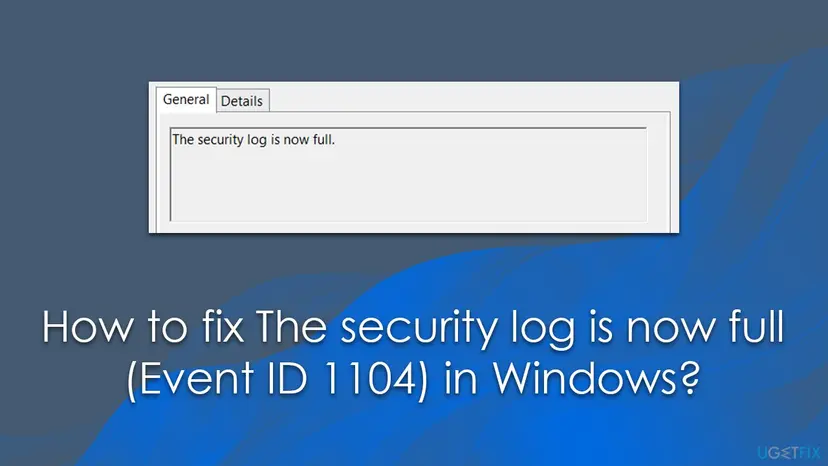
The important part is what happens next. While the log is full and may not overwrite, Windows records no new security events: no sign-ins, no account changes, no file access audits. On a home PC that is mostly a lost history. On a managed PC it can be a compliance gap, and it can lock users out (see the causes below).
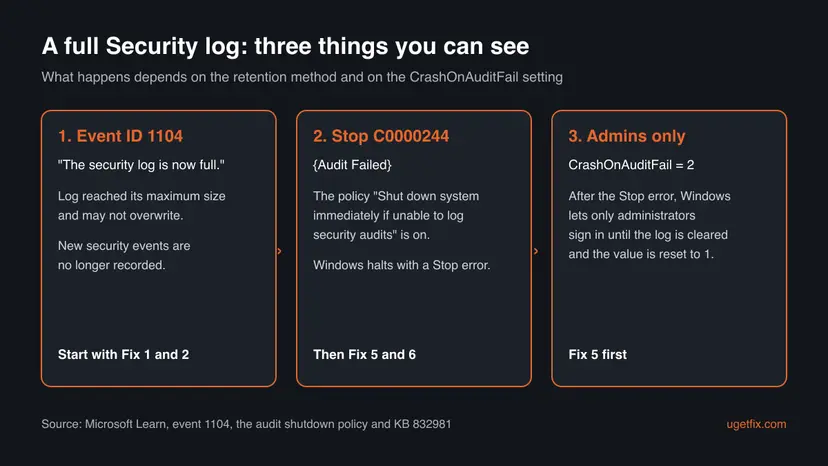
- Event 1104 in the Security log. The log stopped growing. Fixes 1 to 4 apply.
- Stop C0000244 {Audit Failed}. Microsoft's text is "An attempt to generate a security audit failed." Windows halted because the policy Audit: Shut down system immediately if unable to log security audits is on. Fixes 5 and 6 apply.
- Only administrators can sign in. After that Stop error Windows sets
CrashOnAuditFailto 2. Users search the sign-in message as "the security log on this system is full. only administrators can sign in to fix the problem" and "security log is full only administrators". Fix 5 applies. - "Auditing log is full". This is not a separate error. The Security log is the audit log, so it is the same condition.
Why the Security log is full: the causes, ranked
The Security log fills up on every PC. The question is only what Windows does then. Most often a setting tells it to stop instead of overwrite. Less often the log is so small, or auditing so busy, that even a correct setting is not enough for the history you need. Rarely the PC also has the audit shutdown policy, which turns a full log into a crash and a lock-out.
| Cause | How to tell | Fix |
|---|---|---|
| Retention set to Do not overwrite events ( Clear logs manually ), by hand, by a security baseline or by a tool. | The Security log Properties show that option selected. | Fix 1, then Fix 2 |
| A Group Policy or domain policy sets the retention or the size, so your change jumps back. | The options are greyed out, or they return after gpupdate or a restart. | Fix 4 |
| The log is small for the amount of auditing on this PC. | The log covers only hours or a few days of events. | Fix 3 and Fix 7 |
| Auditing is turned up: object access, file shares or other noisy categories. | A few event IDs, such as 4663 or 5145, make up most of the log. | Fix 7 |
| The policy Audit: Shut down system immediately if unable to log security audits is on. | Stop C0000244 {Audit Failed}, then only administrators can sign in. | Fix 5 and Fix 6 |
The old version of this guide said many users began to see 1104 after a Windows update. We found no Microsoft known issue that ties event 1104 to an update, so we no longer suggest removing updates for it. If 1104 began right after an update, check Fix 4 first: an update or a management tool may have changed a policy.
How to fix "The security log is now full" (Event ID 1104)
Fixes 1 and 2 solve it on most home PCs in five minutes. Fix 3 is for those who want a longer history, Fix 4 for a setting that jumps back. Fixes 5 and 6 are for a PC that crashed with C0000244 or lets only administrators sign in. Fix 7 stops the log from filling so fast.
| What you see or have | Start with |
|---|---|
| Event 1104 in Event Viewer on a home PC. | Fix 1, then Fix 2 |
| You need to keep old security events for an audit or an investigation. | Fix 2 (save first), then Fix 3 |
| The retention options are greyed out, or your change returns after a restart. | Fix 4 |
| The sign-in screen says only administrators can sign in. | Fix 5 |
| A blue screen with C0000244 {Audit Failed}. | Fix 5, then Fix 6 |
| The log fills again within hours. | Fix 7 |
Fix 1. Set the Security log to overwrite the oldest events
3 minutesLow riskEveryone who sees event 1104, especially on a home PC with no audit rules to follow.
Event 1104 is written because the log may not overwrite. With Overwrite events as needed (oldest events first) Windows replaces the oldest entries when the log is full, so recording never stops.
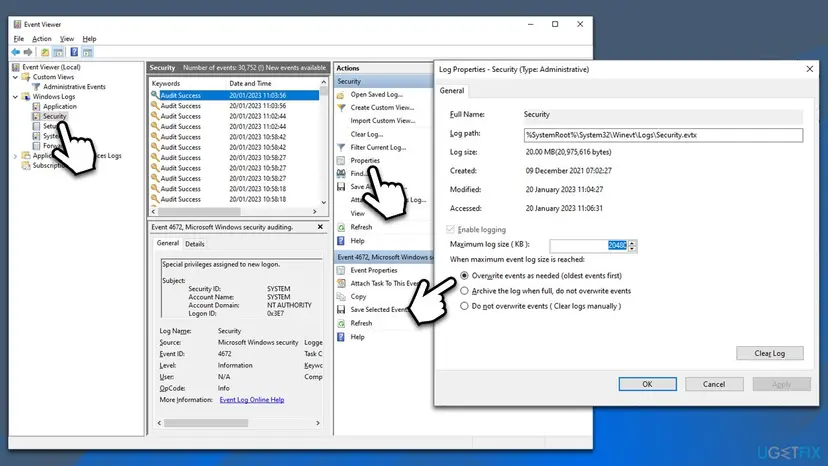
- Press Win + R, type
eventvwr.mscand select OK. Select Yes if Windows asks for permission. - In the left pane expand Windows Logs and select Security.
- In the Actions pane on the right select Properties.
- Under When maximum event log size is reached select Overwrite events as needed (oldest events first).
- Select Apply, then OK.
Prefer one command? Open Terminal (Admin) and run the lines below. The first shows the current setting, the second switches to overwrite as needed.
Terminal (Admin): read and change the retention of the Security log
wevtutil gl Security
wevtutil sl Security /rt:false /ab:false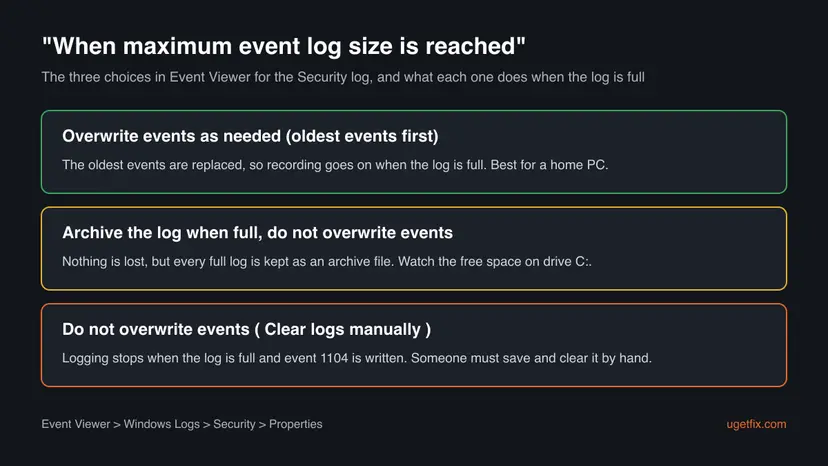
It worked if: The option stays selected when you open Properties again, and wevtutil gl Security shows retention: false.
If not: If the options are greyed out or the choice returns, a policy sets it: go to Fix 4.
Fix 2. Save the full Security log, then clear it
3 minutesLow riskEveryone with a full log, and anyone who must keep the events for later.
Fix 1 stops the problem from coming back, but the log is still full. Clearing it starts a new, empty log at once. Saving it first keeps every old event in a file you can open in Event Viewer later.
- In Event Viewer right-click Windows Logs > Security and select Clear Log.
- In the window that opens select Save and Clear.
- Pick a folder outside the Windows folder, type a name such as
Security-2026-10-15and select Save. - Check that the Security log now holds only a few new events.
Terminal (Admin): the same with commands (the folder must exist)
mkdir C:\Logs
wevtutil epl Security C:\Logs\Security-backup.evtx
wevtutil cl SecurityWindows writes event 1102, "The audit log was cleared", as the first entry of the new log. That is expected, and it names the account that cleared it. To read the saved file later, select Action > Open Saved Log in Event Viewer.
It worked if: The Security log shows a short list with event 1102 at the top, and new sign-in events appear again.
If not: If the log fills again within hours, make it larger with Fix 3 and find the noisy events with Fix 7.
Fix 3. Make the Security log larger to keep more history
2 minutesLow riskYou want overwrite as needed but the log covers too few days for your needs.
With overwrite on, the log size decides how far back the history goes. A larger maximum keeps more days of sign-ins before the oldest are replaced.
- Open the Security log Properties as in Fix 1.
- In Maximum log size ( KB ) type the new size, for example
204800for 200 MB. - Keep Overwrite events as needed (oldest events first) selected.
- Select Apply, then OK.
Terminal (Admin): set the maximum size in bytes (here 200 MB)
wevtutil sl Security /ms:209715200The log lives on the system drive, so leave enough free space on C:. We give no single right size: a PC that audits file access needs far more than a home laptop.
It worked if: Properties and wevtutil gl Security show the new maxSize, and the log keeps more days of events.
If not: If the field is greyed out or resets, the size is set by a policy: go to Fix 4.
Fix 4. Find the policy that sets the retention or the size
10 minutesLow riskThe retention options are greyed out, or your change from Fix 1 or Fix 3 comes back.
A local or domain policy wins over Event Viewer. Microsoft names the policy Retention method for security log with Do not overwrite events (clear log manually) as the setting that makes a full log stop recording.
- Open Terminal (Admin) and run
gpresult /h C:\Logs\gp.html, then open the file in a browser. - Search the report for Event Log, Retention method for security log and Maximum security log size. The report names the policy object that sets each one.
- On a work PC that belongs to a domain, send that name to your IT administrator. Only they can change a domain policy.
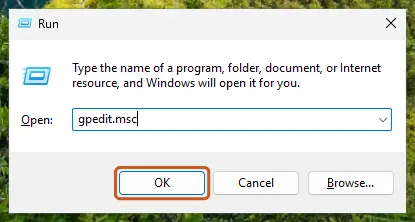
- On your own Pro, Enterprise or Education PC open the Local Group Policy Editor: Open the Local Group Policy Editor.
- Go to Computer Configuration > Administrative Templates > Windows Components > Event Log Service > Security.
- Open Control Event Log behavior when the log file reaches its maximum size and set it to Not Configured or Disabled, then select OK.
- Run
gpupdate /forceand repeat Fix 1.
It worked if: After gpupdate /force the retention options in Event Viewer can be changed again and your choice stays after a restart.
If not: If no policy is listed and the setting still returns, a security or management tool may be setting it. Check its settings, or ask the administrator who installed it.
Fix 5. Only administrators can sign in: clear the log and reset CrashOnAuditFail
10 minutesRead the warningThe sign-in screen lets only administrators in, or the PC crashed with Stop C0000244.
Microsoft explains that when the audit log is full and CrashOnAuditFail is set, Windows halts and then sets the value to 2, which lets only administrators sign in. The lock stays until the log is cleared and the value is set back.
A wrong registry change can stop Windows from starting. Back up the Lsa key first: Back up the registry before editing it. Save the Security log before you clear it, or the old events are gone.
- Sign in with an administrator account. A standard account is refused until the end of this fix.
- Save and clear the Security log as in Fix 2.
- Open Terminal (Admin) and read the value with the first command below.
- If it shows
0x2, set it with the second command:1keeps the audit shutdown policy,0(the default) turns it off. - Restart the PC. Microsoft says the change takes effect only after a restart.
- Sign in with a standard account to check.
Terminal (Admin): read and reset CrashOnAuditFail
reg query HKLM\SYSTEM\CurrentControlSet\Control\Lsa /v CrashOnAuditFail
reg add HKLM\SYSTEM\CurrentControlSet\Control\Lsa /v CrashOnAuditFail /t REG_DWORD /d 1 /f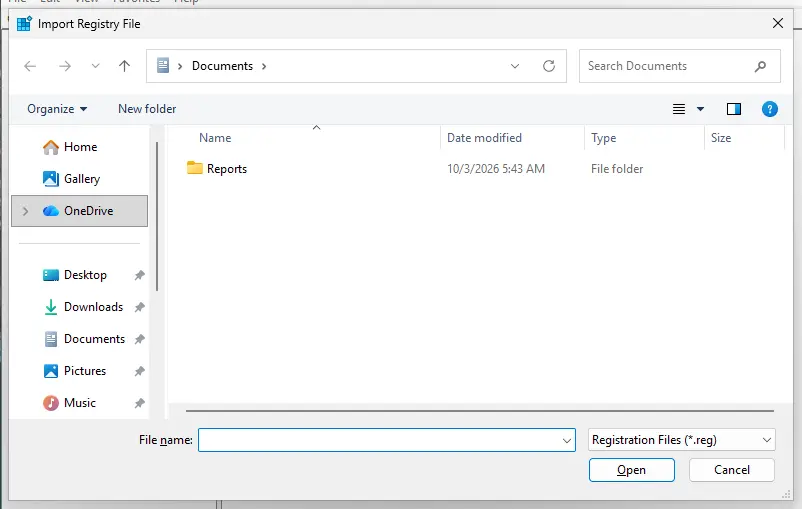
- 0: anyone may sign in. The default.
- 1: anyone may sign in while Windows can write the security log. When it cannot, the value becomes 2 and the PC halts.
- 2: only administrators may sign in.
It worked if: After the restart a standard account signs in again, and the query shows 0x1 or 0x0.
If not: If the value is back at 2 after the next full log, do Fix 1 so the log can no longer fill up, and Fix 6 if you do not need the shutdown policy.
Fix 6. Check the audit shutdown policy behind Stop C0000244
5 minutesLow riskThe PC halted with C0000244 {Audit Failed} and you are not required to keep this policy.
Microsoft says Audit: Shut down system immediately if unable to log security audits stops the system when an audit cannot be logged, typically when the log is full and may not overwrite. It is off by default on client computers.
- Press Win + R, type
secpol.mscand select OK. This is the Local Security Policy, found on Pro, Enterprise and Education. - Go to Security Settings > Local Policies > Security Options.
- Find Audit: Shut down system immediately if unable to log security audits.
- If you do not need it, open it, select Disabled and select OK. Microsoft says no restart is needed.
- If your organisation needs it, keep it on and make sure Fix 1 is done, so the log never stops.
Microsoft warns that with this policy and a log that may not overwrite, anyone who can create many security events can force a server to shut down, and the abrupt shutdown can damage open files. Each such halt also leaves event 6008 at the next start, explained in our guide to Event ID 6008.
It worked if: The policy shows Disabled, or it stays on with the log set to overwrite, and the PC no longer halts.
If not: If the policy is greyed out, it comes from a domain policy: ask the administrator, as in Fix 4.
Fix 7. Find what fills the Security log and audit less of it
15 minutesLow riskThe log fills within hours or days even at a larger size, often on a file server or a tuned workstation.
A full log is often a symptom of auditing that records far more than anyone reads. Counting the event IDs shows which audit subcategory produces the bulk, and Microsoft lists fewer audited events as one way to keep the log from locking down.
- Open Terminal (Admin) and run the first command below. It counts the 20,000 newest Security events by ID.
- Note the two or three IDs at the top. In our old screenshot most rows were 4672, "Special privileges assigned to new logon".
- Run the second command to see which audit subcategories are on.
- Turn off only a subcategory nobody uses, with the third command as a pattern. On a work PC ask the administrator first, because audit rules can be a legal requirement.
Terminal (Admin): count, list and change auditing
Get-WinEvent -LogName Security -MaxEvents 20000 | Group-Object Id | Sort-Object Count -Descending | Select-Object -First 10 Count, Name
auditpol /get /category:*
auditpol /set /subcategory:"File Share" /success:disable /failure:enable
It worked if: The top event IDs drop, and the log covers more days at the same size.
If not: If no single ID stands out, keep overwrite on (Fix 1) and give the log more room (Fix 3).
If event 1104 keeps coming back: what to check and what to send
The old version of this guide reported that some Windows 11 users still saw 1104 with overwrite turned on. We could not confirm this from Microsoft. If it happens to you, first run wevtutil gl Security again: a policy may have switched the retention back since your change.
- The current setting. The output of
wevtutil gl Security. It showsretention,autoBackupandmaxSize. - The policy report. The file from
gpresult /hin Fix 4, which names any policy that sets the Security log. - The time pattern. When each 1104 appears, from Event Viewer. Events at the same time each day point to a scheduled task or a policy refresh.
- CrashOnAuditFail. The value from Fix 5. Microsoft also logs event 4906, "The CrashOnAuditFail value has changed", which shows when it was changed.
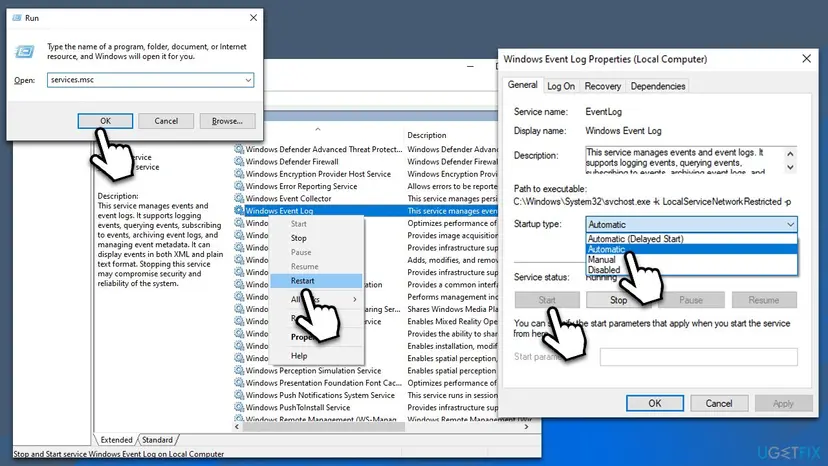
- The Windows Event Log service. It must be running. Check it in Services: Check and restart Windows services.
On a work PC send these four items to IT. A full log is not a hardware fault and not malware by itself, but a log cleared by someone you do not know (event 1102 with a strange account) is worth reporting.
How to keep the Security log from filling up again
- Keep Overwrite events as needed (oldest events first) on any PC that has no rule to keep every event.
- Give the log enough room for the history you need (Fix 3).
- If every event must be kept, use Archive the log when full, do not overwrite events and watch the free space on C:.
- Check
wevtutil gl Securityafter a new security baseline or management tool is applied.
- Do not set the log to Do not overwrite events without someone who clears it on a schedule.
- Do not turn on the audit shutdown policy on a home PC: it turns a full log into a crash.
- Do not raise every audit category to success and failure unless someone reads them.
- Do not delete
Security.evtxby hand. Use Clear Log so Windows records who cleared it.
These settings are the same on Windows 11 and Windows 10. Windows 10 no longer gets regular security updates since 14 October 2025, which is one more reason to keep its security history readable.
Frequently asked questions
What does Event ID 1104 mean?
It means the Security log reached its maximum size and Windows may not overwrite old events, so it stopped recording new ones. The event comes from Microsoft-Windows-Eventlog, has the level Error and reads "The security log is now full." Microsoft documents it as a normal audit event, not a bug. Its own advice is to archive the log or clear it. To stop it for good, set the log to overwrite events as needed (Fix 1) or let it archive itself when full.
How do I fix "the security log on this system is full" on Windows 11?
Open Event Viewer, select Windows Logs, right-click Security and select Properties. Choose Overwrite events as needed (oldest events first) and select OK. Then right-click Security again, select Clear Log and Save and Clear, so the old events stay in a file. The steps are the same on Windows 10. If the options are greyed out, a policy controls them, and Fix 4 shows how to find it.
Why can only administrators sign in when the security log is full?
Because the PC uses the CrashOnAuditFail feature. Microsoft explains that with this value set to 1, Windows halts with Stop C0000244 when it cannot write a security event, then changes the value to 2. With 2, only administrators may sign in. The idea is that no audited action can happen while it cannot be recorded. Sign in as an administrator, save and clear the Security log, set CrashOnAuditFail to 1 or 0 and restart (Fix 5).
Is it safe to clear the Security log?
Yes, as long as you do not need the old events, or you save them first. Clearing removes the history of sign-ins and other audited actions, nothing else: no files, apps or settings. Use Save and Clear, so the events stay in an .evtx file you can open later. Windows then writes event 1102, "The audit log was cleared", with the account that did it. On a work PC ask IT first, because the log may be evidence.
Is "auditing log is full" the same as "security log is full"?
Yes. The Security log is where Windows writes its audit events, so a full audit log and a full Security log are the same thing. Both lead to event 1104 when the log may not overwrite, and to Stop C0000244 when the audit shutdown policy is on. The fixes on this page apply to both wordings, and you may also see it written as security logs full, security log full or event 1104.
Can a Windows update cause event 1104?
We found no Microsoft known issue that ties event 1104 to a Windows update. The event depends only on the log size and the retention method. An update can be involved indirectly: it may come with a changed security baseline, or a management tool may apply new policies at the same time. That is why Fix 4 checks the policies first. Removing an update is not a fix for a full log.
How big should the Security log be?
There is no single right size. The Windows 10 PC in our old screenshot had a maximum of 20,480 KB. A home laptop with overwrite turned on is fine with that. A PC that audits file access or file shares can fill it within hours and may need several hundred megabytes. Count the events for a day with the command in Fix 7, then pick a size that keeps the number of days you need. Leave free space on drive C:.
What are event IDs 4663, 4738 and 5145, and do they fill the log?
They are other Security log events. 4663 records an attempt to access an object such as a file, 5145 records a check of access to a file share, and 4738 records a change to a user account. When object access or file share auditing is on, 4663 and 5145 can appear thousands of times a day and fill the log fast. 4738 is rarer. Fix 7 shows how to count them and turn down only the categories nobody reads.
Does restarting the Windows Event Log service fix event 1104?
No. Restarting the service does not empty the log and does not change its retention method. The old version of this guide suggested it, under the wrong name of a different service. The service, named EventLog, only needs to be running with the startup type Automatic. If it is stopped, no log works at all, which is a different problem. Fix 1 and Fix 2 are what solve a full log.
Sources
- Microsoft Learn: 1104(S) The security log is now full (learn.microsoft.com)
- Microsoft Learn: Audit: Shut down system immediately if unable to log security audits (learn.microsoft.com)
- Microsoft Learn: Users cannot access Web sites when the security event log is full (KB 832981, CrashOnAuditFail values) (learn.microsoft.com)
Did this fix work?
One click, no account. It tells the next reader which guides are worth their time.
Questions and experiences: fix The security log is now full (Event ID 1104) in Windows
Still broken, or found a fix we did not cover? Ask here: members and our editors answer. Reading is open; writing needs a free account.
…