
How to fix Windows Defender error code 0x800106ba on Windows 10 and Windows 11?

Prefer to fix it yourself? The manual steps follow.
- 7methods
- 5 to 45 minutes
- Intermediate
Applies to Microsoft Defender Antivirus (formerly Windows Defender) on Windows 11 and Windows 10, in Windows Security, MpCmdRun.exe, PowerShell and Windows Update
7 methods in this guide
Hi, I was wondering if you could help me with Windows Defender. It will not finish a full scan, but instead shows the 0x800106ba error and is disabled, so it needs to be restarted manually. I've noticed that this started a couple of days after I installed Build 10130. Any idea what the problem is? Is it possible for me to fix the issue manually? I would highly appreciate help!
Error 0x800106ba means the Microsoft Defender Antivirus service is not running, so a scan, an update or a PowerShell command has nothing to talk to. Most often another antivirus switched Defender off, less often a policy or a damaged Defender engine. Check which antivirus is active first, then remove what blocks Defender.
0x800106ba is Microsoft's code for "the Microsoft Defender Antivirus service is disabled". Open Windows Security > Virus & threat protection and check whether another antivirus is named (Fix 1). If it is, either use that program or uninstall it completely, and Defender turns itself back on (Fix 2). If no other antivirus is installed, remove the policies that turn Defender off (Fix 3) and reset its engine (Fix 4).
| Error | 0x800106ba, also shown as 800106BA or hr=0x800106ba. Microsoft: "The Microsoft Defender Antivirus service is disabled. Enable the service and try again." |
|---|---|
| Where it appears | When a Defender scan stops, in MpCmdRun.exe output, in PowerShell commands such as Get-MpPreference, and as Install error - 0x800106ba in Windows Update. |
| Main cause | Another antivirus is installed, or its leftovers are, so Windows switched Defender off. Microsoft calls this disabled mode and says it happens automatically. |
| Fastest fix | Uninstall the other antivirus completely and restart (Fix 2). Microsoft says Defender then turns itself back on. |
| Also written as | 0x800106BA, 800106ba, error code 800106ba, HRESULT 0x800106ba, CmdTool: Failed with hr = 0x800106ba, ValidateMapsConnection failed (800106BA). |
| Affects | Windows 11 and Windows 10, and Windows Server. In 2014 and 2019 faulty Defender updates caused it on Windows 7 and 8.1, which Microsoft fixed with later updates. |
| Vendor status | A documented state, not a bug: Microsoft lists the code under common MpCmdRun errors. No current known issue ties it to a Windows update. |
| Where the cause is logged | Event Viewer: Applications and Services Logs > Microsoft > Windows > Windows Defender > Operational, events 5001 and 5007. MpCmdRun writes MpCmdRun.log in your Temp folder. |
| Not the cause | Not a broken file and not a hardware fault. The old advice to re-register Windows Update DLL files does not touch the Defender service. |
| Time to fix | 5 minutes to check, 15 to 45 minutes to remove another antivirus or reset Defender. |
Facts checked on 15 October 2026. Steps written for Windows 11 (25H2 and 26H2) and Windows 10 22H2.
What error code 0x800106ba means in Microsoft Defender
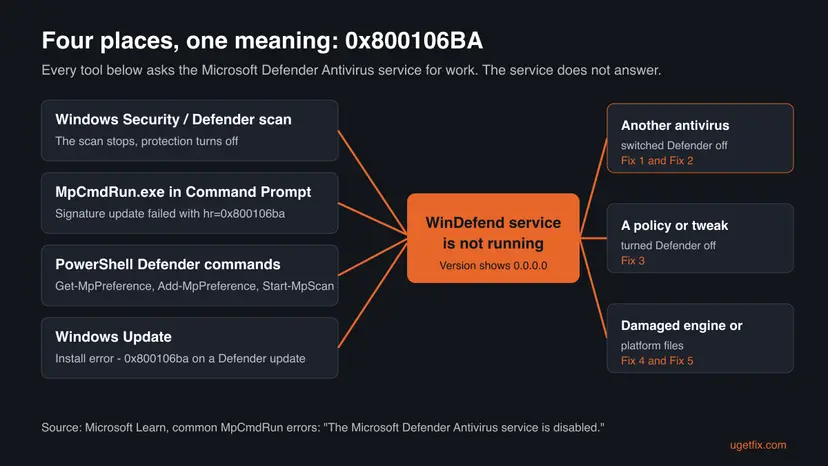
0x800106ba is an HRESULT that Microsoft Defender Antivirus returns when its service is not running. Microsoft's page about the MpCmdRun tool lists it under common errors with one line: "The Microsoft Defender Antivirus service is disabled. Enable the service and try again."
Every Defender tool is only a front end. Windows Security, MpCmdRun.exe, the PowerShell Defender commands and the update installer all hand their work to one service, Microsoft Defender Antivirus Service (service name WinDefend). When that service is off, each of them fails with the same number.
- Spellings. 0x800106ba, 0x800106BA, 800106ba, hr=800106BA and HRESULT 0x800106ba are the same code. People also search it with "errore" (Italian) and "Fehlercode" (German).
- A telltale sign. When the service is off, MpCmdRun often prints
Service Version: 0.0.0.0andEngine Version: 0.0.0.0above the error, as users posting on Microsoft Q&A report. - Not the same as 0x800706ba. That code differs by one digit and means "The RPC server is unavailable" (Win32 error 1722). It shows up with printers and remote tools, not with Defender.
Microsoft renamed Windows Defender to Microsoft Defender Antivirus. Microsoft notes that in Windows 10 version 1909 and earlier the service was still called Windows Defender Antivirus Service. The error and the fixes are the same under both names.
Where 0x800106ba appears: scans, MpCmdRun, PowerShell and Windows Update
The words around the code depend on the tool you used. The table lists the messages people search for and what each one tells you.
| What you see | Where | What it tells you |
|---|---|---|
ERROR: Signature Update failed with hr=0x800106ba and CmdTool: Failed with hr = 0x800106ba. | Command Prompt, MpCmdRun.exe -SignatureUpdate | The update could not start because the service is off. A newer download does not help until the service runs. |
Starting Dynamic Signature removal.Failed! Error 0x800106ba | MpCmdRun.exe -RemoveDefinitions -DynamicSignatures | Same cause. The removal needs the service too. |
Get-MpPreference : Operation failed with the following error: 0x800106ba | PowerShell, also Set-MpPreference, Add-MpPreference and Start-MpScan | The settings live in the service. With the service off there is nothing to read or change. |
| Install error - 0x800106ba | Settings > Windows Update, on a Security Intelligence update for Microsoft Defender Antivirus | Windows Update downloaded the update but Defender could not take it. |
| Your PC couldn't be scanned | Windows Defender scan window | The service stopped during the scan. See the full text below. |
Older Windows Defender showed it in a window. A reader on Microsoft Q&A quoted it in full: "Your PC couldn't be scanned. The program's service has stopped. You can start the service manually or restart your computer, which will restart the service." Below that it read Error code: 0x800106ba. Current Windows Security shows Threat service has stopped. Restart it now. without a code, as Microsoft's own screenshots show.
Scripts that call Add-MpPreference or Get-MpPreference fail with this code on any machine where Defender is not the active antivirus. Microsoft Q&A posts show the same on Windows Server 2019. Check the mode with Get-MpComputerStatus before the script touches Defender settings.
What causes error 0x800106ba, from most to least common
Most often another antivirus is installed, even an expired trial, and Windows has switched Defender off. Less often a policy or a "disable Defender" tweak has turned it off. Rarely the Defender engine itself is damaged, or malware stopped it.
| Cause | How often | How to tell | Fix |
|---|---|---|---|
| A non-Microsoft antivirus is installed, so Defender is in disabled mode. | Most often | Windows Security names another program under Virus & threat protection. | Fix 1, Fix 2 |
| Leftovers of an antivirus that was removed or expired still register it. | Often | No antivirus in the app list, but Defender stays off after a restart. | Fix 2 |
| A Group Policy, a registry value or a tweak tool turned Defender off. | Sometimes | Values under HKLM\SOFTWARE\Policies\Microsoft\Windows Defender, or a work or school PC. | Fix 3 |
| The Defender platform, engine or definitions are damaged. | Sometimes | MpCmdRun shows version 0.0.0.0, updates keep failing. | Fix 4, Fix 5 |
| Malware stopped Defender and keeps it off. | Rarely | Defender turns off again after every fix. | Fix 6 |
| Damaged Windows system files. | Rarely | Other Windows parts fail as well. | Fix 7 |
Two waves of this error came from Microsoft itself. In August 2014 a volunteer on Microsoft's forum tied it to antimalware engine 1.1.10903.0, replaced three days later by 1.1.10904.0. In March 2019 definition version 1.289.1521.0 caused it on Windows 7, 8 and 8.1, according to Windows Latest, which reported that Windows 10 was not affected. Both are long fixed.
How to fix Windows Defender error 0x800106ba
Fix 1 takes five minutes and tells you which of the next fixes you need. Fix 2 ends most cases. Fix 3 and Fix 4 are for PCs without another antivirus. Fixes 5 to 7 come last, because they help only once the service can run again.
| What you see or what your PC has | Start with |
|---|---|
| Windows Security names another antivirus, or one was installed in the past | Fix 1, then Fix 2 |
| A work or school PC, or you ran a tool that "disables Defender" | Fix 3 (on a work PC, your administrator) |
| MpCmdRun shows Service Version 0.0.0.0 or Engine Version 0.0.0.0 | Fix 4 |
| Install error - 0x800106ba in Windows Update | Fix 1, then Fix 5 |
Get-MpPreference or Add-MpPreference fails in a script | Fix 1 |
| Defender switches itself off again after every fix | Fix 6 |
| Nothing above helped | Fix 7 |
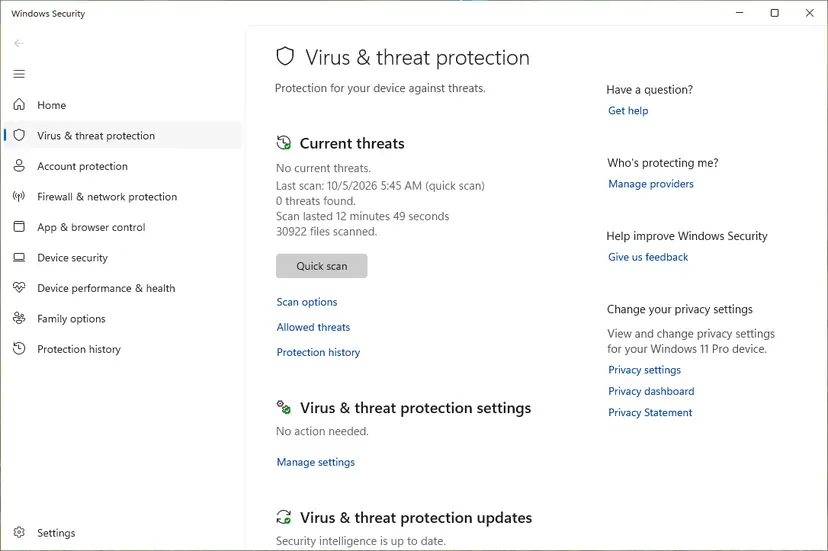
Fix 1. Check which antivirus is active and whether the Defender service runs
5 minutesNo riskEveryone with this error. It decides which of the next fixes you need.
Microsoft writes that when you install a compatible non-Microsoft antivirus, Defender turns itself off. In that state 0x800106ba is the expected answer to any Defender command, so the first question is which program protects the PC.
- Select Start, type Windows Security and open the app.
- Select Virus & threat protection. If the page names another program as your antivirus, that program is active and Defender is off. Go to Fix 2.
- If the page shows Threat service has stopped. Restart it now., select Restart now once and wait a minute.
- Right-click Start and select Terminal (Admin). On Windows 10 select Windows PowerShell (Admin).
- Ask Defender for its state.
AMRunningModeshould read Normal, and the other three values True.Get-MpComputerStatus | Select-Object AMRunningMode, AMServiceEnabled, AntivirusEnabled, RealTimeProtectionEnabled - If that command itself fails with 0x800106ba, list the services Microsoft asks you to check.
Get-Service WinDefend, WdBoot, WdFilter, WdNisSvc, WdNisDrv, SecurityHealthService, wscsvc | Format-Table -Auto DisplayName, Name, StartType, Status - Compare the result with the table below.
| Service | Name | Expected start type | Expected status |
|---|---|---|---|
| Microsoft Defender Antivirus Service | WinDefend | Automatic | Running |
| Microsoft Defender Antivirus Mini-Filter Driver | WdFilter | Boot | Running |
| Microsoft Defender Antivirus Network Inspection Service | WdNisSvc | Manual | Running |
| Microsoft Defender Antivirus Boot Driver | WdBoot | Boot | Stopped (normal after start-up) |
| Windows Security Service | SecurityHealthService | Manual | Running |
| Security Center | wscsvc | Automatic | Running |
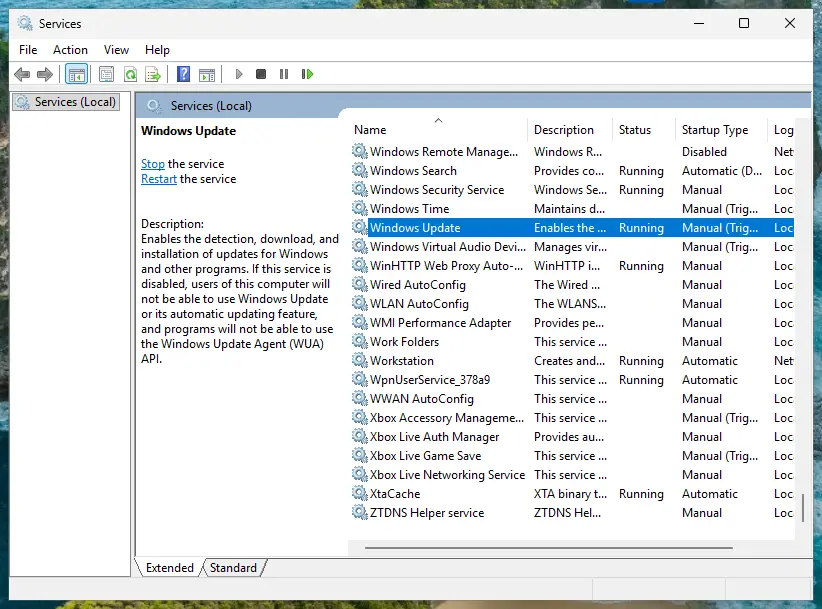
Older guides tell you to open Services and set the Defender service to Automatic. On current Windows this service is protected. A Windows Server user on Microsoft Q&A reported that the option was greyed out or access was denied. The fixes below change the cause instead.
It worked if: You know which antivirus is active. Either another program is named, or AMRunningMode reads Normal and WinDefend is Running, and the command that failed now works.
If not: Another antivirus is named, or one was installed before: Fix 2. No other antivirus and WinDefend stays stopped: Fix 3.
Fix 2. Uninstall the other antivirus completely, including its leftovers
15 to 30 minutesLow riskWindows Security names another antivirus, or one was installed in the past, even as a trial that came with the PC.
Microsoft states that Defender can switch itself back on when the other antivirus expires, is uninstalled or stops giving real-time protection. A half-removed product can keep its registration, so Windows still thinks someone else protects the PC.
If you pay for the other antivirus and want to keep it, nothing is broken. Defender is meant to be off, so run your scans in that program and leave Defender commands alone. Remove it only if you want Microsoft Defender to protect the PC.
- Uninstall from the Start menu. Select Start > All apps and find the app. Right-click it (or press and hold) and select Uninstall.
- Or uninstall in Settings. Select Start > Settings > Apps > Installed apps. Find the app, select More (the three dots) > Uninstall, and confirm.
- Or uninstall from Control Panel. Some programs can only be removed here. Type Control Panel in the search box on the taskbar and open it, then select Programs > Programs and Features. Right-click the program and select Uninstall or Uninstall/Change, then follow the program's own uninstaller.
- Restart if the uninstaller asks. Some programs finish removing their files only after a restart.
These steps were written for Windows 11 24H2 and 25H2. The full page with the other versions and what each result means: Uninstall a program or app in Windows
- Restart the PC after the uninstaller ends, even if it does not ask.
- Open the support site of the antivirus maker and search for its removal tool. Many vendors offer one for exactly this case. Run it and restart again.
- Open Windows Security > Virus & threat protection. After the restart Defender should be listed as active.
- Run the command that showed 0x800106ba once more.
- An expired antivirus counts too. A reader on Microsoft Q&A had an expired product still installed, and Defender would not start until it was removed.
- Never run two real-time scanners. If you install a different antivirus later, Defender steps aside again, and this error returns for Defender commands. That is normal.
It worked if: Windows Security shows Microsoft Defender Antivirus as active, Virus & threat protection has no warning, and a quick scan or MpCmdRun.exe -SignatureUpdate runs without the code.
If not: If no other antivirus is left and Defender is still off, remove the policies that switch it off with Fix 3.
Fix 3. Remove the policies and tweaks that turn Defender off
10 minutesRead the warningNo other antivirus is installed, but Defender stays off, or you once used a tool or script that "disables Defender".
Group Policy, privacy tools and scripts switch Defender off by writing values under the policies key. Windows obeys them at every start, so the service never runs. Microsoft's repair steps back up this key and then delete it.
Deleting the key removes every Defender policy on the PC, including exclusions and scan schedules set as policy. The backup in step 2 brings them back. On a work or school PC do not delete anything: the policies come from your organization, and only the administrator can change them.
Before any registry change, keep a copy of the registry: Back up the registry before editing it
- Right-click Start and select Terminal (Admin). On Windows 10 select Windows PowerShell (Admin).
- Back up the Defender policies, as Microsoft's repair steps do.
New-Item -Path "C:\DefenderTemp" -ItemType Directory; reg export "HKLM\SOFTWARE\Policies\Microsoft\Windows Defender" C:\DefenderTemp\_DefenderAVBackup.reg - If the export reports that the key does not exist, no policy turns Defender off. Skip to Fix 4.
- Delete the policies.
Remove-Item -Path 'HKLM:\SOFTWARE\Policies\Microsoft\Windows Defender' -Recurse -Force - Open an administrator Command Prompt, go to the Defender folder and switch Defender back on with the command Microsoft documents for this.
cd /d "%ProgramFiles%\Windows Defender" MpCmdRun.exe -WdEnable - Restart the PC and open Windows Security > Virus & threat protection.
If a policy still sets Defender off after the restart, it comes back from somewhere. On Windows Pro check the Local Group Policy Editor, which shows Defender settings under Windows Components: Open the Local Group Policy Editor
- Tamper Protection. Microsoft's steps end by checking that Tamper Protection is on, in Virus & threat protection settings > Manage settings. It stops apps from changing Defender settings behind your back.
- Work or school PC. Copy the error and the output of Fix 1 and send them to your IT team.
It worked if: After the restart Windows Security shows real-time protection on, and Get-MpComputerStatus reports AMRunningMode Normal.
If not: If the policies key was empty or Defender still does not start, reset its engine and platform with Fix 4.
Fix 4. Reset the Defender engine, definitions and platform with MpCmdRun
10 minutesLow riskNo other antivirus and no policy, but MpCmdRun shows version 0.0.0.0, or updates fail with hr=800106BA.
A failed update can leave the engine or the platform files half replaced, and then the service cannot start. Microsoft's repair removes the security intelligence and engine, puts the platform back to the copy that ships with Windows, and downloads fresh files.
- Select Start, type cmd, right-click Command Prompt and select Run as administrator.
- Go to the Defender folder. Microsoft notes that MpCmdRun is not in the PATH, so without this step the command is not recognized.
cd /d "%ProgramFiles%\Windows Defender" - Remove the security intelligence and the engine.
MpCmdRun.exe -RemoveDefinitions -All - Put the platform files back to the version in
%ProgramFiles%\Windows Defender.MpCmdRun.exe -ResetPlatform - Switch Defender on again.
MpCmdRun.exe -WdEnable - Download fresh definitions straight from Microsoft.
MpCmdRun.exe -SignatureUpdate -MMPC - Restart the PC.
Microsoft's own steps start in the newest platform folder under %ProgramData%\Microsoft\Windows Defender\Platform\. Microsoft lists %ProgramFiles%\Windows Defender as the second location of MpCmdRun and uses it when the newer folder does not exist. We use it here because it is the same path on every PC.
Then the service does not run at all, and MpCmdRun cannot reach it. That points back at another antivirus (Fix 2) or a policy (Fix 3). A Windows Server user on Microsoft Q&A found that SFC and DISM reported no damage in exactly this case.
It worked if: MpCmdRun.exe -SignatureUpdate -MMPC ends with a finished update instead of hr=0x800106ba, and the version lines show real numbers instead of 0.0.0.0.
If not: If the reset worked but updates still fail in Windows Update, install the definitions by hand with Fix 5.
Fix 5. Install the latest security intelligence update by hand
5 to 15 minutesNo riskWindows Update shows Install error - 0x800106ba on a Defender update, or definitions are days old.
Once the service runs again, Defender needs current definitions before it scans normally. On 15 October 2026 Microsoft listed security intelligence 1.461.34.0, engine 1.1.26090.9 and platform 4.18.26090.9 as the newest.
- Open Windows Security and select Virus & threat protection > Protection updates > Check for updates.
- If that fails, open Settings > Windows Update and select Check for updates. On Windows 10 it is Settings > Update & Security > Windows Update.
- If the update still fails, open Microsoft's page Latest security intelligence updates for Microsoft Defender Antivirus (link in the sources).
- Download the file for your Windows. Microsoft names them
mpam-fe.exeandmpam-feX64.exe. Choose 64-bit on a 64-bit Windows. - Run the downloaded file. Microsoft says you simply launch it to install the latest security intelligence.
- Open Protection updates again and check the date of the last update.
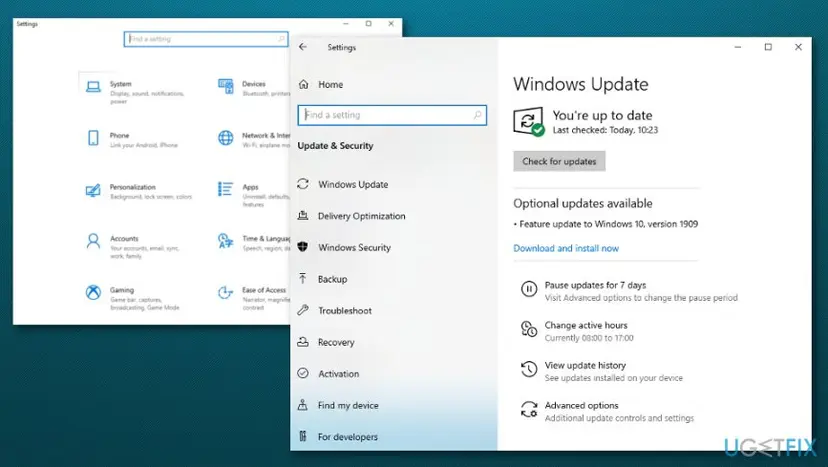
Windows 10 left support on 14 October 2025. Microsoft still publishes Defender definitions for it, but Windows itself gets no fixes without Extended Security Updates. If a Windows update fails, see Install an update from the Microsoft Update Catalog.
It worked if: Protection updates shows today's date, and Windows Update no longer lists the Defender update as failed.
If not: If the manual file also fails with 0x800106ba, the service is still off. Go back to Fix 2 or Fix 3, or check for malware with Fix 6.
Fix 6. Check for malware that keeps Defender switched off
20 minutes to several hoursNo riskDefender turns itself off again after Fix 2 to Fix 4, or settings change without you.
Stopping the built-in antivirus is a common first move of malware. Microsoft's repair steps include a run of the Microsoft Safety Scanner for this reason, because it works even while Defender is down.
- Download the Microsoft Safety Scanner from Microsoft's page (link in the sources). Pick the 64-bit file on a 64-bit Windows. Microsoft notes that a download expires 10 days after you get it.
- Run the downloaded file, select the type of scan and start it. Choose the most thorough type the tool offers.
- Review the results on screen. Microsoft says the detailed log is
%SYSTEMROOT%\debug\msert.log. Restart when asked. - Repeat Fix 3 and Fix 4, then check whether Defender stays on after a restart.
Once Defender runs again, run its own full scan as well: How to scan for malware with Microsoft Defender
It worked if: The Safety Scanner reports no infection or removes one, and Defender stays on after two restarts in a row.
If not: If the scan is clean and Defender still fails, repair Windows itself with Fix 7.
Fix 7. Repair Windows system files, then repair Windows in place
20 to 90 minutesLow riskFixes 1 to 6 did not help, and other Windows parts fail as well.
Defender relies on Windows services, drivers and the component store. If those are damaged, the service can fail even with clean settings. DISM and SFC repair Windows files, and a repair install replaces Windows while keeping apps and files.
- Open an elevated command window. Right-click Start and select Terminal (Admin), or type cmd in the search box, right-click Command Prompt and select Run as administrator. Select Yes when Windows asks for permission.
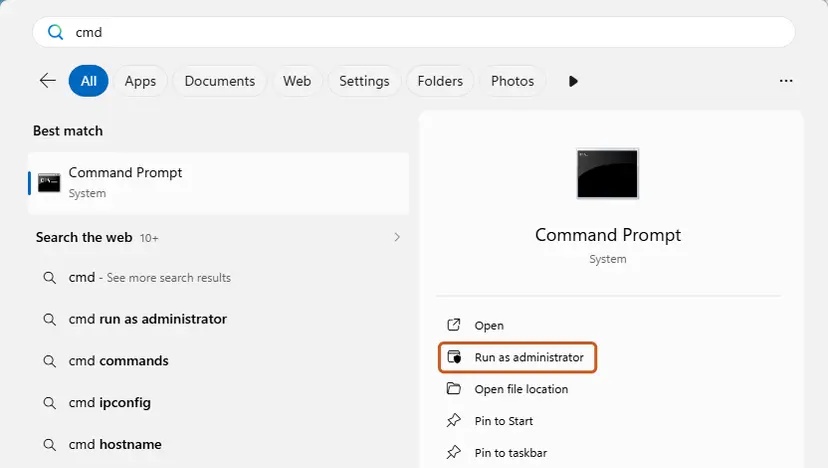
Search for cmd and choose Run as administrator. Screenshot: Windows 11 26H2. - Run DISM first. Type the command below and press Enter. DISM downloads clean copies of damaged components from Windows Update, so it can take several minutes. Wait until it says The operation completed successfully.
DISM.exe /Online /Cleanup-Image /RestoreHealth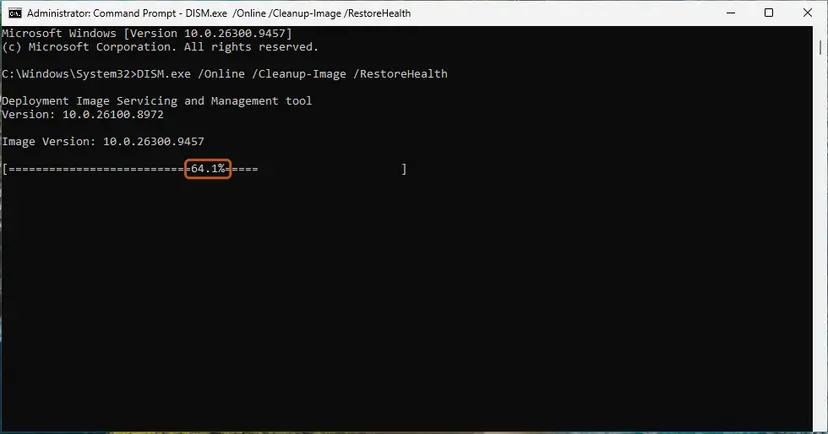
DISM /RestoreHealth running. Screenshot: Windows 11 26H2. - Run System File Checker. In the same window, type the command below and press Enter. Do not close the window until the verification reaches 100%.
sfc /scannow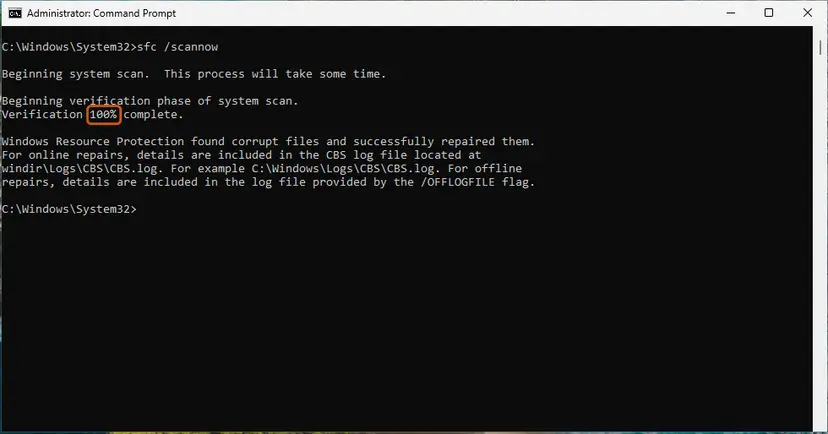
sfc /scannow at 100%. Screenshot: Windows 11 26H2. - Read the result and restart. Compare the last message with the table below this guide, then restart the PC so that repaired files are loaded.
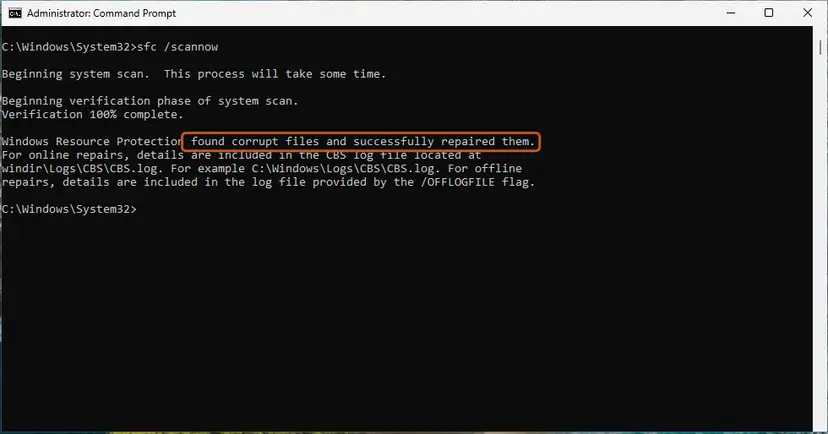
The result line tells you what SFC did. Screenshot: Windows 11 26H2.
These steps were written for Windows 11 24H2 and 25H2. The full page with the other versions and what each result means: Run DISM and SFC to repair Windows system files
- Restart and check Windows Security > Virus & threat protection again.
- If Defender is still off on Windows 11, open Settings > System > Recovery and select Reinstall now next to Fix problems using Windows Update.
- Keep the PC plugged in and online until it restarts into Windows.
- Run Fix 1 once more to confirm that WinDefend is running.
Routes for Windows 10 and the other options: Reinstall Windows without losing files
It worked if: SFC reports no integrity violations or repaired files, and after the repair Defender is active with WinDefend running.
If not: If Defender is still off on a freshly repaired Windows, collect the logs in the next section and contact Microsoft support.
If 0x800106ba is still there: the logs to read and what to send
When nothing helps, stop changing settings and collect evidence. Defender writes its reasons in two places, and one command packs them into a file for Microsoft support.
| Where | What to look for |
|---|---|
| Event Viewer: Applications and Services Logs > Microsoft > Windows > Windows Defender > Operational | Event 5001 (real-time protection was disabled) and event 5007 (configuration changed). A 5007 that names ServiceStartStates or a policy value shows what turned Defender off. |
MpCmdRun.log in your Temp folder, for example C:\Users\<you>\AppData\Local\Temp\MpCmdRun.log | The command, the time and the HRESULT of every MpCmdRun run. MpCmdRun names the exact path when it fails. |
MpCmdRun.exe -GetFiles in an administrator Command Prompt | Packs the Defender logs into C:\ProgramData\Microsoft\Windows Defender\Support\MpSupportFiles.cab. |
- What to send to Microsoft support: the exact message, the output of both commands in Fix 1, the Windows build from
winverand the MpSupportFiles.cab file when they ask for it. - What not to post in public. The CAB file holds logs and system details of your PC. Give it to the person who investigates, not to a public forum.
- The old advice to upload the CAB to the malware submission portal. That portal is for suspicious files. We could not confirm that it accepts Defender log packages today.
Almost never. 0x800106ba says the service is off, and a service is turned off by settings, software or a damaged install. Suspect the drive only if SFC keeps finding new damage after each repair. Then check it: Check a disk for errors (chkdsk)
How to keep error 0x800106ba from coming back
- Use one antivirus at a time, and remove a trial completely when you stop using it.
- Keep Tamper Protection on, so other apps cannot switch Defender off quietly.
- In scripts, check
AMRunningModewithGet-MpComputerStatusbefore you callAdd-MpPreferenceorStart-MpScan. - Let Defender update itself, and restart when Windows Update asks.
- Do not run "debloat" or privacy tools that disable Defender, unless another antivirus protects the PC.
- Do not re-register Windows Update DLL files for this code. They have nothing to do with the Defender service.
- Do not delete files in the Defender folders by hand. Use
MpCmdRun.exe -ResetPlatforminstead. - Do not change Defender policies on a work or school PC.
Windows 11 adds one twist. Microsoft notes that with Smart App Control on, Defender may go to passive mode instead of disabled mode when another antivirus is present. The cure is the same: decide on one antivirus and remove the other.
Frequently asked questions
What does error code 0x800106ba mean?
It means the Microsoft Defender Antivirus service is not running. Microsoft lists the code with the explanation "The Microsoft Defender Antivirus service is disabled. Enable the service and try again." Windows Security, MpCmdRun, the PowerShell Defender commands and Windows Update all pass their work to that service, so all of them fail with this code when it is off. The most common reason is another antivirus, which makes Windows switch Defender off. Policies, tweak tools, a damaged Defender engine or malware are the less common reasons.
How do I fix install error - 0x800106ba in Windows Update?
This message appears on a Security Intelligence update for Microsoft Defender Antivirus. Windows Update downloaded it, but Defender could not take it because its service is off. Retrying the update does not help on its own. First check in Windows Security whether another antivirus is active (Fix 1), and remove it if you want Defender (Fix 2). Then install the update again from Virus & threat protection > Protection updates, or by hand with the mpam-fe file from Microsoft's download page (Fix 5).
Why does Get-MpPreference fail with error 0x800106ba?
Get-MpPreference reads Defender settings from the Defender service. When the service is disabled, the command answers "Operation failed with the following error: 0x800106ba". The same happens with Set-MpPreference, Add-MpPreference and Start-MpScan. On a PC with a third-party antivirus this is normal, because Defender is meant to be off there. In a script, check Get-MpComputerStatus first and skip Defender commands when AMRunningMode is not Normal. If Defender should be the active antivirus, work through Fix 2 to Fix 4.
What does "Signature update failed with hr=0x800106ba" mean?
It is the output of MpCmdRun.exe -SignatureUpdate when the Defender service is not running. The update never starts, so a newer download or a different update source does not help. Users who post this output on Microsoft Q&A usually also see Service Version and Engine Version as 0.0.0.0. Bring the service back first: remove another antivirus (Fix 2), clear Defender policies (Fix 3), or reset the engine and platform (Fix 4). Then run the update again with -SignatureUpdate -MMPC.
Can I keep my other antivirus and fix 0x800106ba?
You can keep it, but then the error is not a fault. Microsoft designed Windows to switch Defender off when a compatible non-Microsoft antivirus is installed, so Defender commands answer with 0x800106ba. Your protection then comes from the other program. Run scans and updates in that program instead. If you want Defender back, Microsoft says it turns on again when the other product is uninstalled, expires or stops giving real-time protection. Do not run two real-time scanners side by side.
Is error 0x800106ba a virus?
The code itself is not a virus. It only says the Defender service is off. In most cases another antivirus or a setting is the reason. Malware is a less common cause, but it does try to stop antivirus software. Suspect it when Defender switches itself off again after you fixed it, or when settings change without you. Scan the PC with the Microsoft Safety Scanner, which runs without Defender (Fix 6), and run a full Defender scan once the service works again.
Why does a Defender full scan stop with 0x800106ba?
The service stopped during the scan. Older Windows Defender then showed "Your PC couldn't be scanned. The program's service has stopped." In 2014 and 2019 faulty Microsoft engine and definition updates caused this on Windows 7 and 8.1, and later updates fixed them. Today a scan that stops this way usually means another security program interfered or the Defender engine is damaged. Check the active antivirus (Fix 1), reset the engine (Fix 4) and update the definitions (Fix 5).
What does errore 0x800106ba or Fehlercode 800106ba mean?
These are the Italian and German ways to write the same code. Errore and Fehlercode both mean error or error code, and 800106ba is 0x800106ba without its prefix. The meaning does not change with the language of Windows: the Microsoft Defender Antivirus service is disabled. The fixes on this page work the same on Windows in any language, although the menu names you see are translated. This page is in English.
Is 0x800706ba the same as 0x800106ba?
No. The two codes differ by one digit and have nothing in common. 0x800706ba is Win32 error 1722, which Microsoft describes as "The RPC server is unavailable". It appears with printers, remote management and some downloads when one Windows component cannot reach another. 0x800106ba belongs to Microsoft Defender and means its service is disabled. If your message about a printer or a download shows 0x800706ba, the fixes on this page do not apply.
Sources
- Microsoft Learn: Configure and manage Microsoft Defender Antivirus with the MpCmdRun command-line tool (common MpCmdRun errors, 0x800106BA) (learn.microsoft.com)
- Microsoft Learn: Troubleshoot Microsoft Defender Antivirus service startup problems (services, events 5001 and 5007, resolution steps) (learn.microsoft.com)
- Microsoft Learn: Microsoft Defender Antivirus compatibility with other security products (disabled mode, passive mode) (learn.microsoft.com)
Did this fix work?
One click, no account. It tells the next reader which guides are worth their time.
Questions and experiences: fix Windows Defender error code 0x800106ba on Windows 10 and Windows 11
Still broken, or found a fix we did not cover? Ask here: members and our editors answer. Reading is open; writing needs a free account.
…