
How to fix Microsoft Store log in error 0x800704ec in Windows?

Prefer to fix it yourself? The manual steps follow.
- 6methods
- 5 to 30 minutes
- Intermediate
Applies to Microsoft Store and other Microsoft apps that sign in with a personal Microsoft account on Windows 11 and Windows 10
6 methods in this guide
Hi, I can't log into Microsoft Store. I get a 0x800704ec error every time. I do use two separate accounts, one for work and one for home, if that helps.
0x800704ec in the Microsoft Store means a policy on the PC forbids apps from signing in with a Microsoft account. On a work PC that block is usually on purpose. On your own PC, find who set it: a connected work or school account, a Group Policy setting or a registry value.
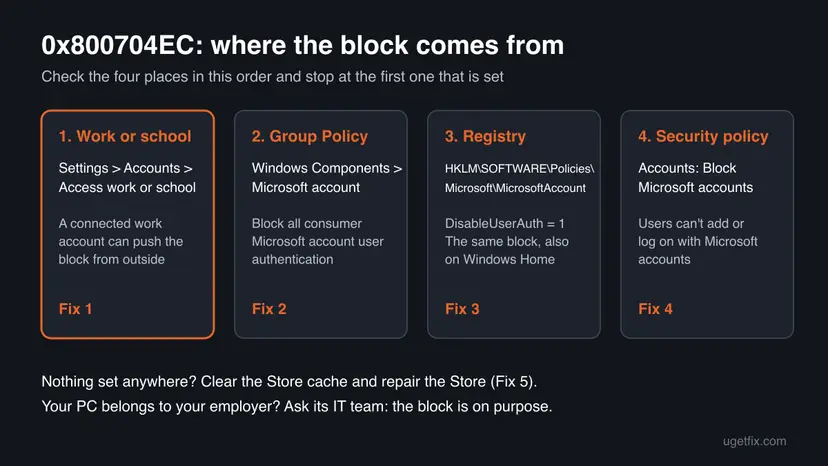
0x800704ec means "This program is blocked by group policy". Something set a policy that stops apps from using a Microsoft account. First check Settings > Accounts > Access work or school for a work account you connected (Fix 1). Then set Block all consumer Microsoft account user authentication to Not Configured in Group Policy (Fix 2), or remove the DisableUserAuth registry value on Windows Home (Fix 3).
| Error | This program is blocked by group policy. For more information, contact your system administrator. with the code 0x800704ec when you sign in to the Microsoft Store. |
|---|---|
| Where it appears | When you select Sign in in the Microsoft Store, or in other Store apps such as Whiteboard. The Store itself usually still opens and shows apps. |
| Main cause | The policy Block all consumer Microsoft account user authentication is on. It is set by a work or school management connection, by Group Policy or by the registry value DisableUserAuth. |
| Fastest fix | On your own PC, disconnect a work account you no longer need, or set the policy to Not Configured and restart. About 10 minutes. |
| Also written as | 0x800704EC, 800704ec, error code 0x800704ec, Windows error 1260. Searches in other languages: код ошибки 0x800704ec. |
| Affects | Windows 11 and Windows 10. Microsoft documents the policy for Pro, Enterprise and Education. Windows Home has no Group Policy editor, so there it is checked in the registry. |
| Microsoft's status | Not a bug. It is a documented policy that is off by default. Microsoft says it does not stop Windows sign-in or sign-in on websites, only apps. |
| Time to fix | 5 minutes to check where the block comes from. Up to 30 minutes with the registry check and a Store repair. Nothing to download. |
Facts checked on 15 October 2026. Steps written for Microsoft Store sign-in on Windows 11 (25H2 and 26H2) and Windows 10 22H2, read against Microsoft Learn policy documentation and Microsoft Q&A.
What Microsoft Store error 0x800704ec means
You open the Microsoft Store, select Sign in and pick your account. Instead of your profile picture, a window says This program is blocked by group policy. For more information, contact your system administrator. with the code 0x800704ec. The Store still lists apps, but it will not let you sign in, install paid apps or see your library.
The code is Windows error 1260 written in hexadecimal (0x4EC is 1260). It does not mean a broken Store. It means Windows checked its policies and found one that forbids the action. A user on Microsoft Q&A who could open the Store but not sign in also saw the same block in Whiteboard, which fits a policy that covers every app.
| What you see | What it usually means | Start with |
|---|---|---|
| Store opens, Sign in fails with 0x800704ec | Apps may not use a Microsoft account on this PC | Fix 1, Fix 2 |
| The same block in other Microsoft apps | The same policy, it covers all apps on the device | Fix 2, Fix 3 |
| The Store will not open at all and says it is blocked | A different policy that turns off the Store app | Your administrator, or the last section |
| 0x800704ec when you turn on Microsoft Defender | Another policy, often linked to other security software | Not this page: see the FAQ |
Microsoft's documentation says this policy does not affect whether you can sign in to Windows with a Microsoft account, or sign in to websites in a browser. So you can still log on to the PC and use account.microsoft.com. Only apps such as the Store are refused.
What causes error 0x800704ec in the Microsoft Store, ranked
Microsoft does not publish how often each cause occurs. The order below follows how the policy is set and what users report with this code. It is our reading, not a statistic.
| How often | Cause | Typical sign | Fix |
|---|---|---|---|
| Most often | A work or school account connected to Windows, whose organisation pushes the block through device management | You added a work email in Settings, or the PC once belonged to a company. | Fix 1 |
| Often | Block all consumer Microsoft account user authentication set to Enabled in Group Policy | Windows Pro, Enterprise or Education, and a tweak or hardening tool was used. | Fix 2 |
| Often | The registry value DisableUserAuth left behind, for example on Windows Home | No Group Policy editor, or the policy shows Not Configured but the error stays. | Fix 3 |
| Less often | Accounts: Block Microsoft accounts in the local security policy | You also cannot add or switch to a Microsoft account in Settings. | Fix 4 |
| Rarely | A cached refusal in the Store after the policy is gone, or damaged system files | Every policy is clear, the error stays. | Fix 5, Fix 6 |
Microsoft's policy page explains why the error seems to appear out of nowhere. An app that signed you in before the block keeps working until its saved sign-in expires. The day you sign out, or the sign-in expires, the Store cannot sign you back in.
How to fix Microsoft Store error 0x800704ec
Fix 1 to Fix 4 each check one place where the block can be set. Stop at the first one you find, restart, and try Sign in in the Store again. If the PC belongs to your employer or school, do not change these settings: ask the IT team, because the block is deliberate there.
| Your case | Start with | Then |
|---|---|---|
| You use a work or school account on this PC too | Fix 1 | Fix 2 |
| Windows Pro and you used a tweak or privacy tool | Fix 2 | Fix 4 |
| Windows Home, or the Group Policy editor will not open | Fix 3 | Fix 5 |
| You cannot add a Microsoft account in Settings either | Fix 4 | Fix 2 |
| Every policy is clear and the error stays | Fix 5 | Fix 6 |
| The PC belongs to your employer or school | Ask the IT team | Use the Store on a personal PC |
Fix 1. Check for a work or school account connected to Windows
5 minutesLow riskYou use a second account for work or school on this PC, or the PC was once used at a company.
Microsoft publishes this block as a device policy that management services can set remotely. Connecting a work account can enrol the PC, and the organisation's rules then forbid personal Microsoft accounts in apps.
- Press Win + I and open Accounts > Access work or school.
- Look at the list. An entry such as Connected to ... Azure AD or Work or school account with a company name means the PC is linked to an organisation.
- Select the entry and look for an Info button. If it is there, the organisation manages the PC and can set policies on it.
- If this is your own PC and you no longer need that connection, select Disconnect and confirm.
- Restart the PC and try Sign in in the Microsoft Store again.
Disconnecting removes the organisation's access from this PC: work email, work OneDrive files and company apps may stop working here. If you still need them, ask the IT team instead whether they can allow personal Microsoft accounts. On a PC the company owns, do not disconnect at all.
It worked if: The entry is gone, and after the restart the Store signs you in with your personal account.
If not: If there was no work entry, or the error stays, check Group Policy with Fix 2.
Fix 2. Set Block all consumer Microsoft account user authentication to Not Configured
5 minutesLow riskWindows 11 or Windows 10 Pro, Enterprise or Education, with no work account in Fix 1.
This is the policy that produces the Store block. Microsoft says that when it is enabled, all applications and services on the device are prevented from using Microsoft accounts. Its default is Disabled.
- Press Win + R, type
gpedit.mscand select OK. If Windows says it cannot find it, you have Windows Home: go to Fix 3. - Go to Computer Configuration > Administrative Templates > Windows Components > Microsoft account.
- Double-click Block all consumer Microsoft account user authentication.
- Select Not Configured (or Disabled) and select OK.
- Open Terminal (Admin) and run this command so the change applies now:
gpupdate /force - Restart the PC and sign in to the Store again.
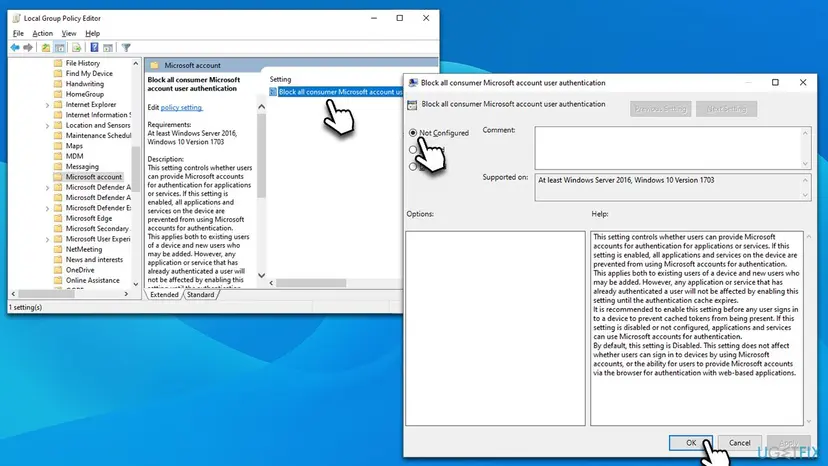
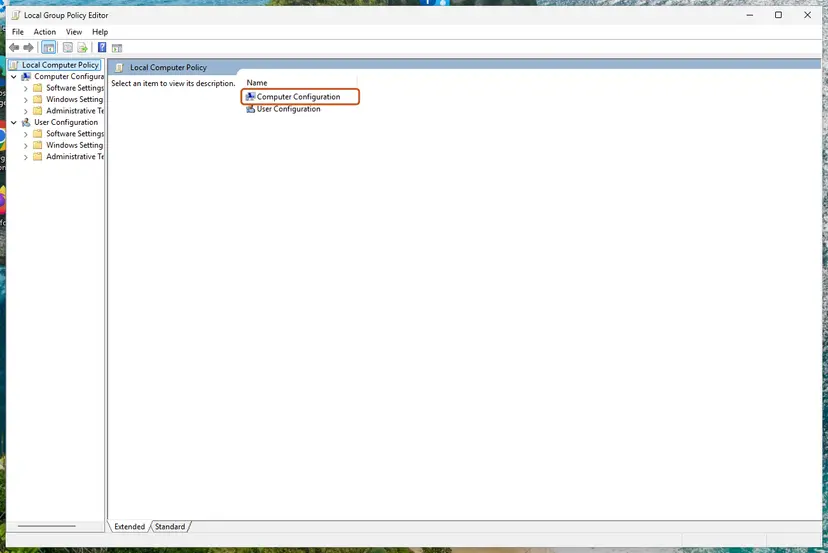
If the setting turns back to Enabled after a restart, something outside the PC sets it again: that is a managed PC, and Fix 1 or the IT team is the answer. All steps of the editor: Open the Local Group Policy Editor.
It worked if: The policy shows Not Configured, and the Store sign-in finishes with your account picture in the top corner.
If not: If it was already Not Configured, check the registry value with Fix 3.
Fix 3. Remove the DisableUserAuth registry value
10 minutesRead the warningWindows Home, where there is no Group Policy editor, or Fix 2 showed Not Configured but the error stays.
Microsoft documents that the policy is stored as the value DisableUserAuth under HKLM\Software\Policies\Microsoft\MicrosoftAccount. A tool or script can write it directly, even on Home, and then the editor in Fix 2 does not show it.
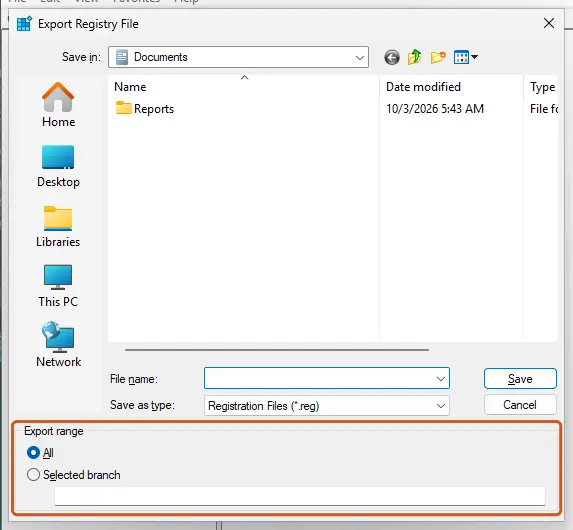
A wrong registry change can break Windows features. Change only the one value below. Export the MicrosoftAccount key first so you can restore it with one double-click: Back up the registry before editing it.
- Right-click Start and open Terminal (Admin). On Windows 10 open Windows PowerShell (Admin). Check whether the value exists:
reg query "HKLM\SOFTWARE\Policies\Microsoft\MicrosoftAccount" /v DisableUserAuth - If the result says ERROR: The system was unable to find the specified registry key or value, the value is not set. Go to Fix 4.
- If it shows
DisableUserAuth REG_DWORD 0x1, the block is on. Back up the key as the warning above says. - Delete the value:
reg delete "HKLM\SOFTWARE\Policies\Microsoft\MicrosoftAccount" /v DisableUserAuth /f - Restart the PC and sign in to the Store again.
It worked if: The query command now reports that the value cannot be found, and the Store signs you in.
If not: If the value comes back after a restart, a management service writes it: see Fix 1. Otherwise go to Fix 4.
Fix 4. Turn off Accounts: Block Microsoft accounts in Local Security Policy
5 minutesLow riskWindows Pro or higher, and you also cannot add a Microsoft account or switch a local account to one in Settings.
This second policy can stop existing Microsoft accounts from being used through Settings. We could not confirm that it shows 0x800704ec in the Store, but it blocks the same accounts and is worth one check.
- Press Win + R, type
secpol.mscand select OK. - Go to Local Policies > Security Options.
- Double-click Accounts: Block Microsoft accounts.
- If it shows Users can't add or log on with Microsoft accounts or Users can't add Microsoft accounts, choose This policy is disabled and select OK.
- Restart the PC and try the Store again.
Microsoft's page for this setting says that disabled or not configured is the recommended state on a personal PC, and that the change works without a restart. A restart still clears what the Store has cached.
It worked if: The setting shows This policy is disabled, and you can add or use a Microsoft account in Settings and the Store.
If not: If every policy is clear, reset the Store with Fix 5.
Fix 5. Clear the Microsoft Store cache, then repair or reset the Store
10 minutesLow riskYou removed a policy in Fix 1 to Fix 4 and the Store still shows 0x800704ec, or no policy was set at all.
The Store keeps its own sign-in state. After a policy is removed, a stale refusal can stay in that cache. Clearing it makes the Store ask Windows again, now without the block.
- Close the Microsoft Store.
- Press Win + R, type
wsreset.exeand select OK. A blank window opens, and after a short wait the Store opens by itself. - Try Sign in. If it still fails, open Settings > System > System components on Windows 11 (on Windows 10, Settings > Apps > Apps & features) and open the advanced options of Microsoft Store.
- Select Repair. If that does not help, select Reset.
- Restart the PC and sign in again.

Reset deletes the Store app's data on this PC, but your purchases stay in your Microsoft account. Every screen: Reset the Microsoft Store.
It worked if: The Store shows your account picture in the top corner and your library loads.
If not: If the block message comes back unchanged, go to Fix 6.
Fix 6. Repair Windows system files
20 minutesLow riskEvery policy is clear, the Store is reset, and the error still appears.
If no policy is set, Windows should not report a policy block. Damaged system files that read policies wrongly are the last plausible cause on a personal PC, and the SFC and DISM repair checks them.
- Open an elevated command window. Right-click Start and select Terminal (Admin), or type cmd in the search box, right-click Command Prompt and select Run as administrator. Select Yes when Windows asks for permission.
- Run DISM first. Type the command below and press Enter. DISM downloads clean copies of damaged components from Windows Update, so it can take several minutes. Wait until it says The operation completed successfully.
DISM.exe /Online /Cleanup-Image /RestoreHealth - Run System File Checker. In the same window, type the command below and press Enter. Do not close the window until the verification reaches 100%.
sfc /scannow - Read the result and restart. Compare the last message with the table below this guide, then restart the PC so that repaired files are loaded.
These steps were written for Windows 11 24H2 and 25H2. The full page with the other versions and what each result means: Run DISM and SFC to repair Windows system files
It worked if: SFC reports that it found and repaired files, or found no problems, and after a restart the Store signs in.
If not: If the error stays, read the last section for what to check and whom to ask.
If 0x800704ec is still there: what to check and whom to ask
Many reader comments on this page, in Russian, German, Dutch, French, Portuguese and Indonesian, say the fixes did not help. In almost every such case the block is set from outside the PC. Work through this list.
- See which policies are applied: open Terminal (Admin) and run
gpresult /h "%USERPROFILE%\Desktop\gp.html". Open the report on the desktop and search it for Microsoft account. It names the source of each setting. - A work or school PC: the IT team set the block on purpose. Ask them, or use the Store on a personal PC. Removing it yourself breaks the company's rules and may come back with the next sync.
- A second-hand PC from a company: if Access work or school shows an organisation you do not belong to, the PC is still enrolled. A clean Windows install does not always remove that link; ask the seller for a release.
- Your own PC, no policy anywhere: update Windows under Settings > Windows Update, then contact Microsoft support and send the
gp.htmlreport with the list of fixes you tried.
| What you find | What it means | Who can change it |
|---|---|---|
| Work or school entry with an Info button | The PC is managed by an organisation | The organisation's IT team |
| Policy back on Enabled after every restart | Something reapplies it from outside | IT team, or the tool that set it |
DisableUserAuth set, no management | A tweak tool or script wrote it | You, with Fix 3 |
| No policy at all, error stays | Damaged Windows components | Fix 6, then Microsoft support |
Windows 10 left support on 14 October 2025. The policies on this page work the same there, but without Extended Security Updates the PC no longer gets repairs for the Store or its sign-in parts.
How to keep 0x800704ec from coming back
The block only returns when someone or something sets the policy again. These habits keep a personal PC free of it.
- Add a work account only to the apps that need it. When Outlook or Teams asks to let your organisation manage the device, choose the option to sign in to this app only.
- Read what privacy and hardening tools change. Many of them apply a list of policies, and blocking consumer Microsoft accounts is a common item. Undo that one item if you use the Store.
- Check Access work or school after a job change, and disconnect organisations you left.
- Keep a registry export of any key you change, so you can undo it later.
If you use one PC for work and home, a separate Windows user for work keeps the two apart. Our guide to Microsoft account login error 0x80048820 covers the case where the sign-in fails without a policy message.
Frequently asked questions
What is error 0x800704ec?
It is Windows error 1260, with the text "This program is blocked by group policy. For more information, contact your system administrator." A policy on the PC forbids what the program tried to do. In the Microsoft Store that is signing in with a Microsoft account. Find where the policy is set: a work or school account (Fix 1), Group Policy (Fix 2) or the registry (Fix 3).
Why do I get error 0x800704ec when I have no system administrator?
On a home PC you are the administrator, and the message means a setting was changed by a program, a script or an organisation you connected. The most common source is a work or school account added under Access work or school, which lets the organisation apply its rules. A tweak or privacy tool that writes the DisableUserAuth value is the next. Fix 1 to Fix 3 check each one.
Can I fix 0x800704ec on Windows Home without gpedit?
Yes. Windows Home has no Group Policy editor, but the policy is stored in the registry as DisableUserAuth under HKLM\SOFTWARE\Policies\Microsoft\MicrosoftAccount. Fix 3 shows the command that checks it and the one that deletes it. Export the key first so you can undo the change. Do not install a downloaded gpedit package for Home: you do not need it here.
Will removing my work account fix the Microsoft Store?
Often, if the organisation applies the block through device management. Disconnecting removes its policies at the next sync and restart. It also removes your access to company email, files and apps on this PC, so check with the IT team first if you still need them. On a PC your employer owns, do not disconnect: ask them instead.
I get 0x800704ec when I turn on Microsoft Defender. Is it the same problem?
It is the same code with the same meaning, a policy blocks the action, but a different policy. This page is about the Microsoft Store sign-in. Users report the Defender case when another antivirus is installed or was not removed cleanly, because it turns Defender off. Removing the leftover antivirus is the usual path there, not the steps on this page.
Does 0x800704ec also appear in OneDrive or Office?
Yes, users report the same code in OneDrive for Business and Office sign-in. The meaning does not change: a policy on the PC blocks the sign-in. In a work setting that is usually a company rule for which accounts may be used, so the IT team is the first contact. On a personal PC, check the same places as in Fix 1 to Fix 4.
Will I lose my apps or purchases?
No. Purchases belong to your Microsoft account, not to the PC. The block only stops apps on this PC from using the account. Installed apps keep working, and your library comes back as soon as the Store can sign in. You can still see your orders at account.microsoft.com in a browser, because Microsoft says the policy does not affect web sign-in.
Does the Windows Store Apps troubleshooter fix 0x800704ec?
We do not expect it to. The troubleshooter checks Store settings, cache and app registration, but it does not change policies, which are the cause of this code. It does no harm to run it, but go straight to Fix 1 to Fix 4 first. For other Store problems, see our guide to the Windows Store Apps troubleshooter.
What does код ошибки 0x800704ec mean?
It is the Russian search for "error code 0x800704ec". The meaning is the same in every language: the Microsoft Store, or another app, is blocked by a policy from signing in with a Microsoft account. The fixes on this page are in English, and the menu names in a Russian Windows have the same places: Access work or school, the Group Policy editor and the registry.
Sources
- Microsoft Learn: Policy CSP ADMX_MSAPolicy, MicrosoftAccount_DisableUserAuth (Block all consumer Microsoft account user authentication: effect, editions, Group Policy path and registry value) (learn.microsoft.com)
- Microsoft Learn: Accounts: Block Microsoft accounts (security policy setting, values and location) (learn.microsoft.com)
- Microsoft Q&A: "This program is blocked by group policy" 0x800704ec (the Store sign-in case and the same block in other apps) (learn.microsoft.com)
Did this fix work?
One click, no account. It tells the next reader which guides are worth their time.
Questions and experiences: fix Microsoft Store log in error 0x800704ec in Windows
Still broken, or found a fix we did not cover? Ask here: members and our editors answer. Reading is open; writing needs a free account.
…