
How to fix the bthmodem.sys blue screen (BSOD) in Windows

Prefer to fix it yourself? The manual steps follow.
- 7methods
- 10 to 40 minutes
- Intermediate
Applies to Windows 11 and Windows 10 PCs with Bluetooth, desktop or laptop
7 methods in this guide
Hello. One month ago I started occasionally getting the Bthmodem.sys Blue Screen error on my Windows PC. What causes it and is there a way to get rid of these errors?
bthmodem.sys is the Bluetooth Modem Communications Driver, a file that comes with Windows from Microsoft. When a stop screen names it, Windows was running that driver when it crashed, which does not always mean the file itself is at fault. Check first whether Driver Verifier is switched on, then update the Bluetooth driver.
bthmodem.sys is a Microsoft driver for Bluetooth modem communication, and the blue screen means Windows stopped while it was loaded. It is often not the real cause. Run verifier /querysettings in an administrator window: if Driver Verifier is on, turn it off with verifier /reset (Fix 1). If not, update the Bluetooth driver from your PC maker (Fix 2).
| Error | A stop screen that names bthmodem.sys. In the reports the stop codes were MEMORY_MANAGEMENT and DRIVER_VERIFIER_DETECTED_VIOLATION. |
|---|---|
| Where it appears | At random while Windows runs, in one report within minutes of signing in after Driver Verifier was switched on. |
| Main cause | Not confirmed by Microsoft. The reports point to Driver Verifier, another program's driver in the same crash, or an old Bluetooth driver. |
| Fastest fix | verifier /reset if Driver Verifier is on (Fix 1), otherwise a newer Bluetooth driver from your PC maker (Fix 2). |
| Also written as | bthmodem, bthmodem sys, BTHMODEM service, Bluetooth Modem Communications Driver, bthmodem.sys not verified, bthmodem.sys corrupted. |
| Who makes it | Microsoft Corporation. It is a Windows component, not a third party driver. |
| Where the file is | C:\Windows\System32\drivers\bthmodem.sys, service name BTHMODEM. |
| Affects | Windows 11 and Windows 10. Windows 10 left support on 14 October 2025. |
| Vendor status | We found no Microsoft notice or fixed version for this file. Microsoft Q&A threads from 2019 and 2023 end without a confirmed fix. |
| Time to fix | 5 minutes for Fix 1, 10 to 40 minutes for the other fixes. |
Facts checked on 16 October 2026. Steps written for Windows 11 (25H2 and 26H2) and Windows 10 22H2.
What bthmodem.sys is and why a blue screen names it
bthmodem.sys is the Windows kernel driver for Bluetooth modem communication. Windows lists its service as BTHMODEM, the Autoruns tool shows it as Bluetooth Modem Communications Driver from Microsoft Corporation, and the file sits in C:\Windows\System32\drivers. It is installed with Windows, so you did not add it yourself.
A kernel driver runs inside Windows, so one mistake nearby stops the whole PC. The file named on the stop screen is the one Windows was running at that moment, not always the one that made the mistake. In a Microsoft Q&A thread, an advisor wrote that bthmodem.sys is a Windows component and not the cause, and the crash dump listed a different driver, fltsrv.sys from the Acronis backup software.
| What you see | What it means |
|---|---|
| bthmodem.sys, bthmodem | The Windows Bluetooth modem driver was loaded when Windows stopped. It is the file name in the crash dump (the IMAGE_NAME line). |
| BTHMODEM | The name of its service. sc qc BTHMODEM shows how it starts (Fix 4). |
DRIVER_VERIFIER_DETECTED_VIOLATION (0xC4) | Microsoft: the general stop code for fatal errors found by Driver Verifier, a tool that stresses drivers on purpose. |
MEMORY_MANAGEMENT | A stop code one reader saw in the earlier crashes, before turning on Driver Verifier. Memory problems are covered in the still-broken section. |
| Not Verified | A label the Autoruns tool put on the file in a 2023 report. See the FAQ. |
The file belongs to Windows. DLL and driver download sites sell copies that can be wrong or unsafe. If the file is damaged, Windows repairs it itself (Fix 5).
Why bthmodem.sys appears in a crash: the causes, in the order to check
No source we read counts how often each cause happens, so this order is by cost: the quickest tests first, and the ones that remove software or roll Windows back last. The Microsoft Q&A reports give the first three.
| Check | Cause | Sign | Fix |
|---|---|---|---|
| First | Driver Verifier is switched on | Stop code DRIVER_VERIFIER_DETECTED_VIOLATION, crash soon after sign-in | Fix 1 |
| Second | An old or mismatched Bluetooth driver | The adapter's Driver Date is years old, or the PC maker has a newer one | Fix 2 |
| Third | Another program's driver is in the same crash | The dump lists a third party driver, such as a backup or imaging tool | Fix 3 |
| Fourth | The BTHMODEM service start type was changed | sc qc BTHMODEM shows a start type you did not set | Fix 4 |
| Fifth | A damaged Windows system file | SFC reports files it repaired or could not repair | Fix 5 |
| Sixth | Malware | The file is outside System32\drivers, or other odd behaviour | Fix 6 |
| Seventh | A recent update, driver or install | The first crash came right after a change | Fix 7 |
| Last | Defective memory or a failing Bluetooth adapter | Many different stop codes, or crashes stop with the adapter off | Still broken |
The crash can come at any moment. Save open documents and copy what you cannot lose to another drive or the cloud before you start the fixes.
How to fix the bthmodem.sys blue screen
Most readers start with Fix 1 if they ever ran Driver Verifier, and with Fix 2 if not. Fix 3 finds a program that shares the crash, Fix 4 checks the service, and Fixes 5 to 7 repair Windows itself. Do them in order and restart after each.
| What you see or what you did | Start with | Then |
|---|---|---|
| The stop code is DRIVER_VERIFIER_DETECTED_VIOLATION, or you ever ran Driver Verifier | Fix 1 | Fix 2 |
| No Driver Verifier, and the Bluetooth driver is old or was never updated by your PC maker | Fix 2 | Fix 3 |
| You use a backup, imaging, security or VPN program, or installed one just before the first crash | Fix 3 | Fix 2 |
| A tweak tool or script changed Windows services | Fix 4 | Fix 5 |
| SFC has never run on this PC, or other system files seem damaged | Fix 5 | Fix 6 |
| The crashes began on a known day after an update or install | Fix 7 | Fix 3 |
| Many different stop codes, not only bthmodem.sys | Still broken section | Fix 5 |
Fix 1. Turn off Driver Verifier if it is running
5 minutesLow riskThe stop code is DRIVER_VERIFIER_DETECTED_VIOLATION, or you or a technician ran Driver Verifier on this PC.
Driver Verifier is a Microsoft tool that tests drivers hard and stops Windows on the first violation. In the Microsoft Q&A report the user had switched it on and bthmodem.sys was named almost at once after sign-in. Microsoft documents verifier /reset as the command that turns it off.
- Right-click Start and select Terminal (Admin) (on Windows 10: Windows PowerShell (Admin)), then select Yes.
- Type this command and press Enter. It shows the current Driver Verifier settings.
verifier /querysettings - Type this command and press Enter. It clears all Driver Verifier settings.
verifier /reset - Restart the PC and use it normally for a day.
Fix 1 ends the test. If Driver Verifier named bthmodem.sys, look in the dump for the other driver on the stack (Fix 3). In the report, an advisor found only fltsrv.sys from Acronis, and the user wrote that the same crash returned after removing Acronis.
It worked if: The PC starts and runs without a DRIVER_VERIFIER_DETECTED_VIOLATION stop screen.
If not: If the query showed no settings, or the crash returns without Driver Verifier, go to Fix 2.
Fix 2. Update the Bluetooth driver
10 to 20 minutesLow riskDriver Verifier is off, and the Bluetooth adapter's driver is old or your PC maker has a newer one.
Outdated, damaged or mismatched drivers can make Windows stop while a Bluetooth driver is loaded. bthmodem.sys itself comes with Windows, so two routes replace the Bluetooth drivers around it: your PC maker's package and Windows Update.
- Open your PC maker's support page, enter your model and download the newest Bluetooth driver, then run its setup.
- Right-click Start, select Device Manager, expand Bluetooth, right-click your adapter, select Properties and open the Driver tab. Note the Driver Date and Driver Version.
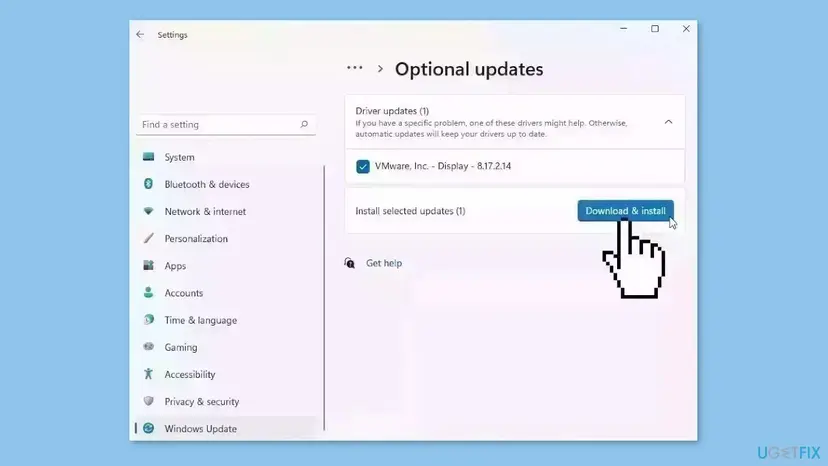
- Open Settings > Windows Update > Advanced options > Optional updates (on Windows 10: Settings > Update & Security > Windows Update > View optional updates).
- Open Driver updates, tick any Bluetooth entry and select Download & install.
- Restart the PC.
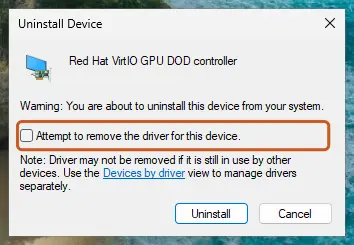
Every way to update, roll back or reinstall a driver, with screenshots: Update, roll back or reinstall a driver
In one 2023 report the user installed every driver from the PC maker's site and Windows still named bthmodem.sys. If that is you, continue with Fix 3.
It worked if: The adapter shows a newer Driver Date, Bluetooth still works and no new file appears in C:\Windows\Minidump over the next days.
If not: If the PC maker has nothing newer, or the crash returns, go to Fix 3.
Fix 3. Update or remove the program that shares the crash
15 to 30 minutesLow riskYou use a backup, imaging, security or VPN program, or installed something shortly before the first crash.
A crash names the file Windows was running, and a different driver can be the one that failed. In the Microsoft Q&A report the dump listed one third party driver, fltsrv.sys from Acronis, and the advisor told the user to update or uninstall that product.
- Open Settings > Apps > Installed apps and sort by Install date (on Windows 10: Settings > Apps > Apps & features, Sort by: Install date).
- Look for backup, disk imaging, security, VPN or virtual device programs installed or updated before the first crash.
- Update each one to its latest version from its maker, restart and use the PC for a day.
- If the crash returns, uninstall the program with its maker's removal tool or with Uninstall a program or app in Windows, then restart.
- If you cannot tell which program it is, find it with How to perform a clean boot in Windows.
Removing a backup or imaging program can stop scheduled backups. Make a copy of your important files first, and set the program up again after the crash is solved.
It worked if: The crashes stop after the update or the removal.
If not: The Q&A user wrote that the crash returned after Acronis was removed, so this is not a guaranteed fix. Go to Fix 4.
Fix 4. Set the BTHMODEM service back to manual start
5 minutesLow riskA tweak tool, script or manual change altered Windows services, or the start type below looks wrong.
bthmodem.sys loads through the BTHMODEM service. The command sets the service to start on demand, which is the manual start type, so Windows starts it only when a Bluetooth modem needs it. We could not confirm Microsoft's default for this service from a Microsoft page, so read the current value first.
- Click Start, type cmd, right-click Command Prompt and select Run as administrator.
- Read the current start type. Look at the START_TYPE line.
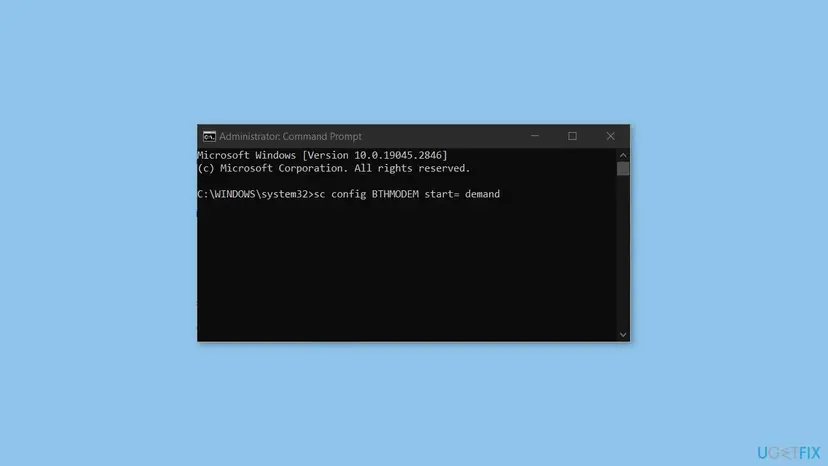
sc qc BTHMODEM - Set the start type to manual. Keep the space after the equals sign.
sc config BTHMODEM start= demand - Restart the PC.
This fix sets manual start only. Setting the service to disabled is not a repair, and we found no source that says what else it would break.
It worked if: sc qc BTHMODEM shows DEMAND_START, and the stop screen does not return.
If not: If the start type was already DEMAND_START, nothing changed. Go to Fix 5.
Fix 5. Repair damaged Windows system files
20 to 30 minutesNo riskThe fixes above did not help, SFC has never run on this PC, or you see messages about a corrupted bthmodem.sys.
bthmodem.sys is a Windows file, so System File Checker can compare it with the stored copy and replace it if it is damaged. DISM repairs the component store that SFC copies from.
Run the two tools in this order in an administrator window. Step by step with screenshots: Run DISM and SFC to repair Windows system files
In Terminal (Admin) or Command Prompt (Admin), one after the other:
sfc /scannow
DISM /Online /Cleanup-Image /RestoreHealth
sfc /scannow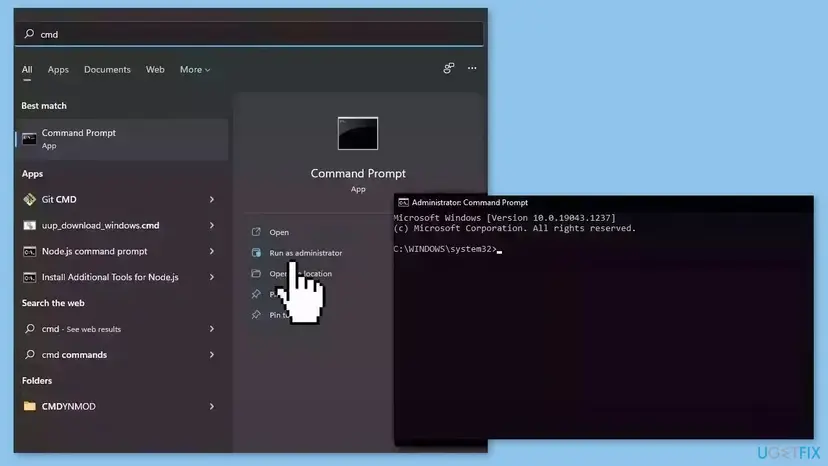
Restart after the second scan. If SFC reports that it repaired files, use the PC for a day before you judge the result.
It worked if: SFC reports that it found no integrity violations or that it repaired the files it found.
If not: If SFC says it could not repair some files, run the DISM line again and then SFC once more. If it still fails, go to Fix 6.
Fix 6. Check the file's location and scan for malware
20 to 60 minutesNo riskYou see a second copy of the file, strange behaviour besides the crash, or you want to rule out malware.
Malware can replace or imitate a driver file. The Windows driver sits in System32, so a copy somewhere else is not it, and a full scan checks the rest of the PC.
- Open File Explorer and go to
C:\Windows\System32\drivers. Find bthmodem.sys. - Right-click it, select Properties and open the Details tab. Check that the file description and copyright match a Microsoft file.
- If you find a file with this name in your user folder, Downloads or Temp, do not run it. Scan it as part of Step 4.
- Open Windows Security > Virus & threat protection, select Scan options > Full scan and select Scan now.
- If you use another security program, run its full scan too, then restart.
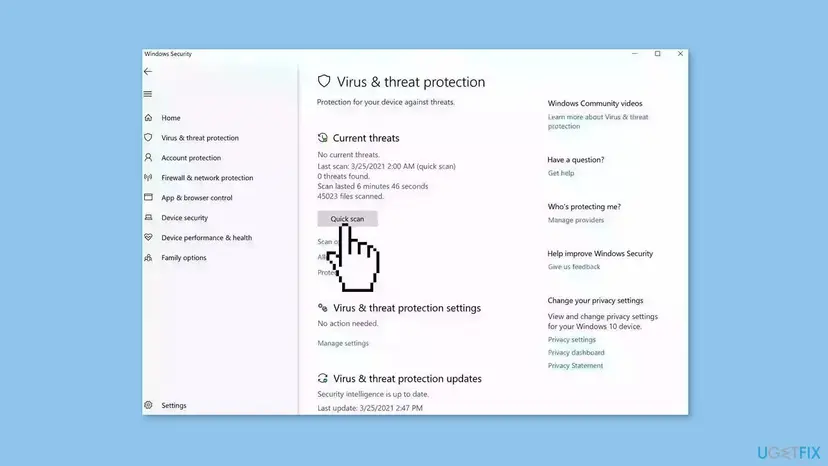
Every step with screenshots: How to scan for malware with Microsoft Defender
It worked if: The scan reports no threats and the file is only in System32\drivers.
If not: If the scan removes a threat, restart, run Fix 5 and watch for new crashes. If nothing was found, go to Fix 7.
Fix 7. Go back to a restore point before the first crash
20 to 40 minutesRead the warningThe crashes began on a known day after an update, driver or program, and a restore point from before it exists.
System Restore returns Windows files, drivers and settings to an earlier point. It helps when a change you made, not the Bluetooth hardware, caused the crash.
It removes apps, drivers and updates installed after the restore point and keeps your documents and photos. Programs installed since then must be installed again. Copy important files first, and note the programs you added recently.
- Press Win + R, type
SystemPropertiesProtectionand press Enter. - On the System Protection tab, select System Restore.
- Select a restore point dated before the first crash, then select Next and Finish.
- Wait for the restart, then use the PC for a day.
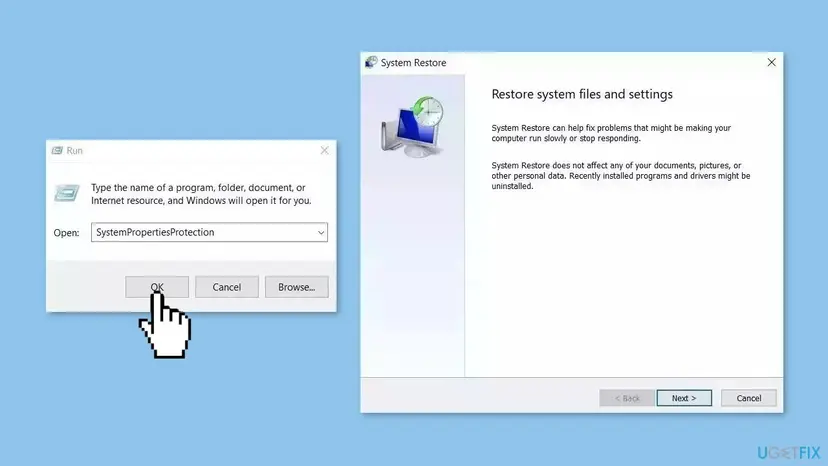
If Windows does not start, begin from Start Windows or a Mac in Safe Mode and choose System Restore in the advanced options. Every step with screenshots: Undo recent changes with System Restore
It worked if: Windows starts from the restore point and the bthmodem.sys stop screen does not return.
If not: If there is no restore point, or the crash returns, use the still-broken section below.
Still crashing: what to read, test and send to support
Find out what Windows recorded. Open Event Viewer > Windows Logs > System and look at the minutes before each crash. Windows also writes one .dmp file per crash to C:\Windows\Minidump. A tool that only shows the file at the top of the dump names bthmodem.sys but cannot show the whole stack, as an advisor noted in the Microsoft Q&A report.
- Zip the three newest
.dmpfiles fromC:\Windows\Minidump. - Note your Windows version from Settings > System > About.
- Note the Bluetooth adapter's Driver Date and Driver Version from Device Manager.
- Note the stop codes you saw. Many different codes point at memory: run How to test your RAM with Windows Memory Diagnostic.
To test the Bluetooth hardware, open Device Manager, right-click the Bluetooth adapter and select Disable device for a few days. If the crashes stop, the adapter or its driver is involved. Turn it on again later and use a USB Bluetooth adapter meanwhile.
| Where to ask | When |
|---|---|
| The PC maker's support | A laptop or branded PC, almost always the Bluetooth adapter is theirs |
| Your company's IT team | A work PC that gets drivers and security programs from a management tool |
| A repair shop | The memory test reports errors, or the crashes stay with Bluetooth turned off |
How to keep the bthmodem.sys blue screen from coming back
- Get Bluetooth drivers from your PC maker or Windows Update.
- Switch Driver Verifier off with
verifier /resetafter every test. - Keep restore points turned on for drive C.
- Note which backup, security or VPN programs you install, and update them.
- Download bthmodem.sys from DLL or driver sites.
- Set the BTHMODEM service to disabled to hide the crash.
- Use driver updater programs for Bluetooth drivers.
- Turn off Windows Security protections to silence a driver compatibility message.
Windows 10 left support on 14 October 2025. A PC that can run Windows 11 gets Bluetooth and Windows fixes through Windows Update for longer.
Frequently asked questions
What is bthmodem.sys?
bthmodem.sys is the Windows driver for Bluetooth modem communication. Autoruns lists it as the Bluetooth Modem Communications Driver from Microsoft Corporation, and its service is named BTHMODEM. The file is C:\Windows\System32\drivers\bthmodem.sys and comes with Windows, not with a Bluetooth adapter or an app. The same path is what people search for when they ask about the full file name. A copy anywhere else is not the Windows driver.
Is bthmodem.sys a virus?
The file in C:\Windows\System32\drivers is a Microsoft Windows component, not a virus. A blue screen alone is not a sign of malware. A file with this name in your user folder, Downloads or Temp does not belong to Windows. Do not run it, and scan the PC with Microsoft Defender or your security program (Fix 6). Windows Security then reports anything it finds.
Is bthmodem.sys really the cause of my blue screen?
Not always. The stop screen names the file Windows was running when it stopped, and the real fault can be another driver. In the Microsoft Q&A report, two advisors said bthmodem.sys is part of Windows and not the cause, and one named a backup program's driver, fltsrv.sys. The user wrote that the crash came back after removing it. So treat the name as a clue, and test Driver Verifier, the Bluetooth driver and other programs in order.
What does bthmodem.sys not verified mean?
It is a label from the Autoruns tool, not a Windows error. A 2023 Microsoft Q&A report shows Autoruns marking BTHMODEM red and Not Verified, with Microsoft Corporation as publisher, when Windows said a driver blocked Kernel-mode Hardware-enforced Stack Protection. The only reply told the user to update drivers from the PC maker, and the user had already done that. We found no confirmed fix. Keep Windows updated and do not turn protections off.
Is bthmodem.sys corrupted, and how do I repair it?
Only a scan can tell. Run System File Checker with sfc /scannow, then DISM with the RestoreHealth option, then SFC again (Fix 5). SFC compares Windows files with a stored copy and replaces damaged ones, so you never download the file yourself. If SFC says it cannot repair everything, run the DISM line again before SFC, and read the CBS log only if support asks for it.
Can I delete or disable bthmodem.sys?
Do not delete it. It is a protected Windows file, a deleted copy can be restored by SFC, and removing it can cause new errors. Setting the BTHMODEM service to disabled is also not a repair, and we found no source that explains what else it would affect. Use the manual start type from Fix 4 or the fixes in order. If you need a stable PC today, test with the Bluetooth adapter disabled in Device Manager.
What does DRIVER_VERIFIER_DETECTED_VIOLATION mean?
Microsoft calls it the general bug check for fatal errors found by Driver Verifier. Driver Verifier is a tool that tests drivers and stops Windows when one breaks a rule. If this code appears, Driver Verifier is on, and the file named is the driver it caught, which in the Q&A report was bthmodem.sys together with another third party driver. Turn it off with verifier /reset in an administrator window (Fix 1).
Will turning Bluetooth off stop the blue screen?
It can, as a test. Open Device Manager, right-click the Bluetooth adapter and select Disable device. If the crashes stop for a few days, the adapter or its driver is involved, and a newer driver from your PC maker is the next step. We could not confirm whether bthmodem.sys still loads with the adapter disabled, so a crash that continues does not clear the file. Turn the adapter on again when you finish testing.
Does this affect Windows 11 and Windows 10?
Yes, both. The Microsoft Q&A report about the crash is from Windows 10 in 2019, and the not verified report is from Windows 11 in 2023. The fixes and menu names are the same, with the paths given for each. Windows 10 left support on 14 October 2025, so check that Windows Update still offers your PC driver updates, or plan the move to Windows 11.
Sources
- Microsoft Learn: Bug Check 0xC4 DRIVER_VERIFIER_DETECTED_VIOLATION (learn.microsoft.com)
- Microsoft Learn: How to Use Driver Verifier for Driver Testing (learn.microsoft.com)
- Microsoft Q&A: bthmodem.sys causing BSOD (user report) (learn.microsoft.com)
Did this fix work?
One click, no account. It tells the next reader which guides are worth their time.
Questions and experiences: fix the bthmodem.sys blue screen (BSOD) in Windows
Still broken, or found a fix we did not cover? Ask here: members and our editors answer. Reading is open; writing needs a free account.
…