
How to fix "ExplorerFrame.dll was loaded but the entry-point DllRegisterServer was not found"?

Prefer to fix it yourself? The manual steps follow.
- 7methods
- 1 minute to 2 hours
- Easy
Applies to Windows 11 and Windows 10: the RegSvr32 window "The module explorerframe.dll was loaded but the entry-point DllRegisterServer was not found" and File Explorer crashes that name explorerframe.dll
7 methods in this guide
Hello. My operating system is heavily malfunctioning, and I was hoping that you could help me. Every time I try to access any folder via File Explorer, I get the error "ExplorerFrame.dll was loaded but the entry-point DllRegisterServer was not found." I am not sure what is happening, but I am sure that something is very wrong. Please help.
The RegSvr32 message about ExplorerFrame.dll means the file has no DllRegisterServer entry point, so it cannot be registered. That is normal for this Windows file and harms nothing. If File Explorer works, close the message and stop there; if Explorer crashes, find the real cause in Event Viewer and repair Windows files with DISM and SFC.
The message comes from regsvr32, not from File Explorer: ExplorerFrame.dll is not a self-registering file, so registering it always fails. If Explorer works, close the window and do nothing more (Fix 1). If Explorer crashes or closes, read which module failed in Event Viewer (Fix 2), remove any Explorer mod or swapped DLL (Fix 3), then run DISM and SFC (Fix 4). Never download ExplorerFrame.dll.
| Error | RegSvr32: "The module "explorerframe.dll" was loaded but the entry-point DllRegisterServer was not found. Make sure that "explorerframe.dll" is a valid DLL or OCX file and then try again." |
|---|---|
| Where it appears | In a RegSvr32 window, right after the command regsvr32 ExplorerFrame.dll runs, typed by you or run by a script or a cleanup tool. |
| Main cause | ExplorerFrame.dll does not export DllRegisterServer. Microsoft says this message appears when the entry point is "not properly exported from the module". It is not a sign of damage. |
| Fastest fix | Close the message: the file needs no registration (Fix 1). For real File Explorer crashes, read the faulting module in Event Viewer (Fix 2). |
| Also written as | the module was loaded but the entry point DllRegisterServer was not found, entry-point DllRegisterServer was not found, regsvr32 explorerframe.dll, explorerframe.dll error |
| What the file is | A Windows system file in C:\Windows\System32 that draws the File Explorer window frame. Explorer.exe loads it. |
| Affects | Every Windows version where someone runs regsvr32 on the file: Windows 11, Windows 10 and older. Windows 10 left support on 14 October 2025. |
| Vendor status | Not a bug. Microsoft's KB 249873 lists this as a regsvr32 message for a module without the required entry point. |
| Time to fix | 1 minute to close the message. 20 to 30 minutes for DISM and SFC. 1 to 2 hours for a repair install. |
Facts checked on 15 October 2026. Steps written for Windows 11 (25H2 and 26H2) and Windows 10 22H2.
What ExplorerFrame.dll is and why you should not replace it
ExplorerFrame.dll is part of Windows. File Explorer (Explorer.exe) loads it from C:\Windows\system32\explorerframe.dll to draw its window frame: the address bar, the navigation pane and the folder view around your files. A crash report on Microsoft Q&A shows exactly this pair: faulting application Explorer.EXE, faulting module explorerframe.dll, both at the same Windows build number.
- File
explorerframe.dll, with a language fileexplorerframe.dll.muinext to it- Location
C:\Windows\System32(the faulting module path Windows writes in crash logs)- Version
- Always the same as your Windows build, for example 10.0.16299.15 on the Windows 10 PC in the Microsoft Q&A report
- Registration
- None needed: Windows loads it directly, and regsvr32 cannot register it
The file must match your exact Windows build. A copy from a DLL site or a forum can be the wrong version, unsigned or infected, and File Explorer may stop opening at all. If the file is damaged, Windows repairs it itself with DISM and SFC (Fix 4).
What "was loaded but the entry-point DllRegisterServer was not found" means
The window title is RegSvr32, the Windows tool that registers COM components. Microsoft's knowledge base article 249873 explains the steps: regsvr32 loads the file, then looks for the function it must call to register it. Loaded means the file was found and is a valid DLL. Entry-point not found means that function is missing.
The full text of the RegSvr32 window
The module "explorerframe.dll" was loaded but the entry-point DllRegisterServer was not found.

Make sure that "explorerframe.dll" is a valid DLL or OCX file and then try again.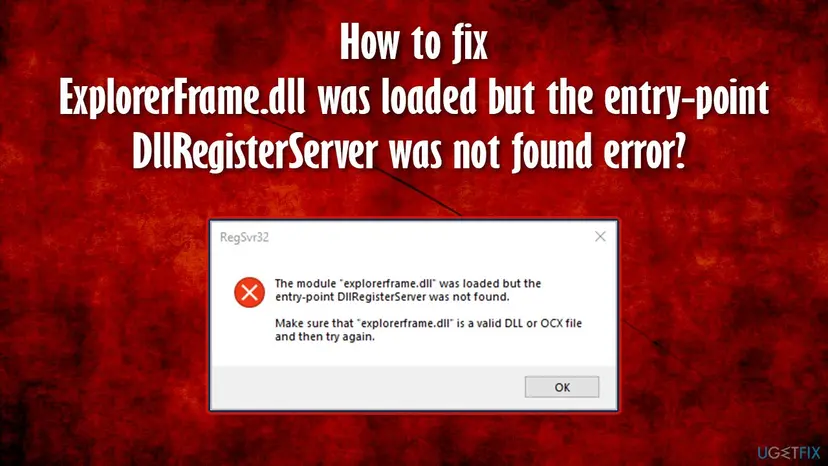
- Microsoft's explanation, word for word: regsvr32 "was unable to find the required entrypoint in the module specified in the command line. This can occur if the entrypoints are not properly exported from the module or if the module is not a .DLL or .OCX file."
- For ExplorerFrame.dll the first case applies. It is a valid DLL, so it loads. It simply does not offer DllRegisterServer, because Windows never registers it that way.
- The same message for other files. Users on Microsoft Q&A see it for ntdll.dll and wuaueng.dll too. The rule is the same: a Windows DLL without that export cannot be registered, and trying again changes nothing.
- Older Windows wording. Before Windows Vista the text read "Dllname was loaded, but the DllRegisterServer or DllUnregisterServer entry point was not found".
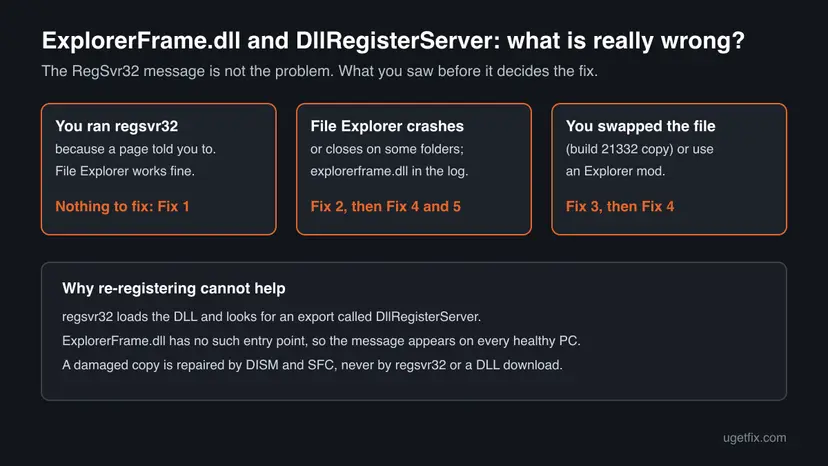
Why you see the message, and what really breaks File Explorer
Most often someone ran regsvr32 ExplorerFrame.dll because a guide told them to, including the older version of this page. Less often a tool or script runs it. When File Explorer also crashes, that crash has its own cause, and the RegSvr32 message is a side track.
| Cause | How often | How to tell | Fix |
|---|---|---|---|
| You or a guide ran regsvr32 on ExplorerFrame.dll. The file has no DllRegisterServer, so it fails. | Most often | The window appeared right after you typed the command. Explorer works. | Fix 1 |
| A cleanup tool, script or startup task runs regsvr32 on Windows DLLs. | Sometimes | The RegSvr32 window appears by itself, often at sign-in. | Fix 1, Fix 6 |
| A third-party program adds to File Explorer (a shell extension) and crashes it. | Often, when Explorer crashes | Event Viewer names Explorer.EXE, and the faulting module is not a Windows file. | Fix 2, Fix 5 |
| ExplorerFrame.dll was replaced by an old copy (build 21332) or patched by an Explorer mod. | Sometimes | You installed a mod or copied the DLL yourself. Explorer crashes after an update. | Fix 3 |
| The Windows copy of ExplorerFrame.dll is damaged. | Rarely | Event Viewer names explorerframe.dll and SFC reports repairs. | Fix 4, Fix 7 |
The old version of this page also linked the message to the "Class not registered" error and to error 0xc000012f. Those are separate problems with their own causes: re-registering ExplorerFrame.dll fixes neither.
How to fix the ExplorerFrame.dll DllRegisterServer error
Fix 1 is enough for most readers: the message only means the file cannot be registered. Fix 2 to Fix 7 are for a File Explorer that really crashes, freezes or closes, ordered from the most common cause to the last resort.
| What you see or what your PC has | Start with |
|---|---|
You ran regsvr32 ExplorerFrame.dll and File Explorer otherwise works | Fix 1 |
| The RegSvr32 window appears by itself at sign-in | Fix 1, then Fix 6 |
| File Explorer closes, freezes or restarts when you open some folders | Fix 2 |
| You installed an Explorer mod or copied an ExplorerFrame.dll from build 21332 | Fix 3 |
| Event Viewer names explorerframe.dll as the faulting module | Fix 4 |
| Explorer crashes only in a normal start, not in Safe Mode | Fix 5 |
| SFC says it could not repair some files | Fix 7 |
Fix 1. Close the RegSvr32 message: ExplorerFrame.dll needs no registration
1 minuteNo riskYou saw the message after running regsvr32 on ExplorerFrame.dll, and File Explorer opens folders normally.
Windows loads ExplorerFrame.dll directly and never registers it with regsvr32. The message only reports that the file has no DllRegisterServer export, so nothing on the PC changed or broke.
- Select OK in the RegSvr32 window.
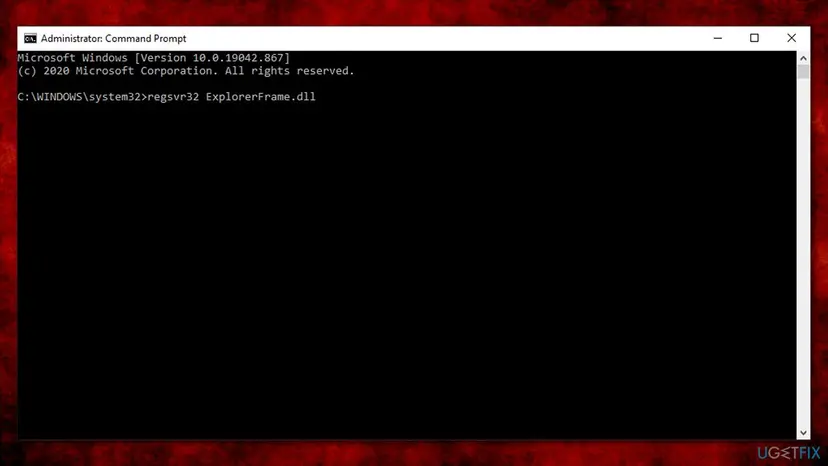
- Do not run
regsvr32 ExplorerFrame.dllorregsvr32 /u ExplorerFrame.dllagain. Neither one changes the file. - Open File Explorer with Win + E and open a few folders to check that it works.
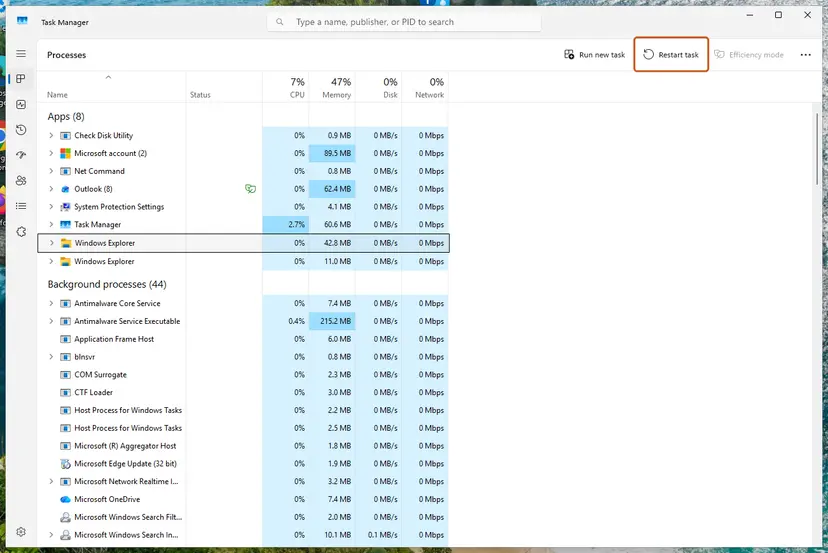
- If Explorer looks stuck, restart it once from Task Manager, as shown below.
- Open Task Manager. Press Ctrl + Shift + Esc. The Processes page opens.
- Select Windows Explorer. Find Windows Explorer in the list and select it. If it is not under Apps, look under Windows processes further down.
- Restart it. Select Restart task at the top of the window. The taskbar disappears for a moment and comes back. If you do not see Restart task, right-click Windows Explorer and select Restart.
These steps were written for Windows 11 26H2 (build 26300). The full page with the other versions and what each result means: Restart File Explorer
It worked if: File Explorer opens folders normally and the RegSvr32 window does not come back.
If not: If the RegSvr32 window appears by itself, something runs the command for you: see Fix 6. If Explorer crashes, go to Fix 2.
Fix 2. Read which module crashes File Explorer in Event Viewer
5 to 10 minutesNo riskFile Explorer closes, freezes or restarts when you open a folder or a file dialog.
Windows logs every Explorer crash with the name of the module that failed. A third-party DLL there points to a program you can uninstall; explorerframe.dll points to Windows itself.
- Make File Explorer crash once, so the newest entry is the right one.
- Press Win + R, type
eventvwr.mscand press Enter. - Open Windows Logs > Application.
- Look for an Error entry with the source Application Error at the time of the crash.
- Read Faulting application name (it should say Explorer.EXE), then Faulting module name and Faulting module path.
- If the module is a third-party file, uninstall the program it belongs to: Uninstall a program or app in Windows
- If the module is
explorerframe.dllinC:\WINDOWS\system32, go to Fix 3 or Fix 4.
What the entry looks like (from a Windows 10 report on Microsoft Q&A)
Faulting application name: Explorer.EXE, version: 10.0.16299.15
Faulting module name: explorerframe.dll, version: 10.0.16299.15
Exception code: 0xc0000005
Faulting module path: C:\WINDOWS\system32\explorerframe.dll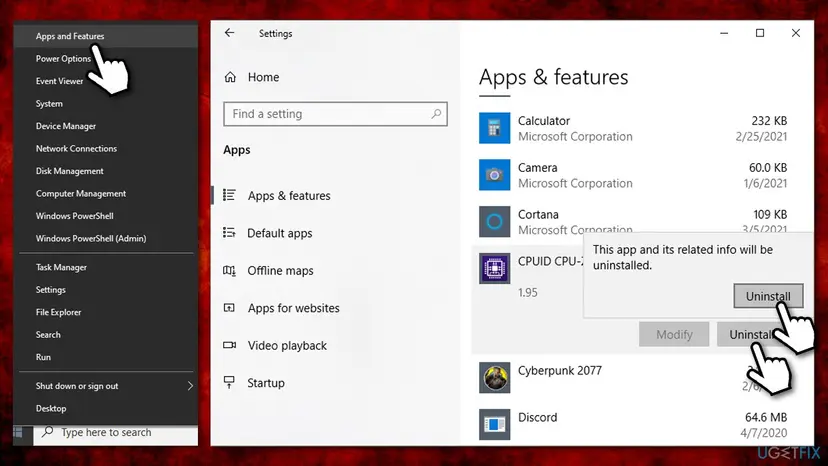
It worked if: You know the faulting module, and after removing its program File Explorer opens the same folders without closing.
If not: If the module is explorerframe.dll, or the program is already gone and Explorer still crashes, continue with Fix 3 and Fix 4.
Fix 3. Remove Explorer mods and any ExplorerFrame.dll copied from build 21332
10 to 30 minutesLow riskYou installed a tool that changes the look of File Explorer or the taskbar, or replaced ExplorerFrame.dll yourself.
Users on WinClassic share the ExplorerFrame.dll from Insider build 21332 to bring back the classic Explorer layout, and they warn of bugs. A file from another build does not match the rest of your Windows, and Windows updates can break such mods.
- Open Settings > Apps > Installed apps (Windows 11) or Settings > Apps > Apps & features (Windows 10).
- Uninstall any Explorer or taskbar mod you added, then restart the PC.
- If you replaced
C:\Windows\System32\ExplorerFrame.dllby hand, do not copy files back yourself: run DISM and SFC (Fix 4), which put back the right version for your build. - Open File Explorer and check whether the crash or the strange layout is gone.
On the ExplorerPatcher project page, users wrote that File Explorer flashed and would not open after a Windows update, and that uninstalling ExplorerPatcher fixed it. This is a report from users, not a statement by Microsoft.
It worked if: File Explorer opens with the standard Windows layout and no longer closes.
If not: If you used no mod, or Explorer still crashes after removing it, repair the Windows files with Fix 4.
Fix 4. Repair ExplorerFrame.dll with DISM and SFC
20 to 30 minutesNo riskEvent Viewer names explorerframe.dll, the file was replaced by hand, or a mod was removed.
ExplorerFrame.dll is a protected Windows file. DISM repairs the component store Windows keeps its files in, and SFC then replaces a damaged or swapped ExplorerFrame.dll with the copy for your exact build.
- Open an elevated command window. Right-click Start and select Terminal (Admin), or type cmd in the search box, right-click Command Prompt and select Run as administrator. Select Yes when Windows asks for permission.
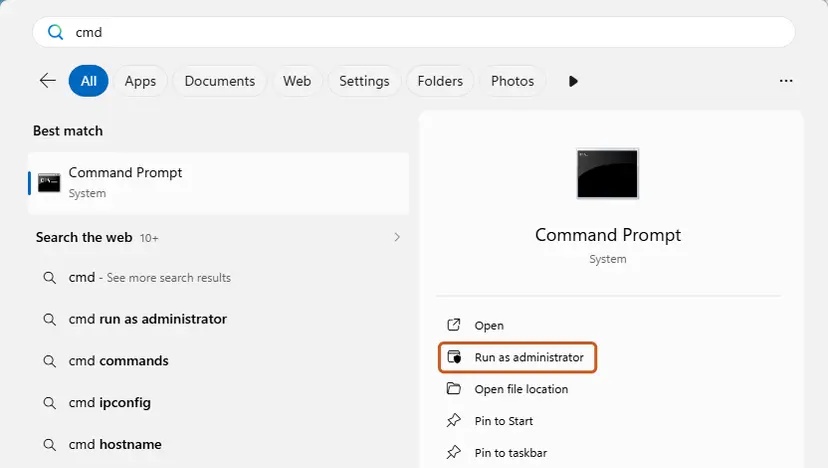
Search for cmd and choose Run as administrator. Screenshot: Windows 11 26H2. - Run DISM first. Type the command below and press Enter. DISM downloads clean copies of damaged components from Windows Update, so it can take several minutes. Wait until it says The operation completed successfully.
DISM.exe /Online /Cleanup-Image /RestoreHealth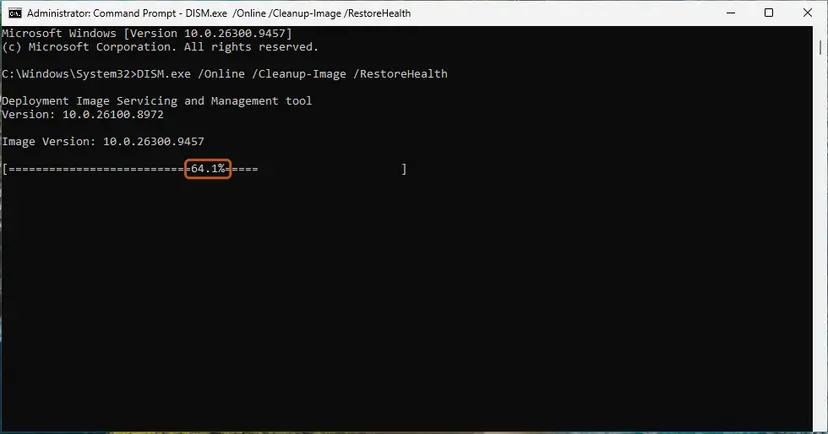
DISM /RestoreHealth running. Screenshot: Windows 11 26H2. - Run System File Checker. In the same window, type the command below and press Enter. Do not close the window until the verification reaches 100%.
sfc /scannow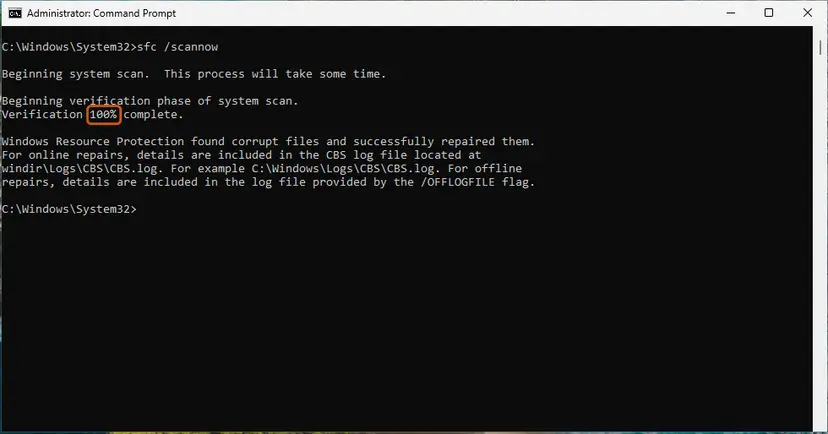
sfc /scannow at 100%. Screenshot: Windows 11 26H2. - Read the result and restart. Compare the last message with the table below this guide, then restart the PC so that repaired files are loaded.
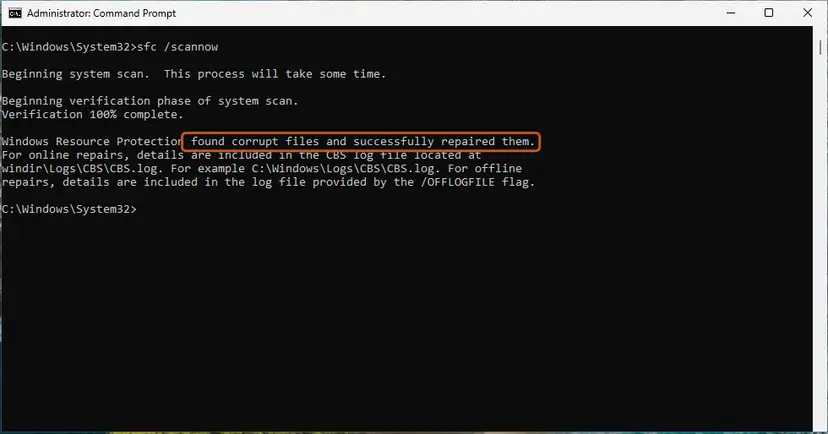
The result line tells you what SFC did. Screenshot: Windows 11 26H2.
These steps were written for Windows 11 24H2 and 25H2. The full page with the other versions and what each result means: Run DISM and SFC to repair Windows system files
Run DISM first, then SFC, then restart. SFC alone can fail when the store it copies from is damaged too. The SFC details are written to C:\Windows\Logs\CBS\CBS.log; search it for explorerframe to see whether the file was replaced.
It worked if: SFC reports no integrity violations or that it repaired files, and File Explorer works after a restart.
If not: If SFC could not repair some files, go to Fix 7. If it repaired files but Explorer still crashes on certain folders, try Fix 5.
Fix 5. Test File Explorer in a clean boot and in Safe Mode
15 to 40 minutesLow riskFile Explorer still crashes and Event Viewer does not point to a clear program.
A Microsoft support answer to an explorerframe.dll crash suggested a clean boot and a test in Safe Mode before anything else. Both start Windows without third-party add-ons, so a crash that stops there comes from a program.
First start Windows with only Microsoft services: How to perform a clean boot in Windows
- Open the folder that made File Explorer crash.
- If Explorer stays open, turn half of the disabled services and startup apps back on and restart.
- Repeat with the half that brings the crash back until one item remains, then update or uninstall that program.
- If Explorer still crashes in the clean boot, start in Safe Mode and open the same folder: Start Windows or a Mac in Safe Mode
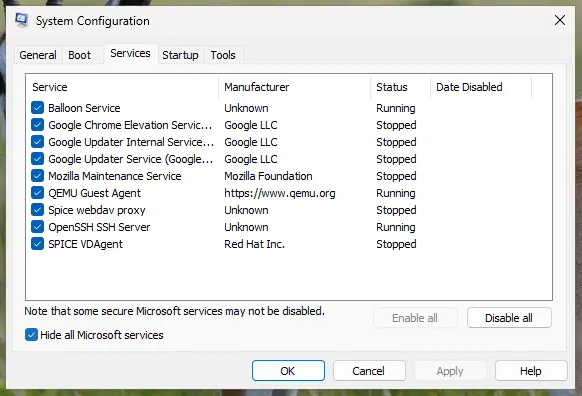
It worked if: Explorer stays open in the clean boot, and you find the one program that brings the crash back.
If not: If Explorer crashes even in Safe Mode, Windows itself is damaged: go to Fix 7.
Fix 6. Scan for malware if RegSvr32 windows appear on their own
15 to 60 minutesNo riskThe RegSvr32 window pops up by itself at sign-in, or other Windows files act strangely.
regsvr32 is a Windows tool that scripts can call. If you never typed the command, a startup item runs it, and an unknown one is worth a malware scan before you remove it.
- Open Windows Security. Select Start, type Windows Security and open the app.
- Open Virus & threat protection. Select Virus & threat protection. Under Current threats you see when the last scan ran, how long it took and how many files it checked.
- Run a quick scan. Select Quick scan. If Windows Security thinks a deeper scan is needed, it tells you when the quick scan is done.
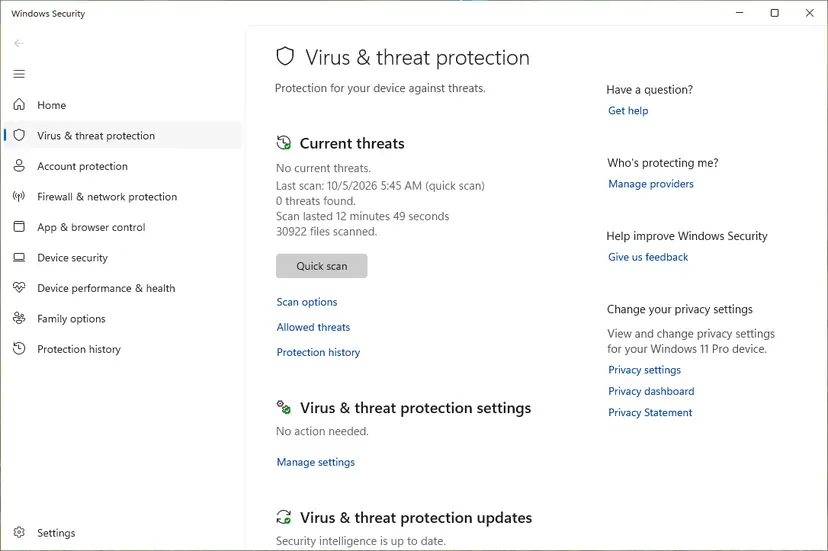
Quick scan and Scan options sit under Current threats. Screenshot: Windows 11 26H2. - Open Scan options. If the quick scan finds nothing and you still suspect an infection, select Scan options under Current threats.
- Run a full scan. Select Full scan and start it. It checks every file and program on the device, so it takes much longer than a quick scan. Leave the PC on until it ends.
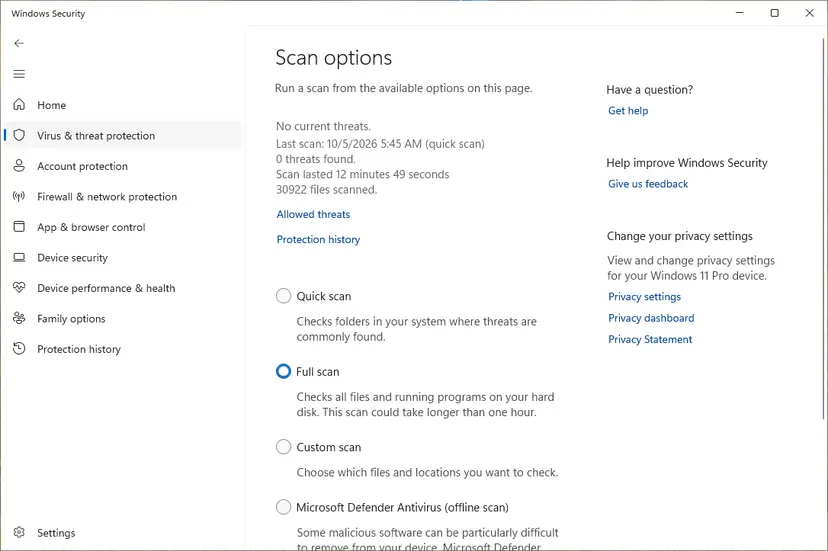
Scan options: Quick scan, Full scan, Custom scan and the offline scan. Screenshot: Windows 11 26H2.
These steps were written for Windows 11 25H2 and 26H2, Windows 10 22H2. The full page with the other versions and what each result means: How to scan for malware with Microsoft Defender
- After the scan, open Task Manager with Ctrl + Shift + Esc and select Startup apps.
- Disable any entry you do not recognize, then restart and see whether the RegSvr32 window returns: Stop apps from opening at startup
It worked if: Microsoft Defender finds no threats, or removes them, and no RegSvr32 window appears at the next sign-in.
If not: If the window still appears, find the startup program with a clean boot (Fix 5).
Fix 7. Reinstall Windows in place and keep your files and apps
1 to 2 hoursRead the warningSFC cannot repair files, or File Explorer crashes even in Safe Mode.
A repair install replaces every Windows file, ExplorerFrame.dll included, with a fresh copy of your version. The Microsoft Q&A reader saw the Explorer crash survive a reinstall, so try Fix 2 to Fix 5 first.
A repair install keeps files and apps when you choose to keep them, but a power cut or a wrong choice can cost data. Copy your documents to an external drive or the cloud first: Back up your files (Windows Backup, File History, Time Machine)
- Open Recovery in Settings. Open Settings > System > Recovery. Next to Fix problems using Windows Update, select Reinstall now. This keeps your apps, files and settings.
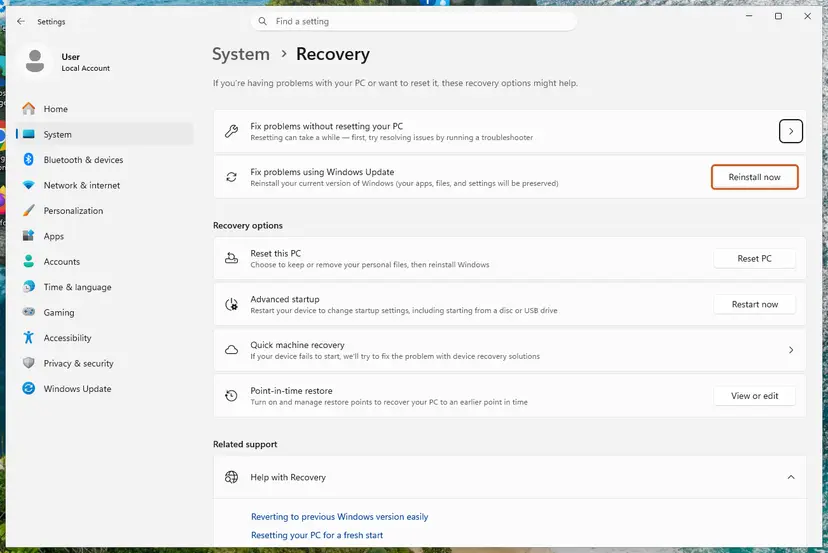
Fix problems using Windows Update reinstalls the current version and keeps apps, files and settings. Screenshot: Windows 11 26H2. - Start the reinstall. Choose whether the PC may restart on its own 15 minutes after the installation, then select OK.
- Wait and restart. Windows Update downloads and installs a repair copy of your current Windows version. Keep the PC plugged in and online, and restart it when asked.
- If that did not help: Reset PC. Back in Settings > System > Recovery, next to Reset this PC, select Reset PC. This keeps your personal files but removes installed apps and settings.
- Choose Keep my files. Select Keep my files. Do not select Remove everything.
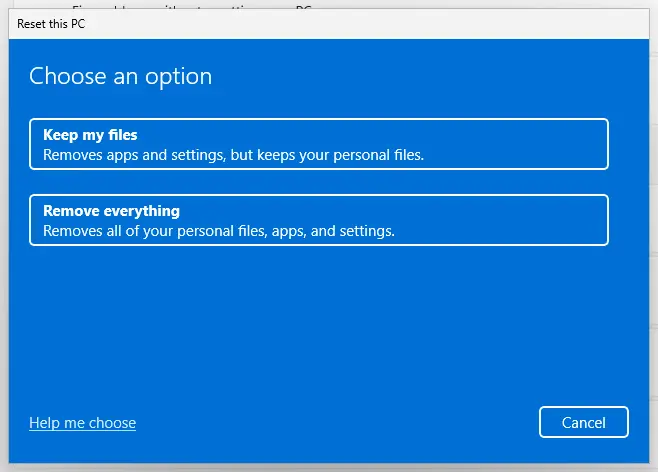
Keep my files removes apps and settings but keeps personal files. Screenshot: Windows 11 26H2. - Choose where Windows comes from. Select Cloud download to download a fresh copy of Windows, or Local reinstall to use the files already on the PC (faster, but may not include the latest updates).
- Reset. Review the summary and select Reset. The PC restarts several times.
These steps were written for Windows 11 22H2 and later. The full page with the other versions and what each result means: Reinstall Windows without losing files
It worked if: Windows starts after several restarts, your files and apps are still there, and File Explorer opens every folder.
If not: If Explorer still crashes on one folder only, read "If File Explorer still crashes" below.
If File Explorer still crashes after these fixes
Stop changing things and collect what support needs. The reader on Microsoft Q&A found that one folder kept crashing Explorer even after a reinstall, while other apps opened it fine. That points to something inside the folder, not to ExplorerFrame.dll.
- Copy the full Event Viewer entry of the crash: faulting module, version, exception code and path.
- Note the folder that crashes Explorer and what is in it (videos, images, archives, files from one program).
- Press Win + R, type
winver, press Enter and note the version and OS build. - Ask on Microsoft Q&A with these details, or contact the maker of the program whose DLL Event Viewer names.
- One folder only. Open it from another program's file dialog or move its files into a new folder in small groups. A single damaged file or preview handler can crash the folder view.
- When it is hardware. If many programs crash and files break again after repairs, check the disk with Check a disk for errors (chkdsk) and the memory with How to test your RAM with Windows Memory Diagnostic.
How to avoid the ExplorerFrame.dll error next time
- Do not run regsvr32 on Windows files. It only works for self-registering COM components and changes nothing for files like ExplorerFrame.dll, ntdll.dll or wuaueng.dll.
- Never replace system DLLs by hand. A copy from another build, such as 21332, or from a DLL site can stop File Explorer from opening.
- Be careful with Explorer and taskbar mods. Check that the mod supports your Windows build before each feature update.
- Keep restore points on. They let you undo a bad mod or update with Undo recent changes with System Restore.
- Keep Windows updated. Updates replace system files with matching versions.
If you still run Windows 10, plan the move to Windows 11 or an extended security option: Windows 10 left support on 14 October 2025 and no longer gets regular fixes.
Frequently asked questions
What does "the module was loaded but the entry-point DllRegisterServer was not found" mean?
It is a message from regsvr32, the Windows tool that registers COM components. The tool found and loaded the file, then looked for the DllRegisterServer function and did not find it. Microsoft's KB 249873 says this happens when the entry point is not exported from the module, or when the file is not a DLL or OCX at all. For ExplorerFrame.dll it only means the file is not meant to be registered. It does not mean the file is damaged.
How do I re-register ExplorerFrame.dll?
You cannot, and you do not need to. Re-registering works only for files that export DllRegisterServer, and ExplorerFrame.dll does not, so regsvr32 ExplorerFrame.dll always ends in the RegSvr32 error. Windows loads the file directly when File Explorer starts. If you think the file is damaged, run DISM and then sfc /scannow as an administrator (Fix 4). SFC puts back the right copy for your Windows build.
Is the ExplorerFrame.dll DllRegisterServer error dangerous?
No. The message itself changes nothing on the PC: regsvr32 stopped before writing anything. If File Explorer works normally, you can ignore it. It is worth a look only in two cases. The RegSvr32 window appears by itself, so a script or startup item runs it (Fix 6). Or File Explorer crashes at the same time, which has its own cause (Fix 2).
Where can I download ExplorerFrame.dll for Windows 7 64-bit?
Do not download it. ExplorerFrame.dll must match your exact Windows build, and a copy from a DLL site can be the wrong version or carry malware. On Windows 7, run sfc /scannow from an administrator Command Prompt to restore the original. Keep in mind that Windows 7 no longer gets security updates from Microsoft, so moving to a supported Windows version protects you better than any single file.
What is the ExplorerFrame.dll from build 21332?
Build 21332 was a Windows Insider build from 2021. Users on the WinClassic forum share its ExplorerFrame.dll to bring back the classic File Explorer layout on newer Windows, and they mention bugs and side effects themselves. Swapping a system file from another build is not supported by Microsoft, can crash Explorer after an update, and SFC replaces it. To undo it, run DISM and SFC (Fix 3 and Fix 4).
Why does File Explorer crash with explorerframe.dll in Event Viewer?
The log names explorerframe.dll because the crash happened inside it, but the cause is often something it called. Third-party shell extensions, Explorer mods and damaged files in one folder are common triggers. A Microsoft support answer to such a report suggested a clean boot and a test in Safe Mode first. Read the full entry (Fix 2), remove mods (Fix 3), run DISM and SFC (Fix 4), then use a clean boot (Fix 5).
Does the error cause "Class not registered" or 0xc000012f?
Not directly. The old version of this page listed them together, but they are separate errors. "Class not registered" means a program asked for a COM component Windows has no entry for. Error 0xc000012f is a Bad Image error about a file that cannot be loaded. Running regsvr32 on ExplorerFrame.dll fixes neither, because the file cannot be registered. Each needs its own fix.
Why does a RegSvr32 window pop up at startup?
If you see the RegSvr32 message without typing anything, something runs regsvr32 for you. It can be a startup script, a scheduled task, an old cleanup or tune-up tool, or malware. Scan the PC with Microsoft Defender and check Startup apps in Task Manager (Fix 6). If the source is still unclear, a clean boot finds it (Fix 5). The message itself is harmless, but an unknown program running Windows tools is not.
What does "explorerframe dll ошибка" mean?
It is Russian for "explorerframe dll error", and it is the same problem. In a Russian copy of Windows the RegSvr32 window shows the same message in Russian: the module was loaded, but the DllRegisterServer entry point was not found. The answer is the same as in English. The file cannot be registered, so close the window; if File Explorer crashes, start with Event Viewer (Fix 2) and DISM and SFC (Fix 4).
Sources
Did this fix work?
One click, no account. It tells the next reader which guides are worth their time.
Questions and experiences: fix "ExplorerFrame.dll was loaded but the entry-point DllRegisterServer was not found"
Still broken, or found a fix we did not cover? Ask here: members and our editors answer. Reading is open; writing needs a free account.
…