
How to restart Windows Explorer (File Explorer)
Windows Explorer draws the taskbar, the Start button, the desktop and File Explorer windows. When any of them freezes, restarting this one process often fixes it without restarting the PC.
- Time
- Under a minute
- Level
- Easy
- You need
- Nothing.
Before you start
- Open File Explorer windows close during the restart. Programs and documents stay open.
Windows 11
Steps written for Windows 11 26H2 (build 26300).
Open Task Manager
Press Ctrl + Shift + Esc. The Processes page opens.
Select Windows Explorer
Find Windows Explorer in the list and select it. If it is not under Apps, look under Windows processes further down.
Restart it
Select Restart task at the top of the window. The taskbar disappears for a moment and comes back. If you do not see Restart task, right-click Windows Explorer and select Restart.
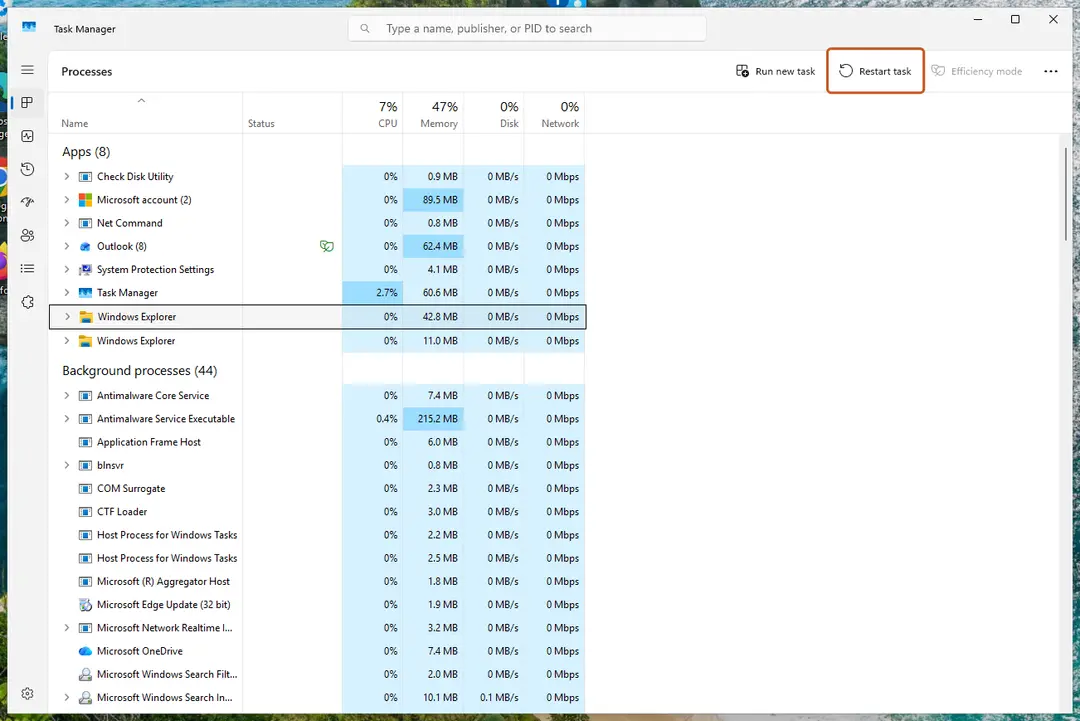
Select Windows Explorer, then Restart task. Screenshot: Windows 11 26H2
Windows 10
Steps written for Windows 10 22H2.
Microsoft ended support for Windows 10 on October 14, 2025.
Open Task Manager
Press Ctrl + Shift + Esc. If Task Manager opens small, select More details.
Select Windows Explorer
On the Processes tab, select Windows Explorer.
Restart it
Select Restart in the lower-right corner, or right-click Windows Explorer and select Restart.
Restart it with a command
Open Command Prompt and run these two commands. The first one ends the process, the second starts it again:
taskkill /f /im explorer.exestart explorer.exe
If the taskbar does not come back
- Press Ctrl + Shift + Esc to open Task Manager.
- Select Run new task (on Windows 10: File > Run new task).
- Type
explorer.exeand select OK.
If that fails too, press Ctrl + Alt + Delete and restart the PC from the power button in the lower-right corner.
If Explorer freezes again and again
Repeated freezes usually come from damaged system files, an add-on that plugs into File Explorer, or a failing drive. Repair system files with Run DISM and SFC to repair Windows system files, uninstall shell add-ons you no longer need (Uninstall a program or app in Windows), and check the drive with Check a disk for errors (chkdsk).
Used in 26 guides
How to fix "We can't get to this file right now because computer syncing is paused"?
Can't bring a window to the foreground in Windows 11: windows not coming to front when clicked
What are brown box icons on my pictures and how to remove them in Windows?
How to fix missing Windows Security icon in taskbar?
Windows 11 calendar not opening on second monitor: click the clock on any screen
How to fix "Unknown Hard Error" on Windows 10?
How to fix Desktop is not refreshing automatically in Windows?
How to fix "These files might be harmful to your computer" Windows Security alert?
How to fix "ExplorerFrame.dll was loaded but the entry-point DllRegisterServer was not found"?
How to fix error 0x80004001 (Not implemented) in Windows?
How to fix ms-settings:personalization-background error?
How to transfer multiple photos at once in Phone Link?
How to fix File System error (-2144927439) in Windows?
How to fix OneDrive error 0x8007018b in Windows?
How to fix "The group or resource is not in the correct state" error on Windows
How to fix File System Error (-2018374635) in Windows?
How to fix "Can't open this item. It might have been moved, renamed, or deleted" on Windows
How to fix "Do Not Disturb" constantly turning itself on in Windows?
How to fix 0x800700aa error in Windows?
How to fix "Docked in the taskbar" option grayed out in Windows?
How to enable or disable the taskbar overflow menu in Windows 11
How to fix StartMenuExperienceHost.exe error in Windows?
How to fix WiFi icon is not showing on taskbar in Windows?
How to fix Alt + F4 not working in Windows?
How to fix black squares behind folder icons in Windows?
How to remove the red dot on the Discord icon (taskbar, tray, iPhone, Android and Mac)
Sources
- Microsoft Q&A: Restarting explorer.exe from Task Manager (read Oct 3, 2026)