
How to fix "You can't sign in with this account" error in Windows?

Prefer to fix it yourself? The manual steps follow.
- 8methods
- 5 to 60 minutes
- Medium
Applies to Windows 11 and Windows 10 PCs that refuse a Microsoft or local account at the sign-in screen, or sign you in with a temporary profile
8 methods in this guide
Yesterday a Windows update was pending, so I let it install before shutting down the PC. Today, to my surprise, I can no longer get into Windows. There is a blue screen with the message "You can't sign in with this account. Try a different account." What should I do?
The You can't sign in with this account message appears on the Windows sign-in screen, most often after an update, when Windows cannot load or check your account while your files stay on the PC. Restart twice with the PC online, then sign in with the password or reset the PIN.
Windows could not load or verify your account, usually after an update. Restart the PC from the power icon on the sign-in screen, twice if needed, with Wi-Fi or a cable connected (Fix 1). If it still fails, select Sign-in options and use your password, or select I forgot my PIN and set a new PIN (Fix 2). Do not reset Windows first: your files are still there.
| Error | You can't sign in with this account. Try a different account. A related message is We can't sign in to your account, shown together with You've been signed in with a temporary profile. |
|---|---|
| Where it appears | On the Windows sign-in screen, right after you type a PIN or password. Users on Microsoft Q&A report it most often after an automatic update and restart. |
| Main cause | Windows cannot load your user profile or cannot accept the PIN after an update. Less often the account itself is locked, or the PC cannot reach Microsoft. |
| Fastest fix | Restart from the sign-in screen with the PC online (Fix 1), then use the password or I forgot my PIN (Fix 2). |
| Also written as | you cant sign in with this account try a different account, we can't sign into your account, we can't sign you into your account, windows can't sign into your account. |
| Affects | Windows 11 and Windows 10, Microsoft and local accounts. Windows 10 left support on 14 October 2025, so it gets no more fixes for sign-in bugs. |
| Microsoft's status | No single bug with a patch. Microsoft's help for the temporary profile message says to restart in Safe Mode, then normally, and if that fails to make a new local administrator account and copy your files (checked 15 October 2026). |
| Time to fix | 5 minutes for a restart or a new PIN. 30 to 60 minutes when you need to remove an update or move to a new account. |
Facts checked on 15 October 2026. Steps written for Windows 11 (25H2 and 26H2) and Windows 10 22H2 with a Microsoft account and a local account, read against Microsoft Support and Microsoft Q&A.
What "You can't sign in with this account" and "We can't sign into your account" mean
Both messages come from the same place: Windows tried to open your user profile and could not. The profile is the folder under C:\Users with your desktop, documents and settings, plus the account data Windows uses to check who you are.
With You can't sign in with this account. Try a different account. Windows stops at the sign-in screen and sends you back. With We can't sign in to your account, Microsoft says Windows creates a temporary profile and signs you in with it, so you reach an empty desktop instead of your own.
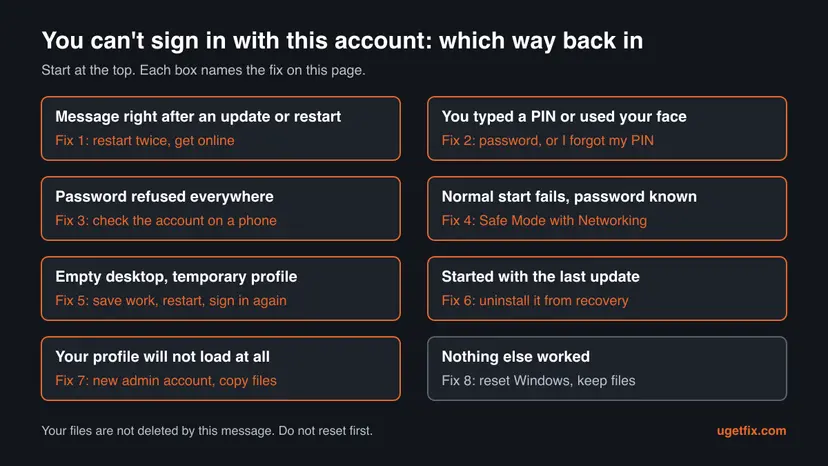
| What you see | What it means | Start with |
|---|---|---|
| You can't sign in with this account. Try a different account. after the PIN | The PIN or the account data did not load, often after an update. | Fix 1, then Fix 2 |
| The same line after the password | Windows refuses the account itself, not only the PIN. | Fix 3, then Fix 4 |
| We can't sign in to your account and an empty desktop | You are in a temporary profile. Work saved there is lost at sign out. | Fix 5 |
| The first sign-in works, the next one fails | Users on Microsoft Q&A describe this after the 24H2 update. | Fix 2, then Fix 6 |
Neither message deletes your profile folder or your Microsoft account. The only data at risk is what you create inside a temporary profile. Do not reset Windows before you have tried the fixes below.
Why Windows says you can't sign in with this account, from the most common cause
Microsoft does not publish a list of causes for this message. The ranking below is our reading of Microsoft's sign-in help and of the reports on Microsoft Q&A, not a statistic.
| How often | Cause | Typical sign | Fix |
|---|---|---|---|
| Most often | An update or a restart left the profile half loaded | The PC restarted overnight, then the message appeared. | Fix 1, Fix 5 |
| Often | The Windows Hello PIN broke during an update | The PIN fails, the same account works with I forgot my PIN. | Fix 2 |
| Less often | The update itself conflicts with sign-in on this PC | Every restart fails until the update is removed. | Fix 6 |
| Less often | The Microsoft account is locked or its password changed | The password fails here and in a browser on a phone. | Fix 3 |
| Less often | No internet when Windows wants to check the account | The network icon on the sign-in screen shows no connection. | Fix 1 |
| Rarely | The user profile is damaged for good | Safe Mode also fails, or you always get a temporary profile. | Fix 7 |
Many wrong tries can lock the PIN and make Microsoft ask for extra checks on the account. Try each password you know once, then move to the next fix.
How to fix "You can't sign in with this account" in Windows
Start with the fixes that take minutes and change nothing. You are done when Windows opens your own desktop with your files and wallpaper, not an empty one.
| Your situation | Start with | Then |
|---|---|---|
| The message appeared after an update or overnight restart | Fix 1 | Fix 2 |
| You sign in with a PIN, face or fingerprint | Fix 2 | Fix 4 |
| The password is refused too | Fix 3 | Fix 4 |
| You got in, but the desktop is empty (temporary profile) | Fix 5 | Fix 7 |
| It fails after every restart since the last update | Fix 6 | Fix 7 |
| Another account on the PC still works | Fix 7 | Fix 8 |
Fix 1. Restart the PC from the sign-in screen with the internet connected
5 minutesLow riskEveryone, first. It is the fix Microsoft names first for sign-in problems, and it costs two minutes.
An update that was still finishing, or a profile that loaded halfway, often clears on the next start. Microsoft also notes that some sign-ins cannot work without the internet, because Windows checks a Microsoft account online.
- On the sign-in screen, select the network icon in the lower right corner and make sure Wi-Fi or a cable is connected.
- Select the Power icon in the lower right corner and select Restart. If Update and restart is offered, choose it so the update can finish.
- Wait until the sign-in screen is back and try your PIN or password once.
- If it fails, restart one more time. Microsoft says you might need to restart more than once.
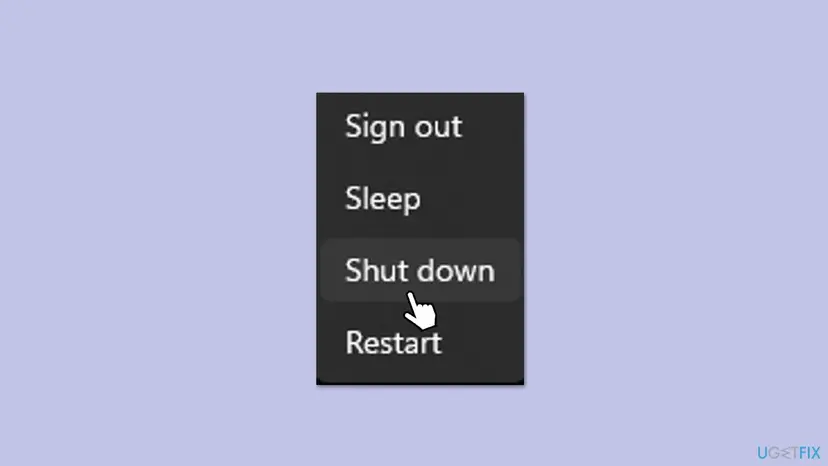
If Wi-Fi will not connect, plug a network cable into the router or use your phone's hotspot. The full connection check from a desktop is here: How to check your internet connection in Windows.
It worked if: Windows accepts the PIN or password and opens your own desktop.
If not: If the PIN still fails, go to Fix 2. If you land on an empty desktop, go to Fix 5.
Fix 2. Sign in with the password, or reset the PIN with I forgot my PIN
5 minutesLow riskYou sign in with a PIN, face or fingerprint and the message came after an update.
The PIN is a key stored on this PC, separate from the account password. An update can break the key while the account is fine. On Microsoft Q&A a user got past this exact message after 24H2 by choosing I forgot my PIN.
- Under the PIN box, select Sign-in options and pick the key icon to sign in with the password.
- If the password works, open Settings > Accounts > Sign-in options, expand PIN (Windows Hello) and set a new PIN.
- If you prefer, or the password option is missing, select I forgot my PIN with the PC online.
- Type your Microsoft account password and select Sign in. Use Forgot my password if you do not know it.
- Confirm with the code Microsoft sends to your phone or email, then type a new PIN twice.
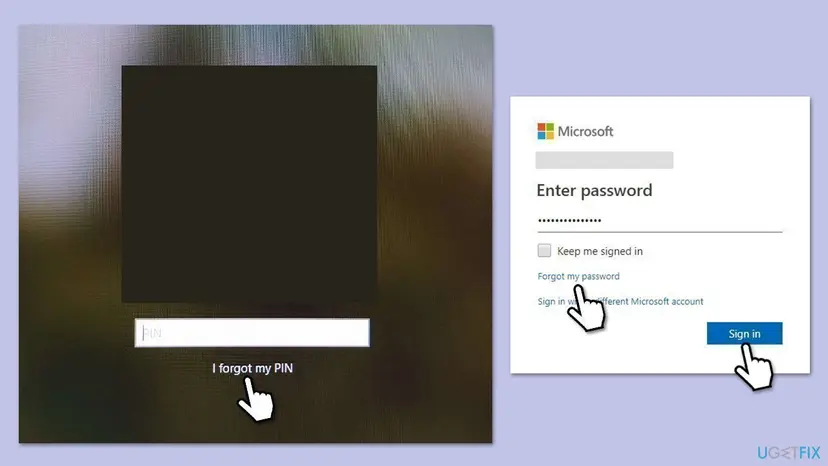
The PIN reset uses your Microsoft account, so it only appears for Microsoft accounts. On a local account, sign in with the local password, or answer the security questions under the password box if you set them.
It worked if: The password or the new PIN opens your desktop, and the next restart signs in normally.
If not: If the password is refused as well, go to Fix 3. If the PIN reset fails, go to Fix 4.
Fix 3. Check the Microsoft account on a phone or another computer
10 minutesLow riskThe password is refused at the sign-in screen, or you think the account was locked or its password changed.
If the account itself is blocked, no fix on the PC helps. A Microsoft support specialist on Microsoft Q&A asks exactly this first: can you sign in to the account in a browser on another device?
- On a phone or another computer, open
login.live.comand sign in with the same account. - If Microsoft says the account is locked or asks for a code, follow its steps to unlock it.
- If you do not know the password, reset it at
account.live.com/password/reset. - Back on the PC, connect to the internet (Fix 1) and sign in with the new password.
Microsoft also offers a Microsoft account sign-in helper that walks through most account problems. If the account works in the browser, the problem is on the PC: continue with Fix 4.
It worked if: The account opens in the browser, and the PC accepts the same password once it is online.
If not: If the account works online but the PC still refuses it, go to Fix 4.
Fix 4. Start Windows in Safe Mode with Networking and sign in with the password
10 minutesLow riskNormal start keeps showing the message and you know the account password.
Safe Mode loads only basic drivers and settings. Microsoft says that if you can sign in there, those were not the cause, and its help for the temporary profile starts with a Safe Mode sign-in to the original profile.
- On the sign-in screen, hold Shift, select the Power icon and select Restart.
- Select Troubleshoot > Advanced options > Startup Settings > Restart.
- Press 5 or F5 for Safe Mode with Networking.
- Sign in with the account password. Microsoft notes that PIN and fingerprint sign-in do not work in Safe Mode.
- Check that your desktop and files are there, then restart normally and sign in again.
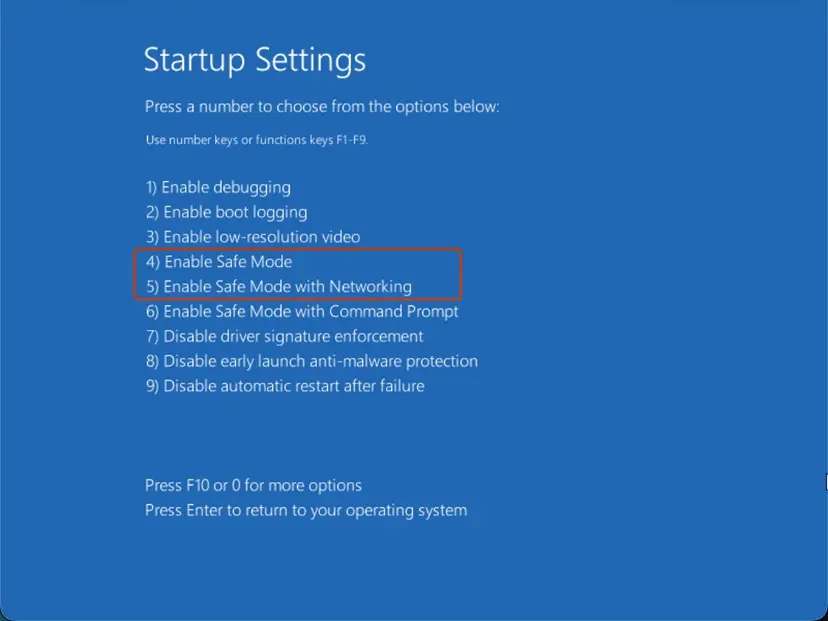
If Windows never reaches the sign-in screen, turn the PC off three times while it starts and the recovery screens open on their own. Step by step: Start Windows or a Mac in Safe Mode.
It worked if: Safe Mode opens your own desktop, and after a normal restart the sign-in works again.
If not: If Safe Mode works but normal start still fails, the cause is likely a recent update or a startup app: go to Fix 6. If Safe Mode refuses the password too, go to Fix 7.
Fix 5. Get out of a temporary profile when Windows says we can't sign into your account
15 minutesRead the warningYou see We can't sign in to your account or You've been signed in with a temporary profile, and your desktop looks empty.
In a temporary profile Windows has given up on your real profile for this session only. Microsoft's own fix is to sign out, sign in through Safe Mode, then sign in again normally, so Windows tries to load the real profile once more.
Microsoft warns that any file you create or change in a temporary profile is lost when you sign out. Copy such files to a USB drive or an external disk before step 2.
- Copy anything you saved in this session to a USB drive or an external disk.
- Select Start, then Power > Restart while holding Shift.
- Open Safe Mode as in Fix 4 and sign in with your password.
- Check whether your own files and wallpaper are back.
- Restart normally and sign in again. Repeat the normal restart once or twice if the temporary profile returns.
Some notices continue with This problem can often be fixed by signing out of your account and signing back in. That is the same advice: sign out, not just lock the screen, and sign in again after a restart.
It worked if: Windows opens your real profile with your desktop, documents and settings.
If not: If every sign-in still ends in a temporary profile, the profile is damaged: move your files to a new account with Fix 7.
Fix 6. Uninstall the latest Windows update from the recovery screens
20 minutesRead the warningThe message started right after an update and comes back after every restart.
On Microsoft Q&A the person who asked about this message got back in only after removing the latest feature update from Safe Mode. Removing the quality update alone did not help them, so try both if the first does not work.
You lose the security fixes of that update until it is installed again, and the same user reported that some apps misbehaved afterwards. On a PC with BitLocker or device encryption, have the recovery key ready, because the recovery screens may ask for it.
- On the sign-in screen, hold Shift and select Power > Restart.
- Select Troubleshoot > Advanced options > Uninstall Updates.
- Select Uninstall latest quality update and confirm. Restart and test the sign-in.
- If the message is still there, go back and select Uninstall latest feature update.
- Once you are in, pause updates in Settings > Windows Update for a week, then install them again.
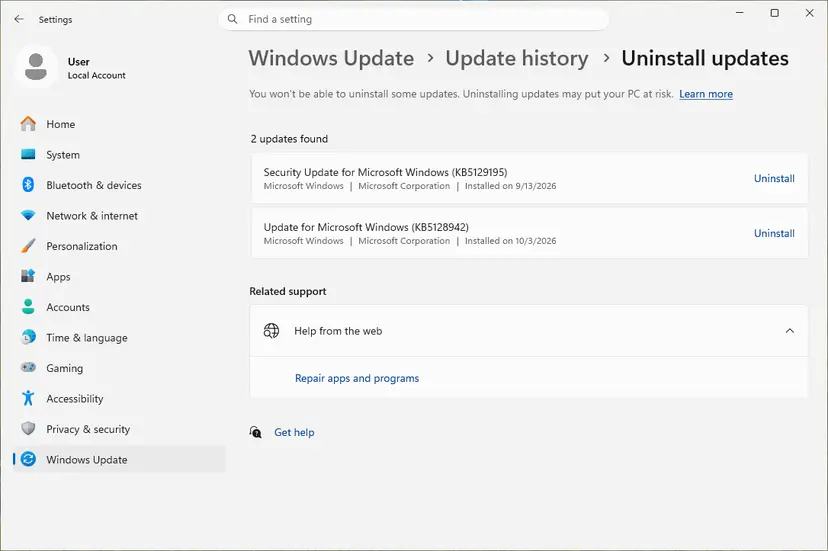
A feature update, such as the move to a new Windows version, can be undone only for 10 days after the upgrade. Full steps for all three ways: How to uninstall a Windows update.
It worked if: The PC starts and accepts your PIN or password as before the update.
If not: If the feature update cannot be removed or nothing changes, go to Fix 7.
Fix 7. Create a new local administrator account and move your files to it
30 to 60 minutesRead the warningYour own profile will not load in normal start or Safe Mode, or another account on the PC still works.
A damaged profile cannot be opened, but its files are still on the disk. Microsoft's help says to create a new local administrator, sign in to it and copy your personal data from the old profile.
Settings, app data and saved passwords of the old profile do not come along, and deleting the old profile folder removes its files for good. Copy your folders to the new account, and to an external disk too, before you remove anything.
- On the sign-in screen, pick another account in the lower left corner, or select Other user, and sign in.
- If no other account works but Safe Mode does, sign in there with your password.
- Create the new account: Create a new user account to test a problem. Make it an Administrator.
- Sign out, sign in to the new account and open
C:\Users\in File Explorer. - Open your old profile folder and copy Desktop, Documents, Pictures and your other folders to the same folders of the new account.
- Add your Microsoft account to the new account later in Settings > Accounts > Your info, if you want it back.
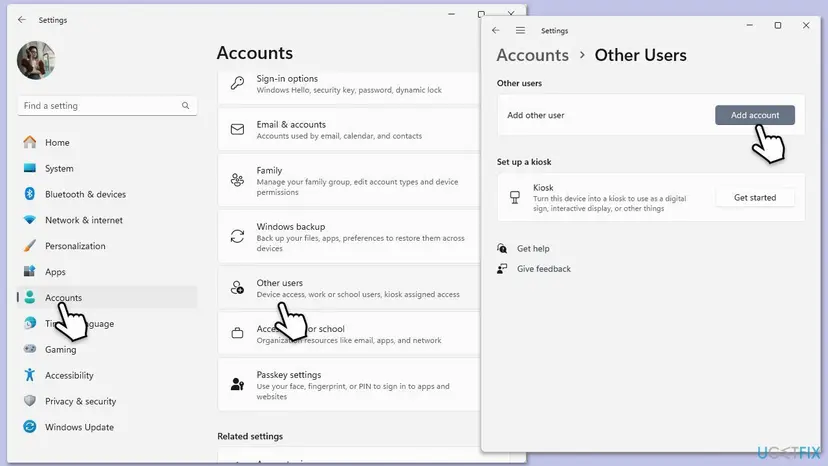
A Microsoft support specialist on Microsoft Q&A gives the same step as two commands in Terminal (Admin) from a working account: net user user1 /add and net localgroup administrators user1 /add, with your own name in place of user1. Choose a password for the account right after.
It worked if: The new account opens a normal desktop, and your old files are in its folders.
If not: If no account and no Safe Mode sign-in works, read the section below before you go to Fix 8.
Fix 8. Reset Windows and keep your files, as the last step
1 to 2 hoursRead the warningNothing above worked and you have no other way to sign in.
A reset reinstalls Windows and rebuilds the accounts, so a damaged profile or a broken update is gone. With Keep my files it leaves your personal files, but removes your apps.
Keep my files keeps your personal files but removes installed apps and many settings. If you can still reach your files through another account, copy them to an external disk first. On an encrypted PC you need the BitLocker recovery key.
- On the sign-in screen, hold Shift and select Power > Restart.
- Select Troubleshoot > Reset this PC.
- Select Keep my files, then Cloud download or Local reinstall.
- Follow the prompts and select Reset.
Full steps, including the reinstall that keeps apps from Settings: Reinstall Windows without losing files.
It worked if: Windows starts with a fresh setup and you sign in with your Microsoft account again.
If not: If the reset itself fails, the disk may be failing: see the section below.
Still locked out: what to check and who can help
If you are in through Safe Mode or another account, Windows records why the profile failed. Open Event Viewer, go to Windows Logs > Application and look for errors with the source User Profile Service at the time of the failed sign-in.
- Security software: Microsoft suggests testing a sign-in with third party antivirus paused, since it scans during sign-in. Pause it for one test only and turn it back on: Turn off Microsoft Defender protection for a moment.
- Work or school PC: contact IT. The account and the sign-in rules are managed by the organization.
- Disk problems: if Safe Mode is slow, files are missing or the reset fails, the drive may be failing. Copy your files off first, then test the disk.
- Backup: before any bigger step, save the profile folders from another account: Back up your files (Windows Backup, File History, Time Machine).
Microsoft's page also lists setting the Microsoft Defender services to Disabled for a test. That leaves the PC without protection if it is forgotten, so we leave it out. A paused third party antivirus is enough for the test.
How to stop the sign-in error from coming back
- Know your account password, not only the PIN. Safe Mode and most recovery steps accept only the password.
- Keep a second administrator account on the PC, so a broken profile never locks you out of the whole PC.
- Let updates finish: choose Update and restart instead of cutting the power while Windows installs.
- Keep your Microsoft account recovery info current, so a phone number or a second email can unlock it quickly.
- Save your BitLocker recovery key from your Microsoft account before you need it.
- Back up your profile folders to OneDrive or an external disk on a schedule.
Frequently asked questions
What does "You can't sign in with this account. Try a different account" mean?
It means Windows could not load or check the account you picked, so it suggests using another one. The account and your files still exist. Most reports on Microsoft Q&A tie it to an update and restart, and to a PIN that stopped working. Restart the PC with the internet connected, then sign in with the password or reset the PIN with I forgot my PIN.
How do I fix "We can't sign into your account" on Windows 10?
Microsoft's steps are the same on Windows 10 and Windows 11. Save anything you made in the temporary profile to a USB drive, restart into Safe Mode and sign in with your password, then restart normally and sign in again. Repeat the normal restart if needed. If the temporary profile keeps coming back, create a new local administrator account and copy your files to it. Windows 10 no longer gets updates since 14 October 2025.
Why won't my laptop let me sign in?
The most common reasons are an update that left the account half loaded, a PIN that broke, a changed or locked Microsoft account password, or no internet when Windows wants to check the account. Read the message under the box first: it tells you which case it is. Then restart with Wi-Fi on and use the password instead of the PIN, as in Fix 1 and Fix 2.
Why does Windows sign me in with a temporary profile?
Windows could not open your real profile folder at sign-in, so it made a blank one for this session. Microsoft says the files you create or change there are lost when you sign out. A restart through Safe Mode and a normal sign-in often brings the real profile back. If it does not, the profile is damaged and you move your files to a new account.
Will I lose my files if I cannot sign in?
No, not from this message. Your files stay in your profile folder under C:\Users even when Windows refuses the account. You can reach them from another administrator account or Safe Mode and copy them. Files are at risk only in two cases: work saved in a temporary profile, and a reset or reinstall of Windows that you start yourself without keeping files.
Why does I forgot my PIN not work or not appear?
I forgot my PIN works only for Microsoft accounts and needs the internet, because it checks your account password with Microsoft. Connect the PC from the network icon first. On a local account the option is not there: sign in with the local password through Sign-in options instead. If the password is also refused, check the account on a phone, as in Fix 3.
Can I sign in without a password if my PIN is broken?
Not in a supported way. Windows needs either a working PIN, a face or fingerprint, or the account password. If none works, reset the Microsoft account password from another device and get the PC online. Tricks that create accounts through the recovery Command Prompt weaken the PC's security, and a Microsoft moderator has noted that they can change the recovery system instead of your Windows.
Should I uninstall the update that caused the sign-in problem?
Only if the message started right after the update and Fix 1 to Fix 5 did not help. Removing it from the recovery screens is safe for your files, but you lose that update's security fixes. Pause updates for a week after you are back in, then install them again, since a later update often installs without the problem.
Does this error mean my PC has a virus?
Usually not. The messages come from Windows failing to load the profile or the PIN, most often after an update. Malware is rarely the cause. Once you are signed in, a full Microsoft Defender scan is a reasonable check. If security software you installed blocks the profile at sign-in, a test with it paused can show it, then turn it back on.
Sources
- Microsoft Support: "We can't sign in to your account" error message (temporary profile, files lost at sign out, Safe Mode then normal restart, new local administrator account) (support.microsoft.com)
- Microsoft Support: Troubleshoot problems signing in to Windows (restart, Safe Mode with Networking needs a password, other user, internet at the lock screen) (support.microsoft.com)
- Microsoft Q&A: "you can't sign in with this account. try a different account" on login screen after auto update (feature update removal, I forgot my PIN after 24H2, support specialist's new admin commands) (learn.microsoft.com)
Did this fix work?
One click, no account. It tells the next reader which guides are worth their time.
Questions and experiences: fix "You can't sign in with this account" error in Windows
Still broken, or found a fix we did not cover? Ask here: members and our editors answer. Reading is open; writing needs a free account.
…