
How to fix File System error (-1073740791) in Windows?

Prefer to fix it yourself? The manual steps follow.
- 7methods
- 5 to 60 minutes
- Medium
Applies to Windows 11 and Windows 10; any program started with Run as administrator, such as Command Prompt, Task Manager, installers and Registry Editor
7 methods in this guide
Hello. When I try to run any app as an administrator on my Windows PC, I get the File System error (-1073740791). Is there a way to fix this?
File system error (-1073740791) appears when you start a program with Run as administrator: the screen dims, no User Account Control prompt shows up, and the box appears instead. The disk is fine; the prompt itself crashes. Set the sound scheme and the theme back to Windows defaults first.
File system error (-1073740791) is the Windows code 0xC0000409. It means a program stopped itself at once; here it is the User Account Control prompt, so nothing can run as administrator. Your files and disk are not the problem. Set the sound scheme to Windows Default or No Sounds (Fix 1), then switch to a built-in Windows theme (Fix 2). If that fails, repair Windows from the recovery screen, which needs no prompt.
| Error | A box with the program's path in the title bar and on the first line, for example C:\WINDOWS\system32\taskmgr.exe, then File system error (-1073740791). and an OK button. |
|---|---|
| Where it appears | After Run as administrator, or when a program that always needs admin rights starts. The screen dims as if the User Account Control (UAC) prompt were coming, but it never shows. |
| Main cause | The UAC prompt crashes while it starts. Reports tie this most often to a custom sound scheme or a non-default theme. |
| Fastest fix | Sound > Sounds tab, Sound Scheme set to Windows Default or No Sounds (Fix 1). It needs no admin rights. |
| Also written as | -1073740791, 1073740791, "error (-1073740791)", 0xC0000409, 0xc0000409, "exit code -1073740791", and in Spanish "error del sistema de archivos (-1073740791)". |
| Microsoft's name | STATUS_STACK_BUFFER_OVERRUN. Microsoft notes that today it usually means a fast, deliberate stop of the program, not a real buffer overrun. |
| Affects | Windows 10 and Windows 11. Every program that needs elevation fails the same way, which is why Command Prompt, Task Manager and installers all show it. |
| Not the cause | A failing hard drive or a broken NTFS file system. The words "file system" in the box are misleading. |
| Time to fix | 5 minutes for the sound and theme fixes, up to an hour for the repairs from the recovery screen. |
Facts checked on 15 October 2026. Steps written for Windows 11 (25H2 and 26H2) and Windows 10 22H2.
What File system error (-1073740791) means
You right-click a program and choose Run as administrator, or open a tool that always asks for admin rights. The screen goes dark as it does before the User Account Control prompt, but the prompt never appears. A moment later Windows shows a box with the program's path and File system error (-1073740791).
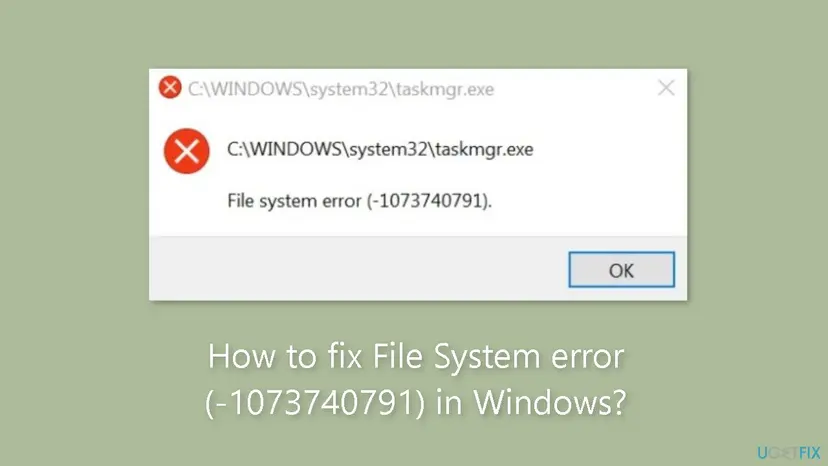
The number is a Windows status code printed as a negative decimal. In hex, -1073740791 is 0xC0000409. Microsoft's list of NTSTATUS values names it STATUS_STACK_BUFFER_OVERRUN and describes it as "The system detected an overrun of a stack-based buffer in this application".
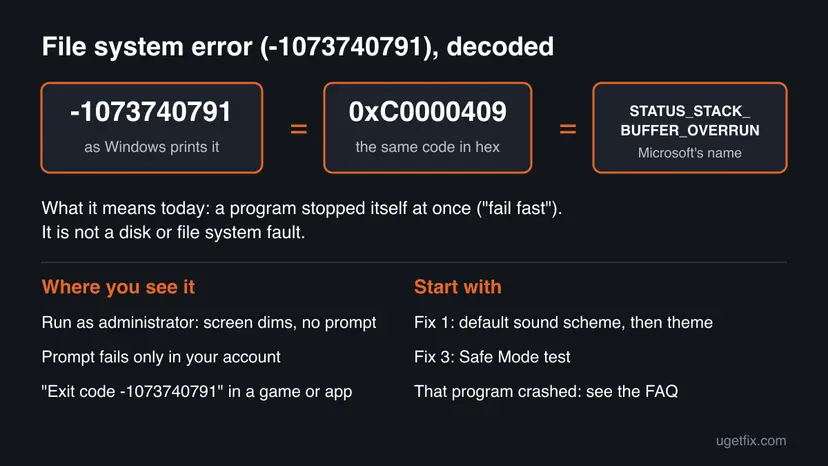
A Microsoft engineer explains on the Old New Thing blog that this code no longer means a real buffer overrun. Programs use it to stop themselves at once when something goes badly wrong. In this box the program that stops is the elevation step itself, so every admin request fails, while your files and your disk are untouched.
A Microsoft Q&A answer to this exact message calls it a User Account Control error: nothing that needs admin rights can start. That is why the usual advice, "open Command Prompt as administrator and run SFC", cannot work here. The fixes below either need no admin rights or run from the Windows recovery screen, which does not use the prompt.
Why the file system error -1073740791 appears
The prompt that asks "Do you want to allow this app to make changes?" plays a sound and draws itself with the current theme. When one of those pieces is broken, the prompt stops before you see it. Rank the causes like this.
| Cause | How often | How to tell | Fix |
|---|---|---|---|
| A custom or broken sound scheme, or a missing sound file for the User Account Control event. | Most often | You installed a sound pack or changed system sounds before the error began. | Fix 1 |
| A third-party theme, or a tool that changes how Windows looks. | Often | The desktop uses a downloaded theme or a visual style patcher. | Fix 2 |
| A program or driver that starts with Windows. | Sometimes | Run as administrator works in Safe Mode. | Fix 3 |
| Damaged Windows system files or file system errors. | Sometimes | Other built-in tools misbehave too. | Fix 4 |
| A recent Windows update. | Less often | The error started the day after an update. | Fix 5 |
| A damaged user profile. | Less often | Another admin account can elevate without the error. | Fix 6 |
| Changes you cannot pin down. | Rarely | Fixes 1 to 6 changed nothing. | Fix 7 |
The same kind of box with another number is a different error with its own cause. File system error (-2147416359), for example, hits Photos and other Store apps when you open pictures or videos: File system error (-2147416359).
How to fix File system error (-1073740791) in Windows
Fixes 1 and 2 need no admin rights and solve most cases. Fix 3 tells you whether a startup program is to blame. Fixes 4, 5 and 7 run from the Windows recovery screen, where the broken prompt is not used. Fix 6 moves you to a clean account.
| What you see or have | Start with |
|---|---|
| Every Run as administrator fails, and you use custom system sounds. | Fix 1 |
| You use a downloaded theme or a tool that restyles Windows. | Fix 2 |
| Sounds and theme are default, and you want to know whether a startup program is to blame. | Fix 3 |
| Windows also shows other errors, or Fixes 1 to 3 did not help. | Fix 4 |
| The error began right after a Windows update. | Fix 5 |
| Elevation works in Safe Mode or in another account. | Fix 6 |
| Nothing above helped and you have restore points. | Fix 7 |
Fix 1. Set the sound scheme to Windows Default or No Sounds
3 minutesNo riskEveryone, first. It takes two minutes and needs no admin rights.
The User Account Control prompt plays a sound as it opens. A custom scheme that points to a missing or broken sound file can make the prompt stop before it is drawn. Microsoft Q&A's answer to this error lists the sound scheme as a fix, with No Sounds as the fallback.
- Press Win + R, type
mmsys.cpland press Enter. The Sound window opens. - Open the Sounds tab.
- Under Sound Scheme, choose Windows Default. Select Apply and OK.
- Right-click a program, for example Command Prompt, and select Run as administrator.
- If the box still appears, open the Sounds tab again, choose No Sounds, select Apply and test again.
On Windows 11 the same window opens from Settings > System > Sound > More sound settings. On Windows 10 it is Settings > System > Sound > Sound Control Panel. In the Program Events list you can also select Windows User Account Control and set its Sounds box to (None).
If the error is gone with No Sounds, the custom sound files were the cause. Keep Windows Default, or add your own sounds back one by one and test after each.
It worked if: The screen dims and the prompt "Do you want to allow this app to make changes to your device?" appears. Select Yes and the program starts.
If not: Go back to a built-in theme in Fix 2.
Fix 2. Switch back to a built-in Windows theme
5 minutesLow riskFix 1 did not help, or you use a downloaded theme, a visual style patcher or a tool that changes the title bars and Start menu.
The prompt is drawn on a separate secure desktop with the current visual style. A third-party style that the prompt cannot load can make it stop at once, which is the code this box reports. Setting the Windows theme is the second fix in Microsoft Q&A's answer.
- Right-click the desktop and select Personalize.
- Select Themes.
- On Windows 11, select Windows (light) or Windows (dark). On Windows 10, select Windows.
- Restart the PC.
- Test Run as administrator on any program.
A tool that patches Windows to allow unsigned themes keeps working after you change the theme. If the error stays, uninstall that tool. Uninstalling usually needs admin rights, so do it in Safe Mode (Fix 3) if the prompt still fails. We could not confirm in a Microsoft document which theme tools cause this.
It worked if: The prompt appears in the normal Windows colours and the program starts after Yes.
If not: Test elevation in Safe Mode in Fix 3.
Fix 3. Test Run as administrator in Safe Mode, then find the startup program
15 minutesLow riskSounds and theme are default, and the error stays.
Safe Mode starts Windows with basic drivers and no third-party startup programs, sounds packs or theme tools. If elevation works there, something that starts with normal Windows breaks the prompt, and Safe Mode lets you remove it.
- Select Start > Power, hold Shift and select Restart. This needs no admin rights.
- Select Troubleshoot > Advanced options > Startup Settings > Restart.
- Press 4 or F4 for Enable Safe Mode and sign in.
- Right-click Command Prompt and select Run as administrator.
- If the prompt appears, uninstall the theme, sound or customisation tools you added before the error, then restart normally.
- If you cannot tell which program it is, set up a clean boot while you can still elevate in Safe Mode: How to perform a clean boot in Windows
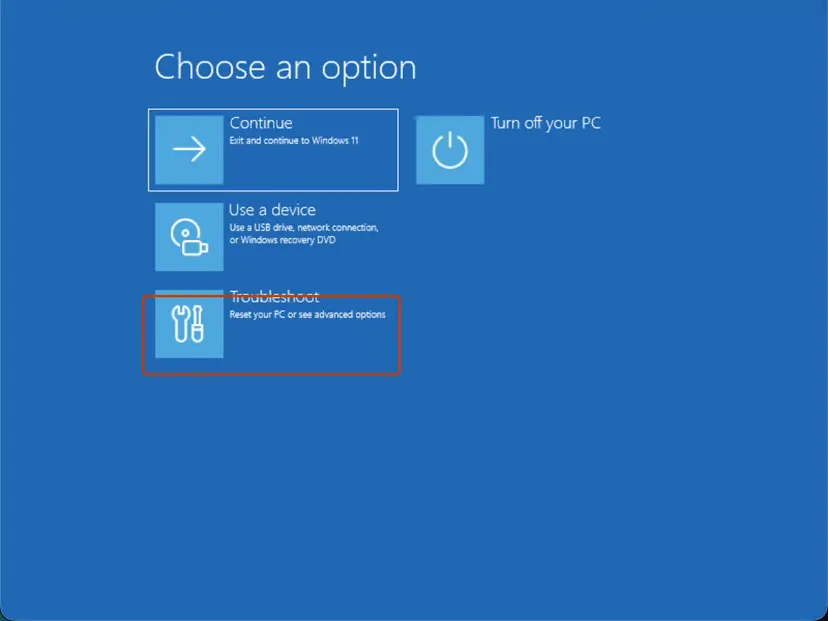
Full steps with screenshots: Start Windows or a Mac in Safe Mode
It worked if: In Safe Mode the prompt appears. After you remove the cause, it appears in normal mode too.
If not: If the error also appears in Safe Mode, the cause is inside Windows. Go to Fix 4.
Fix 4. Repair system files and the disk from the recovery Command Prompt
30 minutesLow riskThe error also appears in Safe Mode, or Windows shows other errors.
SFC and CHKDSK need admin rights, which the broken prompt blocks. The Command Prompt in the Windows recovery screen already runs with full rights, so it can check Windows offline. Microsoft Q&A's answer to this error gives the same offline SFC command.
- Select Start > Power, hold Shift and select Restart.
- Select Troubleshoot > Advanced options > Command Prompt. Pick your account and type its password. If the BitLocker recovery key is asked for, enter it.
- Type
dir C:\Windowsand press Enter. If it lists files, Windows is on C:. If not, tryD:and use that letter below. - Run the system file check on the offline Windows (command below) and wait until it reaches 100 %.
- Run
chkdsk C: /fto fix file system errors on the Windows drive. - Type
exit, select Continue to start Windows, and test Run as administrator.
Offline system file check (recovery Command Prompt)
sfc /scannow /offbootdir=C:\ /offwindir=C:\Windows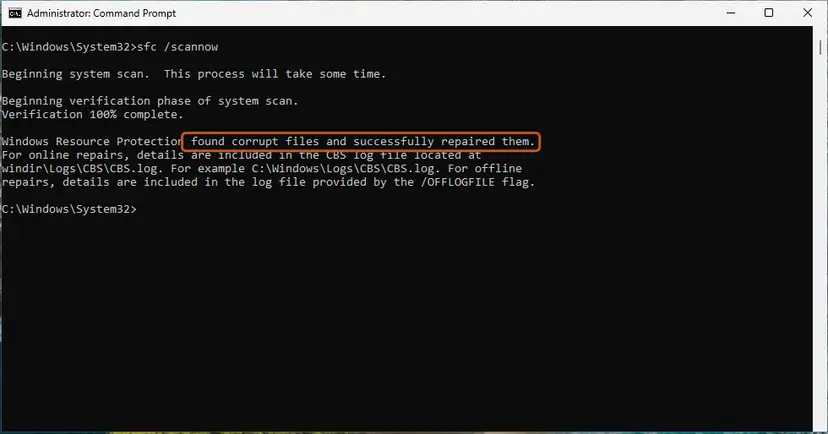
What the SFC messages mean: Run DISM and SFC to repair Windows system files More about CHKDSK and its options: Check a disk for errors (chkdsk)
It worked if: SFC reports that it found no problems or repaired files, CHKDSK finishes, and the prompt appears after the restart.
If not: If the error began after an update, go to Fix 5. Otherwise go to Fix 6.
Fix 5. Remove the latest Windows update from the recovery screen
15 minutesLow riskThe error started right after Windows installed an update.
Removing an update in Settings asks for admin approval, which is exactly what fails. The recovery screen removes the latest update without the prompt.
- Select Start > Power, hold Shift and select Restart.
- Select Troubleshoot > Advanced options > Uninstall Updates.
- Select Uninstall latest quality update first. Use Uninstall latest feature update only if a large version upgrade came just before the error.
- Sign in with your account when asked and confirm.
- Let the PC restart and test Run as administrator.
Windows installs the update again later. If the error comes back with it, pause updates in Settings > Windows Update and check Microsoft's release notes for that update. How removal works in Settings, once elevation works again: How to uninstall a Windows update
It worked if: The PC starts with the previous update level and the prompt appears.
If not: Try another administrator account in Fix 6.
Fix 6. Use another administrator account or create a new one
15 minutesLow riskThe error appears only in your account, or elevation works in Safe Mode but not in normal mode.
Sound and theme settings are stored per user. When your profile holds a setting you cannot find, a fresh account starts with clean defaults, and the prompt works there. Creating an account needs admin rights, so do it where elevation still works.
- If the PC has a second administrator account, sign in to it and test Run as administrator.
- If it works there, create a new local administrator account from that account, or from Safe Mode (Fix 3).
- Sign in to the new account and test elevation.
- If it works, move your files from
C:\Users\<old name>to the new account's folders.
Step by step: Create a new user account to test a problem Make the new account an administrator in Settings > Accounts > Other users > Change account type.
It worked if: The prompt appears in the new account and programs start with admin rights.
If not: If the prompt fails in every account, roll Windows back in Fix 7.
Fix 7. Roll Windows back with System Restore from the recovery screen
20 minutesRead the warningFixes 1 to 6 did not help and System Restore was turned on before the error began.
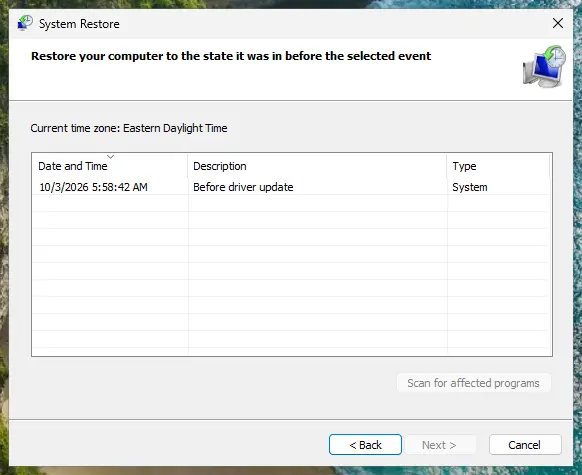
A restore point puts Windows system files, settings and drivers back to a day before the prompt broke. Opening System Restore inside Windows needs admin rights, so start it from the recovery screen.
Programs and drivers installed after the restore point are removed. Your documents, pictures and other personal files are not changed. Note which programs you installed recently so you can install them again.
- Select Start > Power, hold Shift and select Restart.
- Select Troubleshoot > Advanced options > System Restore and sign in.
- Choose a restore point from before the error started and select Next.
- Select Finish and wait. Do not turn the PC off.
- After the restart, test Run as administrator.
More on restore points: Undo recent changes with System Restore
It worked if: Windows reports that the restore finished, and the prompt appears again.
If not: Read "If the file system error is still there" below.
If the file system error -1073740791 is still there
Windows writes the crash to the Application log. It tells you which program stopped, which is the clue you need for support.
- Press Win + R, type
eventvwr.mscand press Enter. Event Viewer opens without admin rights for this log. - Open Windows Logs > Application.
- Look for an Error from Application Error with Event ID 1000 at the time you saw the box.
- Read Faulting application name, Faulting module name and Exception code. The code here is
0xc0000409. - If the faulting module is a theme, sound or third-party file, remove that program in Safe Mode (Fix 3).
- What to send to support: the full message with the path, the Event ID 1000 details, the Windows version from Settings > System > About, and what Fixes 1 to 7 showed.
- Where to ask: Microsoft Q&A or Microsoft Support, since User Account Control is part of Windows.
- When it is not software: if the PC also freezes, restarts by itself or shows blue screens, test the memory: How to test your RAM with Windows Memory Diagnostic
As a last step, reinstall Windows while keeping your files: Reinstall Windows without losing files Starting setup inside Windows needs admin rights and may fail with the same box. Then use Troubleshoot > Reset this PC > Keep my files on the recovery screen. Back up first.
How to keep Run as administrator working
- Keep the sound scheme on Windows Default, or test Run as administrator right after you change any system sound.
- Use built-in Windows themes, or themes from Microsoft Store.
- Keep System Restore on for the Windows drive, so Fix 7 has a point to return to.
- Keep a second local administrator account for emergencies.
- Do not install visual style patchers or theme packs from unknown sites.
- Do not lower the User Account Control slider to get around the error; that removes a key protection.
- Do not delete or rename files in
C:\Windows\MediaorC:\Windows\System32.
Windows 10 left support on 14 October 2025. The fixes above work the same on Windows 10 22H2, but it no longer gets most security and repair updates, so an upgrade to Windows 11 is the lasting route.
Frequently asked questions
What is File system error (-1073740791)?
It is the Windows status code 0xC0000409, written as a negative decimal number. Microsoft names it STATUS_STACK_BUFFER_OVERRUN, but today it usually means a program stopped itself at once. In this box the program that stops is the User Account Control prompt, so nothing starts as administrator. Your disk and files are not involved. Start with Fix 1: set the sound scheme to Windows Default or No Sounds.
Why does every program fail with Run as administrator?
Because the failing part is shared by all of them: the User Account Control prompt that asks for your approval. When it crashes, Windows cannot give any program admin rights, so Command Prompt, Task Manager, installers and Registry Editor all show the same box with their own path. Programs that do not need admin rights keep working. Fix the prompt with Fixes 1 and 2, or work from the recovery screen in Fixes 4, 5 and 7.
Is my hard drive or file system damaged?
Almost certainly not. The words "file system error" are a generic label Windows puts on the box; the code itself says that a program stopped itself. A drive problem shows other signs: files that cannot be read, very slow copying or disk warnings. If you see those, run CHKDSK from the recovery Command Prompt as shown in Fix 4. Otherwise start with the sound scheme and theme.
How do I fix it when I cannot open anything as administrator?
Use fixes that need no admin rights, then the recovery screen. The sound scheme (Fix 1) and the theme (Fix 2) are user settings and change without a prompt. Safe Mode (Fix 3) and the recovery screen are reached with Shift + Restart, which also needs no prompt. In the recovery Command Prompt you already have full rights, so SFC, CHKDSK, update removal and System Restore work there.
What does "exit code -1073740791" mean in Minecraft, Python or other programs?
It is the same code, 0xC0000409, but a different situation: that program crashed and stopped itself, and the UAC prompt is not involved. Searches for "error 1073740791" often come from Minecraft launchers, IDEs and Dropbox. Update the program and your graphics driver, repair the Visual C++ runtimes (How to repair Microsoft Visual C++ Redistributable and .NET Framework) and, for games with mods, remove the last mod you added. This page covers the Run as administrator box.
What is File system error (-1073479340)?
It is another code that people often search together with -1073740791. In hex it is 0xC0040154, a different value from 0xC0000409. We could not find it in Microsoft's list of NTSTATUS values, so we cannot say what it means or give a fix that is sure to match. If it appears on Run as administrator in the same way, Fixes 1 to 4 are safe to try because they repair the same prompt.
Does this error happen on Windows 10 and Windows 11?
Yes. The Microsoft Q&A thread about this message comes from Windows 10, and Windows 11 uses the same User Account Control prompt, so the fixes are the same. Only some paths differ: the sound settings sit under More sound settings on Windows 11 and Sound Control Panel on Windows 10, and the default theme is called Windows (light) or Windows (dark) on Windows 11 and Windows on Windows 10.
Should I lower User Account Control to stop the error?
No. Lowering User Account Control to its lowest level removes the check that stops programs from changing Windows without your approval, and changing that setting needs admin rights anyway. The box is a symptom of a broken prompt, so repair the prompt instead. A forum workaround runs programs without admin rights through a compatibility setting; it only helps programs that do not really need those rights and does not fix the error.
The error is still there after every fix. What now?
Read the Event ID 1000 entry in Event Viewer as described under "Still broken". The faulting module name often points to the theme, sound or startup program that breaks the prompt. If the module is a Windows file, reset Windows from the recovery screen with Keep my files, after a backup. Send the details to Microsoft Support if you want a second opinion first.
Sources
- Microsoft Learn [MS-ERREF]: NTSTATUS Values, entry 0xC0000409 STATUS_STACK_BUFFER_OVERRUN (learn.microsoft.com)
- Microsoft Q&A (Spanish): Windows 10 Error (-1073740791) when running programs as administrator; answer with sound scheme, default theme and offline SFC (learn.microsoft.com)
- The Old New Thing (Microsoft Dev Blogs): STATUS_STACK_BUFFER_OVERRUN doesn't mean that there was a stack buffer overrun (devblogs.microsoft.com)
Did this fix work?
One click, no account. It tells the next reader which guides are worth their time.
Questions and experiences: fix File System error (-1073740791) in Windows
Still broken, or found a fix we did not cover? Ask here: members and our editors answer. Reading is open; writing needs a free account.
…