
How to fix the K7Sentry.sys blue screen (BSOD) error in Windows

Prefer to fix it yourself? The manual steps follow.
- 8methods
- 10 to 45 minutes
- Intermediate
Applies to Windows 11 and Windows 10 PCs with a K7 Computing security product installed
8 methods in this guide
Hello, I recently installed the new security program K7 and noticed that my system sometimes started to crash with a Blue Screen (K7Sentry.sys). I am using Windows 10. Do I need to uninstall the antivirus, or is there another way of fixing this?
K7Sentry.sys is the kernel driver of K7 Computing's antivirus (K7 Total Security, K7 Ultimate Security and other K7 products). When a blue screen names it, the antivirus crashed Windows, not a Windows file. Update K7 first, then reinstall it cleanly if the crash comes back.
You do not have to give up K7 straight away. The crash comes from K7's own real-time protection driver, so update K7 to its newest build first (Fix 1). If the blue screen returns, uninstall K7, restart and install a fresh copy from K7 Computing (Fix 2). If Windows crashes too early to do that, remove K7 from Safe Mode (Fix 3). Keep only one real-time antivirus on the PC.
| Error | A stop screen (blue, or black on Windows 11 24H2 and later) with What failed: K7sentry.sys under the stop code. Reported stop codes include PAGE_FAULT_IN_NONPAGED_AREA and DRIVER_VERIFIER_DETECTED_VIOLATION. |
|---|---|
| Where it appears | At random while K7 protection runs, during startup, or while you install a driver or an update. The PC restarts after the screen. |
| Main cause | A fault in the K7 driver itself: an old or damaged K7 build, or a clash with another low-level security or system driver. |
| Fastest fix | Update K7 to its newest version and restart (Fix 1). A clean reinstall is the next step (Fix 2). |
| Also written as | K7sentry.sys, k7sentry, K7Sentry BSOD, K7AV Sentry System. |
| Who makes it | K7 Computing Pvt Ltd, an antivirus maker from India. The file is not part of Windows. |
| Affects | Windows 11 and Windows 10. Windows 10 left support on 14 October 2025, so newer K7 builds may not be tested on it. |
| Vendor status | No public K7 note on this blue screen. A flaw that let a local program crash Windows through K7Sentry.sys in K7 Antivirus 15.1.0306 is published as CVE-2018-5218. |
| Where the cause is logged | C:\Windows\Minidump, one .dmp file per crash. WinDbg's !analyze -v names the driver. |
| Time to fix | 10 minutes for Fix 1, 20 to 30 minutes for a clean reinstall or a Safe Mode removal. |
Facts checked on 15 October 2026. Steps written for Windows 11 (25H2 and 26H2) and Windows 10 22H2.
What K7Sentry.sys is and why it can stop Windows
K7Sentry.sys is a Windows kernel driver installed by K7 Computing security products, such as K7 Total Security, K7 Ultimate Security, K7 Internet Security and K7 Antivirus. An independent advisor on Microsoft Q&A identifies it as the driver of K7AV Sentry System. It is the part of K7 that watches files and programs in real time.
An antivirus needs this deep access to catch malware before it runs. The cost is that a mistake in the driver cannot be caught by Windows. Windows stops the whole PC with a stop code error and writes What failed: with the driver's file name under the code.
| Name | What it is | Where you see it |
|---|---|---|
K7Sentry.sys, K7sentry.sys | The K7 real-time protection driver | Stop screen, crash dumps, C:\Windows\System32\drivers |
| K7AV Sentry System | The description of that driver | File properties and driver lists |
| K7TotalSecurity and other K7 names | The product that installed the driver, publisher K7 Computing Pvt Ltd | Installed apps and Programs and Features |
PAGE_FAULT_IN_NONPAGED_AREA | The stop code most often reported with this driver | The line above What failed on the stop screen |
Every spelling, K7Sentry.sys, K7sentry.sys or k7sentry, means the same K7 file. If you do not have any K7 product installed and still see this name, treat it as a leftover from an old K7 install and go to Fix 3.
Why K7Sentry.sys crashes: the causes, most common first
A stop screen that names a third-party driver points at that driver first. The driver is not proof on its own, because it may only have been running when something else went wrong, so the table ties each cause to a sign you can check.
| How often | Cause | Sign | Fix |
|---|---|---|---|
| Most often | An outdated K7 build or one that a Windows update no longer suits | Crashes started after a Windows update, or K7 has not updated for weeks | Fix 1 |
| Often | A damaged or half-finished K7 install | The crash stays after updating; K7 shows errors or will not open | Fix 2 |
| Often | Two real-time antivirus products, or a second security tool with its own driver | Another antivirus, firewall suite or anti-exploit tool is installed | Fix 4 |
| Less often | Driver Verifier is turned on and flags K7 | Stop code DRIVER_VERIFIER_DETECTED_VIOLATION | Fix 5 |
| Less often | A clash during a driver install, often a graphics driver | The crash hits while a driver or Windows update installs | Fix 6 |
| Rarely | Damaged Windows files or failing hardware | Crashes with different drivers named, or also with K7 removed | Fix 7, Fix 8 |
Deleting K7Sentry.sys while K7 is installed leaves the antivirus broken and the PC without protection, and K7 may put the file back. Fix 2 and Fix 3 remove or replace it the clean way.
Check that K7Sentry.sys really caused the crash
The stop screen shows the stop code and the module that failed. If it flashed past, the crash dump keeps the same answer. On Microsoft Q&A, the advisor's first request to a user with this crash was the dump files from C:\Windows\Minidump.
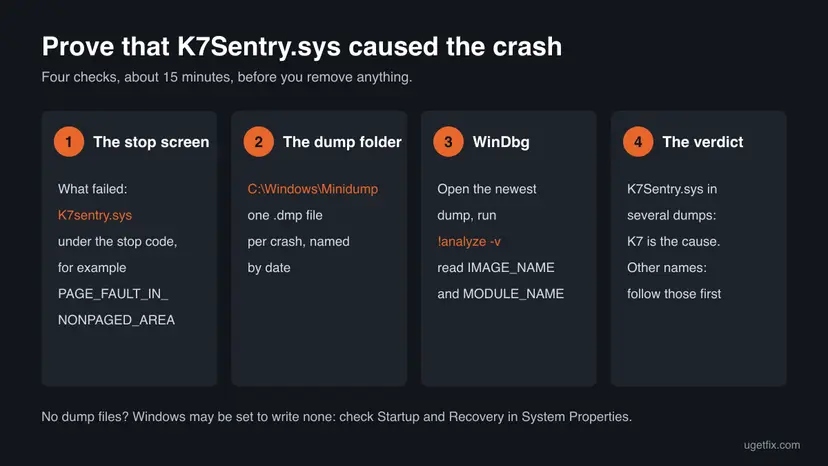
- Open File Explorer and go to
C:\Windows\Minidump. Windows writes one small dump per crash there and names each file by date. - Install Microsoft's debugger: open Terminal and run
winget install Microsoft.WinDbg. - Start WinDbg as administrator and open the newest
.dmpfile from the Minidump folder. - Type
!analyze -vin the command box and press Enter. Wait until the analysis ends. - Read the lines IMAGE_NAME and MODULE_NAME.
K7Sentry.sysorK7Sentryconfirms K7. Open two or three older dumps too.
If the dumps blame ntoskrnl.exe, a graphics driver or a storage driver, K7 may only have been running at that moment. Fixes 6 to 8 then matter more, and the driver the dump names is the one to update.
Is K7Sentry.sys a virus, and is it safe to keep
The genuine file is part of K7 security software and sits in C:\Windows\System32\drivers. Check your copy: right-click the file, select Properties, open the Digital Signatures tab and read the signer's name. It should name K7 Computing. A copy in another folder, or one with no signature, deserves a scan: How to scan for malware with Microsoft Defender
Safe to keep depends on the version. In January 2018 a flaw in K7Sentry.sys in K7 Antivirus 15.1.0306 was published as CVE-2018-5218. The driver did not check input values sent to it, so a local program could crash Windows with a blue screen or possibly do more. NVD rates it 7.8, high. An up-to-date K7 build is the answer, which is one more reason to start with Fix 1.
How to fix the K7Sentry.sys blue screen
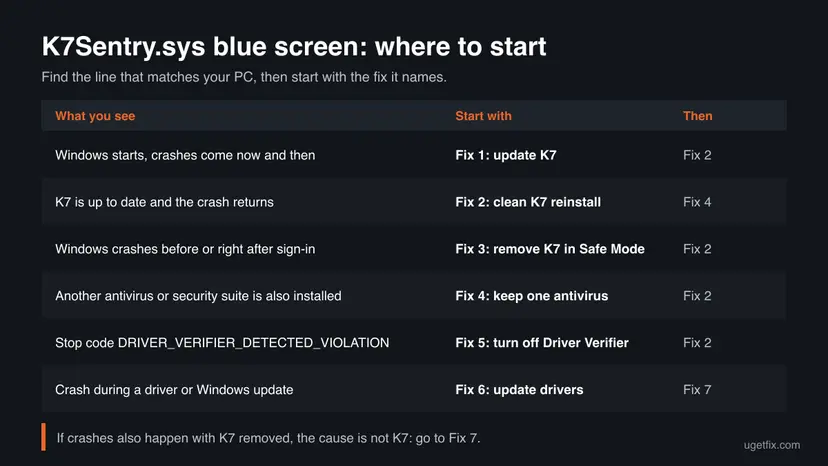
Start with Fix 1 if Windows still starts normally, or with Fix 3 if it crashes before you can work. Fixes 4 to 6 cover the clashes around K7. Fixes 7 and 8 are for crashes that stay after K7 is updated or removed.
| What you see | Start with | Then |
|---|---|---|
| Windows starts, crashes come now and then | Fix 1 | Fix 2 |
| K7 is up to date and the crash returns | Fix 2 | Fix 4 |
| Windows crashes before or right after sign-in | Fix 3 | Fix 2 |
| Another antivirus or security suite is also installed | Fix 4 | Fix 2 |
| The stop code is DRIVER_VERIFIER_DETECTED_VIOLATION | Fix 5 | Fix 2 |
| The crash hits while a driver or Windows update installs | Fix 6 | Fix 7 |
| Crashes continue with K7 removed | Fix 7 | Fix 8 |
Fix 1. Update K7 to its newest version and restart
10 minutesNo riskWindows still starts and the blue screen comes now and then.
The driver ships with the K7 product, so a newer K7 build brings a newer K7Sentry.sys. An old build is the usual reason a kernel driver stops suiting a freshly updated Windows, and the 2018 flaw shows that older builds did crash Windows.
- Save your work, since an update of the driver may ask for a restart.
- Open your K7 product from its icon in the notification area or from Start.
- Run its update and wait until it reports that protection is up to date.
- Check the product version shown in K7's window and compare it with the newest version on the K7 Computing website for your product.
- If your licence covers a newer product edition, install that edition through K7's own upgrade path.
- Restart the PC, even if K7 does not ask for it, so the new driver loads.
K7 sells several products and the update button is not named the same in all of them. Look for an Update item on the main screen or in the settings. K7 support can tell you the newest build for your licence.
It worked if: K7 reports an up-to-date product, and a day of normal use passes with no new file in C:\Windows\Minidump.
If not: If the crash returns, the install itself may be damaged. Go to Fix 2.
Fix 2. Uninstall K7, restart and install a fresh copy
25 minutesLow riskK7 is up to date and the blue screen still returns, or K7 shows errors or will not open.
A half-finished update or a damaged install leaves an old K7Sentry.sys registered with Windows. Removing K7 completely and installing it again replaces the driver and its settings in one go.
- Have your K7 licence key or K7 account details ready before you start.
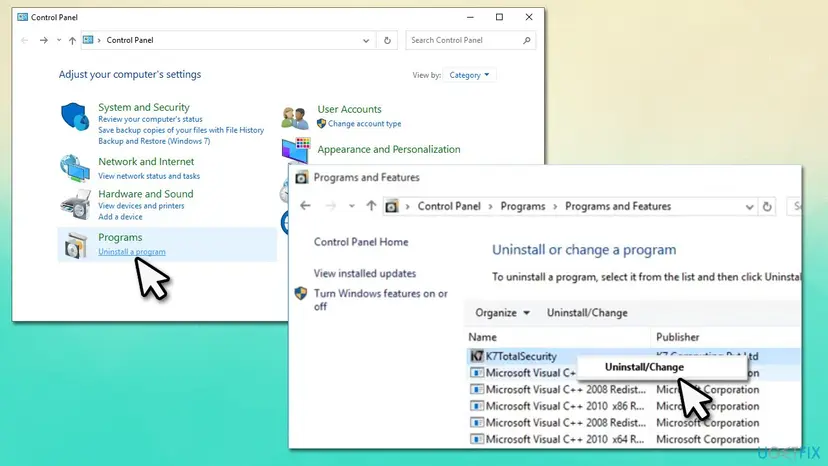
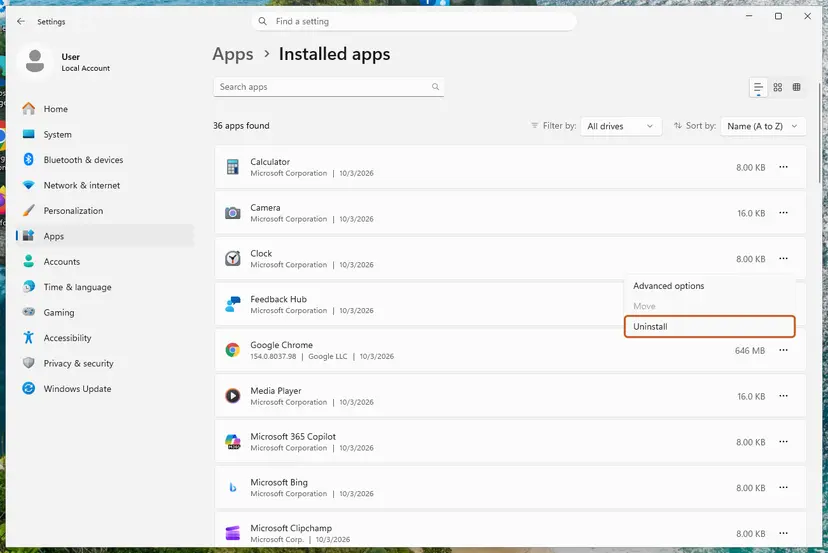
- Open Settings > Apps > Installed apps (Apps & features on Windows 10), or Control Panel > Programs > Uninstall a program.
- Find your K7 product, for example K7TotalSecurity, select Uninstall and follow K7's prompts. All the ways to remove a program: Uninstall a program or app in Windows
- Restart the PC. Microsoft Defender turns its own protection on while no other antivirus is installed.
- Check that
K7Sentry.sysis gone fromC:\Windows\System32\drivers. If it is still there, use Fix 3 to remove the rest. - Download the newest installer for your product from the K7 Computing website, not from a download site.
- Install it, enter your licence and let it update before you restart once more.
It worked if: The fresh K7 install runs without errors and the PC no longer stops with K7Sentry.sys.
If not: If the uninstall fails or the PC crashes during it, remove K7 from Safe Mode in Fix 3. If a fresh install crashes too, check for a second antivirus in Fix 4.
Fix 3. Remove K7 from Safe Mode when Windows crashes too early
25 minutesLow riskWindows crashes before or soon after sign-in, or the normal uninstall fails or crashes.
Safe Mode starts Windows with a minimal set of drivers, which gives you time to remove K7 before its real-time protection can stop the PC again.
If Windows cannot start at all, it opens the recovery screens on its own after two or three failed starts. Choose Troubleshoot > Advanced options > Startup Settings there. Step by step for every route: Start Windows or a Mac in Safe Mode
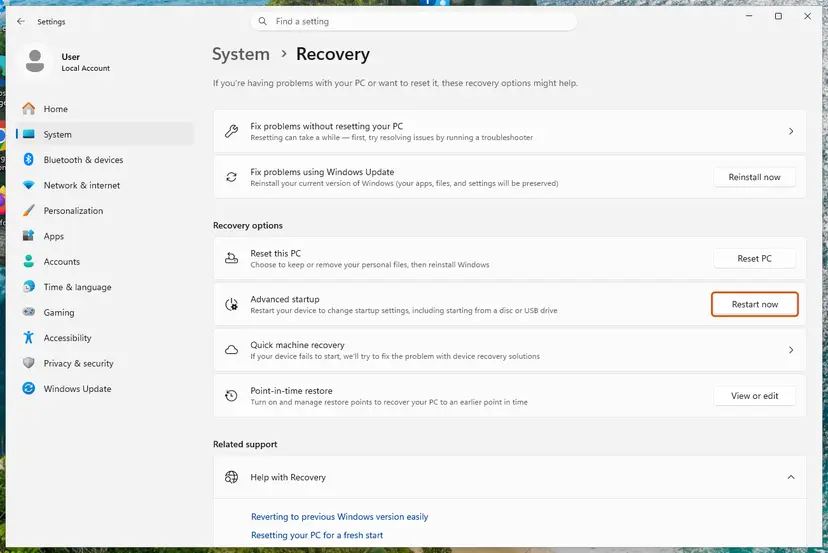
- Start Windows in Safe Mode and sign in.
- Open Control Panel > Programs > Uninstall a program, select your K7 product and choose Uninstall.
- If the uninstaller will not run in Safe Mode, contact K7 support and ask for their removal tool for your product. We could not confirm a public download link for it.
- Restart into normal Windows and confirm the blue screen no longer appears.
- Install a fresh copy from the K7 Computing website as in Fix 2, or keep Microsoft Defender if you decide not to return to K7.
It worked if: Windows starts normally without K7, and Windows Security shows Microsoft Defender as the active antivirus.
If not: If Windows still crashes without K7, the cause is elsewhere. Read the newest dump as shown above and go to Fix 6 or Fix 7.
Fix 4. Keep only one real-time antivirus on the PC
15 minutesLow riskAnother antivirus, internet security suite or anti-exploit tool is installed beside K7.
Two real-time scanners both hook every file the PC opens, and their kernel drivers can block or confuse each other. A crash that names one of them is often the meeting point of both.
- Open Windows Security > Virus & threat protection and read which provider is listed as active.
- Open Settings > Apps > Installed apps and look for other antivirus or security suites, including trial versions that came with the PC.
- Decide which one you keep. Uninstall the others with their own uninstaller: Uninstall a program or app in Windows
- Restart the PC.
- If you keep K7, make sure Windows Security lists K7 as the active provider.
Microsoft Defender steps back on its own when K7 registers as the active antivirus. You do not need to remove it. The clash comes from a second third-party product.
It worked if: Only one antivirus is listed as active, and the blue screen stops.
If not: If only K7 is installed and it still crashes, check Driver Verifier in Fix 5.
Fix 5. Turn off Driver Verifier if it is running
5 minutesNo riskThe stop code is DRIVER_VERIFIER_DETECTED_VIOLATION, or someone turned Driver Verifier on for a test.
Driver Verifier is a Windows test tool that crashes the PC on purpose when a driver breaks a rule. Users report this stop code with K7Sentry.sys. Left on, it keeps stopping Windows even when the driver would run fine in daily use.
- Press Win + R, type
verifierand press Enter. - When User Account Control asks, select Yes.
- In Driver Verifier Manager, select Delete existing settings and click Finish.
- Confirm the warning with Yes and restart the PC.
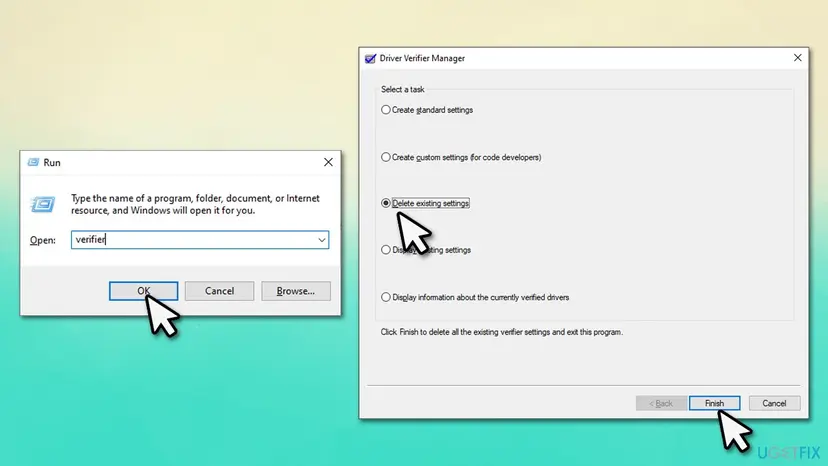
The same in Terminal (Admin), if the window does not open:
verifier /resetIt worked if: After the restart, the DRIVER_VERIFIER_DETECTED_VIOLATION screen no longer appears.
If not: If a stop screen still names K7Sentry.sys with another code, return to Fix 2.
Fix 6. Update Windows and your drivers, then retry the update that crashed
20 minutesLow riskThe crash hits while a graphics driver or a Windows update installs.
One user on Microsoft Q&A got the K7Sentry.sys screen each time an NVIDIA driver update ran. A driver install touches many files at once, which is exactly what the antivirus driver scans, so the two meet at that moment.
- Open Settings > Windows Update and select Check for updates. On Windows 10 the path is Settings > Update & Security > Windows Update.
- Install everything offered, including optional driver updates, and restart.
- Update K7 again as in Fix 1, so it matches the new Windows build.
- Install the driver that crashed. Step by step: Update, roll back or reinstall a driver
- If it crashes again, uninstall K7 for the install as in Fix 2, install the driver, then install K7 again.
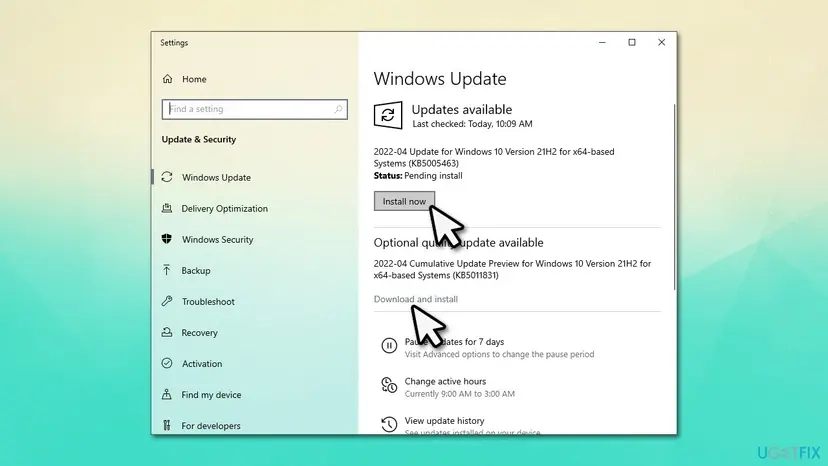
It worked if: Windows and the driver finish installing and later restarts pass without a stop screen.
If not: If crashes continue, repair Windows files and test the memory in Fix 7.
Fix 7. Repair Windows system files and test the memory
30 to 60 minutesNo riskCrashes continue after K7 is updated or removed, or the dumps name different drivers.
K7Sentry.sys is not a Windows file, so this cannot repair it. It rules out damaged Windows components and bad memory, which make any kernel driver, K7 included, look guilty.
DISM fetches clean copies of Windows components and SFC replaces damaged system files. Step by step with screenshots: Run DISM and SFC to repair Windows system files
In Terminal (Admin), one after the other:
DISM.exe /Online /Cleanup-Image /RestoreHealth
sfc /scannow
Then test the RAM with the tool built into Windows: How to test your RAM with Windows Memory Diagnostic
It worked if: SFC reports no integrity violations or that it repaired them, and the memory test finds no errors.
If not: If the memory test reports errors, the RAM needs replacing. If not, go back in time with Fix 8.
Fix 8. Return Windows to a restore point from before the crashes
20 minutesRead the warningThe crashes began after a specific change and nothing above helped.
System Restore rolls drivers, programs and system settings back to an earlier point, which can undo the change that set K7 and Windows against each other.
Programs and drivers installed after the restore point are removed. Your documents and photos stay. Note what you installed recently, and back up anything important first: Back up your files (Windows Backup, File History, Time Machine)
- Open System Restore. Press Windows+R, type the command below and press Enter. You can also open Control Panel > Recovery > Open System Restore. If a first page opens, select Next.
rstrui.exe - Choose a restore point. Select a restore point from a time before the problem started. The Description often names the event, such as a driver or app install. If the one you need is missing, select Show more restore points (shown only when there are more).
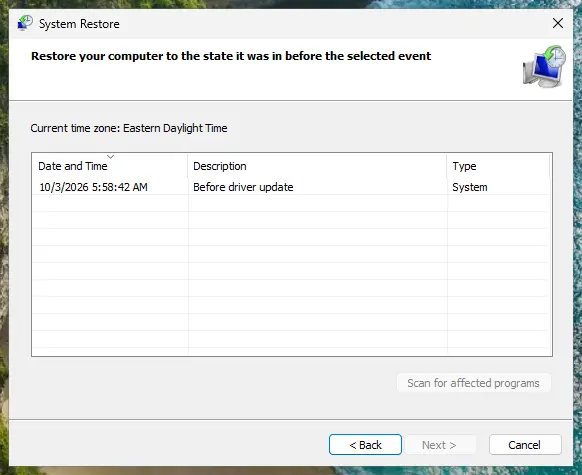
Pick a restore point from before the problem started. Screenshot: Windows 11 26H2. - See what will change. Select Scan for affected programs. The upper list shows programs and drivers that will be removed; the lower list shows those that might come back and may need to be reinstalled. Select Close.
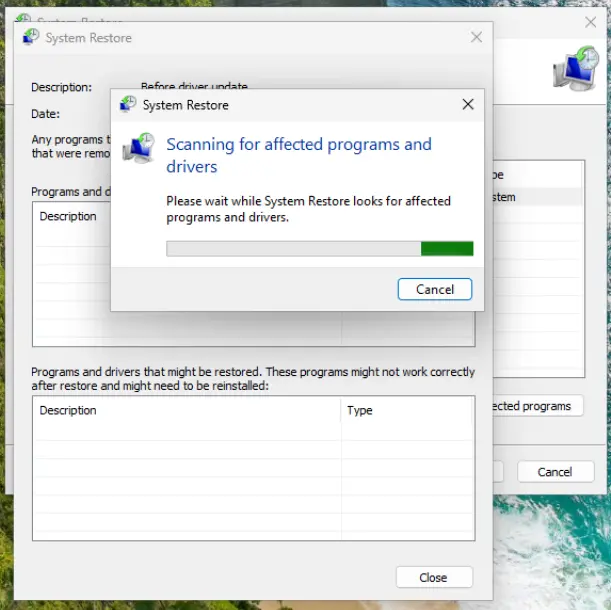
The scan lists programs and drivers the restore removes or brings back. Screenshot: Windows 11 26H2. - Start the restore. Select Next, check the summary and select Finish. Windows restarts and applies the restore point. Do not turn the PC off.
- Check the result. After sign-in Windows reports whether the restore succeeded. Check whether the problem is gone.
These steps were written for Windows 11 and Windows 10 (the steps are the same). The full page with the other versions and what each result means: Undo recent changes with System Restore
It worked if: Windows restarts at the earlier state and runs without the K7Sentry.sys stop screen.
If not: Collect the dumps and contact K7 support as described below.
Still crashing: what to send and to whom
Only K7 Computing can fix a bug inside K7Sentry.sys. Give their support team what they need to reproduce the crash, and use Microsoft Defender in the meantime if you had to remove K7.
- The three newest
.dmpfiles fromC:\Windows\Minidump, zipped. - Your Windows edition and version from Settings > System > About.
- The K7 product name and version, and when the crashes started.
- Other security, backup or hardware tools that load drivers, from Fix 4.
| Where to report | When |
|---|---|
| K7 Computing support, from the K7 website or the product's help menu | Always first: they ship the driver |
| Your PC maker or a hardware shop | Memory test errors, or crashes with K7 removed |
How to keep the K7Sentry.sys blue screen from coming back
- Let K7 update itself and restart after its updates.
- Update K7 right after a large Windows update.
- Keep one real-time antivirus only.
- Download K7 only from K7 Computing.
- Delete or rename K7Sentry.sys while K7 is installed.
- Leave Driver Verifier on after a test.
- Turn off Windows protections to make the crash stop.
- Download .sys files from DLL or driver sites.
Windows 10 left support on 14 October 2025. Security vendors may stop testing new builds on it, so a PC that can run Windows 11 has better odds of staying crash-free.
Frequently asked questions
What is K7Sentry.sys?
K7Sentry.sys is the kernel driver of K7 Computing's security products, described as K7AV Sentry System. It loads with Windows and gives K7 real-time protection: it watches files and programs as they open. It is not part of Windows. You only have it if a K7 product such as K7 Total Security, K7 Ultimate Security or K7 Antivirus is installed, or was installed and not fully removed.
Do I need to uninstall K7 to fix the blue screen?
Not always. Start by updating K7 and restarting (Fix 1), because a newer build brings a newer driver. If the crash comes back, a clean reinstall (Fix 2) is usually enough. Uninstalling for good is the answer only when a fresh, updated K7 still crashes, or when you have a second antivirus and decide to keep that one. Microsoft Defender protects the PC while K7 is off.
Is K7Sentry.sys a virus?
No, the genuine file is part of K7 antivirus. It sits in C:\Windows\System32\drivers and its Digital Signatures tab in Properties should name K7 Computing. A file with this name in another folder or with no signature should be scanned. Keep K7 updated: an older driver build had a published flaw, CVE-2018-5218, that let a local program crash Windows.
What does PAGE_FAULT_IN_NONPAGED_AREA with K7sentry.sys mean?
It means the K7 driver tried to read memory that was not valid at that moment, and Windows stopped to protect itself. This is the stop code most often reported with K7Sentry.sys, for example by a Windows 10 user on Microsoft Q&A. The fix is the same as for any K7Sentry.sys crash: update K7, reinstall it cleanly, and run a memory test if crashes continue with K7 removed.
Windows crashes before I can uninstall K7. What now?
Start Windows in Safe Mode, which loads only the basic drivers, and uninstall K7 there (Fix 3). If Windows fails to start two or three times in a row, it opens the recovery screens by itself. From there choose Troubleshoot, Advanced options, Startup Settings and then Safe Mode. If the K7 uninstaller does not run in Safe Mode, ask K7 support for their removal tool.
Can I just delete K7Sentry.sys?
Do not delete it while K7 is installed. K7 then runs broken and may fail to protect the PC or put the file back. Windows can also fail to start when a registered driver file is missing. Uninstall K7 properly instead, from normal Windows or from Safe Mode. If the file is still there after a full uninstall, ask K7 support how to remove the leftover.
Why did the crash start while I installed a graphics driver?
A driver install writes many system files in a short time, and K7's driver scans each of them. One user on Microsoft Q&A hit the K7sentry.sys screen every time an NVIDIA driver update ran. Update Windows and K7 first, then install the driver again. If it still crashes, remove K7 for the install, install the driver and then reinstall K7 (Fix 6).
Is K7 compatible with Windows 11?
K7 Computing sells its current products for Windows 11, but we could not find a public compatibility list per build. A crash after a large Windows 11 update usually means the installed K7 build is older than that update. Update K7 first. If no newer build is offered and the crash stays, ask K7 support whether your product version supports your Windows build.
What is the "yunxif k0.7" error?
We could not find any error by that name from Microsoft, K7 Computing or another vendor. It looks like a mistyped search, possibly for K7. This page is about the K7Sentry.sys blue screen. If you see a message with that text, write it down exactly and search for the full wording, or read the stop code and the What failed line on the blue screen.
Sources
- Microsoft Q&A: PAGE FAULT IN NONPAGED AREA, What failed: K7sentry.sys (learn.microsoft.com)
- NIST National Vulnerability Database: CVE-2018-5218, K7Sentry.sys (nvd.nist.gov)
Did this fix work?
One click, no account. It tells the next reader which guides are worth their time.
Questions and experiences: fix the K7Sentry.sys blue screen (BSOD) error in Windows
Still broken, or found a fix we did not cover? Ask here: members and our editors answer. Reading is open; writing needs a free account.
…