
How to fix error code 0xe06d7363 on Windows?

Prefer to fix it yourself? The manual steps follow.
- 9methods
- 5 minutes to find the program, 10 to 30 minutes to fix
- Intermediate
Applies to Windows 11, Windows 10, Windows Server, Windows 7
9 methods in this guide
When I try to open some of the apps on my Windows 10 PC, a black loading screen is interrupted by an error message saying: "The exception unknown software exception (0xe06d7363) occurred in the application." Why?
0xe06d7363 is the code Windows reports when a program written in C++ throws an error that its own code never catches. It is a crash of that program, not a Windows fault, and the code alone names no cause. Find out which program crashed first, then update, repair or reinstall it.
0xe06d7363 means a C++ program crashed on an exception it did not handle. Read the program name in the title bar of the error window or in Event Viewer event 1000 (Fix 1), then update, repair or reinstall that program (Fix 2). If several programs crash the same way, repair the Microsoft Visual C++ Redistributable packages they share (Fix 3).
| Error | "The exception unknown software exception (0xe06d7363) occurred in the application", often followed by "at location" and a memory address, or Exception code: 0xe06d7363 in Event Viewer. |
|---|---|
| Where it appears | A window titled [program].exe - Application Error when a program starts, loads or closes, and event 1000 in Windows Logs > Application. |
| Main cause | An error inside one C++ program that its code did not catch: a missing or damaged file of the program, bad settings, or a bug in that version. |
| Fastest fix | Find the program from the title bar or event 1000 (Fix 1), then update or reinstall it (Fix 2). |
| What the code is | Microsoft lists 0xE06D7363 as STATUS_CPP_EH_EXCEPTION, a C++ exception handling exception. The Visual C++ compiler uses this code for every C++ exception. |
| Also written as | 0xE06D7363, e06d7363, exception code 0xe06d7363, External exception E06D7363, [WinError -529697949] Windows Error 0xe06d7363. |
| As a number | 3765269347 unsigned, or -529697949 signed. Programs that print error numbers in decimal show the signed value. |
| Affects | Any program built with Microsoft Visual C++ on Windows 11, Windows 10, Windows Server and older versions such as Windows 7: games, launchers, drivers' control panels, Office add-ins, company tools. |
| Vendor status | Not a known Windows issue and not tied to one Windows update. The fix belongs to the program that crashed. |
| Time to fix | About 5 minutes to find the program. A repair or reinstall takes 10 to 30 minutes. |
Facts checked on 16 October 2026. Steps written for Windows 11 (25H2 and 26H2) and Windows 10 22H2.
What error code 0xe06d7363 means
Microsoft's debugger documentation lists 0xE06D7363 under the name STATUS_CPP_EH_EXCEPTION: a C++ exception handling exception. When a program built with Visual C++ hits a problem, its code "throws" an exception and expects another part of the same program to catch it. If nothing catches it, Windows ends the program and shows this code. Windows cannot see what the C++ error was, so the window calls it an unknown software exception.
The message as the reader above saw it (the program name sits in the title bar)
Application Error
The exception unknown software exception (0xe06d7363) occurred in the application.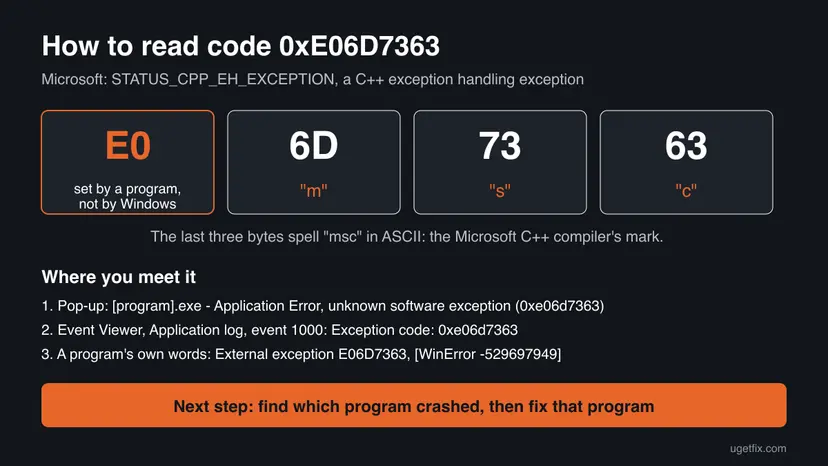
- E0 at the start marks a code made by a program, not one of Windows' own status codes.
- 6D 73 63 are the ASCII letters msc. Every C++ exception from a Visual C++ program carries the same code, whatever went wrong.
- The title bar of the window names the program file that crashed. That name is what you work with.
- The address after "at location" points into Windows' own code, where the exception was raised. It changes between runs and does not help you.
Many pages treat 0xe06d7363 as a Windows error and send you to Windows repairs first. The code is raised inside one program, so the program comes first. Windows repairs only matter when many programs crash.
Why the 0xe06d7363 error happens: causes ranked
We have no counts of how often each cause occurs. The order below follows what the code means: an error inside one program is the normal case, damaged parts shared by many programs are less common, and damaged Windows files are rare.
| Cause | How it looks on your PC | Fix |
|---|---|---|
| A file of the program is missing or damaged, or an update left mixed versions. | One program crashes, often right after an update or an interrupted install. | Fix 2 |
| A bug in the installed version of the program. | The same crash at the same moment every time, also on other PCs. | Fix 2 |
| Damaged or missing Microsoft Visual C++ Redistributable files. | Several C++ programs or games crash during start or a loading screen. | Fix 3 |
| A startup program, overlay or service interferes. | The crash goes away in Safe Mode or a clean boot. | Fix 4 and Fix 5 |
| A recent driver, update or software change. | Crashes started on a known day and affect more than one program. | Fix 6 |
| Malware that damaged program files or settings. | The title bar names a file you do not know, or other odd behaviour appears. | Fix 7 |
| Damaged Windows system files or file system errors on the drive. | Windows' own tools fail too, or SFC cannot repair files. | Fix 8 and Fix 9 |
The reader's case above, several apps crashing on a black loading screen, fits the third and fourth rows: something the apps share is broken or gets in the way. Still find the program names first, because two different apps can also crash for two different reasons.
How to fix error code 0xe06d7363
Fix 1 tells you which program crashed. Fixes 2 and 3 repair that program and the Visual C++ files it needs, and solve most cases. Fixes 4 and 5 find a program that interferes. Fixes 6 to 9 are for crashes in many programs. You do not need to do all of them.
| What you see or have | Start with |
|---|---|
| You do not know which program crashed. | Fix 1 |
| One program you use crashes with 0xe06d7363. | Fix 2 |
| Several programs or games crash, often on a loading screen. | Fix 3 |
| The crash comes at sign-in, or names a program you never open. | Fix 4 |
| Fixes 2 and 3 did not help and the crash still happens. | Fix 5 |
| Crashes began after a driver, update or install on a known day. | Fix 6 |
| The title bar names a file you do not recognise. | Fix 7 |
| Windows' own tools fail too. | Fix 8 |
Fix 1. Find which program crashed with 0xe06d7363
5 minutesNo riskEveryone, unless the title bar of the error window already named a program you know.
0xe06d7363 is the same for every C++ crash, so the code cannot point to a fix. The faulting application named in the crash record can.
- If the error window is still open, note the file name in its title bar before you select OK.
- Press Win + R, type
eventvwrand select OK. - Expand Windows Logs and select Application.
- Find an Error from the source Application Error with event ID 1000 at the time of the crash.
- On the General tab, check that it shows Exception code: 0xe06d7363, then note Faulting application name and Faulting module name.
- Select Copy in the event window and paste the text into Notepad. You may need it for Fix 2 or for the program's support.
A faster view is Reliability Monitor: press Win + R, type perfmon /rel and select OK. Red crosses mark crashes by day. Select one and choose View technical details to see the same program name and exception code.
PowerShell: the last five crashes with code 0xe06d7363 (no administrator rights needed)
Get-WinEvent -FilterHashtable @{ LogName='Application'; ProviderName='Application Error'; Id=1000 } -MaxEvents 100 |
Where-Object Message -match 'e06d7363' | Select-Object -First 5 | Format-List TimeCreated, Message| Faulting module name | What it means |
|---|---|
KERNELBASE.dll | The Windows file that raised the exception for the program. It is not damaged. Look at the application name instead. |
| A file in the program's own folder | The error came from that program's code or one of its add-ons. Fix 2. |
VCRUNTIME140.dll, MSVCP140.dll or another Visual C++ file | The C++ runtime the program uses. Fix 2, then Fix 3. |
| Different programs on different days | Something shared fails. Fix 3, then Fix 5. |
It worked if: You know the program file that crashed and the module named in event 1000.
If not: If no event 1000 with 0xe06d7363 exists, the program closed itself after the window. Use the name in the title bar alone and go to Fix 2.
Fix 2. Update, repair or reinstall the program that crashed
15 to 30 minutesLow riskThe title bar or event 1000 names one program, and other programs work.
The exception was thrown inside that program's own code. A newer version may fix the bug, and a repair or clean install brings back a missing or mismatched file that made its code fail.
- Look for an update in the program's Help or About menu, its launcher, or on its maker's website.
- If there is no update, press Win + I and open Apps > Installed apps (Windows 10: Apps > Apps & features).
- Select the three dots next to the program (Windows 10: select the program). If Modify or Advanced options with Repair is offered, use it first.
- If the crash stays, select Uninstall and restart the PC.
- Install the newest version from the maker's own website or store and start it again.
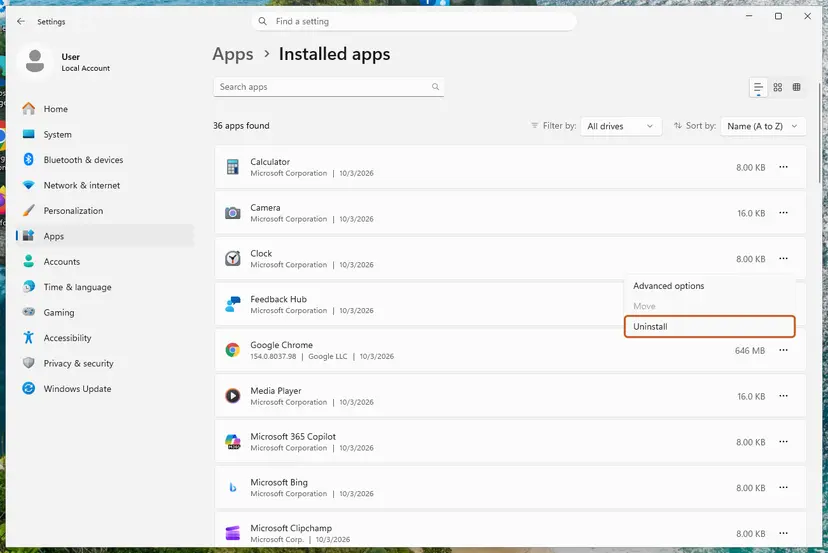
Other ways to remove a program, such as Control Panel: Uninstall a program or app in Windows A Microsoft Store app has Repair and Reset instead: How to repair or reset an app in Windows A game from Steam, Epic or another launcher can check its own files without a reinstall: How to verify game files in Steam, Epic Games, Xbox app, EA app, Battle.net and GOG Galaxy
Games keep saves and business programs keep data in their own folders. Use the program's backup, export or cloud sync before you uninstall it.
It worked if: The program starts and stays open, and no new event 1000 with 0xe06d7363 appears for it.
If not: If several programs crash, go to Fix 3. If only this one still crashes after a clean install, send the copied event to its maker, as described below the fixes.
Fix 3. Repair the Microsoft Visual C++ Redistributable packages
15 minutesLow riskSeveral C++ programs or games crash with 0xe06d7363, as in the reader's question, or event 1000 names a Visual C++ file such as VCRUNTIME140.dll.
Programs built with Visual C++ throw and catch their exceptions through the Visual C++ runtime files that many programs share. A damaged or outdated runtime can break that for all of them at once.
- Open Programs and Features. Type control panel in the search box on the taskbar and select Control Panel. Select Programs > Programs and Features.
- Find the installed versions. Look for the entries that start with Microsoft Visual C++. Each one shows a year and an architecture, x64 or x86. Several entries side by side are normal: older versions stay installed next to newer ones.
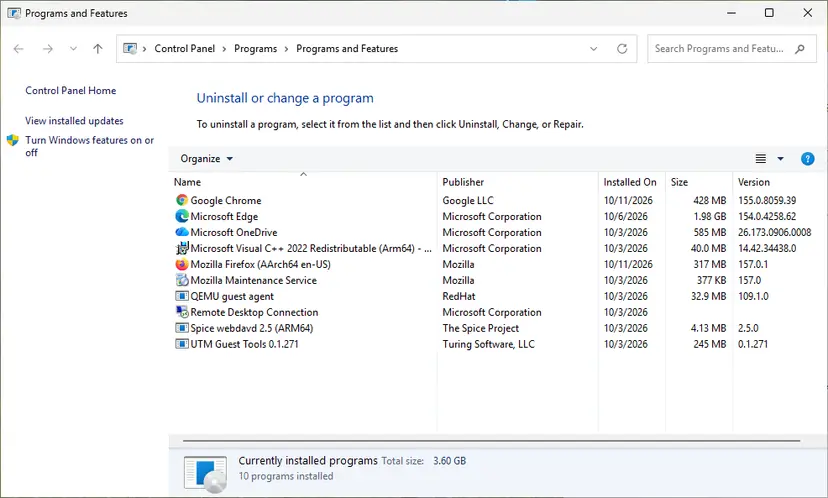
Each Visual C++ version is its own entry in Programs and Features. Screenshot: Windows 11 26H2. - Repair each Visual C++ entry. Right-click an entry and select Change, then select Repair in the window that opens. Do the same for every Microsoft Visual C++ entry.
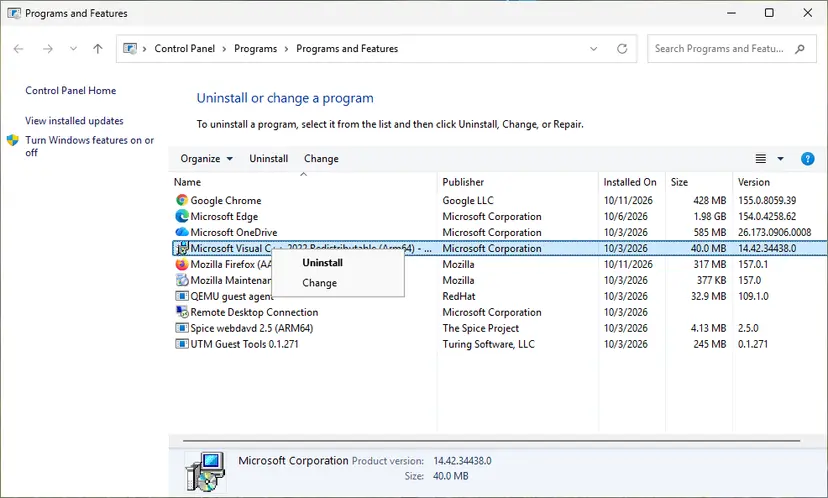
Right-click the entry and select Change to reach the repair option. Screenshot: Windows 11 26H2. - Install the latest supported version. Download the latest Visual C++ v14 Redistributable from Microsoft: Visual C++ Redistributable latest supported downloads and run it. On a 64-bit PC install both X64 and X86, because 32-bit programs need the x86 package. On an ARM64 PC install ARM64. This one version serves programs built with Visual Studio 2017 to 2026.
These steps were written for Windows 11 25H2 and 26H2, Windows 10 22H2. The full page with the other versions and what each result means: How to repair Microsoft Visual C++ Redistributable and .NET Framework
- Repair every Microsoft Visual C++ entry, x64 and x86. A 64-bit PC often runs 32-bit programs that need the x86 package.
- Do not uninstall the older years. Programs built for 2010 or 2013 need those exact packages, and the newer one does not replace them.
- Restart the PC after the repair, then start the program that crashed.
It worked if: Each repair ends with a success message, and the programs that crashed start after the restart.
If not: If one program still crashes, return to Fix 2 for it. If several still crash, try Fix 4 and Fix 5.
Fix 4. Test the program in Safe Mode
10 minutesNo riskThe crash comes at sign-in, names a program you never open, or Fixes 2 and 3 did not help.
Safe Mode starts Windows with basic drivers and no third-party startup programs. If the program runs there without 0xe06d7363, something that loads in a normal start is the cause, not the program's own files.
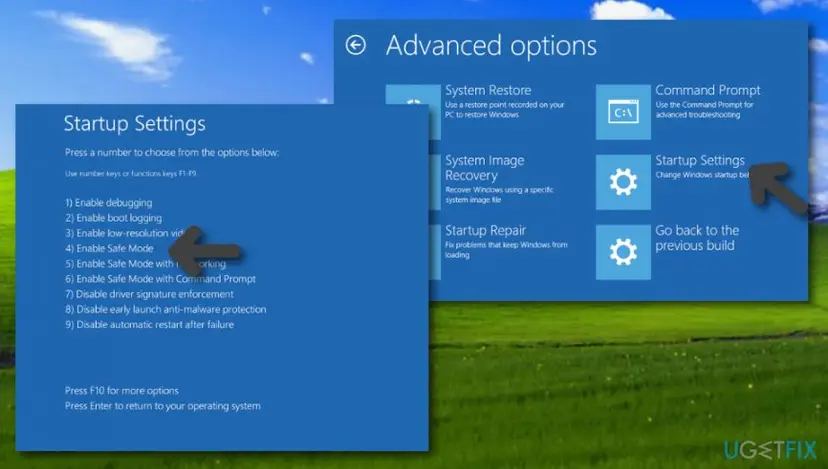
- Restart from Settings…. Open Settings > System > Recovery. Next to Advanced startup, select Restart now and confirm. On Windows 10 the path is Settings > Update & Security > Recovery.
- …or hold Shift and select Restart. Instead of Settings you can select Start > Power, hold Shift and select Restart. This also works from the power button on the sign-in screen.
- Select Troubleshoot. On the blue Choose an option screen, select Troubleshoot.
- Open Startup Settings. Select Advanced options > Startup Settings.
- Restart. On the Startup Settings page, select Restart. The PC restarts and shows a numbered list.
- Choose Safe Mode. Press 4 or F4 for Enable Safe Mode. Press 5 or F5 for Enable Safe Mode with Networking if you need the internet, for example to download a scanner or a driver.
- Leave Safe Mode. When you are done, restart the PC normally. Windows starts in normal mode again.
- If it keeps starting in Safe Mode. Press Windows key + R, type msconfig and press Enter. On the Boot tab, clear Safe boot, select OK and restart.
These steps were written for Windows 11 24H2 and later; Windows 10 22H2. The full page with the other versions and what each result means: Start Windows or a Mac in Safe Mode
- Start the program that crashed while you are in Safe Mode. Some programs, many games among them, need full graphics drivers and do not run there at all. That result tells you nothing.
- It works in Safe Mode: a driver or startup program is involved. Go to Fix 5 to find which one.
- It crashes in Safe Mode too: the cause is in the program or Windows files. Go back to Fix 2 or on to Fix 8.
It worked if: You know whether the program crashes only in a normal start or also in Safe Mode. Restart normally when done.
If not: If you cannot reach Safe Mode, go straight to the clean boot in Fix 5, which needs no recovery screen.
Fix 5. Find an interfering program with a clean boot
20 to 40 minutesLow riskThe program works in Safe Mode, or crashes keep coming with no clear pattern.
Overlays, screen recorders, monitoring tools and some security programs load into other programs and can make their code fail. A clean boot turns them off while Windows keeps its normal drivers, so you can find the one behind 0xe06d7363.
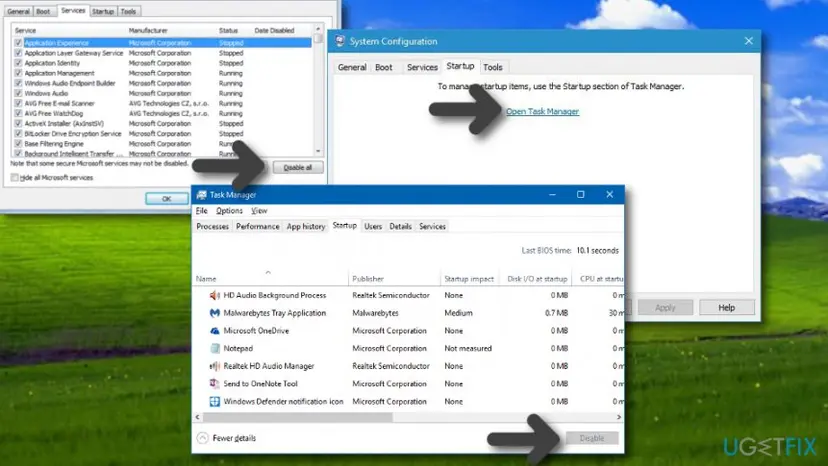
- Do a clean boot as described in How to perform a clean boot in Windows: tick Hide all Microsoft services, turn off the rest, and turn off the startup apps.
- Restart and open the program that crashed. If 0xe06d7363 no longer appears, one of the turned-off items is the cause.
- Turn half of the services back on, restart and test again.
- Keep halving the group that brings the crash back until one service or startup app is left.
- Update or remove that program, then return System Configuration to Normal startup.
Turn off only the services that remain after Hide all Microsoft services is ticked. Turning off Microsoft services can stop sign-in, networking or updates. Write down what you turned off so you can turn it back on.
It worked if: The crash stops in a clean boot, and you find the service or startup app that brings it back.
If not: If 0xe06d7363 appears in a clean boot too, no third-party program interferes. Go to Fix 6.
Fix 6. Undo a recent change with System Restore
20 to 30 minutesRead the warningThe crashes began on a known day, after a driver, Windows update or program install, and a restore point from before that day exists.
If a recent change replaced a shared file or driver that the crashing programs use, returning Windows to a restore point from before the change puts the old files back.
Programs, drivers and updates installed after the restore point are removed, and you may need to install them again. Your documents, photos and other personal files stay. Note what you installed since that day before you start.
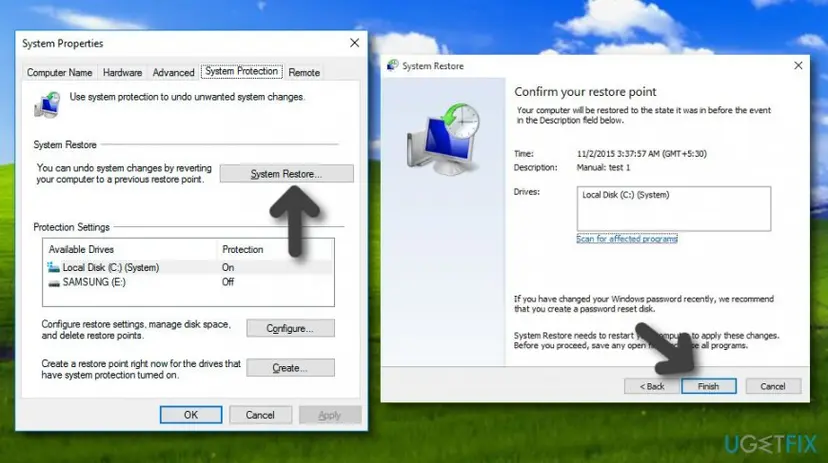
- Open System Restore. Press Windows+R, type the command below and press Enter. You can also open Control Panel > Recovery > Open System Restore. If a first page opens, select Next.
rstrui.exe - Choose a restore point. Select a restore point from a time before the problem started. The Description often names the event, such as a driver or app install. If the one you need is missing, select Show more restore points (shown only when there are more).
- See what will change. Select Scan for affected programs. The upper list shows programs and drivers that will be removed; the lower list shows those that might come back and may need to be reinstalled. Select Close.
- Start the restore. Select Next, check the summary and select Finish. Windows restarts and applies the restore point. Do not turn the PC off.
- Check the result. After sign-in Windows reports whether the restore succeeded. Check whether the problem is gone.
These steps were written for Windows 11 and Windows 10 (the steps are the same). The full page with the other versions and what each result means: Undo recent changes with System Restore
It worked if: Windows restarts, reports that System Restore completed, and the program starts without 0xe06d7363.
If not: If no restore point exists or the crash stays, the change was not the cause. Go to Fix 7 or Fix 8.
Fix 7. Scan for malware with Microsoft Defender
15 minutes to 2 hoursNo riskThe title bar or event 1000 names a program file you do not know, or the PC shows other odd behaviour.
0xe06d7363 is a crash code, not a sign of malware. Malware can still damage program files or settings so that a program crashes, and an unknown file name is worth one check.
- Look at where the file from the title bar lives: in Task Manager, right-click it on the Details tab and select Open file location, if it is running.
- If you cannot place the file, run a full scan or a Microsoft Defender Offline scan with the steps in How to scan for malware with Microsoft Defender
- Let Defender remove or quarantine what it finds and restart the PC.
- Reinstall the program that crashed (Fix 2), because removed malware does not bring back the files it damaged.
It worked if: The scan finds nothing, or it removes a threat and the program works after a reinstall.
If not: If the scan is clean, malware is not the cause. Go to Fix 8.
Fix 8. Repair Windows system files with DISM and SFC
20 to 40 minutesNo riskSeveral programs crash and Fixes 3 to 5 did not help, or Windows' own tools fail too.
C++ programs raise their exceptions through Windows' own system files. If those files are damaged, many programs can fail at once. DISM repairs the Windows image and SFC then replaces bad system files from it.
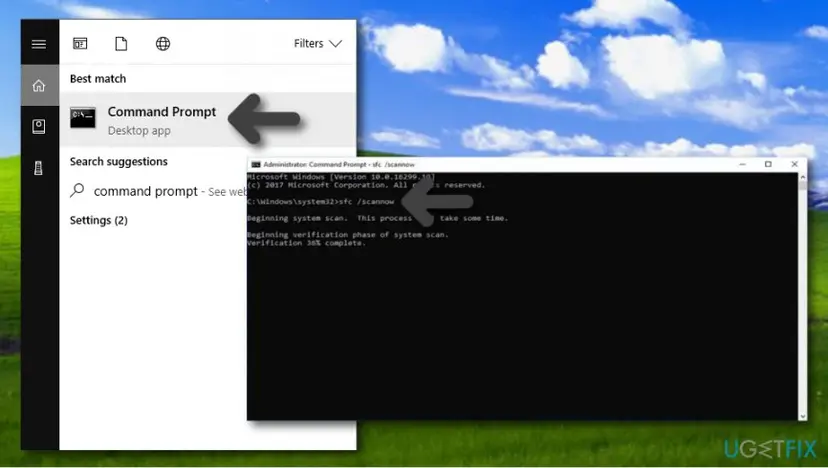
- Open an elevated command window. Right-click Start and select Terminal (Admin), or type cmd in the search box, right-click Command Prompt and select Run as administrator. Select Yes when Windows asks for permission.
- Run DISM first. Type the command below and press Enter. DISM downloads clean copies of damaged components from Windows Update, so it can take several minutes. Wait until it says The operation completed successfully.
DISM.exe /Online /Cleanup-Image /RestoreHealth - Run System File Checker. In the same window, type the command below and press Enter. Do not close the window until the verification reaches 100%.
sfc /scannow - Read the result and restart. Compare the last message with the table below this guide, then restart the PC so that repaired files are loaded.
These steps were written for Windows 11 24H2 and 25H2. The full page with the other versions and what each result means: Run DISM and SFC to repair Windows system files
It worked if: SFC reports that it found no integrity violations or that it repaired them, and the crashes stop after a restart.
If not: If SFC says it could not repair some files, run DISM again and restart, then check the drive with Fix 9.
Fix 9. Check the drive for errors with chkdsk
10 minutes to several hoursLow riskSFC could not repair some files, or programs on one drive crash with damaged files again after a reinstall.
Errors in the file system can damage program and runtime files again after you repair them. chkdsk finds and fixes those errors, so the repaired files stay whole.
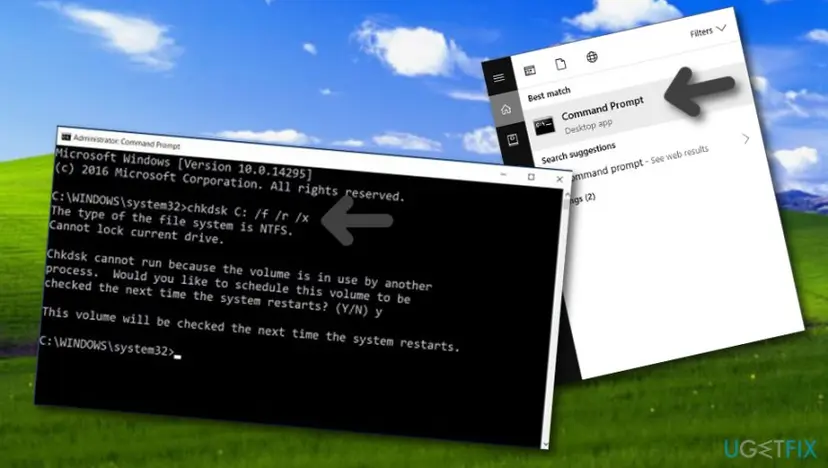
- Open Command Prompt as administrator. Type cmd in the search box on the taskbar, right-click Command Prompt and select Run as administrator. Select Yes when Windows asks for permission.
- Scan the drive without changing anything. Type the command below and press Enter. Replace C: with another drive letter to check that drive. This scan only reports; it does not fix anything.
chkdsk C: - If errors were found, run the repair. Run chkdsk with /f to fix file system errors. On the Windows drive (C:) chkdsk cannot lock the drive while Windows is running, so it offers to check it at the next restart.
chkdsk C: /f - Schedule the check and restart. Type Y and press Enter, then restart the PC. chkdsk runs before Windows starts. Do not turn the PC off while it runs.
- Read the result after the restart. The report of a check made at startup is not shown on the desktop. Open PowerShell and run the command below to see it, or open Event Viewer (eventvwr.msc) > Windows Logs > Application and filter by the sources Chkdsk and Wininit.
Get-WinEvent -FilterHashtable @{LogName='Application'} | Where-Object { $_.ProviderName -match 'wininit' } | Select-Object -First 1 | Format-List TimeCreated, Message
These steps were written for Windows 11 and Windows 10 (the steps are the same). The full page with the other versions and what each result means: Check a disk for errors (chkdsk)
It worked if: chkdsk reports no problems, or fixes them. Then reinstall the program from Fix 2 once more.
If not: If chkdsk reports bad sectors or the drive keeps failing, back up your files and see the next section.
If 0xe06d7363 keeps coming back: what to send and to whom
When the same program crashes with 0xe06d7363 after a clean install and a Visual C++ repair, the bug is in that program, and only its maker can fix it. The code itself helps them little, because all C++ crashes share it. They need the crash records.
- The full text of event 1000, copied in Fix 1: program version, faulting module, exception code and fault offset.
- The Windows Error Reporting files for the crash, found in
C:\ProgramData\Microsoft\Windows\WER\ReportArchivein a folder that starts with the program's name. - What you did when it crashed: starting the program, a loading screen, a menu, closing it.
- Your Windows version: press Win + R and type
winver. - What you already tried: update, reinstall, Visual C++ repair, clean boot.
| What you found | Who to ask |
|---|---|
| One game or app crashes, the others work. | That program's maker or the game's support. |
| A company or work program crashes. | Your IT team or the program's author. |
| Many programs crash after Fixes 3, 8 and 9. | Microsoft Support or the PC maker. |
0xe06d7363 is rarely a hardware fault. Suspect memory or the drive when many programs crash at random moments, blue screens appear as well, or chkdsk reports bad sectors. Test the memory with How to test your RAM with Windows Memory Diagnostic before you buy parts or reset Windows.
How to keep error 0xe06d7363 from coming back
- Keep your programs updated. Most 0xe06d7363 crashes are bugs that the program's maker fixes in a later version.
- Keep the Visual C++ packages. Do not remove old Microsoft Visual C++ entries to tidy up the list of installed apps.
- Install programs from their makers only. Repacks and copied program folders often lack files, which makes their code fail.
- Keep Windows updated. Windows 10 left support on 14 October 2025, so a Windows 10 PC without extended updates gets no more fixes.
- Keep restore points on for the system drive, so a bad change can be undone with Fix 6.
One old event 1000 with 0xe06d7363 for a program you never use needs no action. Start looking when the same program crashes again, or when a program you need does not open.
Frequently asked questions
What is error code 0xe06d7363?
It is the code Windows records when a program written in C++ ends on an exception that its own code did not catch. Microsoft lists it as STATUS_CPP_EH_EXCEPTION, a C++ exception handling exception, and the Visual C++ compiler uses it for every C++ exception. The code tells you that a C++ program crashed, not why. The program's name is in the title bar of the error window and in Event Viewer event 1000, and that program is what you fix.
What does "the exception unknown software exception (0xe06d7363) occurred in the application" mean?
It means the program named in the window's title bar threw a C++ exception that nothing in its code handled, so Windows ended it. Windows calls it unknown because it cannot read what the C++ error was. The address after "at location" points into Windows' own code and changes between runs, so it does not help. Note the program name, check event 1000 (Fix 1) and update or reinstall that program (Fix 2).
Why do several apps crash with 0xe06d7363 on a black loading screen?
When more than one program fails with the same code at the same stage, the likely cause is something they share. For C++ programs that is the Microsoft Visual C++ Redistributable, so repair every Visual C++ entry first (Fix 3). An overlay, screen recorder or other tool that loads into programs at start can cause the same pattern, which Safe Mode and a clean boot reveal (Fixes 4 and 5). Check the names in event 1000 too, in case two different programs fail for different reasons.
What is External exception E06D7363?
It is the same C++ exception, reported in the words of the program that crashed rather than by Windows. Some programs catch exceptions from Windows or from add-ons they load and show them as an external exception with the code, without the 0x. The cause is the same: C++ code inside the program or one of its add-ons threw an error nobody handled. Update or reinstall that program (Fix 2), including any plug-ins it uses, and repair Visual C++ (Fix 3).
What does [WinError -529697949] Windows Error 0xe06d7363 mean?
-529697949 is 0xe06d7363 written as a signed decimal number, so the two are the same code. Python shows errors this way: when a C++ library called from a Python script throws an exception that is not handled, Python reports it as WinError -529697949. The error is in that library or in what the script passed to it. Update the package that wraps the library and its Visual C++ runtime (Fix 3), and check the script's arguments with the package's documentation.
How do I fix the NVIDIA app error 0xe06d7363?
The code means the same there: a part of the NVIDIA app crashed on an unhandled C++ exception. Check event 1000 to see which NVIDIA file failed (Fix 1). Then install the newest NVIDIA app from NVIDIA's website over the old one, or remove it and install it again (Fix 2), and repair Visual C++ (Fix 3). If the NVIDIA installer stops with code 0xE6000000 instead, see NVIDIA installer error 0xE6000000.
Does 0xe06d7363 mean the same on Windows 7?
Yes. The code comes from the Visual C++ compiler, not from one Windows version, so it means the same on Windows 7, 10 and 11, and Event Viewer shows it in the same place. Fixes 1 to 3 work on Windows 7, with Programs and Features in Control Panel instead of the Settings app. Windows 7 lost support on 14 January 2020, and new versions of many programs and of Visual C++ no longer install on it, which can leave a crash unfixable there.
Is 0xe06d7363 caused by KERNELBASE.dll?
No. Event 1000 often names KERNELBASE.dll as the faulting module because that Windows file raises the exception on behalf of the program. It shows up next to almost every 0xe06d7363 crash and is almost never damaged. Do not download a copy of it from a DLL site, which can bring in a wrong or unsafe file. Look at the faulting application name instead and fix that program (Fix 2).
Can malware cause the 0xe06d7363 error?
It can, but not often. The code only says that a C++ program crashed, and a bug or a missing file is far more likely. Malware can still damage program files or settings so that a program crashes. If the title bar names a file you do not know, or the PC shows other odd behaviour, scan with Microsoft Defender (Fix 7). After a threat is removed, reinstall the affected program, because the damaged files do not come back on their own.
Did a Windows 10 update cause the 0xe06d7363 error?
Not as a known issue. Microsoft has not listed 0xe06d7363 as a problem of any Windows update, and the code comes from programs, not from Windows. An update can still change a driver or shared file that one program depends on. If crashes started on the day of an update, check for a new version of the program first (Fix 2), then use System Restore to a point before that day (Fix 6).
Sources
Did this fix work?
One click, no account. It tells the next reader which guides are worth their time.
Questions and experiences: fix error code 0xe06d7363 on Windows
Still broken, or found a fix we did not cover? Ask here: members and our editors answer. Reading is open; writing needs a free account.
…