
[Fix] Windows or Microsoft Office activation error 0xc004c060

Prefer to fix it yourself? The manual steps follow.
- 7methods
- 5 to 30 minutes, or the time of a refund and purchase
- Easy
Applies to Office 2016, 2019, 2021 and 2024, Microsoft 365 apps, and Windows 11 and Windows 10 Home and Pro activated with a product key
7 methods in this guide
Hello, I have a valid licence for MS Office that I got from the official Microsoft website, but every time I try to activate it I receive error 0xc004c060. Any help would be appreciated.
Error 0xC004C060 means Microsoft no longer accepts the product key, in Office 2016 to 2024 and in Windows. If you bought Office from Microsoft, sign in with the buying account instead of typing the key. A key bought on its own from another seller is most likely blocked for good, so ask that seller for a refund.
0xC004C060 means the product key is no longer valid. If you bought Office from Microsoft, do not type the key again: open account.microsoft.com/services, check that Office is listed, and sign in to Office with that same account (Fix 1). If you bought a key on its own from another seller, Microsoft says it was very possibly stolen or fraudulent and then blocked: ask the seller for a refund (Fix 5).
| Error | 0xC004C060: Microsoft's own wording is that "your product key is no longer valid". |
|---|---|
| Where it appears | In Office when you enter a product key or select Activate, and on the Windows Activation page: Settings > System > Activation (Windows 10: Settings > Update & Security > Activation). |
| Main cause | A product key that Microsoft has blocked, most often one sold separately from the software by a third-party seller. |
| Fastest fix | Office bought from Microsoft: sign in with the account that bought it instead of entering the key (Fix 1). Key from another seller: refund and a genuine licence (Fix 5 and 6). |
| Also written as | 0xc004c060, c004c060, 0x004c060 and oxc004c060 (typos of the same code), "Error 0xC004C060", and the Office title bar note Unlicensed Product. |
| Affects | Office 2016, 2019, 2021 and 2024, Microsoft 365 apps, Windows 11 and Windows 10. Windows 10 left support on 14 October 2025, but its activation works the same way. |
| Microsoft's status | Not a bug. Microsoft's Office page calls it a key that is no longer valid and sends you to the seller for a refund. Its Windows list groups the code with other keys that cannot be used. |
| When it is not fixable | A blocked key stays blocked. No setting, update or command on your PC unblocks it. |
| Time to fix | About 5 minutes with an account-linked purchase. Longer when you need a refund and a new licence. |
Facts checked on 15 October 2026. Steps written for Windows 11 (25H2 and 26H2) and Windows 10 22H2.
What activation error 0xC004C060 means
Microsoft has a short support page for this one code. It says: "If you see error code 0xC004C060 when you try to activate Office, your product key is no longer valid." The page applies to Office 2024, Office 2021, Office 2019 and Office 2016. It does not mention updates, repairs or drivers, because nothing on your PC is broken. The activation server looked at the key and said no.
Windows uses the same code. Microsoft's list of Windows activation errors puts 0xC004C060 in one row with 0xC004C001, 0xC004C004, 0xC004F050 and about a dozen more. Its first reason reads: "You entered a product key that can't be used to activate Windows." Two rarer reasons follow in that row. The activation servers were busy right after an upgrade, or a free upgrade did not reactivate after a reinstall.
| Where you see it | What you see | What it tells you |
|---|---|---|
| Office, after you type a 25-character key or select Activate | A message ending in the code 0xC004C060. Users report the wording "We're sorry, something went wrong and we can't do this for you right now. Please try again later. (0xC004C060)". | The key was refused. Trying later does not change a blocked key. |
| Office title bar afterwards | Unlicensed Product or Non-commercial use / Unlicensed Product | Activation failed, so most features are turned off until it succeeds. |
| Windows, Settings > System > Activation | Windows is not activated with error code 0xC004C060 | The key in Windows cannot be used, or the servers were busy after an upgrade. |
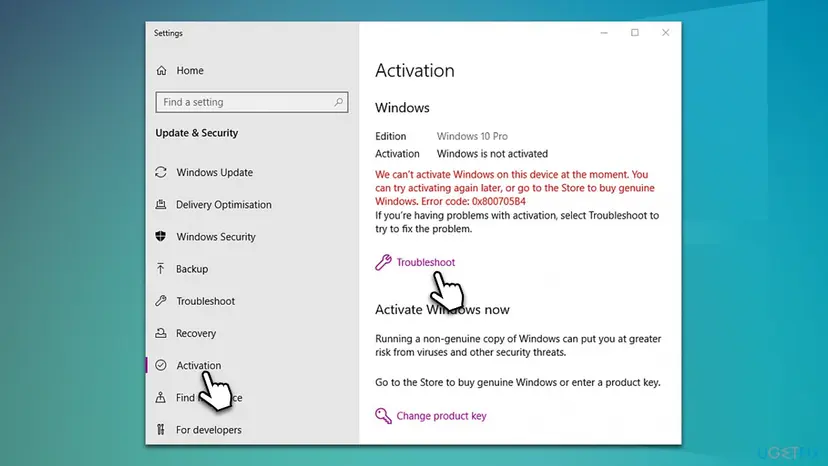
Waiting helps only in one case Microsoft names: right after an upgrade to Windows 11, when the activation servers were busy. For a key that was typed in by hand, the answer will be the same tomorrow.
Why error 0xC004C060 appears, from most to least common
The code is about the key, not the PC. So the question that decides the fix is where the key came from. Find your row and go to its fix.
| Cause | How often | How to tell | Fix |
|---|---|---|---|
| A key bought separately from the software, on a marketplace, auction or cheap key site. Microsoft says such a key was very possibly stolen or fraudulently obtained and then blocked. | Most often | You paid far below the shop price, or got the key by email from a seller that is not Microsoft or a known retailer. | Fix 5, Fix 6 |
| A key that came with media not meant for resale: promotional media, a PC maker's reinstallation media, or a Microsoft programme's media such as MSDN. | Often | The key came with a download link or disc from a seller, not with a new PC. | Fix 5, Fix 6 |
| You bought Office from Microsoft but typed a key into an install that is tied to another key or account. | Sometimes | The purchase is listed at account.microsoft.com/services. | Fix 1, Fix 2 |
| Windows was just upgraded and the activation servers were busy. | Rarely | No key was typed in, and the code appeared right after the upgrade. | Fix 3 |
| A free Windows upgrade did not reactivate after a reinstall. | Rarely | Windows was activated before the reinstall and no hardware changed. | Fix 3, Fix 7 |
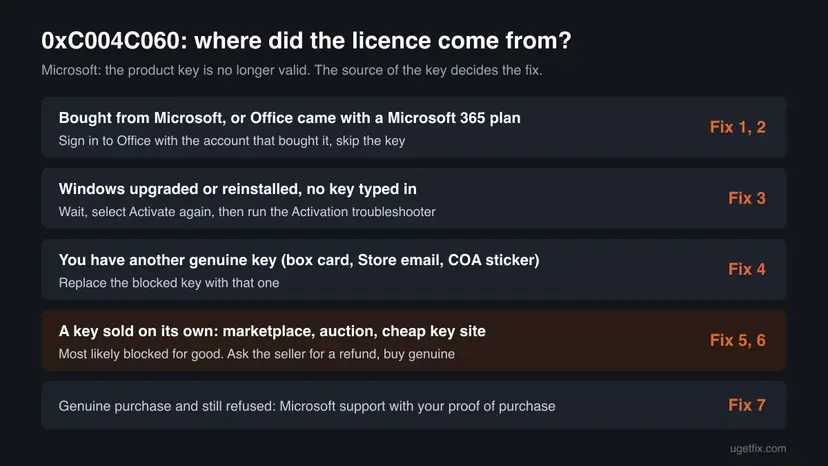
Microsoft's wording on keys sold separately is direct: there are many dishonest sellers who offer stolen, abused or otherwise unauthorised product keys, sometimes printed on counterfeit labels or cards with a download link to real Microsoft software. The download working does not mean the key is genuine.
How to fix activation error 0xC004C060
Fixes 1 and 2 are for Office that you bought from Microsoft or through a Microsoft 365 plan. Fixes 3 and 4 are for Windows. Fixes 5 and 6 are for a key bought on its own, which is the most common case and cannot be repaired on the PC. Fix 7 is for a genuine purchase that is still refused. Never use an activator tool: see Fix 6.
| What you see or have | Start with |
|---|---|
| Office was bought from microsoft.com, the Microsoft Store, or is part of Microsoft 365. | Fix 1 |
| Office is on your account, but more than one Office version is installed. | Fix 2 |
| Windows shows the code right after an upgrade or reinstall, and you typed no key. | Fix 3 |
| You have another genuine key: a box card, a Microsoft Store email or a COA sticker. | Fix 4 |
| You bought the key alone from a marketplace or key site. | Fix 5, then Fix 6 |
| The purchase is genuine and every fix above failed. | Fix 7 |
Fix 1. Sign in to Office with the account that bought it instead of typing the key
5 minutesNo riskYou bought Office from Microsoft or have a Microsoft 365 plan, as in the reader's question above.
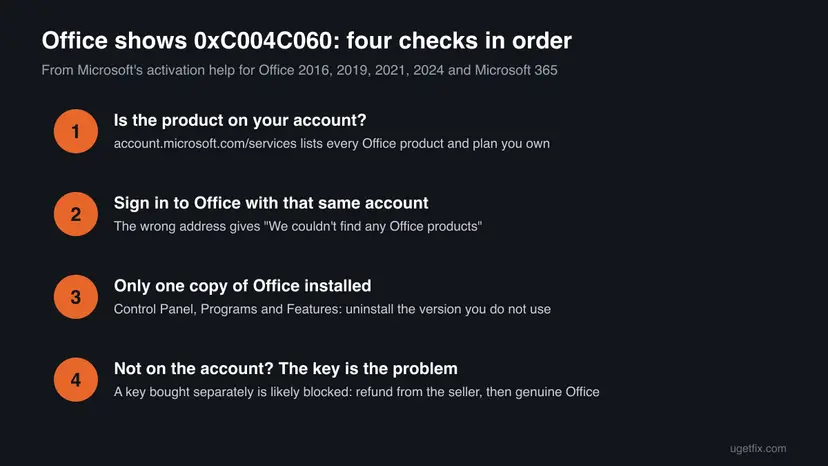
Office bought from Microsoft is tied to the Microsoft account used at purchase, and it activates by signing in. Microsoft's activation help starts here: if you sign in with another address, Office reports "We couldn't find any Office products".
- In a browser, sign in to account.microsoft.com/services with the email you think you used to buy Office.
- Look for your Office product or Microsoft 365 plan under Services & subscriptions. If it is not there, sign out and try your other Microsoft accounts.
- Close all Office apps on the PC.
- Open Word or Excel. When Office asks you to sign in, enter the account that showed the product, not a product key.
- If Office opens without asking, select your name or Sign in at the top of the window and switch to that account.
- Restart the Office app and check the title bar: Unlicensed Product should be gone.
For a Microsoft 365 plan, Microsoft offers an activation troubleshooter that runs on Windows: open aka.ms/SARA-OfficeActivation-OF, allow the Get Help app to open, and follow the prompts.
If your Microsoft 365 plan is listed under Cancelled subscriptions, it has expired. Renew it on the same page, then restart the Office apps.
It worked if: Office opens without the Unlicensed Product note, and the account you signed in with is shown at the top of the window.
If not: If the product is on your account but Office still fails, go to Fix 2. If it is on none of your accounts, the key did not come from Microsoft: Fix 5.
Fix 2. Remove the extra Office copy that holds the blocked key
10 to 20 minutesLow riskOffice is on your account, but the PC also has another Office version, for example one preinstalled or installed with a key from a seller.
Microsoft notes that two Office installs can cause activation conflicts. An old copy activated with a blocked key can keep raising 0xC004C060 even after you sign in with a genuine purchase.
- Close all Office apps.
- Open Control Panel from the Start menu search and select Programs > Programs and Features.
- Type office in the search box at the top right of the window.
- If more than one version appears, right-click the one you are not using and select Uninstall.
- Restart the PC when the uninstall finishes.
- Open a Word or Excel and sign in with the account from Fix 1 if asked.
Step by step, with pictures: Uninstall a program or app in Windows
Uninstalling Office does not delete your documents. Files in Documents or OneDrive stay where they are. If activation still fails after the clean install, Microsoft suggests an online repair of Office as the next step.
It worked if: Only one Office version is listed in Programs and Features, and it activates after you sign in.
If not: If only one copy was ever installed and it still fails with a genuine purchase, go to Fix 7.
Fix 3. Windows after an upgrade: wait, activate again, then run the Activation troubleshooter
5 minutes, plus a waitNo riskWindows shows 0xC004C060 right after an upgrade to Windows 11, or after reinstalling a free upgrade, and you typed no key yourself.
These are the two cases where Microsoft lists 0xC004C060 for a licence that is genuine: the activation servers were busy after the upgrade, or a free upgrade did not reactivate after a reinstall. Microsoft says such a copy activates by itself as long as no significant hardware, such as the motherboard, changed.
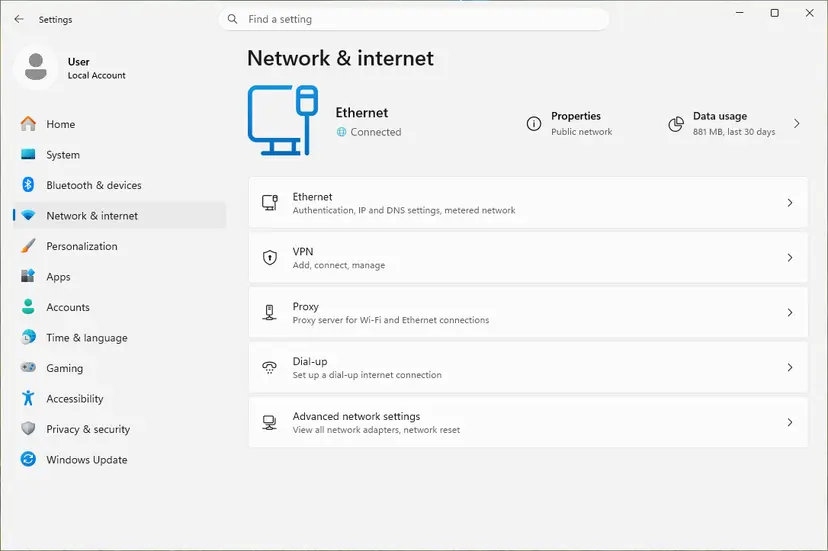
- Check that the PC is online. Activation needs a working connection: How to check your internet connection in Windows
- Wait a while, then open Settings > System > Activation (Windows 10: Settings > Update & Security > Activation) and select Activate if it is shown.
- Still not activated: select Troubleshoot on the same page and follow the screen.
- If the troubleshooter offers it, sign in with the Microsoft account the licence is linked to.
If the motherboard was replaced, this is a different problem with its own code. Our guide to Windows activation error 0xC004F211 covers moving a licence after a hardware change.
It worked if: The Activation page says Windows is activated.
If not: If the licence came from a free upgrade and still fails, Microsoft's advice is to contact customer support: Fix 7. If you did type a key, go to Fix 4.
Fix 4. Replace the blocked key with a genuine one
3 to 5 minutesNo riskYou have another key that came from a genuine source: a retail box card, a Microsoft Store confirmation email, or a COA sticker on a PC that came with Windows.
Microsoft's fix for this group of Windows codes is to enter a different product key. A blocked key cannot be repaired, but it can be replaced, and the new key overwrites the old one.
- Open Settings > System > Activation (Windows 10: Settings > Update & Security > Activation).
- Select Change product key. Windows may ask for an administrator password.
- Type the 25-character key and select Next, then Activate.
To enter the key from Command Prompt instead, which shows a clearer message, run Command Prompt as administrator and use these two commands. slmgr /dli afterwards shows the licence channel, for example RETAIL or OEM.
Install a key and activate online
slmgr /ipk XXXXX-XXXXX-XXXXX-XXXXX-XXXXX
slmgr /atoOlder guides read a key stored in the PC's firmware with a wmic command. WMIC is removed from current Windows 11 versions. That key is useful only on the PC it was made for, and only for the edition it was made for.
For Office, a licence bought from Microsoft appears on your Microsoft account and activates by signing in, as in Fix 1.
It worked if: The Activation page or slmgr /ato reports that Windows is activated.
If not: If the new key also fails with 0xC004C060 or 0xC004C008, it is blocked or used on too many devices. Go to Fix 5 for that key.
Fix 5. Ask the seller of a separately bought key for a refund
15 minutes, plus the seller's replyNo riskYou bought the key on its own: a marketplace, an auction, a classified ad or a cheap key website.
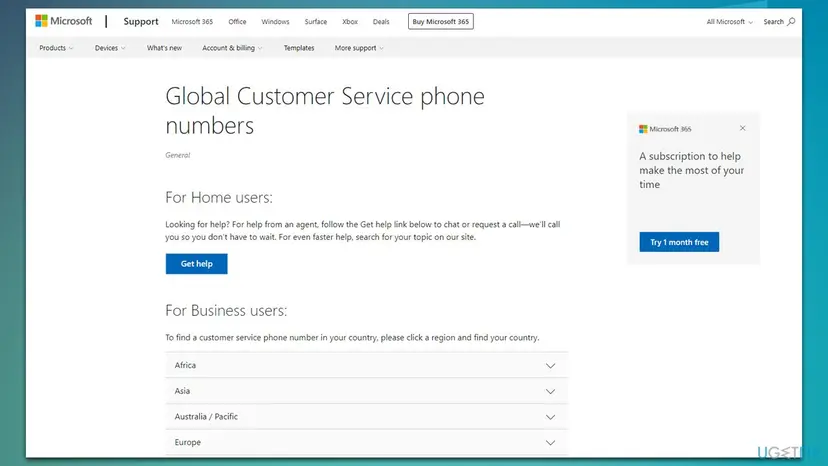
This is the step Microsoft gives for 0xC004C060: if your product key does not work or has stopped working, contact the seller and request a refund. Microsoft cannot unblock a key it has blocked, and only the seller can return your money.
- Take a screenshot of the error with the code 0xC004C060 visible.
- Find your order: the seller's confirmation email, the marketplace order page and the key itself.
- Write to the seller through the marketplace, quoting Microsoft's page: the code means the product key is no longer valid.
- If the seller does not answer, open a dispute with the marketplace or payment provider, attaching the screenshot and the order.
Sellers of blocked keys often send a new key instead of a refund. Microsoft says it does not distribute product keys as standalone products, except product key cards with a certificate of authenticity. A second key from the same source is likely to be blocked later too.
It worked if: The seller refunds the payment, and you can buy a licence that will stay activated.
If not: If no refund comes, the money is a matter for the marketplace or your card provider. The PC still needs a genuine licence: Fix 6.
Fix 6. Buy a genuine licence and activate it
10 to 20 minutesNo riskThe key you have is blocked and cannot be replaced by the seller.
A blocked key never activates again, so the only lasting fix is a licence from Microsoft or an authorised seller. Microsoft's Office page links to the Microsoft Store for this, and its Windows page points to Go to Microsoft Store on the Activation page.
| Product | Where to get a genuine licence | How it activates |
|---|---|---|
| Office or Microsoft 365 | Microsoft's Buy or try Microsoft 365 page, or an authorised retailer | Sign in to Office with the buying account (Fix 1). |
| Windows 11 | Settings > System > Activation > Go to Microsoft Store | A Store purchase activates by itself after it finishes. |
| Windows from a retailer | A boxed product key card with a certificate of authenticity | Enter the key with Fix 4. |
- Decide what you need: Office or Microsoft 365, or Windows 11 Home or Pro matching your installed edition.
- For Office, open Microsoft's Buy or try Microsoft 365 page and buy with the Microsoft account you will sign in with.
- For Windows, open Settings > System > Activation and select Go to Microsoft Store, then follow the purchase screens.
- When the purchase finishes, sign in to Office (Fix 1) or check the Activation page for Windows is activated.
Tools that promise free activation change system files and run with full rights, and a key priced far below the shop price is exactly what Microsoft warns about for this error. This page does not link to any of them. Before buying elsewhere, read Microsoft's tips for safer shopping, especially the one called Beware of Product Keys Sold Separately.
If the Activation page has no Go to Microsoft Store link, the PC is managed by an organisation. Microsoft says to contact your organisation's support person in that case.
It worked if: Office shows your account at the top and no Unlicensed Product note, or Windows shows Windows is activated.
If not: If a licence bought from Microsoft itself fails with 0xC004C060, go to Fix 7.
Fix 7. Contact Microsoft support with proof of a genuine purchase
15 to 30 minutesNo riskYou bought from Microsoft or an authorised retailer, or upgraded for free, and Fixes 1 to 4 did not activate.
Microsoft names customer support as the next step when a genuine upgrade does not activate, and its Office activation help ends the same way. Support can look up a purchase and check the key's status, which nothing on the PC can do.
- Collect the proof: the order number or confirmation email, the account used to buy, and a photo of any key card.
- Take a screenshot of the error and note the product and version, for example Office Home 2024 or Windows 11 Pro.
- Before you contact them, check the PC's date, time and time zone, which Microsoft's Office help lists among the first checks: How to fix the date and time in Windows
- Open support.microsoft.com/contactus in a browser and choose Office or Windows activation.
- Give support all the facts in one message.
It worked if: Support reactivates the licence, replaces a key that was blocked by mistake, or tells you plainly that the key is not genuine.
If not: If support says the key is not genuine, the seller owes you a refund: Fix 5.
If error 0xC004C060 is still there
When none of the fixes worked, the question is not technical any more. It is whether the key or purchase is genuine. Collect these facts before you ask the seller or Microsoft.
| What to check | Where | What it tells you |
|---|---|---|
| Is Office on your account? | account.microsoft.com/services | Listed: Microsoft has the purchase. Not listed: the key came from elsewhere. |
| Which licence Windows uses | slmgr /dli in Command Prompt | The licence channel, such as RETAIL or OEM, and the last five characters of the key. |
| How many Office copies are installed | Control Panel > Programs > Programs and Features | More than one can cause activation conflicts. |
| Where the key came from | Your order email or marketplace page | A key sold on its own is the case Microsoft describes for this code. |
Updating Windows, running a system file check or reinstalling Office does not change the server's answer about a key. These steps from older guides are left out here for that reason. They help only when activation fails for another reason with another code.
How to avoid error 0xC004C060 next time
Almost every case starts at the purchase. A licence bought where Microsoft says to buy it does not get blocked later.
- Buy Office or Microsoft 365 from Microsoft or an authorised retailer, and redeem it to your Microsoft account.
- Buy Windows preinstalled on a new PC, from the Microsoft Store, or as a boxed product key card.
- Keep the order email and the account you used, so support can find the purchase.
- Buy a key sold on its own on an auction site, a classified ad or a key website.
- Install Office from promotional, MSDN or PC maker reinstallation media bought from a seller.
- Run activator tools that promise free activation.
Frequently asked questions
What does error 0xC004C060 mean?
It means the product key is no longer valid. Microsoft says this word for word on its support page for the code, which covers Office 2016, 2019, 2021 and 2024. For Windows, Microsoft lists the same code among keys that cannot be used to activate. Nothing on your PC is damaged: the activation server checked the key and refused it, most often because the key was blocked.
How do I fix 0xC004C060 in Office?
If you bought Office from Microsoft or have Microsoft 365, sign in to Office with the account that bought it instead of typing a key, and remove any second Office copy. If you bought the key from another seller, there is no fix on the PC: Microsoft tells you to contact the seller for a refund and buy a genuine licence. Our Fix 1, Fix 2 and Fix 5 cover these cases.
Why do I get 0xC004C060 with Office 2021 or Office 2024?
The reason is the same for every version Microsoft lists, from Office 2016 to Office 2024: the key is no longer valid. Office 2021 and 2024 keys are often sold separately at low prices, and Microsoft says such keys were very possibly stolen or fraudulently obtained and later blocked. If you bought Office 2021 or 2024 from Microsoft, the purchase is on your account and signing in activates it.
What does 0xC004C060 mean on Windows 11?
On Windows 11 the code is in Microsoft's list of activation errors next to other codes for keys that cannot be used. Most often the key you entered is blocked. Less often, the activation servers were busy right after an upgrade, or a free upgrade did not reactivate after a reinstall. In those two cases wait, select Activate again and run the troubleshooter, as in Fix 3.
Does 0xC004C060 mean I bought a fake or stolen key?
Not always, but often. Microsoft writes that if you bought a product key separately from the software, it is very possible the key was stolen or otherwise fraudulently obtained, and then blocked. A key bought from Microsoft or an authorised retailer can still fail for other reasons, such as signing in with the wrong account, which Fix 1 checks first.
Will waiting or trying again later fix error 0xC004C060?
Only in one case. Microsoft says the code can appear right after an upgrade to Windows 11 when the activation servers were busy, and then a later attempt may work. For a key you typed in yourself, the answer does not change with time. A blocked key stays blocked, so waiting a day or a week will not help.
Can Microsoft unblock my product key?
Microsoft's page for this code does not offer to unblock keys. It tells you to contact the seller and request a refund, and to buy from Microsoft if no refund comes. If you bought the licence from Microsoft itself and it is refused, contact Microsoft support with your order details: support can check a purchase that was made from Microsoft.
Can I use Office or Windows while 0xC004C060 is shown?
Office shows Unlicensed Product in the title bar, and Microsoft says most features are then disabled until activation succeeds. You can still open your files, but editing them may be limited. Windows keeps working when it is not activated and shows that it is not activated. Your files are safe in both cases, because activation does not touch documents.
Is 0xC004C060 the same as 0xC004C003 or 0xC004C008?
They are close relatives with different meanings. Microsoft says 0xC004C003 means the key is not valid, often because it was used on more than one device. The code 0xC004C008 means the key is already used on another device or on more devices than the licence terms allow. The code 0xC004C060 means the key is no longer valid, usually because it was blocked. All three point to the key, not to the PC.
Are 0x004c060, c004c060 and oxc004c060 the same error?
Yes. They are the same code 0xC004C060, typed with a missing letter, without the 0x prefix, or with the letter o instead of a zero. The meaning and the fixes on this page are the same for every spelling. Search engines treat them as separate searches, which is why you may find different pages for each, but Microsoft's activation servers return only the one code.
Sources
- Microsoft Support: Error code 0xC004C060 when activating Office (support.microsoft.com)
- Microsoft Support: Get help with Windows activation errors (support.microsoft.com)
- Microsoft Support: Unlicensed Product and activation errors in Office (support.microsoft.com)
Did this fix work?
One click, no account. It tells the next reader which guides are worth their time.
Questions and experiences: [Fix] Windows or Microsoft Office activation error 0xc004c060
Still broken, or found a fix we did not cover? Ask here: members and our editors answer. Reading is open; writing needs a free account.
…