
How to fix Windows 10 activation error code 0xC004F074?

Prefer to fix it yourself? The manual steps follow.
- 7methods
- 5 to 30 minutes
- Intermediate
Applies to Windows 11 and Windows 10 Home, Pro, Education and Enterprise with a volume (KMS) licence, PCs that came from a company or school, and KMS clients inside an organisation
7 methods in this guide
Hello. I have just updated my Windows operating system, and I cannot activate it. When I try to do so, I receive error code 0xC004F074 on Windows 10. Could you help me with this problem?
Error 0xC004F074 means Windows tried to activate through a company Key Management Service (KMS) host and none could be contacted. On a home PC that usually means a volume key is installed instead of your own. Run slmgr /dli to see which licence Windows holds, then follow Fix 1 or Fix 3.
0xC004F074 means Windows looked for a company KMS activation host and none answered. On your own PC, check the licence with slmgr /dli; if it says VOLUME_KMSCLIENT, enter your own product key for your edition under Change product key (Fix 1) or run Troubleshoot to restore a digital licence (Fix 2). On a work or school PC, connect to the company network or VPN and activate again (Fix 3).
| Error | 0xC004F074: "No Key Management Service (KMS) could be contacted", or "The Key Management Server (KMS) is unavailable". |
|---|---|
| Where it appears | On the Activation page in Settings, and in a Windows Script Host box after slmgr /ato in Command Prompt. |
| Main cause | Windows holds a volume licence that must be renewed by an organisation's KMS host, and that host cannot be reached. On home PCs: a KMS or Enterprise key where a Home or Pro key belongs. |
| Fastest fix | Home PC: your own key under Change product key (Fix 1). Work PC: connect to the company network or VPN, then slmgr /ato (Fix 3). |
| Also written as | 0xc004f074, c004f074, "error code: 0xc004f074", "An error occurred during activation: 0xC004F074", "Windows is unable to reach your company's activation service". |
| Affects | Windows 11 and Windows 10, plus Windows Server KMS clients. Microsoft lists the code in the same row as 0x8007232B, 0xC004F038 and 0x8007007B. Windows 10 left support on 14 October 2025. |
| Vendor status | Not a bug. Microsoft documents it in its activation error list and in a Learn article (former KB 974998) for IT staff. |
| Where the cause is logged | Event Viewer > Windows Logs > Application, source Microsoft-Windows-Security-SPP, Event ID 12288. |
| Time to fix | 5 minutes with your own key. Longer when an IT team has to fix the KMS host, its DNS record or port 1688. |
Facts checked on 16 October 2026. Steps written for Windows 11 (25H2 and 26H2) and Windows 10 22H2.
What Windows activation error 0xC004F074 means
Microsoft's Learn article for this code gives its full text: "Error: 0xC004F074 The Software Licensing Service reported that the product could not be activated. No Key Management Service (KMS) could be contacted. Please see the Application Event Log for additional information."
KMS is the way companies and schools activate many PCs at once. Instead of a key per PC, every PC holds a generic KMS client key and asks a KMS host on the company network to activate it. And to renew that activation later. 0xC004F074 is what Windows reports when it holds such a licence and no host answers.
| Where you see it | What you see | What it tells you |
|---|---|---|
| Settings > System > Activation (Windows 10: Settings > Update & Security > Activation) | Windows is unable to reach your company's activation service. Please connect to your corporate network. If you are connected and continue to see the error, contact your system administrator. | Windows is set up for company activation. Select the error details to see the code. |
A Windows Script Host box after slmgr /ato | No Key Management Service (KMS) could be contacted | The PC looked for a KMS host and found none it could talk to. |
| The same box on older Windows 7 and Server 2008 R2 clients | The Key Management Server (KMS) is unavailable | Microsoft ties this wording to a KMS host that is too old or to a clock difference. |
Output of slmgr /dli | A Description line with VOLUME_KMSCLIENT channel | The licence in use is a KMS client licence, which only a KMS host can activate. |
The message asks you to connect to your corporate network. If the PC is yours and was never part of a company network, that request cannot be met. The fix is to replace the volume licence with your own, not to wait for a server.
Why error 0xC004F074 appears, from most to least common
The first two causes come from Microsoft's consumer activation page, the others from its Learn article for IT staff. Each row points to the fix that removes it.
| Cause | How often | How to tell | Fix |
|---|---|---|---|
| A KMS client or Enterprise key is installed on a personal PC that runs Home or Pro, for example after a volume install image, a used PC or an unofficial activator. | Most often on home PCs | slmgr /dli shows VOLUME_KMSCLIENT, and you have no company network. | Fix 1, Fix 2 |
| A work or school PC is outside the company network, or the VPN is off. | Most often on work PCs | The error goes away in the office, or comes back at home. | Fix 3 |
| The PC clock and the KMS host clock differ by more than 4 hours. | Sometimes | The taskbar time is far off, or Event ID 12288 shows 0xC004F06C. | Fix 4 |
| TCP port 1688 is blocked between the PC and the KMS host. | Sometimes, on company networks | Test-NetConnection to the host on port 1688 returns TcpTestSucceeded : False. | Fix 5 |
| The KMS host is broken: its sppsvc service stopped, its DNS record is wrong or old, or it is too old for the client's Windows version. | Rarely, and only an IT team can fix it | Many PCs in the organisation show the error at the same time. | Fix 6 |
| Online activation of a key you own keeps failing. | Rarely | slmgr /dli shows a RETAIL or MAK channel and the key fits your edition. | Fix 7 |
How to fix Windows activation error 0xC004F074
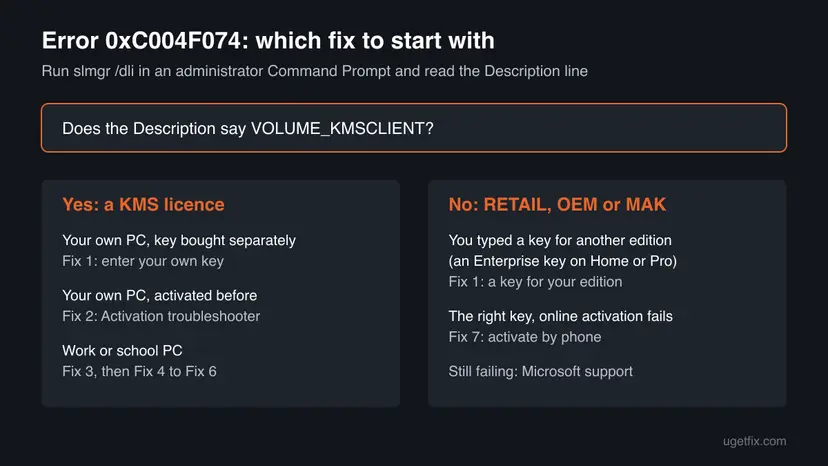
Fixes 1 and 2 are for a PC you own and solve most home cases. Fix 3 is for a work or school PC away from the office. Fixes 4 to 6 are for KMS clients inside an organisation, and Fix 7 is for a key you own that fails online.
| What you see or have | Start with |
|---|---|
Your own PC, and slmgr /dli shows VOLUME_KMSCLIENT, or you typed an Enterprise key on Home or Pro. | Fix 1 |
| Your own PC that was activated before a reinstall or upgrade, and you have no key. | Fix 2 |
| A work or school laptop used at home or on the road. | Fix 3 |
| A company PC whose clock is wrong, or Event ID 12288 shows 0xC004F06C. | Fix 4 |
| A company PC on the right network that still cannot reach the host. | Fix 5, then Fix 6 |
| A retail or MAK key that fits your edition but fails online. | Fix 7 |
Fix 1. Check the licence with slmgr /dli and replace a KMS key with your own product key
5 minutesLow riskA PC you own, with no company network, where slmgr /dli shows a KMS client licence or where you typed an Enterprise key on Home or Pro.
Microsoft says 0xC004F074 can come from a product key for the Enterprise edition entered on Windows Home or Pro, and that you should enter a key that matches your edition. Your own key moves Windows off the KMS licence, so it stops looking for a company host.
- Type cmd in the taskbar search, right-click Command Prompt and select Run as administrator.
- If User Account Control asks, select Yes.
- Type
slmgr /dli, press Enter and read the Description line in the box that opens. - If it shows VOLUME_KMSCLIENT channel, open Settings > System > About and note the Edition under Windows specifications.
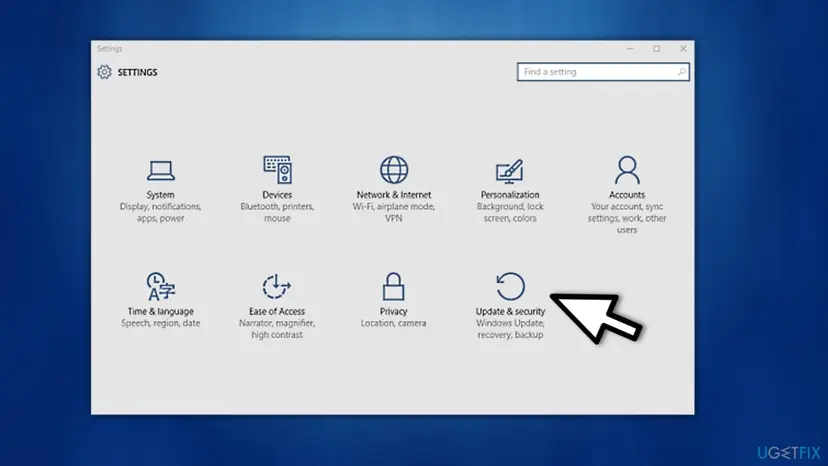
- Open Settings > System > Activation (Windows 10: Settings > Update & Security > Activation).
- Select Change product key, approve the prompt and type the 25-character key for the edition you noted.
- Select Next and Activate, then restart the PC.
The same in the administrator Command Prompt: install your key, then activate
slmgr.vbs /ipk XXXXX-XXXXX-XXXXX-XXXXX-XXXXX
slmgr.vbs /ato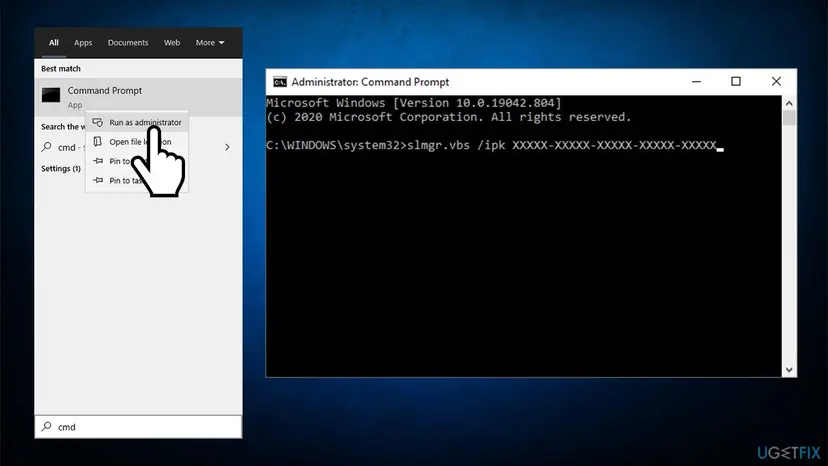
A Home key does not activate Pro, and an Enterprise or generic KMS key from a website brings this error straight back. If the PC runs Enterprise and you only have a Home or Pro licence, you need a clean install of that edition; back up your files first with Back up your files (Windows Backup, File History, Time Machine).
It worked if: The box after slmgr.vbs /ato says the product was activated successfully, and the Activation page shows Active. A new slmgr /dli shows a RETAIL or OEM channel.
If not: If you have no key but the PC was activated before, try Fix 2. If your own key fails online, go to Fix 7.
Fix 2. Restore a digital licence with the Activation troubleshooter
5 minutesNo riskYour own PC was activated in the past (it came with Windows, or you upgraded it), and you have no key to type.
Microsoft points to the Activation troubleshooter for simple activation errors. It checks whether Microsoft holds a digital licence for this hardware or your Microsoft account, which can replace the KMS licence without a key.
- Sign in with an account that has administrator rights.
- Check that the PC is online: How to check your internet connection in Windows
- Open Settings > System > Activation (Windows 10: Settings > Update & Security > Activation).
- Select Troubleshoot and follow the steps on the screen.
- If you replaced the motherboard, choose I changed hardware on this device recently and sign in with your Microsoft account.
- Restart the PC and open the Activation page again.
It worked if: The troubleshooter reports that Windows is activated, or the Activation page shows Active after the restart.
If not: If it finds no licence for this PC, you need your own key (Fix 1). A licence that never existed cannot be restored.
Fix 3. Work or school PC: connect to the company network or VPN, then activate
5 minutesNo riskThe PC is managed by your employer or school, and you see the message about your company's activation service.
A KMS licence is renewed only by the organisation's own host. Microsoft says this error appears when you activate a work device that is not connected to the workplace network.
- Connect to the office network, or start the company VPN if you work from home.
- Open Command Prompt with Run as administrator.
- Type
slmgr /atoand press Enter. - Wait for the Windows Script Host box and read its message.
- If the error stays while you are connected, send a screenshot of it and the
slmgr /dlioutput to your IT team.
Typing your own key on a managed PC replaces the company licence and may break its rules. Microsoft says to contact your organisation's support person when the error stays on the work network.
It worked if: slmgr /ato reports that the product was activated successfully, and the Activation page shows the PC as activated by your organisation.
If not: If it fails on the company network, the cause is the clock, the port or the host: Fix 4 to Fix 6, or your IT team.
Fix 4. Sync the clock with the KMS host
5 minutesNo riskA company PC whose clock is visibly wrong, or whose Application log shows Event ID 12288 with 0xC004F06C in its Info line.
Microsoft's Learn article says activation fails when the client's system time and the KMS host's differ by more than 4 hours. Both are compared in UTC, so the time zone you pick does not matter; the clock itself does.
- Open Settings > Time & language > Date & time and turn on Set time automatically.
- Select Sync now.
- Open Command Prompt with Run as administrator, type
w32tm /resyncand press Enter. - Run
slmgr /atoagain.
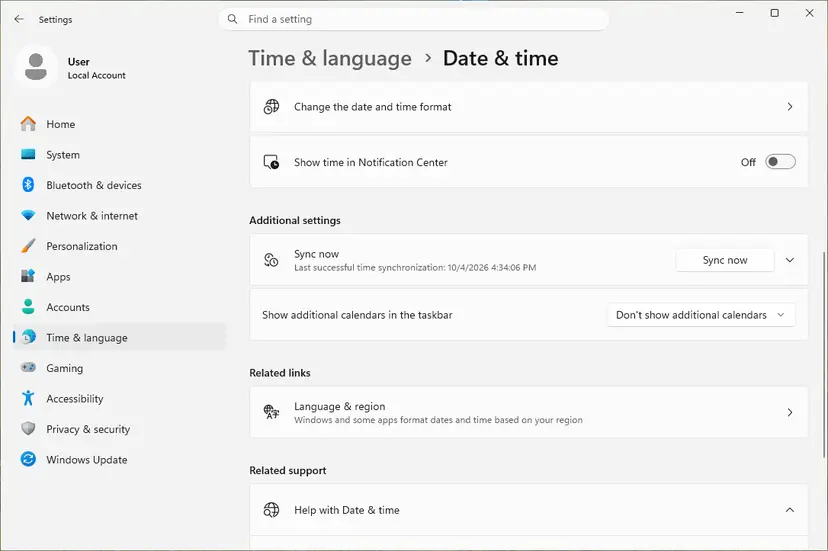
If the clock will not follow, the full walk-through is here: How to fix the date and time in Windows. On a domain PC the time comes from the organisation; if it is wrong there, the IT team has to fix the time source.
It worked if: The clock matches a phone or another device, and slmgr /ato no longer returns 0xC004F074.
If not: If the clock is right and the error stays, check the path to the host (Fix 5).
Fix 5. Check that port 1688 to the KMS host is open
10 minutesNo riskA company PC on the right network, with the right time, that still cannot reach the KMS host. You need the host's name from your IT team.
KMS clients talk to the host over TCP port 1688. Microsoft names a blocked port 1688 as one of the reasons no KMS host can be contacted.
- Right-click Start and open Terminal (Admin) or Windows PowerShell (Admin).
- Run the command below with the real host name.
- Read the TcpTestSucceeded line at the end of the output.
- If it says False, a firewall, VPN rule or router between you and the host blocks port 1688; give the output to your IT team.
PowerShell: test the connection to the KMS host on port 1688
Test-NetConnection -ComputerName <KMS host server> -Port 1688PingSucceeded : True with TcpTestSucceeded : False means the host is up but port 1688 is closed. Opening it is a network change for the IT team, not something to switch off on your PC.
It worked if: TcpTestSucceeded : True, after which slmgr /ato activates the PC.
If not: If the port is open and activation still fails, the host itself needs attention (Fix 6).
Fix 6. IT admin: check the KMS host service, its DNS record and its version
15 to 30 minutesLow riskYou run the organisation's KMS host, and many clients report 0xC004F074 at once.
Microsoft lists three host-side reasons for this error: the Software Protection Platform service (sppsvc) stopped on the host, a wrong or old KMS host record in DNS, and a host too old to activate the clients' Windows version.
- On the KMS host, open Services, find Software Protection (
sppsvc) and start it if it is stopped. - Open the DNS management console and select the _tcp folder under your domain.
- Find the _VLMCS SRV record and check that it names the current KMS host.
- In the domain folder, check the host's A record and correct the IP address if it points to an old server.
- Compare the host's Windows Server version with the clients' Windows version, and update the host if it is older than Microsoft supports for them.
- On a client, run
slmgr /atoagain.
A wrong edit to the _VLMCS or A record stops activation for the whole organisation. Note the current values before you change anything, so you can put them back.
Microsoft's example of a version mismatch is a Windows Server 2008 host that needs update 968912 before it can activate Windows 7 clients. For a client that cannot find the host's DNS record at all, Windows usually shows 0x8007232B instead; that case is covered in our guide to error 0x8007232B.
It worked if: The KMS host's Key Management Service log shows Event ID 12290, "An activation request has been processed", for the client, and the client shows as activated.
If not: Collect data with Microsoft's TSS tool for deployment issues and open a case with Microsoft support.
Fix 7. Activate a key you own by phone with SLUI 4
10 minutesNo riskslmgr /dli shows a RETAIL or MAK licence for your edition, and online activation still fails.
Microsoft offers phone activation when online activation does not go through. It works for a key you own; a KMS licence is activated by the company host, so a call does not replace it.
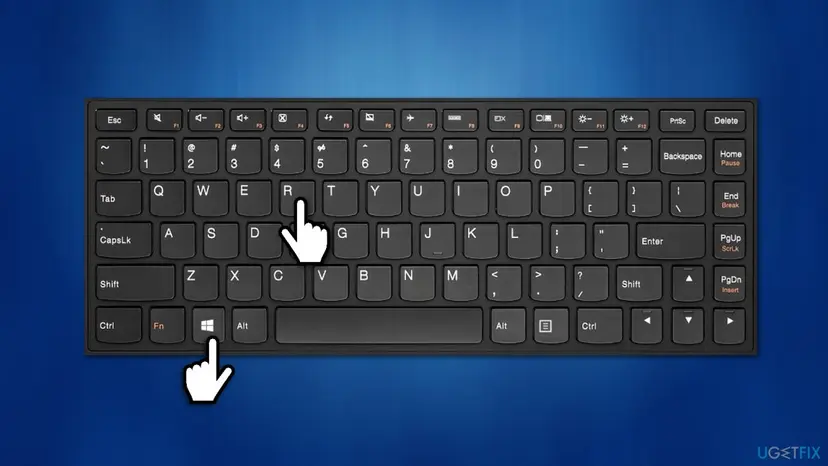
- Press Win + R, type
slui 4and press Enter (or type SLUI 04 in the taskbar search and select it). - Choose your country or region and select Next.
- Call the number shown, or select Activate by phone on the Activation page if your Windows 10 build offers it.
- Follow the voice prompts and type the confirmation ID you are given.
- Select Activate Windows and restart the PC.
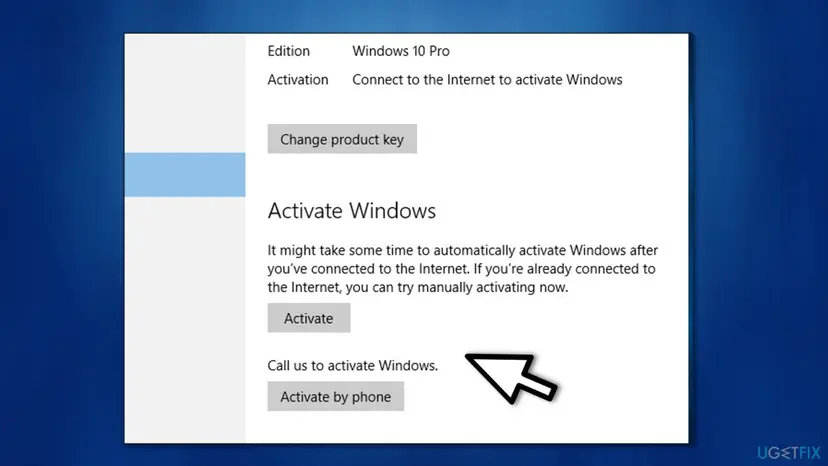
Microsoft says Windows 11 Pro EDU and Windows 11 Pro for Workstations must be activated over the internet: phone activation and SLUI 04 cannot be used for them.
It worked if: The phone activation window confirms that Windows is activated, and the Activation page shows Active.
If not: If the key is refused by phone too, contact Microsoft support with your proof of purchase, as described below.
If error 0xC004F074 is still there
The error text itself says where to look: the Application Event Log. Microsoft's Learn article names the entries that show what happened between the client and the host.
| Where to look | What to find | What it tells you |
|---|---|---|
| On the PC: Event Viewer > Windows Logs > Application | Source Microsoft-Windows-Security-SPP, Event ID 12288, "The client has sent an activation request to the key management service machine" | The Info line shows the host name and port 1688. A code 0xC004F06C there points to the clock (Fix 4). |
| On the KMS host: Applications and Services Logs > Key Management Service | Source Microsoft-Windows-Security-Licensing-SLC, Event ID 12290 | The host received and processed the request. No entry means the request never arrived (Fix 5, Fix 6). |
slmgr /dli in an administrator Command Prompt | The Description line and the partial product key | KMS client, MAK, retail or OEM licence: this decides who can activate the PC. |
On a work PC, send these to your IT team. On your own PC, Microsoft support needs your proof of purchase and the slmgr /dli output. The error is never a sign of a hardware fault and does not touch your files.
How to avoid error 0xC004F074 next time
On home PCs the error comes from a company licence that does not belong there; on work PCs from losing contact with the host. The habits below cover both.
- Run
slmgr /dliwhen you buy a used PC, and ask the seller for a retail or OEM licence if it shows VOLUME_KMSCLIENT. - Install Windows from Microsoft's own media for your edition, not from a volume image.
- Link your digital licence to your Microsoft account.
- Connect a work laptop to the office network or VPN now and then, so its KMS activation is renewed.
- Type a KMS client key or an Enterprise key from a website on a Home or Pro PC.
- Use unofficial activator tools; they install KMS licences that fail later and can carry malware.
- Change the key on a company PC without the IT team.
- Turn off the firewall for good to make activation pass.
Frequently asked questions
What does error code 0xC004F074 mean?
It means Windows could not be activated because no Key Management Service (KMS) host could be contacted. KMS is how organisations activate many PCs with one host on their network. The code shows up when a PC holds a KMS client licence and cannot reach that host, because it is outside the company network, its clock is far off, port 1688 is blocked, or the host itself has a problem. On a home PC it usually means a volume or Enterprise key is installed where your own key belongs. It is not a hardware fault.
What does "Windows is unable to reach your company's activation service" mean?
It is the Settings version of error 0xC004F074. Windows tells you it is set up for company activation and asks you to connect to your corporate network, then to contact your system administrator if you are connected and the error stays. If the PC belongs to your employer or school, follow that advice (Fix 3). If the PC is yours and has never been on a company network, the message is a sign that the wrong licence is installed, and Fix 1 or Fix 2 is the way out.
I got 0xC004F074 right after a Windows update. Why?
An update does not change your product key. What usually happens is that Windows checks its activation after the update or upgrade, and the error appears because the licence it holds is a KMS licence that needs a company host. That is common on PCs set up from a volume image or activated with an unofficial tool. Run slmgr /dli in an administrator Command Prompt: if it shows VOLUME_KMSCLIENT on your own PC, enter your own key (Fix 1) or let the Activation troubleshooter restore your digital licence (Fix 2).
Does error 0xC004F074 also appear on Windows 11?
Yes. Microsoft lists 0xC004F074 with the same advice for Windows 11 and Windows 10: enter a key that matches your edition, or connect a work device to the workplace network. The only difference is the path. On Windows 11 the Activation page is under Settings > System > Activation; on Windows 10 it is under Settings > Update & Security > Activation. Windows 10 left support on 14 October 2025, so activation help for it is now limited.
Will a KMS key or activator from a website fix 0xC004F074?
No. Generic KMS client keys only work with an organisation's own KMS host, so on a home PC they produce exactly this error. Unofficial activator tools pretend to be a KMS host; when they stop working, the PC falls back to 0xC004F074. They also break Microsoft's licence terms and are a common way malware gets onto a PC. The lasting fix is a genuine key for your edition, or the digital licence your PC already has.
Can I activate by phone when I see 0xC004F074?
Only with a key you own, such as a retail or MAK key. Phone activation sends Microsoft an installation ID and returns a confirmation ID for that key. A KMS client licence is activated by the company host, not by Microsoft, so a call does not help a PC that holds one. Install your own key first (Fix 1), then use slui 4 if online activation still fails (Fix 7). Microsoft also says Windows 11 Pro EDU and Pro for Workstations cannot be activated by phone.
Does the time zone cause error 0xC004F074?
No, the time zone does not, but a wrong clock can. Microsoft says the KMS host and the client compare time in UTC, so a different time zone setting has no effect. What breaks activation is a system time that differs from the host's by more than 4 hours. Turn on Set time automatically, select Sync now, or run w32tm /resync in an administrator Command Prompt, then try slmgr /ato again (Fix 4).
Is 0xC004F074 the same error as 0x8007232B?
They are close relatives. Microsoft lists both codes in one row with the same consumer advice, because both come from a PC that expects a KMS host. 0xC004F074 means a host could not be contacted. While 0x8007232B, "DNS name does not exist", means the PC could not even find a host's record in DNS. The home fix is the same for both: your own key for your edition. On company networks the checks differ, so read the code the slmgr /ato box shows.
Can I keep using Windows while it shows 0xC004F074?
Yes. An unactivated Windows keeps running and gets security updates, and your files and programs stay as they are. You will see an activation reminder, and some personalisation settings, such as the wallpaper and colours, are locked until Windows is activated. A KMS-activated work PC also stays usable for a while after it loses the host, but it falls back to the unactivated state if the activation is not renewed.
Sources
- Microsoft Learn: Error 0xC004F074 when you try to activate Windows (former KB 974998) (learn.microsoft.com)
- Microsoft Support: Get help with Windows activation errors (support.microsoft.com)
Did this fix work?
One click, no account. It tells the next reader which guides are worth their time.
Questions and experiences: fix Windows 10 activation error code 0xC004F074
Still broken, or found a fix we did not cover? Ask here: members and our editors answer. Reading is open; writing needs a free account.
…