
How to fix DirectX error "Setup could not download the file" in Windows?

Prefer to fix it yourself? The manual steps follow.
- 7methods
- 5 to 20 minutes
- Easy
Applies to The DirectX End-User Runtime web installer and game installers that run DirectX setup, on Windows 11 and Windows 10
7 methods in this guide
Hi, I accidentally downgraded my DirectX, and now, whenever I attempt to upgrade it, I receive an error "Setup could not download the file." I tried to reboot my PC and wait for a while, and I still received this error. Any tips on this, please?
The DirectX message "Setup could not download the file" comes from the DirectX End-User Runtime Web Installer, which downloads its files while it installs. Install Microsoft's offline package directx_Jun2010_redist.exe instead, since it needs no download during setup. If you wanted to update DirectX 12 itself, that only comes through Windows Update.
The web installer could not fetch its files from Microsoft. Skip the download: get DirectX End-User Runtimes (June 2010), the offline file directx_Jun2010_redist.exe (95.6 MB) from the Microsoft Download Center, extract it to a new folder and run DXSETUP.exe (Fix 1). It adds the old game libraries without any download. DirectX 12 is already part of Windows 11 and 10 and is updated only by Windows Update (Fix 2).
| Error | "Setup could not download the file. Please retry later or check network connection." in the DirectX setup window. Setup stops and nothing is installed. |
|---|---|
| Where it appears | While the DirectX End-User Runtime Web Installer runs, or when a game installer runs DirectX setup on its first start. |
| Main cause | The web installer cannot reach Microsoft's download server: a blocked connection, a VPN or proxy, security software or a broken network setting. |
| Fastest fix | Install the offline package directx_Jun2010_redist.exe (Fix 1). It holds every file, so nothing has to be downloaded during setup. |
| Also written as | directx could not download the file, directx setup could not download the file please retry later, setup could not download the file please retry later or check network connection, directx download error. |
| What it installs | Old side-by-side libraries for older games: D3DX9, D3DX10, D3DX11, XAudio 2.7, XInput 1.3, XACT and Managed DirectX 1.1. Microsoft says it does not change the DirectX version of Windows. |
| Affects | Windows 11 and Windows 10, and older Windows versions. The offline package's page lists only older systems, but games still use it on Windows 11 and 10. |
| Vendor status | Not a listed bug. A Microsoft support answer for this exact message advises the offline redistributable instead of the web installer. |
| Time to fix | 5 minutes for the offline package, 10 to 20 minutes for network and system checks. |
Facts checked on 15 October 2026. Steps written for Windows 11 (25H2 and 26H2) and Windows 10 22H2.
What "Setup could not download the file. Please retry later or check network connection" means
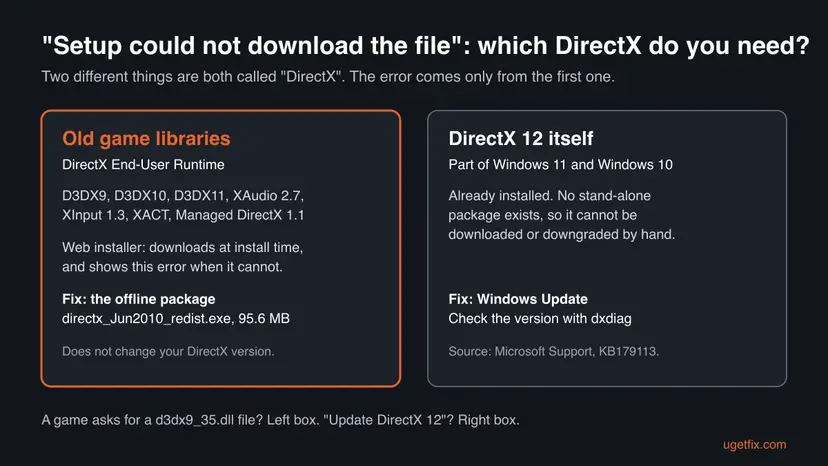
Microsoft offers the DirectX End-User Runtime in two forms. The web installer is a small file that downloads the rest of the package while it runs. The offline package, DirectX End-User Runtimes (June 2010), already contains every file. The message appears only in the first case: the web installer tried to download a part, got no answer and stopped. So the words "could not download" are meant literally.
Neither form installs DirectX 12 or changes your DirectX version. Microsoft's Download Center says the package adds legacy DirectX SDK libraries for games that use D3DX9, D3DX10, D3DX11, XAudio 2.7, XInput 1.3, XACT or Managed DirectX 1.1. It also says the package does not modify the DirectX runtime of Windows in any way.
| What you see or type | What it means |
|---|---|
| "Setup could not download the file. Please retry later or check network connection." | The full text in the DirectX setup window. The web installer lost or never had a connection to Microsoft's server. |
| "directx setup could not download the file" | The same error, searched with the window name in front. |
| "could not download" or "directx download error" | Short forms of the same message. |
| "An internal system error occurred" in DirectX setup | A different DirectX setup error. Fixes 1, 6 and 7 help, but it is not a download problem. |
| "A cabinet file necessary for installation cannot be trusted" | Setup reached its files but could not verify their signature. See the FAQ below. |
Why DirectX setup could not download the file, most common cause first
The ranking follows Microsoft's own support answer for this message, which names a blocked download and the web installer itself, and what users report on Microsoft Q&A and Reddit. Each cause is tied to the fix that removes it.
| How often | Cause | How to spot it | Fix |
|---|---|---|---|
| Most often | The web installer cannot reach Microsoft's download server | The browser works, but setup fails at once or after a few seconds, every time | Fix 1 |
| Often | You are trying to install or downgrade DirectX 12, which this package does not do | You ran the installer to "update DirectX", not because a game asked for a missing file | Fix 2 |
| Often | A VPN, proxy or damaged network setting blocks programs other than the browser | Other desktop programs cannot connect either, or a VPN is on | Fix 3 |
| Sometimes | The PC clock is wrong, so secure connections and signatures fail | The date or time in the taskbar is off, or the cabinet file error appears | Fix 4 |
| Sometimes | A game installer runs DirectX setup without the rights it needs | The error appears on a game's first start from Steam, the EA app or a disc | Fix 5 |
| Rarely | Security software blocks the download or the extraction | Third-party antivirus or firewall is installed | Fix 6 |
| Rarely | Damaged Windows system files | Other installers fail too | Fix 7 |
Microsoft says DirectX 11.3 and 12 are included in Windows 10, and the same holds for Windows 11. Updates come through Windows Update, and there is no stand-alone package. The End-User Runtime adds old libraries next to DirectX 12. It cannot downgrade it, and running it again cannot upgrade it.
How to fix "Setup could not download the file" in DirectX
Fix 1 avoids the download completely and solves most cases. Fix 2 is for readers who wanted to update DirectX 12 itself. Fixes 3 and 4 repair what stops the download, Fix 5 covers game installers, and Fixes 6 and 7 are the last checks.
| What you see or what your PC has | Start with |
|---|---|
| A game asks for a missing DirectX file, or you just need DirectX for a game | Fix 1 |
| You wanted to update, repair or downgrade DirectX 12 itself | Fix 2 |
| A VPN or proxy is on, or other programs cannot connect | Fix 3 |
| The clock in the taskbar is wrong, or a cabinet file cannot be trusted | Fix 4 |
| The error appears while a game installs or starts for the first time | Fix 5 |
| Even the offline package fails | Fix 6, then Fix 7 |
Fix 1. Install the offline DirectX End-User Runtimes (June 2010) package
5 minutesNo riskEveryone first: anyone who saw the message in the web installer or needs the old DirectX libraries for a game.
The error is a failed download. The offline package already holds every file, and Microsoft's page says it is recommended for users who have no internet connection during installation. With nothing to download, the step that failed does not happen.
- Open the Microsoft Download Center page DirectX End-User Runtimes (June 2010) (link in the sources below) and select Download.
- Check the file: it is
directx_Jun2010_redist.exe, 95.6 MB, version 9.29.1974.1. - Create an empty folder, for example
C:\DXRedist. - Double-click
directx_Jun2010_redist.exe, accept the licence and, when it asks you to type the location where you want to place the extracted files, choose that folder. - Open the folder and double-click
DXSETUP.exe. Select Yes in the User Account Control prompt. - Accept the licence, select Next and wait for setup to finish.
- Restart the PC and start the game again.
The first file only unpacks many small cabinet files and DXSETUP.exe into the folder. Nothing is installed until you run DXSETUP.exe. If you skip it, the game still reports the missing file.
Download it only from Microsoft. Sites that offer single DirectX files such as d3dx9_35.dll are not needed: Microsoft names this package as the fix when a game says that file is missing.
It worked if: Setup ends with a message that the installation is complete, and the game no longer asks for a DirectX file.
If not: If you wanted DirectX 12 itself, go to Fix 2. If DXSETUP.exe shows an error, go to Fix 4 and then Fix 6.
Fix 2. Check your DirectX version and update DirectX 12 through Windows Update
10 minutesNo riskYou ran the installer to update, repair or roll back DirectX itself, as in the reader's question above.
Microsoft says DirectX 12 is included in Windows 10, and its page covers Windows 11 the same way. Updates come only through Windows Update and no stand-alone package exists. So no download fixes or downgrades it, and Windows Update is the only route.
- Select Start, type
dxdiagand press Enter. - Select Yes if it asks to check whether drivers are digitally signed.
- On the System tab, read DirectX Version under System Information. On Windows 11 and 10 it says DirectX 12.
- Open Settings > Windows Update on Windows 11, or Settings > Update & Security > Windows Update on Windows 10.
- Select Check for updates, install what it finds, including optional updates, and restart.
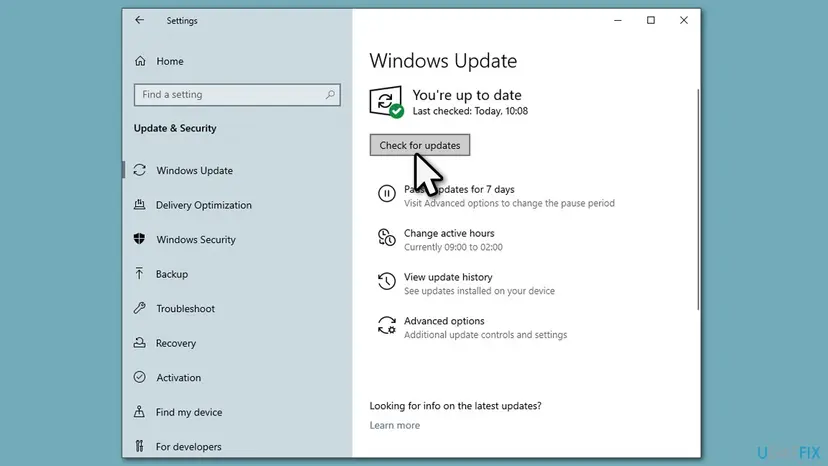
If a single update will not install, Windows Update is the thing to repair, not DirectX. Step by step: Install an update from the Microsoft Update Catalog.
It worked if: dxdiag shows DirectX 12 and Windows Update says you are up to date. A game that needs the old libraries still wants Fix 1.
If not: If dxdiag shows an older version on Windows 10 or 11, run the system file check in Fix 7.
Fix 3. Turn off the VPN or proxy and reset the network settings
10 minutesLow riskYou must use the web installer, a VPN or proxy is on, or other desktop programs cannot connect while the browser can.
The web installer connects on its own, outside the browser. A user on Microsoft's forum reports that only browsers and Store apps could connect on his PC, so every desktop installer failed. A VPN, a leftover proxy or a damaged Winsock catalog causes exactly that.
- Disconnect any VPN app and close it.
- Open Settings > Network & internet > Proxy on Windows 11, or Settings > Network & Internet > Proxy on Windows 10.
- Turn off Use a proxy server unless your school or company set it.
- Run the web installer again.
If it still fails, reset Winsock and TCP/IP and get a new IP address. Note any IP or DNS address you typed in by hand first. Step by step: Reset the network and flush DNS.
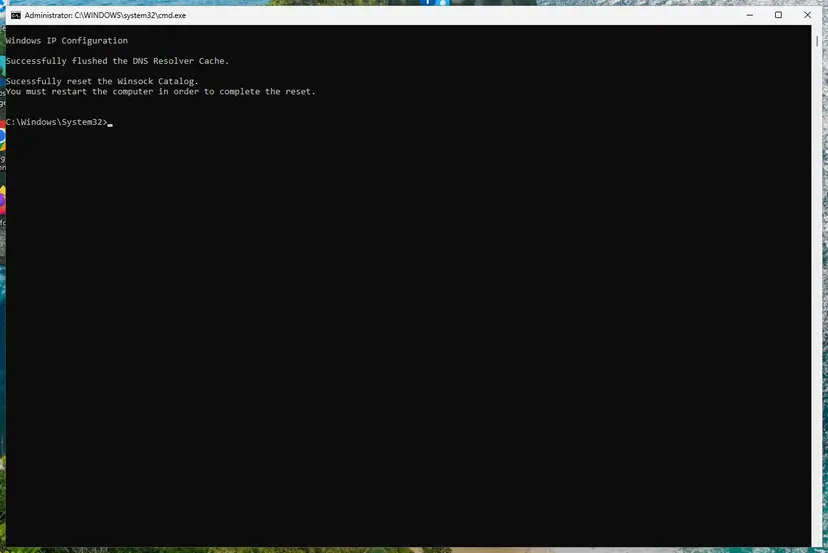
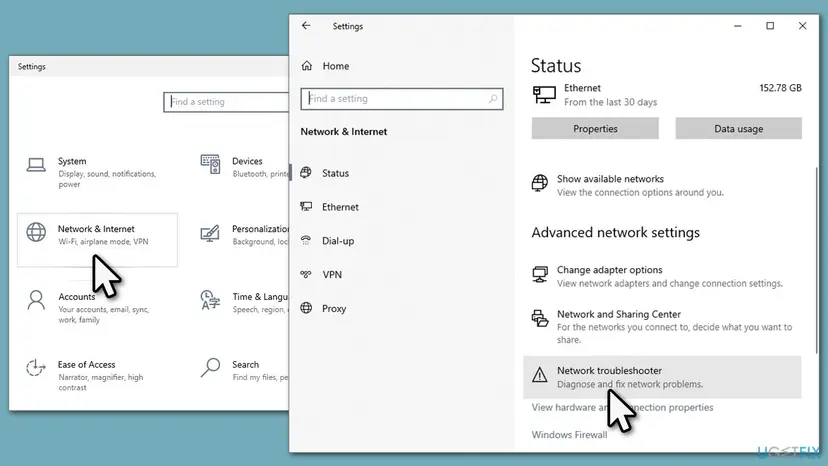
It worked if: The web installer downloads its files and setup goes on to the install step.
If not: Use the offline package in Fix 1, which needs no connection, or check the clock in Fix 4.
Fix 4. Set the correct date and time
5 minutesNo riskThe clock in the taskbar is wrong, the battery of an old PC is weak, or setup says a cabinet file cannot be trusted.
Secure downloads and signed files are checked against the current date. When the clock is far off, a valid certificate can look expired or not yet valid, so the download or the file check fails.
- Right-click the clock in the taskbar and select Adjust date and time.
- Turn on Set time automatically and Set time zone automatically.
- Select Sync now under Additional settings.
- Run
DXSETUP.exeor the web installer again.
On Windows 10 the same switches are in Settings > Time & Language > Date & time. Step by step, with the commands for a clock that will not sync: How to fix the date and time in Windows.
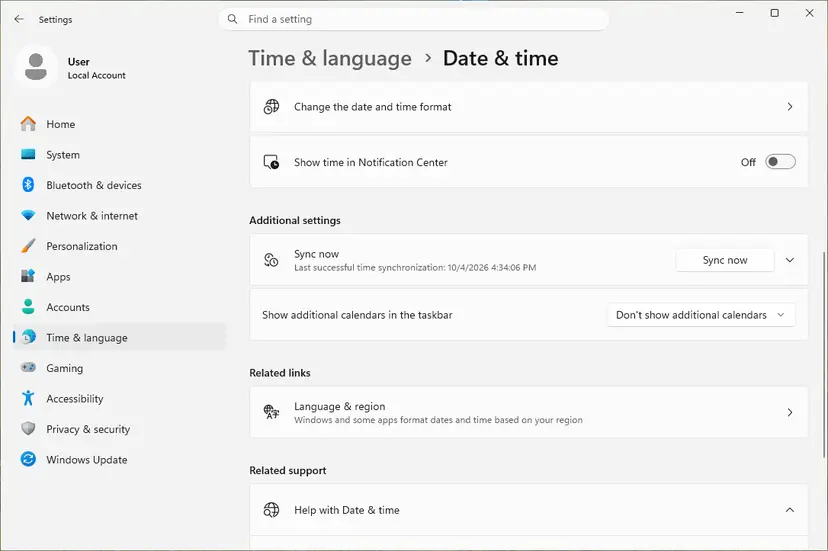
- If the clock is wrong again after every restart, the motherboard battery is likely flat.
- Run
DXSETUP.exeor the web installer again after the clock is right.
It worked if: The taskbar clock shows the right time and setup runs to the end.
If not: If a game shows the error, go to Fix 5.
Fix 5. Let the game install DirectX with administrator rights
10 minutesNo riskThe error appears while a game installs, on its first start in Steam or the EA app, or from a game disc.
Many games run Microsoft's DirectX setup from their own folder on the first start. Without administrator rights or with a damaged copy of that folder, the step fails and the game shows a DirectX setup error.
- Close the game and its launcher completely.
- Right-click the launcher, for example Steam or the EA app, and select Run as administrator.
- Start the game and let the first-run installs finish.
- If it fails again, repair the game files in the launcher, which also restores its DirectX folder.
- As a last test, install the offline package from Fix 1. A game whose DirectX step fails often runs once those libraries are present.
Step by step for every launcher: How to verify game files in Steam, Epic Games, Xbox app, EA app, Battle.net and GOG Galaxy. More on administrator rights: How to run a program as administrator or in compatibility mode.
It worked if: The launcher finishes its first-run installs and the game starts.
If not: If even the offline package fails, test without security software in Fix 6.
Fix 6. Pause the antivirus for one install, then turn it back on
5 minutesRead the warningThird-party antivirus or firewall is installed, and both the web installer and the offline package fail.
A Microsoft support answer for this message names antivirus and firewall as things that can block the download. Pausing protection for one install shows whether that is the cause. It is a test, not a fix you keep.
While protection is paused, the PC can be infected by anything you open. Pause it only to run directx_Jun2010_redist.exe from the Microsoft Download Center, open nothing else, and turn protection on right after. Do not turn off the Windows firewall for this.
- Open your antivirus, or Windows Security > Virus & threat protection > Manage settings for Microsoft Defender.
- Turn real-time protection off for the shortest time it offers.
- Run
DXSETUP.exefrom the extracted folder at once. - Turn real-time protection back on as soon as setup ends.
Step by step, including how to turn it back on: Turn off Microsoft Defender protection for a moment.
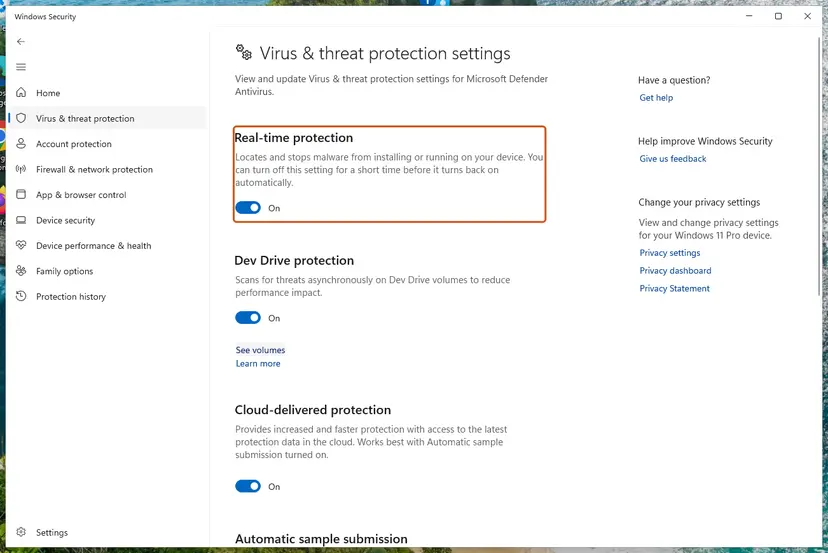
If the install works with protection paused, add an exception for the DirectX folder in your antivirus, or ask its maker why it blocks Microsoft's signed file.
It worked if: Setup finishes with protection paused, and protection is on again right afterwards.
If not: Turn protection back on and repair Windows files in Fix 7.
Fix 7. Repair Windows system files with DISM and SFC
15 to 30 minutesNo riskEvery installer fails, DXSETUP.exe reports a bad image, or dxdiag shows an older DirectX version on Windows 11 or 10.
DirectX 12 and the parts setup uses to install are Windows system files. If they are damaged, setup can fail even with every file on disk. DISM restores the component store and SFC replaces damaged files from it.
Run DISM first, then SFC, in an administrator Terminal, and restart when both finish. Step by step: Run DISM and SFC to repair Windows system files.
- Open an elevated command window. Right-click Start and select Terminal (Admin), or type cmd in the search box, right-click Command Prompt and select Run as administrator. Select Yes when Windows asks for permission.
- Run DISM first. Type the command below and press Enter. DISM downloads clean copies of damaged components from Windows Update, so it can take several minutes. Wait until it says The operation completed successfully.
DISM.exe /Online /Cleanup-Image /RestoreHealth - Run System File Checker. In the same window, type the command below and press Enter. Do not close the window until the verification reaches 100%.
sfc /scannow - Read the result and restart. Compare the last message with the table below this guide, then restart the PC so that repaired files are loaded.
These steps were written for Windows 11 24H2 and 25H2. The full page with the other versions and what each result means: Run DISM and SFC to repair Windows system files
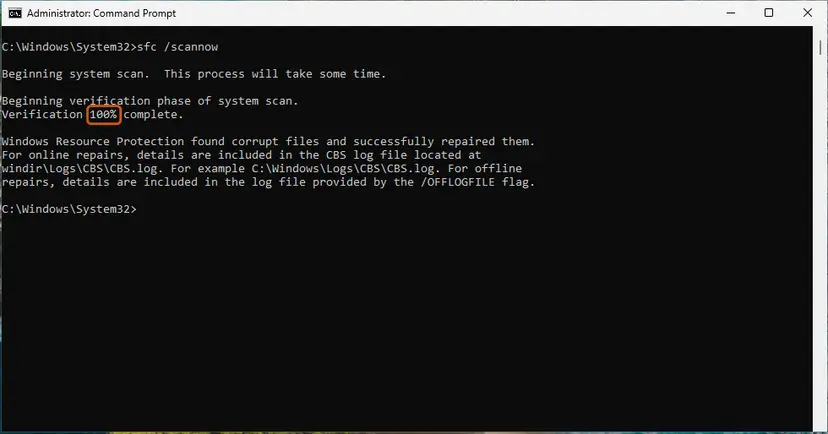
It worked if: SFC reports that it found no integrity violations or repaired them, and DirectX setup completes after the restart.
If not: Read the section below on what to check and send.
Still getting "Setup could not download the file": what to check and send
DirectX setup writes logs into the Windows folder. They show the last file it tried to get and why it stopped, which is what support needs.
- Press Win + R, type
%windir%and press Enter. - Open
DXError.logandDirectX.log, which DirectX setup writes there. - Scroll to the end of each file and note the last lines with an error or a file name.
- Run
dxdiag, select Save All Information and saveDxDiag.txt. - Send both logs and
DxDiag.txtto the game's support, or post them on Microsoft Q&A.
- The offline package also fails with a file error: download it again, extract it to a new empty folder and run it from there.
- Every program that is not a browser fails to connect: a proxy, VPN or network filter is the cause. Ask whoever manages the PC.
- The PC is managed by work or school: policies can block installers. Ask the administrator.
DirectX setup has long written DXError.log and DirectX.log to the Windows folder, but we could not confirm this in a current Microsoft page. If they are not there, sort the Windows folder by date and look for a log written at the time of the error.
How to avoid DirectX setup download errors next time
- Keep a copy of
directx_Jun2010_redist.exeand use it instead of the web installer on every PC. - Do not try to downgrade or reinstall DirectX 12. It is part of Windows and is kept current by Windows Update.
- Keep the clock synced automatically.
- Disconnect VPNs before installing games and runtimes, then connect again.
- Download DirectX only from Microsoft, never from DLL download sites.
- Keep Windows updated. Windows 10 left support on 14 October 2025, so move to Windows 11 if the PC allows it.
Frequently asked questions
What does "Setup could not download the file. Please retry later or check network connection" mean?
It means the DirectX End-User Runtime Web Installer could not download a part of the package from Microsoft. The web installer is small and fetches the rest while it runs, so any blocked connection stops it. Retrying later rarely helps when the cause is a VPN, proxy or blocked program. The offline package directx_Jun2010_redist.exe contains every file and avoids the download completely. It is on the Microsoft Download Center as DirectX End-User Runtimes (June 2010).
Where do I download DirectX without the web installer?
From the Microsoft Download Center page DirectX End-User Runtimes (June 2010). The file is directx_Jun2010_redist.exe, 95.6 MB, version 9.29.1974.1. Run it, choose an empty folder when it asks where to place the extracted files, then run DXSETUP.exe from that folder. Microsoft's page says this package is recommended for users who have no internet connection during installation. Do not use sites that offer single DirectX DLL files.
Can I install, upgrade or downgrade DirectX 12 with this installer?
No. Microsoft says DirectX 12 is included in Windows 10 and updated only through Windows Update, with no stand-alone package, and Windows 11 works the same way. The End-User Runtime adds old libraries for older games and does not change the DirectX version. So an "accidental downgrade" through this installer is not possible. Check your version with dxdiag and install updates through Windows Update. If dxdiag shows the wrong version, run DISM and SFC.
DirectX installation failed or DirectX is not installing: what else can cause it?
If the offline package also fails, the download was not the cause. Check the clock first, because signed files fail with a wrong date. Then run the launcher or setup as administrator, pause third-party antivirus for one install and repair system files with DISM and SFC. The setup logs DXError.log and DirectX.log in the Windows folder show the last file it worked on. A different message, such as an internal system error, needs those logs to tell more.
What does "A cabinet file necessary for installation cannot be trusted" mean?
DirectX setup checks the digital signature of each cabinet file it installs. This message means the check failed. A wrong system clock is a common reason, because the signature date then looks invalid. A damaged or partly downloaded copy is another. Set the date and time automatically, download directx_Jun2010_redist.exe again from Microsoft, extract it to a new empty folder and run DXSETUP.exe from there. If it repeats, run DISM and SFC. We could not find a Microsoft page that explains this message.
What if DXSETUP.exe says "bad image" or "parameters not found"?
A bad image message means Windows found a damaged program or DLL file while starting setup. Delete the extracted folder, download the package again and extract it to a new folder. If the bad image message names a file in C:\Windows\System32, repair Windows with DISM and SFC. A parameters not found message usually means setup was started from the wrong place. Run DXSETUP.exe from the full extracted folder, not on its own. We could not confirm either message in Microsoft's documentation.
Why does a game in Origin, the EA app or Steam show a DirectX setup error?
Many games run Microsoft's DirectX setup on their first start to add the old libraries they need. If that step fails, the game shows the setup error, and Origin users have long reported it. Origin has since been replaced by the EA app. Start the launcher as administrator, repair the game files and try again. If it still fails, install the offline package from Fix 1 yourself, then start the game.
Should I turn off the firewall to install DirectX?
No. Turning off the firewall leaves the PC open and is not needed: the offline package installs with no connection at all. If you suspect third-party antivirus blocks setup, pause its protection for one install of Microsoft's own file and turn it back on right after. If that works, add an exception for the DirectX folder instead of leaving protection off. A Microsoft support answer also warns to turn security software back on after the test.
Can I uninstall DirectX and install it again?
No. Microsoft's Download Center says the DirectX runtime cannot be uninstalled. The June 2010 libraries stay once installed, and running DXSETUP.exe again repairs missing ones. DirectX 12 is part of Windows and cannot be removed either. If you think DirectX is damaged, run DISM and SFC, which restore Windows' own DirectX files, then install the offline package again for the old libraries.
I asked about this error in another language. Is it the same fix?
Yes. Questions in Thai, Vietnamese, Malay or any other language about this DirectX window point to the same web installer download problem. This page is in English, but the steps work the same on any language version of Windows. In short: download directx_Jun2010_redist.exe from Microsoft, extract it and run DXSETUP.exe. If you wanted DirectX 12 itself, use Windows Update.
Sources
- Microsoft Support: How to install the latest version of DirectX (KB179113) (support.microsoft.com)
- Microsoft Download Center: DirectX End-User Runtimes (June 2010) (microsoft.com)
- Microsoft Q&A: "setup could not download the file. please retry later or check network connection." (learn.microsoft.com)
Did this fix work?
One click, no account. It tells the next reader which guides are worth their time.
Questions and experiences: fix DirectX error "Setup could not download the file" in Windows
Still broken, or found a fix we did not cover? Ask here: members and our editors answer. Reading is open; writing needs a free account.
…