
How to fix Windows activation error 0xC004F009?

Prefer to fix it yourself? The manual steps follow.
- 6methods
- 5 to 15 minutes online, longer for offline activation or when an IT team must answer
- Easy
Applies to Windows 11, Windows 10 and Windows 7 installs that were not activated in time, mostly with a volume licence key (MAK)
6 methods in this guide
Hello. I have had my Windows laptop for a couple of months, and I started receiving activation error 0xC004F009. The update services have stopped working too, which is causing problems. What can I do? Any tips would be appreciated.
Error 0xC004F009 means Windows was never activated before its grace period ran out, so it now runs in the Notifications state. Microsoft lists it as a volume licence (MAK) error. Check which key Windows holds first, then activate it online, offline with an Installation ID, or with your own licence.
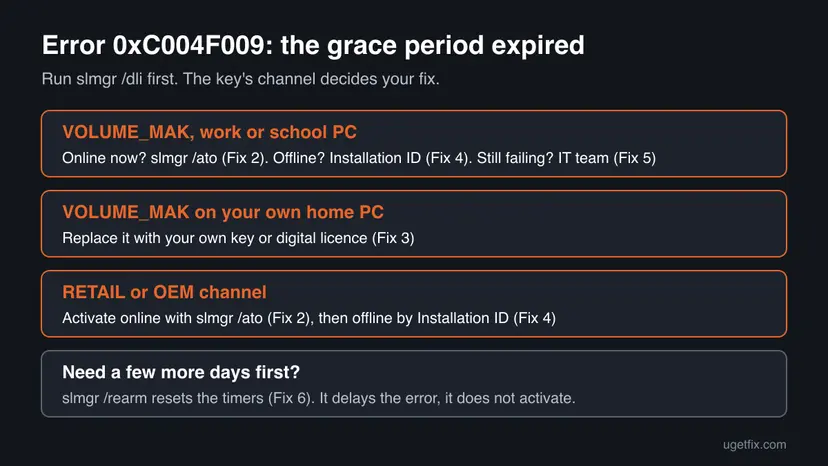
0xC004F009 means the grace period for activation expired before Windows was activated. Open Command Prompt as administrator and run slmgr /dli to see the key and its status (Fix 1). Then run slmgr /ato to activate online (Fix 2). If you own a retail licence, enter your own key (Fix 3). Offline PCs use an Installation ID (Fix 4), and work PCs need the IT team (Fix 5).
| Error | 0xC004F009: "The Software Protection Service reported that the grace period expired." |
|---|---|
| Where it appears | On the Activation page, Settings > System > Activation (Windows 10: Settings > Update & Security > Activation), or in a Windows Script Host box after slmgr /ato. |
| Main cause | The grace period after installation ended before Windows was activated. Microsoft says the system is then in the Notifications state. |
| Fastest fix | Run slmgr /ato as administrator while online (Fix 2). Work PC: ask your IT team (Fix 5). |
| Also written as | 0xc004f009, 0XC004F009, "error code: 0xc004f009", and on Windows 7 the same message with Software Licensing Service instead of Software Protection Service. |
| Affects | Windows 11, Windows 10 and Windows 7. Microsoft's error list marks it as a MAK (volume activation) error. Windows 10 left support on 14 October 2025 and Windows 7 on 14 January 2020. |
| Microsoft's status | Not a bug. Microsoft sends this code to the Microsoft Licensing Activation Centers for help. |
| What does not help | System file repair, Windows updates or a generic product key. A generic volume key only tries a company KMS server. |
| Time to fix | About 5 minutes online. 15 minutes offline. Days when an IT team or Microsoft must answer. |
Facts checked on 15 October 2026. Steps written for Windows 11 (25H2 and 26H2) and Windows 10 22H2.
What Windows activation error 0xC004F009 means
Microsoft's activation error list for IT staff names it "0xC004F009 The Software Protection Service reported that the grace period expired". The cause it gives is short: the grace period expired before you activated the system, and the system is now in the Notifications state.
In plain words, Windows gives you some time after installation to activate. That time is over and no activation happened. The licence is not refused or blocked. It was simply never activated, which is why activating it now is the main fix.
| Where you see it | What you see | What it tells you |
|---|---|---|
| Settings > System > Activation (Windows 10: Settings > Update & Security > Activation) | Windows is not activated and Error code: 0xC004F009 | The activation time ran out before Windows was activated. |
A Windows Script Host box after slmgr /ato or slmgr /dli | The Software Protection Service reported that the grace period expired. | Microsoft's full wording of the same state. |
| Windows 7 | The Software Licensing Service reported that the grace period expired. | The same error. Windows 7 used the older service name. |
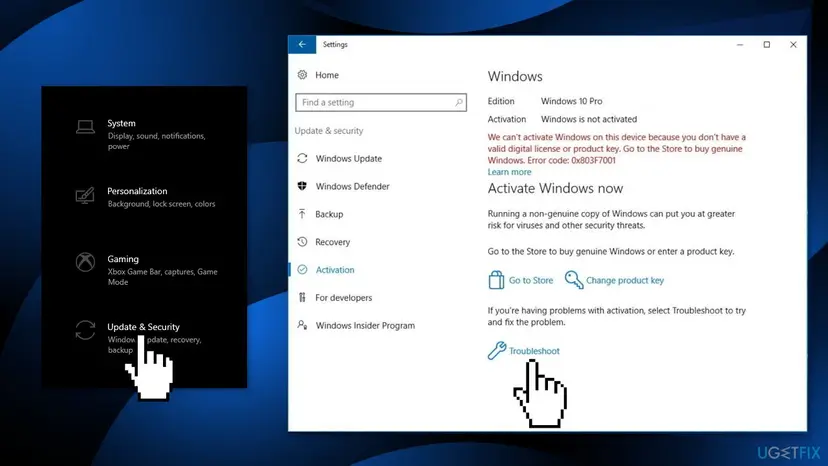
Microsoft's list puts 0xC004F009 under Multiple Activation Key (MAK) errors, the volume keys organisations buy. On a home laptop that shows this code, the key in Windows is often not the one you bought. Fix 1 tells you in one command.
Why error 0xC004F009 appears, from most to least common
Every cause ends the same way: the clock ran out before activation. What differs is why activation never happened, and that decides your fix.
| Cause | How often | How to tell | Fix |
|---|---|---|---|
| A volume key (MAK) was installed but never activated, for example on a PC set up from a company image. | Most often | slmgr /dli shows VOLUME_MAK channel and a status that is not Licensed. | Fix 2, Fix 5 |
| The PC could not reach Microsoft when it tried to activate: no internet, a blocked network or a wrong clock. | Often | The PC is offline often, sits behind a strict firewall, or its date is wrong. | Fix 2, Fix 4 |
| A home PC holds a volume key from a key site or a second-hand seller instead of your own licence. | Sometimes | The PC came from a company, a refurbisher or a cheap key seller. | Fix 3 |
| The PC's activation was delayed on purpose by an IT team, and nobody activated it later. | In companies | Several company PCs show the code at the same time. | Fix 5 |
The reader's question above mentions update services that stopped. Microsoft's error page does not say that Windows Update stops in the Notifications state, and we could not confirm it. Activate first. If updates still fail after that, treat it as a separate problem: Reset Windows Update components
How to fix Windows activation error 0xC004F009
Fix 1 shows the key and its status. Fix 2 activates it online, which ends the error for most people. Fix 3 is for a home PC that holds the wrong key, Fix 4 for a PC that cannot go online, and Fix 5 for work and school PCs. Fix 6 only buys time. System file repair and updates do not activate Windows, so they are left out.
| What you see or have | Start with |
|---|---|
| You do not know which key Windows holds. | Fix 1 |
| The PC is online and the key should be valid. | Fix 2 |
| It is your own PC and you bought Windows yourself, but Fix 1 shows VOLUME_MAK. | Fix 3 |
| Online activation fails or the PC has no internet. | Fix 4 |
| The PC belongs to an employer or school. | Fix 5 |
| You need a few more days before you can activate. | Fix 6 |
Fix 1. Check the installed key and its status with slmgr /dli
2 minutesNo riskEveryone, before anything else. It takes two minutes and tells you which fix is yours.
Microsoft says slmgr /dli displays the licence information for the installed Windows edition. The channel shows whether a volume key or your own key is in place, and the status shows that activation is still missing.
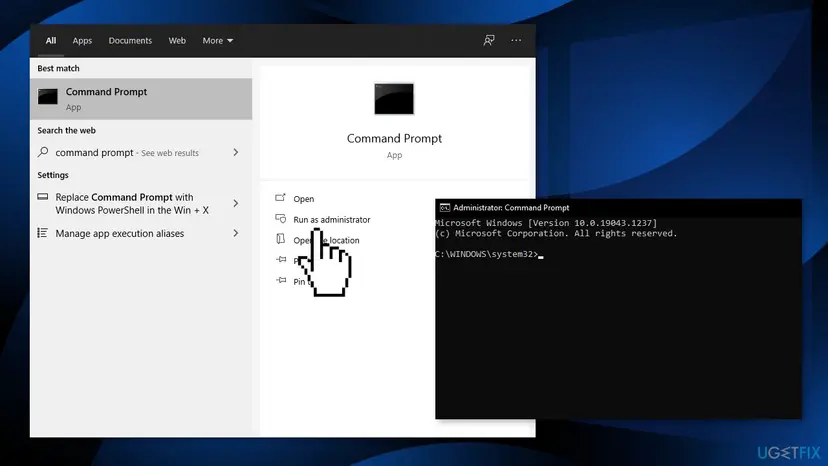
- Open Start, type cmd, right-click Command Prompt and select Run as administrator.
- Select Yes in the User Account Control window.
- Type
slmgr /dliand press Enter. - Read the Description line, the Partial Product Key and the License Status in the Windows Script Host box.
- Select OK to close the box.
| The Description line contains | What it means | Go to |
|---|---|---|
| VOLUME_MAK channel | A volume key is installed, the case Microsoft's list describes. | Fix 2, then Fix 5 on a work PC or Fix 3 on your own PC |
| RETAIL channel or OEM channel | Your own licence is installed but not activated. | Fix 2, then Fix 4 |
| VOLUME_KMSCLIENT channel | A generic volume key that needs a company KMS server. | Fix 5, or Fix 3 on a home PC |
slmgr /xpr shows the activation expiration date. Microsoft notes that MAK and retail activation is permanent once it succeeds, so a date there matters mostly on company KMS PCs.
It worked if: The Windows Script Host box shows the licence name, its channel, the last five characters of the key and a status other than Licensed.
If not: If slmgr reports an access error, close the window and open Command Prompt again with Run as administrator.
Fix 2. Activate the installed key online with slmgr /ato
5 minutesNo riskThe PC has internet and Fix 1 shows a MAK, retail or OEM key that should be valid.
The grace period expired because no activation happened, so activating ends it. Microsoft says /ato makes Windows try online activation for retail editions and for systems with a MAK installed, and that this needs an elevated Command Prompt.
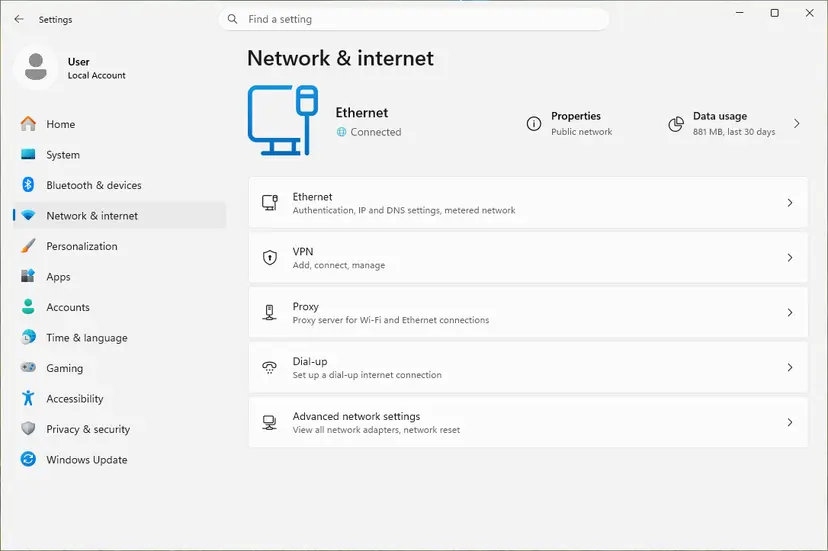
- Check that the PC is online: How to check your internet connection in Windows
- Check the date, time and time zone, because activation fails with a wrong clock: How to fix the date and time in Windows
- Open Command Prompt as administrator, as in Fix 1.
- Type
slmgr /atoand press Enter, then wait for the Windows Script Host box. - Run
slmgr /dliagain and read the License Status line.
Activate online, then check the result
slmgr /ato
slmgr /dliIf slmgr /ato returns a different code, that code is now the real reason. A MAK over its limit gives 0xC004C020, and a blocked key gives 0xC004C003. Look that code up before you try more fixes here.
It worked if: The box says the product activated successfully, and slmgr /dli shows License Status: Licensed.
If not: No internet or the same code again: Fix 4. A work PC: Fix 5. A volume key on your own PC: Fix 3.
Fix 3. Put your own licence back: change the product key or use the troubleshooter
5 to 10 minutesNo riskIt is your own PC, you bought Windows or it came with the PC, and Fix 1 shows a volume key instead of RETAIL or OEM.
Microsoft says /ipk silently replaces a key that is already installed. Your own retail or OEM key then activates against your licence instead of a volume key that was never activated.
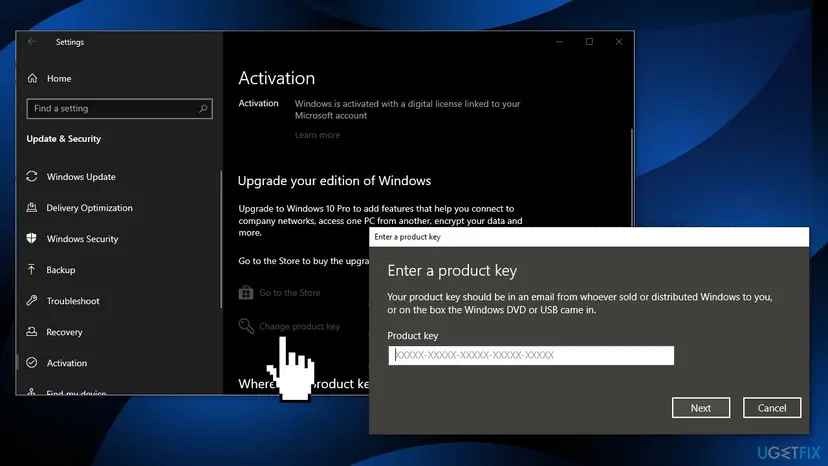
- Open Settings > System > Activation (Windows 10: Settings > Update & Security > Activation).
- Select Change product key and approve the administrator prompt.
- Type your 25-character key from the box card, order email or COA sticker, and select Next.
- Select Activate and wait for the page to update.
- No key to type because Windows was activated with a digital licence before? Select Troubleshoot on the same page and sign in with your Microsoft account if asked.
From Command Prompt as administrator, the same takes two commands. Microsoft advises a restart after /ipk so the licence service stays stable.
Install your own key, restart, then activate
slmgr /ipk XXXXX-XXXXX-XXXXX-XXXXX-XXXXX
slmgr /atoOlder guides suggested a default key from Microsoft's website. Those are generic volume keys (GVLK), and Microsoft says /ato with a GVLK only tries a company KMS server. On a home PC that fails. Use the key you bought.
It worked if: The Activation page says Windows is activated, and slmgr /dli shows RETAIL or OEM with License Status: Licensed.
If not: If your key is refused with another code, look that code up. If the PC has no internet, go to Fix 4.
Fix 4. Activate offline with the Installation ID and the Product Activation Portal
15 minutesNo riskThe PC has no internet, or online activation in Fix 2 failed without a new code.
Microsoft's offline route gives Windows a Confirmation ID from its Product Activation Portal, so activation does not depend on the PC reaching the servers itself.
- Open Command Prompt as administrator, type
slmgr /dtiand press Enter. Write down the Installation ID from the Windows Script Host box. - On any device with internet, open the Product Activation Portal at
aka.ms/WindowsActivate, pass the Captcha and sign in. - Select Activate a Microsoft Product > Windows and your version, enter the Installation ID and select Submit.
- Back on the PC, type
slmgr /atpfollowed by the Confirmation ID, without hyphens or spaces, and press Enter. - Type
slmgr /dliand press Enter to check the status.
Offline activation in Command Prompt as administrator
slmgr /dti
slmgr /atp <ConfirmationID>
slmgr /dli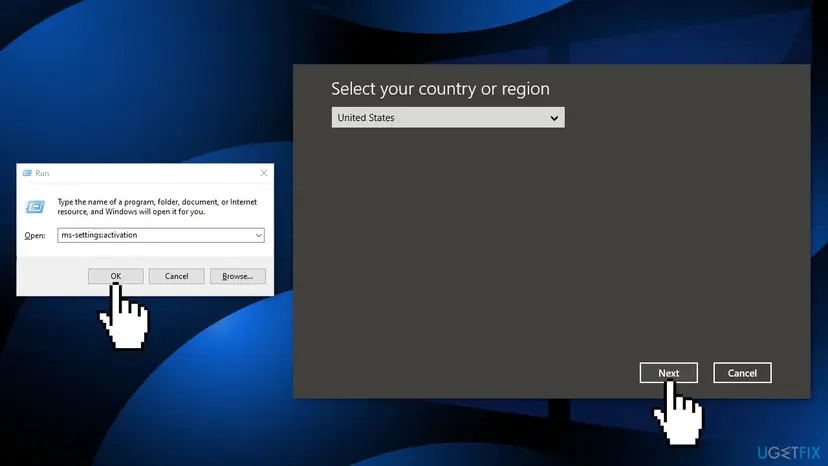
Microsoft's activation page says not to call the phone number the offline flow may show, but to use the Product Activation Portal. It also says SLUI 4 may not be available on Windows 11 builds 26200.7922 and newer. Builds 26200.8973, 26100.8973 and newer show the Installation ID under Settings > System > Activation > Automated Help.
It worked if: slmgr /dli shows License Status: Licensed, and the Activation page says Windows is activated.
If not: If the portal refuses the Installation ID, it offers support options. On a work PC, go to Fix 5.
Fix 5. Work or school PC: ask the IT team or the Microsoft Licensing Activation Centers
5 minutes, plus the replyNo riskThe PC belongs to an employer or school, or you manage the organisation's volume licence.
Microsoft's only advice on its 0xC004F009 entry is to contact the Microsoft Licensing Activation Centers. The volume key belongs to the organisation, so its licensing contact makes that request.
- Run
slmgr /dli(Fix 1) and note the Description line and the Partial Product Key. - Take a screenshot of the Activation page with the code 0xC004F009.
- Send both to your IT team or helpdesk, with the PC name from Settings > System > About.
- IT admins: run
slmgr /atoon the PC while it is on the company network, and if it still fails, contact the Microsoft Licensing Activation Centers with the agreement details.
If you bought a used PC that holds a former owner's volume key, that key is not yours to keep. Ask the seller for the licence that should come with the PC, or use your own licence with Fix 3.
It worked if: The IT team activates the PC or gives you a key, and the Activation page then says Windows is activated.
If not: If the organisation no longer manages the PC, it needs your own licence: Fix 3.
Fix 6. Reset the activation timers with slmgr /rearm to gain time
5 minutesLow riskYou will activate later, for example when back on the company network, and need the error gone for now.
Microsoft says /rearm resets the activation timers. That starts the grace period again, but it does not activate Windows, so the error comes back when the new period ends.
- Open Command Prompt as administrator, as in Fix 1.
- Type
slmgr /rearmand press Enter. - Restart the PC when the Windows Script Host box asks you to.
- Activate with Fix 2, 4 or 5 before the new grace period ends.
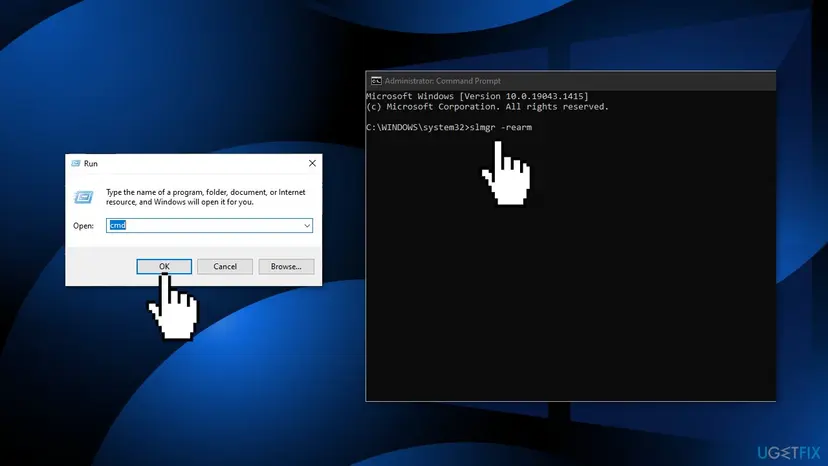
Microsoft says /rearm does nothing when the SkipRearm registry value is set to 1. Older guides said it works four times and told you to edit the registry first; we could not confirm either from Microsoft, so this page leaves the registry alone.
It worked if: After the restart the error is gone for now, and slmgr /dli shows a new grace period.
If not: If rearm reports an error or nothing changes, the PC cannot rearm. Activate with Fix 2, 4 or 5.
If error 0xC004F009 is still there
If no fix worked, the question is whose key is in Windows and whether it can still be activated. Collect these facts before you contact your IT team or Microsoft.
| What to check | Where | What it tells you |
|---|---|---|
| Which licence Windows uses | slmgr /dli in Command Prompt as administrator | VOLUME_MAK, VOLUME_KMSCLIENT, RETAIL or OEM, and the licence status. |
| Full licence details | slmgr /dlv in the same window | Detailed licence information for support or an IT team. |
| The code from a fresh attempt | slmgr /ato | A different code, such as 0xC004C020, names the real cause. |
| The installed edition | Settings > System > About | Enterprise or Education on a home PC points to a company install image. |
With a genuine retail purchase, Microsoft's Product Activation Portal offers support options when activation fails. Have the order details, the slmgr /dli output and a screenshot of the error ready.
How to avoid error 0xC004F009 next time
The error only appears when activation is put off until the grace period runs out. Activate on the day you install.
- Check Settings > System > Activation right after every clean install.
- Keep the PC online and its clock correct during the first days, so automatic activation can run.
- Link your digital licence to your Microsoft account, so a reinstall activates by itself.
- IT admins: activate MAK PCs as part of setup, not later.
- Buy a key sold on its own on an auction site or a key website.
- Use a company install image on a personal PC.
- Rely on
slmgr /rearmas a lasting fix. - Run activator tools that promise free activation.
Frequently asked questions
What does error code 0xC004F009 mean?
It means the grace period for activation expired before Windows was activated. Microsoft's wording is "The Software Protection Service reported that the grace period expired." It adds that the system is now in the Notifications state. Nothing on the PC is broken. The key was simply never activated, so activating it with slmgr /ato or offline is the fix.
How do I fix 0xC004F009 on Windows 7?
The same commands work on Windows 7. Open Command Prompt as administrator and run slmgr.vbs /dli to see the key, then slmgr.vbs /ato to activate online. Offline, Microsoft's Windows 7 steps use slmgr.vbs /dti for the Installation ID and the Product Activation Portal. Windows 7 support ended on 14 January 2020, so it gets no security updates even when activated.
Why does the message say Software Licensing Service on my PC?
That is the older name of the same service. Windows 7 shows "The Software Licensing Service reported that the grace period expired", while Microsoft's current list says Software Protection Service. The code 0xC004F009 and the fixes on this page are the same for both wordings. Only the service name in the text changed between versions.
Is 0xC004F009 a MAK error?
Microsoft's activation error list marks 0xC004F009 with the activation type MAK, the volume key organisations buy. That is why Microsoft sends it to the Licensing Activation Centers. On a home PC, run slmgr /dli. If the channel says VOLUME_MAK and you bought Windows yourself, replace the key with your own as in Fix 3.
Does slmgr /rearm fix 0xC004F009 for good?
No. Microsoft says /rearm resets the activation timers, so a new grace period starts and the error goes away for a while. It does not activate Windows. When the new period ends, the error returns. Use it only to gain time, then activate with Fix 2, 4 or 5. Rearm has its own limits too.
Can a default or generic product key fix this error?
Not on a home PC. The default keys published by Microsoft are generic volume license keys (GVLK). Microsoft says that with a GVLK installed, /ato only tries to activate against a KMS server, which a home network does not have. Older guides that promised temporary activation this way were wrong. Use the key you bought or your digital licence.
Will phone activation with SLUI 4 still work?
It depends on the build. Microsoft says SLUI may no longer be available on Windows 11 builds 26200.7922 and newer, and newer builds show the Installation ID under Automated Help on the Activation page. Microsoft also says not to call the phone number shown, but to use the Product Activation Portal. slmgr /dti and slmgr /atp work on every version.
My Windows updates stopped after this error. Are they related?
We could not confirm that. Microsoft's description of 0xC004F009 says only that the system is in the Notifications state, not that Windows Update stops. Activate Windows first with Fix 2. If updates still fail afterwards, reset the Windows Update components, which is a separate problem with its own fixes. Step by step: Reset Windows Update components
I searched in another language how to activate Windows 7 for free. Can this page help?
This page is about the activation error 0xC004F009, and it does not cover free activation. Windows 7 activates only with a genuine key. Activator tools change system files and run with full rights, so we do not link to them. If your search was simply "how do I solve this problem" in your own language, the short answer at the top and Fix 1 and Fix 2 are the place to start.
Sources
- Microsoft Learn: Troubleshoot Windows activation error codes (learn.microsoft.com)
- Microsoft Learn: Slmgr.vbs options for obtaining volume activation information (learn.microsoft.com)
- Microsoft Support: Activate Windows online, or offline using the Installation ID and Confirmation ID (support.microsoft.com)
Did this fix work?
One click, no account. It tells the next reader which guides are worth their time.
Questions and experiences: fix Windows activation error 0xC004F009
Still broken, or found a fix we did not cover? Ask here: members and our editors answer. Reading is open; writing needs a free account.
…