
Clear the cache and cookies in Chrome, Edge and Firefox
The cache keeps copies of pages and images so sites load faster; cookies keep you signed in. Clearing them fixes pages that look broken, load old content or refuse to sign you in. Deleting cookies signs you out of most sites.
- Time
- A minute
- Level
- Easy
Before you start
- Clearing cookies signs you out of most websites. Make sure you know your passwords, or keep cookies checked off and clear only the cache.
- For one page only, try a hard reload first: press Ctrl + F5 in Chrome, Edge or Firefox on Windows. It reloads the page without using the cache.
Chrome
Steps written for Chrome for Windows (screenshot: Windows 11 26H2).
Open Delete browsing data
Press Ctrl + Shift + Delete. Or select More (the three dots at the top right) > Delete browsing data.
Choose how far back to delete
Select a time range at the top, such as Last hour. To clear everything, open More next to the ranges and choose All time.
Choose what to delete
Check Cached images and files. Check Cookies and other site data too if a site will not sign you in. Uncheck anything you want to keep.
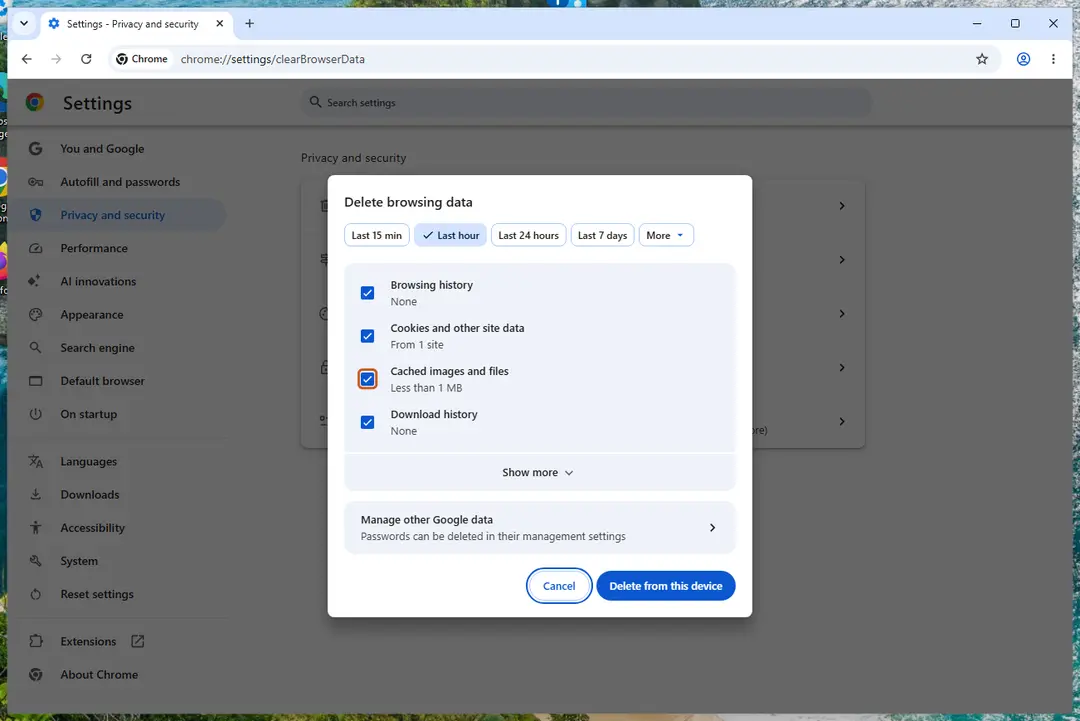
Chrome: Delete browsing data, with the time ranges at the top. Screenshot: Windows 11 26H2 Delete the data
Select Delete from this device.
Edge
Steps written for Microsoft Edge for Windows (screenshot: Windows 11 26H2).
Open Delete browsing data
Press Ctrl + Shift + Delete. Or select Settings and more (the three dots) > Settings > Privacy, search, and services > Clear browsing data, then Choose what to clear.
Choose how far back to delete
Pick a range in the Time range list.
Choose what to delete
Check Cached images and files, and Cookies and other site data if you also want to clear cookies. Uncheck what you want to keep, such as passwords.
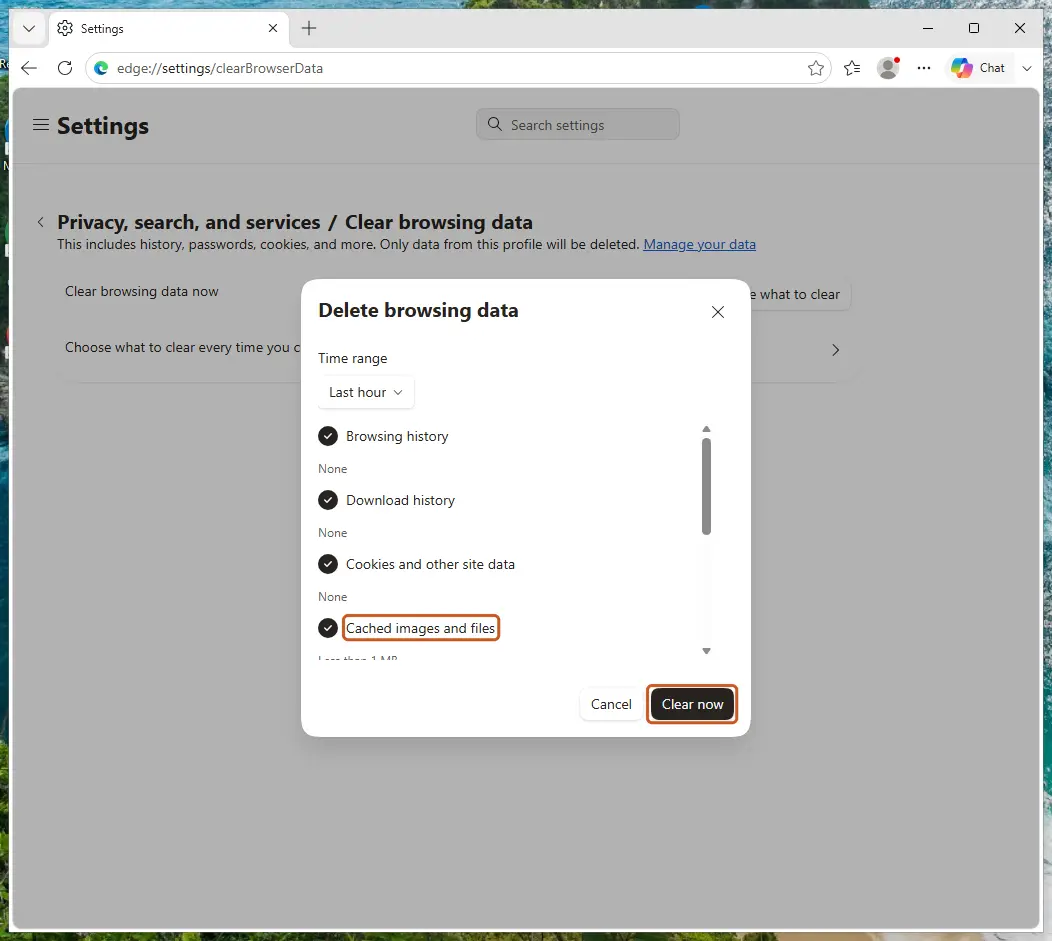
Edge: check Cached images and files, then Clear now. Screenshot: Windows 11 26H2 Delete the data
Select Clear now.
Firefox
Steps written for Firefox for Windows (screenshot: Windows 11 26H2).
Open Clear browsing data and cookies
Press Ctrl + Shift + Delete. Or open the menu (three lines) > Settings > Privacy & Security and select the clear button in the section for cookies and browsing data.
Choose how far back to delete
Next to When:, choose a range. Choose Everything to clear the whole cache.
Choose what to delete
Check Temporary cached files and pages. Check Cookies and site data too if a site will not sign you in. Uncheck the rest if you want to keep it.
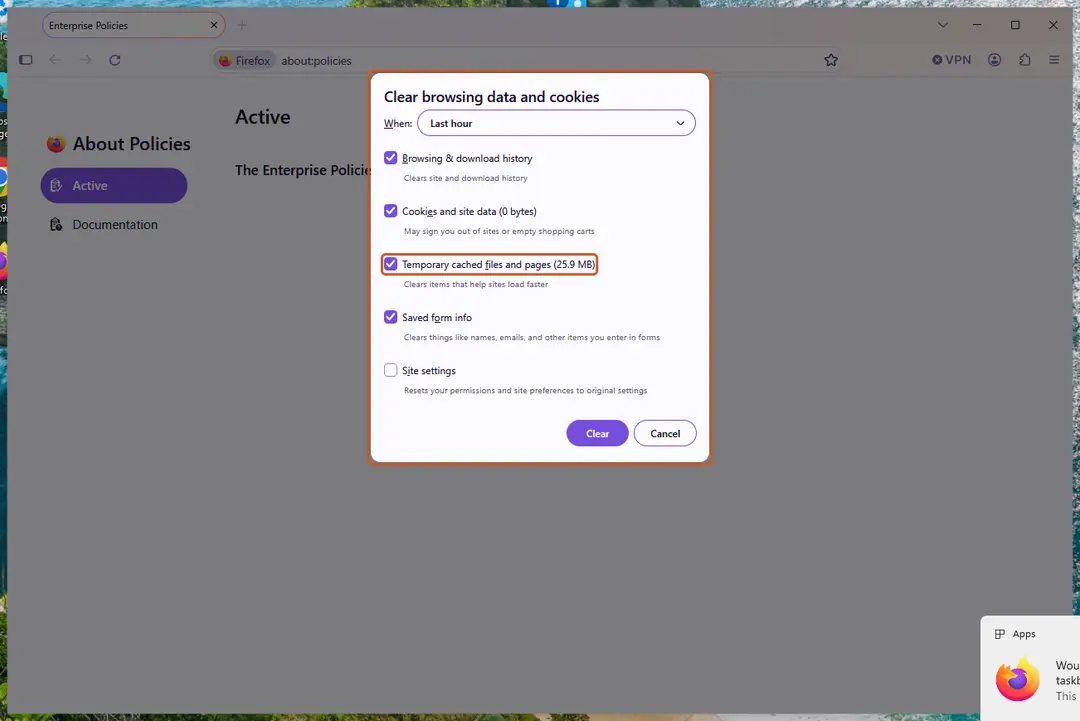
Firefox: Temporary cached files and pages is the cache. Screenshot: Windows 11 26H2 Delete the data
Click Clear.
If the site still does not work
- Close every window of the browser and open it again.
- Open the site in a private window. If it works there, an extension is the likely cause: Remove a browser extension On 2-Spyware.
- If the browser opens pages you did not ask for or its search engine changed, follow Reset a browser and fix a hijacked search engine On 2-Spyware.
Clear the data every time you close the browser
- Edge: on the same Clear browsing data page, open Choose what to clear every time you close the browser and turn on the items you want.
- Firefox: in Settings > Privacy & Security, in the History section choose to use custom settings for history, check Clear history when Firefox closes, then pick the items under Settings….
Used in 40 guides
How to fix "An error occurred, please try again later" on YouTube?
How to fix "This site can't be reached" in Chrome on Windows?
How to fix "Oops! Something went wrong" error on YouTube?
How to fix "You're offline. Check your connection" on YouTube?
How to fix Google Chrome opening new tabs automatically?
How to fix RESULT_CODE_HUNG error in MS Edge and Google Chrome?
How to resolve Microsoft PC Manager "Coming soon" download error?
youtube.com/activate: how to sign in to YouTube on a TV with the activation code
How to fix Website Online but Isn't Responding to Connection Attempts?
How to fix Steam “Failed loading profile data” error in Windows?
How to fix "Unknown Hard Error" on Windows 10?
How to fix Steam error "Unable to verify email address" in Windows?
How to fix “There was an error trying to load your shopping cart” error on Steam?
How to fix log in error "Too many requests" in Windows?
How to fix Microsoft Bookings not working?
How to fix error AADSTS90100: Login parameter is empty or not valid error in Windows?
How to fix SSL_ERROR_HANDSHAKE_FAILURE_ALERT error in Windows?
How to fix "RPC executor service threw an error!" when signing in to Google
How to fix Microsoft Edge translator not working?
How to fix Office apps sign-in error code 53003 in Windows?
How to fix "Making sure it's you" message when logging in?
How to fix “Sorry, but you're not permitted to view these materials at this time” on Steam
How to fix Microsoft login error code 50058 in Windows?
How to fix Microsoft Teams error code 3399614475 (Tag 4usqa) in Windows?
How to fix INET_E_DOWNLOAD_FAILURE on IE and Edge?
That verification method isn't working right now: how to fix it on a Microsoft account?
How to fix "The network you are using may require you to visit its login page" error in Windows
How to fix “There was a problem loading this web content” error on Steam?
How to fix Google Classroom stuck at loading screen?
How to fix "Our systems have detected unusual traffic from your computer network" error?
How to fix ERR_SOCKET_NOT_CONNECTED error in Google Chrome?
How to fix streaming error code 232001 in Windows?
Retrieving data. Wait a few seconds and try to cut or copy again. How to fix it in Excel
How to fix Steam error code 2 in Windows?
How to fix "sent an invalid response" ERR_SSL_PROTOCOL_ERROR on Google Chrome?
How to fix WhatsApp white screen error?
How to fix ERR_CACHE_MISS error?
How to fix "Application error: a client-side exception has occurred" on Chrome?
How to fix DNS_PROBE_POSSIBLE error in Chrome or other browsers?
How to disable Efficiency Mode in Windows?
Sources
- Google Help: Clear cache & cookies (computer) (read Oct 3, 2026)
- Microsoft Support: View and delete browser history in Microsoft Edge (read Oct 3, 2026)
- Mozilla Support: How to clear the Firefox cache (read Oct 3, 2026)