
youtube.com/activate: how to sign in to YouTube on a TV with the activation code

Prefer to fix it yourself? The manual steps follow.
- 5methods
- 2 to 5 minutes
- Easy
Applies to Smart TVs, Roku, Apple TV, Fire TV, Google TV, Xbox and PlayStation consoles that run the YouTube or YouTube TV app
5 methods in this guide
Hey. I am trying to set up YouTube TV, but choosing the channel and signing in does not work. I should activate it at youtube.com/activate, but I can't find how to do that with the activation code. I use a Roku device as the streaming device, but I can't find any Smart TV options that would show me how to activate YouTube. It should be via tv.youtube.com/activate on Roku, but there is no place to enter the code and move on. HELP!
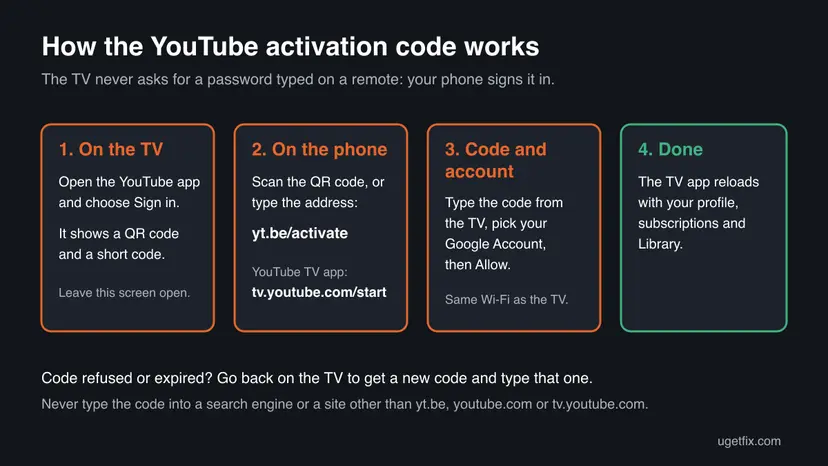
youtube.com/activate is the page where you type the short code your TV shows, so the YouTube app on the TV signs in to your Google Account without a remote keyboard. Google's help now prints the address as yt.be/activate, and the YouTube TV app uses tv.youtube.com/start instead. Open the app on the TV, choose sign in, and keep the code on screen while you use your phone.
Open the YouTube app on the TV and choose Sign in with your phone. On your phone or computer, go to yt.be/activate (or youtube.com/activate), type the code shown on the TV, pick your Google Account and confirm (Method 1). For the paid YouTube TV app the address is tv.youtube.com/start (Method 3). If the code is refused, get a fresh one on the TV and check that both devices use the same Wi-Fi (Method 5).
| What it is | YouTube's page for signing a TV or game console in to your Google Account with a short code shown on the TV screen. |
|---|---|
| Safe to use | Yes, on Google's own addresses only: yt.be/activate, youtube.com/activate and, for YouTube TV, tv.youtube.com/start. |
| What you gain | Your subscriptions, Library, paid content and recommendations on the TV, without typing a password with the remote. |
| Side effect | Anyone who uses that TV sees your account. Guests can use Guest mode, which leaves your recommendations alone. |
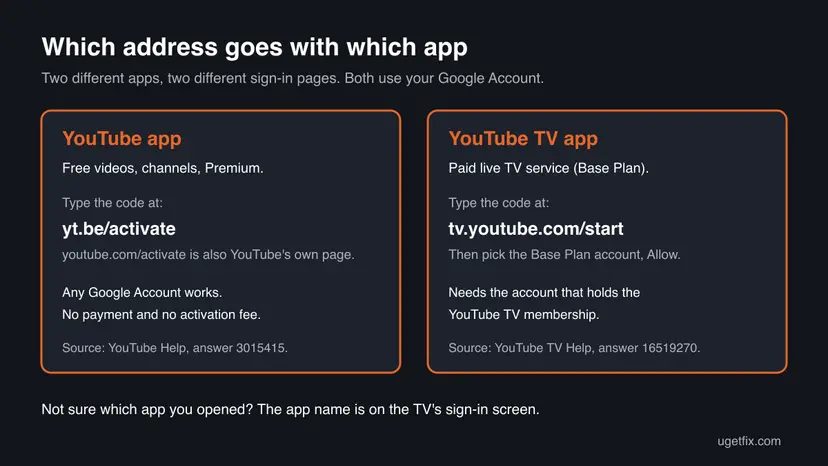
| Address for the YouTube app | yt.be/activate, as printed in YouTube Help. youtube.com/activate is YouTube's own activation page too. |
| Address for YouTube TV | tv.youtube.com/start, then the account with your YouTube TV Base Plan and Allow. |
| If the code fails | It may have expired. Go back on the TV to get a new code. The phone must be on the same Wi-Fi, not mobile data. |
| Cost | Signing in to the YouTube app is free. YouTube TV needs a paid membership on the account you choose. |
| Not supported | Signing in directly on older Chromecast devices. Cast from your phone instead. |
Facts checked on 16 October 2026. Steps written for The YouTube and YouTube TV apps as Google's help describes them on 16 October 2026, with the code entered from a phone or a Windows 11 PC.
What youtube.com/activate is and when the TV asks for it
A TV remote is a poor keyboard, so the YouTube app on smart TVs, streaming boxes and game consoles lets another device do the sign-in. The TV shows a QR code and a short activation code. You open the activation page on a phone, tablet or computer, type that code and approve the sign-in with your Google Account. The TV then loads your account by itself.
Nothing is activated in the sense of a licence or a subscription. The page only links one device to your account. That is why the same page works for a Samsung or LG TV, a Roku stick, an Apple TV, a Fire TV, an Xbox or a PlayStation: the app on each of them shows the same kind of code.
| Address | App on the TV | What it does |
|---|---|---|
yt.be/activate | YouTube | The address YouTube Help prints today. You type the TV code here. |
youtube.com/activate | YouTube | YouTube's own activation page, the older name of the same step. |
tv.youtube.com/start | YouTube TV | The sign-in page for the paid live TV service. You then choose the account with the Base Plan. |
tv.youtube.com/activate | YouTube TV | The address many people search for. Google's YouTube TV help names tv.youtube.com/start instead, so use that one. |
| A search engine box | None | Typing "youtube" and the code into Google or Bing does not sign in anything. See the next section. |
Why typing "youtube" and the code into Google does nothing
This page gets many visits from searches such as youtube10601, youtube58010, youtube10582, youtube80067 and youtube10058, and dozens more like them. They look like the word YouTube with a code typed straight after it into the search box. A search engine cannot pass the code to your TV, so the TV keeps waiting.
- Type the address
yt.be/activateinto the address bar of the browser, not into the search box. Then type the code into the box on that page. - Do not add the word youtube to the code. Type only the characters the TV shows, in the same order.
- The same goes for youtube33584, youtube60282, youtube60107, youtube67282 and youtube49584: each one is a code that belongs on the activation page.
- If what your TV shows is long or does not fit the box, you may be on a different screen of the app. Go back to Sign in and look for the screen that names
yt.be/activate.
The search results for these addresses include spam pages and PDF files on unrelated sites that copy the words "youtube activate". Never type your code or your Google password on them. A real code entered on a fake page can hand your account to someone else's TV.
What you gain by signing in on the TV, and what it costs
You can use the YouTube app on a TV without signing in. Signing in adds your own things to the big screen. It also puts your account on a device that other people use, which is the cost most guides leave out.
| What happens | Source | |
|---|---|---|
| Your subscriptions and Library. | The TV shows the channels you follow and your saved videos and playlists. | YouTube Help, answer 3015415. |
| Paid content. | Films and shows you bought or rented on the account play on the TV. | YouTube Help, answer 3015415. |
| Phone as a remote. | Once signed in, you can connect the phone and control the TV app from it. | YouTube Help, answer 3015415. |
| Shared TV. | Everyone who picks your profile watches as you, and what they watch shapes your recommendations. | YouTube Help: guest mode does not affect your recommendations. |
| Speed or picture quality. | No change. Signing in does not make videos load faster or look sharper. | No Google page claims it does. |
| Time. | Two to five minutes once per device, as long as the code is still valid. | In our case, on a phone. |
Who should sign in on the TV and who should not
The sign-in is harmless on your own TV and a small privacy risk on anyone else's. Google built guest mode and per-person accounts into the TV app for exactly that reason, so pick the option that fits the screen in front of you.
- The TV or console is yours and stays at home.
- You pay for YouTube Premium or YouTube TV and want it on the big screen.
- Each person in the house adds their own account, so recommendations stay separate.
- You bought or rented films on YouTube and want to play them on the TV.
- The TV is in a hotel, a rental flat or a friend's home.
- You only want to show one video. Cast it from your phone and nothing stays on the TV.
- The device is an older Chromecast. Google says it cannot be signed in directly.
- Children use the TV alone. Set up a YouTube Kids profile instead of leaving your account on it.
Get the YouTube app on your TV first
No code appears until the app is installed, and the original reader's problem was exactly this: on Roku there was no place to type a code because the app was not there yet. Each device installs apps from its own store. Install YouTube for ordinary videos, or YouTube TV if you pay for the live TV service.
| Device | Where to get the app |
|---|---|
| Roku | Search on the Roku home screen and add the YouTube or YouTube TV channel. |
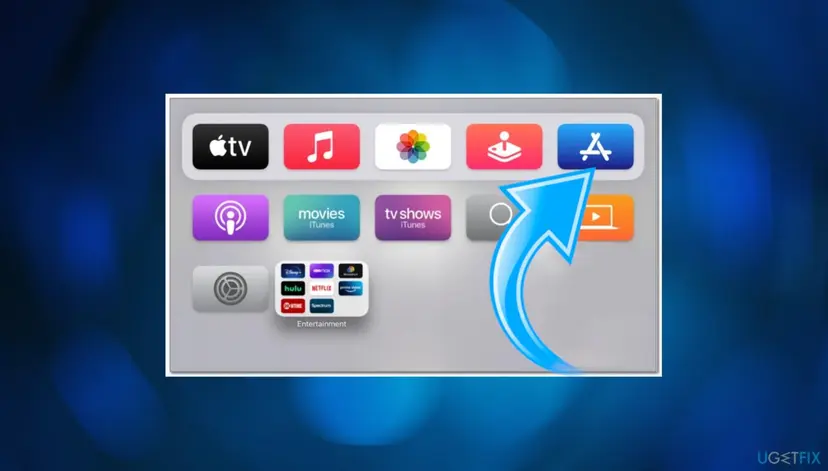
| Apple TV | The App Store on the Apple TV home screen. |
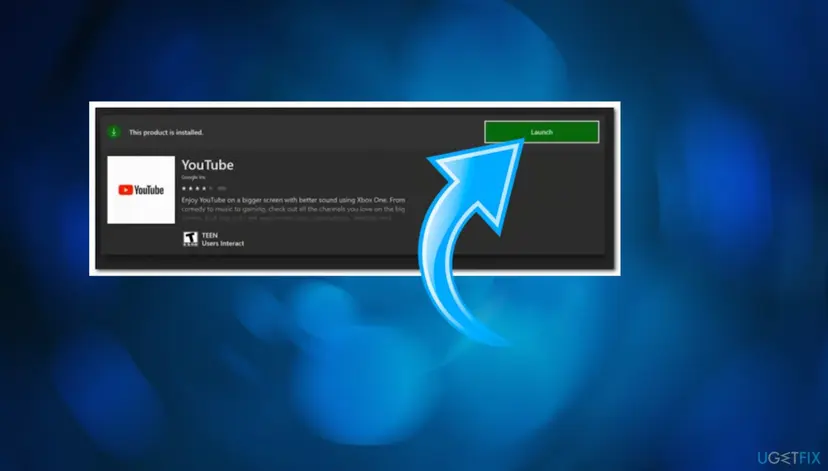
| Xbox | The Microsoft Store on the console, then Launch. |
| Smart TVs, Fire TV, Google TV, PlayStation | The device's own app store. Many TVs have YouTube installed already. |
| Kodi | The YouTube add-on for Kodi is not made by Google. We could not confirm how it signs in today, so this guide does not cover it. |
How to activate YouTube on a TV with the code
Method 1 is the sign-in Google describes first, and it works on almost every device. Method 2 skips the typing with the QR code. Method 3 is only for the paid YouTube TV app. Method 4 avoids the code altogether, and Method 5 is for a code that is refused.
| Your case | Start with |
|---|---|
The TV shows a code and yt.be/activate or youtube.com/activate. | Method 1. |
| The TV shows a QR code and your phone has a camera. | Method 2. |
| You opened the YouTube TV app, the paid live TV service. | Method 3. |
| You have no phone or computer at hand. | Method 4. |
| The code is refused, or nothing happens on the TV after you enter it. | Method 5. |
Method 1. Enter the TV code at yt.be/activate on your phone or computer
2 minutesNo riskThe YouTube app on your TV or console shows a code and asks you to go to an activation page.
This is the first sign-in option in Google's own help. The code ties this one TV session to your account, so you never type your password on the TV.
- Open the YouTube app on your smart TV or game console.
- Choose Sign in, then Sign in with your phone. A code appears on the TV.
- On your phone, tablet or computer, open a browser and type
yt.be/activatein the address bar.youtube.com/activateworks too. - Type the code exactly as the TV shows it, then select Next.
- Choose the Google Account you want on the TV, or sign in to it.
- Confirm the access when the page asks, then look at the TV.
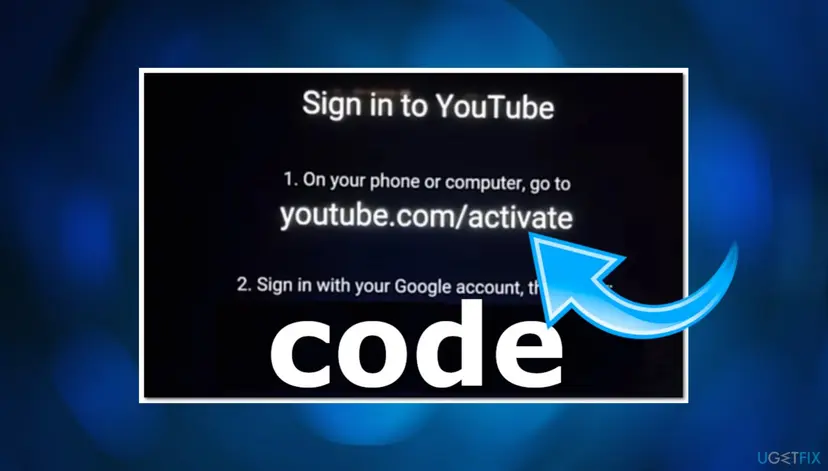
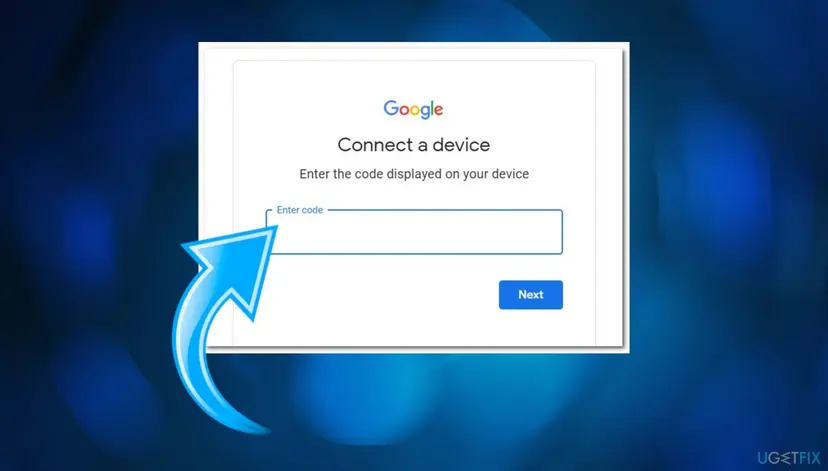
It worked if: The TV reloads within a few seconds and shows your profile picture, your subscriptions and your Library.
If not: If the page says the code is wrong or the TV does not react, go to Method 5. If you have no second device, use Method 4.
Method 2. Scan the QR code on the TV with your phone
1 minuteNo riskThe sign-in screen on the TV shows a QR code and your phone's camera can read QR codes.
Google offers the QR code as the first alternative to typing the address. It carries the address for you, so a mistyped address or a lookalike site cannot get in the way.
- Open the YouTube app on the TV and choose Sign in with your phone.
- Open the camera on your phone and point it at the QR code on the TV.
- Tap the link the camera shows. Check that it opens a
youtube.com,yt.beorgoogle.comaddress. - Pick your Google Account and follow the prompts on the phone until you are asked to confirm.
- Confirm, then look at the TV.
Use the same Wi-Fi network on the phone as on the TV, and turn mobile data off for a moment. Google lists both as the first checks when signing in with a phone does not work.
It worked if: The TV signs in without you typing any code.
If not: If the camera opens nothing or the page asks for a code anyway, type the code as in Method 1.
Method 3. Sign in to the YouTube TV app at tv.youtube.com/start
3 minutesNo riskYou pay for YouTube TV, the live TV service, and opened the YouTube TV app on Roku, a smart TV or a console.
YouTube TV is a separate app with its own sign-in page. It also has to know which account holds the paid Base Plan, which the ordinary activation page does not ask.
- Open the YouTube TV app on your smart TV or game console.
- Scan the QR code, or go to
tv.youtube.com/starton your phone, tablet or computer. - Enter the activation code shown on your TV and tap Continue.
- Select the account associated with your YouTube TV Base Plan.
- Select Allow to connect your devices and start watching.
Google's YouTube TV help says the activation code may have expired. Go back on the TV and reload the screen to get a new code, then enter the new code at tv.youtube.com/start.
It worked if: The YouTube TV app opens the live guide for your membership.
If not: If the account you pick has no membership, choose the account that pays for YouTube TV. If the code still fails, use Method 5 or Method 4.
Method 4. Sign in with the remote and the on-screen keyboard
5 minutesNo riskYou have no phone or computer nearby, or every code you enter is refused.
Google's help says that if one sign-in option fails, try the other. This one does not use a code or a second device, so network and code problems do not matter.
- Open the YouTube or YouTube TV app on the TV.
- Choose Sign in with your remote.
- Type your Google Account email with the on-screen keyboard, then select Next.
- Type your password and complete any two-step verification prompt.
It worked if: The app signs in without any activation page.
If not: If the TV app has no remote option, go back to Method 1 after the checks in Method 5.
Method 5. Fix a YouTube activation code that is refused or does nothing
5 to 10 minutesNo riskYou typed the code but the page refuses it, or the page accepts it and the TV keeps showing the code.
Most failures come from an expired code or from the phone and TV being on different networks. These are the checks Google lists for a phone sign-in that does not go through.
- Go back on the TV and open Sign in again to get a new code. Use only the newest one.
- Check that you typed the code at
yt.be/activate(ortv.youtube.com/startfor YouTube TV) and not into a search box. - Check that the TV is on the same Wi-Fi network as your phone. The network name is in the TV's Settings.
- Turn off mobile data on the phone for a moment so it uses Wi-Fi.
- Unplug the TV or streaming box, leave it unplugged for 30 seconds, then plug it in again.
- Restart your router and your phone, then try with a new code.
If yt.be/activate does not load or keeps showing an old page in the browser, clear its cache and cookies for Google: Clear the browser cache and cookies. If no Google page loads on the PC at all, reset its network settings: Reset the network and flush DNS.
It worked if: A fresh code, entered on the right page over the same network, signs the TV in within seconds.
If not: If all of this fails, use Method 4. If your account itself has a problem, Google's sign-in troubleshooter at support.google.com is the next step.
How to sign out of YouTube on a TV, even one you no longer have
Activation is fully reversible. You can sign the TV out from the TV itself, remove one person's account from it, or cut off a TV you sold or left behind from your Google Account.
- Sign out on the TV (YouTube TV). Open the app, select your profile photo, then Sign Out. Google notes this signs out every account on that device.
- Remove one account (YouTube TV). Profile photo, Switch account, then Remove under the account.
- YouTube app. Your accounts are under your profile picture at the top of the left-hand navigation, in the Accounts tab. Google has a separate help article for signing out there.
- A TV you cannot reach. On a computer or phone, go to
myaccount.google.com/permissions, find YouTube TV and select Remove access.
Google documents the remote removal for YouTube TV. If the ordinary YouTube app on a lost TV is listed on the same page, removing it works the same way; we could not confirm that it is always listed.
Myths about youtube.com/activate
- "You have to pay to activate YouTube on a TV." The YouTube app signs in with any Google Account at no cost. Only YouTube TV, a separate live TV service, needs a paid membership.
- "Typing youtube and the code into Google activates the TV." It does not. The code works only in the box on Google's activation page, reached by its address.
- "youtube.com/activate and tv.youtube.com are the same." They are not. The YouTube app uses
yt.be/activate, the YouTube TV app usestv.youtube.com/start. - "Any site that says YouTube activate is official." Spam pages and PDF files copy these words to catch searches. Enter codes only on
youtube.com,yt.be,tv.youtube.comorgoogle.compages. - "An old code still works later." Codes expire. Google's advice for a stuck code is to reload the screen on the TV and use the new one.
Frequently asked questions
What is youtube.com/activate?
It is YouTube's page for signing a TV, streaming box or game console in to your Google Account with a short code. The YouTube app on the TV shows the code, you type it on the page from a phone or computer, and the TV signs in. Google's help now prints the shorter address yt.be/activate, which leads to the same step. Nothing is bought or licensed: the page only links the device to your account, and you can undo it at any time.
Is yt.be/activate the same as youtube.com/activate?
Both are YouTube's own addresses for the same sign-in step. yt.be is a short domain that belongs to YouTube, and YouTube Help names yt.be/activate in its current steps, while older TV apps print youtube.com/activate. Use the one your TV shows. Both expect the same thing: the code from the TV screen, typed exactly, then your Google Account. The paid YouTube TV app is the exception and uses tv.youtube.com/start.
Why does my YouTube activation code not work?
Usually the code has expired or was typed in the wrong place. Codes are valid only for a short time, so go back on the TV and open the sign-in screen again for a new one. Type it in the box on yt.be/activate, not into a search engine. Then check that the phone is on the same Wi-Fi as the TV with mobile data off, and restart the TV, the router and the phone if it still fails (Method 5).
How do I activate YouTube TV on Roku?
First add the YouTube TV channel from the Roku home screen search, because no code appears until the app is installed. Open it, then scan the QR code or go to tv.youtube.com/start on your phone or computer. Enter the code shown on the TV and tap Continue, choose the account that holds your YouTube TV Base Plan and select Allow. Many people search for tv.youtube.com/activate, but Google's own steps name tv.youtube.com/start.
Do I have to pay to activate YouTube on my TV?
No. The YouTube app is free, and signing it in with your Google Account costs nothing, with or without the activation code. You pay only for things on the account, such as YouTube Premium, films you buy, or the separate YouTube TV live TV service. A site that asks for money or card details to "activate" YouTube is not Google, so close it and use yt.be/activate or the remote sign-in instead.
What does a search like youtube10601 or youtube58010 mean?
It most likely means someone typed the word youtube and the TV code into a search box instead of onto the activation page. A search engine cannot send that code to your TV, so nothing happens. Open the browser's address bar, type yt.be/activate, and enter only the characters the TV shows. We cannot see what these exact numbers were, so if your TV shows a different kind of number, go back to the Sign in screen of the app.
Can I sign in to YouTube on an older Chromecast?
No. Google's help says that signing in directly on older Chromecast devices is not supported. You can still cast from your phone, and the cast session uses the account that is signed in on the phone. With a remote, such a Chromecast can play YouTube only signed out. If you need your account on the TV itself, a streaming device that runs the full YouTube app signs in with the code like any smart TV.
How do I sign out of YouTube on a TV I sold or left behind?
Use your Google Account from another device. On a phone or computer, go to myaccount.google.com/permissions, find YouTube TV in the list and select Remove access. Google documents this for YouTube TV. If you still have the TV, sign out in the app instead: select your profile photo and then Sign Out. Change your Google password too if you think someone else used the account on that TV.
Is it safe to enter the activation code on other websites?
No. Enter the code only on Google's own pages: yt.be/activate, youtube.com/activate, tv.youtube.com/start or the accounts.google.com page they lead to. Search results for these addresses also show spam pages and PDF files on unrelated sites. A code typed on such a page gives nothing to you, and a password typed there can be stolen. If you entered your password on such a site, change it at once.
Sources
- YouTube Help: Sign in to the YouTube app on your smart TV or game console (answer 3015415) (support.google.com)
- YouTube TV Help: Sign in & out of the YouTube TV app (answer 16519270) (support.google.com)
Did this fix work?
One click, no account. It tells the next reader which guides are worth their time.
Questions and experiences: youtube.com/activate: how to sign in to YouTube on a TV with the activation code
Still broken, or found a fix we did not cover? Ask here: members and our editors answer. Reading is open; writing needs a free account.
…