
How to fix Netflix proxy error (netflix.com/proxy)?

Prefer to fix it yourself? The manual steps follow.
- 7methods
- 5 to 30 minutes
- Beginner
Applies to Netflix in a browser or app on Windows 11 (25H2, 26H2) and Windows 10 22H2; the same checks work on Mac, phones and TVs
7 methods in this guide
Netflix shows this message when its servers see a VPN, proxy or unblocker between your device and Netflix. The cause is often a VPN you forgot, a VPN inside your security suite, or a proxy set in Windows. Find what is switched on and turn it off.
Netflix shows the proxy error when your connection looks like it comes from somewhere else. Open fast.com and compare the country next to Client with your real location (Fix 1). If it differs, turn off every VPN, including the one in your security suite and any browser extension (Fix 2), then check the Windows proxy (Fix 3).
| Error | You seem to be using a VPN or proxy. Please turn off any of these services and try again. Netflix error code E106, older wording "unblocker or proxy". |
|---|---|
| Where it appears | In the Netflix app or on the page netflix.com/proxy, when you press play or open the site in a browser. |
| Main cause | Netflix sees an IP address or a route that does not match where you are: a VPN, a proxy, a VPN built into antivirus, or a network setting. |
| Fastest fix | Turn off the VPN or proxy and test again. Use fast.com to see which country Netflix thinks you are in (Fixes 1 and 2). |
| Also written as | "netflix.com/proxy", "netflix.com proxy", "netflix proxy", "netflix.comproxy", "visit netflix.com/proxy", "netflix proxy error". |
| Affects | Windows 11 (25H2, 26H2), Windows 10 22H2, Mac, phones, smart TVs and game consoles. Windows 10 has had no security updates since 14 October 2025. |
| Vendor status | Not a fault in your device. Netflix says VPNs are not supported on ad-supported plans or for live events. |
| Time to fix | 5 to 30 minutes, depending on how many places a VPN or proxy can hide. |
Facts checked on 16 October 2026. Steps written for Steps checked against the Netflix Help Center pages on the VPN or proxy message and on watching through a VPN, and the Microsoft Support page on proxy servers in Windows.
What the Netflix proxy error means and why netflix.com/proxy appears
When Netflix cannot trust where a connection comes from, it stops playback and shows a message. The wording is: "You seem to be using a VPN or proxy. Please turn off any of these services and try again." Netflix gives the error code E106 for it. Older versions of the page said "Whoops, something went wrong. Streaming error. You seem to be using an unblocker or proxy."
A VPN or proxy makes your device or network look as if it connects from somewhere other than your real place. Netflix reads that mismatch and blocks the stream. The page netflix.com/proxy is the Netflix address that shows this notice, so searches such as netflix.com proxy and netflix proxy lead to the same problem.
- You did not mean to use a VPN: a VPN app, a browser extension or a feature in your antivirus is still on. Fixes 1 and 2 find it.
- Your PC or router sends traffic through a proxy: Windows can use a proxy server set by you, by a program or by your workplace. Fix 3 checks it.
- Your internet provider assigns an address Netflix does not match to your home: this is rare and needs your provider (Fix 7).
This guide fixes the error by removing the VPN or proxy that Netflix detects. It does not list ways to hide a VPN from Netflix. Netflix states that VPNs are not supported for live events or on an ad-supported plan, and that with a VPN you may only see titles it licenses worldwide. If you want your own country's library, turn the VPN off.
Why Netflix thinks you are behind a VPN or proxy
The causes below are ordered from the most common to the rarest, each with the fix that removes it. Netflix does not publish how it detects a VPN, so this list comes from its help pages and from what the settings on your own device can change.
| Cause | How often | Typical sign | Fix |
|---|---|---|---|
| A VPN app or extension is still switched on | Most often | fast.com shows another country as Client | Fixes 1 and 2 |
| A VPN built into an antivirus or security suite | Often | You never installed a VPN, yet fast.com shows another country | Fix 2 |
| A proxy server set in Windows, a browser or a program | Sometimes | A work or school PC, or a tool that was uninstalled badly | Fix 3 |
| An ad-supported Netflix plan used with a VPN | Sometimes | The error returns even though the VPN is off on one device | Fix 4 |
| Router or device network settings, or a custom DNS | Less often | The error appears on every device at home | Fixes 5 and 6 |
| The address your provider assigned does not match your location | Rare | fast.com shows the right country, yet the error stays | Fix 7 |
A VPN on your router, on a second PC in the house or on a mesh Wi-Fi system affects every device on that network. If only one device shows the error, look at that device first. If all of them do, look at the router.
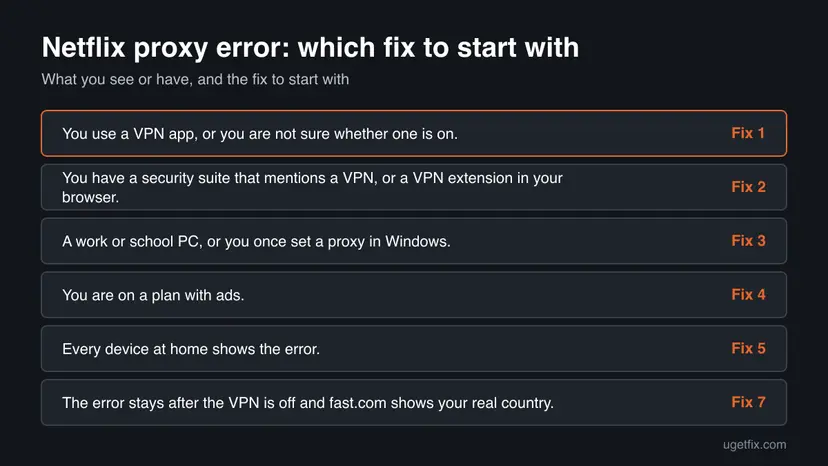
How to fix the Netflix proxy error
Fixes 1 and 2 solve most cases because they find and remove the VPN. Fix 3 covers the Windows proxy, and Fix 4 the plan. Fixes 5 and 6 repair network settings, and Fix 7 is for your internet provider.
| What you see or have | Start with |
|---|---|
| You use a VPN app, or you are not sure whether one is on. | Fix 1 |
| You have a security suite that mentions a VPN, or a VPN extension in your browser. | Fix 2 |
| A work or school PC, or you once set a proxy in Windows. | Fix 3 |
| You are on a plan with ads. | Fix 4 |
| Every device at home shows the error. | Fix 5 |
| The error stays after the VPN is off and fast.com shows your real country. | Fix 7 |
Fix 1. Check with fast.com whether Netflix sees a VPN
3 minutesNo riskYou are not sure whether a VPN or proxy is on, or you never set one up on purpose.
Fast.com is run by Netflix and shows the country Netflix sees for your connection. If that country is not yours, something between you and Netflix changes your address.
- Open a web browser on a device that is on the same network as the device with the error.
- Go to fast.com. Netflix starts a connection test.
- When the test stops, select Show more info.
- Write down the country next to Client, and the IP address.
- Compare the country with the place where you really are.
It worked if: The country next to Client is wrong, which tells you that a VPN or proxy is active. Go to Fix 2.
If not: If the country is correct, the VPN is probably not the cause on this network. Go to Fix 3, then Fix 4.
Fix 2. Turn off every VPN, including the hidden ones
10 minutesNo riskfast.com shows the wrong country, or a VPN app, extension or security suite is installed on the device.
Netflix asks you to turn off VPN services. Several things can run a VPN at once: an app, a browser extension, a feature of your antivirus and a router. One left on is enough to trigger the error.
- Open your VPN app and disconnect. Close the app from the system tray (the arrow near the clock), or quit it.
- In your browser, open the extensions page and turn off every VPN or proxy extension. In Chrome and Edge, open Extensions from the menu. In Firefox, open Add-ons and themes.
- Open your antivirus or security suite and look for a section called VPN, Secure connection or Privacy. Netflix notes that some antivirus software comes with a VPN that may be on. Turn it off there.
- Check your router and any second PC for a VPN client that covers the whole network. Netflix cannot help you turn a VPN off, so ask your VPN provider or whoever manages the network.
- Open fast.com again and confirm that Client now shows your real country.
- Close Netflix completely, open it again and press play.
If you need a company VPN, disconnect it while you watch Netflix. Do not remove it unless your IT department tells you to.
It worked if: Fast.com shows your real country and Netflix plays without the proxy message.
If not: If the country is right and the error stays, go to Fix 3 to check the Windows proxy.
Fix 3. Turn off the proxy server in Windows
5 minutesLow riskA work or school PC, an old proxy tool, or a program that changed network settings and was removed.
Windows can send web traffic through a proxy server, set automatically, by a script or by hand. If that proxy sits in another country or is used by many people, Netflix sees its address and not yours.
- Open Settings > Network & internet > Proxy.
- Under Manual proxy setup, next to Use a proxy server, select Set up.
- In the Edit proxy server dialog box, turn Use a proxy server off and select Save.
- Under Automatic proxy setup, turn Use setup script off unless your workplace gave you the script address.
- Keep Automatically detect settings as it was, then restart the browser or the Netflix app and test.
On a work or school PC, an administrator may set the proxy for security. If the options are grey or turn back on, leave them alone and ask your IT department, or use Netflix on a personal device instead.
It worked if: The proxy switch stays off, and Netflix plays without the message.
If not: If the proxy was already off, go to Fix 4. A proxy outside Windows, such as inside a browser, is covered by Fix 2.
Fix 4. Check your Netflix plan
3 minutesNo riskYou use a plan with ads, or you watch live events, and a VPN is part of your setup on any device.
Netflix says VPNs are not supported on ad-supported plans or for live events. On those, even a VPN you think is off on one device can still trigger the error from another device on the same account.
- Sign in on the Netflix website and open your Account page.
- Open Plan details and read the name of your plan.
- If it is an ad-supported plan, make sure no device on your network uses a VPN while you watch.
- If you want to keep using a VPN for other things, use it on a device you do not stream from.
It worked if: You know whether your plan allows a VPN at all, and the VPN is off on every device that streams.
If not: If you are on an ad-free plan and the error remains, go to Fix 5.
Fix 5. Restart the router and use your provider's DNS
10 minutesLow riskThe error appears on every device at home, or a custom DNS service was set on the PC or the router.
Netflix says network settings on a device, modem or router can cause the error. Netflix also tells providers to confirm that a connection uses their own DNS server, so a custom DNS is worth undoing.
- Check that the internet works at all with How to check your internet connection in Windows.
- Unplug the modem and router, wait 30 seconds and plug them in again. Wait until the lights are steady.
- On Windows 11, open Settings > Network & internet, select Wi-Fi or Ethernet, then your connection, and next to DNS server assignment select Edit.
- Choose Automatic (DHCP), then select Save. On Windows 10, open Settings > Network & Internet > Change adapter options and set the IPv4 DNS to obtain automatically.
- Restart the Netflix app or browser and test again.
It worked if: The connection uses the DNS servers your provider hands out, and Netflix plays.
If not: If it still fails, reset the network settings in Fix 6.
Fix 6. Reset the network settings on the device
15 minutesRead the warningThe VPN is off, fast.com looks right or wrong, and only one device keeps the error after a router restart.
Netflix lists resetting the network settings on the device as a step when network settings are the cause. A VPN client can leave network filters behind, and a reset returns the stack to its defaults.
Saved Wi-Fi networks, VPN connections and fixed IP or DNS settings are removed. Write down your Wi-Fi password and your VPN details first. Resetting the router to its factory settings also erases its settings, so do that only when your provider tells you how.
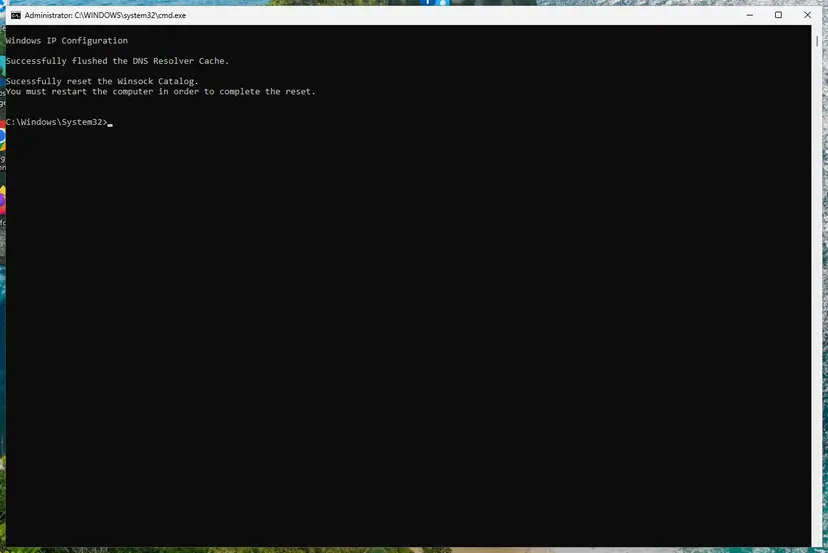
- Follow Reset the network and flush DNS. Start with the commands and use the full network reset last.
- Restart the PC when it asks.
- Join your Wi-Fi again and do not start the VPN.
- Open Netflix and press play.
It worked if: The device joins the network without a VPN or proxy and Netflix plays.
If not: If the error remains, the address your provider gives you may be the cause. Go to Fix 7.
Fix 7. Contact your internet provider with the right details
15 minutesNo riskEvery VPN and proxy is off, fast.com shows your real country, and the error stays on every device.
If your provider's address for your home does not match your real location, only the provider and Netflix together can fix it. Netflix gives a clear order for that call.
- On fast.com, select Show more info and write down the country and the IP address next to Client.
- Call your provider and describe the problem and the steps you have already tried.
- Give the country and IP address, and ask them to confirm that these match the location and address assigned to your home.
- If they match, ask the provider to contact Netflix customer service directly.
- If they do not match, ask the provider to confirm that your connection uses their DNS server, and to help you switch to it if it does not.
It worked if: The provider either fixes the address or works with Netflix, and you restart the Netflix app and try again.
If not: If the provider finds no problem, contact Netflix help and give the error code E106 and the fast.com details.
Still seeing the proxy message: what to check and what to send
When every fix fails, collect facts before you contact anyone. Open fast.com on a device on the same network and write down the country and the IP address next to Client. Note the exact text of the message, and whether it also shows the code E106.
- fast.com shows the wrong country: something still changes your address. Check the router, a second PC and a hotspot sharing app, then ask your VPN or internet provider.
- fast.com shows the right country: tell Netflix and your provider both facts. Netflix says the provider may need to contact Netflix directly.
- Only the TV, console or phone shows it: repeat Fix 2 on that device and restart it, because its VPN app or private DNS setting is separate from your PC.
- Only a work network shows it: ask the network administrator whether traffic goes through a proxy.
Write the details down in this form before you contact anyone.
Error: You seem to be using a VPN or proxy (E106)
fast.com Client country: <country>
fast.com IP address: <address>
VPN or proxy turned off: yes
Plan: with ads / without ads
Keep the details short and exact. A support agent who sees the country, the IP address and the steps you took can send the case to the right team at once.
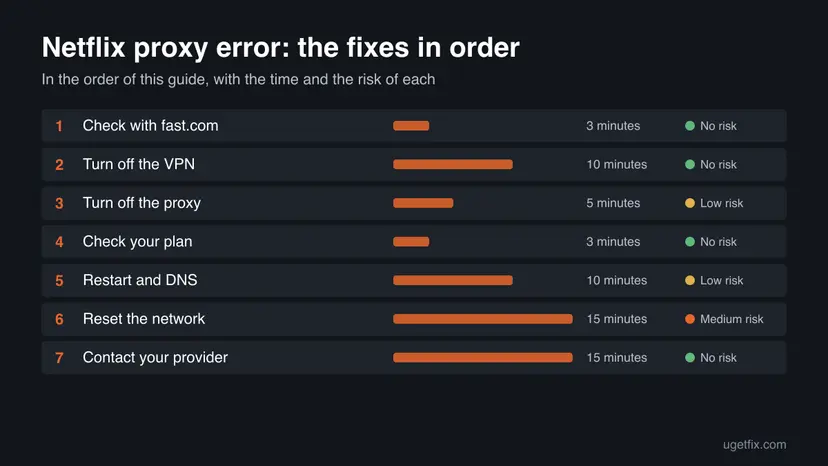
How to keep the Netflix proxy error from coming back
- Turn the VPN off before you open Netflix, and turn it on again afterwards for other tasks.
- Check your antivirus for a bundled VPN and set it not to start with Windows.
- Keep a short note of where you set a proxy, so you can find it later.
- Use fast.com when the message returns; it shows what Netflix sees in seconds.
- Do not leave a browser VPN extension on for every site.
- Do not set a custom DNS on the router and forget it.
- Do not stream on an ad-supported plan through a VPN, since Netflix does not support it.
- Do not install tools that promise to unblock Netflix; they are the usual source of the error.
Windows 10 left support on 14 October 2025. These checks still work on Windows 10 22H2, but a move to Windows 11 is the safer long-term choice. Keep the router firmware up to date as well.
Frequently asked questions
What does the Netflix proxy error "You seem to be using a VPN or proxy" mean?
It means Netflix sees a connection that looks like it comes from somewhere other than your real location. A VPN, a proxy server or a similar service is usually the reason. Netflix gives it the error code E106 and asks you to turn off these services and try again. Start by opening fast.com and checking which country shows next to Client (Fix 1), then turn off every VPN on the device and the network (Fix 2).
What is netflix.com/proxy?
It is the Netflix address of the page that tells you the connection looks like a VPN or proxy. People land on it from the app or from a link, then search for netflix.com/proxy, netflix.com proxy or netflix proxy to find out why. The page is not a virus and not a different site. The fix is to remove the VPN or proxy that Netflix detects, starting with Fix 1.
How do I fix the Netflix proxy error?
Turn off every VPN and proxy, then test again. First use fast.com to see the country Netflix assigns to your connection. Then disconnect VPN apps, remove browser extensions that act as VPNs, check the security suite for a built-in VPN, and turn off the proxy in Windows settings. If this does not help, restart the router and reset the network settings, then contact your internet provider with the fast.com details.
How do I bypass the Netflix proxy error?
This guide does not describe ways to hide a VPN from Netflix. Netflix states that VPNs are not supported for live events or on ad-supported plans, and that a VPN may restrict you to titles it licenses worldwide. The reliable way to remove the message is to turn the VPN off. If you need a VPN for other apps, switch it off only while you use Netflix.
I do not use a VPN. Why do I still get the error?
Something else can look like a VPN to Netflix. A security suite may include a VPN that starts on its own, a browser extension may route traffic, Windows may use a proxy, or a custom DNS on the router may be set. A work or school network can also use a proxy. Check each in turn with Fixes 2, 3 and 5, and compare fast.com with your real location.
Is Netflix error E106 the same as the proxy error?
Yes. Netflix's help page for the message "You seem to be using a VPN or proxy" says you may get the error code E106 or the message. The fixes are the same: find the VPN or proxy, turn it off, and test again. Older pages used the words unblocker or proxy for the same condition, so the steps in this guide cover both wordings.
Will a free VPN or a proxy extension work with Netflix?
There is no promise that any of them will. Netflix does not support VPNs for live events or ad-supported plans, and it states that it may restrict what you can see. Free tools also change their addresses often and can put your data at risk. If you see the proxy error, turn them off first, and do not rely on them for streaming.
Can I fix the Netflix proxy error on a smart TV or phone?
Yes. The checks are the same on every device. Turn off the VPN app on the phone or TV, remove any private DNS or custom DNS setting, and restart the device. Then check the router and other devices on the network, because a VPN there affects every screen. Use fast.com on a phone or PC to see what country Netflix assigns to the network.
When should I contact my internet provider or Netflix?
Contact them when every VPN and proxy is off, fast.com shows your real country, and the error stays on all devices. Give the provider the country and IP address from fast.com, and ask them to confirm they match your home. Netflix says the provider may need to work with Netflix directly, so ask them to contact Netflix customer service if the details match.
Sources
- Netflix Help Center: Netflix says, 'You seem to be using a VPN or proxy.' (help.netflix.com)
- Netflix Help Center: Watching TV shows and movies through a VPN (help.netflix.com)
- Microsoft Support: Use a proxy server in Windows (support.microsoft.com)
Did this fix work?
One click, no account. It tells the next reader which guides are worth their time.
Questions and experiences: fix Netflix proxy error (netflix.com/proxy)
Still broken, or found a fix we did not cover? Ask here: members and our editors answer. Reading is open; writing needs a free account.
…