
How to fix Steam error code 118?

Prefer to fix it yourself? The manual steps follow.
- 8methods
- 5 minutes for the first checks, up to 30 minutes for the network fixes
- Intermediate
Applies to Steam client on Windows 11 and Windows 10
8 methods in this guide
Hi. I opened my Steam today and noticed that nothing was being loaded, and instead, I received error code 118. It's weird because my internet is working when I try to do anything else online, but Steam says it can't connect to the server. Is there anything that can be done about this?
Steam error code -118 is a timeout: the Steam client sent a request and no answer came back in time. Your internet can still work for everything else. Check whether Steam itself is slow or down, then test the same page in a normal browser to see whether the fault is Steam's or your connection's.
-118 is Chromium's CONNECTION_TIMED_OUT: "A connection attempt timed out." Steam's built-in browser asked for a page and waited in vain. Steam Support says timeouts are very likely a system-wide issue, so Fix 1 is to check the server status and wait a few minutes. If Steam is up and the page also fails in your browser, work through the router, VPN, firewall and DNS fixes in that order.
| Error | A page titled Error in place of the Store, Library or Community inside Steam: "Error Code: -118" and a line saying Steam is unable to connect to the server, which may be offline, or you may not be connected to the internet. |
|---|---|
| Where it appears | As soon as the Steam window opens or when you open the Store or Community tab. Pages that do not need Steam's web pages, such as an already installed game, may still start. |
| Main cause | A connection attempt to a Steam server timed out. Most often Steam's servers are overloaded or down; otherwise a VPN, a router, a firewall or your provider drops the traffic. |
| Fastest fix | Open https://store.steampowered.com/stats/ in a normal browser. If it is slow or fails, wait; if Steam is healthy, restart the router and turn any VPN off (Fixes 1 to 4). |
| Also written as | Steam error 118, error code 118 on Steam, Steam code -118, Steam Fehler 118, CONNECTION_TIMED_OUT. |
| What the number is | -118 in Chromium's list net_error_list.h: CONNECTION_TIMED_OUT. It is not Windows error 118, which is a different, unrelated number. |
| Affects | The Steam client on Windows 11 and Windows 10. The code comes from the client's built-in browser, not from Windows. |
| Vendor status | Not a bug with a patch. Valve has no page for -118 itself; its network troubleshooting page covers timeout errors in general. |
| Time to fix | 5 minutes if Steam was down; 10 to 30 minutes if the cause is on your side. |
Facts checked on 16 October 2026. Steps written for the Steam client on Windows 11 (25H2 and 26H2) and Windows 10 22H2, read against Steam Support and Chromium's network error list.
What Steam error code -118 "Unable to connect to the server" means
Store, Community and Library pages in the Steam client are web pages, drawn by a built-in copy of Chromium, the engine of Chrome. When a page cannot load, the client shows its own Error page with the number that Chromium returned. We read the number's name in Chromium's current source file net_error_list.h on 16 October 2026.
- The number
-118isCONNECTION_TIMED_OUT, with Chromium's comment "A connection attempt timed out."- In plain words
- Your PC tried to open a connection to a Steam server and the server never answered in time. The address was found, so this is not a DNS fault, and nothing refused the connection.
- The sentence under it
- "Server may be offline or you may not be connected to the internet." is a general sentence for connection failures. Users with -118 report that their other sites work, so do not read it as proof that your internet is down.
- Not the same as
-7isTIMED_OUT, "An operation timed out.", a timeout during a request that was already running.-105is a failed name lookup and-109an unreachable address. They need different fixes.- Windows error 118
- The number 118 is also
ERROR_INVALID_VERIFY_SWITCHin the Win32 list, "The verify-on-write switch parameter value is not correct." That has nothing to do with Steam: the minus sign tells the two apart.
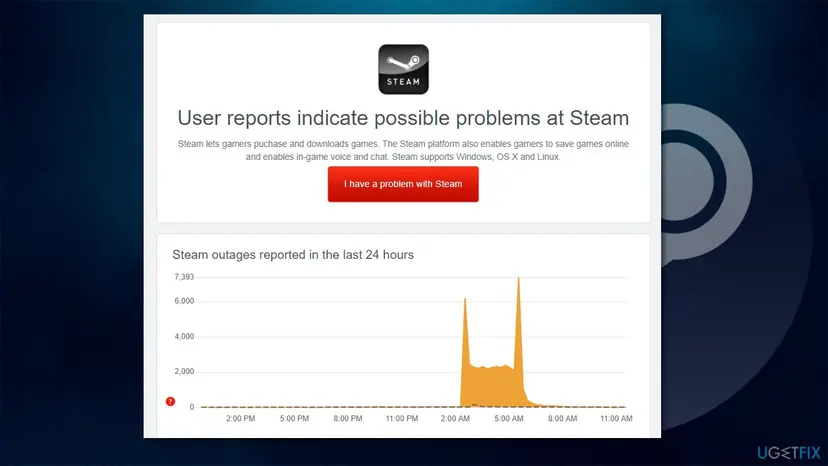
Steam's own wording explains why a timeout feels strange. Because Steam keeps a cached version of the window, parts of the client may open while every live page fails, which looks almost like offline mode. Offline mode only helps with games that need no connection.
Why Steam error code 118 appears: the causes, most common first
A timeout has few causes, because the PC found Steam's address and sent a request. The route between your PC and Valve's servers is where the answer is lost.
| Cause | How to tell | Fix |
|---|---|---|
| Steam is overloaded or down. Steam Support: with timeout errors it is "very likely" a system-wide issue. | It began suddenly, often during a big sale or release; others report it; the Steam status page is slow. | Fix 1 |
| The router or the line. A stuck router, a weak Wi-Fi link or a provider that shapes traffic. | Other devices on the same network also have trouble with Steam. A restart or another network helps. | Fix 2 and Fix 3 |
| A VPN, proxy or program in the way. Steam Support names programs that interfere with Steam and with the connection. | -118 started after you turned a VPN on, or installed a download manager, a filter or similar software. | Fix 4 |
| The Windows network connection. The adapter or its settings are in a bad state. | The Windows network troubleshooter finds something, or other programs are slow as well. | Fix 5 |
| A firewall. Steam Support: after a first install or a Steam update, a firewall may block Steam although it worked before. | -118 started right after a Steam or Windows update and nothing else changed. | Fix 6 |
| DNS or a damaged network stack. Less likely with a timeout, but a bad route or cache can cause it. | The earlier fixes did not help and Steam fails on every network of this PC. | Fix 7 and Fix 8 |
Our guide to Steam error code 2 and the other minus codes decodes the whole family of numbers. For a failed name lookup read Steam error code 105, and for an unreachable address Steam error code 109.
How to fix Steam error code 118
Fix 1 is the one that solves the most cases and costs nothing. Fix 2 tells you whether the problem is Steam or your connection, so do not skip it. Fixes 3 to 5 deal with the network around the PC; Fixes 6 to 8 change Windows settings, one at a time, and each can be undone.
| What you see | Start with |
|---|---|
| -118 appeared suddenly, perhaps during a sale or a release. | Fix 1 |
| Other people on the same Wi-Fi or other devices also cannot use Steam. | Fix 3 |
| The same Steam page loads in your normal browser. | Fix 2, then Fix 4 |
| A VPN, proxy, download manager or filtering program runs on the PC. | Fix 4 |
| -118 started right after Steam or Windows updated. | Fix 6 |
| Nothing above matches and the error stays on every network. | Fix 5, then Fix 7 and Fix 8 |
Fix 1. Check whether Steam is down and wait
2 minutes, then waitingNo riskEveryone starts here, above all when -118 appeared suddenly.
A timeout means no answer came back. Steam Support's own advice for timeout errors is to check the server status first: it is "very likely" a system-wide issue, and nothing on your PC can repair a server that is overloaded. Sales and big releases bring more visitors than the servers can serve.
- Select OK or close the error and write down the full text with its minus sign.
- In a normal browser, open
https://store.steampowered.com/stats/, the page that Steam Support links as the Steam Server Status page. - Watch how it behaves: if it loads very slowly, shows errors or looks empty, the problem is on Steam's side.
- Open an outage tracker for Steam in the browser. A sharp rise in reports at your time means you are not alone.
These websites count user reports. They can show a spike for a regional problem or a wrong guess, so take them as a signal, not a proof.
- Wait 15 to 30 minutes, then close Steam from its Steam menu with Exit and start it again.
- If the error is gone, the cause was Steam's servers and nothing else needs doing.
It worked if: The Store and Library pages load, with banners and your games, and the Error page does not return after you restart Steam.
If not: If the status page works normally and -118 stays, the cause is between your PC and Steam. Continue with Fix 2.
Fix 2. Open the same page in a normal browser and on another network
5 minutesNo riskSteam looks healthy and you want to know whether the fault is your connection or only the Steam client.
The test splits the problem in two. If the Store page opens in Chrome or Edge on the same PC, the network can reach Steam and the client's own browser is blocked or damaged. If it times out in the browser too, the route is the problem.
- In Chrome or Edge, open
https://store.steampowered.com/. - Open
https://steamcommunity.com/as well, because a filter sometimes treats the two apart. - Note which pages load, which time out and which fail with another message.
- If you can, connect the PC to a phone hotspot for a minute and open Steam again. Do not run a big update on mobile data.
| Result | Meaning | Next |
|---|---|---|
| Both pages load in the browser, the client times out | The route works. A VPN, a firewall rule or a program blocks the client only. | Fix 4, then Fix 6 |
| Pages time out in the browser too, hotspot works | Your home network, router or provider is the cause. | Fix 3 |
| Pages time out in the browser and on the hotspot | Steam's side or a problem in Windows for every connection. | Fix 1 again, then Fix 5 |
It worked if: You know which side the fault is on, and the table shows which fix to do next.
If not: If the browser also shows another message, such as "This site can't be reached", note its error name and use the matching guide, for example the one for a failed name lookup (Fix 7).
Fix 3. Restart the router and test a wired connection
10 minutesLow riskThe browser test timed out too, other devices are slow, or -118 comes back every evening.
A router that has run for weeks can stop forwarding some connections, and Wi-Fi interference makes requests time out. Steam Support lists a router restart and a direct wired connection among the first checks, and says that an ISP which blocks or shapes traffic can cause problems at certain hours.
- Exit Steam from its Steam menu.
- Switch the router and the modem off, wait 30 seconds and switch them on. Wait until all the lights are steady.
- If you use Wi-Fi, connect the PC with a network cable for the test.
- Start Steam and open the Store.
Everyone on your network loses the connection for a few minutes, so tell the others first.
- Only in the evening? Steam Support: if problems appear only at certain hours, for example between 5 pm and 11 pm, your provider may be blocking or shaping the connection. Test at other hours.
- University, office or hotel network? Steam Support: such networks and proxies often block the ports Steam needs. The required ports are TCP 80 and 443 plus UDP and TCP 27015 to 27050 for logging in and downloading, and they cannot be remapped. Ask the network administrator.
- Still timing out? Contact your provider with the times of the failures and your tests from Fix 2.
It worked if: Steam loads its pages on the wired connection or after the restart.
If not: If Steam works on the cable but not on Wi-Fi, the Wi-Fi link is the problem. If it fails on every network, continue with Fix 4.
Fix 4. Turn off the VPN and proxy and close programs that filter traffic
10 minutesLow riskA VPN, proxy, download manager or network filter is installed, or -118 started right after you installed one.
Steam Support names VPN software and other programs as able to interfere with the connection. A VPN server that is far away or overloaded makes requests time out, and a proxy that points to a program which is not running swallows them.
- Exit Steam from its Steam menu.
- Disconnect the VPN and quit its app from the tray icon, so that it cannot reconnect.
- Press Win + I and open Network & internet and then Proxy. Switch Use a proxy server off unless your workplace requires it.
- Close download managers, peer-to-peer programs and any program that filters web traffic.
- Start Steam and open the Store.
If you cannot tell which program is in the way, start Windows once without the extras: How to perform a clean boot in Windows. Undo it when the test is done.
It worked if: The Store loads with the VPN off. If you need the VPN, turn it on after Steam has started and test again, or pick another server.
If not: If -118 stays with no VPN and no proxy, check the Windows connection in Fix 5.
Fix 5. Check the connection in Windows with the troubleshooter
10 minutesNo riskOther programs also feel slow or drop, or the earlier fixes found nothing.
The Windows troubleshooter and a few simple tests find a faulty adapter or a stuck setting that makes only some connections time out. It does not change settings that you did not agree to.
Step by step: How to check your internet connection in Windows
- Type Troubleshoot in Windows search and press Enter.
- Select Additional troubleshooters (on Windows 10 on the right, on Windows 11 under Other troubleshooters).
- Select Internet Connections and then Run the troubleshooter.
- Wait until the scan finishes and the fixes are applied, then start Steam again.
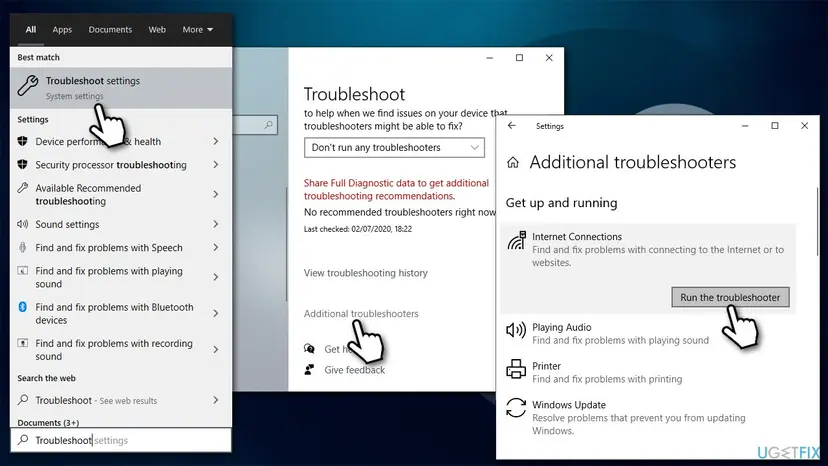
It worked if: The troubleshooter reports a problem it fixed, or finds none, and the Steam Store loads.
If not: If it finds nothing and Steam still times out, a firewall is the next suspect (Fix 6).
Fix 6. Allow Steam and Steam Web Helper through Windows Firewall
5 minutesLow risk-118 began right after a Steam or Windows update, after installing a new security program, or only Steam is affected.
Steam Support says that after a first install or a Steam update a firewall may stop Steam from connecting, even if Steam worked before. The pages inside the client are loaded by the Steam Web Helper, so both entries must be allowed. This fix allows two apps; it does not turn the firewall off.
- Type Control Panel in Windows search and press Enter.
- Open System and Security and then Windows Defender Firewall.
- On the left, select Allow an app or feature through Windows Defender Firewall.
- Select Change settings. If you are not an administrator, Windows asks for a password.
- Scroll down and tick Private and Public for Steam and Steam Web Helper.
- Select OK, exit Steam and start it again.
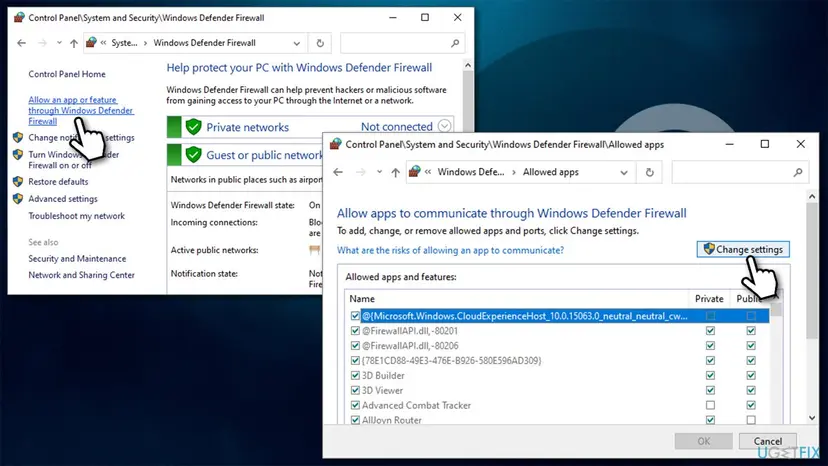
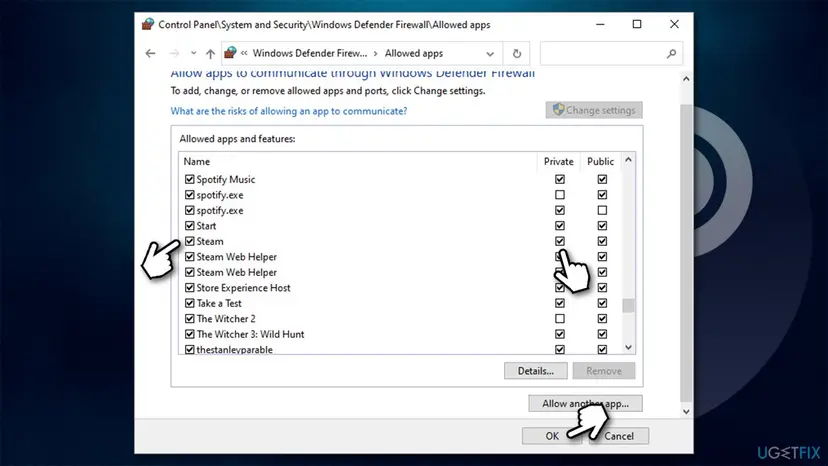
Allowing two named apps is enough. Switching the whole firewall off, or adding rules for apps you do not know, makes the PC less safe. If another security program has its own firewall, add Steam there in the same way.
It worked if: Both Steam entries are ticked, and the Store loads after you restart Steam.
If not: If Steam is not in the list, or the boxes were already ticked, the firewall is probably not the cause. Continue with Fix 7.
Fix 7. Test another DNS server in Windows
5 minutesLow riskThe earlier fixes did not help, other sites are slow as well, or Steam times out on this PC only.
A timeout is not a failed lookup, so DNS is a less likely cause of -118 than of -105. A slow or unreliable DNS server of the provider can still delay the first request until it times out, and the test is quick and can be undone.
| Preferred | Alternate |
|---|---|
8.8.8.8 | 8.8.4.4 |
The earlier version of this guide gave 8.8.8.9 as the second address. Google's second server is 8.8.4.4. An address that does not belong to Google gives no answers and makes things worse.
- Right-click Start and select Network Connections. On Windows 11 you can also press Win + R, type
ncpa.cpland press Enter. - Under Advanced network settings select Change adapter options (Windows 11: More network adapter options).
- Right-click your main connection, for example Ethernet or Wi-Fi, and select Properties.
- Select Internet Protocol Version 4 (TCP/IPv4) and then Properties.
- Choose Use the following DNS server addresses and type
8.8.8.8and8.8.4.4. - Select OK, then Close, and restart Steam.
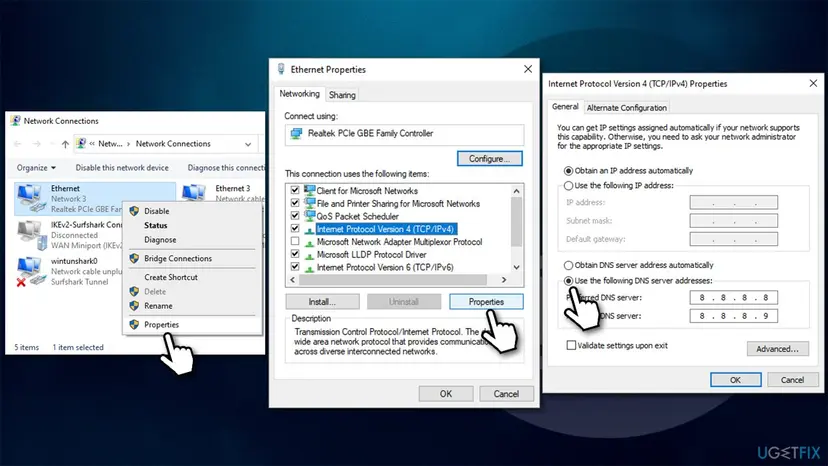
- Undo: choose Obtain DNS server address automatically in the same dialog.
- Travel: on hotel or airport Wi-Fi, switch back to automatic, because a fixed server can block their sign-in page.
It worked if: The Store loads after the restart. If it does, your provider's DNS server was the slow part and you can keep the new setting.
If not: If nothing changed, put the setting back to automatic and try Fix 8.
Fix 8. Reset the network stack with Command Prompt
5 minutes plus a restartLow riskThe other fixes did not help and Steam fails on every network of this PC.
The commands clear the cached addresses and rebuild the Windows socket settings, which removes a damaged state that can make connections hang. They change no files of yours. ipconfig /release drops the connection for a moment, and /renew brings it back.
- Type cmd in Windows search.
- Right-click Command Prompt and select Run as administrator.
- When User Account Control appears, select Yes.
- Copy these commands one at a time, pressing Enter after each:
ipconfig /flushdns ipconfig /registerdns ipconfig /release ipconfig /renew netsh winsock reset - Restart the PC, then open Steam.
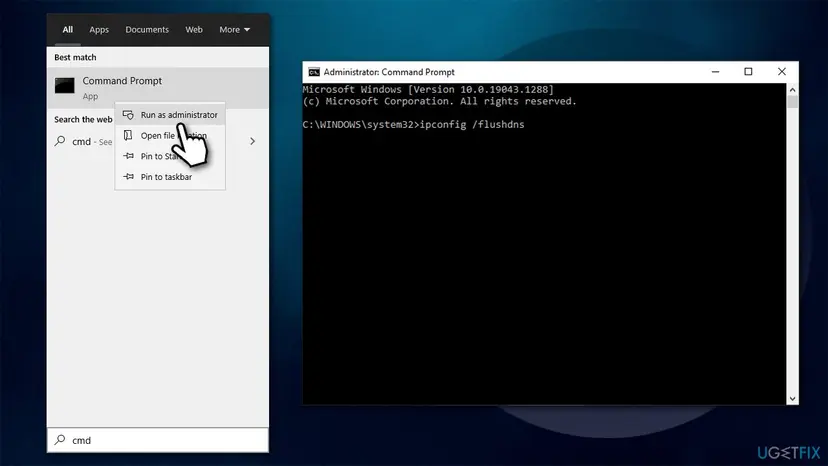
If you want the full reset, with a reinstall of the network adapters as the last step, see Reset the network and flush DNS. It removes saved Wi-Fi networks and VPN adapters, so write down your passwords first.
It worked if: After the restart Steam loads its pages and the Error page does not return.
If not: If -118 stays after all eight fixes, read the section on what to send to Steam Support.
If Steam error code 118 is still there: what to check and what to send
By now you have three useful facts: whether the Steam status page worked, whether the Store opened in a normal browser, and whether a wired connection or a phone hotspot made a difference. Together they show who is at fault.
| Your result | What it points at | What to do |
|---|---|---|
| Browser fails on every network | Steam's servers or a fault that affects all routes | Wait a few hours and test again. Check the status page before changing anything else. |
| Browser works, client times out on every network | The Steam client, a firewall or security software on this PC | Repeat Fix 4 and Fix 6, and test a Steam restart after a Windows restart. |
| Works on the hotspot, not at home | Router, provider, or a block of Steam ports | Call your provider with the times of failures. Steam Support lists providers that were found to block Steam traffic. |
| Fails only at certain hours | Traffic shaping by the provider | Test in the morning and contact the provider. |
If you contact Steam Support at https://help.steampowered.com, send the exact text of the error, the time, the results of the browser and hotspot tests, and the fixes you tried. Do not reinstall Steam only because of -118: the client is rarely the faulty part, and an uninstall puts your installed games at risk.
How to keep Steam error code 118 from coming back
- Check the Steam status page before you change settings when an error appears suddenly.
- Exit Steam from its Steam menu before you switch a VPN on or off, then start it again.
- Restart the router now and then and keep Wi-Fi interference low, or use a cable for downloads.
- After a Steam update that brings -118, look at the firewall list first.
- Do not turn the Windows firewall off to test Steam.
- Do not leave a changed DNS server on a laptop that moves between networks.
- Do not reinstall Steam or Windows for a timeout.
- Do not trust an address you typed from an old guide: check that DNS addresses belong to the operator.
Most repeat cases are Steam's busy periods, which cannot be prevented, and VPN or firewall changes, which you control.
Frequently asked questions
What is Steam error code 118?
It is Chromium's network error -118, CONNECTION_TIMED_OUT, shown by the browser built into the Steam client. Chromium describes it as "A connection attempt timed out." The client asked a Steam server for a page and no answer arrived in time. Steam adds a general sentence about the server being offline or the internet being down, but your internet can work for everything else. Most often Steam's servers are busy or down; otherwise a router, VPN or firewall is in the way.
Why does Steam say it cannot connect when my internet works?
Your internet works for sites that answer, while the route to Steam's servers can still fail. A server that is overloaded, a VPN that sends traffic through a far away server, a firewall that drops Steam's packets or a provider that shapes traffic each stop only Steam. Open https://store.steampowered.com/ in a normal browser. If it also times out, the cause is outside the Steam client.
Is Steam error 118 caused by Steam being down?
It often is. Steam Support says that if you meet timeout errors when you open Steam sites, it is very likely a system-wide issue and Steam will not be accessible until it is resolved. That fits sales and big releases. Check the Steam Server Status page, wait for a while and restart the client before you change any setting on your PC.
Should I turn off my firewall to fix error 118?
No. Allow Steam and Steam Web Helper through the Windows firewall instead, as in Fix 6. That keeps the protection on and removes the block. Steam Support explains that a firewall may stop Steam from connecting after a first install or an update, even if Steam worked before. If you use a security program with its own firewall, add Steam there too.
Does changing DNS fix Steam error code 118?
Sometimes, but it is not the likeliest fix. A timeout is different from a failed name lookup, which is -105. A slow DNS server can still cause delays long enough to time out, so a test with Google Public DNS (8.8.8.8 and 8.8.4.4) is cheap. Use the correct second address, not 8.8.8.9, and set the connection back to automatic if it makes no difference.
What do the commands in Fix 8 do?
ipconfig /flushdns clears the list of remembered addresses, ipconfig /registerdns registers your PC's name again, ipconfig /release and ipconfig /renew drop and request your IP address from the router, and netsh winsock reset returns the Windows socket settings to default. None of them changes your files. Restart the PC afterwards so that the reset takes effect.
Can I still play games when Steam shows error 118?
Some installed games that need no Steam connection may start, and Steam's Offline Mode is meant for single-player games. Online games cannot work while the client cannot reach its servers. We could not confirm the exact steps of Offline Mode today, so use the Steam menu of your client and Valve's own help for it.
What is Steam error code -7, and is it the same as 118?
No. In Chromium's list -7 is TIMED_OUT, "An operation timed out.", while -118 is CONNECTION_TIMED_OUT, "A connection attempt timed out." Both are timeouts, so the same first steps help: check the Steam status page, then the router, VPN and firewall. Searchers who typed -7 usually land here because both numbers say that something waited too long. This page is written for -118, and the fixes are in the same order.
What does Steam Fehler 118 bedeuten?
Steam Fehler 118 ist derselbe Fehler wie error code -118: ein Verbindungsversuch zu einem Steam-Server ist in die Zeitüberschreitung gelaufen. Prüfen Sie zuerst die Steam-Serverstatusseite und starten Sie den Router neu. Danach helfen VPN aus, Steam in der Windows-Firewall zulassen und das Zurücksetzen des Netzwerks. Diese Seite ist auf Englisch; die Schritte und Menünamen stehen in den Fixes oben.
Is error 118 on Steam related to a Windows error 118?
No. Windows has its own number 118, ERROR_INVALID_VERIFY_SWITCH, about a verify-on-write switch. The Steam code is -118, with a minus sign, and comes from the network list of the client's built-in browser. Fixing one does nothing for the other, and nothing on this page touches Windows' own error list. If you see only the bare number 118 in a Windows dialog, search for that dialog's text instead.
Sources
- Steam Support: Troubleshooting Network Connectivity (server status, router, firewall, programs, ISP shaping) (help.steampowered.com)
- Steam Support: Required Ports for Steam (help.steampowered.com)
- Chromium source: net/base/net_error_list.h (CONNECTION_TIMED_OUT -118, TIMED_OUT -7, NAME_NOT_RESOLVED -105) (github.com)
Did this fix work?
One click, no account. It tells the next reader which guides are worth their time.
Questions and experiences: fix Steam error code 118
Still broken, or found a fix we did not cover? Ask here: members and our editors answer. Reading is open; writing needs a free account.
…