
How to fix installation error 0x80040c01 in Windows?

Prefer to fix it yourself? The manual steps follow.
- 6methods
- 5 to 30 minutes
- Easy
Applies to Windows 11, Windows 10; Google Chrome and other Google programs that install through Google Update
6 methods in this guide
Hello. When I try to install any software on my Windows PC I get the 0x80040c01 error. Is there a way to fix this?
Error 0x80040c01 is a Google Update error: the small updater that the Chrome installer sets up first could not make sense of the task it was given. It is not a general Windows install error. Start with Google's offline Chrome installer, run as administrator, and clear the old Google Update leftovers if that fails.
The code belongs to Google Update, which the Chrome installer (and some other Google installers) runs first. Download Google's offline Chrome installer, right-click it and select Run as administrator (Fix 1). If the error stays, delete the old %LocalAppData%\Google\Update folder (Fix 2) and the leftover Chrome Binaries registry entry (Fix 3), then install again.
| Error | 0x80040c01. One full wording seen in a Chromium bug report: "The installation of Google Update failed with error 0x80040c01." |
|---|---|
| Where it appears | In the window of the Google Chrome installer (or another Google installer) a few seconds after you start it, before Chrome is installed. |
| Main cause | Google Update cannot carry out the start command it receives. In practice this follows a damaged or half-removed earlier Chrome or Google Update install. |
| Fastest fix | Google's offline (standalone) Chrome installer, run as administrator (Fix 1). |
| Also written as | 0x80040C01, error code 0x80040c01, Chrome installation failed 0x80040c01. |
| Name in Google's code | GOOGLEUPDATE_COMMANDLINE_E_NO_SCENARIO_HANDLER_MATCHED, from the error list of Omaha, the open source Google Update client. |
| Affects | Windows 11 and Windows 10. Chrome most of all, and other Google programs that use Google Update, such as Google Earth (user reports). |
| Google's status | No help article names this code. Google's general install steps (offline installer, firewall, antivirus) apply to it. |
| Time to fix | About 5 minutes with the offline installer, up to 30 minutes when leftovers must be removed. |
Facts checked on 15 October 2026. Steps written for Windows 11 (25H2 and 26H2) and Windows 10 22H2.
What installation error 0x80040c01 means
The online Chrome installer you get from google.com/chrome is small. It does not contain Chrome. It first installs Google Update, Google's updater, and Google Update then downloads and installs Chrome. Error 0x80040c01 is raised in that first part, so Chrome itself never starts to install.
Google publishes the source code of the classic Google Update client as the Omaha project. In its error list, the code 0x80040C01 is called GOOGLEUPDATE_COMMANDLINE_E_NO_SCENARIO_HANDLER_MATCHED. In plain words: Google Update was started with a command it could not match to any task it knows how to do.
The reader's question says the error appears with any software. The code is Google Update's own, so it shows up with Google installers. If a program from another maker shows exactly this code, check whether its installer also sets up a Google component. We found no source that ties 0x80040c01 to non-Google setups.
- Wording seen in a Chromium bug report: "The installation of Google Update failed with error 0x80040c01."
- Spellings people search: 0x80040c01, 0x80040C01, error code 0x80040c01.
- Not the same error: 0x80070070 means the system disk is full (Google), and 0xc1900401 is a Windows setup and update code, not a Google one.
Why Google Update fails with 0x80040c01
Most often an earlier Chrome or Google Update install left files or registry entries behind, and the new installer hands its task to that damaged copy. Less often the installer cannot reach Google's servers, because a firewall, proxy or security program blocks it. Rarely the account has no administrator rights or the PC is managed by an employer.
| Cause | How often | How to tell | Fix |
|---|---|---|---|
| The online installer depends on a download step that fails on this PC. | Most often | Any PC. The offline installer skips that step. | Fix 1 |
| Old per-user Google Update folder from an earlier Chrome install. | Often | %LocalAppData%\Google\Update exists, but Chrome is not in your list of apps. | Fix 2 |
| Leftover Chrome Binaries entry in the registry. | Sometimes | The key {4DC8B4CA-1BDA-483e-B5FA-D3C12E15B62D} sits under Google\Update\ClientState. | Fix 3 |
| Half-removed Chrome that Windows still lists. | Sometimes | Google Chrome or Google Update shows in Installed apps, but does not open or will not uninstall. | Fix 4 |
| Firewall, proxy or security software blocks Google's updater. | Less often | Work network, third-party firewall or a proxy server. | Fix 5, Fix 6 |
Google does not describe this code on its help pages. The order above follows Google's own install steps for Chrome and what the code name says about the failure. It is not a measured share of cases.
How to fix error 0x80040c01 when you install Chrome
Fix 1 avoids the failing step and solves the problem for most readers. Fixes 2 to 4 clear what an earlier install left behind. Fixes 5 and 6 deal with a blocked connection.
| What you see or have | Start with |
|---|---|
| First attempt with the small installer from google.com/chrome. | Fix 1 |
| Chrome was on this PC before and was removed, or a cleaner tool removed it. | Fix 2, then Fix 3 |
| Google Chrome or Google Update is still listed in Installed apps but does not work. | Fix 4 |
| Work or school network, proxy, or a third-party firewall. | Fix 5 |
| Everything above failed and you use a third-party antivirus. | Fix 6 |
Fix 1. Install Chrome with Google's offline installer as administrator
5 minutesNo riskAnyone who sees 0x80040c01 with the normal online Chrome installer.
Google names the offline installer as its next step when installation still fails. It carries Chrome inside the file, so the install does not depend on the online download that hands its task to Google Update.
- Close every open installer window that still shows the error.
- Open Google's offline installer link for computers with multiple user accounts:
https://www.google.com/chrome/browser/desktop/index.html?system=true&standalone=1 - If you are the only user and have no administrator rights, use the link for computers with one user account instead: the same address with
system=false&standalone=1. - Download the file and save it to your Downloads folder.
- Right-click the file and select Run as administrator, then select Yes.
- Wait until Chrome opens by itself.
Users in a video tutorial report that this exact combination, the offline file started with Run as administrator, cleared 0x80040c01 for them. More about running a setup file with full rights: How to run a program as administrator or in compatibility mode
It worked if: The installer shows its progress bar, finishes without a code and Google Chrome opens.
If not: The same code means a damaged Google Update is still on the PC. Go to Fix 2.
Fix 2. Delete the old Google Update folder in your user profile
5 minutesRead the warningChrome was installed on this PC before, or Fix 1 showed the same code again.
A Chrome install for one user keeps its own copy of Google Update in your profile. If that copy is broken, every new installer passes its task to it and fails with the same code. Removing the folder makes the installer set up a fresh copy.
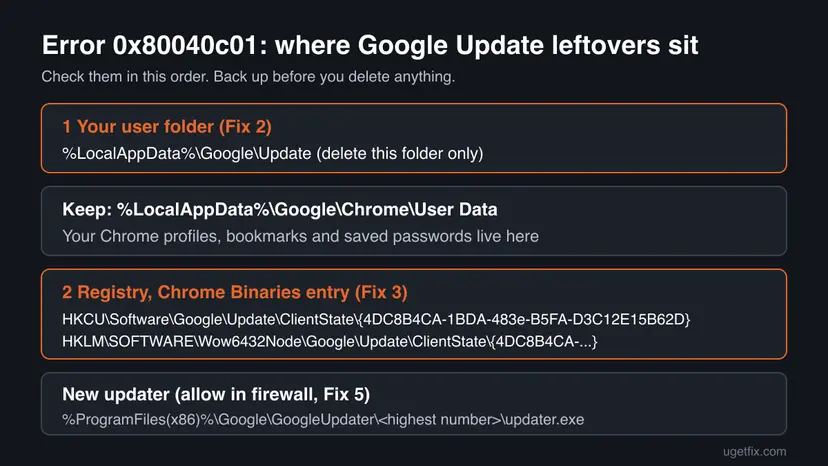
The same Google folder holds Chrome\User Data, where Chrome keeps local profiles, bookmarks and saved passwords. Do not delete the whole Google folder, as older guides say. Copy the Google folder to a USB stick or another drive first: Back up your files (Windows Backup, File History, Time Machine)
- Press Win + R, type
%localappdata%and press Enter. - Open the folder Google.
- Right-click the folder Update and select Delete. Leave the Chrome folder where it is.
- If Windows says the folder is in use, restart the PC and delete it right after you sign in.
- Run the offline installer from Fix 1 again, as administrator.
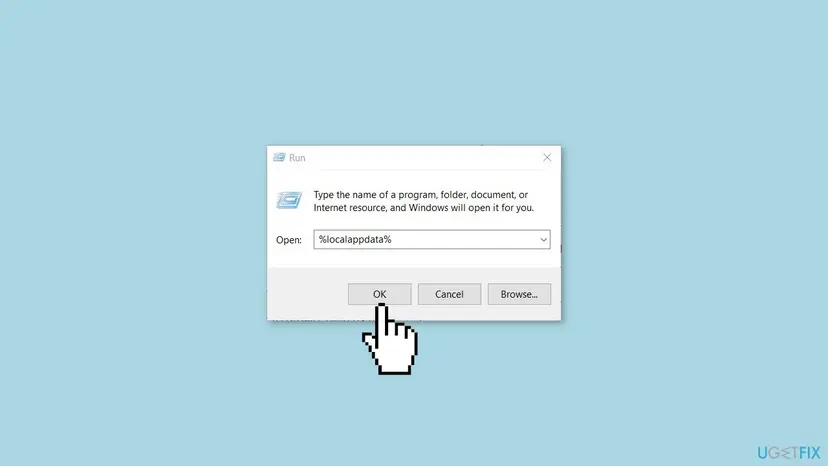
It worked if: The Update folder is gone, and the next install creates a new one and finishes.
If not: If there was no Update folder, or the code stays, remove the registry entry in Fix 3.
Fix 3. Delete the leftover Chrome Binaries entry from the registry
10 minutesRead the warningFix 2 did not help, or the key named below exists on your PC.
Google's Chrome deployment guide names {4DC8B4CA-1BDA-483E-B5FA-D3C12E15B62D} as the Google Update entry of Chrome Binaries. Older Chrome installs left it behind. A stale entry can tell the new installer that a broken Chrome install is still present.
A wrong deletion can stop programs from starting. Export the ClientState key before you change anything and delete only the one key named here. How: Back up the registry before editing it
- Press Win + R, type
regedit, press Enter and select Yes. - Paste the first path below into the address bar of Registry Editor and press Enter.
- Right-click ClientState, select Export and save the file to your desktop.
- If the key
{4DC8B4CA-1BDA-483e-B5FA-D3C12E15B62D}is listed under ClientState, right-click it, select Delete and confirm. - Repeat steps 2 to 4 for the second path, which is used by installs for all users.
- Close Registry Editor, restart the PC and run the offline installer from Fix 1.
The two places of the key
HKEY_CURRENT_USER\Software\Google\Update\ClientState
HKEY_LOCAL_MACHINE\SOFTWARE\Wow6432Node\Google\Update\ClientState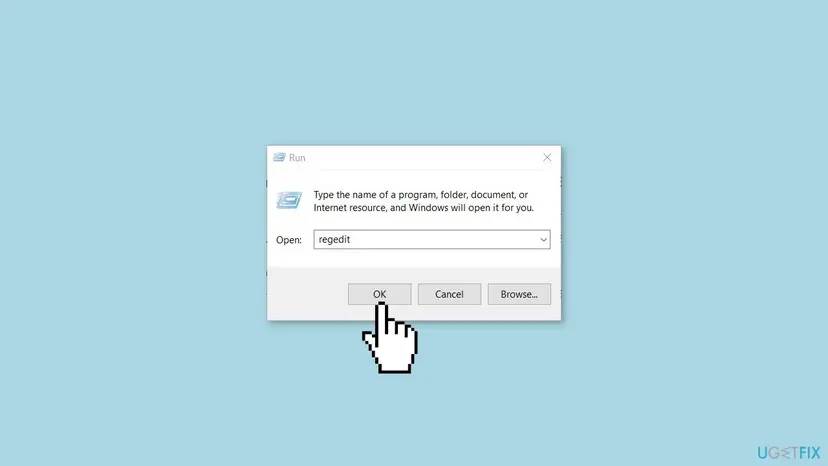
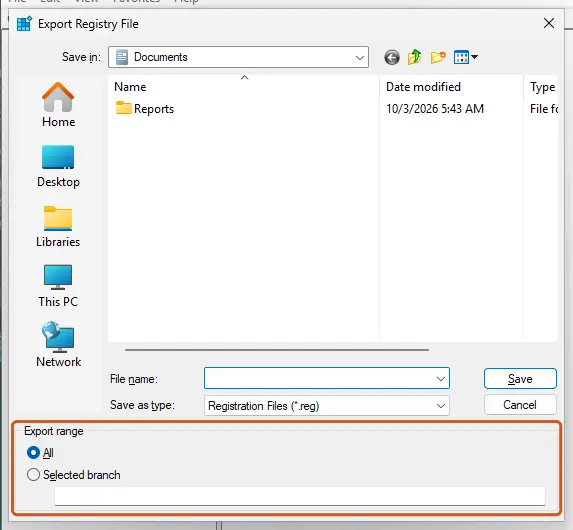
It worked if: The key is gone from both places, or was never there, and the installer now runs through.
If not: To undo, double-click the exported .reg file. Then go to Fix 4.
Fix 4. Uninstall the old Chrome and Google Update entries, then install again
15 minutesLow riskGoogle Chrome or a Google Update entry still shows in Installed apps, but Chrome does not open.
Google's help says to uninstall and reinstall Chrome when updates do not work. A half-removed Chrome keeps its Google Update registration, and the new installer runs into it.
- Right-click Start, open Settings and go to Apps > Installed apps.
- Find Google Chrome, select the three dots next to it and select Uninstall.
- If Windows asks whether to delete your browsing data, leave the box clear to keep your profile.
- Restart the PC.
- Run the offline installer from Fix 1 as administrator.
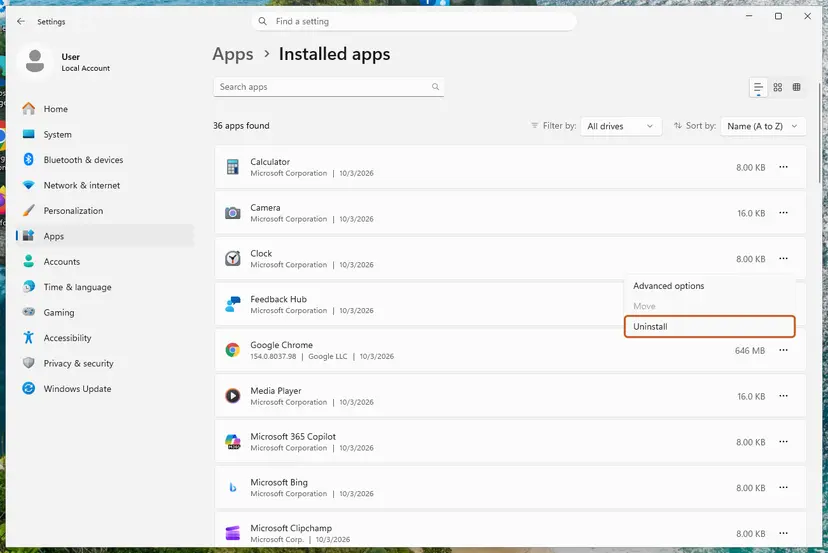
If the entry will not uninstall, Google's help page links Microsoft's Program Install and Uninstall troubleshooter. It looks for registry damage that blocks a program from being installed or removed. We could not confirm that Microsoft still offers it for every Windows 11 version. On Windows 10 the Installed apps list is in another place: Uninstall a program or app in Windows
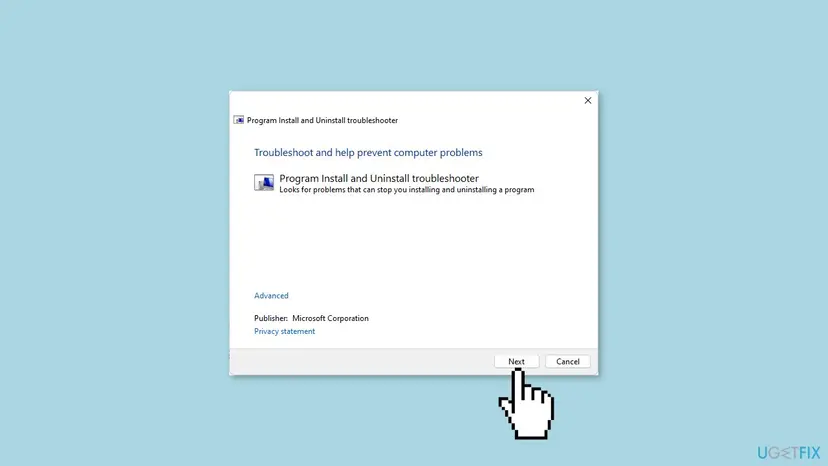
It worked if: Chrome is gone from Installed apps, and the new install finishes without 0x80040c01.
If not: If the install still stops, the connection may be blocked. Go to Fix 5.
Fix 5. Let Google's updater through the firewall and check the proxy
10 minutesLow riskYou use a work or school network, a proxy server or a third-party firewall.
Google says a firewall, antivirus or proxy can stop Chrome from connecting during setup, and gives the updater file to allow. If the updater cannot reach Google, the task it was handed fails.
- Select Start, open Settings and type
Firewallin the Find a setting box. - Select Allow an app through Windows Firewall, then Change settings and Allow another app.
- Select Browse and type
%ProgramFiles(x86)%\Google\GoogleUpdaterin the address bar. - Open the folder with the highest number, select updater.exe and then Add.
- Run the installer again.
- Proxy: Google supports proxies that use the Negotiate scheme (Kerberos and NTLM) and proxies with integrated authentication. Another proxy type can block the install.
- Other firewall software: add the same file to its exceptions list. The maker's help page shows how.
- Basic connection: Google's first step is to make sure the internet works normally. Help: How to check your internet connection in Windows
It worked if: The installer connects, downloads Chrome and finishes.
If not: If no folder named GoogleUpdater exists yet, use Fix 1 first, then try Fix 6.
Fix 6. Pause third-party security software for one install
5 minutesLow riskYou use an antivirus other than Microsoft Defender and every fix above has failed.
Google states that some antivirus software can prevent Chrome from installing. Its steps are to turn it off, install Chrome and turn it back on right away.
- Open your antivirus and pause its real-time protection for the shortest time it offers.
- Run the offline installer from Fix 1 straight away.
- Turn the protection back on as soon as the install ends, whether it worked or not.
Do this for one install only and stay off other websites while protection is paused. If Chrome installs only with protection paused, Google says to upgrade the antivirus. Microsoft Defender steps: Turn off Microsoft Defender protection for a moment
It worked if: Chrome installs while protection is paused, which shows the security program blocked Google Update.
If not: Turn protection back on. Then follow the steps under "If the error is still there" below.
If error 0x80040c01 is still there
Google's help page ends with the Chrome Help Forum for problems its steps do not solve, and with your system administrator for managed PCs. Before you post, collect what the helpers will ask for, so they do not have to guess.
- The exact text of the window, with the code, and whether you used the online or the offline installer.
- Your Windows edition and version from Settings > System > About.
- What was on the PC before: an older Chrome, Chrome for all users, or a cleaner tool that removed it.
- Which fixes you tried, by number, and what changed after each one.
| What you notice | What it means |
|---|---|
| A message that Windows is in S mode, or only Store apps install. | Chrome cannot install in S mode. Switching out is free but cannot be undone, Google says. |
| A message that you are not an administrator. | Use the one-user offline installer from Fix 1, or ask the person who manages the PC. |
| Error 0x80070070. | The system disk is full. Free up space: Free up disk space and delete temporary files |
| "OS not supported". | Your Windows version is older than Chrome supports. Check Google's system requirements. |
We could not confirm where the current Google updater writes its install log, so this page does not send you to a log file. Google's own pages do not name one for this error.
How to keep error 0x80040c01 from coming back
- Remove Chrome through Settings > Apps > Installed apps, so Google Update is removed with it.
- Keep a copy of the offline installer that worked, for the next Windows reinstall.
- Download Chrome only from google.com/chrome or from the offline links on Google's help page.
- Restart the PC after an uninstall, before you install Chrome again.
- Do not delete the whole
%LocalAppData%\Googlefolder. It holds your local Chrome profiles. - Do not let cleaner tools strip Google entries out of the registry while Chrome is installed.
- Do not take Chrome installers from download sites that are not Google's.
- Do not leave antivirus protection paused after a test.
Most cases we know of start with a removal that went half way, often by hand or by a cleaner. A normal uninstall followed by a restart leaves no damaged Google Update for the next installer to trip over.
Frequently asked questions
What is error code 0x80040c01?
It is an error of Google Update, the updater that the Chrome installer sets up before Chrome itself. In the open source code of Google Update the number is named GOOGLEUPDATE_COMMANDLINE_E_NO_SCENARIO_HANDLER_MATCHED. That means Google Update received a start command it could not match to any task it knows. On a home PC this usually follows a damaged or half-removed earlier install of Chrome. The quickest way past it is Google's offline Chrome installer, run as administrator, as Fix 1 describes.
Does 0x80040c01 appear with programs that are not from Google?
We found no source that ties it to other makers. The code belongs to Google Update, so it appears with installers that use it: Google Chrome first of all, and users also report it with Google Earth. If a program from another maker shows the same code, its setup may install a Google component along the way. Check the name in the window that shows the error. If the window is not from Google, search for that maker's own help on its installer instead.
What is the key 4DC8B4CA-1BDA-483e-B5FA-D3C12E15B62D?
It is the Google Update entry that Google's Chrome deployment guide lists for Chrome Binaries, a part used by older Chrome installs. It sits under Google\Update\ClientState in the current user's registry branch, the machine branch, or both. A stale copy can stay behind after Chrome is removed. Deleting it is Fix 3 on this page. Back up the ClientState key first, delete only this one key, and run the offline installer again after a restart.
Is it safe to delete the Google folder in AppData\Local?
Not the whole folder. The Google folder in your local app data holds both Google Update and Chrome's User Data folder, where your local profiles, bookmarks and saved passwords are kept. Older guides, including the earlier version of this page, told readers to delete the whole folder. Delete only the Update folder inside it, as Fix 2 shows. If you want to be sure, copy the Google folder to another drive first, so you can put the Chrome profile back.
Is 0xc1900401 the same error as 0x80040c01?
No. 0xc1900401 is a code from Windows setup and Windows Update, not from Google Update. It appears while Windows installs a feature update or runs the Installation Assistant, not while you install Chrome. The two numbers only look alike. This page covers the Google error 0x80040c01 only. If you see 0xc1900401, search for that exact code together with the name of the Windows tool that showed it, because its causes and fixes are different.
Why does the online installer fail when the offline one works?
The online installer is a small file that sets up Google Update first and then lets it fetch Chrome from Google's servers. Error 0x80040c01 happens in that hand-over step. The offline installer, which Google calls the standalone installer, already contains Chrome. It does not need the same download step, so a broken updater or a blocked connection is less likely to stop it. Google lists it as the next step when a normal install keeps failing.
Do I need administrator rights to fix 0x80040c01?
For most fixes, yes. Running the installer as administrator, deleting the machine-wide registry key and changing firewall rules all need an administrator account. Without one, use Google's offline installer for computers with one user account, which installs Chrome for your account only. Google's help page says that if you are not an administrator and still have problems, you should contact your system administrator. On a work or school PC, policies set by the employer can block the install entirely.
Should I turn off my antivirus to fix this error?
Only for one test, and only as the last step. Google says that some antivirus software can prevent Chrome from installing, and its steps are to turn it off, install Chrome and turn it on again. Pause real-time protection for the shortest time your antivirus offers, run the offline installer and switch protection back on straight away. If Chrome installs only while protection is paused, Google advises an upgrade of the antivirus rather than leaving it off.
None of the fixes helped. What else can I do?
Collect the details first: the exact text of the error window, your Windows version, whether Chrome was on the PC before and which fixes you tried. Post them in the Chrome Help Forum, which Google's help page names for problems its steps do not solve. Check also for signs that it is not this error at all: S mode, no administrator rights, a full disk (error 0x80070070) or an unsupported Windows version. Each of those has its own fix in the table above.
Is there a video guide or a guide in Russian, Spanish or Vietnamese?
This page is written in English and has no video. The code 0x80040c01 is the same in every language of Windows and of the Chrome installer; only the words around it are translated. The fixes are the same too. Menus and buttons sit in the same places in other languages, so you can follow the steps by position. Start with Fix 1, the offline installer run as administrator, which is the one that helps most readers.
Sources
Did this fix work?
One click, no account. It tells the next reader which guides are worth their time.
Questions and experiences: fix installation error 0x80040c01 in Windows
Still broken, or found a fix we did not cover? Ask here: members and our editors answer. Reading is open; writing needs a free account.
…