
How to fix PuTTy Fatal Error: Network Connection timed out?

Prefer to fix it yourself? The manual steps follow.
- 8methods
- 2 to 30 minutes
- Intermediate
Applies to PuTTY, PSCP, PSFTP and Plink on Windows 11 (25H2, 26H2) and Windows 10 22H2; servers on Linux, Raspberry Pi OS, Windows and network devices
8 methods in this guide
Hello. I tried to use PuTTY to access a remote server but I received a Fatal Error: Network Connection timed out. I have never encountered issues like this before. How do I fix it?
"Network error: Connection timed out" in a PuTTY Fatal Error box means PuTTY sent a connection request and the server never answered. It is almost never a PuTTY bug. Check the host name and port first, then test whether port 22 is reachable at all.
The server sent no reply at all. Most often the host name or IP address is wrong, the server is off, or a firewall silently drops port 22. Check the address and port in PuTTY (Fix 1), then run Test-NetConnection with -Port 22 in PowerShell (Fix 2). Its result tells you whether to look at the server, its firewall or your own network.
| Error | PuTTY Fatal Error with the line Network error: Connection timed out. |
|---|---|
| Where it appears | Right after you select Open in PuTTY, after a pause of some seconds, or in the middle of an open session when the network drops. |
| Main cause | The server never answered: wrong host name or IP, the server is off or offline, or a firewall drops traffic to the SSH port. |
| Fastest fix | Check Host Name and Port in the Session panel (Fix 1), then test the port with Test-NetConnection (Fix 2). |
| Also written as | "putty connection timed out", "putty network error connection timed out", "network error: connection timed out". |
| Not the same as | Network error: Connection refused (the server answered and said no) and Connection reset by peer (an open session broke). |
| Vendor status | Not a PuTTY bug. The PuTTY manual (release 0.85) says the server gave no response, usually because it is isolated from the network or turned off. |
| Affects | Every PuTTY version, plus PSCP, PSFTP and Plink, on Windows 11 and Windows 10 22H2. |
| Time to fix | 2 minutes for a typo; longer when the server's firewall or your network has to be changed. |
Facts checked on 15 October 2026. Steps written for Messages and meanings checked against the PuTTY manual, chapter 10 (release 0.85), and Microsoft Learn pages for OpenSSH on Windows and Test-NetConnection.
What "PuTTY Fatal Error: Network error: Connection timed out" means
The PuTTY manual explains it plainly: the connection PuTTY tried to make to your server received no response at all. Usually the server machine is cut off from the network or turned off. PuTTY waits, gives up and shows the PuTTY Fatal Error box with the line Network error: Connection timed out.
The key word is no response. A server that is up but has nothing on the port sends back a refusal, and PuTTY then says Connection refused instead. A timeout means the request was lost or silently dropped on the way, so the cause is the address, the server's power and network, or a firewall that drops instead of rejecting.
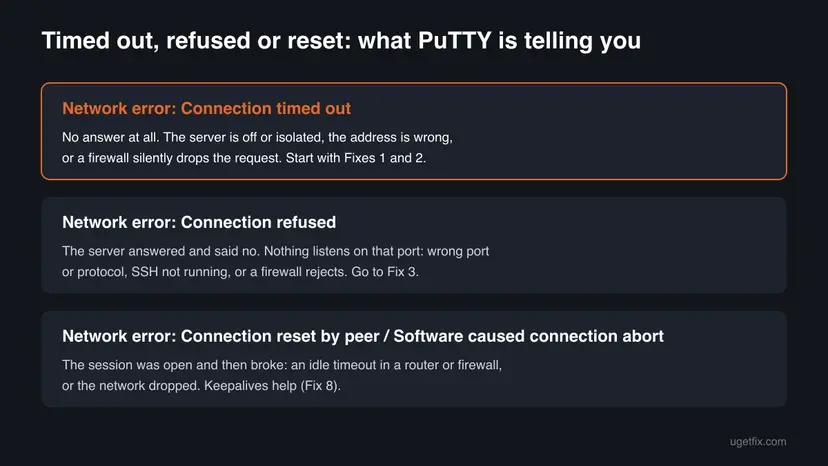
- When you click Open: the server cannot be reached. Fixes 1 to 7 are for you.
- In the middle of a session: the PuTTY manual notes that the error can also appear when contact with the server is lost while a session is open, for example during a repeat key exchange or a keepalive. Go to Fix 8.
- In PSCP, PSFTP or Plink: these tools use the same network code and show the same text in the command window. The fixes are the same.
- Spellings people search: "putty network error connection timed out", "connection timed out putty", "network error: connection timed out".
Why PuTTY shows Network error: Connection timed out
The causes are listed from the most common to the rarest. Each one is tied to the fix that removes it, and the test in Fix 2 tells you which group you are in.
| Cause | How often | Typical sign | Fix |
|---|---|---|---|
| Wrong host name, IP address or port in PuTTY | Most often | A new server, a changed IP or a saved session from long ago | Fix 1 |
| The server is off, asleep or lost its network | Often | Ping also gets no reply | Fix 3 |
| The SSH service is not enabled or not listening on that port | Often on new devices | A new Raspberry Pi, router or Windows PC | Fix 3 |
| A cloud security group, server firewall or IP allowlist drops port 22 | Often on cloud servers | Ping works, the port test fails; your public IP changed | Fix 4 |
| Your network blocks port 22, or the server has a private address | Less often | Works at home, fails at work, school or a hotel | Fix 5 |
| A VPN, a proxy in PuTTY or a third-party firewall on your PC | Less often | Other PCs can connect, yours cannot | Fix 6 |
| A broken network stack on your PC | Rare | Several apps have odd network errors | Fix 7 |
| An idle open session cut by a router or firewall | Only during a session | The error comes after minutes of no typing | Fix 8 |
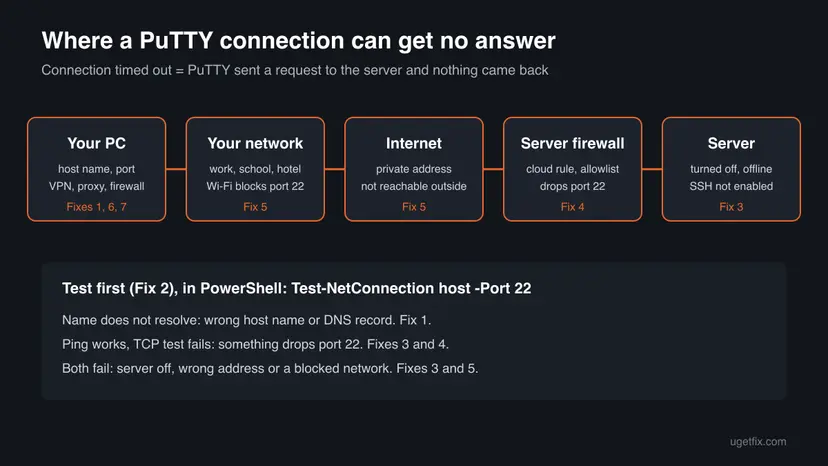
If PuTTY says Connection refused, the server is reachable and the problem is the port, the protocol or the SSH service. The PuTTY manual adds that a firewall can also send back a refusal. Start with Fix 3 in that case.
How to fix PuTTY Network error: Connection timed out
Fixes 1 and 2 take a few minutes and tell you where the problem is. Fixes 3 and 4 are on the server side and may need its owner or hosting panel. Fixes 5 to 7 are about your network and your PC. Fix 8 is only for sessions that time out after they were open.
| What you see or have | Start with |
|---|---|
| A new server, a changed IP address or an old saved session. | Fix 1 |
| You do not know whether the server is reachable at all. | Fix 2 |
| A new Raspberry Pi, router, NAS or Windows PC you want to reach by SSH. | Fix 3 |
| A cloud server (VPS) and your home or office IP changed. | Fix 4 |
| It works on one network and fails on another, or the address starts with 192.168 or 10. | Fix 5 |
| Other computers connect fine, only yours fails. | Fix 6 |
| The session opens, then dies after a while with no typing. | Fix 8 |
Fix 1. Check the host name, IP address, port and connection type in PuTTY
2 minutesNo riskEveryone, first. Especially after a server move, a new IP address or when you load an old saved session.
The PuTTY manual's first advice for this error is to check that you entered the host name or IP address correctly. A single wrong digit sends the request to a machine that does not answer, and PuTTY waits until it times out.
- Open PuTTY and stay on the Session panel.
- Compare Host Name (or IP address) with the address your host, hosting panel or administrator gave you. Remove spaces and any
https://oruser@you pasted by mistake. - Check Port. SSH uses
22unless the server owner moved it; ask whether a different port was set. - Make sure Connection type is SSH for an SSH server.
- If you used a saved session, select it, select Load and check the same fields, because an old IP address stays saved.
- Select Open and try again.
If you connect by name, check that the name still points to the right server. On a new server with a new domain, the old guide's tip still holds: the domain's records must point to your host, or the name leads to an old or empty address. Try the server's IP address directly to rule this out.
It worked if: PuTTY shows the host key prompt or the login as: line instead of the error.
If not: If the address and port are right and it still times out, test the connection in Fix 2.
Fix 2. Test whether the server and port 22 can be reached
3 minutesNo riskThe settings are right and you need to know whether the problem is the server, a firewall or your network.
PuTTY only says that nothing answered. Microsoft's Test-NetConnection command checks name lookup, ping and the TCP port separately, so you see where the request stops instead of guessing.
- Right-click Start and select Terminal (on Windows 10, Windows PowerShell).
- Type the command below with your server's name or IP address and press Enter.
- Read the result: the resolved address, the ping result and TcpTestSucceeded.
- If the server uses another port, put that number after
-Port.
Replace the example name with your server. -InformationLevel Detailed adds more lines, -TraceRoute shows where the path stops.
Test-NetConnection server.example.com -Port 22| Result | What it means | Go to |
|---|---|---|
| The name cannot be resolved | Wrong name, or its DNS record is missing or old | Fix 1 |
| Ping succeeds, TCP test fails | The machine is up, but port 22 is closed or dropped | Fixes 3 and 4 |
| Ping and TCP test both fail | Server off, wrong address, or the network blocks you | Fixes 3 and 5 |
| TCP test succeeds | The port is open from this PC; PuTTY's own settings are the suspect | Fix 6 |
Many servers and cloud firewalls do not answer ping at all. Trust the TCP port test more than the ping line.
It worked if: You know whether the name resolves and whether port 22 answers, and which fix comes next.
If not: If you cannot run PowerShell on this PC, try PuTTY from another network or device, as in Fix 5.
Fix 3. Make sure the server is on and its SSH service is running
10 minutesLow riskPing fails too, or the device is new: a Raspberry Pi, a router, a NAS or a Windows PC you want to reach by SSH.
The PuTTY manual names a server that is turned off or isolated from the network as the usual cause. A device that never had SSH turned on gives no answer on port 22, and many home devices ship with SSH off.
- Check that the server or device is powered on, awake and connected. Use its screen, its hosting panel console or its status lights.
- On a Raspberry Pi or home device, turn SSH on in its own settings first. Raspberry Pi OS ships with SSH off unless you turned it on when you set it up.
- On a Linux server, open the console from your hosting panel and check the SSH service: it is called
sshon Debian, Ubuntu and Raspberry Pi OS, andsshdon Fedora and Red Hat. - On a Windows PC or server, check that OpenSSH Server is installed and the OpenSSH SSH Server service is running.
- Ask the server owner whether SSH was moved to another port, then use that port in PuTTY.
Windows as the SSH server: run in PowerShell as administrator on that machine. Microsoft's commands start the service and make it start with Windows.
Start-Service sshd
Set-Service -Name sshd -StartupType 'Automatic'
Get-NetFirewallRule -Name "OpenSSH-Server-In-TCP"
Microsoft notes that installing OpenSSH Server creates and enables the firewall rule OpenSSH-Server-In-TCP for port 22. If that rule is missing or off, the port is closed. On Windows Server 2025, OpenSSH is installed by default and you turn it on under Server Manager > Local Server > Remote SSH Access.
It worked if: The service shows as running and Test-NetConnection with -Port 22 reports TcpTestSucceeded : True.
If not: If the server is up and SSH runs but the port still times out from outside, a firewall drops it: go to Fix 4.
Fix 4. Open port 22 in the server's firewall, cloud rules or IP allowlist
10 minutesRead the warningPing or the console shows the server is up, but the port test fails; often on a cloud server or after your own IP address changed.
A firewall that drops packets sends nothing back, so PuTTY sees exactly the silence that ends in a timeout. Many admins allow SSH only from known addresses, and a new home or office IP falls outside that list.
Allow port 22 only from your own address or range where you can. A rule mistake on a remote server can also lock you out: keep the hosting panel's console open while you change firewall rules.
- Find your current public IP address, for example in your router's status page.
- In your hosting or cloud panel, open the server's firewall, security group or network rules and look for an inbound rule for TCP port 22.
- If the rule allows only certain addresses, add your current address. If there is no rule, add one for your address only.
- On the server itself, check its own firewall for the same port through the panel's console.
- If the server uses a tool that bans addresses after failed logins, ask the owner to check whether your address was banned.
- Test again with
Test-NetConnectionand then PuTTY.
On a work server you cannot change these rules yourself. Send the administrator your public IP address, the server name, the port and the time of the error. They may also have changed access for security reasons, as the old version of this guide noted.
It worked if: The port test succeeds from your PC and PuTTY shows the host key prompt or the login line.
If not: If the server side is open and you still time out, the block is on your network: go to Fix 5.
Fix 5. Try another network, or use the VPN the server needs
5 minutesNo riskIt works from one place and fails from another, or the server address starts with 192.168., 10. or 172.16 to 172.31.
Some company, school, hotel and public networks block outgoing SSH. A private address only exists inside its own network, so from outside the request goes nowhere and times out.
- Connect the PC to your phone's mobile hotspot and try PuTTY again. If it works there, your usual network blocks the port.
- On a work or school network, ask IT whether outgoing SSH is allowed or which jump host or VPN to use.
- If the server has a private address, connect to its network first: through the company VPN, or from a device on the same home network.
- To reach a home device from outside, the router must forward the port to it. Weigh this carefully, because it exposes the device to the internet.
First make sure the PC is online at all, since a dead Wi-Fi link also ends in a timeout: How to check your internet connection in Windows.
It worked if: PuTTY connects on the other network or through the VPN.
If not: If it fails on every network while others can connect, the cause is on your PC: go to Fix 6.
Fix 6. Check the VPN, PuTTY proxy settings and security software on your PC
10 minutesLow riskOther computers reach the server, yours does not, or Test-NetConnection succeeds while PuTTY still times out.
A proxy set in PuTTY sends the connection somewhere else first. A VPN can route it into a tunnel that cannot reach the server, and a third-party firewall can drop PuTTY's outgoing traffic without telling you.
- In PuTTY, open Connection > Proxy. If Proxy type is not None and you did not set it on purpose, set it to None.
- Load your saved session, apply the change and select Save, or the old proxy comes back next time.
- Disconnect your VPN app and test again, or connect to the VPN if the server needs it.
- Open your third-party security suite's firewall and check that
putty.exeis allowed. Allow it there instead of turning the firewall off. - Test with PuTTY again.
If your security suite blocks several apps, our guide to security or firewall settings blocking the connection walks through suites, VPN kill switches and Windows Firewall rules.
It worked if: PuTTY connects with the proxy set to None and the app allowed in your firewall.
If not: If nothing on the PC blocks PuTTY, reset the network stack in Fix 7.
Fix 7. Reset the network stack on your PC
10 minutes plus a restartRead the warningOther apps on this PC also have strange network errors, or the problem began after a VPN or security program was removed.
Leftover entries of removed VPNs or security programs can keep filtering traffic. Resetting Winsock and TCP/IP returns the stack to its defaults, which clears them without touching PuTTY.
The commands keep your adapters, but the full network reset in Settings reinstalls them. You may need your Wi-Fi password again and may have to set up VPN clients again. Write down any fixed IP or DNS settings first.
Run in Terminal (Admin), then restart the PC. Step by step: Reset the network and flush DNS.
netsh winsock reset
netsh int ip reset
ipconfig /flushdns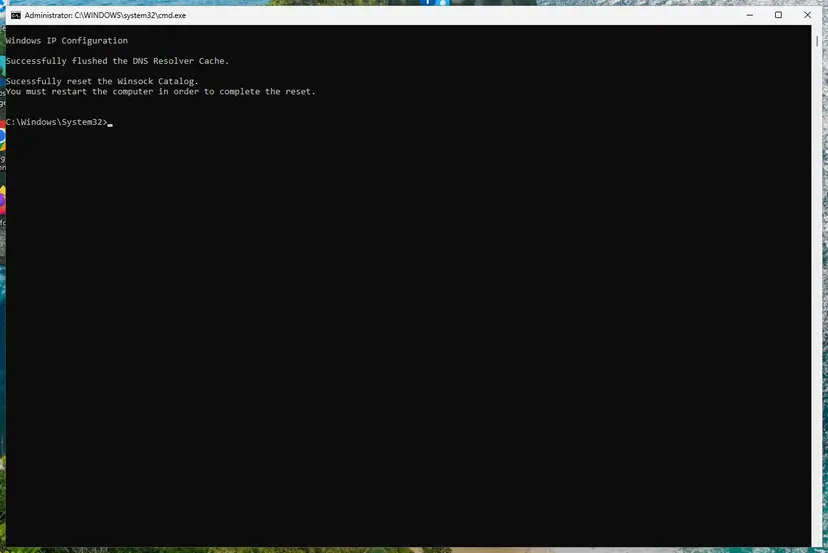
It worked if: After the restart other apps work normally and PuTTY reaches the server.
If not: If PuTTY still times out on every network, collect the details in the section below and contact the server owner.
Fix 8. Turn on keepalives when an open session times out
3 minutesLow riskYou log in fine, but the error appears after some minutes, often when you have not typed anything.
Routers and firewalls forget idle connections. The PuTTY manual says the timeout can also hit an open session when contact is lost, and that keepalives help with connections that a firewall or router has timed out.
- Open PuTTY, select your saved session and select Load.
- Go to Connection and set Seconds between keepalives (0 to turn off) to a value such as
30or60. - Go back to Session and select Save.
- Open the session and leave it idle for a while to test.
The PuTTY manual lists pros and cons: keepalives keep a quiet link alive, but on an unreliable network they can make PuTTY notice a short outage and end the session sooner.
It worked if: The session stays open while you are idle.
If not: If sessions still drop, the network between you and the server is unstable. Test from another network and tell the server owner.
Still timing out: what to check and what to send to the server owner
PuTTY's Event Log shows the steps of the attempt. Right-click the PuTTY window title and select Event Log, or check it before the window closes. Lines such as looking up the host and connecting to an address show which address PuTTY really tried.
- To the server owner or hosting support: the host name and IP address, the port, your public IP address, the time of the error and the full
Test-NetConnectionoutput. - Other people cannot connect either: the server is down or its network is broken. Only the owner or the host can fix that.
- Only you cannot connect: your address is blocked or your network filters SSH (Fixes 4 to 6).
- Hardware: a server that does not answer ping, its console or its hosting panel is likely off or has a failed network link. PuTTY cannot fix that.
- Another SSH client gives the same timeout: the problem is not PuTTY. The old advice to switch terminals does not help with a timeout.
How to avoid PuTTY connection timeouts later
- Save each server as a named session and update it when the IP or port changes.
- Give home servers a fixed address on your router so their IP does not change.
- Keep the hosting panel's console as a back door before you change firewall rules.
- Turn on keepalives for servers you leave open for a long time.
- Do not turn off your PC's firewall or antivirus to make PuTTY connect.
- Do not open port 22 to every address when an allowlist is possible.
- Do not set a proxy in PuTTY's default settings unless every session needs it.
- Do not download PuTTY from mirror sites; use the official PuTTY page.
Windows 10 left support on 14 October 2025. PuTTY and these checks still work on Windows 10 22H2, but its network stack gets no more security fixes, so Windows 11 is the safer place to run SSH clients.
Frequently asked questions
What does PuTTY Fatal Error Connection timed out mean?
It means PuTTY tried to open a connection to your server and got no response at all before it gave up. The PuTTY manual says this usually happens because the server is isolated from the network or turned off. A wrong host name or IP address, or a firewall that silently drops port 22, has the same effect. Check the address first (Fix 1) and then test the port (Fix 2).
What is the difference between Connection timed out and Connection refused in PuTTY?
Timed out means nothing answered. Refused means the server answered and rejected the connection. The PuTTY manual says a refusal usually comes from a server that does not offer the service on that port, so check the protocol and port number. It adds that a firewall in between can send the same refusal. With a timeout, check the address, the server's power and network, and firewalls that drop traffic.
How do I fix PuTTY Fatal Error Network error: Connection refused?
Make sure Connection type is SSH and Port is the one the server really uses, usually 22. Then check that the SSH service runs on the server and listens on that port, as in Fix 3. On Windows servers Microsoft notes that if the rule OpenSSH-Server-In-TCP is not enabled and the port is not open, connections are refused or reset. If all of this is right, ask the server's administrator.
Why does PuTTY say unable to open connection?
PuTTY reports that it is unable to open the connection when it cannot even start one. Most often the host name cannot be found, because of a typo, a name that no longer exists or a missing DNS record. Check the name in Host Name (or IP address), try the server's IP address directly and run Test-NetConnection with the name to see whether it resolves (Fix 2).
How do I increase the connection timeout in PuTTY?
A longer wait rarely helps, because a timeout means no answer is coming at all. Fix the reason instead: the address, the server or a firewall. If your problem is an open session that drops after a quiet period, that is a different case. Set Seconds between keepalives in the Connection panel to 30 or 60 and save the session (Fix 8).
Can Windows Firewall cause the PuTTY connection timed out error?
On your own PC it is not the usual cause. A third-party firewall or a VPN is more likely to block PuTTY, and you should allow putty.exe there rather than switch protection off (Fix 6). On a Windows machine that runs the SSH server, a missing or disabled OpenSSH-Server-In-TCP rule does close port 22, so check that rule on the server (Fix 3).
Why does PuTTY time out on my Raspberry Pi?
Usually SSH is not turned on, the Pi has a new address on your network, or you are trying from outside your home network. Turn SSH on in the Pi's settings, look up its current address in your router's list of devices, and connect from the same network. A private address such as 192.168.1.20 cannot be reached from the internet without a VPN or port forwarding (Fix 5).
PuTTY worked yesterday and now it times out. What changed?
Something between you and the server changed. The most common change is a new public IP address on your side that an allowlist does not know. Others are a server that restarted with a new address, a server that is down, or a different network such as office or hotel Wi-Fi. Run Test-NetConnection (Fix 2) and ask the server owner whether access rules changed.
Is the PuTTY timeout a bug in PuTTY?
No. The PuTTY manual describes the message as the network giving no response, and the error comes from the operating system's network code. Updating or reinstalling PuTTY does not change it, and other SSH clients show the same problem against the same server. Get PuTTY only from its official page, though, because fake downloads of popular free tools are common.
Sources
- PuTTY User Manual, chapter 10: Common error messages (release 0.85) (the.earth.li)
- Microsoft Learn: Get started with OpenSSH for Windows (learn.microsoft.com)
- Microsoft Learn: Test-NetConnection (NetTCPIP) (learn.microsoft.com)
Did this fix work?
One click, no account. It tells the next reader which guides are worth their time.
Questions and experiences: fix PuTTy Fatal Error: Network Connection timed out
Still broken, or found a fix we did not cover? Ask here: members and our editors answer. Reading is open; writing needs a free account.
…