
QTS1081B driver: how to install it on Windows 11 and Windows 10 when it fails

Prefer to fix it yourself? The manual steps follow.
- 6methods
- 5 to 15 minutes
- Easy
Applies to QTS1081B and other USB 2.0 10/100M Ethernet adapters with a CoreChip SR9700 or SR9900 chip on Windows 11 and Windows 10
6 methods in this guide
Hello. I just bought the QTS1081B LAN-USB adapter for my Windows laptop, but I can't install drivers for it. Any suggestions would be appreciated.
The QTS1081B is a cheap USB to Ethernet adapter built on the CoreChip SR9700 chip, and Windows 11 and 10 often leave it under Other devices with Code 28. The driver exists and is free: Microsoft hosts it in the Microsoft Update Catalog under the hardware ID USB\VID_0FE6&PID_9700. Check the hardware ID first, then install that driver from a folder.
Open Device Manager and read the adapter's hardware ID (Fix 1). Then download the CoreChip "USB to Ethernet Adapter" driver 1.0.906.0 from the Microsoft Update Catalog, unpack the .cab file and point Update driver > Browse my computer for drivers at that folder (Fix 2). Use the x64 file on 64-bit Windows. If Device Manager refuses the folder, add it with pnputil (Fix 3).
| Error | The adapter shows as USB 2.0 10/100M Ethernet Adaptor under Other devices with a yellow sign: "The drivers for this device are not installed. (Code 28)" |
|---|---|
| Where it appears | Device Manager, right after you plug the QTS1081B into a USB port; no Ethernet entry appears in Settings > Network & internet. |
| Main cause | Windows has no driver for the CoreChip SR9700 chip in its own driver store, and the adapter ships with no download page from a known maker. |
| Fastest fix | The Microsoft Update Catalog driver for vid_0fe6&pid_9700, installed from a folder in Device Manager (Fix 2). |
| Also written as | QTS1081B, QST1081B, "9700" on the label, RD9700, SR9700, USB\VID_0FE6&PID_9700&REV_0101, USB\VID_0FE6&PID_9702 |
| Driver in the catalog | Corechip Semiconductor, Inc. USB to Ethernet Adapter, version 1.0.906.0, AMD64 (x64) and X86 files of about 31 KB, listed for Windows 8, 8.1 and later |
| Affects | Windows 11 (25H2, 26H2) and Windows 10 22H2, 64-bit and 32-bit. No file exists for ARM (Snapdragon) PCs. |
| Vendor status | No maker support page for the QTS1081B could be found. The chip maker's driver is the one Microsoft hosts; it dates from 2012. |
| Time to fix | 5 to 15 minutes, on a PC that has Wi-Fi or another way to download a 31 KB file |
Facts checked on 15 October 2026. Steps written for Windows 11 (25H2 and 26H2) and Windows 10 22H2.
What the QTS1081B is and why Windows shows Code 28 for it
The QTS1081B is a small USB 2.0 to RJ45 adapter sold under many shop names. Inside it is a CoreChip SR9700 network chip. The model name is printed on the side; some units also carry the number 9700, which is the chip, not a version of the adapter.
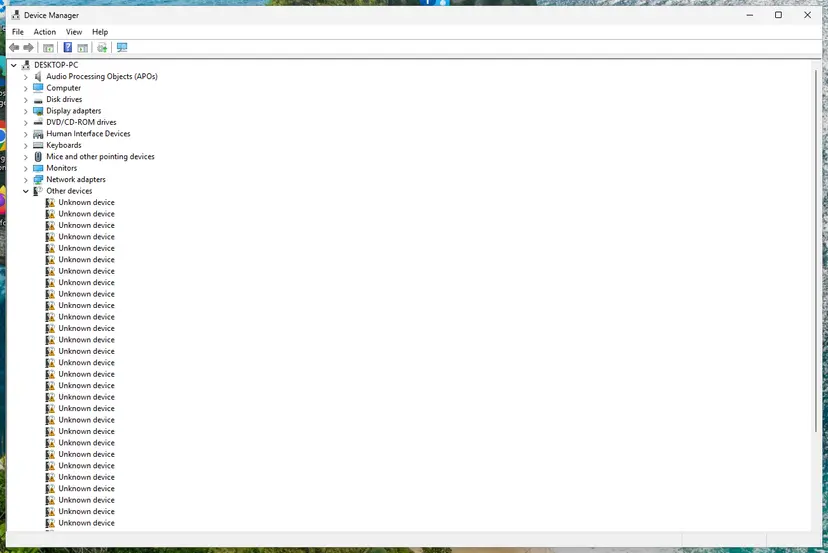
Windows 11 and Windows 10 do not ship a driver for this chip. So when you plug the adapter in, Windows creates a device called USB 2.0 10/100M Ethernet Adaptor under Other devices and marks it with a yellow sign. Its status reads "The drivers for this device are not installed. (Code 28)". Microsoft's own description of Code 28 is simply that no driver is installed for the device.
- Hardware ID (plain adapter)
USB\VID_0FE6&PID_9700(often with&REV_0101)- Hardware ID (adapter with a driver disc)
USB\VID_0FE6&PID_9702, with the network part asMI_01- Driver file after install
USB_Ethernet_Adaptor.sysinC:\Windows\System32\drivers, service USB_Ethernet_Adaptor- Name after install
- USB to Ethernet Adapter under Network adapters
- Speed
- The Linux kernel describes the SR9700 as a USB 1.1 chip. USB 1.1 runs at 12 Mbit/s at most, so the "100M" on the box is not reached.
Searches for "QTS1081B driver download" lead to dozens of driver sites with installers of unknown origin. The hardware ID tells you exactly which driver fits, and Microsoft hosts that driver itself.
Why the QTS1081B driver will not install, from most to least common
Most often there is simply no driver on the PC yet, and Search automatically for drivers only looks in the local driver store, so it reports that no driver was found. Less often the reader downloaded the wrong file. Rarely, the PC itself cannot run the driver.
| Cause | How common | What you see | Fix |
|---|---|---|---|
| No driver on the PC for the SR9700 | Most cases | Code 28 under Other devices | Fix 2, then Fix 3 |
| Wrong Corechip file picked in the catalog (SR9900 "Corechip - Net" driver, or the X86 file on 64-bit Windows) | Common | "Windows could not find drivers" when you point at the folder | Fix 1, then Fix 2 |
| Adapter with a built-in driver disc (PID_9702) | Some units | A new CD drive appears next to the unknown network device | Fix 4 or Fix 2 |
| Half-installed or wrong driver left from an earlier try | Less common | Device listed with a yellow sign under Network adapters, Code 10 or Code 31 | Fix 5 |
| ARM (Snapdragon) PC, or Memory integrity blocks the 2012 driver | Rare | No file fits, or "A driver can't load on this device" | Still not working, below |
| Faulty adapter or cable | Rare | Device appears and vanishes, or not at all, on every port | Still not working, below |
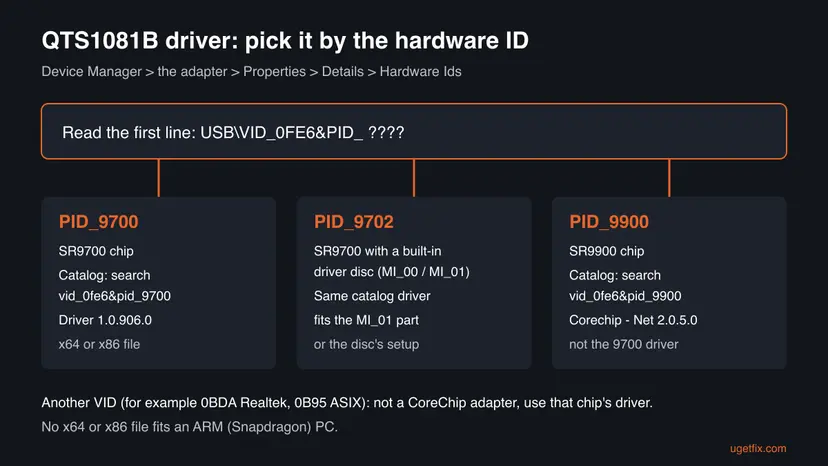
How to install the QTS1081B driver on Windows 11 and Windows 10
Start with Fix 1: it takes two minutes and tells you which file to download. Fix 2 is the one that works for most readers. You need a second way online for the download, such as Wi-Fi or a phone hotspot, or another PC and a USB stick.
| What you see or have | Start with |
|---|---|
| USB 2.0 10/100M Ethernet Adaptor with Code 28 under Other devices | Fix 1, then Fix 2 |
| Device Manager says "Windows could not find drivers" when you point at the folder | Fix 3 |
| A new CD drive or flash drive appeared when you plugged in the adapter | Fix 4 |
| The PC has Wi-Fi and you prefer not to download files by hand | Fix 6 |
| The adapter is under Network adapters but has a yellow sign or does not connect | Fix 5 |
| An ARM laptop (Snapdragon) or a "driver can't load" message | Still not working, below |
Fix 1. Read the adapter's hardware ID in Device Manager
2 minutesNo riskEveryone, before downloading any QTS1081B driver.
Adapters sold as QTS1081B do not all carry the same chip. The hardware ID names the chip exactly, so you download the one driver that fits instead of guessing from the box.
- Plug the adapter into a USB port directly on the PC, not into a hub.
- Right-click Start and select Device Manager.
- Expand Other devices and find USB 2.0 10/100M Ethernet Adaptor (or USB to Ethernet Adapter, or an unnamed device with a yellow sign).
- Right-click it, select Properties and open the Details tab.
- In the Property list, select Hardware Ids and read the first line.
- Also check Settings > System > About > System type: it says whether Windows is 64-bit (x64-based) or 32-bit, or runs on an ARM-based processor.
| First line of Hardware Ids | Chip | Driver to get |
|---|---|---|
USB\VID_0FE6&PID_9700&REV_0101 | SR9700 | Corechip Semiconductor, Inc. USB to Ethernet Adapter 1.0.906.0 |
USB\VID_0FE6&PID_9702&MI_01 | SR9700 with driver disc | The same 1.0.906.0 driver, or the disc's setup (Fix 4) |
USB\VID_0FE6&PID_9900 | SR9900 | Corechip - Net 2.0.5.0, listed for Windows 10, version 1809 and later |
Another VID, for example 0BDA or 0B95 | Realtek or ASIX | Not a CoreChip adapter: use the driver for that chip |
It worked if: You have the full hardware ID and know whether Windows is x64, x86 or ARM.
If not: If the adapter does not show up in Device Manager at all, try another USB port and see Still not working below.
Fix 2. Download the CoreChip driver from the Microsoft Update Catalog and install it from a folder
10 minutesLow riskAnyone whose hardware ID starts with USB\VID_0FE6&PID_9700 or PID_9702.
The catalog holds the chip maker's signed driver for exactly these hardware IDs. Device Manager cannot find it on its own because it is not in the Windows driver store until you give it the unpacked folder.
- On a PC with internet, open
https://www.catalog.update.microsoft.com, typevid_0fe6&pid_9700into the search box and press Enter. Four rows titled Corechip Semiconductor, Inc. appear. - Pick a row listed for Windows 8, Windows 8.1 and later drivers. Select its title to open the details and check Architecture: AMD64 for 64-bit Windows, X86 for 32-bit Windows.
- Select Download on that row, then select the
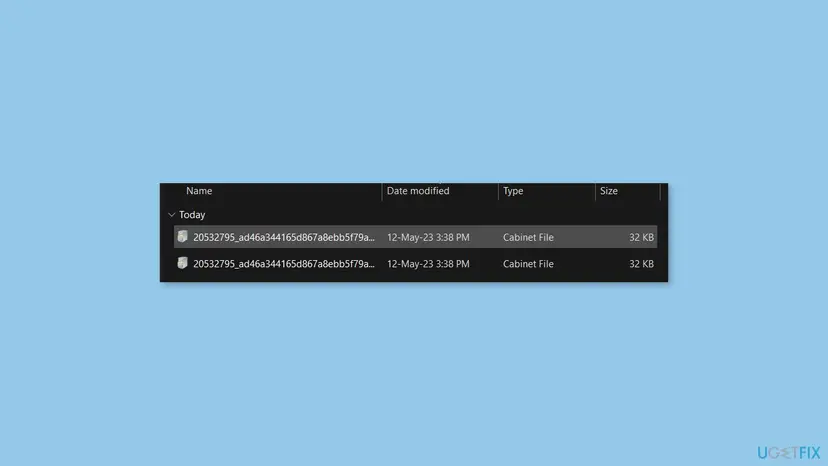
.cablink in the window that opens. The file is about 31 KB. - Create a folder, for example
C:\Drivers\QTS1081B. Double-click the.cabfile, select its three files (USB_Ethernet_Adaptor.inf,USB_Ethernet_Adaptor.sys,usb_ethernet_adaptor.cat), copy them and paste them into the new folder. - In Device Manager, right-click USB 2.0 10/100M Ethernet Adaptor and select Update driver.
- Select Browse my computer for drivers, then Browse, choose
C:\Drivers\QTS1081B, keep Include subfolders ticked and select Next. - Wait for "Windows has successfully updated your drivers", select Close and plug the network cable into the adapter.
Optional: unpack the .cab file from Command Prompt instead of copying by hand
mkdir C:\Drivers\QTS1081B
expand -F:* "%USERPROFILE%\Downloads\20532795_ad46a344165d867a8ebb5f79a3e050f3f3b4a784.cab" C:\Drivers\QTS1081B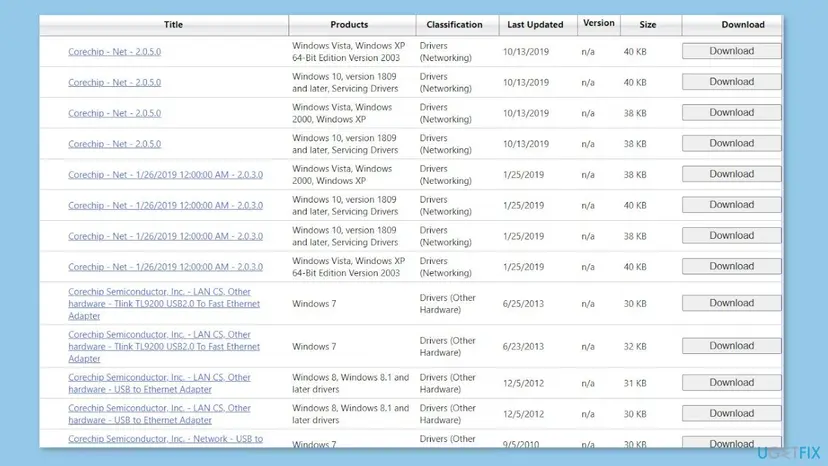
The steps of the generic driver dialog, with screenshots, are in Update, roll back or reinstall a driver. How the catalog's search and download window work is in Install an update from the Microsoft Update Catalog; for a driver you open the .cab file instead of an .msu.
It worked if: The adapter moves to Network adapters as USB to Ethernet Adapter, and an Ethernet connection appears in Settings > Network & internet.
If not: If Windows says it could not find drivers in the folder, check the AMD64 or X86 choice and then use Fix 3.
Fix 3. Add the driver with pnputil when Device Manager will not take the folder
3 minutesLow riskReaders who unpacked the right files but Device Manager still finds no driver.
pnputil puts the driver package straight into the driver store and installs it on every matching device. It also prints a clear reason when the package does not fit, which the Device Manager wizard does not.
- Right-click Start and select Terminal (Admin) on Windows 11 or Windows PowerShell (Admin) on Windows 10. Select Yes.
- Run the command below with the folder you created in Fix 2.
- Read the summary at the end: it should say that one driver package was added and installed on the device.
- If it says the package was added but not installed on any device, unplug the adapter, wait five seconds and plug it in again.
Add and install the driver (Terminal as administrator)
pnputil /add-driver C:\Drivers\QTS1081B\USB_Ethernet_Adaptor.inf /installIf pnputil refuses the package or installs it on no device, the most likely reason is the X86 package on 64-bit Windows, or any package on an ARM PC. Download the AMD64 file, or see Still not working for ARM.
It worked if: pnputil reports the package as added and installed, and Device Manager lists USB to Ethernet Adapter under Network adapters.
If not: If pnputil installs the package but the device keeps Code 28, remove the device as in Fix 5 and plug it in again.
Fix 4. Run the setup from the adapter's built-in driver disc
5 minutesLow riskAdapters with the hardware ID PID_9702 that show a new CD or flash drive when plugged in.
Some QTS1081B units are two devices in one: a small read-only drive holding a Windows installer and the network adapter itself. The installer on that drive is the maker's own package for this exact unit.
- Plug the adapter in and open File Explorer > This PC.
- Look for a new CD drive or removable drive that appeared with the adapter and open it.
- Right-click the setup file (usually Setup.exe) and select Run as administrator.
- Follow the installer and restart the PC when it asks.
Do not download "QTS1081B setup" or "RD9700 driver" installers from driver sites or video descriptions. If you are unsure about the file on the disc, scan it first with How to scan for malware with Microsoft Defender or use Fix 2, which needs no installer at all.
It worked if: After the restart the network adapter is listed under Network adapters and the Ethernet connection is up.
If not: If no drive appears, or the setup fails on Windows 11, use Fix 2: the catalog driver covers the PID_9702 network part too.
Fix 5. Remove the failed device and let Windows detect the adapter again
5 minutesLow riskReaders who tried several drivers and now see Code 10, Code 31 or a yellow sign under Network adapters.
Each failed try can leave a wrong driver bound to the adapter. Removing the device with its driver gives Windows a clean start, which is also Microsoft's own advice for Code 28.
- In Device Manager, right-click the adapter (under Other devices or Network adapters) and select Uninstall device.
- Tick Attempt to remove the driver for this device if a wrong driver from an earlier try is attached, then select Uninstall.
- Unplug the adapter, restart the PC and plug the adapter into a different USB port.
- Select Action > Scan for hardware changes, then repeat Fix 2 or Fix 3 with the right file.
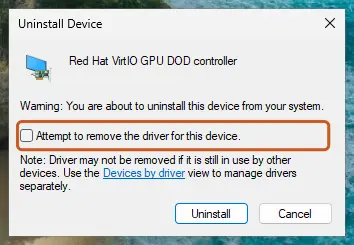
It worked if: The adapter returns as one clean device, and the catalog driver installs without an error.
If not: If the same code comes back with the right driver, read the setup log described in Still not working.
Fix 6. Let Windows Update offer the driver as an optional update
5 minutesNo riskLaptops with working Wi-Fi whose owners prefer not to download files by hand.
Drivers in the Microsoft Update Catalog are published through Windows Update, so Windows can offer the CoreChip driver when the adapter is plugged in. We could not confirm that it is offered on every PC, which is why this is not Fix 2.
- Connect the PC to the internet over Wi-Fi and keep the adapter plugged in.
- Windows 11: open Settings > Windows Update > Advanced options > Optional updates. Windows 10: open Settings > Update & Security > Windows Update and select View optional updates.
- Expand Driver updates and look for a Corechip Semiconductor, Inc. entry.
- Tick it and select Download & install, then restart if asked.
The full steps for both versions are in Update, roll back or reinstall a driver, under optional driver updates.
It worked if: A Corechip driver is listed, installs, and the adapter appears under Network adapters.
If not: If no Corechip entry is listed, go back to Fix 2 and install the same driver by hand.
QTS1081B still not working: the log to read and when it is the hardware
Windows writes every driver installation attempt to C:\Windows\INF\setupapi.dev.log. Open it in Notepad, press Ctrl + End and search upward for VID_0FE6. The lines below that entry say which INF Windows tried and why it refused it.
- ARM PC (Snapdragon): the catalog has only AMD64 and X86 packages for this chip, and Windows on ARM cannot load an x64 kernel driver. No driver exists for this adapter on such a PC. A USB Ethernet adapter whose driver Windows already includes, or one whose maker lists ARM64 support, is the fix.
- "A driver can't load on this device" naming USB_Ethernet_Adaptor.sys: Memory integrity in Windows Security has blocked the 2012 driver. Microsoft's advice is to look for a newer driver first. Turning Memory integrity off lowers protection for the whole PC, so we do not suggest it to save a cheap adapter: replace the adapter instead.
- Installs fine but no connection: test the cable and router port with another device, then follow How to check your internet connection in Windows.
- The device appears and disappears, or never appears on any port: that is a hardware fault in the adapter or its plug. Return it to the shop.
The full hardware ID from Fix 1, your Windows edition and version from winver, the System type line, and the setupapi.dev.log lines for VID_0FE6. With those four facts anyone can tell whether the adapter or the driver is at fault.
Keep the QTS1081B working and avoid the same problem next time
- Keep
C:\Drivers\QTS1081Bwith the three driver files, so a reinstall of Windows does not need internet first. - Use the same USB port for the adapter; a new port can make Windows create the device again.
- Before buying the next adapter, check that it is sold with Windows 11 support or uses a chip whose driver Windows includes.
- Install driver packs or "driver updater" tools to find this driver.
- Run installers from video descriptions or file-sharing links.
- Turn off Memory integrity to load the 2012 driver.
Windows 10 left support on 14 October 2025. The catalog driver still installs on Windows 10 22H2, but a PC that stays on Windows 10 gets no more security fixes, which matters more for a PC on a wired network than the adapter does.
Frequently asked questions
Where can I download the QTS1081B driver?
From the Microsoft Update Catalog at catalog.update.microsoft.com. Search for vid_0fe6&pid_9700 and you get four Corechip Semiconductor, Inc. rows named USB to Ethernet Adapter. For Windows 10 and 11 take a row listed for Windows 8, Windows 8.1 and later drivers, AMD64 for 64-bit or X86 for 32-bit. The download is a .cab file of about 31 KB that you unpack and install from Device Manager, as in Fix 2. We found no maker download page for the QTS1081B itself.
Is there a QTS1081B driver for Windows 11?
Yes, in practice. The catalog driver is listed for Windows 8, Windows 8.1 and later, and it installs on 64-bit Windows 11 from a folder (Fix 2) or with pnputil (Fix 3). It is a 2012 driver, so Windows 11 never offers it as a Windows 11 driver by name. On Windows 11 on ARM (Snapdragon laptops) it cannot work, because only x64 and x86 files exist. If Memory integrity blocks it, replacing the adapter is the safer choice.
Which file do I need for Windows 10 64-bit?
The AMD64 package. In the catalog, open each Corechip USB to Ethernet Adapter row for Windows 8, Windows 8.1 and later drivers and read Architecture in the details window. AMD64 is the file for 64-bit Windows 10 and 11, whether the processor is Intel or AMD. X86 is only for 32-bit Windows, which you can check under Settings > System > About > System type. The wrong one gives "Windows could not find drivers" in Device Manager.
What does 9700 on my QTS1081B adapter mean?
It is the chip, the CoreChip SR9700, and it matches the product ID PID_9700 in the hardware ID. Searches such as "qts1081b 9700 driver download" and "qts1081b no 9700 driver" lead to the same driver: the Corechip Semiconductor USB to Ethernet Adapter package 1.0.906.0 in the Microsoft Update Catalog. RD9700, the name used on some driver discs and videos, appears to be the same chip family; the hardware ID in Fix 1 settles it for your unit.
Why does Windows say the best driver is already installed or no driver was found?
Search automatically for drivers looks only in the Windows driver store and, on some versions, Windows Update. The SR9700 driver is in neither until you add it, so Windows reports that it found nothing. Point the wizard at the folder with the unpacked files instead (Fix 2), or add the package with pnputil (Fix 3). If you pointed at a folder and still got no driver, the package is probably for the wrong architecture.
Is RS1081B the same as QTS1081B?
We could not confirm it. RS1081B appears in a few searches and videos for USB LAN adapters of the same look, and it may be a seller's name or a typo for QTS1081B. Do not rely on the name. Plug the adapter in and read its hardware ID in Device Manager (Fix 1). If the ID starts with USB\VID_0FE6&PID_9700 or PID_9702, the catalog driver in Fix 2 is the right one, whatever the label says.
Is the QTS1081B really a 100 Mbit/s adapter?
The box says USB 2.0 10/100M, but the Linux kernel driver for the SR9700 describes it as a USB 1.1 chip, and USB 1.1 tops out at 12 Mbit/s. So the adapter gives a steady wired link for browsing, video calls and remote work, but it will be slower than fast Wi-Fi for large downloads. If you need full 100 Mbit/s or gigabit speed, a USB 3 adapter is the better buy.
Does the QTS1081B work on a Mac or on Linux?
On Linux, yes: the kernel has an sr9700 driver since version 3.10, and current kernels also accept the PID_9702 version on its network interface. On a Mac we could not confirm any driver from Apple or the chip maker; one user reports the adapter worked on a MacBook without installing anything, but we have not tested it. This page covers Windows; the steps above do not apply to macOS.
Is it safe to download a QTS1081B driver from a driver website?
It is not needed and it adds risk. The driver sites that rank for this adapter offer installers whose origin you cannot check, and some bundle other software. The Microsoft Update Catalog gives you the chip maker's signed package directly, three files and no installer. If the adapter has its own driver disc, the setup on it is the other trustworthy source (Fix 4). Scan anything else with Microsoft Defender before you run it.
The driver installed but there is no internet. What now?
Check that USB to Ethernet Adapter is under Network adapters without a yellow sign, then look at the adapter's lights with the cable in. No light means a bad cable or router port: try another cable and port. If the light is on, open Settings > Network & internet and see whether Ethernet says Connected. If it says No internet, follow the connection checks in How to check your internet connection in Windows and, if needed, Reset the network and flush DNS.
Sources
- Microsoft Support: Error codes in Device Manager in Windows (Code 28) (support.microsoft.com)
- Microsoft Learn: PnPUtil command syntax (learn.microsoft.com)
- Microsoft Learn: expand command (learn.microsoft.com)
Did this fix work?
One click, no account. It tells the next reader which guides are worth their time.
Questions and experiences: QTS1081B driver: how to install it on Windows 11 and Windows 10 when it fails
Still broken, or found a fix we did not cover? Ask here: members and our editors answer. Reading is open; writing needs a free account.
…